wheel HONDA ELEMENT 2009 1.G User Guide
[x] Cancel search | Manufacturer: HONDA, Model Year: 2009, Model line: ELEMENT, Model: HONDA ELEMENT 2009 1.GPages: 345, PDF Size: 18.9 MB
Page 79 of 345
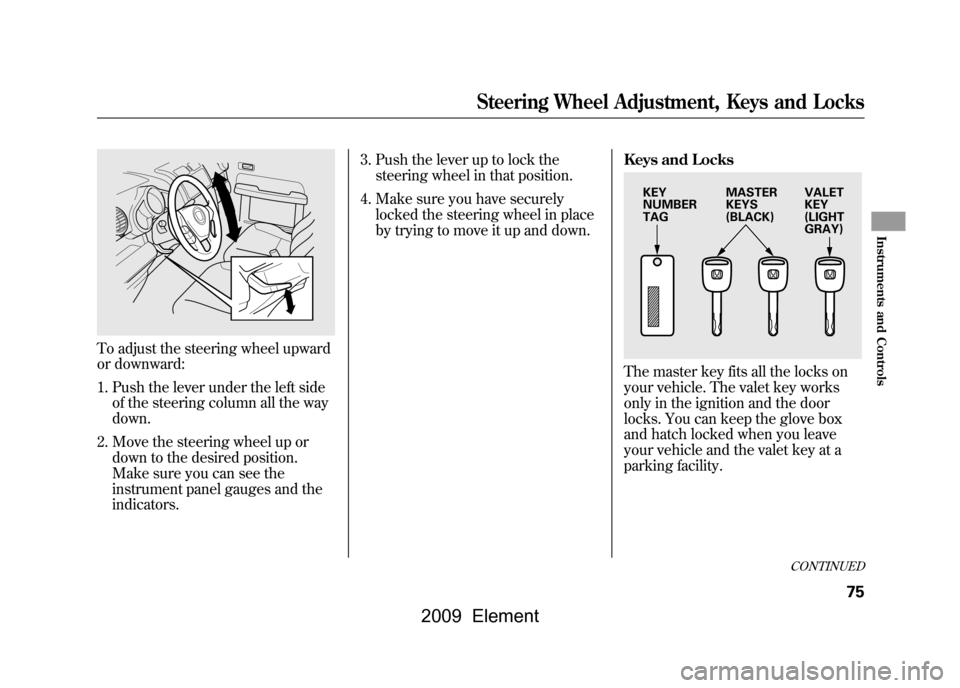
To adjust the steering wheel upward
or downward:1. Push the lever under the left side of the steering column all the way
down.
2. Move the steering wheel up or down to the desired position.
Make sure you can see the
instrument panel gauges and the
indicators. 3. Push the lever up to lock the
steering wheel in that position.
4. Make sure you have securely locked the steering wheel in place
by trying to move it up and down. Keys and Locks
The master key fits all the locks on
your vehicle. The valet key works
only in the ignition and the door
locks. You can keep the glove box
and hatch locked when you leave
your vehicle and the valet key at a
parking facility.
KEY
NUMBER
TAG
MASTER
KEYS
(BLACK)VALET
KEY
(LIGHT
GRAY)
CONTINUED
Steering Wheel Adjustment, Keys and Locks
75
Instruments and Controls
2009 Element
Page 84 of 345
If the front wheels are turned, the
anti-theft lock may make it difficult to
turn the key. Firmly turn the steering
wheel to the left or right as you turn
the key.
ACCESSORY (I)-You can operate
the audio system and the accessory
power sockets in this position.
ON (II) -This is the normal key
position when driving. Several of the
indicators on the instrument panel
come on as a test when you turn the
ignition switch from the
ACCESSORY (I) to the ON (II)
position.
START (III) -Use this position
only to start the engine. The switch
returns to the ON (II) position when
you let go of the key. You will hear a reminder beeper if
you leave the key in the LOCK (0) or
the ACCESSORY (I) position and
open the driver's door. Remove the
key to turn off the beeper.
If your vehicle has an automatic
transmission, the shift lever must be
in Park before you can remove the
key from the ignition switch.
Removing the key from the
ignition switch while driving
locks the steering. This can
cause you to lose control of the
vehicle.
Remove the key from the
ignition switch only when
parked.Power Door Locks
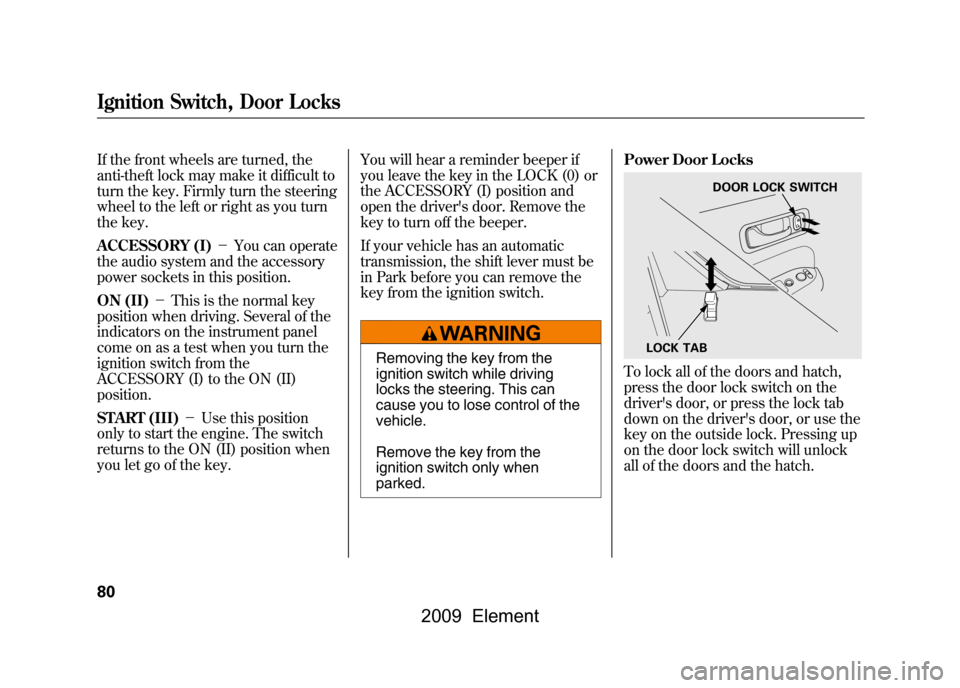
To lock all of the doors and hatch,
press the door lock switch on the
driver's door, or press the lock tab
down on the driver's door, or use the
key on the outside lock. Pressing up
on the door lock switch will unlock
all of the doors and the hatch.
LOCK TAB
DOOR LOCK SWITCH
Ignition Switch, Door Locks80
2009 Element
Page 195 of 345
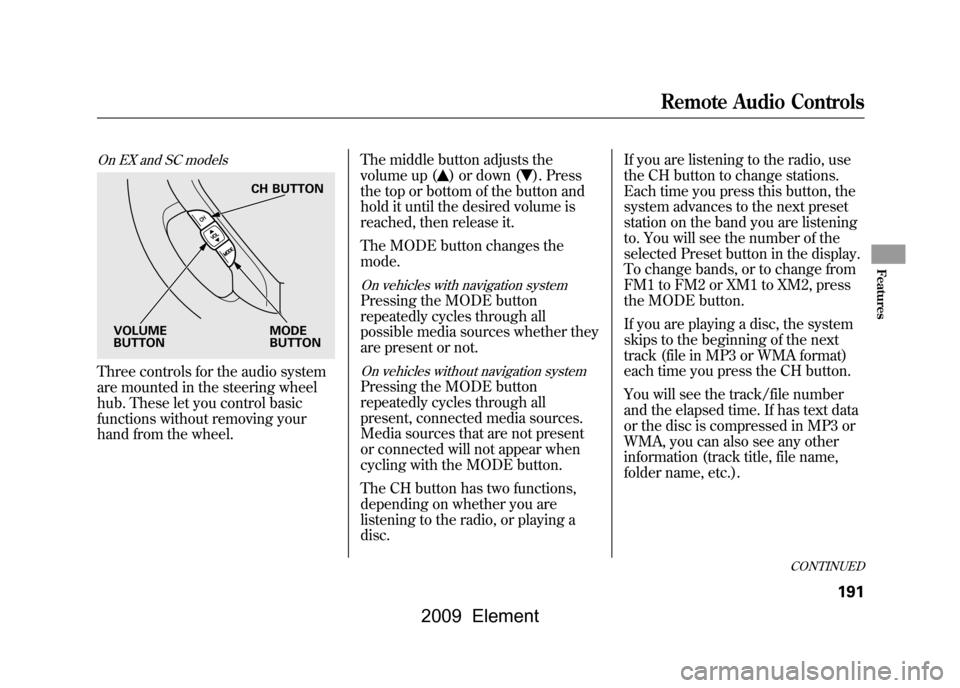
On EX and SC modelsThree controls for the audio system
are mounted in the steering wheel
hub. These let you control basic
functions without removing your
hand from the wheel.The middle button adjusts the
volume up (
) or down (
). Press
the top or bottom of the button and
hold it until the desired volume is
reached, then release it.
The MODE button changes the
mode.
On vehicles with navigation systemPressing the MODE button
repeatedly cycles through all
possible media sources whether they
are present or not.On vehicles without navigation systemPressing the MODE button
repeatedly cycles through all
present, connected media sources.
Media sources that are not present
or connected will not appear when
cycling with the MODE button.
The CH button has two functions,
depending on whether you are
listening to the radio, or playing a
disc. If you are listening to the radio, use
the CH button to change stations.
Each time you press this button, the
system advances to the next preset
station on the band you are listening
to. You will see the number of the
selected Preset button in the display.
To change bands, or to change from
FM1 to FM2 or XM1 to XM2, press
the MODE button.
If you are playing a disc, the system
skips to the beginning of the next
track (file in MP3 or WMA format)
each time you press the CH button.
You will see the track/file number
and the elapsed time. If has text data
or the disc is compressed in MP3 or
WMA, you can also see any other
information (track title, file name,
folder name, etc.).
CH BUTTON
MODE
BUTTON
VOLUME
BUTTON
CONTINUED
Remote Audio Controls
191
Features
2009 Element
Page 197 of 345
Cruise control allows you to maintain
a set speed above 25 mph (40 km/h)
without keeping your foot on the
accelerator pedal. It should be used
for cruising on straight, open
highways. It is not recommended for
city driving, winding roads, slippery
roads, heavy rain, or bad weather.
Improper use of the cruise
control can lead to a crash.
Use the cruise control only
when traveling on open
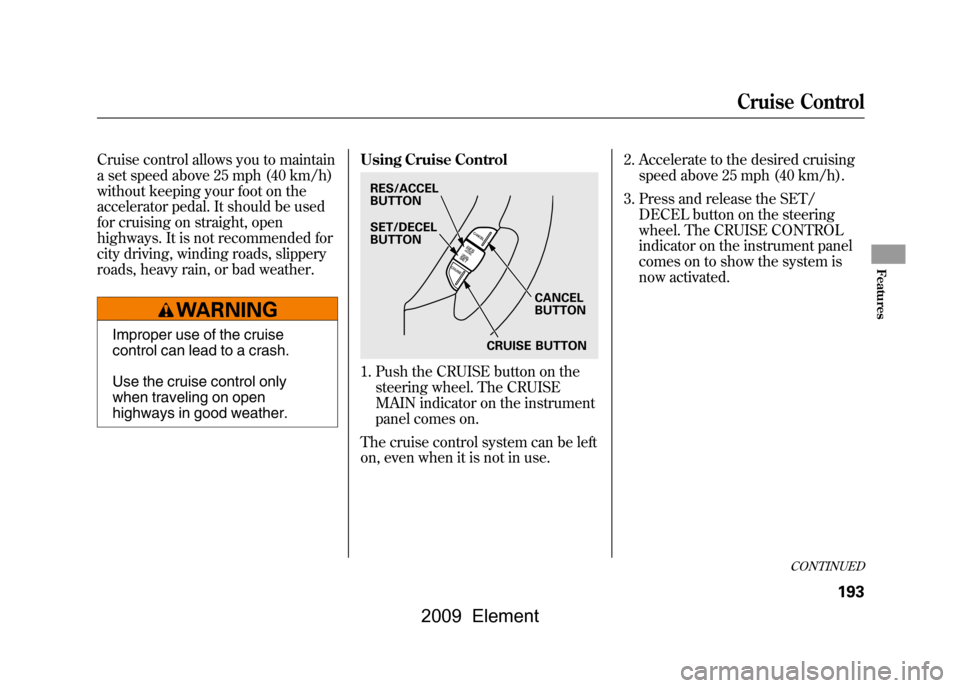
highways in good weather.Using Cruise Control
1. Push the CRUISE button on the
steering wheel. The CRUISE
MAIN indicator on the instrument
panel comes on.
The cruise control system can be left
on, even when it is not in use. 2. Accelerate to the desired cruising
speed above 25 mph (40 km/h).
3. Press and release the SET/ DECEL button on the steering
wheel. The CRUISE CONTROL
indicator on the instrument panel
comes on to show the system is
now activated.RES/ACCEL
BUTTON
CANCEL
BUTTON
SET/DECEL
BUTTON
CRUISE BUTTON
CONTINUED
Cruise Control
193
Features
2009 Element
Page 199 of 345
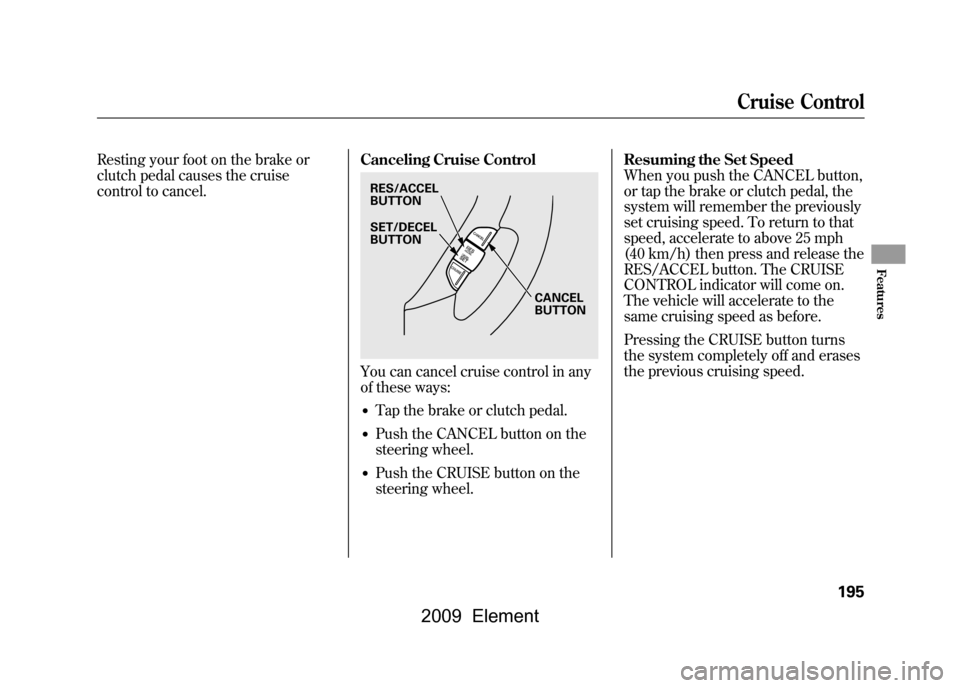
Resting your foot on the brake or
clutch pedal causes the cruise
control to cancel.Canceling Cruise Control
You can cancel cruise control in any
of these ways:●Tap the brake or clutch pedal.●Push the CANCEL button on the
steering wheel.●Push the CRUISE button on the
steering wheel.Resuming the Set Speed
When you push the CANCEL button,
or tap the brake or clutch pedal, the
system will remember the previously
set cruising speed. To return to that
speed, accelerate to above 25 mph
(40 km/h) then press and release the
RES/ACCEL button. The CRUISE
CONTROL indicator will come on.
The vehicle will accelerate to the
same cruising speed as before.
Pressing the CRUISE button turns
the system completely off and erases
the previous cruising speed.RES/ACCEL
BUTTON
CANCEL
BUTTON
SET/DECEL
BUTTON
Cruise Control
195
Features
2009 Element
Page 210 of 345

Modifying Your Vehicle
Removing parts from your vehicle, or
replacing components with some
non-Honda components could
seriously affect your vehicle's
handling, stability, and reliability.
Some examples are:●Lowering the vehicle with a non-
Honda suspension kit that
significantly reduces ground
clearance can allow the
undercarriage to hit speed bumps
or other raised objects, which
could cause the airbags to deploy.●Raising your vehicle with a non-
Honda suspension kit can affect
the handling and stability.
●Non-Honda wheels, because they
are a universal design, can cause
excessive stress on suspension
components, and are not
compatible with the tire pressure
monitoring system (TPMS).●Larger or smaller wheels and tires
can interfere with the operation of
your vehicle's anti-lock brakes and
other systems.●Modifying your steering wheel or
any other part of your vehicle's
safety features can make the
systems ineffective.
If you plan to modify your vehicle,
consult your dealer.
Accessories and Modifications206
2009 Element
Page 218 of 345

Your vehicle has a higher ground
clearance that allows you to travel
over bumps, obstacles, and rough
terrain. It also provides good
visibility so you can anticipate
problems earlier.
Because your vehicle rides higher off
the ground, it has a high center of
gravity that can cause it to roll over if
you make abrupt turns. Utility
vehicles have a significantly higher
roll over rate than other types of
vehicles.
To prevent rollovers or loss of
control:●Take corners at slower speeds
than you would with a passenger
vehicle.●Avoid sharp turns and abrupt
maneuvers whenever possible.
●Do not modify your vehicle in any
way that would raise the center of
gravity.●Do not carry heavy cargo on the
roof.
Four-wheel drive modelsYour vehicle is equipped with a four-
wheel drive (4WD) system. When
the system senses a loss of front-
wheel traction, it automatically
transfers some power to the rear
wheels. This gives you better traction
and mobility.
You still need to exercise the same
care when accelerating, steering, and
braking that you would in a two-
wheel drive vehicle.Seepage 238 for off-highway driving
guidelines.
Driving Guidelines214
2009 Element
Page 219 of 345

You should do the following checks
and adjustments before you drive
your vehicle.1. Make sure all windows, mirrors, and outside lights are clean and
unobstructed. Remove frost, snow,
or ice.
2. Check that the hood is fully closed.
3. Visually check the tires. If a tire looks low, use a gauge to check its
pressure.
4. Check that any items you may be carrying are stored properly or
fastened down securely. 5. Check the seat adjustment (see
page83).
6. Check the adjustment of the inside and outside mirrors (see page93).
7. Check the steering wheel adjustment (see page74). 8. Make sure the doors, the hatch,
and the tailgate are securely
closed and locked.
9. Fasten your seat belt. Check that your passengers have fastened
their seat belts (see page14).
10. When you start the engine, check the gauges and indicators in the
instrument panel (see page57).
Preparing to Drive
215
Driving
2009 Element
Page 225 of 345

Second (2)-This position locks
the transmission in second gear. It
does not downshift to first gear when
you come to a stop.
Use second gear:●For more power when climbing.●To increase engine braking when
going down steep hills.●For starting out on a slippery
surface or in deep snow.●To help reduce wheel spin.●When driving downhill with a
trailer. First (1)
-This position locks the
transmission in first gear. By
upshifting and downshifting through
1, 2, D3, and D, you can operate the
transmission much like a manual
transmission without a clutch pedal.
Engine Speed Limiter
If you exceed the maximum speed
for the gear you are in, the engine
speed will enter into the
tachometer's red zone. If this occurs,
you may feel the engine cut in and
out. This is caused by a limiter in the
engine's computer controls. The
engine will run normally when you
reduce the rpm below the red zone. Shift Lock Release
This allows you to move the shift
lever out of Park if the normal
method of pushing on the brake
pedal and pressing the release button
does not work.
1. Set the parking brake.
2. Remove the key from the ignition
switch.
CONTINUED
Automatic Transmission
221
Driving
2009 Element
Page 227 of 345

Always use the parking brake when
you park your vehicle. Make sure the
parking brake is set firmly, or your
vehicle may roll if it is parked on an
incline.
If your vehicle has an automatic
transmission, set the parking brake
before you put the transmission in
Park. This keeps the vehicle from
moving and putting pressure on the
parking mechanism in the
transmission.Parking Tips
●Make sure the windows are
closed.●Turn off the lights.●Place any packages, valuables, etc.
in the cargo area or take them with
you.●Lock the doors and the hatch with
the key.●Never park over dry leaves, tall
grass, or other flammable
materials. The hot three way
catalytic converter could cause
these materials to catch on fire.
●If the vehicle is facing uphill, turn
the front wheels away from the
curb. If your vehicle has a manual
transmission, put it in first gear.●If the vehicle is facing downhill,
turn the front wheels toward the
curb. If your vehicle has a manual
transmission, put it in reverse
gear.●Make sure the parking brake is
fully released before driving away.
Driving with the parking brake
partially set can overheat or
damage the rear brakes.
Parking
223
Driving
2009 Element