lock HONDA ELEMENT 2010 1.G Workshop Manual
[x] Cancel search | Manufacturer: HONDA, Model Year: 2010, Model line: ELEMENT, Model: HONDA ELEMENT 2010 1.GPages: 342, PDF Size: 5.76 MB
Page 121 of 342
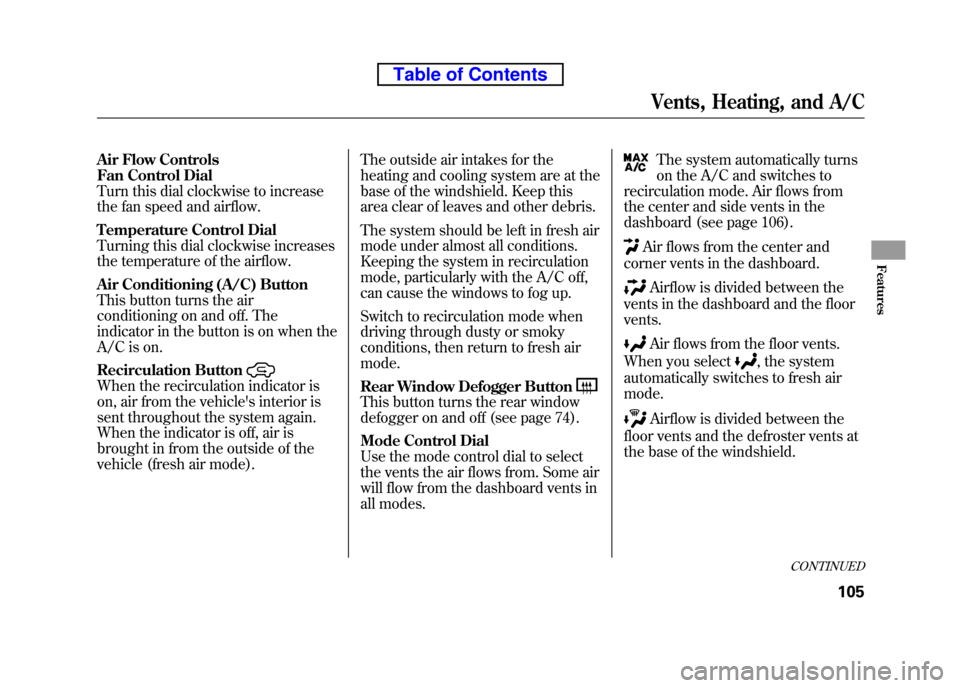
Air Flow Controls
Fan Control Dial
Turn this dial clockwise to increase
the fan speed and airflow.
Temperature Control Dial
Turning this dial clockwise increases
the temperature of the airflow.
Air Conditioning (A/C) Button
This button turns the air
conditioning on and off. The
indicator in the button is on when the
A/C is on.
Recirculation Button
When the recirculation indicator is
on, air from the vehicle's interior is
sent throughout the system again.
When the indicator is off, air is
brought in from the outside of the
vehicle (fresh air mode).The outside air intakes for the
heating and cooling system are at the
base of the windshield. Keep this
area clear of leaves and other debris.
The system should be left in fresh air
mode under almost all conditions.
Keeping the system in recirculation
mode, particularly with the A/C off,
can cause the windows to fog up.
Switch to recirculation mode when
driving through dusty or smoky
conditions, then return to fresh air mode.
Rear Window Defogger Button
This button turns the rear window
defogger on and off (see page 74).
Mode Control Dial
Use the mode control dial to select
the vents the air flows from. Some air
will flow from the dashboard vents in
all modes.
The system automatically turns
on the A/C and switches to
recirculation mode. Air flows from
the center and side vents in the
dashboard (see page 106).
Air flows from the center and
corner vents in the dashboard.
Airflow is divided between the
vents in the dashboard and the floor vents.
Air flows from the floor vents.
When you select
, the system
automatically switches to fresh air mode.
Airflow is divided between the
floor vents and the defroster vents at
the base of the windshield.
CONTINUED
Vents, Heating, and A/C
105
Features
Table of Contents
Page 133 of 342
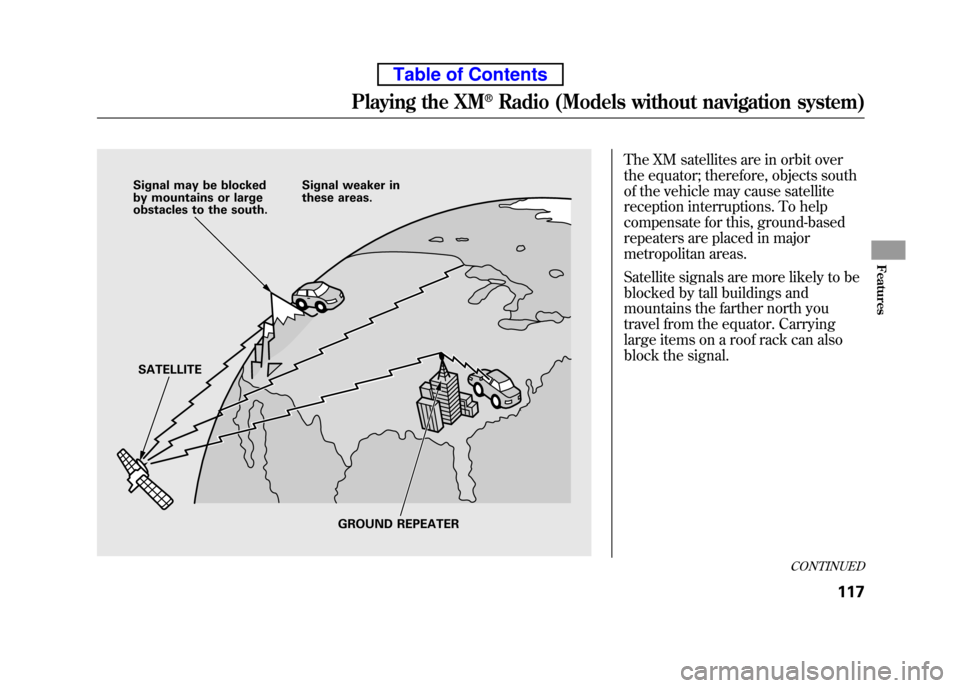
The XM satellites are in orbit over
the equator; therefore, objects south
of the vehicle may cause satellite
reception interruptions. To help
compensate for this, ground-based
repeaters are placed in major
metropolitan areas.
Satellite signals are more likely to be
blocked by tall buildings and
mountains the farther north you
travel from the equator. Carrying
large items on a roof rack can also
block the signal.
Signal may be blocked
by mountains or large
obstacles to the south.Signal weaker in
these areas.
SATELLITE GROUND REPEATER
CONTINUED
Playing the XM®Radio (Models without navigation system)
117
Features
Table of Contents
Page 153 of 342
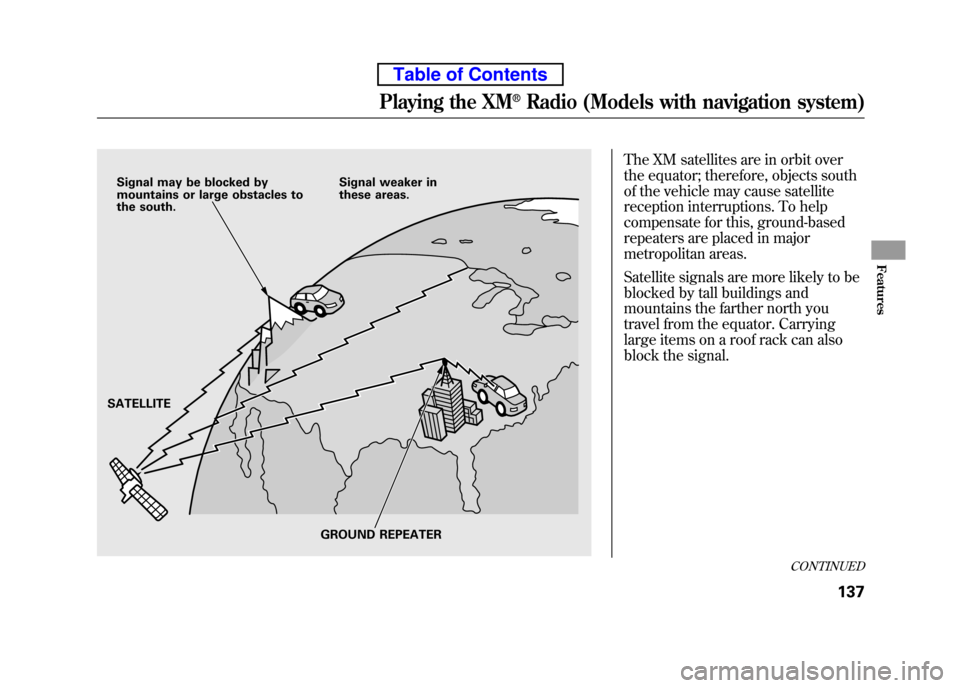
The XM satellites are in orbit over
the equator; therefore, objects south
of the vehicle may cause satellite
reception interruptions. To help
compensate for this, ground-based
repeaters are placed in major
metropolitan areas.
Satellite signals are more likely to be
blocked by tall buildings and
mountains the farther north you
travel from the equator. Carrying
large items on a roof rack can also
block the signal.
Signal may be blocked by
mountains or large obstacles to
the south.Signal weaker in
these areas.
SATELLITE GROUND REPEATER
CONTINUED
Playing the XM®Radio (Models with navigation system)
137
Features
Table of Contents
Page 190 of 342

To Play a USB Flash Memory Device
This audio system can select and
play the audio files from a USB flash
memory device with the same
controls used for the in-dash disc
player. To play a USB flash memory
device, connect it to the USB adapter
cable in the glove box. The ignition
switch must be in the ACCESSORY
(I) or ON (II) position. Press the
AUDIO button beside the screen to
show the audio display and touch the
AUX icon.
You can also select an icon by
moving the joystick. Move it to left,
right, up, or down to change the
highlighting and scroll through lists,
then press ENT on the top of the
joystick to set your selection.To select the USB mode without
using the icon, press the CD/XM
button repeatedly. The status bar
appears on the bottom of the screen.
The audio system reads and plays
the audio files on the USB flash
memory device in MP3, WMA orAAC
ꭧformats. Depending on the
format, the display shows MP3,
WMA or AAC when a USB flash
memory device is playing. The USB
flash memory device limit is up to
700 folders or up to 65535 files. ꭧ : Only AAC format files recorded
with iTunes are playable on this
audio unit. The recommended USB flash
memory devices are 256 MB or
higher and formatted with the FAT
file system. Some digital audio
players may be compatible as well.
Some USB flash memory devices
(such as devices with security lock-
out features, etc.) will not work in
this audio unit.
Playing a USB Flash Memory Device (Models with navigation system)
174
Table of Contents
Page 205 of 342
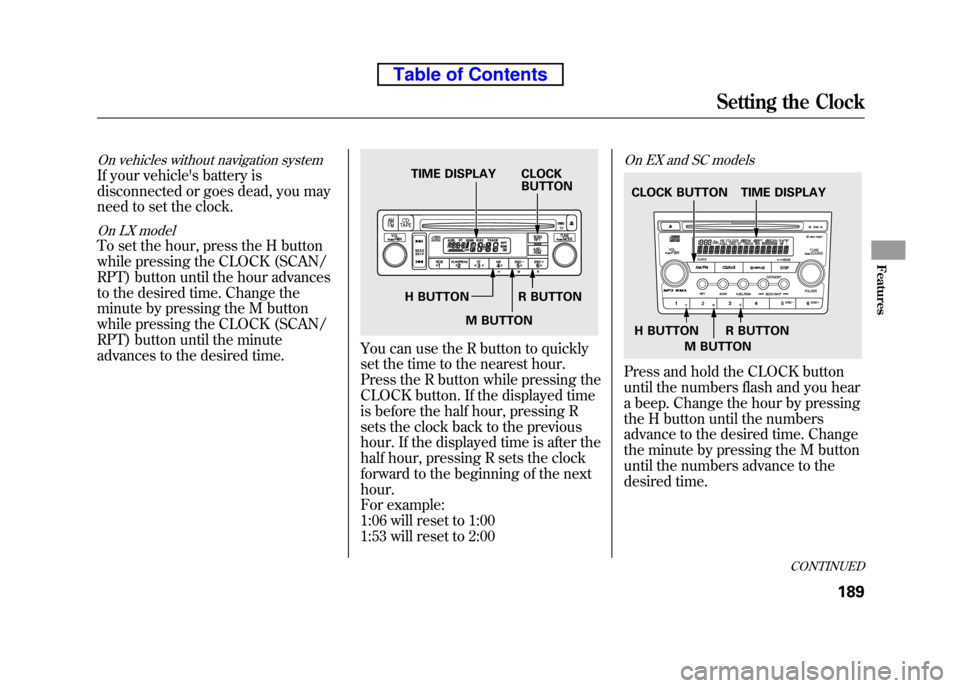
On vehicles without navigation system
If your vehicle's battery is
disconnected or goes dead, you may
need to set the clock.
On LX model
To set the hour, press the H button
while pressing the CLOCK (SCAN/
RPT) button until the hour advances
to the desired time. Change the
minute by pressing the M button
while pressing the CLOCK (SCAN/
RPT) button until the minute
advances to the desired time.
You can use the R button to quickly
set the time to the nearest hour.
Press the R button while pressing the
CLOCK button. If the displayed time
is before the half hour, pressing R
sets the clock back to the previous
hour. If the displayed time is after the
half hour, pressing R sets the clock
forward to the beginning of the nexthour.
For example:
1:06 will reset to 1:00
1:53 will reset to 2:00
On EX and SC models
Press and hold the CLOCK button
until the numbers flash and you hear
a beep. Change the hour by pressing
the H button until the numbers
advance to the desired time. Change
the minute by pressing the M button
until the numbers advance to the
desired time.
TIME DISPLAY CLOCKBUTTON
H BUTTON R BUTTON M BUTTON
TIME DISPLAY
CLOCK BUTTON
H BUTTON R BUTTON M BUTTON
CONTINUED
Setting the Clock
189
Features
Table of Contents
Page 206 of 342

You can quickly set the time to the
nearest hour. If the displayed time is
before the half hour, press the R
(RESET) button to set the clock back
to the previous hour. If the displayed
time is after the half hour, pressing R
sets the clock forward to the
beginning of the next hour.
For example:
1:06 will reset to 1:00
1:53 will reset to 2:00
When you are finished, press the
CLOCK button again.On vehicles with navigation system
The navigation system receives
signals from the global positioning
system (GPS), and the displayed
time is updated automatically by the
GPS. Refer to the navigation system
manual for how to adjust the time.
Setting the Clock
190
Table of Contents
Page 212 of 342
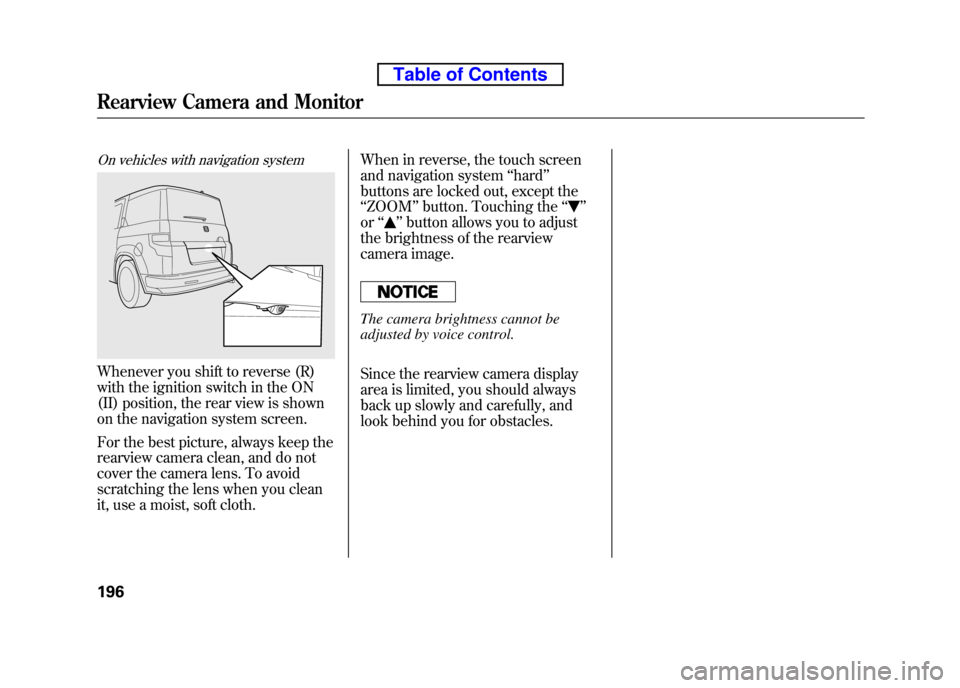
On vehicles with navigation system
Whenever you shift to reverse (R)
with the ignition switch in the ON
(II) position, the rear view is shown
on the navigation system screen.
For the best picture, always keep the
rearview camera clean, and do not
cover the camera lens. To avoid
scratching the lens when you clean
it, use a moist, soft cloth.When in reverse, the touch screen
and navigation system
‘‘hard ’’
buttons are locked out, except the‘‘ ZOOM ’’button. Touching the ‘‘
’’
or ‘‘
’’button allows you to adjust
the brightness of the rearview
camera image.
The camera brightness cannot be
adjusted by voice control.
Since the rearview camera display
area is limited, you should always
back up slowly and carefully, and
look behind you for obstacles.
Rearview Camera and Monitor
196
Table of Contents
Page 221 of 342
Modifying your vehicle, or installing
some non-Honda accessories, can
make it unsafe. Before you make any
modifications or add any accessories,
be sure to read the following information. Accessories
Your dealer has Honda accessories
that allow you to personalize your
vehicle. These accessories have been
designed and approved for your
vehicle, and are covered by warranty.
Although non-Honda accessories
may fit on your vehicle, they may not
meet factory specifications, and could
adversely affect your vehicle's
handling and stability.
Improper accessories or
modifications can affect your
vehicle's handling, stability, and
performance, and cause a
crash in which you can be hurt
or killed.
Follow all instructions in this
owner's manual regarding
accessories and modifications.
When properly installed, cellular
phones, alarms, two-way radios, and
low-powered audio systems should
not interfere with your vehicle's
computer controlled systems, such
as your airbags, anti-lock brakes, and
tire pressure monitoring system. Before installing any accessory:
● Make sure the accessory does not
obscure any lights, or interfere
with proper vehicle operation or performance.
● Be sure electronic accessories do
not overload electrical circuits (see
page 298) or interfere with the
proper operation of your vehicle.
● Before installing any electronic
accessory, have the installer
contact your dealer for assistance.
If possible, have your dealer
inspect the final installation.
● Do not install accessories on the
side pillars or across the rear
windows. Accessories installed in
these areas may interfere with
proper operation of the side
curtain airbags.
CONTINUED
Accessories and Modifications
205
Before Driving
Table of Contents
Page 222 of 342

Modifying Your Vehicle
Removing parts from your vehicle, or
replacing components with some
non-Honda components could
seriously affect your vehicle's
handling, stability, and reliability.
Some examples are:● Lowering the vehicle with a non-
Honda suspension kit that
significantly reduces ground
clearance can allow the
undercarriage to hit speed bumps
or other raised objects, which
could cause the airbags to deploy.
● Raising your vehicle with a non-
Honda suspension kit can affect
the handling and stability. ●
Non-Honda wheels, because they
are a universal design, can cause
excessive stress on suspension
components, and are not
compatible with the tire pressure
monitoring system (TPMS).
● Larger or smaller wheels and tires
can interfere with the operation of
your vehicle's anti-lock brakes and
other systems.
● Modifying your steering wheel or
any other part of your vehicle's
safety features can make the
systems ineffective.
If you plan to modify your vehicle,
consult your dealer.
Accessories and Modifications
206
Table of Contents
Page 229 of 342
This section gives you tips on
starting the engine under various
conditions, and how to operate the
manual and automatic transmissions.
It also includes important information
on parking your vehicle, the braking
system, the vehicle stability assist(VSA
®) system, the tire pressure
monitoring system (TPMS), and
facts you need if you are planning to
tow a trailer or drive off-highway.
Driving Guidelines ......................
214
Preparing to Drive ......................
215
Starting the Engine .....................216
Manual Transmission .................
217
Automatic Transmission .............219
Parking .......................................
223
Braking System .......................... 224
Anti-lock Brakes (ABS) ...............225
Tire Pressure Monitoring System
(TPMS) ................................... 227
Vehicle Stability Assist (VSA
®),
aka Electronic Stability Control (ESC), System .....................230
Towing a Trailer .......................... 232
Off-Highway Driving
Guidelines ............................... 238
Driving
213
Driving