audio HONDA FIT 2010 2.G User Guide
[x] Cancel search | Manufacturer: HONDA, Model Year: 2010, Model line: FIT, Model: HONDA FIT 2010 2.GPages: 351, PDF Size: 5.67 MB
Page 124 of 351
The heating and air conditioning
system in your vehicle provides a
comfortable driving environment in
all weather conditions.
The standard audio system has many
features. This section describes
those features and how to use them.
Your vehicle has an anti-theft audio
system that requires a code number
to enable it.
The security system helps to
discourage vandalism and theft of
your vehicle.Vents, Heating, and A/C.............
110
Playing the FM/AM Radio (Models without navigationsystem) ...............................
115
Playing a Disc (Models without navigation system) ..................
122
Disc Player Error Messages (Models without navigationsystem) ...............................
128
Playing an iPod
®(Models without
navigation system) ..................
129
iPod
®Error Messages (Models
without navigation system) .....
135
Playing a USB Flash Memory Device (Models without
navigation system) ..............
136
USB Flash Memory Device Error
Messages (Models withoutnavigation system) ..............
142
Playing the AM/FM Radio
(Models with navigation
system) ...............................
143
Playing a Disc (Models with
navigation system) ..................
149Disc Player Error Messages
(Models with navigation
system) ...............................
157
Playing a PC card (Models with
navigation system) ..................
158
Playing an iPod
®(Models with
navigation system) ..................
170
iPod
®Error Messages (Models
with navigation system) ..........
176
Playing a USB Flash Memory
Device (Models withnavigation system) ..............
177
USB Flash Memory Device Error Messages (Models withnavigation system) ..............
183
FM/AM Radio Reception ............
184
Protecting Your Discs .................
186
Remote Audio Controls ...............
189
Auxiliary Input Jack ....................
190
Radio Theft Protection ................
191
Setting the Clock .........................
192
Security System ..........................
193
Cruise Control ............................
194
Features
109
Features
Page 133 of 351
Radio Data System (RDS)
On the FM band, you can select a
favorite station and display the
program service name according to
the information provided by the radio
data system (RDS).
Program Service (PS) Name Display
The program service name display
function shows the name of the
station you are listening to. With the
audio system on and the FM band
selected, you can turn this function
on or off.
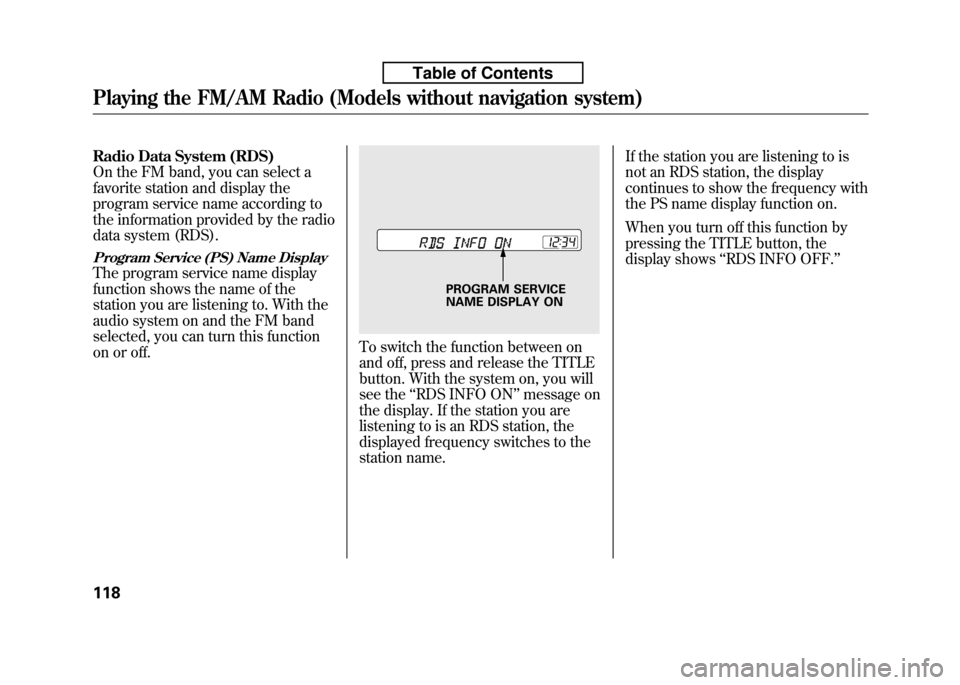
To switch the function between on
and off, press and release the TITLE
button. With the system on, you will
see the‘‘RDS INFO ON ’’message on
the display. If the station you are
listening to is an RDS station, the
displayed frequency switches to the
station name. If the station you are listening to is
not an RDS station, the display
continues to show the frequency with
the PS name display function on.
When you turn off this function by
pressing the TITLE button, the
display shows
‘‘RDS INFO OFF. ’’
PROGRAM SERVICE
NAME DISPLAY ON
Playing the FM/AM Radio (Models without navigation system)
118
Table of Contents
Page 136 of 351

Adjusting the Sound
Press the SOUND (
) button to
select an appropriate setting: bass,
treble, fader, balance, and SVC
(speed-sensitive volume
compensation). Turn the VOL/
SELECT knob to adjust the setting. BASS -Adjusts the bass.
TREBLE -Adjusts the treble.
FADER -Adjusts the front-to-back
strength of the sound.BALANCE -Adjusts the side-to-
side strength of the sound.
Each mode is shown in the display as
it changes. Turn the VOL/SELECT
knob to adjust the setting to your
liking. When the level reaches the
center, you will see ‘‘C ’’in the
display. SVC
-Adjusts the volume level
based on the vehicle speed.
The system will return to the audio
display about 10 seconds after you
stop adjusting a mode.
Speed-sensitive Volume Compensation (SVC)
The SVC mode controls the volume
based on vehicle speed. The faster
you go, the louder the audio volume
becomes. As you slow down, the
audio volume decreases.
The SVC has four modes; SVC OFF,
SVC LOW, SVC MID, and SVC
HIGH. Turn the VOL/SELECT knob
to adjust the setting to your liking. If
you feel the sound is too loud,
choose low. If you feel the sound is
too quiet, choose high.
This function is set to MID as the
default setting when the vehicle
leaves the factory. Audio System Lighting
You can use the instrument panel
brightness control knob to adjust the
illumination of the audio system (see
page 76). The audio system
illuminates when the parking lights
are on, even if the system is turnedoff.
Playing the FM/AM Radio (Models without navigation system)
121
Features
Table of Contents
Page 138 of 351
To Play a Disc
To load or play discs, the ignition
switch must be in the ACCESSORY
(I) or ON (II) position.
You operate the in-dash disc player
with the same controls used for the
radio. To select the disc player, press
the CD button. You will see‘‘CD ’’in
the display. The folder or track
numbers are shown in the display.
You can also select the displayed
information with the TITLE button
(see page 123). The system will
continuously play a disc until you
change modes.
Do not use discs with adhesive labels.
The label can curl up and cause the
disc to jam in the unit. The in-dash disc player can also play
CD-Rs and CD-RWs compressed in
CD-TEXT, MP3, and WMA formats.
When playing a disc in MP3 or
WMA, you will see
‘‘MP3 ’’or ‘‘WMA ’’
in the display. You can see up to 99
folders, and select up to 999 tracks/files. NOTE: If a file on an MP3 or WMA
disc is protected by digital rights
management (DRM), the audio unit
displays UNSUPPORTED, and then
skips to the next file.
If you have a disc that is a
combination of CD-DA tracks and
MP3/WMA files, you can choose the
format to listen by pressing the CDbutton.
Video CDs and DVDs will not work
in this unit.
A disc compressed in AAC format
cannot be played in this audiosystem.
CONTINUED
Playing a Disc (Models without navigation system)
123
Features
Table of Contents
Page 140 of 351

If you press and hold the TITLE
button again, the display shows the
first 15 characters again.
If any letter is not available, it is
replaced with‘‘.’’ (dot) in the
display. When the disc has no text
data, you will see ‘‘NO INFO ’’on the
display.
You will also see some text data
under these conditions:
● When a new folder, file, or track isselected.
● When you change the audio mode
to play a disc with text data or in
MP3 or WMA.
● When you insert a disc, and the
system begins to play.
When playing a CD-DA with text
data, the album and track name are
shown in the display. With a disc in
MP3 or WMA, the display shows the
folder and file name. When you turn on the audio system
next time, the system keeps your
selection with the TITLE button.
To Change or Select Tracks/Files
You can use the SEEK/SKIP button
while a disc is playing to select
passages and change tracks (files in
MP3/WMA mode).
In MP3/WMA mode, use the
orPLAY button to select folders in
the disc, and use the SEEK/SKIP
button to change files. SEEK/SKIP
-Each time you press
the
button, the player skips
forward to the beginning of the next
track (files in MP3/WMA mode).
Press the
button to skip
backward to the beginning of the
current track. Press it again to skip to
the beginning of the previous track.
To move rapidly within a track, press
and hold the
orbutton.
You can also operate the track
selection by using the VOL/SELECT
knob. Press the VOL/SELECT knob
and you will see ‘‘SEL ’’in the display.
Turn the knob to switch the track
number. Press the VOL/SELECT
knob or
PLAY button to set your
selection. To turn it off, press the
button.
CONTINUED
Playing a Disc (Models without navigation system)
125
Features
Table of Contents
Page 143 of 351

The chart on the right explains the
error messages you may see in the
display while playing a disc.
If you see an error message in the
display while playing a disc, press
the eject button. After ejecting the
disc, check it for damage or
deformation. If there is no damage,
insert the disc again. For the
additional information on damaged
discs, see page 187.
The audio system will try to play the
disc. If there is still a problem, the
error message will reappear. Press
the eject button, and pull out thedisc.
Insert a different disc. If the new disc
plays, there is a problem with the
first disc. If the error message cycle
repeats and you cannot clear it, take
your vehicle to a dealer.Error
Message Cause Solution
HEAT ERROR High Temperature Will disappear when the temperature returns
to normal.
UNSUPPORTED Track/File format not
supported Current track will be skipped. The next
supported track or file plays automatically.
BAD DISC
PLEASE CHECK OWNERS
MANUAL PUSH
EJECT Mechanical Error Press the EJECT button and pull out the
disc. Check the disc for serious damage,
signs of deformation, excessive scratches,
and/or dirt (see page 187). Insert the disc
again. If the code does not disappear, or the
disc cannot be removed, consult your dealer.
Do not try to force the disc out of the player.
BAD DISC
PLEASE CHECK OWNERS
MANUAL Servo Error
BAD DISC
PLEASE CHECK
OWNERS
MANUAL DISC Error Check the disc for serious damage, signs of
deformation, excessive scratches, and/or
dirt (see page 187).
Disc Player Error Messages (Models without navigation system)
128
Table of Contents
Page 145 of 351

To Play an iPodꭂ
This audio system can operate the
audio files on the iPodꭂwith the
same controls used for the in-dash
disc player. To play an iPod, connect
it to the USB adapter cable in the
upper glove box by using your dock
connector, then press the AUX
button. The ignition switch must be
in the ACCESSORY (I) or ON (II)
position. The iPod will also be
recharged with the ignition switch in
these positions.
The audio system reads and plays
sound files to be playable on the
iPod. The system cannot operate an
iPod as a mass storage device. The
system will only play songs stored on
the iPod with iTunes.
iPod and iTunes are registered
trademarks owned by Apple Inc.
iPods compatible with your audio
system using the USB adapter cable are: Model Software
iPod classic Ver. 1.0 or more
iPod with video
(iPod 5th generation) Ver. 1.2 or more
iPod nano Ver. 1.2 or more
iPod nano 2nd generation Ver. 1.1.2 or more
iPod nano 3rdgeneration Ver. 1.0 or more
iPod touch Ver. 1.1.1 or more
Use only compatible iPods with the
latest software. iPods that are not
compatible will not work in this audiounit. NOTE: ● Do not connect your iPod using a HUB.
● Do not keep the iPod in the
vehicle. Direct sunlight and high
heat will damage it. ●
Do not use an extension cable
between the USB adapter cable
equipped with your vehicle and
your dock connector.
● We recommend backing up your
data before playing it.
In AAC format, DRM (digital rights
management) files cannot be played.
If the system finds a DRM file, the
audio unit displays UNPLAYABLE,
and then skips to the next file.
Playing an iPod®(Models without navigation system)
130
Table of Contents
Page 149 of 351

SHUFFLE ALBUM-This feature
plays all available albums in a
selected list (playlists, artists, albums
or songs) in random order. The files
in each album are played in the
recorded order. To activate the
shuffle album feature, press the
RDM button repeatedly. You will see‘‘ F-RDM ’’in the display. To turn it
off, press and hold the RDM button.
Each time you press the RDM
button, the mode changes from
shuffle all play to shuffle album play,
then to normal playing. To Stop Playing Your iPod
To play the radio when an iPod is
playing, press the FM/AM button. If
a disc is in the audio unit, press the
CD button to play the disc.
Disconnecting an iPod
You can disconnect the iPod at any
time when you see
‘‘OK to
Disconnect ’’message
ꭧin the iPod
display. Always make sure you see‘‘ OK to Disconnect ’’message in the
iPod display before you disconnect it.
Make sure to follow the iPod's
instructions on how to disconnect the
dock connector from the USB
adapter cable. ꭧ : The displayed message may vary
on models or versions. On some
models, there is no message todisconnect.
If you reconnect the same iPod, the
system may begin playing where it
left off, depending on what mode the
iPod is in when it is reconnected. When you disconnect the iPod while
it is playing, the display shows
‘‘USB
NO DATA. ’’
iPod Error Messages
If you see an error message in the
display, see page 135.
Playing an iPod®(Models without navigation system)
134
Table of Contents
Page 150 of 351

If you see an error message on the
audio display while playing an iPod,
find the solution in the chart to the
right. If you cannot clear the error
message, take your vehicle to yourdealer.Error
Message Solution
UNPLAYABLE FILE The system cannot read the file(s). Check the files in the iPod. There is a
possibility that the files have been damaged.
UNSUPPORTED VER. Appears when an unsupported iPod is inserted.
iPod®Error Messages (Models without navigation system)
135
Features
Table of Contents
Page 152 of 351

To Play a USB Flash Memory Device
This audio system can operate the
audio files on a USB flash memory
device with the same controls used
for the in-dash disc player. To play a
USB flash memory device, connect it
to the USB adapter cable in the
upper glove box, then press the AUX
button. The ignition switch must be
in the ACCESSORY (I) or ON (II)position.
The audio system reads and plays
the audio files on the USB flash
memory device in MP3, WMA orAAC
ꭧformats. Depending on the
format, the display shows MP3,
WMA or AAC when a USB flash
memory device is playing. The USB
flash memory device limit is up to
700 folders or up to 65535 files. ꭧ : Only AAC format files recorded
with iTunes are playable on this
audio unit. The recommended USB flash
memory devices are 256 Mbyte or
higher, and formatted with the FAT
file system. Some digital audio
players may be compatible as well.
Some USB flash memory device
(such as devices with security
lockout features, etc.) will not work
in this audio unit. NOTE:
● Do not use a device such as a card
reader or hard drive as the device
or your files may be damaged.
● Do not connect your USB flash
memory device using a HUB.
● Do not use an extension cable to
the USB adapter cable equipped
with your vehicle.
● Do not keep the USB flash
memory device in the vehicle.
Direct sunlight and high heat will
damage it. ●
We recommend backing up your
data before playing a USB flash
memory device.
● Depending on the type and
number of files, it may take some
time before they begin to play.
● Depending on the software the
files were made with, it may not be
possible to play some files, or
display some text data.
The specifications for compatible
MP3 files are: – Sampling frequency:
32/44.1/48 kHz (MPEG1)
16/22.05/24 kHz (MPEG2)
– Bit rate:
32/40/48/56/64/80/96/112/128/
160/192/224/256/320/VBR kbps(MPEG1)
8/16/24/32/40/48/56/64/80/96/
112/128/144/160/VBR kbps(MPEG2)
CONTINUED
Playing a USB Flash Memory Device (Models without navigation system)
137
Features
Table of Contents