audio HONDA FIT 2010 2.G Service Manual
[x] Cancel search | Manufacturer: HONDA, Model Year: 2010, Model line: FIT, Model: HONDA FIT 2010 2.GPages: 351, PDF Size: 5.67 MB
Page 181 of 351
Using a Track List
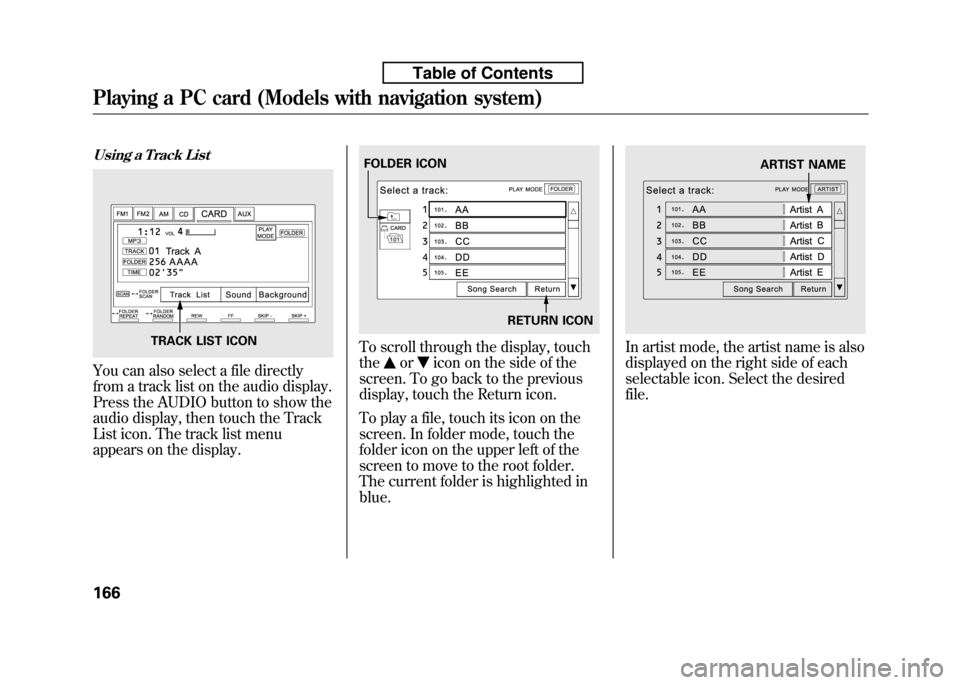
You can also select a file directly
from a track list on the audio display.
Press the AUDIO button to show the
audio display, then touch the Track
List icon. The track list menu
appears on the display.
To scroll through the display, touch the
oricon on the side of the
screen. To go back to the previous
display, touch the Return icon.
To play a file, touch its icon on the
screen. In folder mode, touch the
folder icon on the upper left of the
screen to move to the root folder.
The current folder is highlighted inblue.
In artist mode, the artist name is also
displayed on the right side of each
selectable icon. Select the desiredfile.TRACK LIST ICON
FOLDER ICON
RETURN ICONARTIST NAME
Playing a PC card (Models with navigation system)
166
Table of Contents
Page 184 of 351
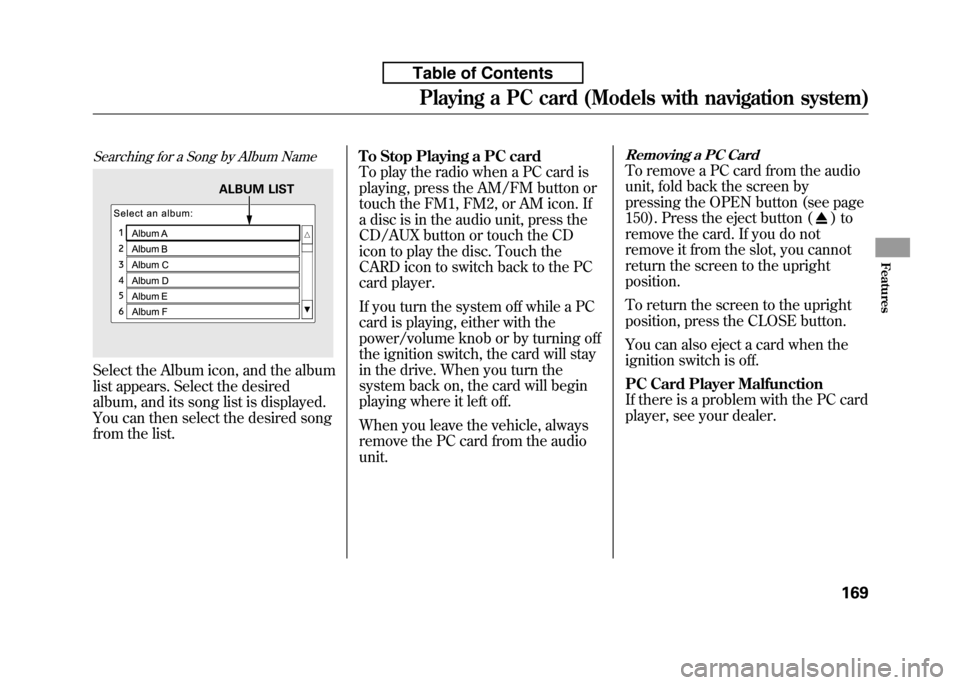
Searching for a Song by Album Name
Select the Album icon, and the album
list appears. Select the desired
album, and its song list is displayed.
You can then select the desired song
from the list.To Stop Playing a PC card
To play the radio when a PC card is
playing, press the AM/FM button or
touch the FM1, FM2, or AM icon. If
a disc is in the audio unit, press the
CD/AUX button or touch the CD
icon to play the disc. Touch the
CARD icon to switch back to the PC
card player.
If you turn the system off while a PC
card is playing, either with the
power/volume knob or by turning off
the ignition switch, the card will stay
in the drive. When you turn the
system back on, the card will begin
playing where it left off.
When you leave the vehicle, always
remove the PC card from the audiounit.
Removing a PC Card
To remove a PC card from the audio
unit, fold back the screen by
pressing the OPEN button (see page
150). Press the eject button (
)to
remove the card. If you do not
remove it from the slot, you cannot
return the screen to the uprightposition.
To return the screen to the upright
position, press the CLOSE button.
You can also eject a card when the
ignition switch is off.
PC Card Player Malfunction
If there is a problem with the PC card
player, see your dealer.
ALBUM LIST
Playing a PC card (Models with navigation system)
169
Features
Table of Contents
Page 185 of 351
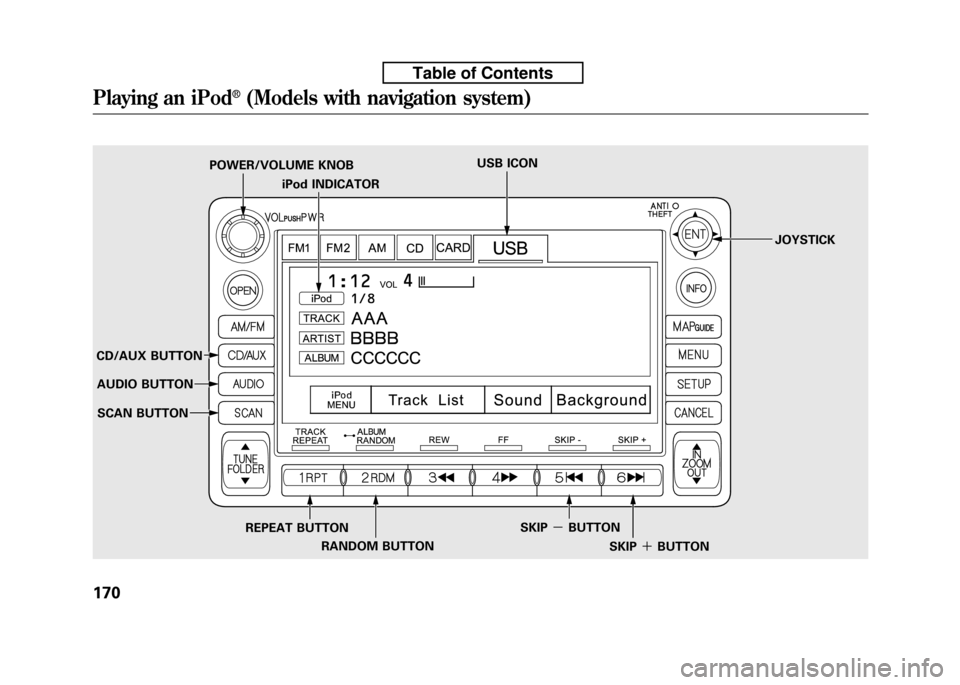
iPod INDICATOR
POWER/VOLUME KNOB
USB ICON
JOYSTICK
CD/AUX BUTTON AUDIO BUTTON
SCAN BUTTON
REPEAT BUTTONRANDOM BUTTON SKIP
-BUTTON
SKIP+BUTTON
Playing an iPod®(Models with navigation system)
170
Table of Contents
Page 186 of 351

To Play an iPodꭂ
This audio system can operate the
audio files on the iPodꭂwith the
same controls used for the in-dash
disc player. To play an iPod, connect
it to the USB adapter cable in the
upper glove box by using your dock
connector, then press the CD/AUX
button. The ignition switch must be
in the ACCESSORY (I) or ON (II)
position. The iPod will also be
recharged with the ignition switch in
these positions.
The audio system reads and plays
sound files to be playable on the
iPod. The system cannot operate an
iPod as a mass storage device. The
system will only play songs stored on
the iPod with iTunes.
iPod and iTunes are registered
trademarks owned by Apple Inc.
Voice Control System
You can select the AUX mode by
using the navigation system voice
control buttons, but cannot operate
the play mode functions.
iPods compatible with your audio
system using the USB adapter cableare:
Model Software
iPod classic Ver. 1.0 or more
iPod with video
(iPod 5th generation) Ver. 1.2 or more
iPod nano Ver. 1.2 or more
iPod nano 2nd generation Ver. 1.1.2 or more
iPod nano 3rdgeneration Ver. 1.0 or more
iPod touch Ver. 1.1.1 or more
Use only compatible iPods with the
latest software. iPods that are not
compatible will not work in this audiounit. NOTE:
● Do not connect your iPod using aHUB.
● Do not keep the iPod in the
vehicle. Direct sunlight and high
heat will damage it.
● Do not use an extension cable
between the USB adapter cable
equipped with your vehicle and
your dock connector.
● We recommend backing up your
data before playing it.
In AAC format, DRM (digital rights
management) files cannot be played.
If the system finds a DRM file, the
audio unit displays UNPLAYABLE,
and then skips to the next file.
CONTINUED
Playing an iPod®(Models with navigation system)
171
Features
Table of Contents
Page 187 of 351
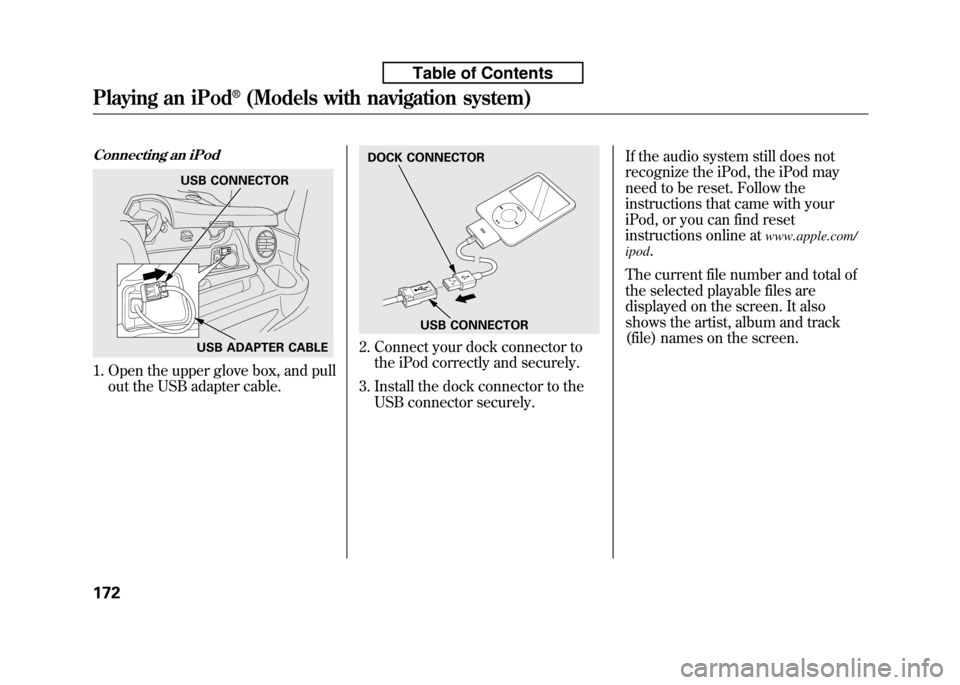
Connecting an iPod
1. Open the upper glove box, and pullout the USB adapter cable.
2. Connect your dock connector tothe iPod correctly and securely.
3. Install the dock connector to the USB connector securely. If the audio system still does not
recognize the iPod, the iPod may
need to be reset. Follow the
instructions that came with your
iPod, or you can find reset
instructions online at
www.apple.com/
ipod .
The current file number and total of
the selected playable files are
displayed on the screen. It also
shows the artist, album and track
(file) names on the screen.
USB CONNECTOR
USB ADAPTER CABLE
DOCK CONNECTOR
USB CONNECTOR
Playing an iPod®(Models with navigation system)
172
Table of Contents
Page 188 of 351
To Change or Select Files
Use the SKIP button while an iPod is
playing to select passages and
change files. SKIP-Each time you press the
SKIP +button (Preset 6), the
system skips forward to the
beginning of the next file. Press theSKIP -button (Preset 5), to skip
backward to the beginning of the
current file. Press it again to skip to
the beginning of the previous file.
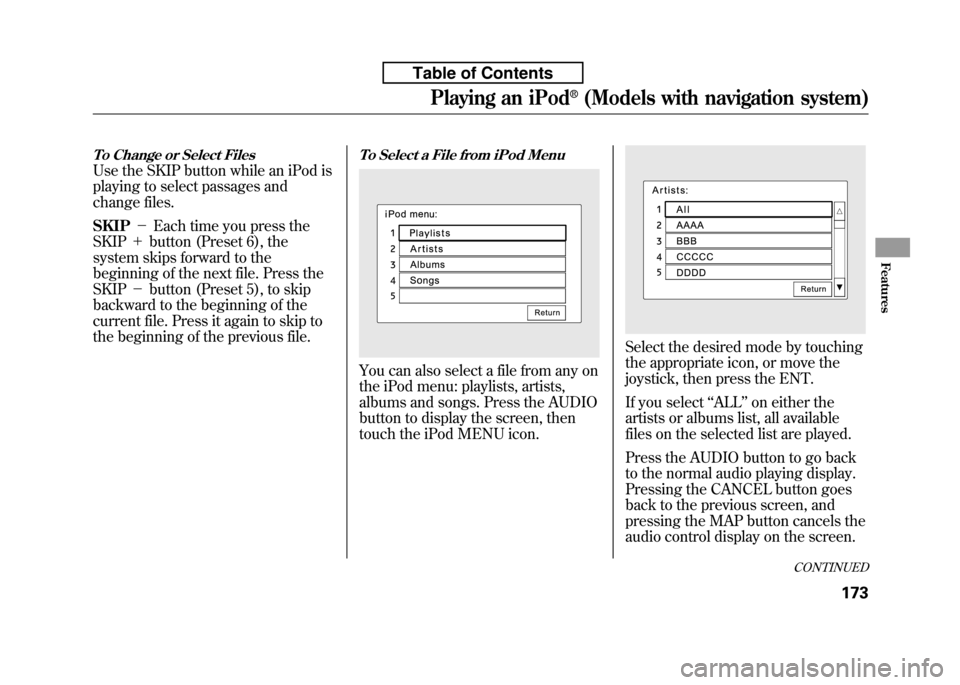
To Select a File from iPod Menu
You can also select a file from any on
the iPod menu: playlists, artists,
albums and songs. Press the AUDIO
button to display the screen, then
touch the iPod MENU icon.
Select the desired mode by touching
the appropriate icon, or move the
joystick, then press the ENT.
If you select ‘‘ALL ’’on either the
artists or albums list, all available
files on the selected list are played.
Press the AUDIO button to go back
to the normal audio playing display.
Pressing the CANCEL button goes
back to the previous screen, and
pressing the MAP button cancels the
audio control display on the screen.
CONTINUED
Playing an iPod®(Models with navigation system)
173
Features
Table of Contents
Page 189 of 351
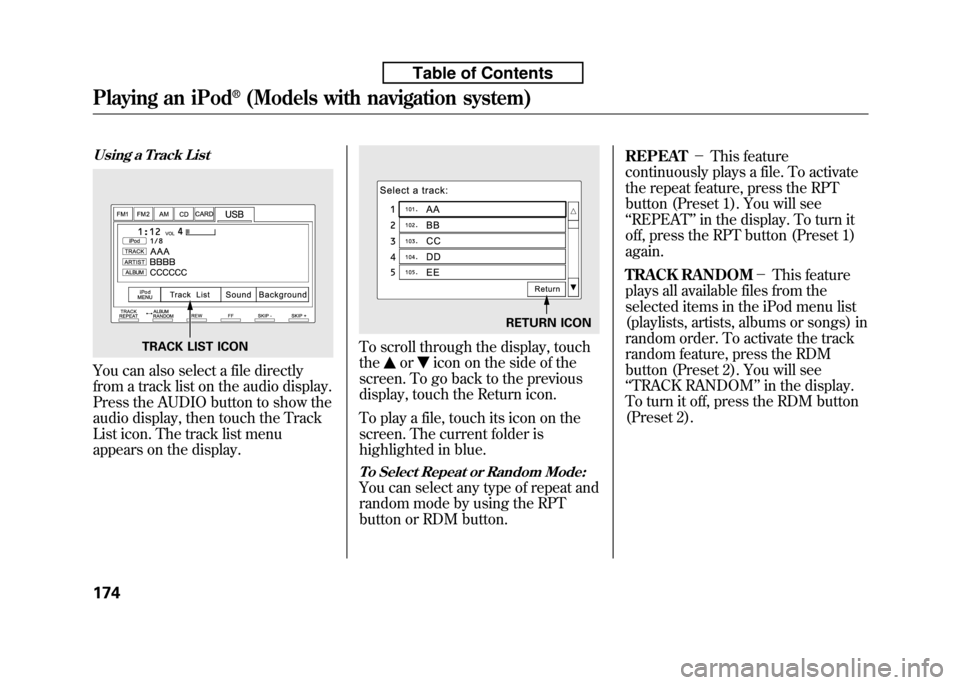
Using a Track List
You can also select a file directly
from a track list on the audio display.
Press the AUDIO button to show the
audio display, then touch the Track
List icon. The track list menu
appears on the display.
To scroll through the display, touch the
oricon on the side of the
screen. To go back to the previous
display, touch the Return icon.
To play a file, touch its icon on the
screen. The current folder is
highlighted in blue.
To Select Repeat or Random Mode:
You can select any type of repeat and
random mode by using the RPT
button or RDM button. REPEAT
-This feature
continuously plays a file. To activate
the repeat feature, press the RPT
button (Preset 1). You will see‘‘ REPEAT ’’in the display. To turn it
off, press the RPT button (Preset 1)again.
TRACK RANDOM -This feature
plays all available files from the
selected items in the iPod menu list
(playlists, artists, albums or songs) in
random order. To activate the track
random feature, press the RDM
button (Preset 2). You will see‘‘ TRACK RANDOM ’’in the display.
To turn it off, press the RDM button
(Preset 2).
TRACK LIST ICON
RETURN ICON
Playing an iPod®(Models with navigation system)
174
Table of Contents
Page 190 of 351

ALBUM RANDOM-This feature
plays all available albums from the
selected items in the iPod menu list
(playlists, artists, albums or songs) in
random order. The files in each
album are played in the recorded
order. To activate the album random
feature, press and hold the RDM
button (Preset 2). You will see‘‘ ALBUM RANDOM ’’in the display.
To turn it off, press and hold the
RDM button (Preset 2).
You can also select another list from
the iPod menu while keeping the
random function. NOTE:
Available operating function varies
on models or versions. Some
functions may not be available on the
vehicle's audio system. To Stop Playing Your iPod
To play the radio when an iPod is
playing, press the FM/AM button or
touch the FM1, FM2, or AM icon. If
a disc is in the audio unit, press the
CD/AUX button or touch the CD
icon to play the disc. If a PC card is in
the audio unit, Press the CD/AUX
button or touch the CARD icon to
play a PC card.
Press the CD/AUX button again or
touch the AUX icon to switch back to
the iPod.
Disconnecting an iPod
You can disconnect the iPod at any
time when you see
‘‘OK to
Disconnect ’’message
ꭧin the iPod
display. Always make sure you see‘‘ OK to Disconnect ’’message in the
iPod display before you disconnect it.
Make sure to follow the iPod's
instructions on how to disconnect the
dock connector from the USB
adapter cable. ꭧ
: The displayed message may vary
on models or versions. On some
models, there is no message to
disconnect.
When you disconnect the iPod while
it is playing, the navigation screenshows ‘‘NO DATA. ’’
If you reconnect the same iPod, the
system may begin playing where it
left off, depending on what mode the
iPod is in when it is reconnected.
iPod Error Messages
If you see an error message on the
screen, see page 176.
Playing an iPod®(Models with navigation system)
175
Features
Table of Contents
Page 192 of 351
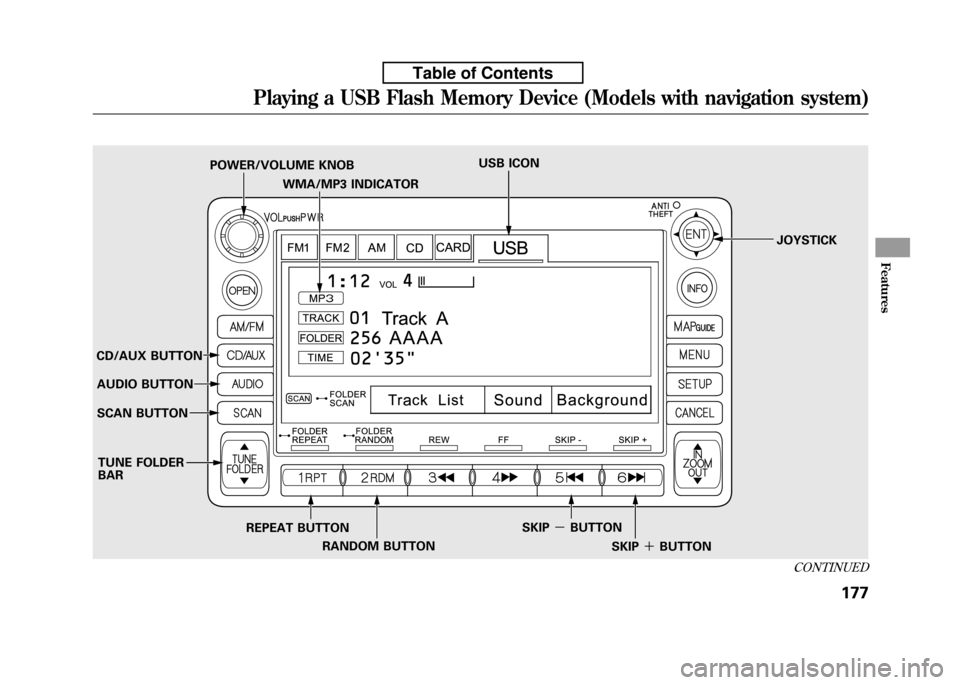
WMA/MP3 INDICATOR
POWER/VOLUME KNOB
USB ICON
JOYSTICK
CD/AUX BUTTON AUDIO BUTTON
SCAN BUTTON
REPEAT BUTTONRANDOM BUTTON SKIP
-BUTTON
SKIP+BUTTON
TUNE FOLDER BAR
CONTINUED
Playing a USB Flash Memory Device (Models with navigation system)
177
Features
Table of Contents
Page 193 of 351

To Play a USB Flash Memory Device
This audio system can operate the
audio files on a USB flash memory
device with the same controls used
for the in-dash disc player. To play a
USB flash memory device, connect it
to the USB adapter cable in the
upper glove box, then press the CD/
AUX button. The ignition switch
must be in the ACCESSORY (I) or
ON (II) position.
The audio system reads and plays
the audio files on the USB flash
memory device in MP3, WMA orAAC
ꭧformats. Depending on the
format, the display shows MP3,
WMA or AAC when a USB flash
memory device is playing. The USB
flash memory device limit is up to
700 folders or up to 65535 files. ꭧ : Only AAC format files recorded
with iTunes are playable on this
audio unit. The recommended USB flash
memory devices are 256 Mbyte or
higher, and formatted with the FAT
file system. Some digital audio
players may be compatible as well.
Some USB flash memory device
(such as devices with security
lockout features, etc.) will not work
in this audio unit. NOTE:
● Do not use a device such as a card
reader or hard drive as the device
or your files may be damaged.
● Do not connect your USB flash
memory device using a HUB.
● Do not use an extension cable to
the USB adapter cable equipped
with your vehicle.
● Do not keep the USB flash
memory device in the vehicle.
Direct sunlight and high heat will
damage it. ●
We recommend backing up your
data before playing a USB flash
memory device.
● Depending on the type and
number of files, it may take some
time before they begin to play.
● Depending on the software the
files were made with, it may not be
possible to play some files, or
display some text data.
Voice Control System
You can select the AUX mode by
using the navigation system voice
control buttons, but cannot operate
the play mode functions.
The specifications for compatible
MP3 files are:
– Sampling frequency:
32/44.1/48 kHz (MPEG1)
16/22.05/24 kHz (MPEG2)
Playing a USB Flash Memory Device (Models with navigation system)
178
Table of Contents