fuel HONDA FIT 2010 2.G User Guide
[x] Cancel search | Manufacturer: HONDA, Model Year: 2010, Model line: FIT, Model: HONDA FIT 2010 2.GPages: 351, PDF Size: 5.67 MB
Page 73 of 351
This section gives information about
the controls and displays that
contribute to the daily operation of
your vehicle. All the essential
controls are within easy reach.Control Locations..........................
58
Instrument Panel ..........................
59
Instrument Panel Indicators ..........
60
Gauges ..........................................
68
Trip Meter ................................
69
Instant Fuel Economy ...............
70
Average Fuel Economy .............
70
Odometer ..................................
70
Fuel Gauge ...............................
70
Check Fuel Cap Indicator .........
70
Maintenance Minder ................
71
Controls Near the Steering
Wheel .......................................
72
Windshield Wipers and Washers ................................
73
Windshield Wipers ...................
73
Rear Window Wiper and
Washer .................................
73
Turn Signal and Headlights ..........
74
Headlights ....................................
75
Instrument Panel Brightness ........
76
Hazard Warning Button ................
76
Rear Window Defogger .................
76
Steering Wheel Adjustments .........
77Keys and Locks
............................. 78
Immobilizer System ......................
79
Ignition Switch ..............................
80
Door Locks ...................................
81
Power Door Locks ....................
81
Childproof Door Locks ..............
82
Auto Door Locking/ Unlocking .............................
83
Auto Door Locking ...................
83
Auto Door Unlocking ................
85
Tailgate .........................................
88
Remote Transmitter ......................
90
Seats .............................................
93
Power Windows ..........................
100
Mirrors .......................................
101
Parking Brake .............................
102
Interior Convenience Items .........
104
Lower Glove Box ....................
105
Upper Glove Box .....................
105
Beverage Holders ...................
106
Seat Under Box .......................
106
Accessory Power Socket .........
106
Sun Visor ................................
106
Interior Lights .............................
107
Instruments and Controls
57
Instruments and Controls
Page 75 of 351
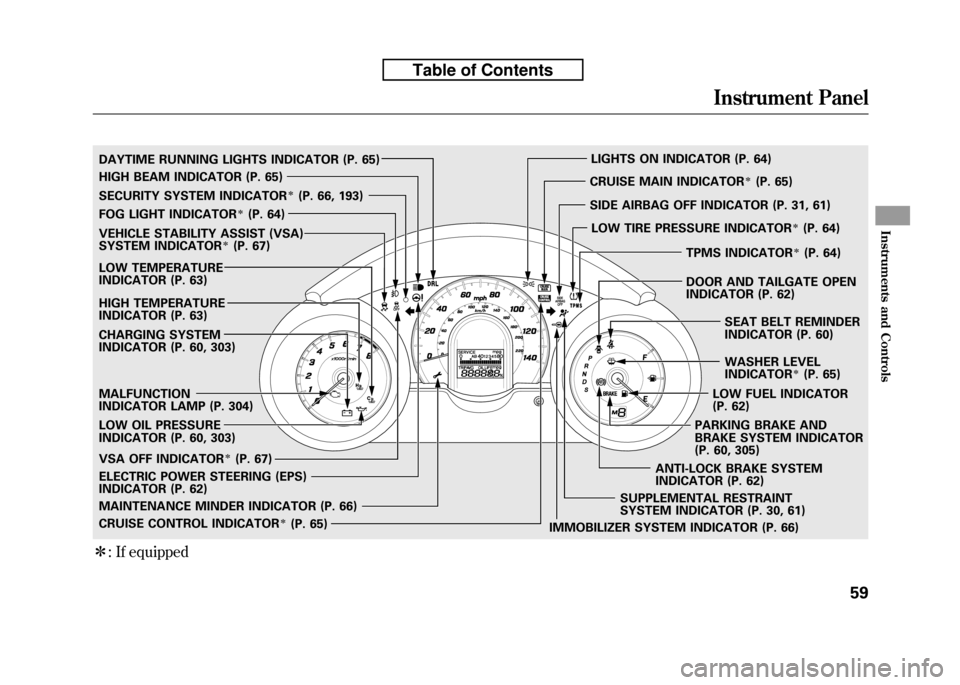
ꭧ: If equipped
SECURITY SYSTEM INDICATORꭧ(P. 66, 193)
WASHER LEVEL
INDICATOR
ꭧ(P. 65)
MALFUNCTION
INDICATOR LAMP (P. 304)
CHARGING SYSTEM
INDICATOR (P. 60, 303)
LOW OIL PRESSURE
INDICATOR (P. 60, 303)
IMMOBILIZER SYSTEM INDICATOR (P. 66)
FOG LIGHT INDICATOR
ꭧ(P. 64)
LIGHTS ON INDICATOR (P. 64)
SUPPLEMENTAL RESTRAINT
SYSTEM INDICATOR (P. 30, 61)
MAINTENANCE MINDER INDICATOR (P. 66) CRUISE MAIN INDICATOR
ꭧ(P. 65)
CRUISE CONTROL INDICATOR
ꭧ(P. 65)
LOW TEMPERATURE
INDICATOR (P. 63)
ELECTRIC POWER STEERING (EPS)
INDICATOR (P. 62)
HIGH BEAM INDICATOR (P. 65)
LOW FUEL INDICATOR
(P. 62)
TPMS INDICATOR
ꭧ(P. 64)
SEAT BELT REMINDER
INDICATOR (P. 60)
PARKING BRAKE AND
BRAKE SYSTEM INDICATOR
(P. 60, 305)
DAYTIME RUNNING LIGHTS INDICATOR (P. 65)
HIGH TEMPERATURE
INDICATOR (P. 63)
VEHICLE STABILITY ASSIST (VSA)
SYSTEM INDICATORꭧ(P. 67)
VSA OFF INDICATOR
ꭧ(P. 67) SIDE AIRBAG OFF INDICATOR (P. 31, 61)
LOW TIRE PRESSURE INDICATOR
ꭧ(P. 64)
ANTI-LOCK BRAKE SYSTEM
INDICATOR (P. 62) DOOR AND TAILGATE OPEN
INDICATOR (P. 62)
Instrument Panel
59
Instruments and Controls
Table of Contents
Page 78 of 351

Anti-lock Brake System
(ABS) Indicator
This indicator normally comes on for
a few seconds when you turn the
ignition switch to the ON (II)
position, and when the ignition
switch is turned to the START (III)
position. If it comes on at any other
time, there is a problem with the
ABS. If this happens, have your
vehicle checked at a dealer. With this
indicator on, your vehicle still has
normal braking ability but no anti-
lock function. For more information,
see page 231.Electric Power Steering
(EPS) Indicator
This indicator normally comes on when
you turn the ignition switch to the ON
(II) position and goes off after the
engine starts. If it comes on at any
other time, there is a problem in the
electric power steering system. If this
happens, stop the vehicle in a safe
place and turn off the engine. Reset the
system by restarting the engine. The
indicator will not turn off immediately.
If it does not go off after driving a short
distance, or comes back on again while
driving, take the vehicle to your dealer
to have it checked. With the indicator
on, the EPS may be turned off, making
the vehicle harder to steer.
If you turn the steering wheel to the
full left or right position repeatedly
while stopping or driving at very low
speed, you may feel slightly harder
steering in order to prevent damage to
the steering box caused by overheating.Low Fuel Indicator
This indicator comes on as a
reminder that you must refuel soon.
When the indicator comes on, there
is about 1.64 US gal (6.2 L) of fuel
remaining in the tank before the
needle reaches E. There is a small
reserve of fuel remaining in the tank
when the needle does reach E.
Door and Tailgate Open Indicator
This indicator comes on if any door
or the tailgate is not closed tightly.
Instrument Panel Indicators
62
Table of Contents
Page 82 of 351
Maintenance Minder Indicator
This indicator comes on for a few
seconds when you turn the ignition
switch to the ON (II) position. It
reminds you that it is time to take
your vehicle in for scheduled
maintenance. The maintenance main
items and sub items will be displayed
in the information display. See page
245 for more information on the
maintenance minder.
This indicator goes off when your
dealer resets it after completing the
required maintenance service.Immobilizer System Indicator
This indicator comes on briefly when
you turn the ignition switch to the
ON (II) position. It will go off if you
have inserted a properly coded
ignition key. If it is not a properly
coded key, the indicator will blink,
and the engine's fuel system will be
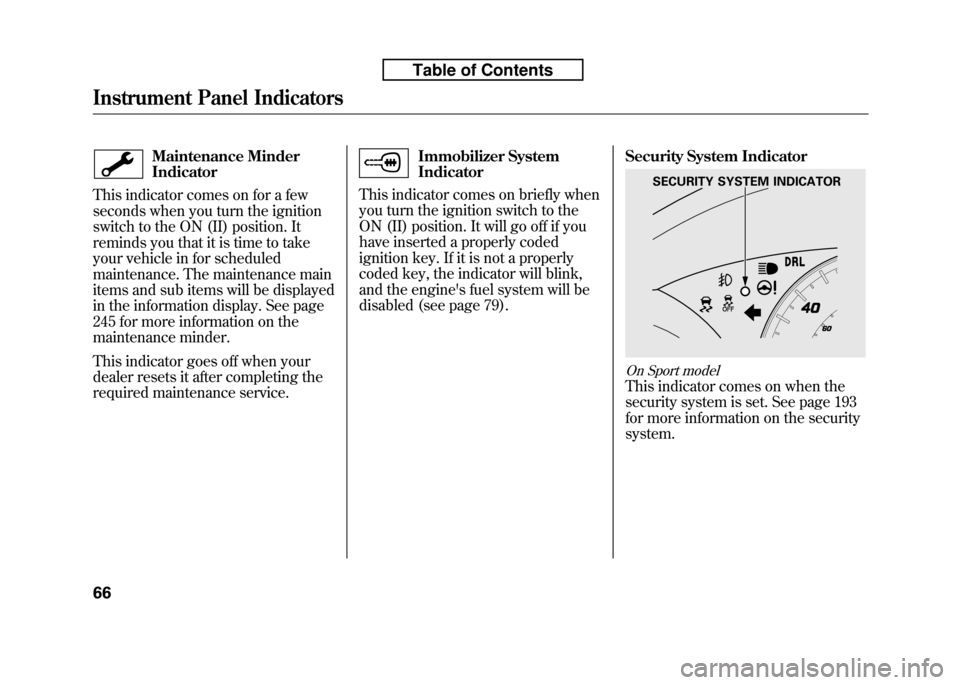
disabled (see page 79). Security System Indicator
On Sport model
This indicator comes on when the
security system is set. See page 193
for more information on the securitysystem.
SECURITY SYSTEM INDICATOR
Instrument Panel Indicators
66
Table of Contents
Page 84 of 351
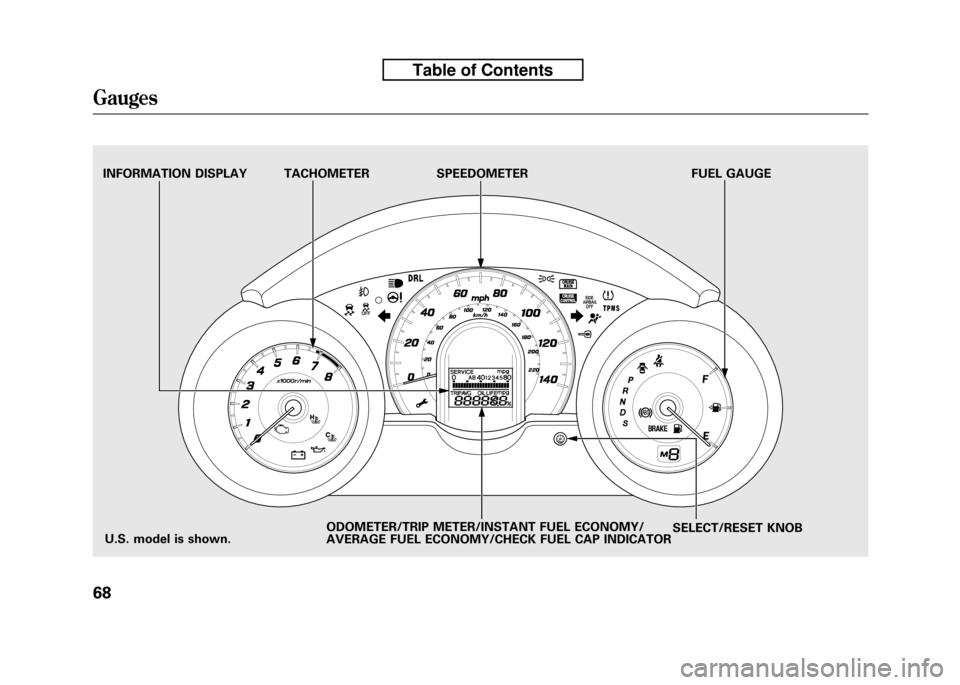
TACHOMETER SPEEDOMETER FUEL GAUGESELECT/RESET KNOB
INFORMATION DISPLAY
ODOMETER/TRIP METER/INSTANT FUEL ECONOMY/
AVERAGE FUEL ECONOMY/CHECK FUEL CAP INDICATOR
U.S. model is shown.
Gauges
68
Table of Contents
Page 85 of 351
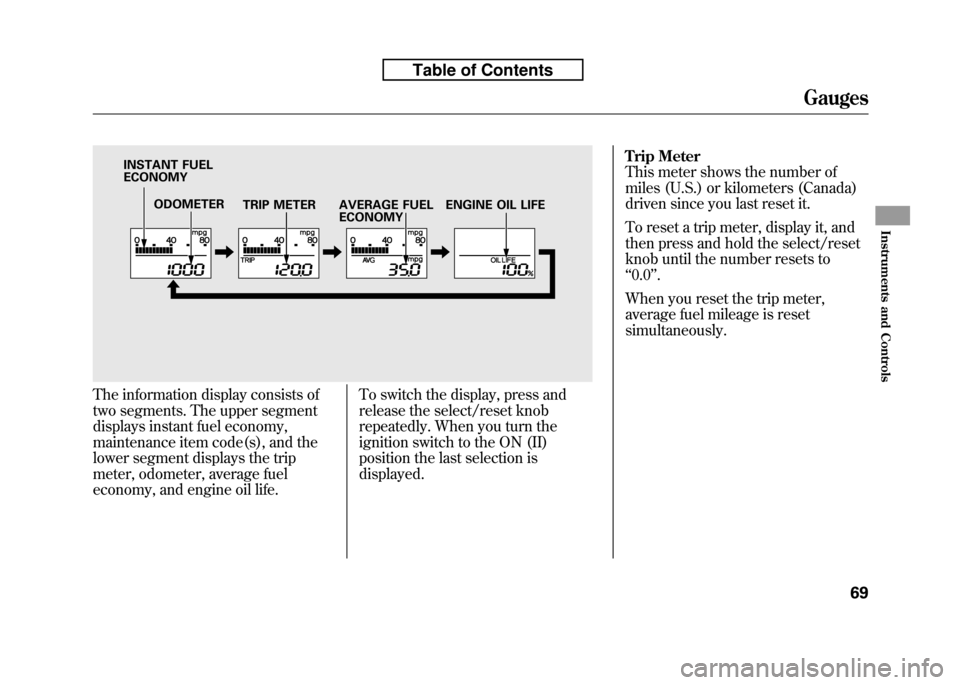
The information display consists of
two segments. The upper segment
displays instant fuel economy,
maintenance item code(s), and the
lower segment displays the trip
meter, odometer, average fuel
economy, and engine oil life.To switch the display, press and
release the select/reset knob
repeatedly. When you turn the
ignition switch to the ON (II)
position the last selection isdisplayed.Trip Meter
This meter shows the number of
miles (U.S.) or kilometers (Canada)
driven since you last reset it.
To reset a trip meter, display it, and
then press and hold the select/reset
knob until the number resets to‘‘
0.0 ’’.
When you reset the trip meter,
average fuel mileage is reset
simultaneously.
ODOMETER TRIP METER
INSTANT FUEL ECONOMY
AVERAGE FUEL ECONOMYENGINE OIL LIFE
Gauges
69
Instruments and Controls
Table of Contents
Page 86 of 351
Instant Fuel Economy
This shows your instant fuel
economy in mpg (U.S.) or l/100 km(Canada).
Average Fuel Economy
This shows your vehicle's average
fuel economy in mpg (U.S.) or 1/100
km (Canada) since you last reset the
trip meter.
When you reset a trip meter, the
average fuel economiy for that trip
meter also resets.Odometer
The odometer shows the total
distance your vehicle has been
driven. It measures miles in U.S.
models and kilometers in Canadian
models. It is illegal under U.S.
federal law and Canadian provincial/
territorial regulations to disconnect,
reset, or alter the odometer with the
intent to change the number of miles
or kilometers indicated.
Fuel Gauge
This shows how much fuel you have.
It may show slightly more or less
than the actual amount. The needle
returns to the bottom after you turn
off the ignition.
Avoid driving with an extremely low
fuel level. Running out of fuel could
cause the engine to misfire, damaging
the catalytic converter.Check Fuel Cap Indicator
If the fuel fill cap is loose or missing,a
‘‘CHECK FUEL CAP ’’message
appears on the information display
after you start the engine. The
message changes from CHECK, to
FUEL, to CAP repeatedly.
Turn the engine off and confirm the
fuel fill cap is installed. If it is, loosen
the cap, then retighten it until it
clicks at least once. You can cycle the
message off of the display by
pressing the select/reset knob
repeatedly, but this message will be
displayed each time the engine is
started. It will take several days of
normal driving for the vehicle to turn
the warning off.
Gauges
70
Table of Contents
Page 87 of 351

If the system still detects a loose or
missing fuel fill cap, the malfunction
indicator lamp (MIL) comes on. Turn
the engine off, and check or
retighten the fuel fill cap until it
clicks at least once. The MIL goes
out after several days of normal
driving once the cap is tightened or
replaced. If it does not go out, have
your dealer inspect the vehicle. For
more information, see page 304.Maintenance Minder
The information display in the
instrument panel shows you the
engine oil life and maintenance
service items when the ignition
switch is in the ON (II) position. This
information helps to keep you aware
of the periodic maintenance your
vehicle needs for continued trouble-
free driving. Refer to page 245 for
more information.
Gauges
71
Instruments and Controls
Table of Contents
Page 95 of 351
The immobilizer system protects
your vehicle from theft. If an
improperly coded key (or other
device) is used, the engine's fuel
system is disabled.
When you turn the ignition switch to
the ON (II) position, the immobilizer
system indicator should come on
briefly, then go off. If the indicator
starts to blink, it means the system
does not recognize the coding of the
key. Turn the ignition switch to the
LOCK (0) position, remove the key,
reinsert it, and turn the ignition
switch to the ON (II) position again.
The system may not recognize your
key's coding if another immobilizer
key or other metal object (i.e. key
chain) is near the ignition switch
when you insert the key.If the system repeatedly does not
recognize the coding of your key,
contact your dealer.
Do not attempt to alter this system or
add other devices to it. Electrical
problems could result that may make
your vehicle inoperable.
If you have lost your key and cannot
start the engine, contact your dealer.
Always take the ignition key with you
whenever you leave the vehicle alone.
As required by the FCC:
This device complies with Part 15 of the
FCC rules. Operation is subject to thefollowing two conditions: (1) This devicemay not cause harmful interference, and(2) this device must accept any
interference received, including interference that may cause undesiredoperation.
Changes or modifications not expresslyapproved by the party responsible forcompliance could void the user's
authority to operate the equipment.
This device complies with IndustryCanada Standard RSS-210. Operation is subject to the following two conditions:(1) this device may not cause
interference, and (2) this device mustaccept any interference that may cause undesired operation of the device.
Immobilizer System
79
Instruments and Controls
Table of Contents
Page 212 of 351
Before you begin driving your
vehicle, you should know what
gasoline to use and how to check the
levels of important fluids. You also
need to know how to properly store
luggage or packages. The
information in this section will help
you. If you plan to add any
accessories to your vehicle, please
read the information in this sectionfirst.Break-in Period...........................
198
Fuel Recommendation ................
198
Service Station Procedures .........
199
Refueling .................................
199
Opening and Closing the Hood ...................................
200
Oil Check ................................
201
Engine Coolant Check ............
202
Fuel Economy .............................
203
Accessories and
Modifications ..........................
206
Carrying Cargo ...........................
208
Before Driving
197
Before Driving