reset HONDA FIT 2020 (in English) User Guide
[x] Cancel search | Manufacturer: HONDA, Model Year: 2020, Model line: FIT, Model: HONDA FIT 2020Pages: 599, PDF Size: 41.91 MB
Page 115 of 599
113
uuGauges and Displays uMulti-Information Display*
Continued
Instrument Panel
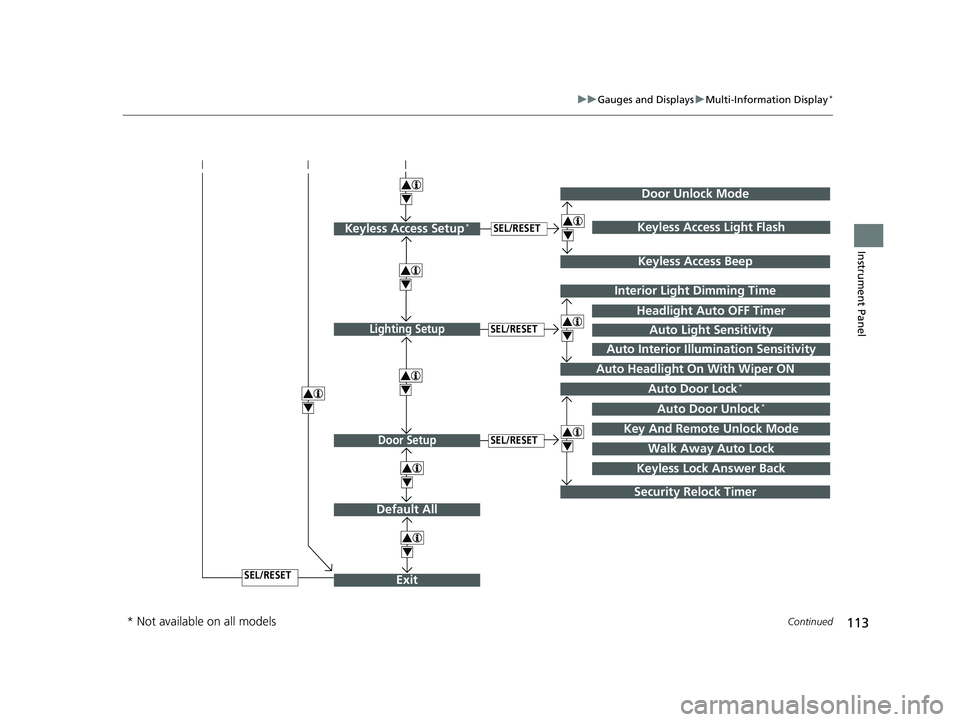
Exit
4
4
Door Setup
Default All
SEL/RESET
4
SEL/RESET
Lighting SetupSEL/RESET
4Auto Door Lock*
Auto Door Unlock*
Key And Remote Unlock Mode
Walk Away Auto Lock
Interior Light Dimming Time
Headlight Auto OFF Timer
Auto Headlight On With Wiper ON
4
4
Security Relock Timer
Auto Light Sensitivity
Auto Interior Illumination Sensitivity
Keyless Lock Answer Back
Door Unlock Mode
Keyless Access Setup*SEL/RESET
Keyless Access Beep
4Keyless Access Light Flash
4
4
* Not available on all models
20 FIT-31T5A6500.book 113 ページ 2019年9月26日 木曜日 午後4時41分
Page 117 of 599
115
uuGauges and Displays uMulti-Information Display*
Continued
Instrument Panel
*1 : Default Setting
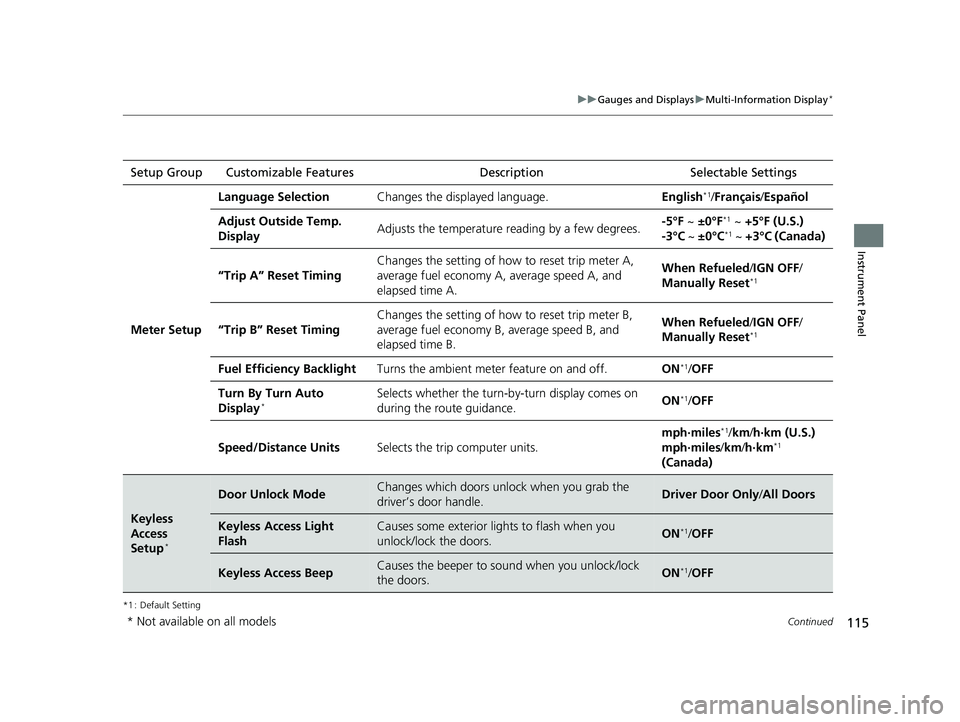
Setup Group Customizable Features Description Selectable Settings
Meter Setup
Language SelectionChanges the displayed language.English*1/Français /Español
Adjust Outside Temp.
DisplayAdjusts the temperature r eading by a few degrees.-5°F ~ ±0°F*1 ~ +5°F (U.S.)
-3°C ~ ±0°C*1 ~ +3°C (Canada)
“Trip A” Reset Timing
Changes the setting of how to reset trip meter A,
average fuel economy A, average speed A, and
elapsed time A.When Refueled /IGN OFF /
Manually Reset*1
“Trip B” Reset Timing
Changes the setting of ho w to reset trip meter B,
average fuel economy B, average speed B, and
elapsed time B.When Refueled /IGN OFF /
Manually Reset*1
Fuel Efficiency BacklightTurns the ambient meter feature on and off.ON*1/ OFF
Turn By Turn Auto
Display*Selects whether the turn-b y-turn display comes on
during the route guidance.ON*1/ OFF
Speed/Distance UnitsSelects the trip computer units.
mph∙miles*1/ km/ h∙km (U.S.)
mph∙miles /km/ h∙km*1
(Canada)
Keyless
Access
Setup
*
Door Unlock ModeChanges which doors unlock when you grab the
driver’s door handle.Driver Door Only /All Doors
Keyless Access Light
FlashCauses some exterior li ghts to flash when you
unlock/lock the doors.ON*1/ OFF
Keyless Access BeepCauses the beeper to sound when you unlock/lock
the doors.ON*1/OFF
* Not available on all models
20 FIT-31T5A6500.book 115 ページ 2019年9月26日 木曜日 午後4時41分
Page 119 of 599
117
uuGauges and Displays uMulti-Information Display*
Continued
Instrument Panel
*1 : Default Setting
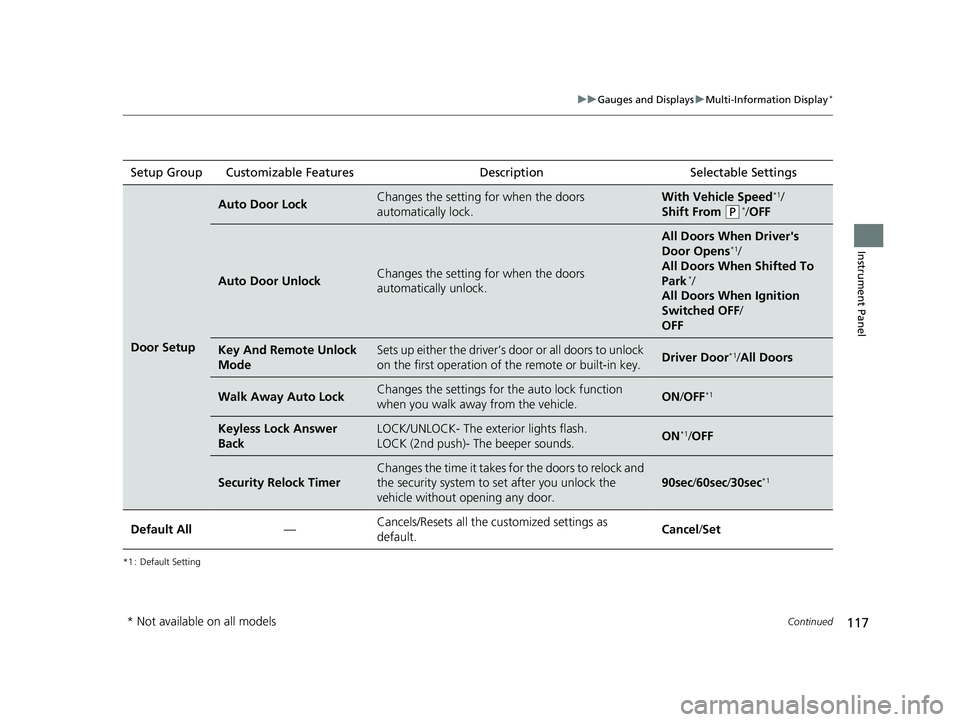
Setup Group Customizable Features Description Selectable Settings
Door Setup
Auto Door LockChanges the setting for when the doors
automatically lock.With Vehicle Speed*1/
Shift From
(P*/ OFF
Auto Door UnlockChanges the setting for when the doors
automatically unlock.
All Doors When Driver's
Door Opens*1/
All Doors When Shifted To
Park
*/
All Doors When Ignition
Switched OFF /
OFF
Key And Remote Unlock
ModeSets up either the driver’s door or all doors to unlock
on the first operation of the remote or built-in key.Driver Door*1/ All Doors
Walk Away Auto LockChanges the settings for the auto lock function
when you walk away from the vehicle.ON /OFF*1
Keyless Lock Answer
BackLOCK/UNLOCK- The exterior lights flash.
LOCK (2nd push)- The beeper sounds.ON*1/OFF
Security Relock Timer
Changes the time it takes for the doors to relock and
the security system to set after you unlock the
vehicle without opening any door.
90sec /60sec /30sec*1
Default All—Cancels/Resets all the customized settings as
default.Cancel /Set
* Not available on all models
20 FIT-31T5A6500.book 117 ページ 2019年9月26日 木曜日 午後4時41分
Page 120 of 599
118
uuGauges and Displays uMulti-Information Display*
Instrument Panel
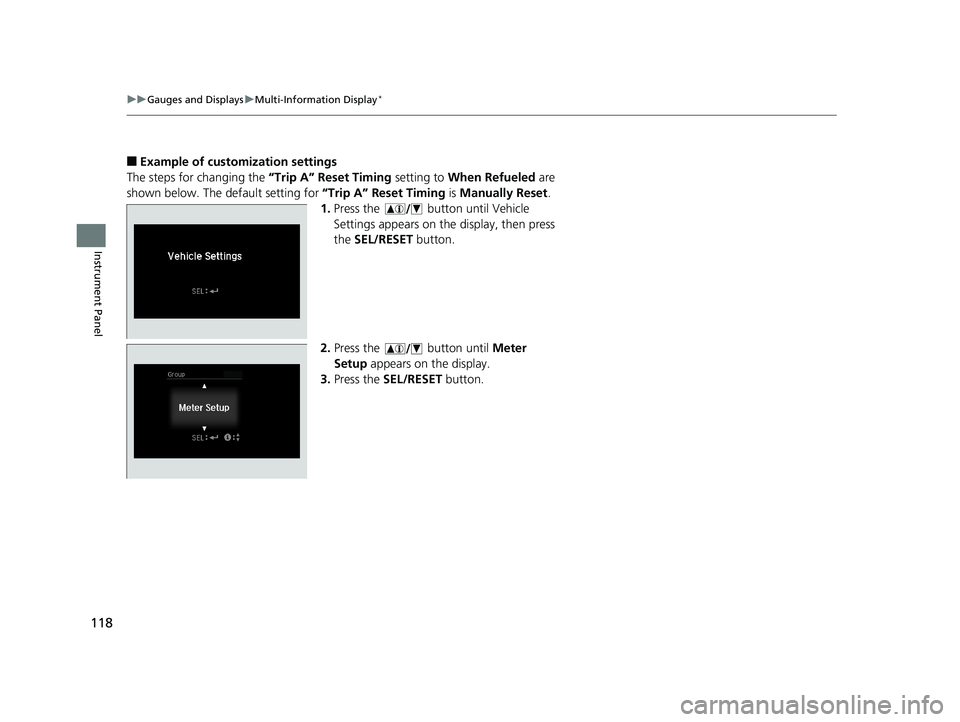
■Example of customization settings
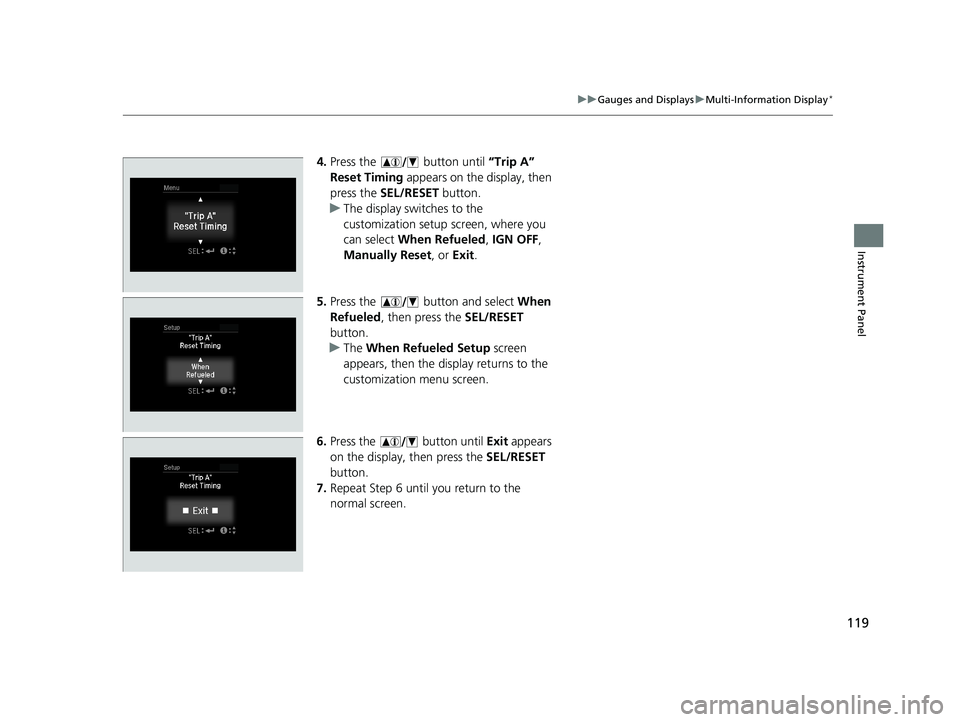
The steps for changing the “Trip A” Reset Timing setting to When Refueled are
shown below. The default setting for “Trip A” Reset Timing is Manually Reset .
1. Press the button until Vehicle
Settings appears on the display, then press
the SEL/RESET button.
2. Press the button until Meter
Setup appears on the display.
3. Press the SEL/RESET button.
20 FIT-31T5A6500.book 118 ページ 2019年9月26日 木曜日 午後4時41分
Page 121 of 599
119
uuGauges and Displays uMulti-Information Display*
Instrument Panel
4. Press the button until “Trip A”
Reset Timing appears on the display, then
press the SEL/RESET button.
u The display swit ches to the
customization setup screen, where you
can select When Refueled , IGN OFF ,
Manually Reset , or Exit .
5. Press the button and select When
Refueled , then press the SEL/RESET
button.
u The When Refueled Setup screen
appears, then the di splay returns to the
customization menu screen.
6. Press the button until Exit appears
on the display, then press the SEL/RESET
button.
7. Repeat Step 6 until you return to the
normal screen.
20 FIT-31T5A6500.book 119 ページ 2019年9月26日 木曜日 午後4時41分
Page 172 of 599
170
uuOperating the Switches Around the Steering Wheel uBrightness Control
Controls
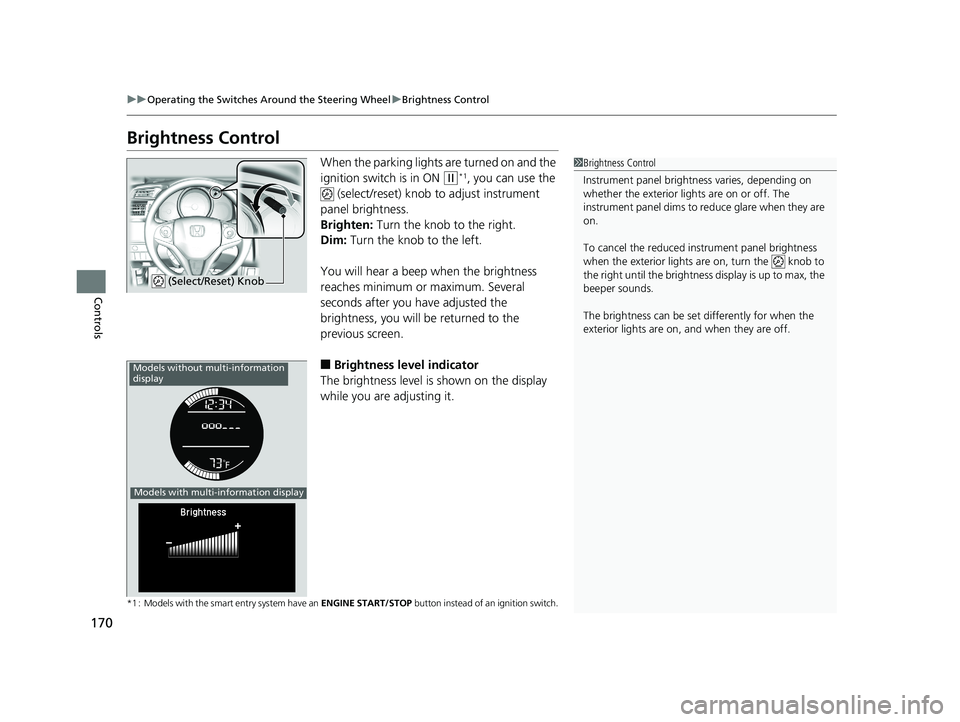
Brightness Control
When the parking lights are turned on and the
ignition switch is in ON
(w*1, you can use the
(select/reset) knob to adjust instrument
panel brightness.
Brighten: Turn the knob to the right.
Dim: Turn the knob to the left.
You will hear a beep when the brightness
reaches minimum or maximum. Several
seconds after you have adjusted the
brightness, you will be returned to the
previous screen.
■Brightness level indicator
The brightness level is shown on the display
while you are adjusting it.
*1 : Models with the smart entry system have an ENGINE START/STOP button instead of an ignition switch.
1Brightness Control
Instrument panel brightne ss varies, depending on
whether the exterior lights are on or off. The
instrument panel dims to reduce glare when they are
on.
To cancel the reduced in strument panel brightness
when the exterior lights are on, turn the knob to
the right until the brightness display is up to max, the
beeper sounds.
The brightness can be set differently for when the
exterior lights are on, and when they are off.
(Select/Reset) Knob
Models without multi-information
display
Models with multi-information display
20 FIT-31T5A6500.book 170 ページ 2019年9月26日 木曜日 午後4時41分
Page 212 of 599
210
uuAudio System uAudio Remote Controls*
Features
Audio Remote Controls*
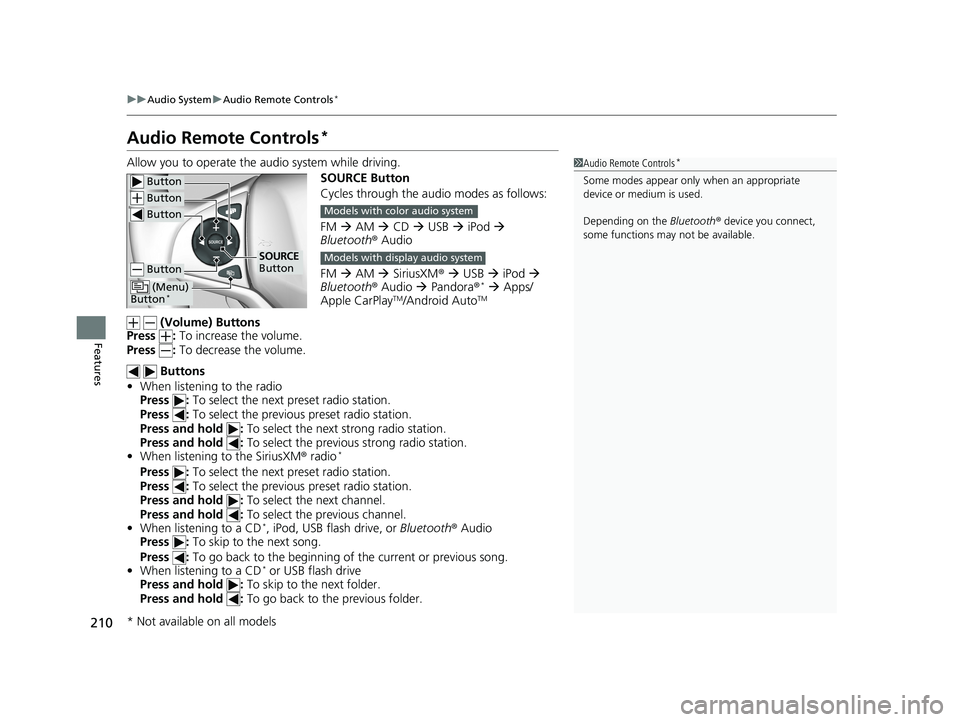
Allow you to operate the audio system while driving.
SOURCE Button
Cycles through the audio modes as follows:
FM AM CD USB iPod
Bluetooth ® Audio
FM AM SiriusXM ® USB iPod
Bluetooth ® Audio Pandora ®
* Apps/
Apple CarPlayTM/Android AutoTM
(Volume) Buttons
Press : To increase the volume.
Press : To decrease the volume.
Buttons
• When listening to the radio
Press : To select the next preset radio station.
Press : To select the previous preset radio station.
Press and hold : To select the next strong radio station.
Press and hold : To select the previous strong radio station.
• When listening to the SiriusXM® radio
*
Press : To select the next preset radio station.
Press : To select the previous preset radio station.
Press and hold : To select the next channel.
Press and hold : To select the previous channel.
• When listening to a CD
*, iPod, USB flash drive, or Bluetooth® Audio
Press : To skip to the next song.
Press : To go back to the beginning of the current or previous song.
• When listening to a CD
* or USB flash drive
Press and hold : To skip to the next folder.
Press and hold : To go back to the previous folder.
1Audio Remote Controls*
Some modes appear only when an appropriate
device or medium is used.
Depending on the Bluetooth® device you connect,
some functions may not be available. Button
Button
Button
Button
(Menu)
Button*
SOURCE
Button
Models with color audio system
Models with display audio system
* Not available on all models
20 FIT-31T5A6500.book 210 ページ 2019年9月26日 木曜日 午後4時41分
Page 213 of 599
211
uuAudio System uAudio Remote Controls*
Features
• When listening to a Bluetooth® Audio
Press and hold : To go to the group up.*1
Press and hold : To go to the group down.*1
•When listening to a Pandora ®*
Press : To skip to the next track.
Press and hold : To select the next station.
Press and hold : To select the previous station.
Steering Wheel (Menu) Button
• When listening to the radio
Press : To display the menu items. You can select Scan, Save Preset, or
Seek.
• When listening to the SiriusXM ® radio
*
Press : To display the menu items. You can select Scan, Save Preset,
Channel , or Category.
• When listening to a USB flash drive
Press : To display the menu items. You can select Scan, Repeat , or Random .
• When listening to an iPod
Press : To display the menu items. You can select Repeat or Shuffle .
• When listening to a Bluetooth® Audio
Press : To display the menu items. You can select Pause or Play .
• When listening to a Pandora ®
*
Press : To display the menu items. You can select Bookmark, or Play/Pause .
*1 : Available on specific phones only.
1Audio Remote Controls*
The button is available only when the audio
mode is FM, AM, CD*, USB, iPod, Pandora ®*, or
Bluetooth ® Audio.
Models with display audio system
* Not available on all models
20 FIT-31T5A6500.book 211 ページ 2019年9月26日 木曜日 午後4時41分
Page 221 of 599
219
uuAudio System Basic Operation uPlaying AM/FM Radio
Continued
Features
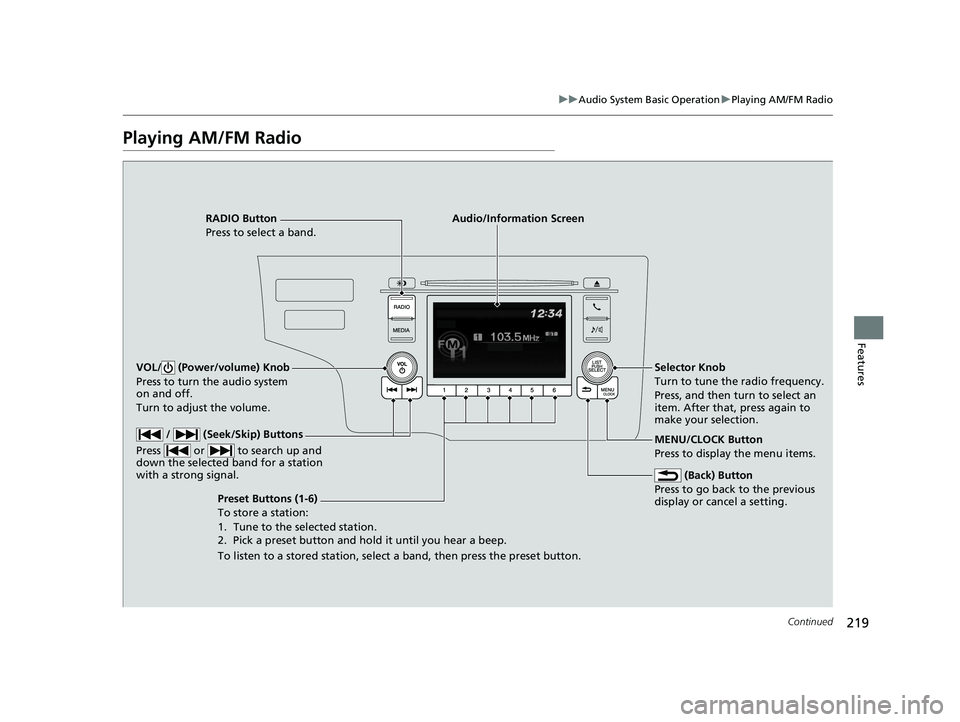
Playing AM/FM Radio
RADIO Button
Press to select a band.
(Back) Button
Press to go back to the previous
display or cancel a setting.
/ (Seek/Skip) Buttons
Press or to search up and
down the selected band for a station
with a strong signal.
VOL/ (Power/volume) Knob
Press to turn the audio system
on and off.
Turn to adjust the volume.
Preset Buttons (1-6)
To store a station:
1. Tune to the selected station.
2. Pick a preset button and hold it until you hear a beep.
To listen to a stored station, select a band, then press the preset button. Selector Knob
Turn to tune the radio frequency.
Press, and then turn to select an
item. After that, press again to
make your selection.
MENU/CLOCK Button
Press to display the menu items.
Audio/Information Screen
20 FIT-31T5A6500.book 219 ページ 2019年9月26日 木曜日 午後4時41分
Page 222 of 599
uuAudio System Basic Operation uPlaying AM/FM Radio
220
Features
Provides text data information related to your selected RDS capable FM station.
■To find an RDS station from Station List
1. Press while listening to an FM station.
2. Rotate to select the station, then press .
■Update List
Updates your available station list at any time.
1. Press while listening to an FM station.
2. Rotate to select Update List, then press .
■Radio text
Displays the radio text informat ion of the selected RDS station.
1. Press the MENU/CLOCK button.
2. Rotate to select Settings, then press .
3. Rotate to select RDS Settings, then press .
4. Rotate to select Radio Text, then press .
■Scan
Samples each of the strongest stations on the selected band for 10 seconds.
1. Press the MENU/CLOCK button.
2. Rotate to select Scan, then press .
To turn off scan, press .
■Radio Data System (RDS)1 Playing AM/FM Radio
The ST indicator appears on the display indicating
stereo FM broadcasts.
Stereo reproduction in AM is not available.
You can store 6 AM stations and 12 FM stations into
the preset memory.
Switching the Audio Mode
Press the SOURCE button on the steering wheel.
2 Audio Remote Controls
* P. 210
Models with audio remote controls
1Radio Data System (RDS)
When you select an RDS-capable FM station, the RDS
automatically turns on, and the frequency display
changes to the station name. However, when the
signals of that station become weak, the display
changes from the statio n name to the frequency.
* Not available on all models
20 FIT-31T5A6500.book 220 ページ 2019年9月26日 木曜日 午後4時41分