reset HONDA FIT 2020 (in English) Owner's Guide
[x] Cancel search | Manufacturer: HONDA, Model Year: 2020, Model line: FIT, Model: HONDA FIT 2020Pages: 599, PDF Size: 41.91 MB
Page 318 of 599
316
uuAudio Error Messages uAndroid/Apps
Features
Android/Apps
If an error occurs while using the audio system or apps, you may see the following
error messages. If you cannot clear the error message, contact a dealer.
*1 : ****part is variable characters, and w ill change depending upon where an error occurs.
Error Message*1Solution
Unfortunately, **** has
stopped.
Error has occurred within app, select OK on the screen to close the app. Un less it is a fatal error, it would
return to normal if you startup the app.
If it does not return to normal even after starting up the app, press and hold the (power) button to
perform the forced reset. If it still does not get back to normal, you need Factory Data Reset.
2Defaulting All the Settings P. 342
**** is not responding.
Would you like to close it?
App is in a busy state.
Select Wait if you can wait for a response from app a little longer. If it does not respond even if you keep
waiting, select OK to close the app and start it up. When it does not return to normal, press and hold
the (power) button to perform the forced reset. You also need Factory Data Reset.
2Defaulting All the Settings P. 342
Models with display audio system
20 FIT-31T5A6500.book 316 ページ 2019年9月26日 木曜日 午後4時41分
Page 329 of 599
327
uuCustomized Features u
Features
*1 : Default Setting
Setup
GroupCustomizable FeaturesDescriptionSelectable Settings
Phone
Setup
Bluetooth
Setup
Add New DevicePairs a new phone to HFL.
2 Phone Setup P. 349—
Connect a Phone
Pairs a new phone or connects a paired phone
to HFL.
2Phone Setup P. 349
—
Connect an Audio
DeviceConnects a Bluetooth® Audio device to HFL.—
Disconnect All DevicesDisconnects a paired phone from HFL.—
Delete DeviceDeletes a paired phone.—
Pass-KeyInputs and changes a code for a paired phone.—
Speed DialEdits, adds or deletes a speed dial entry.
2Speed Dial P. 358—
RingtoneSelects the ring tone.Fixed*1/Mobile Phone
Caller ID InfoPrioritizes the caller’s name or phone number
as the caller ID.Name Priority*1/Number
Priority
System ClearCancels/Resets all customized items in the
Phone Setup group as default.—
20 FIT-31T5A6500.book 327 ページ 2019年9月26日 木曜日 午後4時41分
Page 331 of 599
329
uuCustomized Features u
Continued
Features
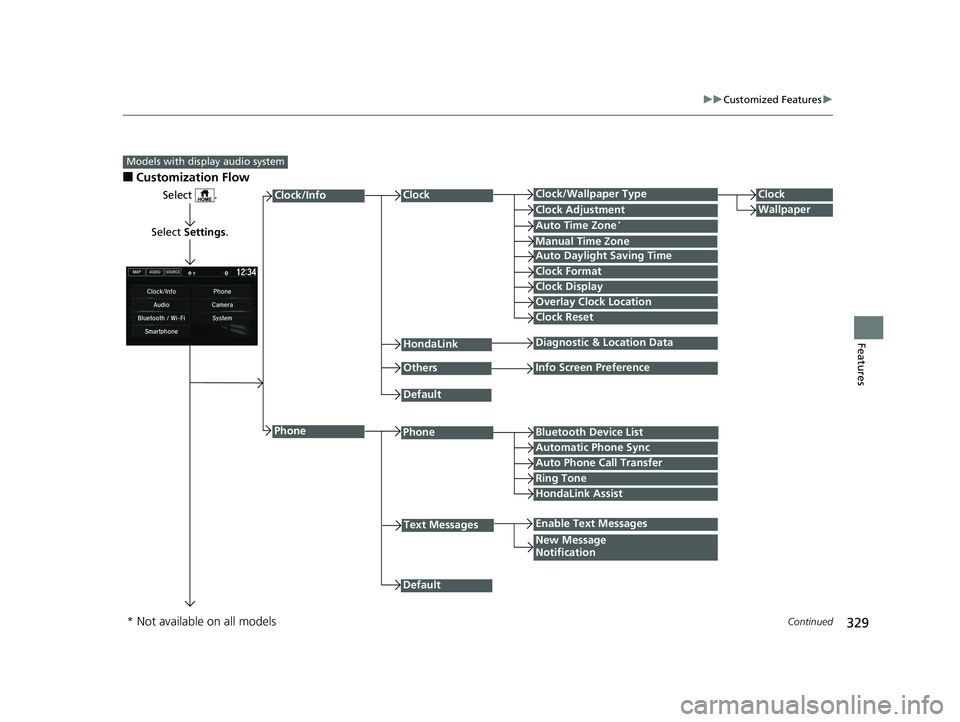
■Customization Flow
Models with display audio system
Select .
Select Settings .
PhoneBluetooth Device List
Manual Time Zone
HondaLink
Auto Time Zone*
Default
New Message
Notification
Phone
Diagnostic & Location Data
Others
Auto Daylight Saving Time
Info Screen Preference
Default
Enable Text Messages
Clock Format
ClockClock/Wallpaper TypeClock
WallpaperClock Adjustment
Clock Display
Overlay Clock Location
Clock Reset
Auto Phone Call Transfer
Text Messages
Automatic Phone Sync
HondaLink Assist
Ring Tone
Clock/Info
* Not available on all models
20 FIT-31T5A6500.book 329 ページ 2019年9月26日 木曜日 午後4時41分
Page 332 of 599
330
uuCustomized Features u
Features
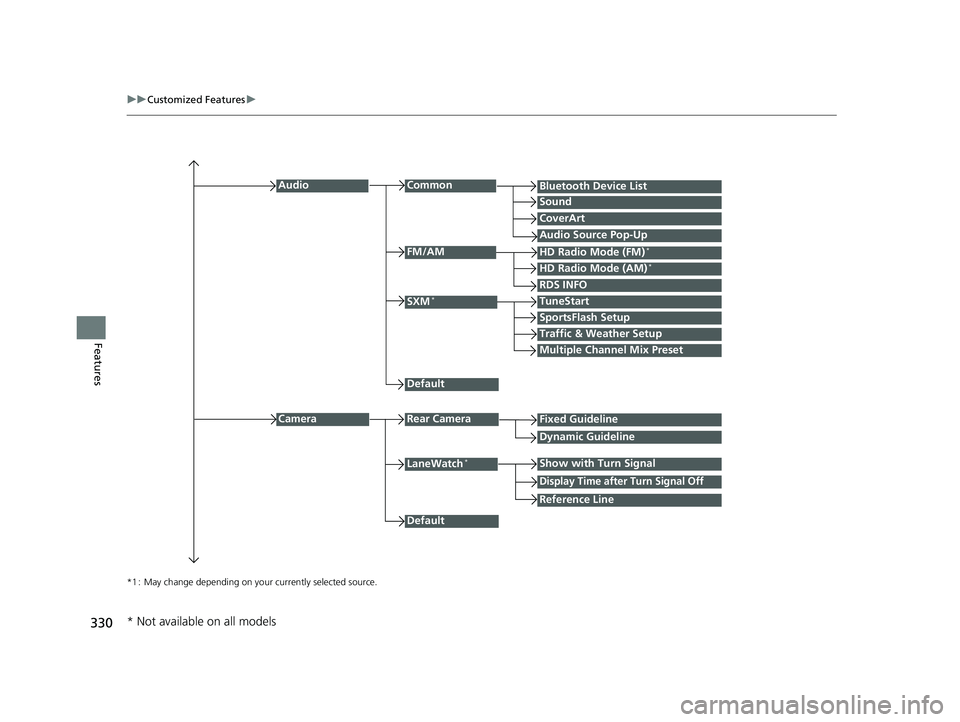
*1 : May change depending on your currently selected source.
Common
Multiple Channel Mix Preset
Audio
Sound
Audio Source Pop-Up
SXM*
HD Radio Mode (AM)*HD Radio Mode (FM)*
TuneStart
Traffic & Weather Setup
CameraRear Camera
LaneWatch*
Default
CoverArt
RDS INFO
Bluetooth Device List
FM/AM
Fixed Guideline
Dynamic Guideline
Show with Turn Signal
Default
Display Time after Turn Signal Off
Reference Line
SportsFlash Setup
* Not available on all models
20 FIT-31T5A6500.book 330 ページ 2019年9月26日 木曜日 午後4時41分
Page 334 of 599
332
uuCustomized Features u
Features
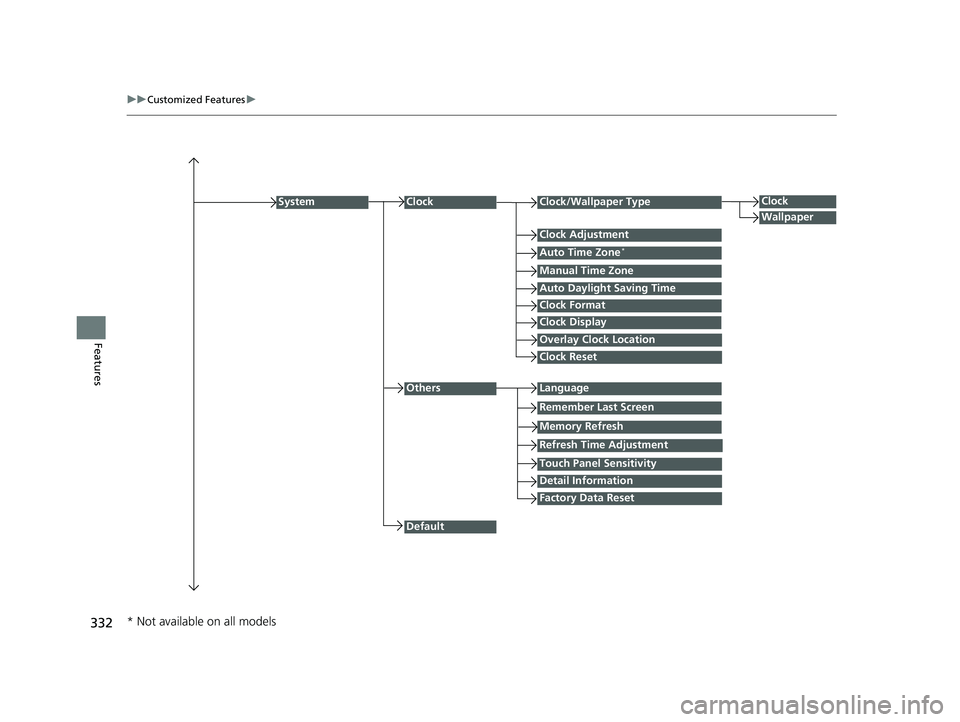
Auto Daylight Saving Time
Auto Time Zone*
ClockClock/Wallpaper Type
Clock Adjustment
Manual Time Zone
Clock Format
System
Default
OthersLanguage
Remember Last Screen
Memory Refresh
Clock Display
Clock Reset
Overlay Clock Location
Detail Information
Touch Panel Sensitivity
Refresh Time Adjustment
Clock
Wallpaper
Factory Data Reset
* Not available on all models
20 FIT-31T5A6500.book 332 ページ 2019年9月26日 木曜日 午後4時41分
Page 336 of 599
334
uuCustomized Features u
Features
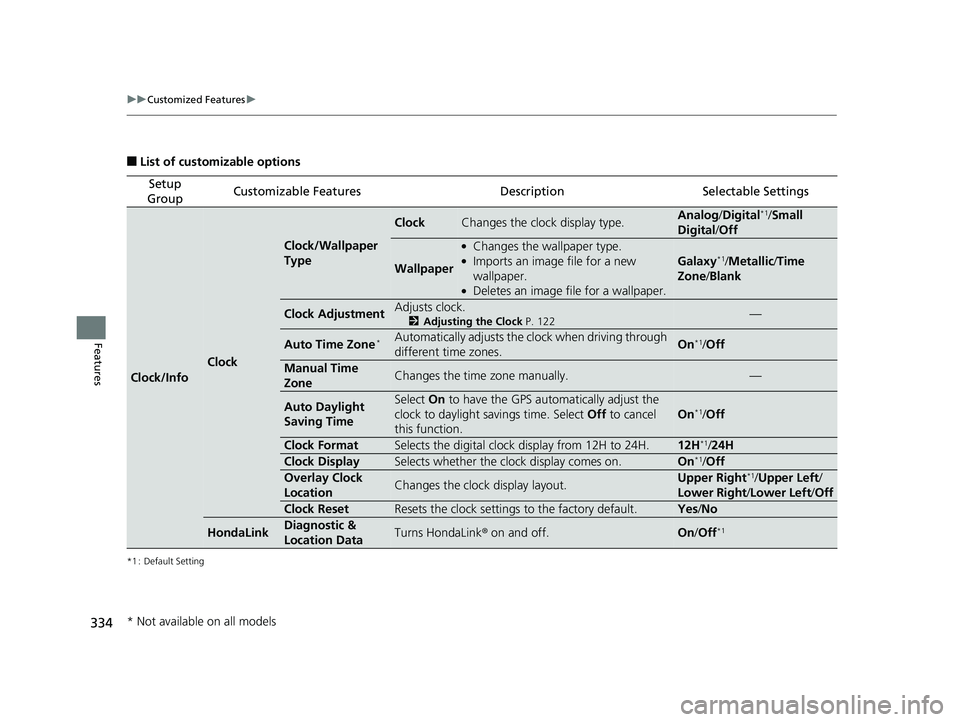
■List of customizable options
*1 : Default Setting
Setup
GroupCustomizable FeaturesDescriptionSelectable Settings
Clock/Info
Clock
Clock/Wallpaper
Type
ClockChanges the clock display type.Analog /Digital*1/Small
Digital /Off
Wallpaper
●Changes the wallpaper type.●Imports an image file for a new
wallpaper.
●Deletes an image file for a wallpaper.
Galaxy*1/Metallic /Time
Zone /Blank
Clock AdjustmentAdjusts clock.
2 Adjusting the Clock P. 122—
Auto Time Zone*Automatically adjusts the clock when driving through
different time zones.On*1/Off
Manual Time
ZoneChanges the time zone manually.—
Auto Daylight
Saving TimeSelect On to have the GPS automatically adjust the
clock to daylight savings time. Select Off to cancel
this function.
On*1/ Off
Clock FormatSelects the digital clock display from 12H to 24H.12H*1/ 24H
Clock DisplaySelects whether the clock display comes on.On*1/Off
Overlay Clock
LocationChanges the clock display layout.Upper Right*1/ Upper Left /
Lower Right/ Lower Left/Off
Clock ResetResets the clock settings to the factory default.Yes /No
HondaLinkDiagnostic &
Location DataTurns HondaLink ® on and off.On/Off*1
* Not available on all models
20 FIT-31T5A6500.book 334 ページ 2019年9月26日 木曜日 午後4時41分
Page 337 of 599
335
uuCustomized Features u
Continued
Features
*1 : Default Setting
Setup
GroupCustomizable FeaturesDescriptionSelectable Settings
Clock/Info
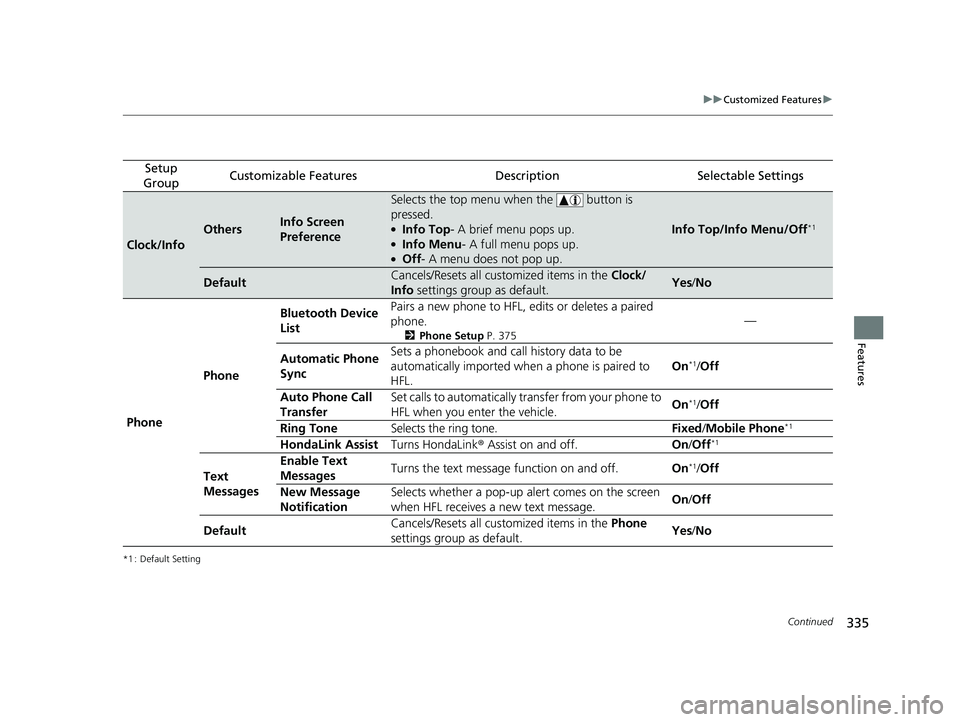
OthersInfo Screen
Preference
Selects the top menu when the button is
pressed.
●Info Top- A brief menu pops up.●Info Menu - A full menu pops up.●Off- A menu does not pop up.
Info Top/Info Menu/Off*1
DefaultCancels/Resets all customized items in the Clock/
Info settings group as default.Yes/No
Phone Phone Bluetooth Device
List
Pairs a new phone to HFL, edits or deletes a paired
phone.
2
Phone Setup P. 375
—
Automatic Phone
Sync Sets a phonebook and call history data to be
automatically imported when
a phone is paired to
HFL. On
*1/
Off
Auto Phone Call
Transfer Set calls to automatically transfer from your phone to
HFL when you enter the vehicle.
On
*1/
Off
Ring Tone Selects the ring tone. Fixed/Mobile Phone
*1
HondaLink Assist Turns HondaLink® Assist on and off. On/Off*1
Text
Messages Enable Text
Messages
Turns the text message function on and off.
On*1/Off
New Message
Notification Selects whether a pop-up alert comes on the screen
when HFL receives a new text message.
On
/Off
Default Cancels/Resets all customized items in the
Phone
settings group as default. Yes
/No
20 FIT-31T5A6500.book 335 ページ 2019年9月26日 木曜日 午後4時41分
Page 339 of 599
337
uuCustomized Features u
Continued
Features
*1 : Default Setting
Setup
GroupCustomizable FeaturesDescriptionSelectable Settings
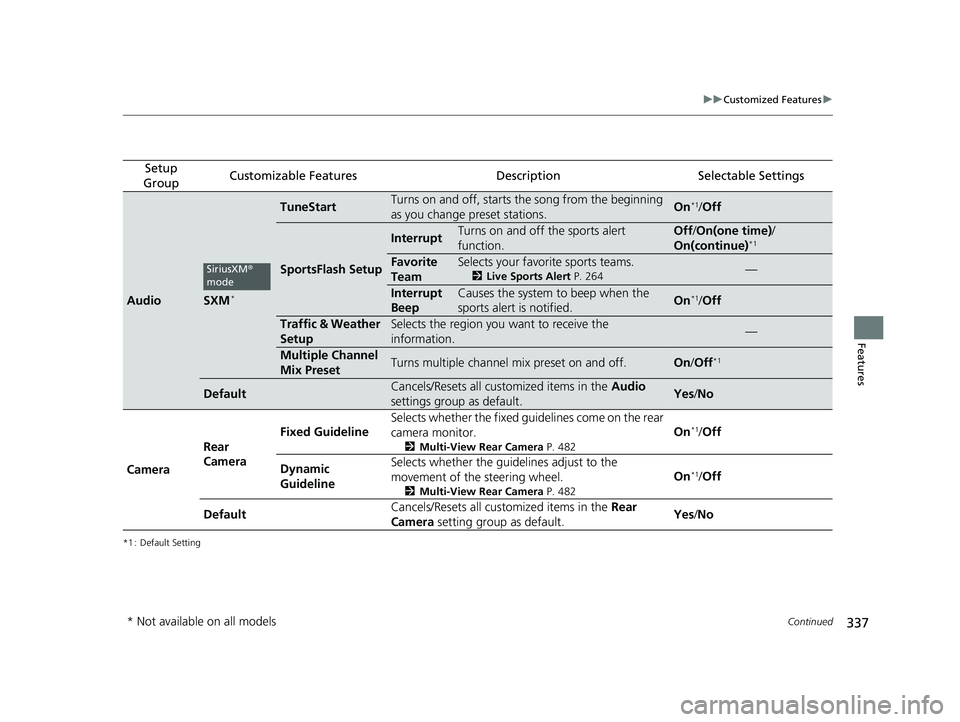
AudioSXM*
TuneStartTurns on and off, starts the song from the beginning
as you change preset stations.On*1/ Off
SportsFlash Setup
InterruptTurns on and off the sports alert
function.Off /On(one time) /
On(continue)*1
Favorite
TeamSelects your favorite sports teams.
2 Live Sports Alert P. 264—
Interrupt
BeepCauses the system to beep when the
sports alert is notified.On*1/ Off
Traffic & Weather
SetupSelects the region you want to receive the
information.—
Multiple Channel
Mix PresetTurns multiple channel mix preset on and off.On /Off*1
DefaultCancels/Resets all customized items in the Audio
settings group as default.Yes /No
Camera Rear
Camera Fixed Guideline
Selects whether the fixed guid
elines come on the rear
camera monitor.
2 Multi-View Rear Camera P. 482
On*1/Off
Dynamic
Guideline Selects whether the guid
elines adjust to the
movement of the steering wheel.
2 Multi-View Rear Camera P. 482
On*1/Off
Default Cancels/Resets all customized items in the
Rear
Camera setting group as default. Yes
/No
SiriusXM ®
mode
* Not available on all models
20 FIT-31T5A6500.book 337 ページ 2019年9月26日 木曜日 午後4時41分
Page 340 of 599
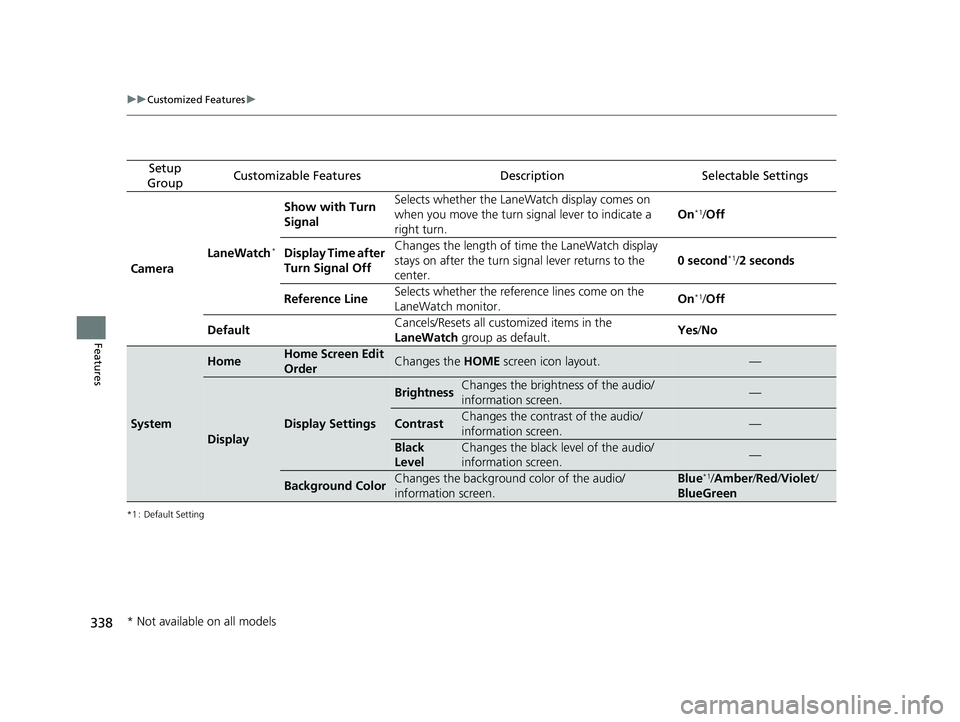
338
uuCustomized Features u
Features
*1 : Default Setting
Setup
GroupCustomizable FeaturesDescriptionSelectable Settings
Camera LaneWatch
*
Show with Turn
Signal Selects whether the LaneWatch display comes on
when you move the turn signal lever to indicate a
right turn.
On*1/
Off
Display Time after
Turn Signal Off Changes the length of ti
me the LaneWatch display
stays on after the turn sign al lever returns to the
center. 0 second
*1/
2 seconds
Reference Line Selects whether the reference lines come on the
LaneWatch monitor. On
*1/
Off
Default Cancels/Resets all customized items in the
LaneWatch
group as default. Yes
/No
System
HomeHome Screen Edit
OrderChanges the HOME screen icon layout.—
Display
Display Settings
BrightnessChanges the brightness of the audio/
information screen.—
ContrastChanges the contrast of the audio/
information screen.—
Black
LevelChanges the black level of the audio/
information screen.—
Background ColorChanges the background color of the audio/
information screen.Blue*1/Amber /Red /Violet /
BlueGreen
* Not available on all models
20 FIT-31T5A6500.book 338 ページ 2019年9月26日 木曜日 午後4時41分
Page 342 of 599
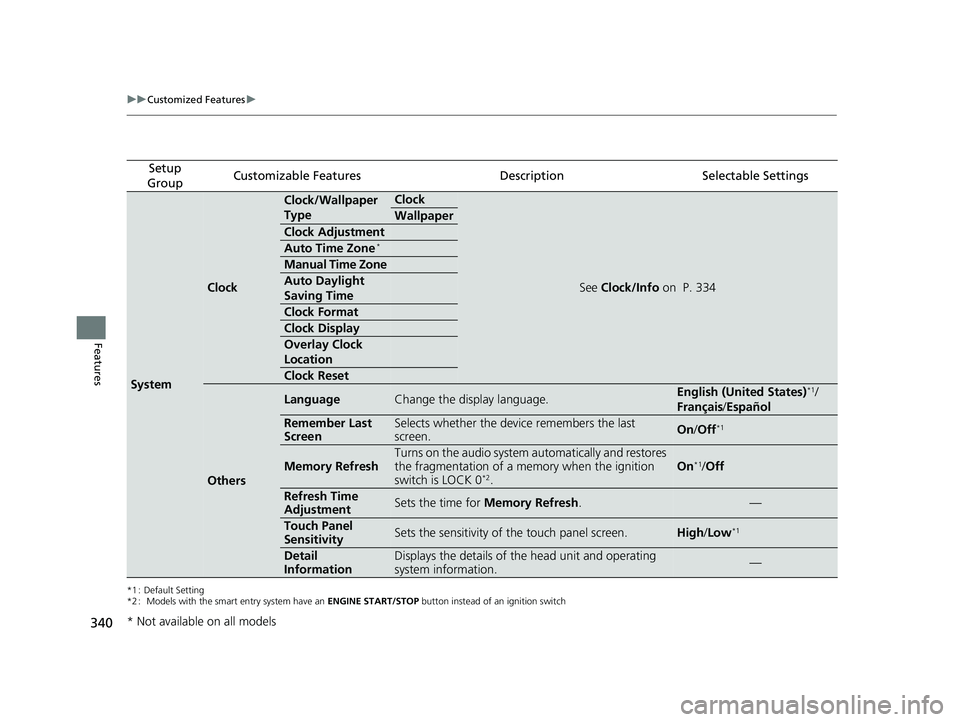
340
uuCustomized Features u
Features
*1 : Default Setting
*2 : Models with the smart entry system have an ENGINE START/STOP button instead of an ignition switch
Setup
GroupCustomizable FeaturesDescriptionSelectable Settings
System
Clock
Clock/Wallpaper
TypeClock
See Clock/Info on P. 334
Wallpaper
Clock Adjustment
Auto Time Zone*
Manual Time Zone
Auto Daylight
Saving Time
Clock Format
Clock Display
Overlay Clock
Location
Clock Reset
Others
LanguageChange the display language.English (United States)*1/
Français /Español
Remember Last
ScreenSelects whether the device remembers the last
screen.On /Off*1
Memory RefreshTurns on the audio system automatically and restores
the fragmentation of a memory when the ignition
switch is LOCK 0
*2.
On*1/ Off
Refresh Time
AdjustmentSets the time for Memory Refresh .—
Touch Panel
SensitivitySets the sensitivity of the touch panel screen.High/Low*1
Detail
InformationDisplays the details of th e head unit and operating
system information.—
* Not available on all models
20 FIT-31T5A6500.book 340 ページ 2019年9月26日 木曜日 午後4時41分