wipers HONDA INSIGHT 2019 Owner's Manual (in English)
[x] Cancel search | Manufacturer: HONDA, Model Year: 2019, Model line: INSIGHT, Model: HONDA INSIGHT 2019Pages: 675, PDF Size: 36.97 MB
Page 7 of 675
5
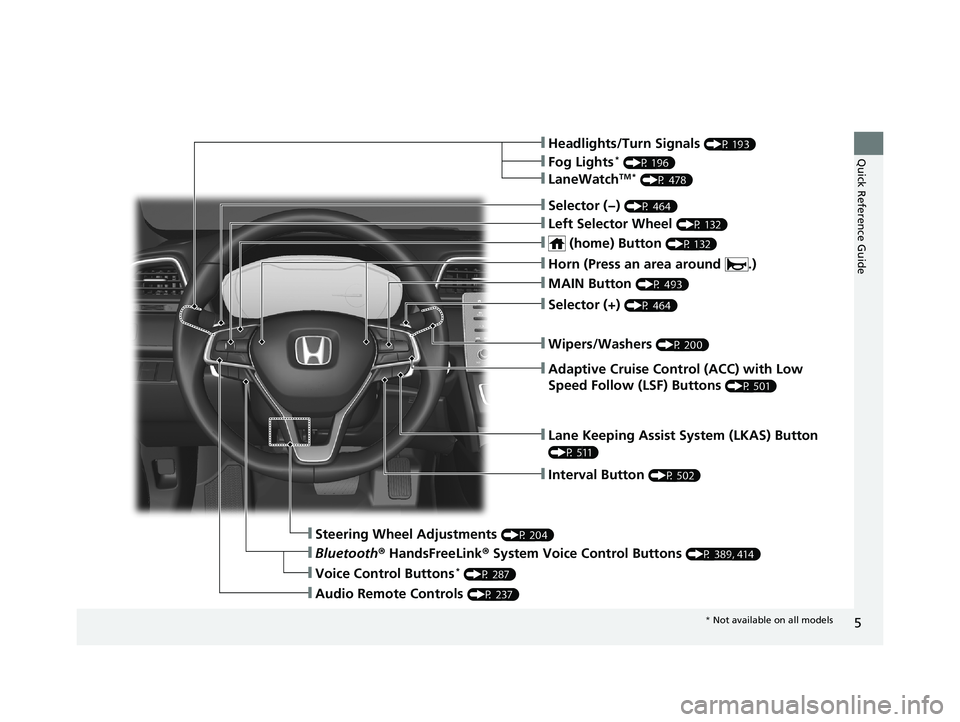
Quick Reference Guide❙Headlights/Turn Signals (P 193)
❙Fog Lights* (P 196)
❙LaneWatchTM * (P 478)
❙Lane Keeping Assist System (LKAS) Button
(P 511)
❙Interval Button (P 502)
❙Steering Wheel Adjustments (P 204)
❙Bluetooth® HandsFreeLink ® System Voice Control Buttons (P 389, 414)
❙Audio Remote Controls (P 237)
❙Voice Control Buttons* (P 287)
❙Selector (−) (P 464)
❙Left Selector Wheel (P 132)
❙ (home) Button (P 132)
❙MAIN Button (P 493)
❙Adaptive Cruise Control (ACC) with Low
Speed Follow (LSF) Buttons
(P 501)
❙Wipers/Washers (P 200)
❙Selector (+) (P 464)
❙Horn (Press an area around .)
* Not available on all models
19 INSIGHT HMIN-31TXM6000.book 5 ページ 2018年4月20日 金曜日 午後4時22分
Page 10 of 675
Visual Index
8
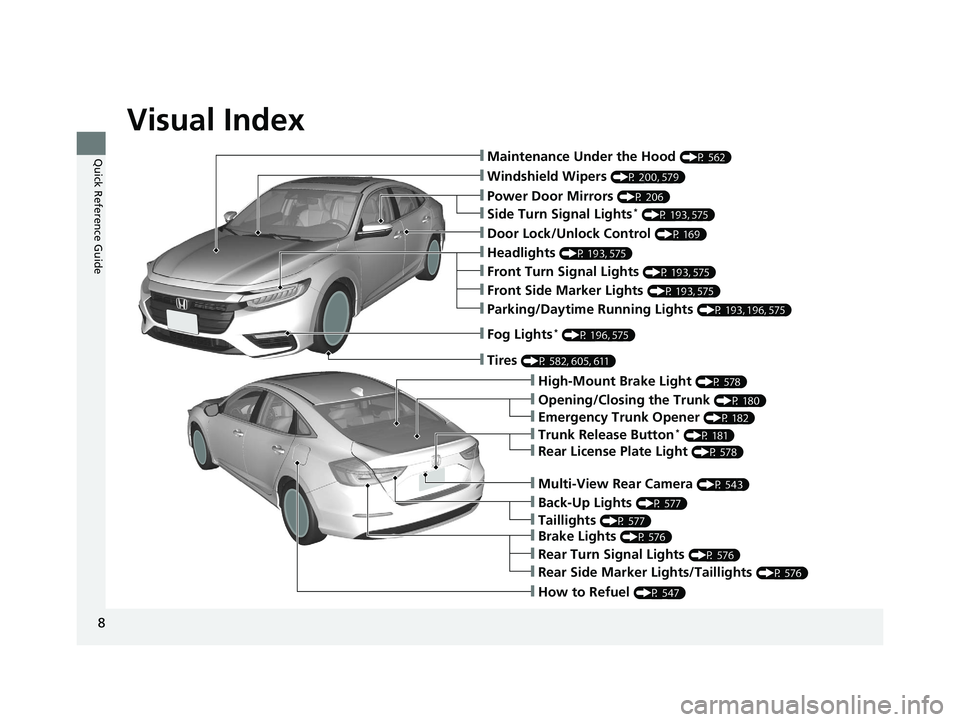
Quick Reference Guide❙Maintenance Under the Hood (P 562)
❙Windshield Wipers (P 200, 579)
❙Door Lock/Unlock Control (P 169)
❙Power Door Mirrors (P 206)
❙Headlights (P 193, 575)
❙High-Mount Brake Light (P 578)
❙Emergency Trunk Opener (P 182)
❙Opening/Closing the Trunk (P 180)
❙Parking/Daytime Running Lights (P 193, 196, 575)
❙Fog Lights* (P 196, 575)
❙Trunk Release Button* (P 181)
❙Brake Lights (P 576)
❙Rear Side Marker Lights/Taillights (P 576)
❙Rear Turn Signal Lights (P 576)
❙Back-Up Lights (P 577)
❙How to Refuel (P 547)
❙Tires (P 582, 605, 611)
❙Taillights (P 577)
❙Multi-View Rear Camera (P 543)
❙Rear License Plate Light (P 578)
❙Front Turn Signal Lights (P 193, 575)
❙Front Side Marker Lights (P 193, 575)
❙Side Turn Signal Lights* (P 193, 575)
19 INSIGHT HMIN-31TXM6000.book 8 ページ 2018年4月20日 金曜日 午後4時22分
Page 23 of 675
21
Quick Reference Guide
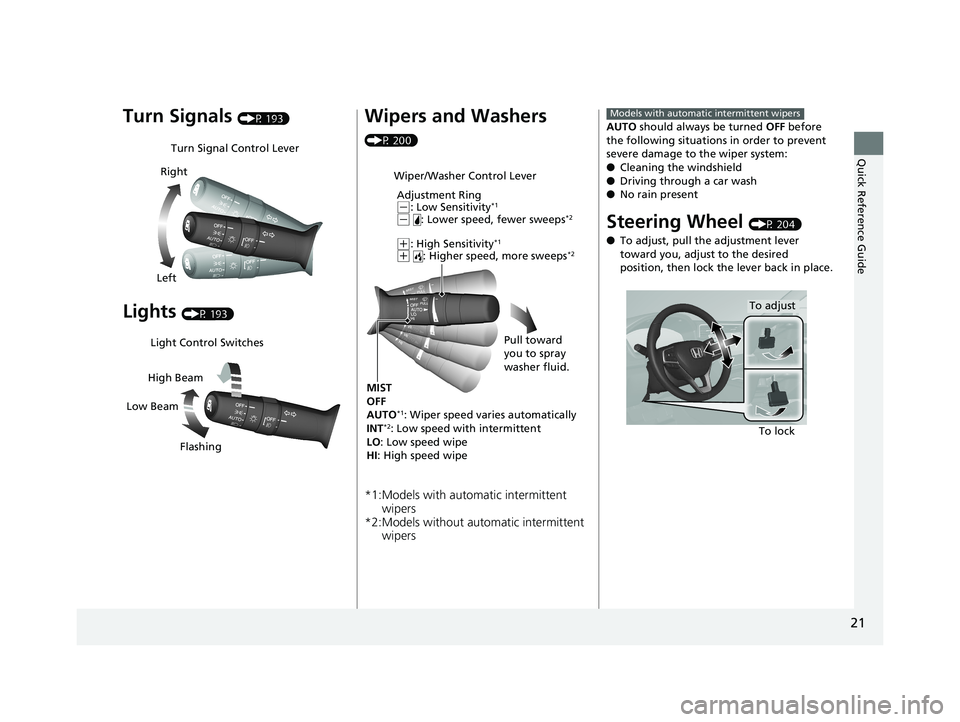
Turn Signals (P 193)
Lights (P 193)
Turn Signal Control Lever
Right
Left
Light Control Switches
Low Beam High Beam
Flashing
Wipers and Washers
(P 200)
*1:Models with automatic intermittent wipers
*2:Models without au tomatic intermittent
wipers
Wiper/Washer Control Lever
Adjustment Ring
(-: Low Sensitivity*1
(- : Lower speed, fewer sweeps*2
(+: High Sensitivity*1
(+ : Higher speed, more sweeps*2
MIST
OFF
AUTO
*1: Wiper speed varies automatically
INT*2: Low speed with intermittent
LO : Low speed wipe
HI : High speed wipe Pull toward
you to spray
washer fluid.
AUTO
should always be turned OFF before
the following situations in order to prevent
severe damage to the wiper system:
● Cleaning the windshield
● Driving through a car wash
● No rain present
Steering Wheel (P 204)
● To adjust, pull the adjustment lever
toward you, adjust to the desired
position, then lock the lever back in place.
Models with automatic intermittent wipers
To lock
To adjust
19 INSIGHT HMIN-31TXM6000.book 21 ページ 2018年4月20日 金曜日 午後4時22分
Page 160 of 675
158
uuGauges and Driver Information Interface uDriver Information Interface
Instrument Panel
*1: Default SettingSetup Group Customizable Features
Description Selectable Settings
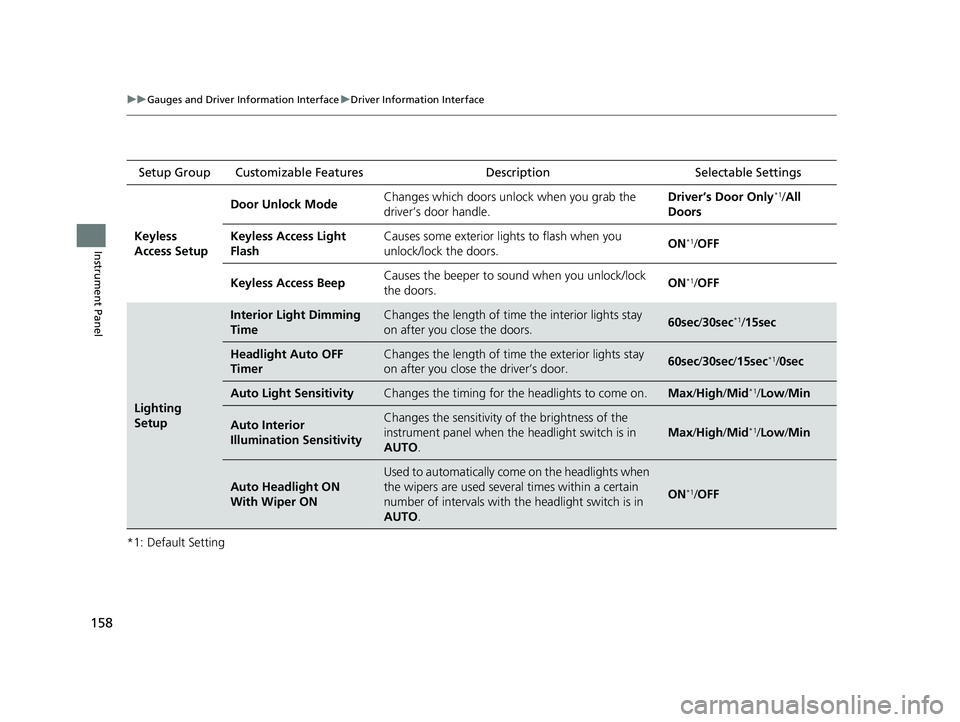
Keyless
Access Setup Door Unlock Mode
Changes which doors unlock when you grab the
driver’s door handle. Driver’s Door Only
*1/
All
Doors
Keyless Access Light
Flash Causes some exterior lights to flash when you
unlock/lock the doors.
ON
*1/
OFF
Keyless Access Beep Causes the beeper to sound when you unlock/lock
the doors.
ON
*1/
OFF
Lighting
Setup
Interior Light Dimming
TimeChanges the length of time the interior lights stay
on after you close the doors.60sec /30sec*1/ 15sec
Headlight Auto OFF
TimerChanges the length of time the exterior lights stay
on after you close the driver’s door.60sec /30sec /15sec*1/0sec
Auto Light SensitivityChanges the timing for the headlights to come on.Max/High /Mid*1/Low /Min
Auto Interior
Illumination SensitivityChanges the sensitivity of the brightness of the
instrument panel when the headlight switch is in
AUTO .
Max/High /Mid*1/Low /Min
Auto Headlight ON
With Wiper ON
Used to automatically come on the headlights when
the wipers are used several times within a certain
number of intervals with the headlight switch is in
AUTO .
ON*1/OFF
19 INSIGHT HMIN-31TXM6000.book 158 ページ 2018年4月20日 金曜日 午後4時22分
Page 165 of 675
163
Controls
This chapter explains how to operate the various controls necessary for driving.
Clock.................................................. 164
Locking and Unlocking the Doors Key Types and Functions .................. 166
Low Remote Signal Strength ............ 168
Locking/Unlocking the Doors from the Outside .......................................... 169
Locking/Unlocking the Doors from the Inside ............................................. 176
Childproof Door Locks ..................... 178
Auto Door Locking/Unlocking .......... 179
Opening and Closing the Trunk ....... 180
Security System
Immobilizer System .......................... 183 Security System Alarm...................... 184
Opening and Closing the Windows ... 186
Moonroof*................................................ 189Operating the Switches Around the
Steering Wheel POWER Button................................. 190
Turn Signals ..................................... 193
Light Switches.................................. 193
Fog Lights
*...................................... 196
Daytime Running Lights ................... 196
Auto High-Beam .............................. 197
Wipers and Washers ........................ 200
Rear Defogger/Heated Door Mirror Button ........................................ 202
Brightness Control ........................... 203
Adjusting the Steering Wheel .......... 204
Adjusting the Mirrors Interior Rearview Mirror ................... 205
Power Door Mirrors ......................... 206
Adjusting the Seats .......................... 207
Interior Lights/Interior Convenience
Items ................................................ 215
Climate Control System Using Automatic Climate Control .... 225
Automatic Climate Control Sensors ... 231
* Not available on all models
19 INSIGHT HMIN-31TXM6000.book 163 ページ 2018年4月20日 金曜日 午後4時22分
Page 196 of 675
uuOperating the Switches Around the Steering Wheel uLight Switches
194
Controls
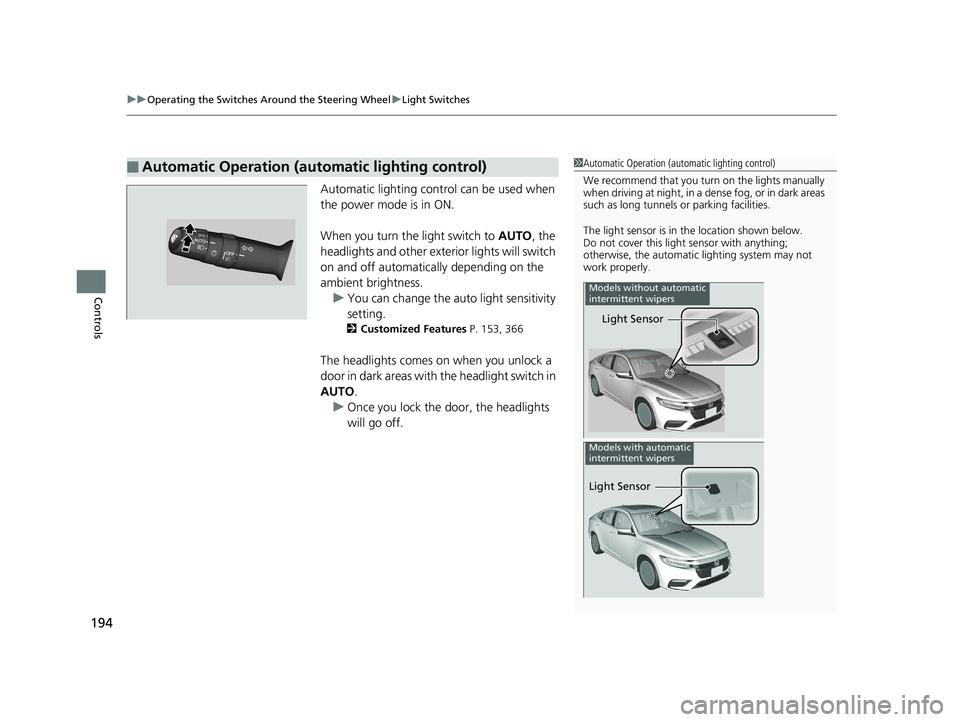
Automatic lighting control can be used when
the power mode is in ON.
When you turn the light switch to AUTO, the
headlights and other exterior lights will switch
on and off automatically depending on the
ambient brightness. u You can change the au to light sensitivity
setting.
2 Customized Features P. 153, 366
The headlights comes on when you unlock a
door in dark areas with the headlight switch in
AUTO.
u Once you lock the door, the headlights
will go off.
■Automatic Operation (automatic lighting control)1Automatic Operation (aut omatic lighting control)
We recommend that you tu rn on the lights manually
when driving at night, in a dense fog, or in dark areas
such as long tunnels or parking facilities.
The light sensor is in the location shown below.
Do not cover this light sensor with anything;
otherwise, the automatic lighting system may not
work properly.
Light Sensor
Models without automatic
intermittent wipers
Light Sensor
Models with automatic
intermittent wipers
19 INSIGHT HMIN-31TXM6000.book 194 ページ 2018年4月20日 金曜日 午後4時22分
Page 197 of 675
195
uuOperating the Switches Around the Steering Wheel uLight Switches
Controls
The headlights automatically come on when the wipers are used several times within
a certain number of intervals with the headlight switch in AUTO.
The headlights automatically go off a few mi nutes later if the wipers are stopped.
The headlights, all other exterior lights, and the instrument panel lights turn off 15
seconds after you set the po wer mode to VEHICLE OFF (LOCK), take the remote with
you, and close the driver’s door.
If you set the power mode to VEHICLE OFF (LOCK) with the headlight switch on, but
do not open the door, the lights turn off after 10 minutes (3 minutes, if the switch
is in the AUTO position).
The lights turn on again when you unlock or open the driver’s door. If you unlock
the door, but do not open it within 15 seconds, the lights go off. If you open the
driver’s door, you will hear a lights on reminder chime.
■Headlight Integration with Wipers
■Automatic Lighting Off Feature
1 Automatic Operation (aut omatic lighting control)
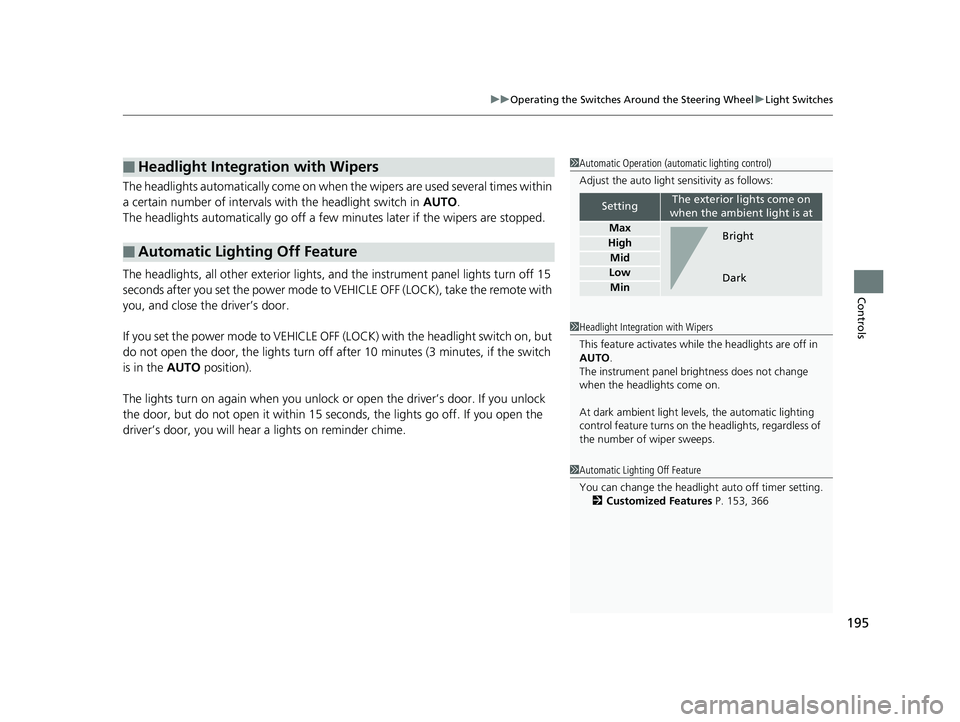
Adjust the auto light sensitivity as follows:
SettingThe exterior lights come on
when the ambient light is at
Max
High
Mid
Low
Min
Bright
Dark
1 Headlight Integration with Wipers
This feature activates while the headlights are off in
AUTO .
The instrument panel br ightness does not change
when the headlights come on.
At dark ambient light leve ls, the automatic lighting
control feature turns on the headlights, regardless of
the number of wiper sweeps.
1 Automatic Lighting Off Feature
You can change the headlight auto off timer setting.
2 Customized Features P. 153, 366
19 INSIGHT HMIN-31TXM6000.book 195 ページ 2018年4月20日 金曜日 午後4時22分
Page 200 of 675

uuOperating the Switches Around the Steering Wheel uAuto High-Beam
198
Controls
To activate the system, turn the headlight
switch to AUTO and then set the headlights
to low beam. The auto high-beam indicator
will come on.
2 Light Switches P. 193
The high beams remain on unless:
•You have been driving below 15 mph (24 km/h) for an extended amount of time.
• The speed of the vehicle drops below 6 mph (10 km/h).
• The windshield wipers have been running at a high speed for more than a few
seconds.
• You enter a well lit location.
The high beams come back on once the condition that caused them to turn off no
longer exists.
If needed, you can temporar ily turn the system off manually. Turn on the high
beams by pushing the lever forward until yo u hear a click, or flash the high beams
once by pulling the lever toward you while driving. To turn the system back on,
repeat one of the procedures.
■Operating the System1 Operating the System
For the auto high-beam to work properly:
•Do not place an object that reflects light on the
dashboard.
•Keep the windshield around the camera clean.
When cleaning the windshield, be careful not to
apply the windshield cleans er to the camera lens.
•Do not attach an object, sticker or film to the area
around the camera.
•Do not touch the camera lens.
If the camera receives a st rong impact, or repairing of
the area near the camera is required, consult a dealer.
If the Some Driver Assist Systems Cannot
Operate: Camera Temperature Too High message
appears:
•Use the climate control system to cool down the
interior and, if necessary, also use defroster mode
with the airflow directed toward the camera.
•Start driving the vehicle to lower the windshield
temperature, which cool s down the area around
the camera.
If the Some Driver Assist Systems Cannot
Operate: Clean Front Windshield message
appears:
•Park your vehicle in a sa fe place, and clean the
windshield. If the message does not disappear after
you have cleaned the windshield and driven for a
while, have your vehicle checked by a dealer.
Headlight Switch
19 INSIGHT HMIN-31TXM6000.book 198 ページ 2018年4月20日 金曜日 午後4時22分
Page 202 of 675
200
uuOperating the Switches Around the Steering Wheel uWipers and Washers
Controls
Wipers and Washers
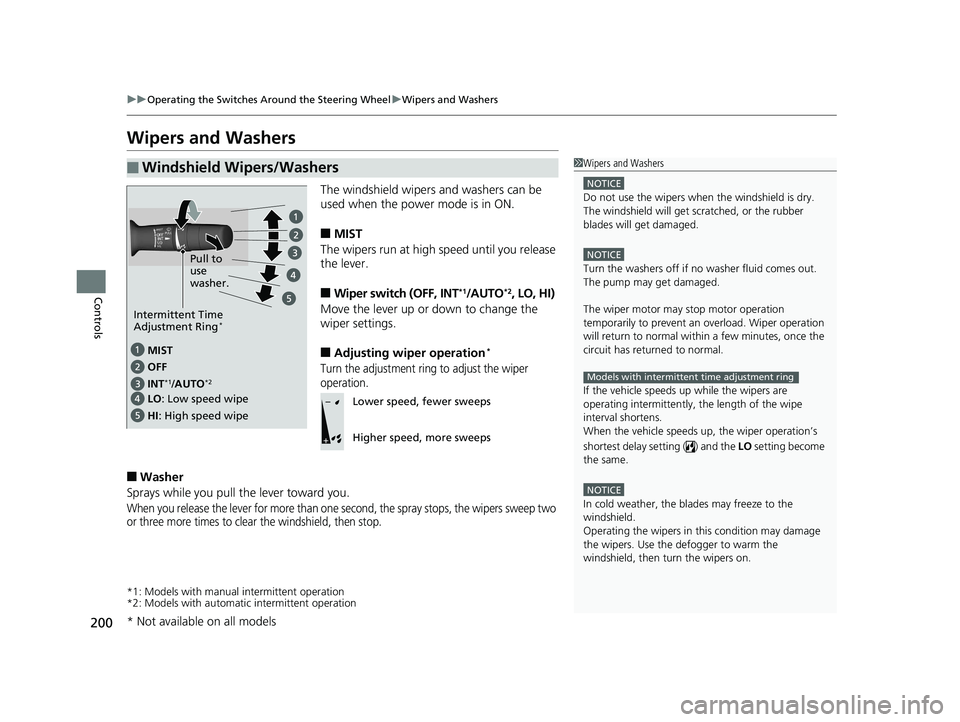
The windshield wipers and washers can be
used when the power mode is in ON.
■MIST
The wipers run at high speed until you release
the lever.
■Wiper switch (OFF, INT*1/AUTO*2, LO, HI)
Move the lever up or down to change the
wiper settings.
■Adjusting wiper operation*
Turn the adjustment ring to adjust the wiper
operation.
■Washer
Sprays while you pull the lever toward you.
When you release the lever for more than one second, the spray stops, the wipers sweep two
or three more times to clear the windshield, then stop.
*1: Models with manual intermittent operation
*2: Models with automati c intermittent operation
■Windshield Wipers/Washers1Wipers and Washers
NOTICE
Do not use the wipers when the windshield is dry.
The windshield will get sc ratched, or the rubber
blades will get damaged.
NOTICE
Turn the washers off if no washer fluid comes out.
The pump may get damaged.
The wiper motor may stop motor operation
temporarily to prevent an overload. Wiper operation
will return to normal within a few minutes, once the
circuit has returned to normal.
If the vehicle speeds up while the wipers are
operating intermittently, the length of the wipe
interval shortens.
When the vehicle speeds up, the wiper operation’s
shortest delay se tting ( ) and the LO setting become
the same.
NOTICE
In cold weather, the blades may freeze to the
windshield.
Operating the wipers in th is condition may damage
the wipers. Use the defogger to warm the
windshield, then turn the wipers on.
Models with intermittent time adjustment ring
MIST
INT
*1/AUTO*2
OFF
LO: Low speed wipe
HI : High speed wipe Pull to
use
washer.
Intermittent Time
Adjustment Ring*
Lower speed, fewer sweeps
Higher speed, more sweeps
* Not available on all models
19 INSIGHT HMIN-31TXM6000.book 200 ページ 2018年4月20日 金曜日 午後4時22分
Page 203 of 675
201
uuOperating the Switches Around the Steering Wheel uWipers and Washers
Controls
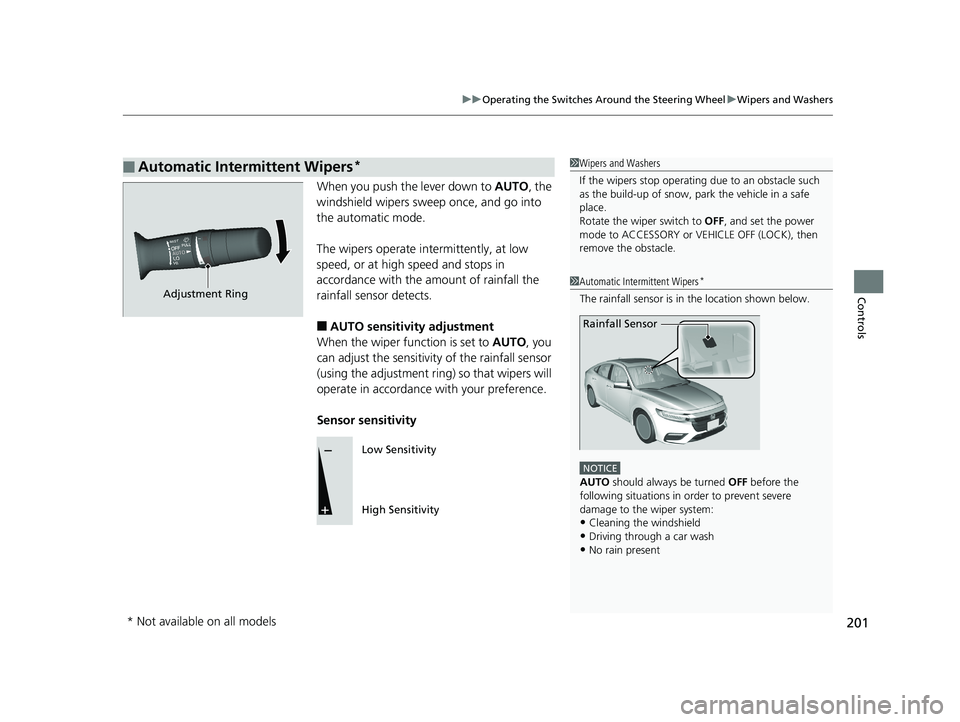
When you push the lever down to AUTO, the
windshield wipers sweep once, and go into
the automatic mode.
The wipers operate intermittently, at low
speed, or at high speed and stops in
accordance with the amount of rainfall the
rainfall sensor detects.
■AUTO sensitivity adjustment
When the wiper function is set to AUTO, you
can adjust the sensitivity of the rainfall sensor
(using the adjustment ring) so that wipers will
operate in accordance with your preference.
Sensor sensitivity
■Automatic Intermittent Wipers*1 Wipers and Washers
If the wipers st op operating due to an obstacle such
as the build-up of snow, pa rk the vehicle in a safe
place.
Rotate the wiper switch to OFF, and set the power
mode to ACCESSORY or VEHICLE OFF (LOCK), then
remove the obstacle.
1 Automatic Intermittent Wipers*
The rainfall sensor is in the location shown below.
NOTICE
AUTO should always be turned OFF before the
following situations in order to prevent severe
damage to the wiper system:
•Cleaning the windshield•Driving through a car wash
•No rain present
Rainfall Sensor
Adjustment Ring
Low Sensitivity
High Sensitivity
* Not available on all models
19 INSIGHT HMIN-31TXM6000.book 201 ページ 2018年4月20日 金曜日 午後4時22分