light HONDA INSIGHT 2022 Workshop Manual
[x] Cancel search | Manufacturer: HONDA, Model Year: 2022, Model line: INSIGHT, Model: HONDA INSIGHT 2022Pages: 609, PDF Size: 18.48 MB
Page 256 of 609
255
uuAudio System Basic Operation uVoice Control Operation
Continued
Features
Voice Control Operation
Your vehicle has a voice control syst em that allows hands-free operation.
The voice control system uses the (tal k) and (back) buttons on the steering
wheel and a microphone near the map lights on the ceiling.
To achieve optimum voice recognition when using the voice control system:
• Make sure the correct screen is displa yed for the voice command that you are
using.
The system recognizes only certain commands.
Available voice commands.
2 Voice Portal Screen P. 256
•Close the windows and moonroof*.
• Adjust the dashboard and side vents so air does not blow onto the microphone
on the ceiling.
• Speak clearly in a clear, natural speaking voice without pausing between words.
• Reduce any background noise if possibl e. The system may misinterpret your
command if more than one person is speaking at the same time.
■Voice Recognition
1Voice Control Operation
When you press the button, a helpful prompt asks
what you would like to do. Press and release the
button again to bypass th is prompt and give a
command.
* Not available on all models
22 INSIGHT HMIN-31TXM6300.book 255 ページ 2021年2月24日 水曜日 午後3時45分
Page 306 of 609
305
uuGeneral Information on the Audio System uCompatible iPod, iPhone, and USB Flash Drives
Features
Compatible iPod, iPhone , and USB Flash Drives
•A USB flash drive of 256 MB or higher is recommended.
• Some digital audio players may not be compatible.
• Some USB flash drives (e.g., a device with security lockout) may not work.
• Some software files may not allow for audio play or text data display.
• Some versions of MP3, WMA, AAC, FLAC, or WAV formats may be unsupported.
■iPod, and iPhone Model Compatibility
Model
Made for iPod touch (6th generation), iPod touch (5th generation)
Made for iPhone 7 Plus/iPhone 7/iPhone SE/iPhone 6s Plus/iPhone 6s/iPhone 6 Plus/
iPhone 6/iPhone 5c/iPhone 5s/iPhone 5/iPhone 4s
1iPod, and iPhone Model Compatibility
This system may not work with all software versions
of these devices.
The Lightning connector work s with iPhone 7 Plus,
iPhone 7, iPhone SE, iPhone 6s Plus, iPhone 6s,
iPhone 6 Plus, iPhone 6, iP hone 5c, iPhone 5s, iPhone
5, iPod touch (6th generation), iPod touch (5th
generation).
The 30-pin connector wo rks with iPhone 4s.
USB works with iPhone 7 Pl us, iPhone 7, iPhone SE,
iPhone 6s Plus, iPhone 6s, iPhone 6 Plus, iPhone 6,
iPhone 5c, iPhone 5s, iPhone 5, iPhone 4s, iPod touch
(6th generation), iPod t ouch (5th generation).
■USB Flash Drives1USB Flash Drives
Files on the USB flash drive are played in their stored
order. This order may be different from the order
displayed on your PC or device.
22 INSIGHT HMIN-31TXM6300.book 305 ページ 2021年2月24日 水曜日 午後3時45分
Page 324 of 609
323
uuGeneral Information on the Audio System uLicense Information*
Continued
Features
“Made for iPod,” and “Made for iPhone,” mean that an electronic accessory has
been designed to connect specifically to iP od, or iPhone, respectively, and has been
certified by the developer to meet Appl e performance standards. Apple is not
responsible for the operation of this devi ce or its compliance with safety and
regulatory standards. Please no te that the use of this accessory with iPod, or iPhone,
may affect wireless performance.
Apple, the Apple Logo, iPhone, iPod touch are trademarks of Apple Inc., registered
in the U.S. and other countries. Apple CarPlay, and Lightning are trademarks of
Apple Inc. App Store is a service mark of Apple Inc.
■Apple
22 INSIGHT HMIN-31TXM6300.book 323 ページ 2021年2月24日 水曜日 午後3時45分
Page 328 of 609

327
uuCustomized Features u
Continued
Features
■Customization flow
Select Settings .
Automatic Date &
Time
Set Date
Set Time
System
Press the button.
Automatic Time Zone*
Time Format
Time Zone
Set Date & Time
Touch Panel Sensitivity
Day & Time
(Select time zone)
Language
Auto Daylight Saving Time
Date Format
Verbal Reminder
System Volumes
Reading/Warning
Unknown sources
Password
Select configuration
System Volumes
Config. of
Instrument Panel
Security
* Not available on all models
22 INSIGHT HMIN-31TXM6300.book 327 ページ 2021年2月24日 水曜日 午後3時45分
Page 331 of 609
330
uuCustomized Features u
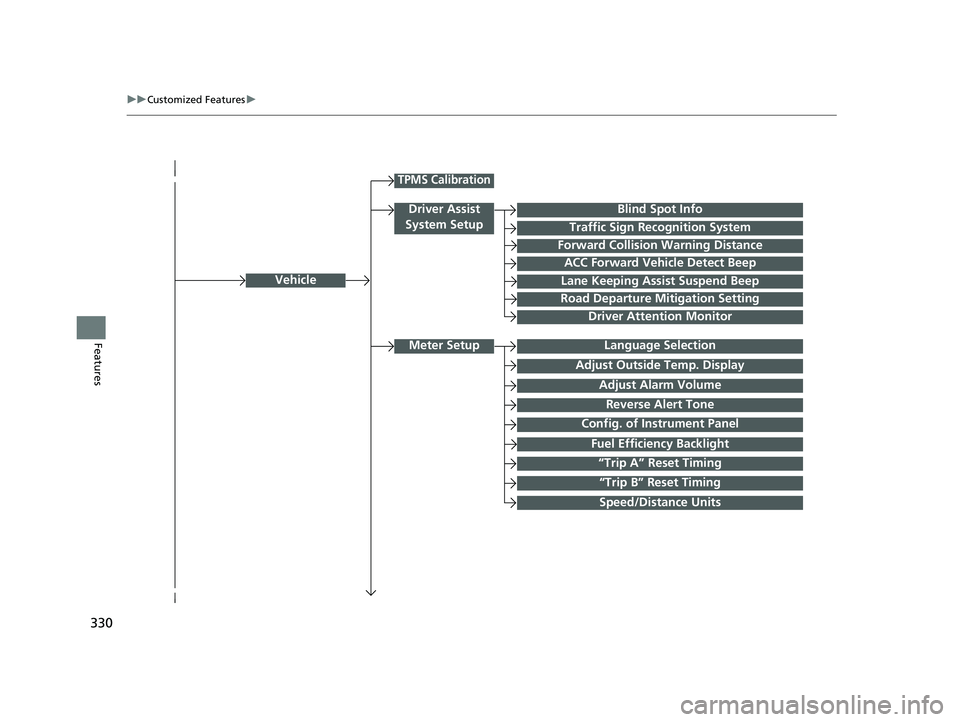
FeaturesLanguage Selection
Vehicle
Meter Setup
Adjust Outside Temp. Display
“Trip A” Reset Timing
“Trip B” Reset Timing
Reverse Alert Tone
Config. of Instrument Panel
Adjust Alarm Volume
Fuel Efficiency Backlight
TPMS Calibration
Driver Assist
System Setup
Traffic Sign Recognition System
Forward Collision Warning Distance
ACC Forward Vehicle Detect Beep
Lane Keeping Assist Suspend Beep
Road Departure Mitigation Setting
Driver Attention Monitor
Speed/Distance Units
Blind Spot Info
22 INSIGHT HMIN-31TXM6300.book 330 ページ 2021年2月24日 水曜日 午後3時45分
Page 332 of 609
331
uuCustomized Features u
Continued
Features
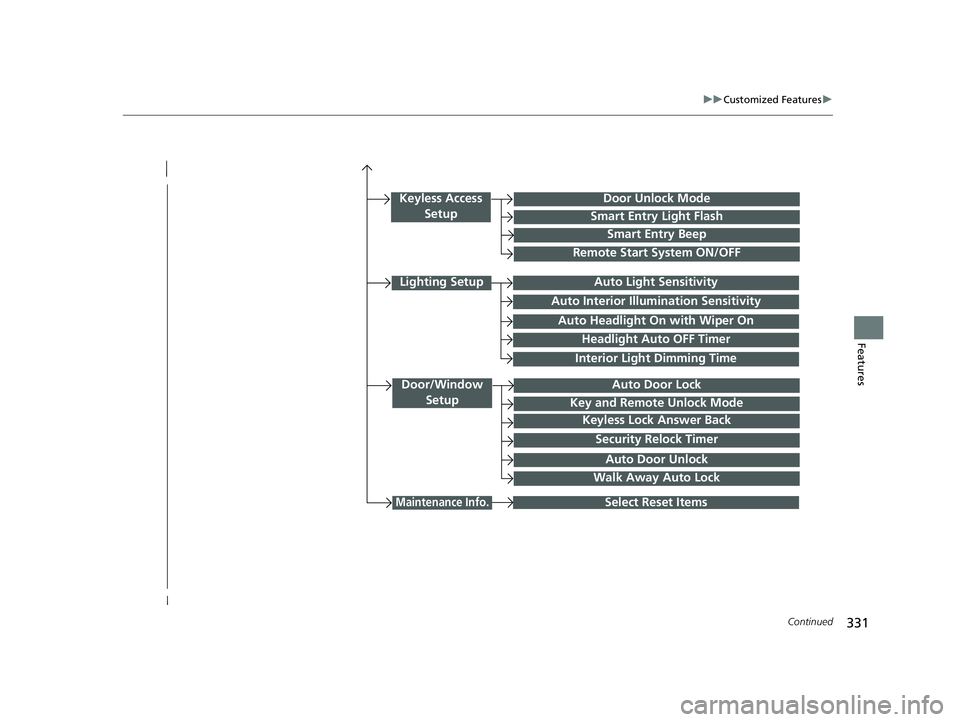
Interior Light Dimming Time
Headlight Auto OFF Timer
Auto Light Sensitivity
Door/Window
SetupAuto Door Lock
Auto Door Unlock
Key and Remote Unlock Mode
Keyless Lock Answer Back
Security Relock Timer
Select Reset Items
Walk Away Auto Lock
Keyless Access SetupDoor Unlock Mode
Smart Entry Light Flash
Smart Entry Beep
Remote Start System ON/OFF
Auto Headlight On with Wiper On
Auto Interior Illumi nation Sensitivity
Maintenance Info.
Lighting Setup
22 INSIGHT HMIN-31TXM6300.book 331 ページ 2021年2月24日 水曜日 午後3時45分
Page 334 of 609
333
uuCustomized Features u
Continued
Features
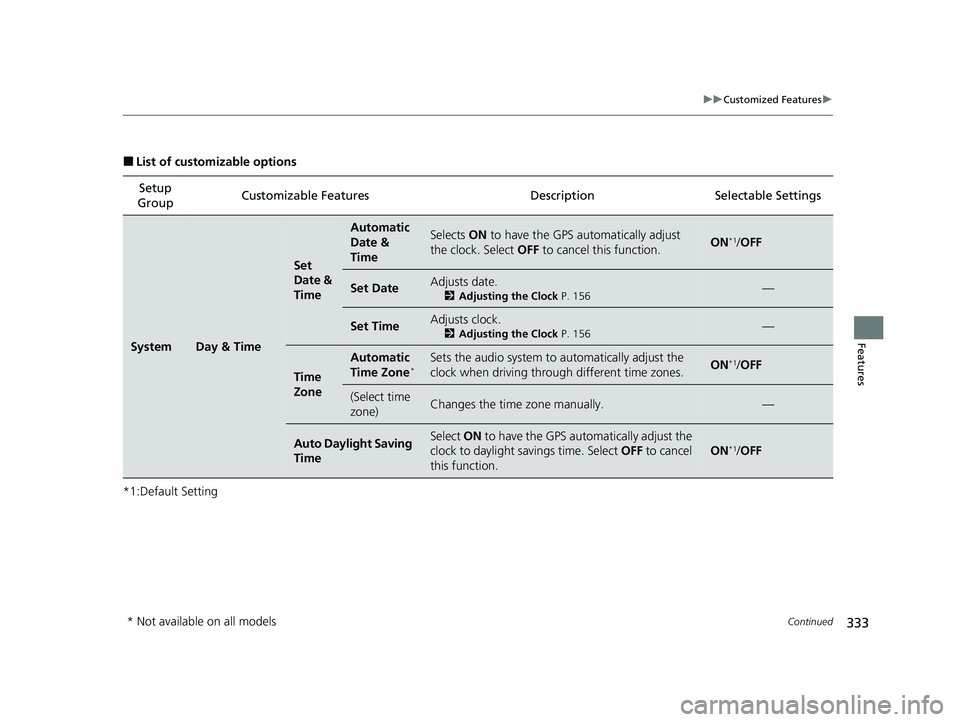
■List of customizable options
*1:Default Setting Setup
Group Customizable Features
DescriptionSelectable Settings
SystemDay & Time
Set
Date &
Time
Automatic
Date &
TimeSelects ON to have the GPS automatically adjust
the clock. Select OFF to cancel this function.ON*1/OFF
Set DateAdjusts date.
2 Adjusting the Clock P. 156—
Set TimeAdjusts clock.
2Adjusting the Clock P. 156—
Time
Zone
Automatic
Time Zone*Sets the audio system to automatically adjust the
clock when driving through different time zones.ON*1/ OFF
(Select time
zone)Changes the time zone manually.—
Auto Daylight Saving
TimeSelect ON to have the GPS automatically adjust the
clock to daylight savings time. Select OFF to cancel
this function.
ON*1/ OFF
* Not available on all models
22 INSIGHT HMIN-31TXM6300.book 333 ページ 2021年2月24日 水曜日 午後3時45分
Page 341 of 609
340
uuCustomized Features u
Features
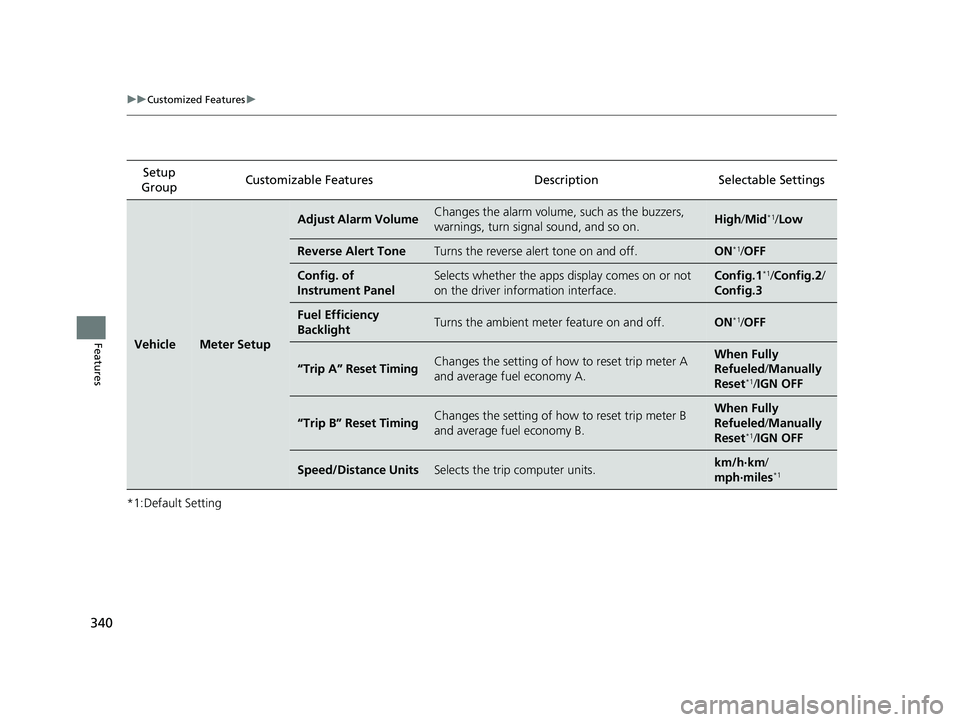
*1:Default SettingSetup
Group Customizable Features
DescriptionSelectable Settings
VehicleMeter Setup
Adjust Alarm VolumeChanges the alarm volume, such as the buzzers,
warnings, turn signal sound, and so on.High /Mid*1/Low
Reverse Alert ToneTurns the reverse alert tone on and off.ON*1/OFF
Config. of
Instrument PanelSelects whether the apps display comes on or not
on the driver info rmation interface.Config.1*1/Config.2 /
Config.3
Fuel Efficiency
BacklightTurns the ambient meter feature on and off.ON*1/ OFF
“Trip A” Reset TimingChanges the setting of how to reset trip meter A
and average fuel economy A.When Fully
Refueled /Manually
Reset
*1/ IGN OFF
“Trip B” Reset TimingChanges the setting of how to reset trip meter B
and average fuel economy B.When Fully
Refueled /Manually
Reset
*1/ IGN OFF
Speed/Distance UnitsSelects the trip computer units.km/h·km /
mph·miles*1
22 INSIGHT HMIN-31TXM6300.book 340 ページ 2021年2月24日 水曜日 午後3時45分
Page 342 of 609
341
uuCustomized Features u
Continued
Features
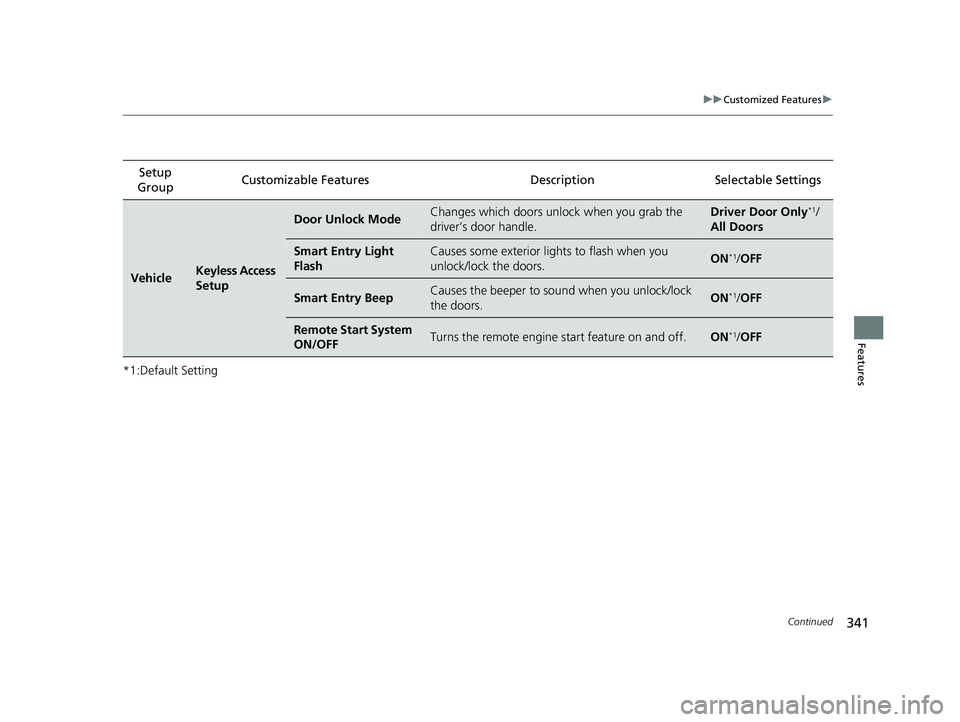
*1:Default SettingSetup
Group Customizable Features
DescriptionSelectable Settings
VehicleKeyless Access
Setup
Door Unlock ModeChanges which doors unlock when you grab the
driver’s door handle.Driver Door Only*1/
All Doors
Smart Entry Light
FlashCauses some exterior lights to flash when you
unlock/lock the doors.ON*1/ OFF
Smart Entry BeepCauses the beeper to so und when you unlock/lock
the doors.ON*1/ OFF
Remote Start System
ON/OFFTurns the remote engine start feature on and off.ON*1/OFF
22 INSIGHT HMIN-31TXM6300.book 341 ページ 2021年2月24日 水曜日 午後3時45分
Page 343 of 609
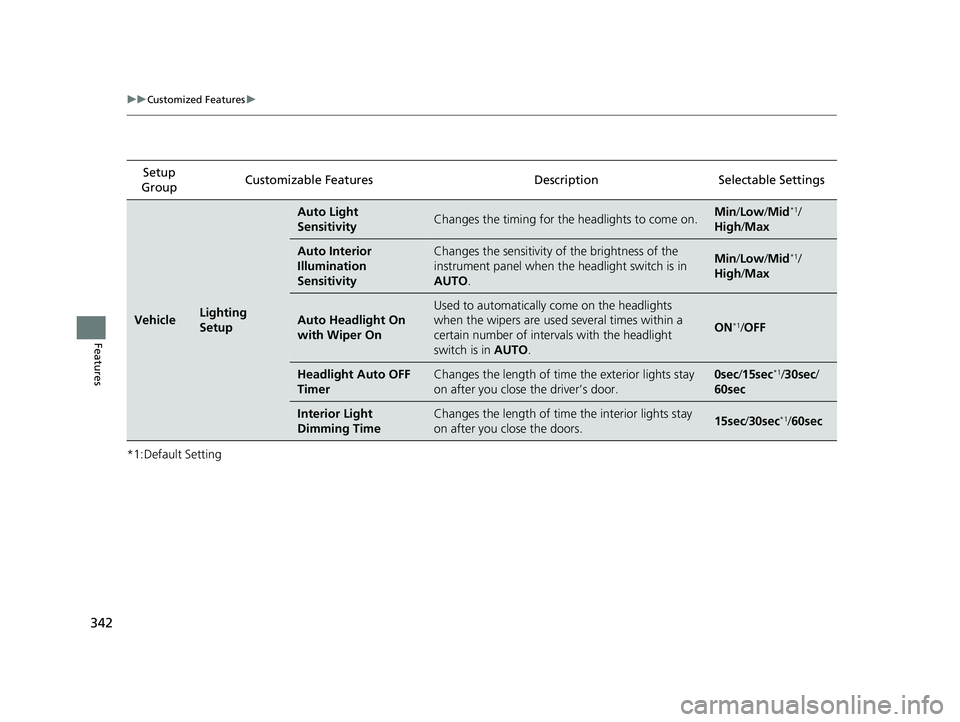
342
uuCustomized Features u
Features
*1:Default SettingSetup
Group Customizable Features Description Selectable Settings
VehicleLighting
Setup
Auto Light
SensitivityChanges the timing for the
headlights to come on.Min/Low/Mid*1/
High /Max
Auto Interior
Illumination
SensitivityChanges the sensitivity of the brightness of the
instrument panel when the headlight switch is in
AUTO .Min/Low/Mid*1/
High /Max
Auto Headlight On
with Wiper On
Used to automatically come on the headlights
when the wipers are used several times within a
certain number of interv als with the headlight
switch is in AUTO.
ON*1/OFF
Headlight Auto OFF
TimerChanges the length of time the exterior lights stay
on after you close the driver’s door.0sec /15sec*1/ 30sec /
60sec
Interior Light
Dimming TimeChanges the length of time the interior lights stay
on after you close the doors.15sec /30sec*1/60sec
22 INSIGHT HMIN-31TXM6300.book 342 ページ 2021年2月24日 水曜日 午後3時45分