light HONDA ODYSSEY 1996 Owner's Guide
[x] Cancel search | Manufacturer: HONDA, Model Year: 1996, Model line: ODYSSEY, Model: HONDA ODYSSEY 1996Pages: 240, PDF Size: 2.64 MB
Page 86 of 240
Audio System
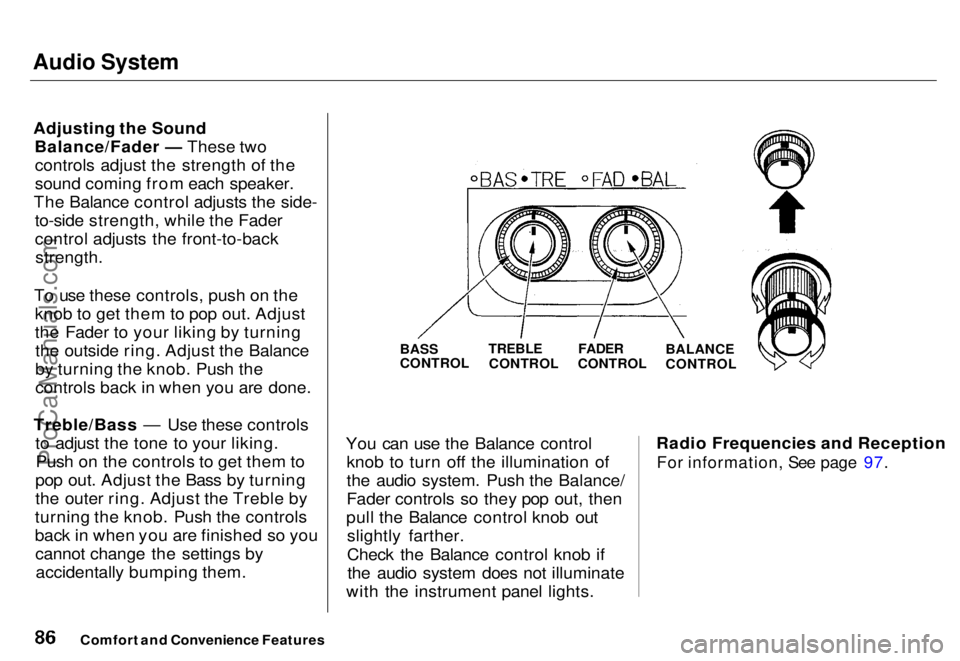
Adjusting the Sound Balance/Fader — These twocontrols adjust the strength of the
sound coming from each speaker.
The Balance control adjusts the side- to-side strength, while the Fader
control adjusts the front-to-back
strength.
To use these controls, push on the knob to get them to pop out. Adjust
the Fader to your liking by turningthe outside ring. Adjust the Balance
by turning the knob. Push the
controls back in when you are done.
Treble/Bass — Use these controls to adjust the tone to your liking.Push on the controls to get them to
pop out. Adjust the Bass by turning
the outer ring. Adjust the Treble by
turning the knob. Push the controls
back in when you are finished so you cannot change the settings byaccidentally bumping them.
BASS
CONTROL
You can use the Balance control knob to turn off the illumination of
the audio system. Push the Balance/
Fader controls so they pop out, then
pull the Balance control knob out slightly farther.
Check the Balance control knob ifthe audio system does not illuminate
with the instrument panel lights. Radio Frequencies and Reception
For information, See page 97.
Comfort and Convenience Features
TREBLE
CONTROL
FADER
CONTROL
BALANCE
CONTROLProCarManuals.comMain Menu s t Table of Contents
Page 87 of 240
Audio System
Operating the Cassette Player
Turn the audio system ON. Make sure the tape opening on the cassette
is facing to the right, then insert the
cassette most of the way into the slot.
The system will pull it in the rest of the way, and begin to play.
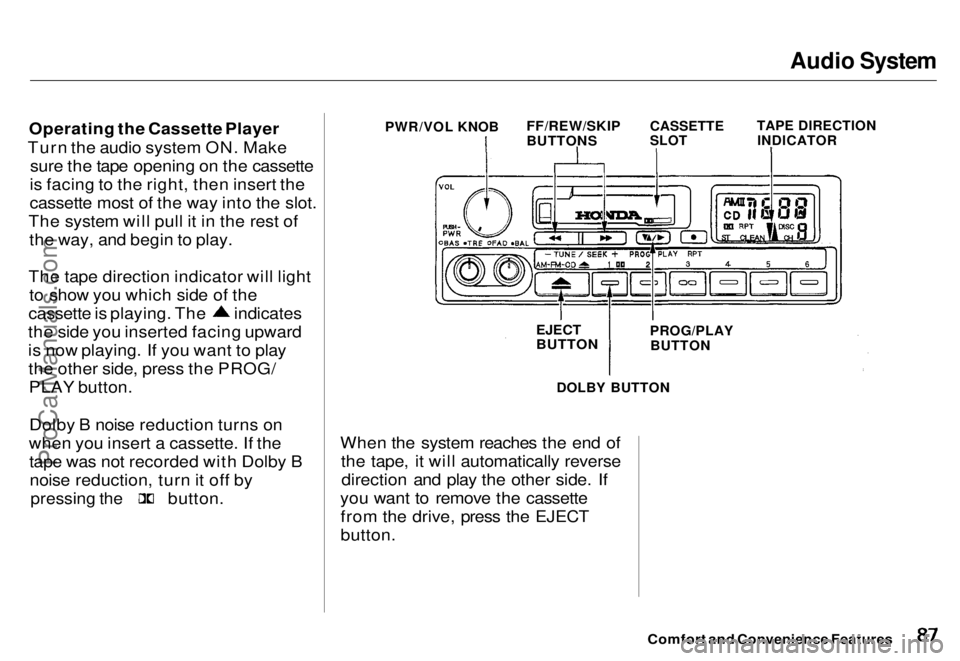
The tape direction indicator will light to show you which side of the cassette is playing. The indicates
the side you inserted facing upward
is now playing. If you want to play the other side, press the PROG/PLAY button.
Dolby B noise reduction turns on
when you insert a cassette. If the tape was not recorded with Dolby Bnoise reduction, turn it off by
pressing the
button.
DOLBY BUTTON
When the system reaches the end of the tape, it will automatically reversedirection and play the other side. If
you want to remove the cassette from the drive, press the EJECT
button.
Comfort and Convenience Features
PWR/VOL KNOB
FF/REW/SKIP
BUTTONS
CASSETTE
SLOT
TAPE DIRECTION
INDICATOR
EJECT
BUTTON
PROG/PLAY
BUTTONProCarManuals.comMain Menu s t Table of Contents
Page 94 of 240
Audio System
To store a frequency:
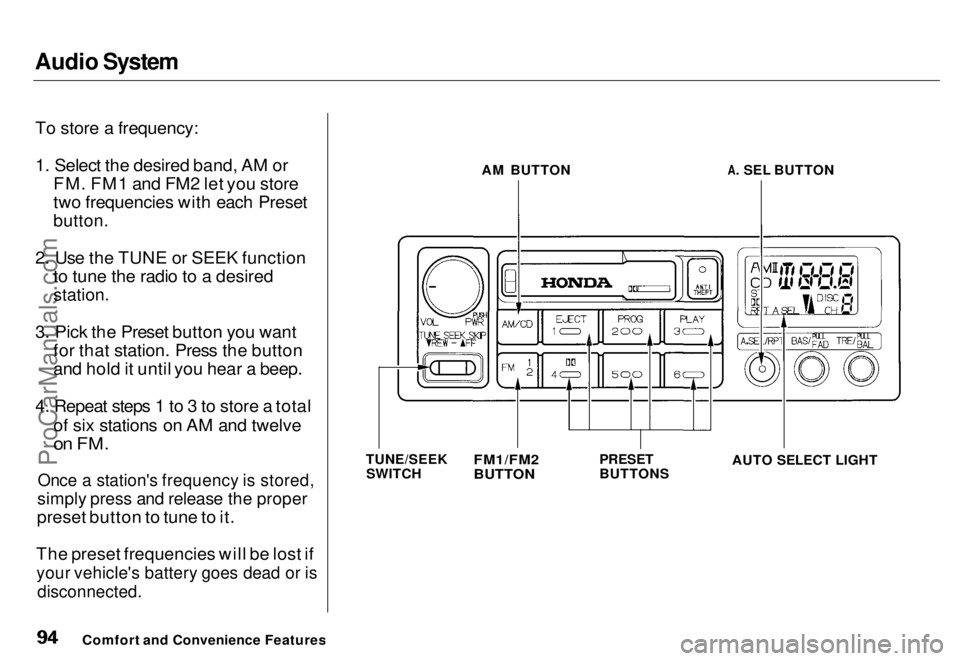
1. Select the desired band, AM or FM. FM1 and FM2 let you store
two frequencies with each Preset
button.
2. Use the TUNE or SEEK function to tune the radio to a desired
station.
3. Pick the Preset button you want for that station. Press the button
and hold it until you hear a beep.
4. Repeat steps 1 to 3 to store a total of six stations on AM and twelve
on FM.
Once a station's frequency is stored,
simply press and release the proper
preset button to tune to it.
The preset frequencies will be lost if
your vehicle's battery goes dead or is
disconnected.
Comfort and Convenience Features AM BUTTON
A. SEL BUTTON
TUNE/SEEK SWITCH
PRESET
BUTTON
S
FM1/FM2
BUTTON
AUTO SELECT LIGHTProCarManuals.comMain Menu s t Table of Contents
Page 95 of 240
Audio System
AUTO SELECT — If you are traveling far from home and can no longer receive the stations youpreset, you can use the Auto Select
feature to find stations in the local
area.
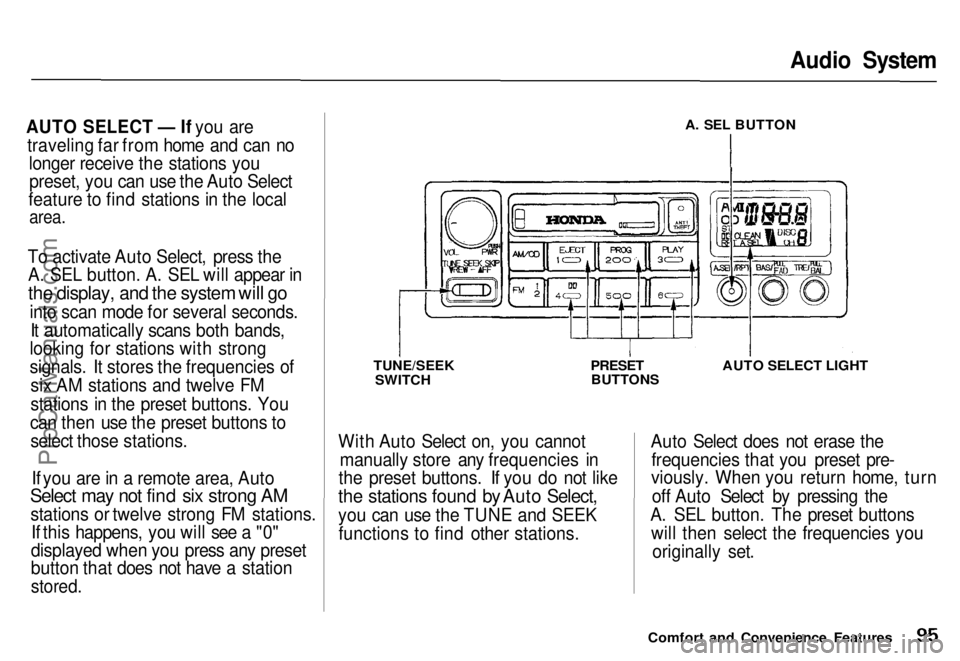
To activate Auto Select, press the A. SEL button. A. SEL will appear in
the display, and the system will go
into scan mode for several seconds.It automatically scans both bands,
looking for stations with strong
signals. It stores the frequencies of
six AM stations and twelve FM
stations in the preset buttons. You
can then use the preset buttons to select those stations.
If you are in a remote area, Auto
Select may not find six strong AM
stations or twelve strong FM stations. If this happens, you will see a "0"
displayed when you press any preset
button that does not have a station
stored.
A. SEL BUTTON
TUNE/SEEK SWITCH
PRESET
BUTTONS AUTO SELECT LIGHT
With Auto Select on, you cannot manually store any frequencies in
the preset buttons. If you do not like
the stations found by Auto Select,
you can use the TUNE and SEEK functions to find other stations. Auto Select does not erase the
frequencies that you preset pre-
viously. When you return home, turn
off Auto Select by pressing the
A. SEL button. The preset buttons will then select the frequencies you
originally set.
Comfort and Convenience FeaturesProCarManuals.comMain Menu s t Table of Contents
Page 96 of 240
Audio System
Adjusting the Sound
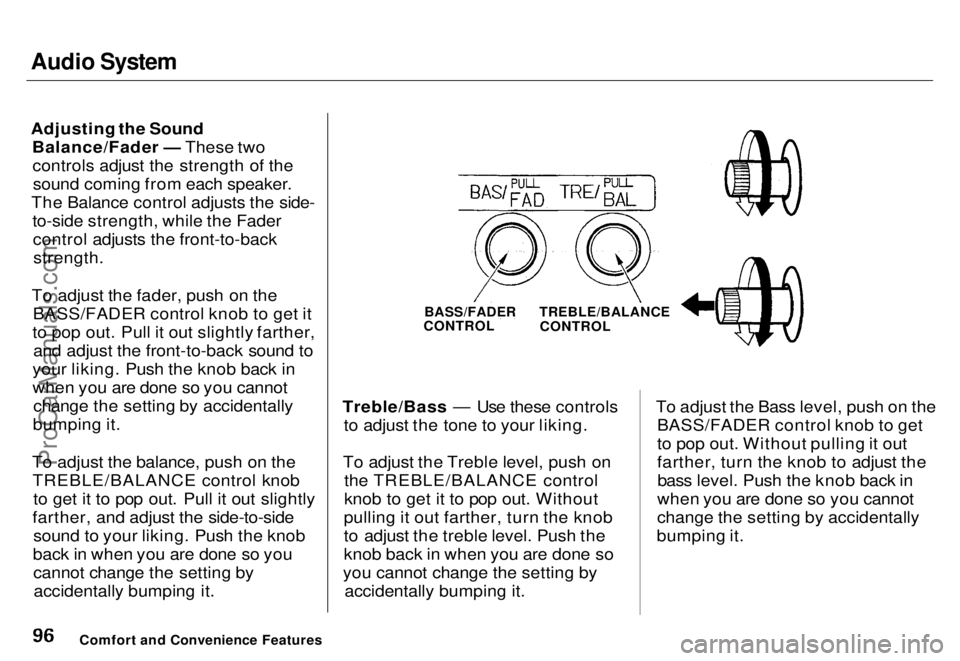
Balance/Fader — These twocontrols adjust the strength of thesound coming from each speaker.
The Balance control adjusts the side- to-side strength, while the Fadercontrol adjusts the front-to-backstrength.
To adjust the fader, push on the BASS/FADER control knob to get it
to pop out. Pull it out slightly farther, and adjust the front-to-back sound to
your liking. Push the knob back in
when you are done so you cannot change the setting by accidentally
bumping it.
To adjust the balance, push on the TREBLE/BALANCE control knob to get it to pop out. Pull it out slightly
farther, and adjust the side-to-side sound to your liking. Push the knob
back in when you are done so you cannot change the setting byaccidentally bumping it. Treble/Bass — Use these controls
to adjust the tone to your liking.
To adjust the Treble level, push on the TREBLE/BALANCE control
knob to get it to pop out. Without
pulling it out farther, turn the knob
to adjust the treble level. Push the
knob back in when you are done so
you cannot change the setting by accidentally bumping it. To adjust the Bass level, push on the
BASS/FADER control knob to get
to pop out. Without pulling it out
farther, turn the knob to adjust thebass level. Push the knob back in
when you are done so you cannot
change the setting by accidentally
bumping it.
Comfort and Convenience Features
BASS/FADER
CONTROL
TREBLE/BALANCE
CONTROLProCarManuals.comMain Menu s t Table of Contents
Page 99 of 240
Audio System
Operating the Cassette Player
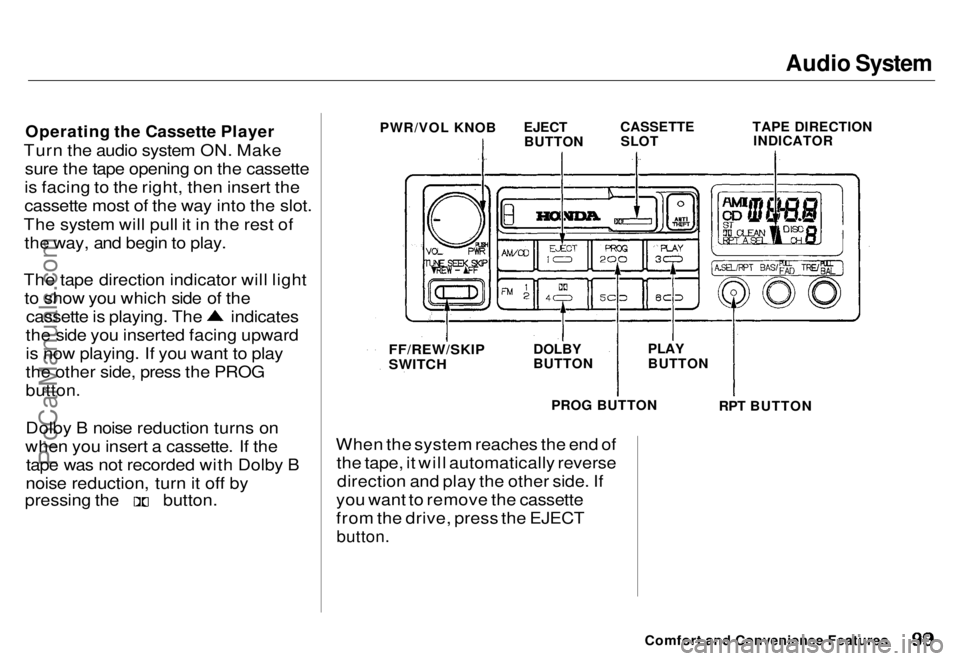
Turn the audio system ON. Make sure the tape opening on the cassette
is facing to the right, then insert the
cassette most of the way into the slot.
The system will pull it in the rest of the way, and begin to play.
The tape direction indicator will light to show you which side of the cassette is playing. The indicates
the side you inserted facing upward
is now playing. If you want to play
the other side, press the PROG
button.
Dolby B noise reduction turns on
when you insert a cassette. If the tape was not recorded with Dolby B
noise reduction, turn it off by pressing the button.
When the system reaches the end of
the tape, it will automatically reversedirection and play the other side. If
you want to remove the cassette
from the drive, press the EJECT
button.
Comfort and Convenience Features
PWR/VOL KNOB
EJECT
BUTTON
CASSETTE
SLOT
TAPE DIRECTION
INDICATOR
FF/REW/SKIP
SWITCH
DOLBY
BUTTON
PLAY
BUTTON
PROG BUTTON
RPT BUTTONProCarManuals.comMain Menu s t Table of Contents
Page 101 of 240
Audio System
Caring for the Cassette Player
The cassette player picks up dirt and oxides from the tape. This
contamination builds up over time
and causes the sound quality todegrade. To prevent this, you should
clean the player after every 30 hours
of use.
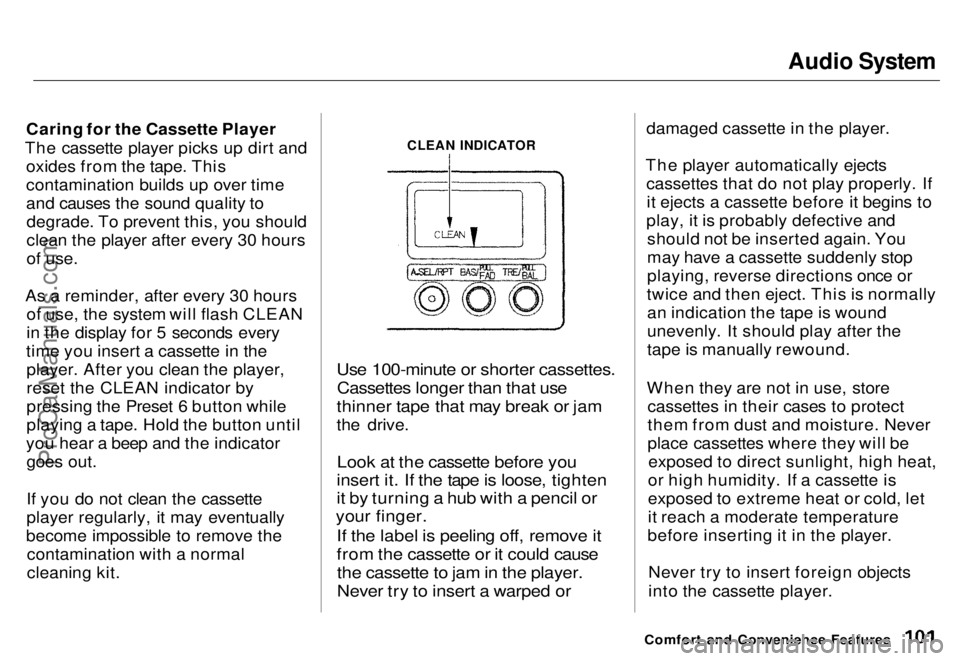
As a reminder, after every 30 hours of use, the system will flash CLEAN
in the display for 5 seconds every
time you insert a cassette in the player. After you clean the player,
reset the CLEAN indicator by
pressing the Preset 6 button while
playing a tape. Hold the button until
you hear a beep and the indicator goes out.
If you do not clean the cassette
player regularly, it may eventually
become impossible to remove the contamination with a normal
cleaning kit.
Use 100-minute or shorter cassettes.
Cassettes longer than that use
thinner tape that may break or jam
the drive.
Look at the cassette before you
insert it. If the tape is loose, tighten
it by turning a hub with a pencil or
your finger.
If the label is peeling off, remove it
from the cassette or it could cause
the cassette to jam in the player.
Never try to insert a warped or
damaged cassette in the player.
The player automatically ejects cassettes that do not play properly. Ifit ejects a cassette before it begins to
play, it is probably defective and should not be inserted again. You
may have a cassette suddenly stop
playing, reverse directions once or
twice and then eject. This is normally an indication the tape is wound
unevenly. It should play after the
tape is manually rewound.
When they are not in use, store cassettes in their cases to protect
them from dust and moisture. Never
place cassettes where they will beexposed to direct sunlight, high heat,
or high humidity. If a cassette is
exposed to extreme heat or cold, let
it reach a moderate temperature
before inserting it in the player.
Never try to insert foreign objects
into the cassette player.
Comfort and Convenience Features
CLEAN INDICATORProCarManuals.comMain Menu s t Table of Contents
Page 104 of 240
Audio System
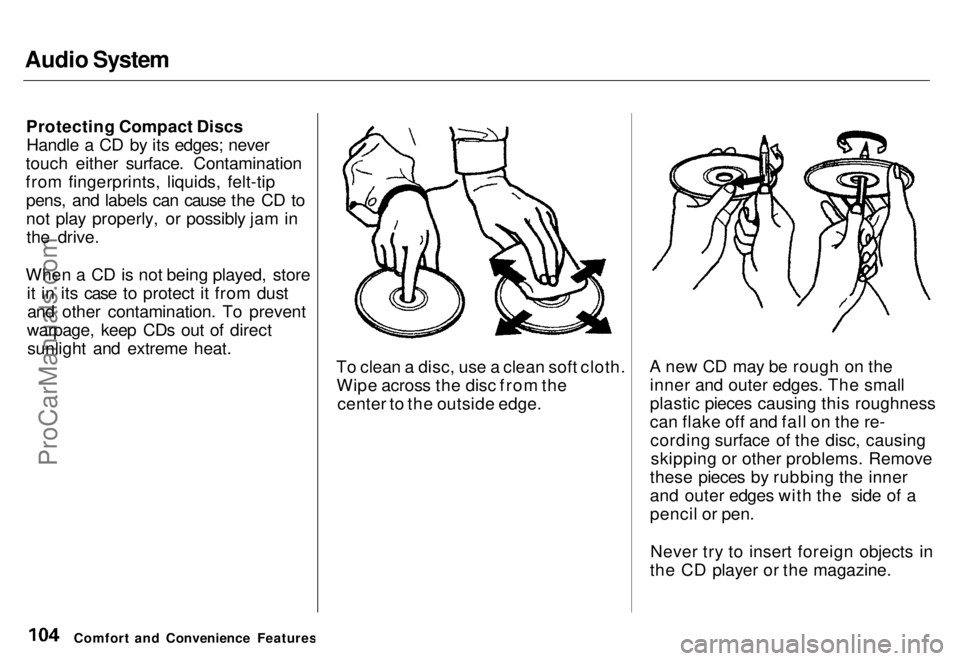
Protecting Compact DiscsHandle a CD by its edges; never
touch either surface. Contamination
from fingerprints, liquids, felt-tip pens, and labels can cause the CD to
not play properly, or possibly jam inthe drive.
When a CD is not being played, store it in its case to protect it from dustand other contamination. To prevent
warpage, keep CDs out of direct sunlight and extreme heat. To clean a disc, use a clean soft cloth.Wipe across the disc from the center to the outside edge. A new CD may be rough on the
inner and outer edges. The small
plastic pieces causing this roughness
can flake off and fall on the re-cording surface of the disc, causingskipping or other problems. Remove
these pieces by rubbing the inner
and outer edges with the side of a
pencil or pen.
Never try to insert foreign objects in
the CD player or the magazine.
Comfort and Convenience FeaturesProCarManuals.comMain Menu s t Table of Contents
Page 111 of 240
Service Station Procedures
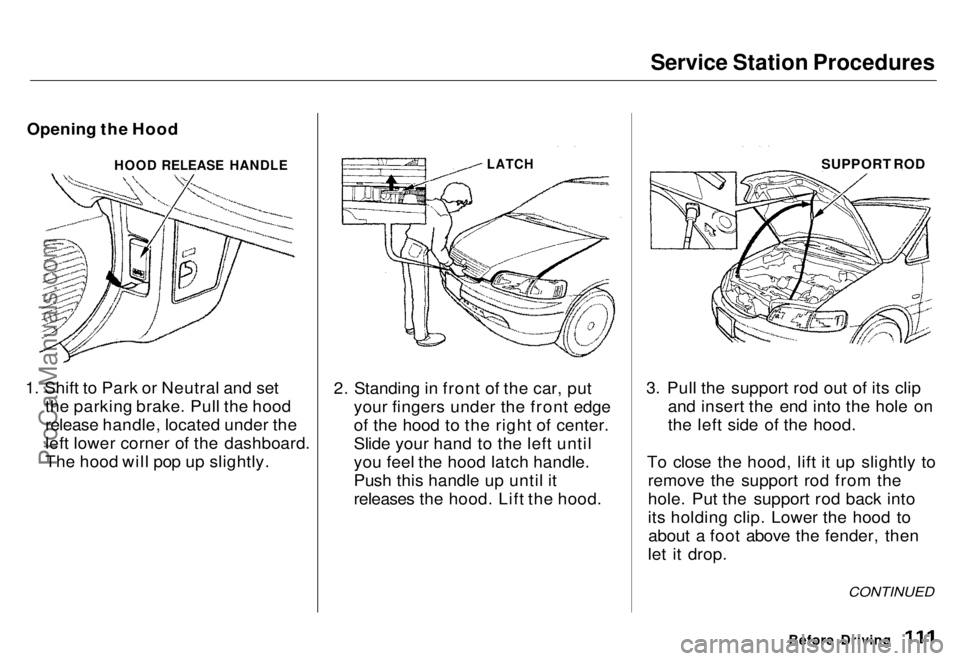
Opening the Hood
1. Shift to Park or Neutral and set the parking brake. Pull the hood
release handle, located under the
left lower corner of the dashboard.
The hood will pop up slightly. 2. Standing in front of the car, put
your fingers under the front edge
of the hood to the right of center.
Slide your hand to the left until
you feel the hood latch handle.
Push this handle up until it
releases the hood. Lift the hood. 3. Pull the support rod out of its clip
and insert the end into the hole on
the left side of the hood.
To close the hood, lift it up slightly to remove the support rod from the
hole. Put the support rod back into
its holding clip. Lower the hood toabout a foot above the fender, then
let it drop.
Before Driving
CONTINUED
HOOD RELEASE HANDLE
LATCH
SUPPORT RODProCarManuals.comMain Menu s t Table of Contents
Page 118 of 240
Preparing to Drive
You should do the following checks
and adjustments every day before
you drive your car.
1. Make sure all windows, mirrors, and outside
lights are clean and
unobstructed. Remove frost, snow,
or ice.
2. Check that the hood and tailgate are fully closed.
3. Visually check the tires. If a tire looks low, use a gauge to check its
pressure.
4. Check that any items you may be carrying with you inside are stored
properly or fastened down
securely. 5. Check the adjustment of the seat
(see page 54).
6. Check the adjustment of the inside and outside mirrors (see
page 64).
7. Check the adjustment of the steering wheel (see page 44).
8. Make sure the doors are securely closed and locked.
9. Fasten your seat belt. Check that your passengers have fastened
their seat belts (see page 7 ). 10.Turn the ignition ON (II). Check
the indicator lights in the instru-
ment panel.
11. Start the engine (see page 119 ).
12. Check the gauges and indicator lights in the instrument panel (see
page 33 ).
DrivingProCarManuals.comMain Menu s t Table of Contents