cooling HONDA ODYSSEY 1999 User Guide
[x] Cancel search | Manufacturer: HONDA, Model Year: 1999, Model line: ODYSSEY, Model: HONDA ODYSSEY 1999Pages: 343, PDF Size: 3.73 MB
Page 136 of 343
Heating and Cooling
To Heat
To warm the interior:
1. Start the engine. 2. Select and Fresh Air mode.
3. Set the fan to the desired speed.
4. Adjust the warmth of the air with
the temperature control dial.
To Heat and Dehumidify with Air
Conditioning
Air conditioning, as it cools, removes moisture from the air. When used in
combination with the heater, it
makes the interior warm and dry.
1. Switch the fan on.
2. Turn on the air conditioning. 3. Select and Fresh Air mode.
4. Adjust the temperature control
dial so the mixture of heated and
cooled air feels comfortable.
This setting is suitable for all driving conditions whenever the outside
temperature is above 32°F (0°C).
To Defog and Defrost
To remove fog from the inside of the
windows:
1. Switch the fan on. 2. Select
When you select the
system automatically switches to
Fresh Air mode and turns on the
A/C.
3. Adjust the temperature control dial so the air flow from the
defroster vents feels warm.
4. Turn on the rear window defogger to help clear the rear window.
When you switch to another mode from the A/C stays on.
Press the A/C button to turn it off.
CONTINUED
Comfort and Convenience FeaturesProCarManuals.comMain Menu Table of Contents s t
Page 137 of 343
Heating and Cooling
To remove exterior frost or ice from the windshield and side windowsafter the vehicle has been sitting out
in cold weather:
1. Start the engine. 2. Select
When you select the
system automatically switches to
Fresh Air mode and turns on the
A/C.
3. Switch the fan and temperature controls to maximum.
To rapidly remove exterior frost or ice from the windshield (on very colddays), first select the Recirculation
mode. Once the windshield is clear, select the Fresh Air mode to avoid
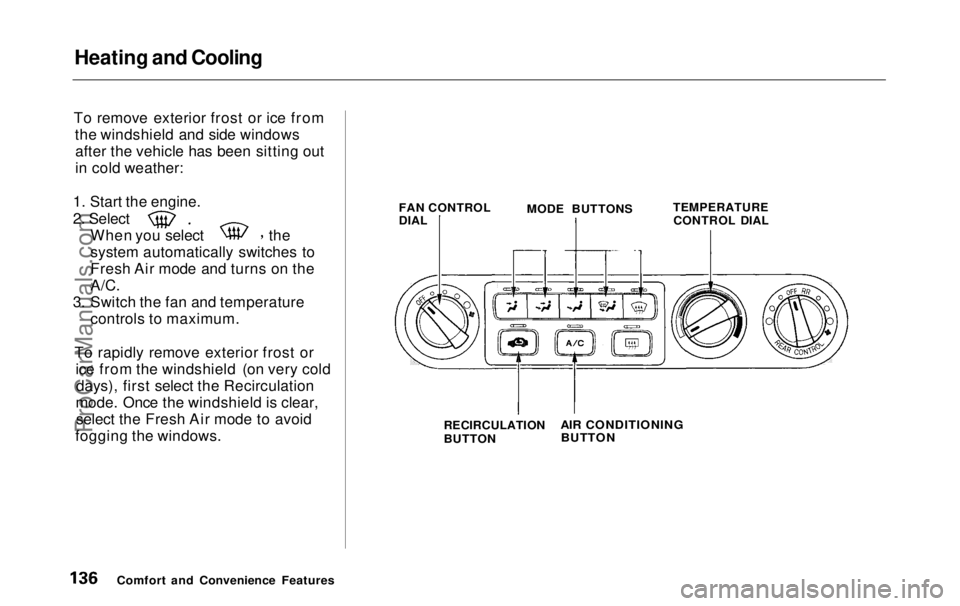
fogging the windows. FAN CONTROL
DIAL
MODE BUTTONS
TEMPERATURE
CONTROL DIAL
Comfort and Convenience Features RECIRCULATION
BUTTON
AIR CONDITIONING
BUTTONProCarManuals.comMain Menu Table of Contents s t
Page 138 of 343

Heating and Cooling
These settings direct all the air flow to the defroster vents at the base ofthe windshield and the side windowdefroster vents. The air flow will get
warmer and clear the windows faster as the engine warms up. You can
close the corner vents with the dial
beside each vent. This will send
more warm air to the windshield
defroster vents.
For safety, make sure you have a
clear view through all the windows
before driving away. To Turn Everything Off
To shut off the system temporarily,
turn the fan speed and temperaturecontrol dials all the way to the left.
You should shut the system completely off only for the first few
minutes of driving in cold weather,
until the engine coolant warms up
enough to operate the heater. Keep
the fan on at all other times so stale air does not build up in the interior.
Comfort and Convenience FeaturesProCarManuals.comMain Menu Table of Contents s t
Page 139 of 343
Climate Control System
On EX model
The automatic climate control system in your Honda picks the
proper combination of air condi-
tioning, heating, and ventilation to maintain the interior temperature
you select. The system also adjusts the fan speed and air flow levels.
Your vehicle also has a rear A/C unit that allows the rear passengers toadjust the heating, cooling, and air
flow (see page 146).
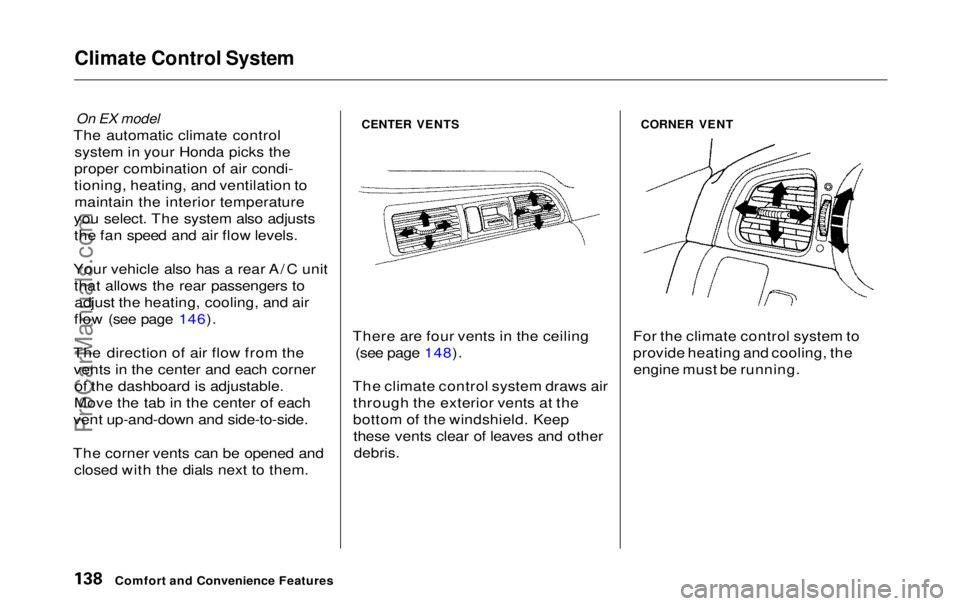
The direction of air flow from the vents in the center and each corner of the dashboard is adjustable.
Move the tab in the center of each
vent up-and-down and side-to-side.
The corner vents can be opened and closed with the dials next to them.
CENTER VENTS
There are four vents in the ceiling (see page 148).
The climate control system draws air through the exterior vents at the
bottom of the windshield. Keepthese vents clear of leaves and other
debris.
CORNER VENT
For the climate control system to
provide heating and cooling, the engine must be running.
Comfort and Convenience FeaturesProCarManuals.comMain Menu Table of Contents s t
Page 141 of 343
Climate Control System
Fully-automatic Operation
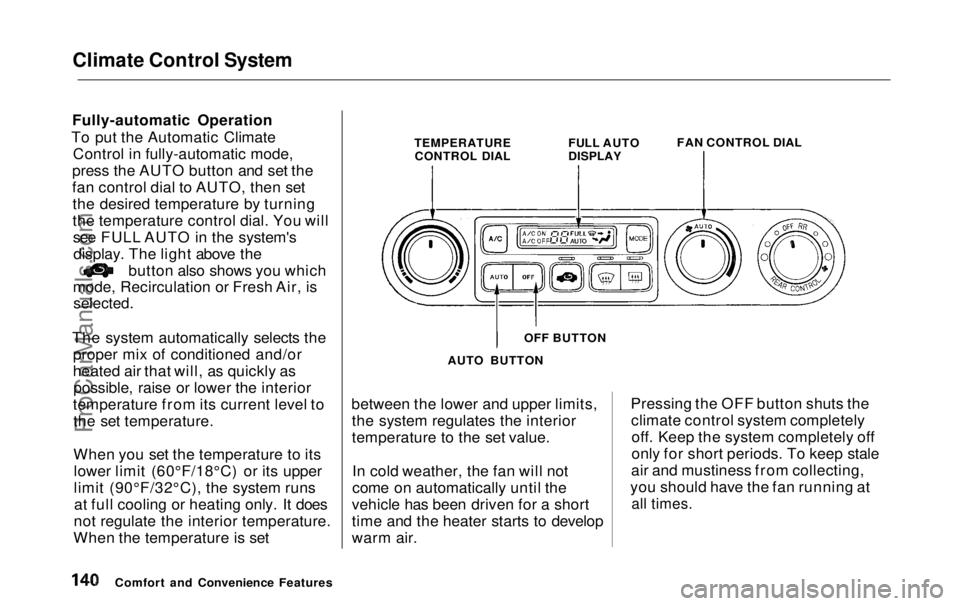
To put the Automatic Climate Control in fully-automatic mode,
press the AUTO button and set the
fan control dial to AUTO, then set the desired temperature by turning
the temperature control dial. You willsee FULL AUTO in the system'sdisplay. The light above the button also shows you which
mode, Recirculation or Fresh Air, is
selected.
The system automatically selects the proper mix of conditioned and/or
heated air that will, as quickly aspossible, raise or lower the interior
temperature from its current level to the set temperature.
When you set the temperature to itslower limit (60°F/18°C) or its upper
limit (90°F/32°C), the system runsat full cooling or heating only. It does
not regulate the interior temperature.
When the temperature is set between the lower and upper limits,
the system regulates the interior
temperature to the set value.
In cold weather, the fan will not
come on automatically until the
vehicle has been driven for a short
time and the heater starts to develop
warm air. Pressing the OFF button shuts the
climate control system completelyoff. Keep the system completely off
only for short periods. To keep stale
air and mustiness from collecting,
you should have the fan running at
all times.
Comfort and Convenience Features TEMPERATURE
CONTROL DIAL FULL AUTO
DISPLAY
FAN CONTROL DIAL
OFF BUTTON
AUTO BUTTONProCarManuals.comMain Menu Table of Contents s t
Page 143 of 343
Climate Control System
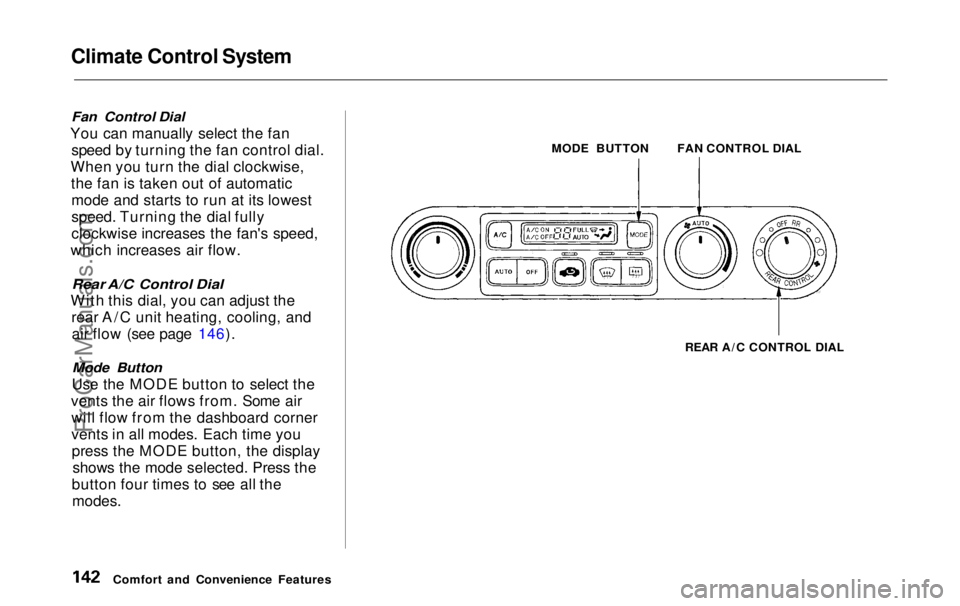
Fan Control Dial
You can manually select the fan speed by turning the fan control dial.
When you turn the dial clockwise, the fan is taken out of automaticmode and starts to run at its lowest
speed. Turning the dial fully
clockwise increases the fan's speed,
which increases air flow.
Rear A/C Control Dial
With this dial, you can adjust the rear A/C unit heating, cooling, andair flow (see page 146).
Mode Button
Use the MODE button to select the
vents the air flows from. Some air will flow from the dashboard corner
vents in all modes. Each time youpress the MODE button, the display shows the mode selected. Press the
button four times to see all the
modes.
MODE BUTTON
REAR A/C CONTROL DIAL
Comfort and Convenience Features FAN CONTROL DIALProCarManuals.comMain Menu Table of Contents s t
Page 147 of 343
Climate Control System
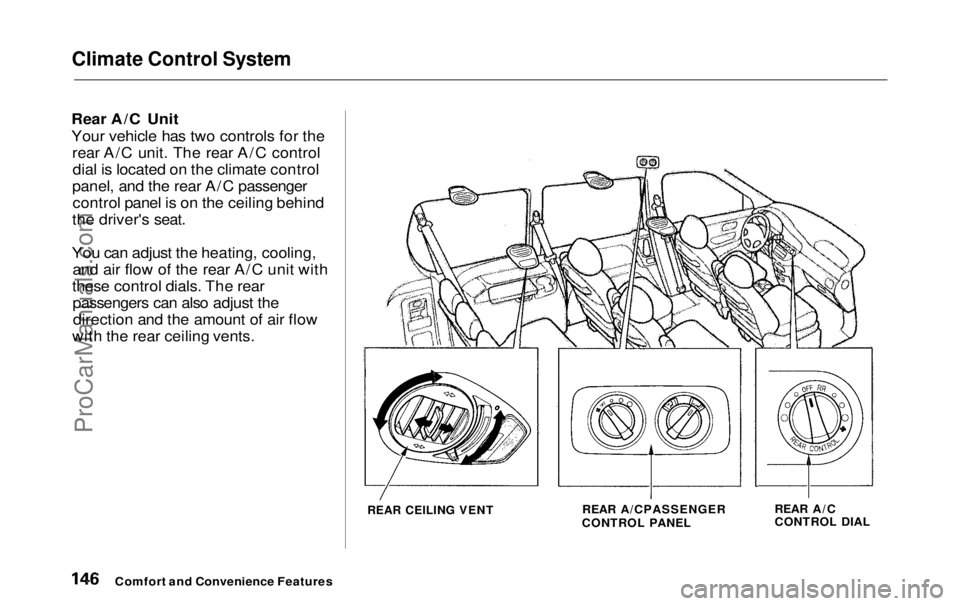
Rear A/C Unit
Your vehicle has two controls for the rear A/C unit. The rear A/C controldial is located on the climate control
panel, and the rear A/C passenger control panel is on the ceiling behind
the driver's seat.
You can adjust the heating, cooling, and air flow of the rear A/C unit with
these control dials. The rear passengers can also adjust thedirection and the amount of air flow
with the rear ceiling vents.
REAR CEILING VENT
REAR A/CPASSENGER
CONTROL PANEL REAR A/C
CONTROL DIAL
Comfort and Convenience FeaturesProCarManuals.comMain Menu Table of Contents s t
Page 148 of 343
Climate Control System
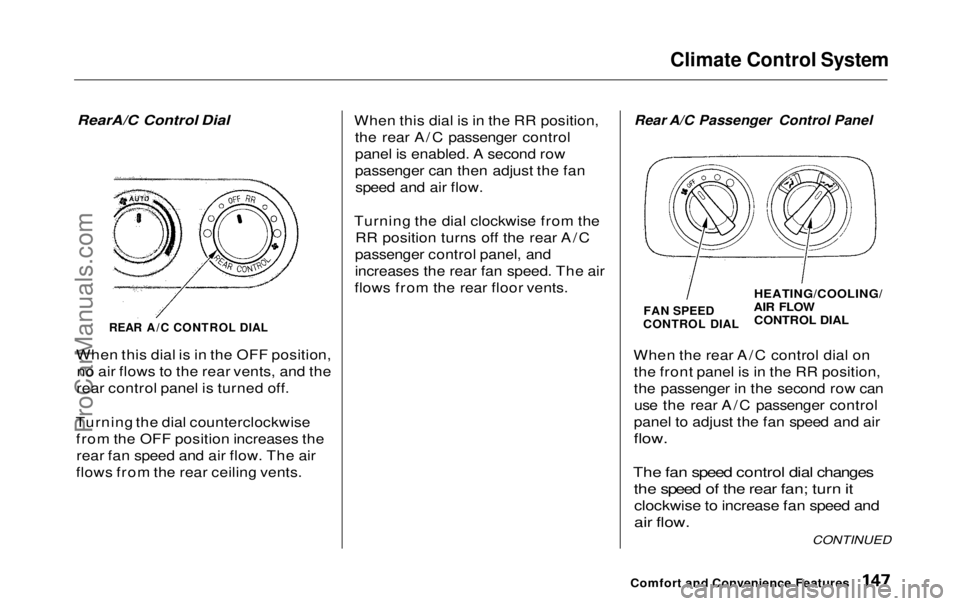
RearA/C Control Dial
REAR A/C CONTROL DIAL
When this dial is in the OFF position, no air flows to the rear vents, and the
rear control panel is turned off.
Turning the dial counterclockwise from the OFF position increases therear fan speed and air flow. The air
flows from the rear ceiling vents. When this dial is in the RR position,
the rear A/C passenger control
panel is enabled. A second row
passenger can then adjust the fanspeed and air flow.
Turning the dial clockwise from the RR position turns off the rear A/C
passenger control panel, and
increases the rear fan speed. The air
flows from the rear floor vents.
Rear A/C Passenger Control Panel
FAN SPEED
CONTROL DIAL
HEATING/COOLING/
AIR FLOW
CONTROL DIAL
When the rear A/C control dial on the front panel is in the RR position,
the passenger in the second row canuse the rear A/C passenger control
panel to adjust the fan speed and air
flow.
The fan speed control dial changes the speed of the rear fan; turn it
clockwise to increase fan speed and
air flow.
Comfort and Convenience Features
CONTINUEDProCarManuals.comMain Menu Table of Contents s t
Page 149 of 343
Climate Control System
The heating/cooling/air flow control dial selects the temperature and
level of the air flow.
When the dial is in the position, heated air flows
from the rear floor vents.
When the dial is in the position, cooled air flows
from the rear ceiling vents. Cooled air can be selected when the A/C
switch on the front control panel is
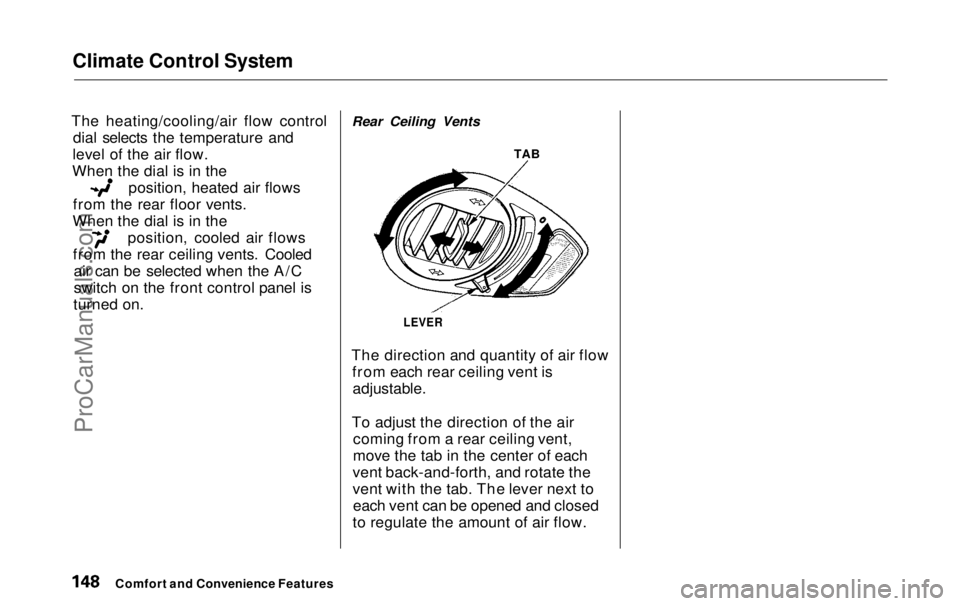
turned on. Rear Ceiling Vents
TAB
LEVER
The direction and quantity of air flow from each rear ceiling vent is
adjustable.
To adjust the direction of the air coming from a rear ceiling vent,
move the tab in the center of each
vent back-and-forth, and rotate the
vent with the tab. The lever next to each vent can be opened and closed
to regulate the amount of air flow.
Comfort and Convenience FeaturesProCarManuals.comMain Menu Table of Contents s t
Page 217 of 343
Towing a Trailer
Spare Vehicle Tire
When towing a trailer, you should carry a full-size wheel and tire as aspare in case you have a flat. If you
use the compact spare tire that came
with the vehicle, it may adversely affect vehicle handling. See page 317 for information on proper tire
size, and page 293 for information on
how to store a full-size tire. When storing a full-size spare tire in the
trailer, follow the trailer maker's
instructions.
Additional Trailer equipment
Many states and provinces require
special outside mirrors when towing
a trailer. Even if they don't, you should install special mirrors if you
cannot clearly see behind you, or if
the trailer creates a blind spot.
Ask your trailer sales or rental agency if any other items are
recommended or required for your
towing situation. Pre-Tow Checklist
When preparing to tow, and before driving away, be sure to check the
following:
The vehicle has been properlyserviced, and the tires, brakes,
suspension, and cooling system
are in good operating condition.
All weights and loads are within limits (see pages 212 and 213).
The hitch, safety chain, and any other attachments are secure.
All items on and in the trailer are properly secured and cannot shift
while you drive.
The lights and brakes on your vehicle and the trailer are workingproperly. Your vehicle tires and spare are
properly inflated (see page 317),and the trailer tires and spare are
inflated as recommended by the
trailer maker.
You may want to fill the fuel tank with premium fuel. Premium fuelprovides improved performance.
DrivingProCarManuals.comMain Menu Table of Contents s t