navigation update HONDA ODYSSEY 2013 RC1-RC2 / 5.G Navigation Manual
[x] Cancel search | Manufacturer: HONDA, Model Year: 2013, Model line: ODYSSEY, Model: HONDA ODYSSEY 2013 RC1-RC2 / 5.GPages: 267, PDF Size: 8.64 MB
Page 233 of 267
231
Reference Information
System Initialization..............................232
Entering the Security Code ....................232
Acquiring GPS Information ....................232
Startup Confirmation Screen .................233
Map Matching ......................................233
System Limitations ................................234
GPS System...........................................234
Address Calculation ..............................234
Database ..............................................234
Client Assistance ....................................236
Resolving Problems ...............................236
Reporting Errors ....................................236
Honda Automobile Customer Service Contact Information ............................236 Visiting Your Dealer ............................. 236
Map Coverage ..................................... 237
Obtaining a Navigation Update DVD .... 237
Traffic Information ............................... 238
Operation in Alaska, Hawaii, Canada, and
Puerto Rico......................................... 238
Shipping a Vehicle to the U.S. Mainland 238
Legal Information ................................. 239
Copyrights ........................................... 239
User Agreements ................................. 239
As required by the FCC ........................ 244
Page 237 of 267

235
System Limitations
Database
Reference Information
In addition, the map database contains
verified and unverified areas. Unverified
streets may be missing from the map, in
the wrong location, or have an incorrect
name or address range. A message will
warn you if your route includes unverified
streets. Exercise additional caution when
driving in unve rified areas.
The database does not include, analyze,
process, consider, or reflect any of the
following categories of information:
• Neighborhood quality or safety
• Population density
• Availability or proximity of law
enforcement
• Emergency, rescue, medical, or other
assistance
• Construction work, zones, or hazards
• Road and lane closures
• Legal restrictions (such as vehicular type,
weight, load, height, and speed
restrictions)
• Road slope or grade
• Bridge height, width, weight, or other
limits
• Traffic facilities safety
• Special events •
Pavement characteristics or conditions
Every effort has been made to verify that
the database is accurate. The number of
inaccuracies you experience increases the
longer you go without obtaining an
updated map database.
2 Obtaining a Navigation Update DVD P. 237
We assume no liability for any incident that
may result from an error in the program, or
from changed conditions not noted above.
Page 238 of 267
236Reference Information
Client AssistanceResolving ProblemsIf you run into a specific issue that you
cannot resolve, consult the following help
resources:
• For navigation system issues: 2 Troubleshooting
P. 220
There are also FAQs available online at
automobiles.honda.com.
• For questions regarding HandsFreeLink,
audio, or other systems that interact
with the navigation system:
2 Bluetooth® HandsFreeLink®
P. 170
• For traffic-related issues:
2 Traffic
P. 222
• For reporting issues with the database
or places/landmarks:
2 Reporting Errors
P. 236
• Call Honda Automobile Customer
Service.
2 Honda Automobile Customer Service
Contact Information
P. 236
Reporting ErrorsYou can help to improve database
accuracy by reporti ng any errors you
encounter.
• Report errors in freeways and main
“verified” roads shown in black on the
map at http://mapreporter.navteq.com/
dur-web-external/ .
• Please do not report errors in purple
“unverified” roads. Maps for these
areas are provided for reference only. 2 Unverified Area Routing
P. 51
• Please do not report errors in places/
landmarks, such as changes in business
names. Information about points of
interest are constantly being updated.
An updated database is available for
purchase, usually in the fall of each year.
2 Obtaining a Navigation Update DVD P. 237
• For vehicle position ic on errors, screen
error messages, or other GPS-related
errors: 2 Troubleshooting
P. 220
2System Limitations
P. 234
Honda Automobile
Customer Service Contact InformationHonda Navi
American Honda Motor Co., Inc.
Honda Automobile Customer Service
Mail Stop 500-2N-7E
1919 Torrance Blvd.
Torrance, CA 90501-2746
Tel: (800) 999-1009
Fax: (310) 783-3273Visiting Your DealerIf you have a question that you cannot
resolve using the available help resources,
you can consult your dealer. Please identify
the specific is sue (e.g., error occurs when
you enter a specific a ddress, when driving
on a certain road, or just when it’s cold) so
that the service consultant can refer the
issue to the factory so that a solution can
be found. Be patient, the service
consultant may be unfamiliar with your
specific issue.
Page 239 of 267
237
Client Assistance
Map Coverage
Reference Information
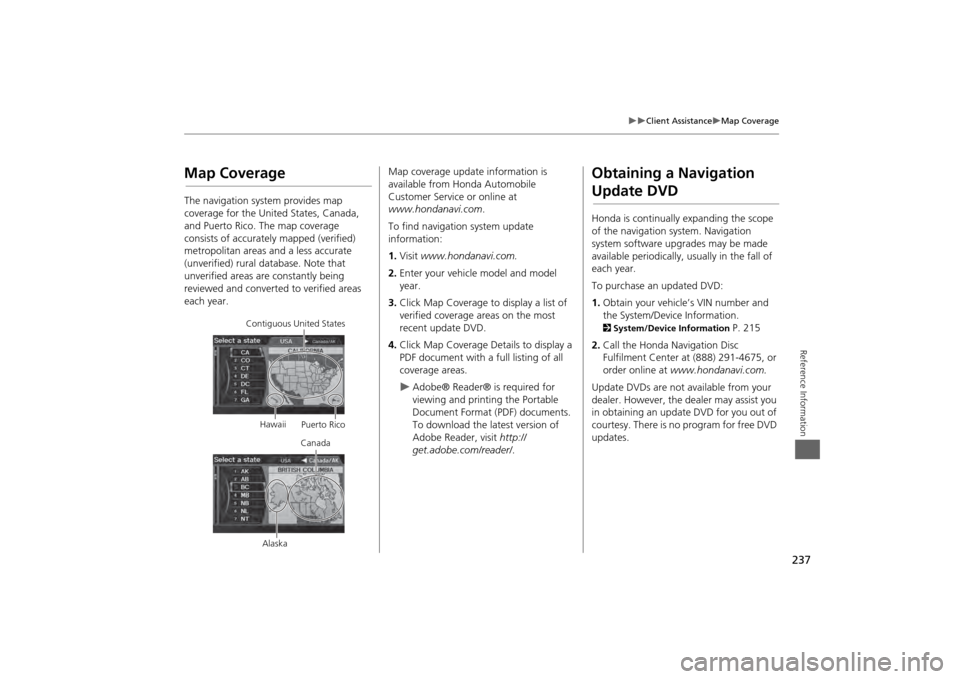
Map CoverageThe navigation system provides map
coverage for the United States, Canada,
and Puerto Rico. The map coverage
consists of accurately mapped (verified)
metropolitan areas and a less accurate
(unverified) rural database. Note that
unverified areas are constantly being
reviewed and converted to verified areas
each year.
Contiguous United States
Hawaii Puerto Rico
Canada
Alaska
Map coverage update information is
available from Honda Automobile
Customer Service or online at
www.hondanavi.com .
To find navigation system update
information:
1. Visit www.hondanavi.com.
2. Enter your vehicle model and model
year.
3. Click Map Coverage to display a list of
verified coverage areas on the most
recent update DVD.
4. Click Map Coverage Details to display a
PDF document with a full listing of all
coverage areas.
Adobe® Reader® is required for
viewing and printing the Portable
Document Format (PDF) documents.
To download the latest version of
Adobe Reader, visit http://
get.adobe.com/reader/ .
Obtaining a Navigation Update DVDHonda is continually expanding the scope
of the navigation system. Navigation
system software upgrades may be made
available periodically, usually in the fall of
each year.
To purchase an updated DVD:
1.Obtain your vehicle’s VIN number and
the System/Device Information. 2 System/Device Information
P. 215
2. Call the Honda Navigation Disc
Fulfilment Center at (888) 291-4675, or
order online at www.hondanavi.com.
Update DVDs are not available from your
dealer. However, the d ealer may assist you
in obtaining an update DVD for you out of
courtesy. There is no program for free DVD
updates.
Page 240 of 267
238
Client Assistance
Traffic Information
Reference Information
Traffic Information•Continuously updated traffic
information is available in major
metropolitan areas across the 48
contiguous states and and Hawaii.
• Visit automobiles.honda.com/traffic for
a complete listing of coverage areas and
other information.
Operation in Alaska,
Hawaii, Canada, and Puerto RicoNavigation-equipped vehicles delivered to
Alaska, Hawaii, Canada, and Puerto Rico
are equipped with XM hardware, but XM
broadcasting is not available. There are
certain functions that rely on XM satellite
signal coverage which are not available.
Unavailable menu options will appear gray
on the LCD display.
All roads displayed on the map screens are
verified roads. Information in this manual
relating to “unverified” roads or areas is
not applicable.■ XM® Radio■Map Coverage
Entering a destination address or place/
landmark on another island may result in a
screen caution message. This is because
there are no ferry routes between islands
in the database.
If Street Name Guidance is set to ON, the
street names will not be read out by voice
guidance. This may change in a future data
update.Shipping a Vehicle to the U.S. MainlandTo receive XM audio, you must call XM
and set up an account at (800) 852-9696.■Address and Place Entry
Screens■Puerto Rico
Page 264 of 267

262
Index
Index
Color
..............................................................27
Map Color
...................................................28
Menu Color
................................................28
Community (Place Category)
.....................80
Continue Trip
.............................................127
Contrast
.........................................................24
Coordinate
....................................................86
Correct Vehicle Position
..............................63
Current Location
........................................109
Current Position
Editing Address Book
.................................40
Setting Destination
.....................................88
DDay ModeMap Color
...................................................28
Menu Color
................................................28
Switching Display Mode
.............................29
Delete a Phone
...........................................175
Dest. Menu 1
................................................68
Dest. Menu 2
................................................68
Destination List
Adding Waypoint
.....................................118
Editing
.......................................................122
Destination Map
..........................................92
Detour
.........................................................117
Dial
...............................................................183
Direct Dial
...................................................185
Directions
....................................................101
Disc
Playing
......................................................141
Voice Commands List
...............................250
EEdit Avoid Area
........................................... 53
Edit Music Info.
.......................................... 151
Edit Speed Dial
.......................................... 178
Edit User/PIN
.............................................. 180
Edit Waypoint Search Area
........................ 55
Emergency (Place Category)
...................... 80
ENT Button
..................................................... 8
Error Messages
.......................................... 227
Disc Player
................................................ 228
iPod®
....................................................... 229
Navigation System
................................... 227
USB Flash Drive
........................................ 230
Exit Info.
..................................................... 102
FFavorite Subcategory
.................................. 82
Find Nearest...
............................................ 123
Folder List
Disc
........................................................... 143
USB Flash Drive
........................................ 163
GGet Music Info.
.......................................... 153
Go Home 1
................................................... 12
Go Home 1 PIN
............................................ 43
Go Home 2
................................................... 12
Go Home 2 PIN
............................................ 43
Gracenote Info. Update
........................... 154
Guidance Menu
......................................... 100
Directions
................................................. 101
Exit Info
.................................................... 102
Guidance Mode
........................................ 103
Guidance Mode
......................................... 103
Guidance Screen Interruption
................... 57
HHDD
Playing
...................................................... 145
Voice Commands List
............................... 250
HDD Button
............................................ 6
, 145
HDD SetupDisc
........................................................... 142
HDD
.......................................................... 147
Heading-up
................................................ 108
Home Address 1
..................................... 12
, 42
Home Address 2
..................................... 12
, 42
Honda Automobile Customer Service
.... 236
IIcon Option
................................................ 107
Import Cellular Phonebook
..................... 177
Interface Dial
................................................. 8
Interface Dial Feedback
.............................. 25
Intersection
.................................................. 87
iPod®
Connecting, Disconnecting
.............. 155
, 160
Playing
...................................................... 155
Voice Commands List
............................... 251