door HONDA ODYSSEY 2019 (in English) Owners Manual
[x] Cancel search | Manufacturer: HONDA, Model Year: 2019, Model line: ODYSSEY, Model: HONDA ODYSSEY 2019Pages: 767, PDF Size: 47.46 MB
Page 542 of 767
uuWhen Driving uStarting the Engine
540
Driving
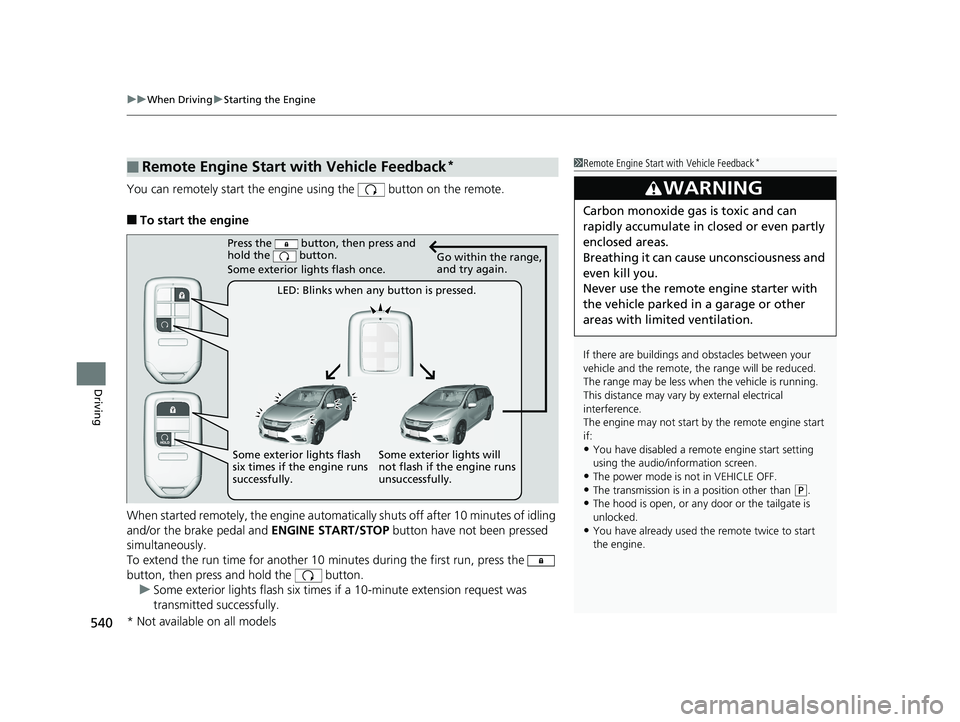
You can remotely start the engine using the button on the remote.
■To start the engine
When started remotely, the engine automati cally shuts off after 10 minutes of idling
and/or the brake pedal and ENGINE START/STOP button have not been pressed
simultaneously.
To extend the run time for another 10 minutes during the first run, press the
button, then press and hold the button. u Some exterior lights flash six times if a 10-minute extension request was
transmitted successfully.
■Remote Engine Start with Vehicle Feedback*1Remote Engine Start with Vehicle Feedback*
If there are buildings an d obstacles between your
vehicle and the remote, th e range will be reduced.
The range may be less when the vehicle is running.
This distance may vary by external electrical
interference.
The engine may not start by the remote engine start
if:
•You have disabled a remo te engine start setting
using the audio/information screen.
•The power mode is not in VEHICLE OFF.
•The transmission is in a position other than ( P.•The hood is open, or any door or the tailgate is
unlocked.
•You have already used the remote twice to start
the engine.
3WARNING
Carbon monoxide ga s is toxic and can
rapidly accumulate in closed or even partly
enclosed areas.
Breathing it can cause unconsciousness and
even kill you.
Never use the remote engine starter with
the vehicle parked in a garage or other
areas with limited ventilation.
Press the button, then press and
hold the button.
Some exterior lights flash once.
LED: Blinks when any button is pressed. Go within the range,
and try again.
Some exterior lights will
not flash if the engine runs
unsuccessfully.
Some exterior lights flash
six times if the engine runs
successfully.
* Not available on all models
19 ODYSSEY-31THR6120.book 540 ページ 2018年12月6日 木曜日 午後4時35分
Page 543 of 767
Continued541
uuWhen Driving uStarting the Engine
Driving
■To stop the engine1Remote Engine Start with Vehicle Feedback*
•Another registered remo te is in the vehicle.•There is any antenna failure.
•The door is unlocked with the built-in key.
•The engine oil pressure is low.•The engine coolant temper ature is extremely high.
•The telematics unit malfunctions.
•The security system alarm is not set.
The engine may stop whil e it is running if:
•You do not start the vehicl e within 10 minutes of
starting the engine with the remote.
•The engine is stopped by using the remote.
•The security system alarm is not set.•Door is unlocked with the built-in key.
•The hood is open, or any door, or the tailgate is
unlocked.
•Any door is open.
•The transmission is in a position other than ( P.
•The engine coolant temper ature is extremely high.
•The battery is low.•The engine oil pressure is low.
•The Malfunction Indicator Lamp (MIL) comes on if
there is a problem with the emissions control
systems.
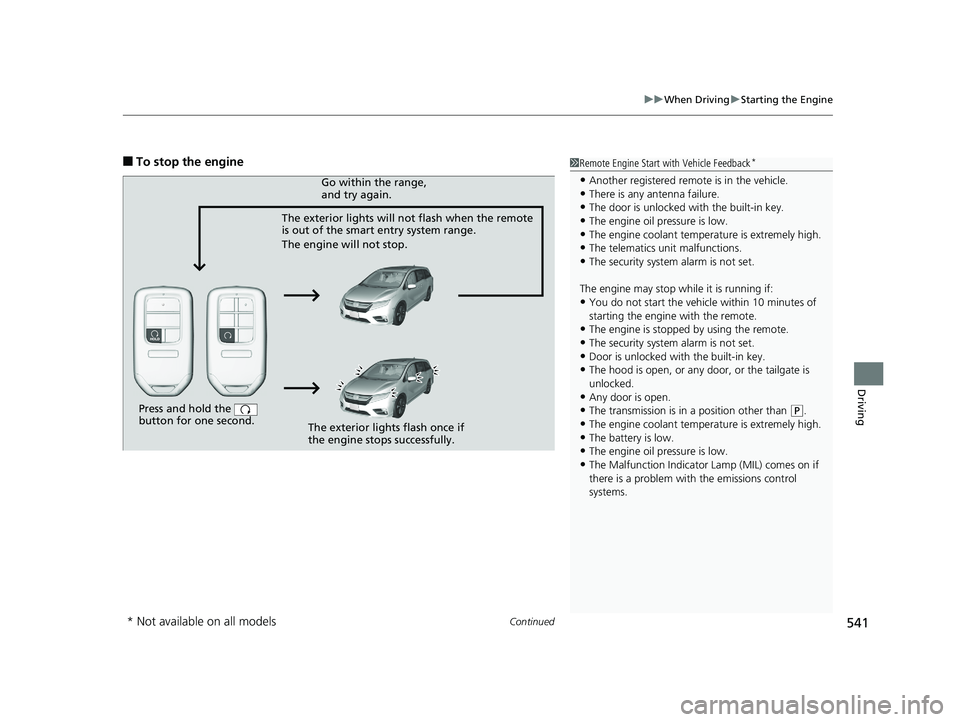
Press and hold the
button for one second.
The exterior lights will not flash when the remote
is out of the smart entry system range.
The engine will not stop.Go within the range,
and try again.
The exterior lights flash once if
the engine stops successfully.
* Not available on all models
19 ODYSSEY-31THR6120.book 541 ページ 2018年12月6日 木曜日 午後4時35分
Page 544 of 767
uuWhen Driving uStarting the Engine
542
Driving
1Remote Engine Start with Vehicle Feedback*
While the engine is running, the vehicle will
automatically preconditi on inside the vehicle.
When it is warm outside:
•The climate control system is activated in
recirculation mode.
•The seat ventilation is activated*.
When it is cold outside:
•The defroster is activated at a moderately warm
temperature.
•The rear defogger and door mirror heaters are
activated*.
•The seat heaters and heated steering wheel are
activated*.
2 Heated Steering Wheel* P. 241
2 Front Seat Heaters and Seat
Ventilation
* P. 243
* Not available on all models
19 ODYSSEY-31THR6120.book 542 ページ 2018年12月6日 木曜日 午後4時35分
Page 551 of 767
Continued549
uuWhen Driving uShifting
Driving
In freezing or sub-freezing conditions, the gear selection response may be slow.
Always depress the brake pedal before changing the gear position to
(P, and
confirm that
(P is shown on the gear position in dicator before releasing the brake.
■When opening the driver’s door
If you open the driver’s door under the following conditions, the gear position
automatically changes to
(P;
• The vehicle is stationary with the engine running, or moving at 1 mph (2 km/h) or
slower.
• The transmission is in other than
(P.
• You have unfastened the driver side seat belt.
u If you manually change the gear position from
(P with the brake pedal
depressed, the gear position will automatically return to
(P once you release
the brake pedal.
■When turning off the power mode
If you turn the engine off wh ile the vehicle is stationary, and the transmission is in
other than
(P, the gear position au tomatically changes to (P.
Except ELITE and TOURING grade models
1When opening the driver’s door
You should always select
(P before opening the
driver’s door.
Make sure to park the vehicle in a safe place. 2 When Stopped P. 619
If you want to drive the ve hicle after the gear position
has automatically changed to
( P under the described
conditions, close the door, fasten the seat belt,
depress the brake pedal, then change the gear
position.
If you leave the vehicle, tu rn off the engine and lock
the doors.
19 ODYSSEY-31THR6120.book 549 ページ 2018年12月6日 木曜日 午後4時35分
Page 556 of 767
554
uuWhen Driving uAuto Idle Stop*
Driving
Auto Idle Stop*
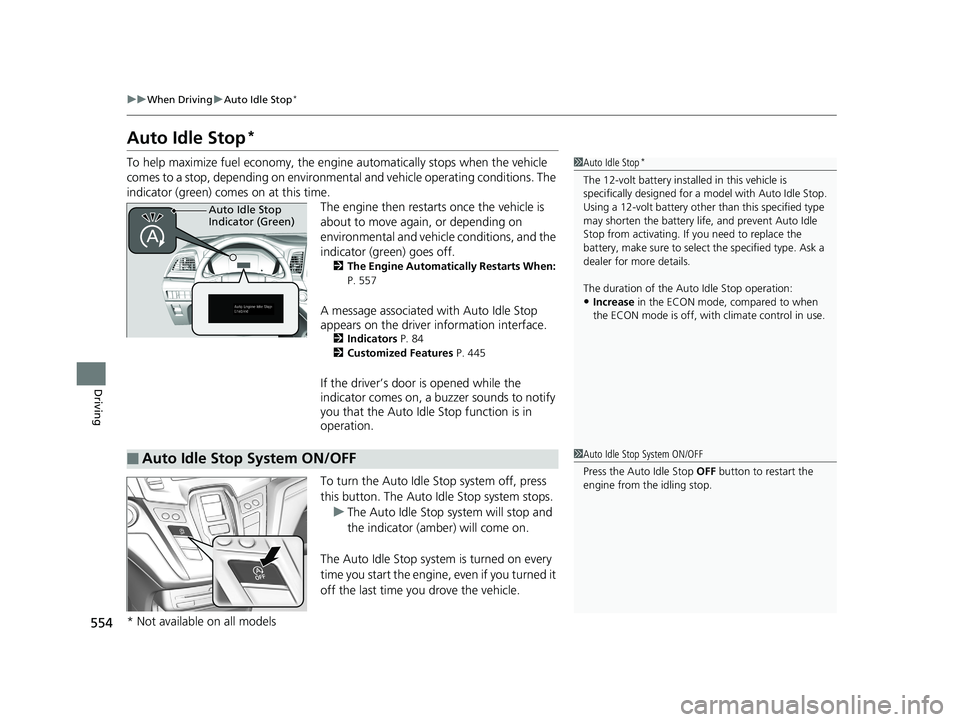
To help maximize fuel econ omy, the engine automatica lly stops when the vehicle
comes to a stop, depending on environmental and vehicle operating conditions. The
indicator (green) comes on at this time. The engine then restarts once the vehicle is
about to move again, or depending on
environmental and vehicle conditions, and the
indicator (green) goes off.
2The Engine Automatically Restarts When:
P. 557
A message associated with Auto Idle Stop
appears on the driver information interface.
2Indicators P. 84
2 Customized Features P. 445
If the driver’s door is opened while the
indicator comes on, a buzzer sounds to notify
you that the Auto Idle Stop function is in
operation.
To turn the Auto Idle Stop system off, press
this button. The Auto Idle Stop system stops.
u The Auto Idle Stop system will stop and
the indicator (amber) will come on.
The Auto Idle Stop syst em is turned on every
time you start the engine, even if you turned it
off the last time you drove the vehicle.
1 Auto Idle Stop*
The 12-volt battery insta lled in this vehicle is
specifically designed for a model with Auto Idle Stop.
Using a 12-volt battery other than this specified type
may shorten the battery life , and prevent Auto Idle
Stop from activati ng. If you need to replace the
battery, make sure to select the specified type. Ask a
dealer for more details.
The duration of the Au to Idle Stop operation:
•Increase in the ECON mode, compared to when
the ECON mode is off, with climate control in use.
Auto Idle Stop
Indicator (Green)
■Auto Idle Stop System ON/OFF1 Auto Idle Stop System ON/OFF
Press the Auto Idle Stop OFF button to restart the
engine from the idling stop.
* Not available on all models
19 ODYSSEY-31THR6120.book 554 ページ 2018年12月6日 木曜日 午後4時35分
Page 601 of 767
599
uuWhen Driving uBlind spot information System*
Driving
■When the system detects a vehicle1Blind spot information System*
You can turn off the audible al ert, or all the blind spot
information system alert using the audio/information
screen.
2 Customized Features P. 445
Turn the system off when towing a trailer. The system
may not work properly fo r the following reasons:
•The added mass tilts the vehicle and changes the
radar coverage.
•The trailer itself can be detected by the radar
sensors, causing the blind spot information system
alert indicators to come on.
Blind spot information sy stem may be adversely
affected when:
•Objects (guard rails, poles, trees, etc,.) are
detected.
•An object that does not re flect radio waves well,
such as a motorcycle, is in the alert zone.
•Driving on a curved road.•A vehicle is moving from a far lane to the adjacent
lane.
•The system picks up external electrical interference.•The rear bumper or the sensors have been
improperly repaired or the rear bumper has been
deformed.
•The orientation of the sensors has been changed.•In bad weather (Heavy rain, snow, and fog).
For proper blind spot information system operation:
•Always keep the rear bumper corner area clean.•Do not cover the rear bumper corner area with
labels or sticke rs of any kind.
•Take your vehicle to a dealer if you need the rear
bumper corner area or th e radar sensors to be
repaired, or the rear bumper corner area is strongly
impacted.
The system does not operate when in
( R.
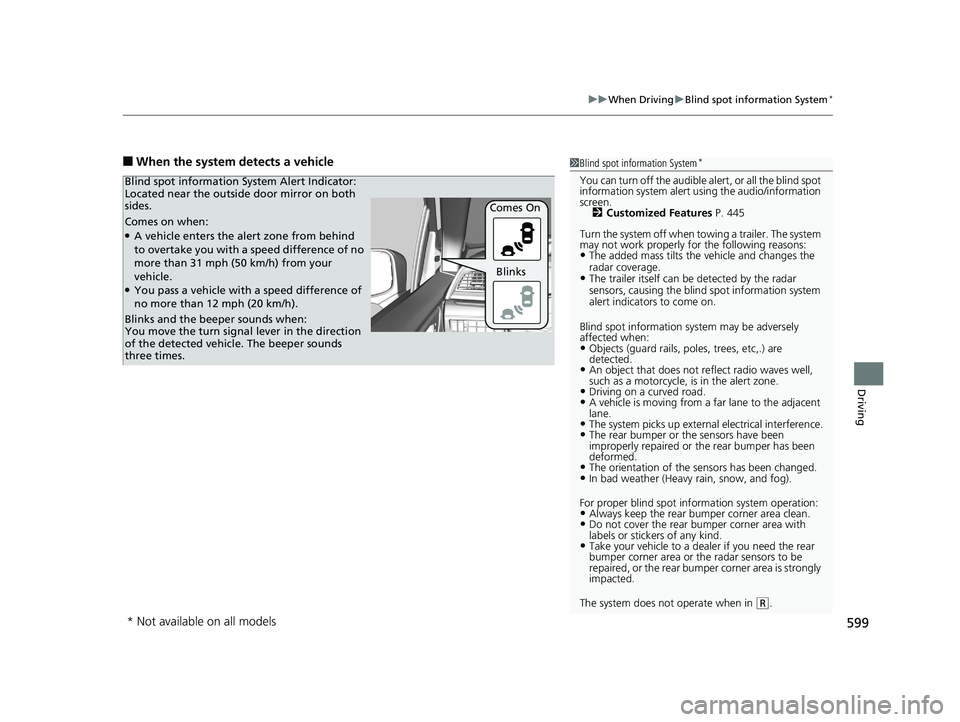
Comes on when:●A vehicle enters the alert zone from behind
to overtake you with a speed difference of no
more than 31 mph (50 km/h) from your
vehicle.
●You pass a vehicle with a speed difference of
no more than 12 mph (20 km/h). Comes On
Blind spot information System Alert Indicator:
Located near the outside door mirror on both
sides.
Blinks and the beeper sounds when:
You move the turn signal
lever in the direction
of the detected vehicle. The beeper sounds
three times. Blinks
* Not available on all models
19 ODYSSEY-31THR6120.book 599 ページ 2018年12月6日 木曜日 午後4時35分
Page 602 of 767
600
uuWhen Driving uLaneWatchTM*
Driving
LaneWatchTM*
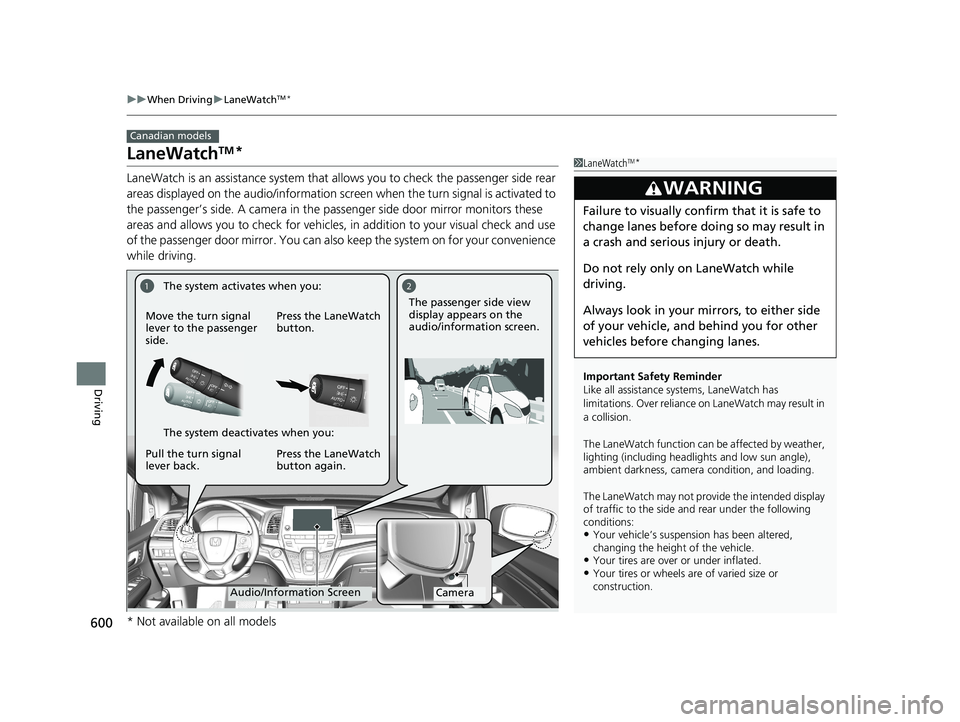
LaneWatch is an assistance system that allows you to check the passenger side rear
areas displayed on the audio/in formation screen when the turn signal is activated to
the passenger’s side. A camera in the passenger side door mirror monitors these
areas and allows you to check for vehicles, in addition to your visual check and use
of the passenger door mirror. You can also keep the system on for your convenience
while driving.
Canadian models
1 LaneWatchTM*
Important Safety Reminder
Like all assistance systems, LaneWatch has
limitations. Over reliance on LaneWatch may result in
a collision.
The LaneWatch func tion can be affected by weather,
lighting (including headli ghts and low sun angle),
ambient darkness, camera condition, and loading.
The LaneWatch may not prov ide the intended display
of traffic to the side and rear under the following
conditions:
•Your vehicle’s suspension has been altered,
changing the height of the vehicle.
•Your tires are over or under inflated.•Your tires or wheels are of varied size or
construction.
3WARNING
Failure to visually confirm that it is safe to
change lanes before doing so may result in
a crash and serious injury or death.
Do not rely only on LaneWatch while
driving.
Always look in your mi rrors, to either side
of your vehicle, and behind you for other
vehicles before changing lanes.
12
CameraAudio/Information Screen
Move the turn signal
lever to the passenger
side.
Press the LaneWatch
button.
Pull the turn signal
lever back. Press the LaneWatch
button again. The passenger side view
display appears on the
audio/information screen.
The system activates when you:
The system deactivates when you:
* Not available on all models
19 ODYSSEY-31THR6120.book 600 ページ 2018年12月6日 木曜日 午後4時35分
Page 603 of 767

601
uuWhen Driving uLaneWatchTM*
Driving
■Customizing the La neWatch settings
You can customize the following items using the audio/information screen.
• Show with Turn Signal : Selects whether LaneWatch monitor comes on when
you operate the turn signal light lever.
• Show Reference Line : Selects whether the reference lines appear on the
LaneWatch monitor.
2 Customized Features P. 445
■Reference Lines
Three lines that appear on the screen can give
an idea of how far the vehicles or objects on
the screen are from your vehicle, respectively.
If an object is near line 1 (in red), it indicates
that it is close to your vehicle whereas an
object near line 3 farther away.
1LaneWatchTM*
The LaneWatch camera view is restricted. Its unique
lens makes objects on the screen slightly look
different from what they are.
LaneWatch display does not come on when the
transmission is in
( R.
For proper LaneWatch operation:
•The camera is located in the passenger side door
mirror. Always keep this ar ea clean. If the camera
lens is covered with dirt or moisture, use a soft,
moist cloth to keep the lens clean and free of
debris.
•Do not cover the camera lens with labels or stickers
of any kind.
•Do not touch the camera lens.
1 Reference Lines
The area around the reference line 1 (red) is very close
to your vehicle. As always, make sure to visually
confirm the safety of a la ne change before changing
lanes.
The distance betwee n your vehicle and lines 1, 2 and
3 on the screen vary depending on road conditions
and vehicle loading. For ex ample, the reference lines
on the screen may seem to appear closer than the
actual distances when the rear of your vehicle is more
heavily loaded.
Consult a dealer if:
•The passenger side door mirr or, or area around it is
severely impacted, resulting in changing the
camera angle.
•The LaneWatch display doe s not come on at all.
23
1
* Not available on all models
19 ODYSSEY-31THR6120.book 601 ページ 2018年12月6日 木曜日 午後4時35分
Page 635 of 767
633
uuRefueling uHow to Refuel
Continued
Driving
How to Refuel
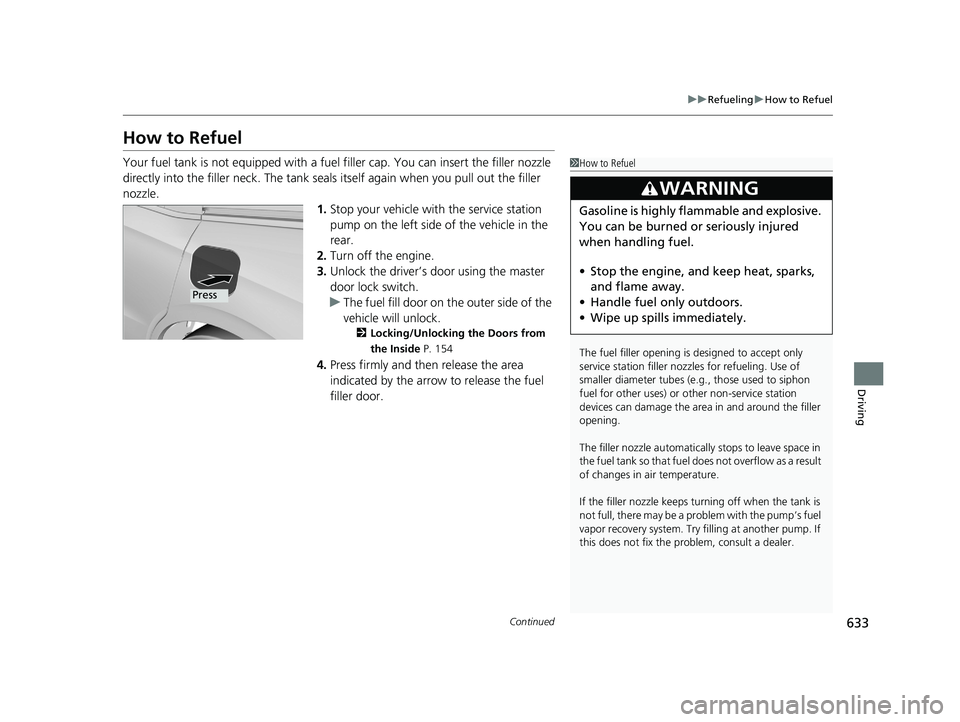
Your fuel tank is not equipped with a fuel filler cap. You can insert the filler nozzle
directly into the filler neck. The tank seals itself again when you pull out the filler
nozzle. 1.Stop your vehicle with the service station
pump on the left side of the vehicle in the
rear.
2. Turn off the engine.
3. Unlock the driver’s door using the master
door lock switch.
u The fuel fill door on the outer side of the
vehicle will unlock.
2 Locking/Unlocking the Doors from
the Inside P. 154
4.Press firmly and then release the area
indicated by the arrow to release the fuel
filler door.
1How to Refuel
The fuel filler opening is designed to accept only
service station filler nozzles for refueling. Use of
smaller diamet er tubes (e.g., those used to siphon
fuel for other uses) or other non-service station
devices can damage the area in and around the filler
opening.
The filler nozzle automatically stops to leave space in
the fuel tank so that fuel does not overflow as a result
of changes in air temperature.
If the filler nozzle keeps tu rning off when the tank is
not full, there may be a problem with the pump’s fuel
vapor recovery system. Try fi lling at another pump. If
this does not fix the problem, consult a dealer.
3WARNING
Gasoline is highly flammable and explosive.
You can be burned or seriously injured
when handling fuel.
• Stop the engine, and keep heat, sparks,
and flame away.
• Handle fuel only outdoors.
• Wipe up spills immediately.
Press
19 ODYSSEY-31THR6120.book 633 ページ 2018年12月6日 木曜日 午後4時35分
Page 636 of 767
uuRefueling uHow to Refuel
634
Driving
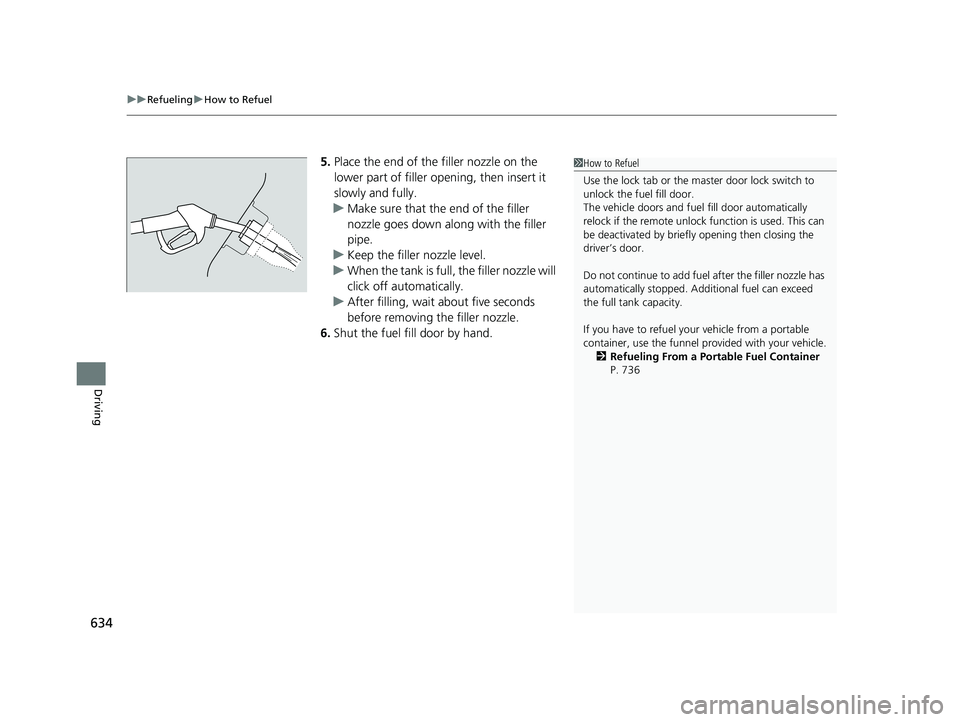
5. Place the end of the filler nozzle on the
lower part of filler opening, then insert it
slowly and fully.
u Make sure that the end of the filler
nozzle goes down along with the filler
pipe.
u Keep the filler nozzle level.
u When the tank is full, the filler nozzle will
click off automatically.
u After filling, wait about five seconds
before removing th e filler nozzle.
6. Shut the fuel fill door by hand.1How to Refuel
Use the lock tab or the ma ster door lock switch to
unlock the fuel fill door.
The vehicle doors and fuel fill door automatically
relock if the remote unlock function is used. This can
be deactivated by briefl y opening then closing the
driver’s door.
Do not continue to add fuel after the filler nozzle has
automatically stopped. Addi tional fuel can exceed
the full tank capacity.
If you have to refuel y our vehicle from a portable
container, use the funnel pr ovided with your vehicle.
2 Refueling From a Portable Fuel Container
P. 736
19 ODYSSEY-31THR6120.book 634 ページ 2018年12月6日 木曜日 午後4時35分