change HONDA ODYSSEY 2022 Owners Manual
[x] Cancel search | Manufacturer: HONDA, Model Year: 2022, Model line: ODYSSEY, Model: HONDA ODYSSEY 2022Pages: 782, PDF Size: 27.17 MB
Page 559 of 782
558
uuWhen Driving uShifting
Driving
Shifting
Change the gear position in acco rdance with your driving needs.
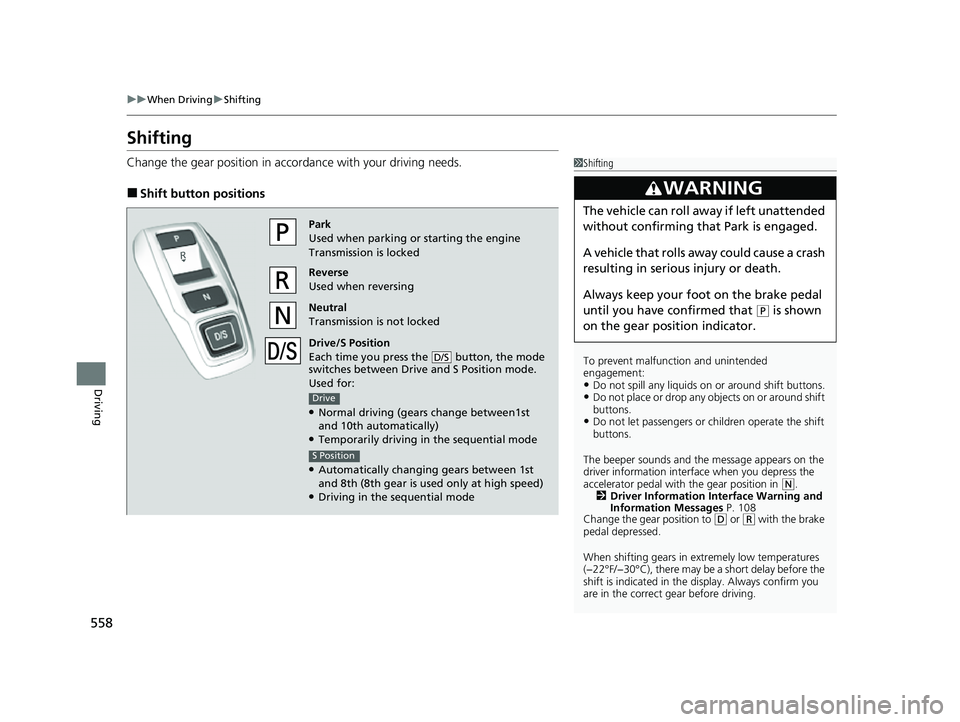
■Shift button positions
1Shifting
To prevent malfunc tion and unintended
engagement:
•Do not spill any liquids on or around shift buttons.•Do not place or drop any objects on or around shift
buttons.
•Do not let passengers or ch ildren operate the shift
buttons.
The beeper sounds and the message appears on the
driver information interf ace when you depress the
accelerator pedal with the gear position in
( N.
2 Driver Information Interface Warning and
Information Messages P. 108
Change the gear position to
( D or (R with the brake
pedal depressed.
When shifting gears in extremely low temperatures
(−22°F/−30°C), there may be a short delay before the
shift is indicated in the di splay. Always confirm you
are in the correct gear before driving.
3WARNING
The vehicle can roll aw ay if left unattended
without confirming that Park is engaged.
A vehicle that rolls away could cause a crash
resulting in seriou s injury or death.
Always keep your foot on the brake pedal
until you have confirmed that
( P is shown
on the gear position indicator.
Park
Used when parking or starting the engine
Transmission is locked
Reverse
Used when reversing
Neutral
Transmission is not locked
Drive/S Position
Each time you press the button, the mode
switches between Drive and S Position mode.
Used for:
●Normal driving (gears change between1st
and 10th automatically)
●Temporarily driving in the sequential mode
●Automatically changing gears between 1st
and 8th (8th gear is used only at high speed)
●Driving in the sequential mode
D/S
Drive
S Position
22 US ODYSSEY-31THR6400.book 558 ページ 2020年11月16日 月曜日 午後1時41分
Page 561 of 782
uuWhen Driving uShifting
560
Driving
■Shift Operation1Shift Operation
NOTICE
When you change (D to (R and vice versa, depress
the brake pedal to come to a complete stop, then
select the intended gear position while maintaining
brake pressure.
Use the gear position indicator and the shift button
indicator to check the gear position before selecting
a shift button.
If the indicator of the currently selected gear position,
or all the gear position indicators are blinking
simultaneously, there is a problem with the
transmission.
Avoid sudden acceleration and have the transmission
checked by a dealer as soon as possible.
The fuel supply may be cut of f if you drive at engine
speeds in or over the tac hometer’s red zone (engine
speed limit). If this happe ns, you may experience a
slight jolt.
When the engine speed is increased while the
transmission is in
( N, (P or (R, the fuel supply may
be cut off even without the engine speed entering
the tachometer’s red zone.
The beeper sounds once when you change to
( R.
2 Vehicle Customization P. 143
2 Customized Features P. 463Models with color audio system
Models with Display Audio
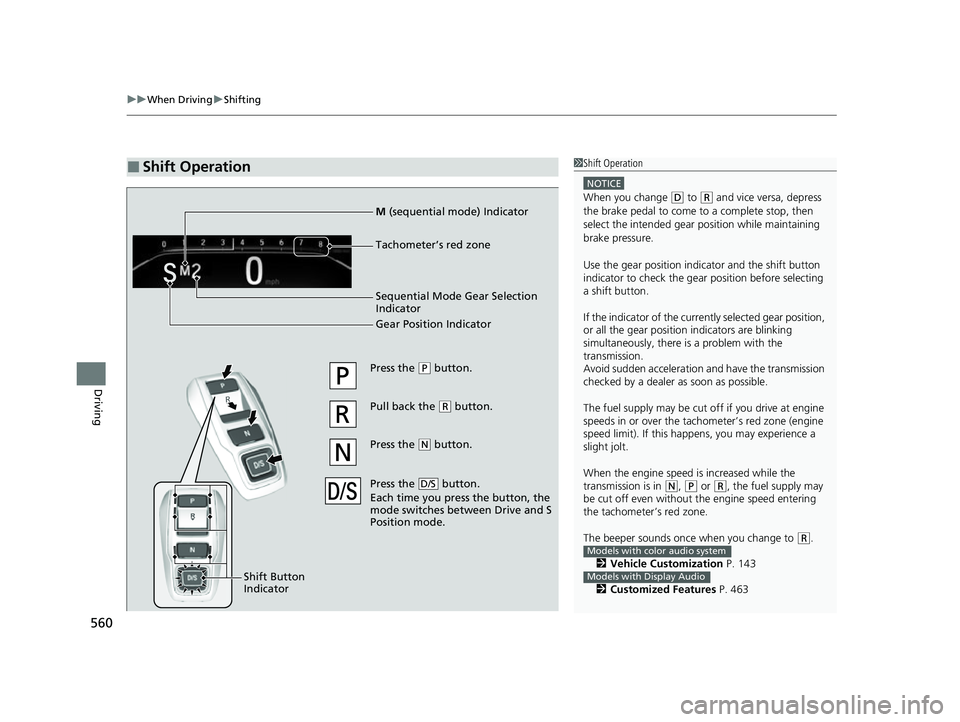
Press the (P button.
Pull back the
( R button.
Press the
( N button.
Press the button.
Each time you pre ss the button, the
mode switches between Drive and S
Position mode.
D/S
Shift Button
Indicator
M (sequential mode) Indicator
Tachometer’s red zone
Sequential Mode Gear Selection
Indicator
Gear Position Indicator
22 US ODYSSEY-31THR6400.book 560 ページ 2020年11月16日 月曜日 午後1時41分
Page 562 of 782
Continued561
uuWhen Driving uShifting
Driving
■When opening the driver’s door
If you open the driver’s door under the following conditions, the gear position
automatically changes to
(P;
• The vehicle is stationary with the engine running, or moving at 1 mph (2 km/h) or
slower.
• The transmission is in other than
(P.
• You have unfastened the driver side seat belt.
u If you manually change the gear position from
(P with the brake pedal
depressed, the gear position will automatically return to
(P once you release
the brake pedal.
■When turning off the power mode
If you turn the engine off wh ile the vehicle is stationary, and the transmission is in
other than
(P, the gear position au tomatically changes to (P.
1When opening the driver’s door
You should always select
(P before opening the
driver’s door.
Make sure to park the vehicle in a safe place.
2 When Stopped P. 646
If you want to drive the ve hicle after the gear position
has automatically changed to
( P under the described
conditions, close the door, fasten the seat belt,
depress the brake pedal, then change the gear
position.
If you leave the vehicle, tu rn off the engine and lock
the doors.
22 US ODYSSEY-31THR6400.book 561 ページ 2020年11月16日 月曜日 午後1時41分
Page 563 of 782
![HONDA ODYSSEY 2022 Owners Manual uuWhen Driving uShifting
562
Driving
■If you want to keep the transmission in (N position [car wash mode]
With the engine running:
1. Press and hold the brake pedal.
2. Select
(N, then release the](/img/13/58872/w960_58872-562.png "HONDA ODYSSEY 2022 Owners Manual uuWhen Driving uShifting
562
Driving
■If you want to keep the transmission in (N position [car wash mode]
With the engine running:
1. Press and hold the brake pedal.
2. Select
(N, then release the")
uuWhen Driving uShifting
562
Driving
■If you want to keep the transmission in (N position [car wash mode]
With the engine running:
1. Press and hold the brake pedal.
2. Select
(N, then release the button to display (Neutral) (N hold mode on the driver
information interface.
3. Press and hold
(N again for two seconds.
u This puts the vehicle in car wash mode which must be used when your vehicle
is pulled through a conveyor type automatic car wash where you or an
attendant do not remain in the vehicle.
If the ENGINE STOP/START button is pressed
after car wash mode has been activated, the
power mode will change to ACCESSORY and
a message will be displayed on the driver
information interface. u For 15 minutes the gear position remains
in
(N with the power mode in
ACCESSORY. After that, the position
automatically changes to
(P and the
power mode changes to OFF.
u Manually changing to
(P cancels
ACCESSORY mode. The
(P indicator
comes on and the power mode changes
to OFF. You must always shift to
(P
when car wash mode is no longer
needed.
1 If you want to keep the transmission in (N position [car wash
mode]
NOTICE
When transmission is too hot, carwash mode may
not be available. Let the engine idle and cool down
transmission.
The transmission may not stay in
(N position while
the following indicator is on:
•Transmission system indicator.
•Malfunction indicator lamp.•Charging system indicator.
22 US ODYSSEY-31THR6400.book 562 ページ 2020年11月16日 月曜日 午後1時41分
Page 564 of 782
563
uuWhen Driving uShifting
Continued
Driving
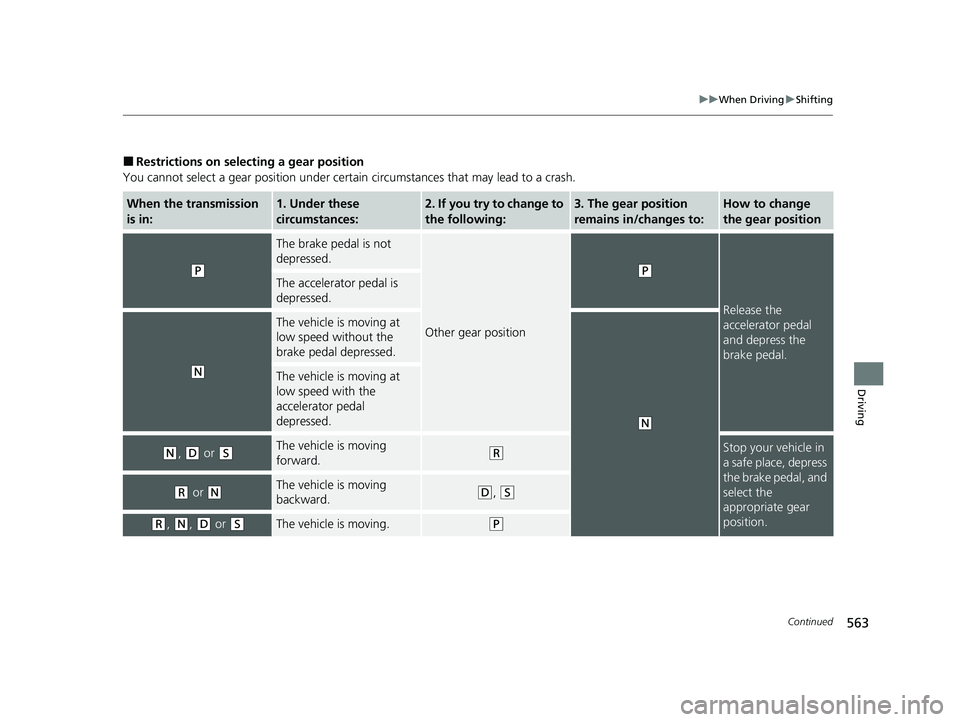
■Restrictions on selecting a gear position
You cannot select a gear position under certain circumstances that may lead to a crash.
When the transmission
is in:1. Under these
circumstances:2. If you try to change to
the following:3. The gear position
remains in/changes to:How to change
the gear position
(P
The brake pedal is not
depressed.
Other gear position
(P
Release the
accelerator pedal
and depress the
brake pedal.
The accelerator pedal is
depressed.
(N
The vehicle is moving at
low speed without the
brake pedal depressed.
(N
The vehicle is moving at
low speed with the
accelerator pedal
depressed.
(N, (D or (SThe vehicle is moving
forward.(RStop your vehicle in
a safe place, depress
the brake pedal, and
select the
appropriate gear
position.
(R or (NThe vehicle is moving
backward.(D, (S
(R, (N, (D or (SThe vehicle is moving.(P
22 US ODYSSEY-31THR6400.book 563 ページ 2020年11月16日 月曜日 午後1時41分
Page 565 of 782
564
uuWhen Driving uShifting
Driving
Use the paddle shifters to change between 1st and 10th gears without removing
your hands from the steering wheel. The tr ansmission will switch to the sequential
mode.
■When the transmi ssion is in (D:
The vehicle will go into the sequential mode momentarily, and the sequential mode
gear selection indicator will come on.
When the vehicle goes into the sequential mode by
(- paddle shifter and the lower
gear is available, the trans mission properly selects single or double gear change.
Once you start traveling at a constant sp eed, the sequential mode will automatically
switch off, and the sequential mode gear selection indicator will go off.
Hold the
(+ paddle shifter for two seconds to return to normal drive.
■When the transmission is in (S:
The vehicle will go into the sequential mode, and the M (sequential mode) indicator
and sequential mode gear selection indicator will come on.
If the vehicle speed increases and the engi ne speed reaches near the tachometer’s
red zone, the transmission automatica lly shifts up to the next gear.
You can cancel this mode by holding the
(+ paddle shifter for two seconds. When
the sequential mode is canceled, the sequential mode indicator and sequential
mode gear selection indicator go off.
■Sequential Mode
22 US ODYSSEY-31THR6400.book 564 ページ 2020年11月16日 月曜日 午後1時41分
Page 566 of 782
565
uuWhen Driving uShifting
Driving
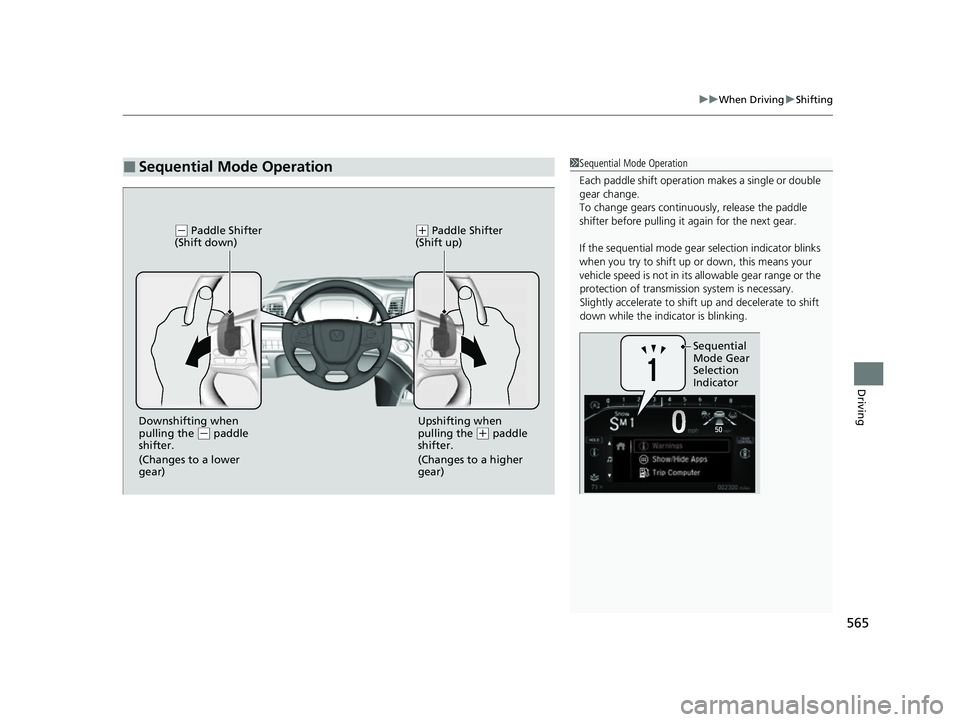
■Sequential Mode Operation1Sequential Mode Operation
Each paddle shif t operation makes a single or double
gear change.
To change gears continuously, release the paddle
shifter before pulling it again for the next gear.
If the sequential mode gear selection indicator blinks
when you try to shift up or down, this means your
vehicle speed is not in its allowable gear range or the
protection of transmissi on system is necessary.
Slightly accelerate to shift up and decelerate to shift
down while the indi cator is blinking.
Sequential
Mode Gear
Selection
Indicator
(- Paddle Shifter
(Shift down)( + Paddle Shifter
(Shift up)
Downshifting when
pulling the ( - paddle
shifter.
(Changes to a lower
gear) Upshifting when
pulling the (
+ paddle
shifter.
(Changes to a higher
gear)
22 US ODYSSEY-31THR6400.book 565 ページ 2020年11月16日 月曜日 午後1時41分
Page 569 of 782
uuWhen Driving uAuto Idle Stop
568
Driving
The vehicle stops with the gear position in (D and the brake pedal depressed.
When you put the transmission into
(P, the Auto Idle Stop continues to operate,
even if the brake pedal is released. u If you depress the brake pedal, the engine may automatically restart.
■Auto Idle Stop does not activate when:
• The Auto Idle Stop OFF button is pressed.
• The driver’s seat belt is not fastened.
• The engine coolant temperature is low or high.
• The transmission fluid temperature is low or high.
• The vehicle comes to a stop again before the vehicle speed reaches 3 mph (5 km/
h) after the engine starts.
• The vehicle is stopped on a steep incline.
• The transmission is in a position other than
(D.
• The engine is started with the hood open.
u Turn off the engine. Close the hood before you restart the engine to activate
Auto Idle Stop.
• The battery charge is low.
• The internal temperature of the battery is 14°F (−10°C) or less.
• The climate control system is in use, an d the outside temperature is below −4°F
(−20°C) or over 104°F (40°C).
• The climate control system is in us e, and the temperature is set to Hi or Lo.
• is on (indicator on).
• The rear fan is set to maximum speed.
u Auto Idle Stop may not ac tivate under other conditions when the rear climate
control system is in use.
• When the Intelligent Traction Management is set to Snow.
■Auto Idle Stop Activates When:1Auto Idle Stop Activates When:
Do not open the hood while the Auto Idle Stop
function is activated. If the hood is opened, the
engine will not re start automatically.
In this case, restart the engine with the ENGINE
START/STOP button.
2 Starting the Engine P. 550
When ACC with Low Speed Follow is in operation,
the vehicle stops without de pressing the brake pedal
and Auto Idle Stop may activate.
In such cases, the engine may restart if you change
the shift position other than
( D.
Pressing the ENGINE START/STOP button causes
the engine to no longer rest art automatically. Follow
the standard procedure to start the engine.
2 Starting the Engine P. 550
22 US ODYSSEY-31THR6400.book 568 ページ 2020年11月16日 月曜日 午後1時41分
Page 578 of 782
577
uuWhen Driving uTire Pressure Monitoring System (TPMS) with Tire Fill Assist
Continued
Driving
Tire Pressure Monitoring System (TPMS) with Tire
Fill Assist
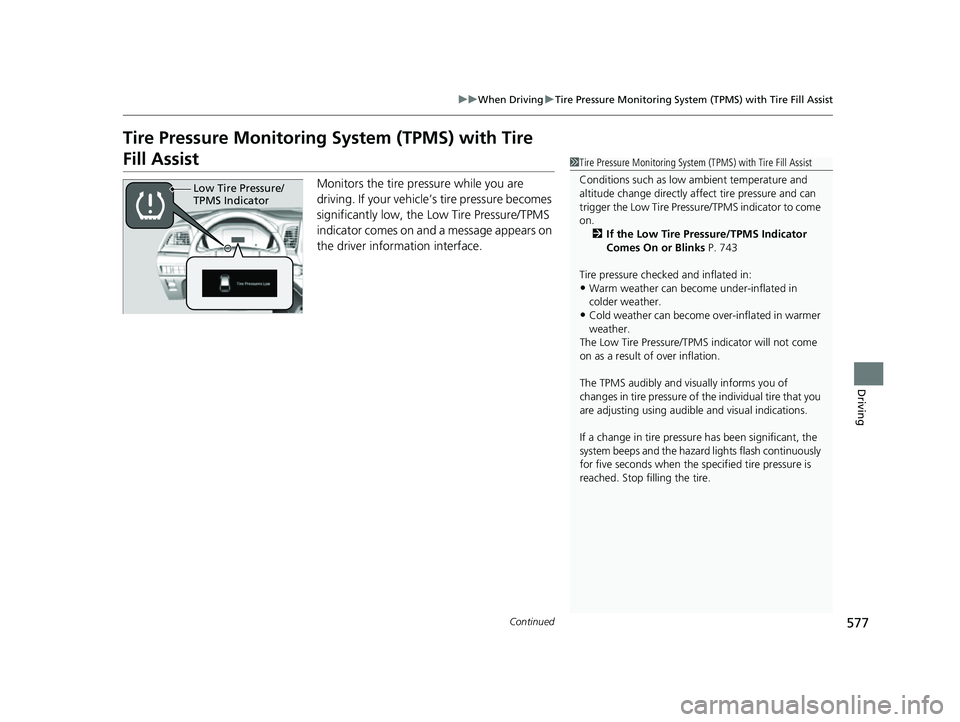
Monitors the tire pr essure while you are
driving. If your vehicle’s tire pressure becomes
significantly low, the Low Tire Pressure/TPMS
indicator comes on and a message appears on
the driver information interface.
1 Tire Pressure Monitoring System (TPMS) with Tire Fill Assist
Conditions such as low ambient temperature and
altitude change directly affect tire pressure and can
trigger the Low Tire Pressure/TPMS indicator to come
on. 2 If the Low Tire Pressure/TPMS Indicator
Comes On or Blinks P. 743
Tire pressure checked and inflated in:
•Warm weather can beco me under-inflated in
colder weather.
•Cold weather can become over-inflated in warmer
weather.
The Low Tire Pressure/TPMS indicator will not come
on as a result of over inflation.
The TPMS audibly and visually informs you of
changes in tire pressure of the individual tire that you
are adjusting using audibl e and visual indications.
If a change in tire pressure has been significant, the
system beeps and the hazard lights flash continuously
for five seconds when the specified tire pressure is
reached. Stop filling the tire.
Low Tire Pressure/
TPMS Indicator
22 US ODYSSEY-31THR6400.book 577 ページ 2020年11月16日 月曜日 午後1時41分
Page 582 of 782
581
uuWhen Driving uBlind spot information System*
Continued
Driving
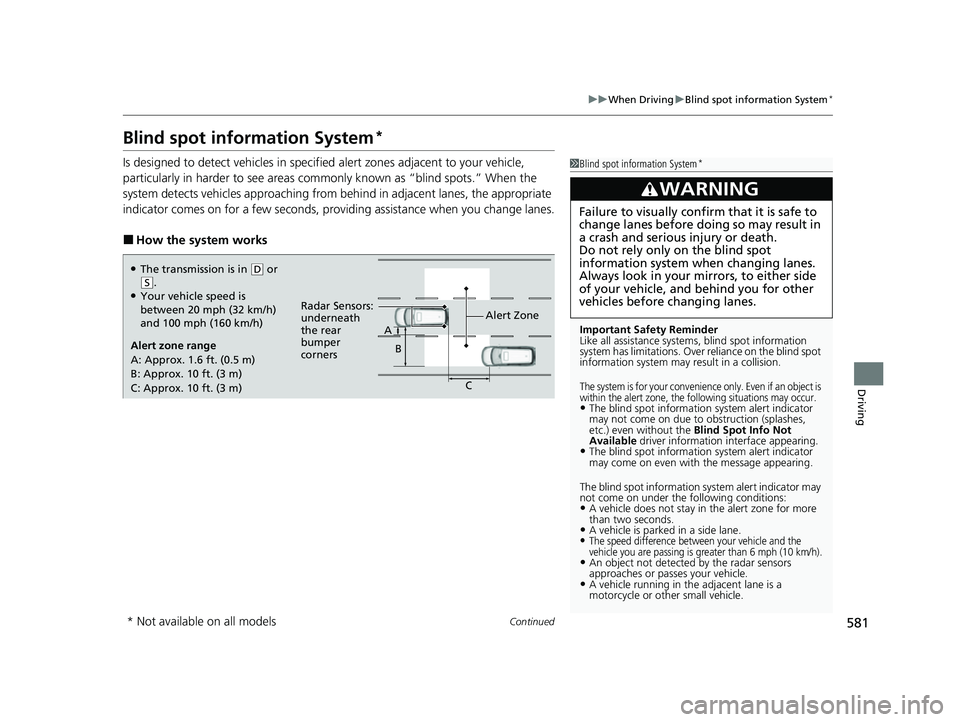
Blind spot information System*
Is designed to detect vehicles in specified alert zones adjacent to your vehicle,
particularly in harder to see areas comm only known as “blind spots.” When the
system detects vehicles approaching from be hind in adjacent lanes, the appropriate
indicator comes on for a few seconds, providing assistance when you change lanes.
■How the system works
1 Blind spot information System*
Important Safety Reminder
Like all assistance systems, blind spot information
system has limitations. Over reliance on the blind spot
information system may result in a collision.
The system is for your convenience only. Even if an object is
within the alert zone, the following situations may occur.
•The blind spot informatio n system alert indicator
may not come on due to obstruction (splashes,
etc.) even without the Blind Spot Info Not
Available driver information interface appearing.
•The blind spot information system alert indicator
may come on even with the message appearing.
The blind spot information system alert indicator may
not come on under the following conditions:
•A vehicle does not stay in the alert zone for more
than two seconds.
•A vehicle is parked in a side lane.•The speed difference between your vehicle and the
vehicle you are passing is greater than 6 mph (10 km/h).
•An object not detected by the radar sensors
approaches or passes your vehicle.
•A vehicle running in the adjacent lane is a
motorcycle or other small vehicle.
3WARNING
Failure to visually confirm that it is safe to
change lanes before doing so may result in
a crash and serious injury or death.
Do not rely only on the blind spot
information system wh en changing lanes.
Always look in your mi rrors, to either side
of your vehicle, and behind you for other
vehicles before changing lanes.
●The transmission is in ( D or (S.●Your vehicle speed is
between 20 mph (32 km/h)
and 100 mph (160 km/h)
Alert zone range
A: Approx. 1.6 ft. (0.5 m)
B: Approx. 10 ft. (3 m)
C: Approx. 10 ft. (3 m) Alert Zone
Radar Sensors:
underneath
the rear
bumper
corners A
B
C
* Not available on all models
22 US ODYSSEY-31THR6400.book 581 ページ 2020年11月16日 月曜日 午後1時41分