change HONDA ODYSSEY 2022 Owners Manual
[x] Cancel search | Manufacturer: HONDA, Model Year: 2022, Model line: ODYSSEY, Model: HONDA ODYSSEY 2022Pages: 782, PDF Size: 27.17 MB
Page 606 of 782
Continued605
uuHonda Sensing ®u Adaptive Cruise Control (ACC) with Low Speed Follow
Driving
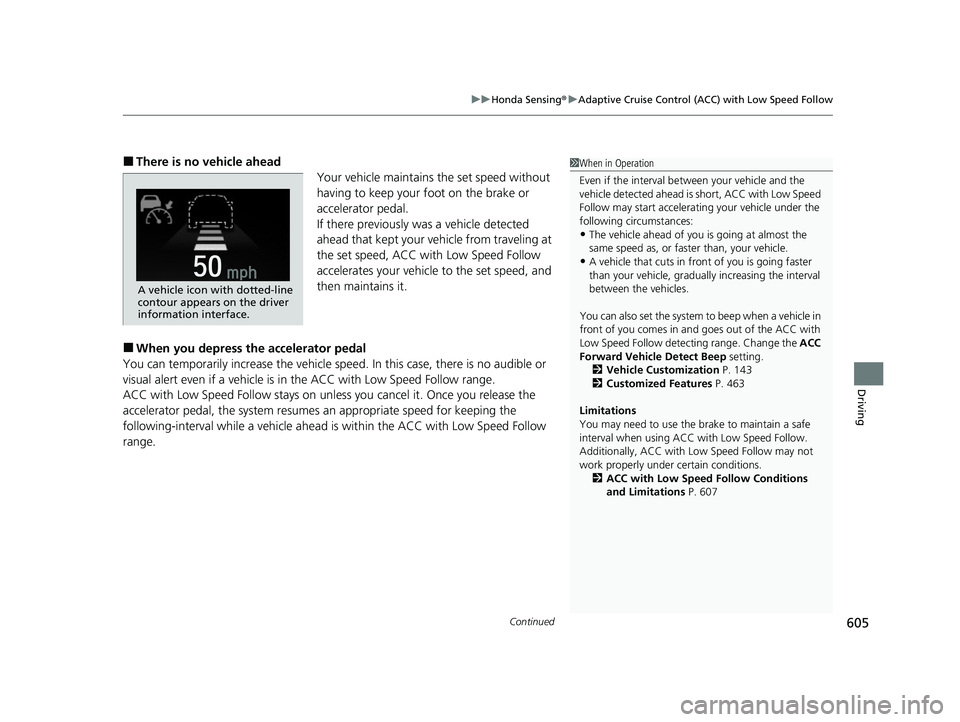
■There is no vehicle ahead
Your vehicle maintains the set speed without
having to keep your foot on the brake or
accelerator pedal.
If there previously was a vehicle detected
ahead that kept your ve hicle from traveling at
the set speed, ACC with Low Speed Follow
accelerates your vehicle to the set speed, and
then maintains it.
■When you depress the accelerator pedal
You can temporarily increase the vehicle speed . In this case, there is no audible or
visual alert even if a vehicle is in the ACC with Low Speed Follow range.
ACC with Low Speed Follow stays on unle ss you cancel it. Once you release the
accelerator pedal, the system resume s an appropriate speed for keeping the
following-interval while a vehicle ahead is within the ACC with Low Speed Follow
range.
1 When in Operation
Even if the interval betw een your vehicle and the
vehicle detected ahead is short, ACC with Low Speed
Follow may start accelerati ng your vehicle under the
following circumstances:
•The vehicle ahead of you is going at almost the
same speed as, or faster than, your vehicle.
•A vehicle that cuts in front of you is going faster
than your vehicle, gradua lly increasing the interval
between the vehicles.
You can also set the system to beep when a vehicle in
front of you comes in and goes out of the ACC with
Low Speed Follow detect ing range. Change the ACC
Forward Vehicle Detect Beep setting.
2 Vehicle Customization P. 143
2 Customized Features P. 463
Limitations
You may need to use the brake to maintain a safe
interval when using ACC with Low Speed Follow.
Additionally, ACC with Lo w Speed Follow may not
work properly under certain conditions.
2 ACC with Low Speed Follow Conditions
and Limitations P. 607
A vehicle icon with dotted-line
contour appears on the driver
information interface.
22 US ODYSSEY-31THR6400.book 605 ページ 2020年11月16日 月曜日 午後1時41分
Page 611 of 782
uuHonda Sensing ®u Adaptive Cruise Control (ACC) with Low Speed Follow
610
Driving
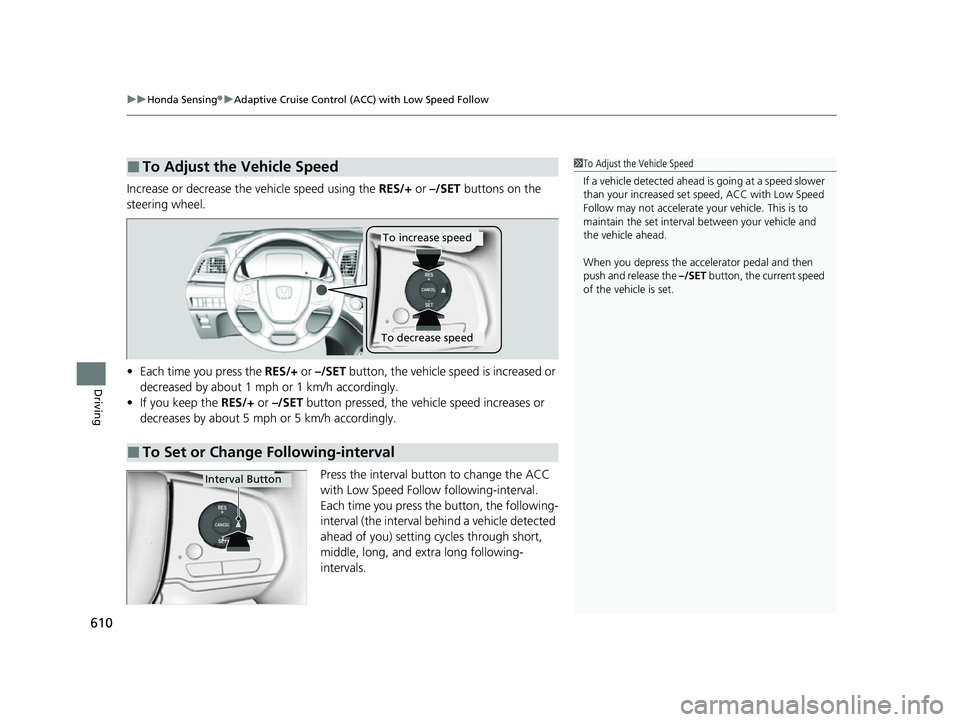
Increase or decrease the vehicle speed using the RES/+ or –/SET buttons on the
steering wheel.
• Each time you press the RES/+ or –/SET button, the vehicle speed is increased or
decreased by about 1 mph or 1 km/h accordingly.
• If you keep the RES/+ or –/SET button pressed, the vehicle speed increases or
decreases by about 5 mph or 5 km/h accordingly.
Press the interval button to change the ACC
with Low Speed Follow following-interval.
Each time you press the button, the following-
interval (the interval behind a vehicle detected
ahead of you) setting cycles through short,
middle, long, and extra long following-
intervals.
■To Adjust the Vehicle Speed1 To Adjust the Vehicle Speed
If a vehicle detected ahead is going at a speed slower
than your increased set speed, ACC with Low Speed
Follow may not accelerate y our vehicle. This is to
maintain the set interval between your vehicle and
the vehicle ahead.
When you depress the accelerator pedal and then
push and release the –/SET button, the current speed
of the vehicle is set.
■To Set or Change Following-interval
To increase speed
To decrease speed
Interval Button
22 US ODYSSEY-31THR6400.book 610 ページ 2020年11月16日 月曜日 午後1時41分
Page 613 of 782
uuHonda Sensing ®u Adaptive Cruise Control (ACC) with Low Speed Follow
612
Driving
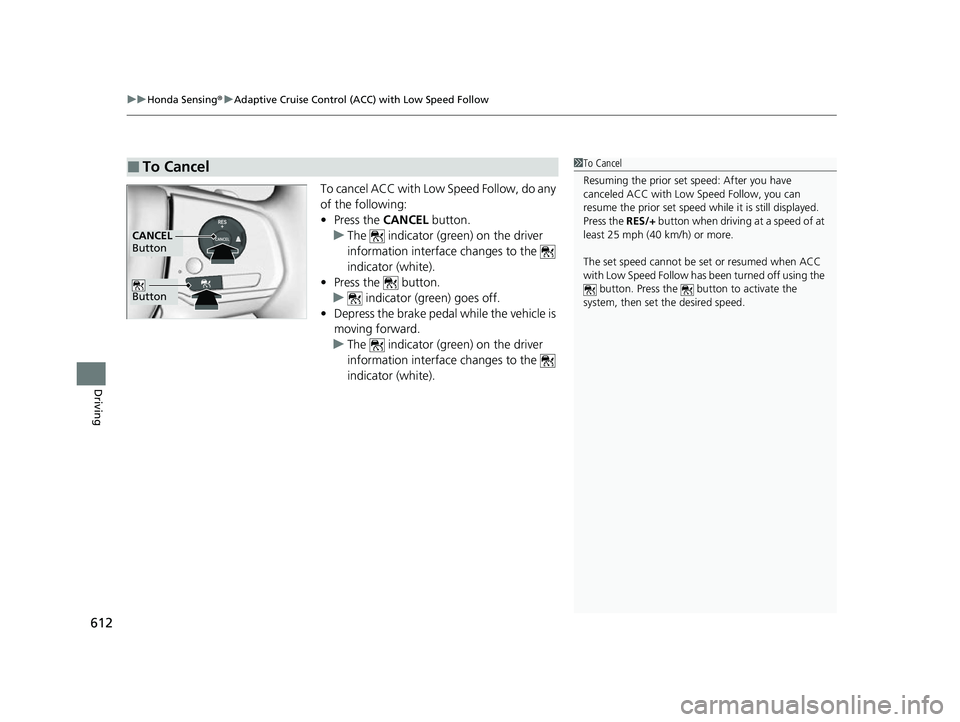
To cancel ACC with Low Speed Follow, do any
of the following:
• Press the CANCEL button.
u The indicator (green) on the driver
information interface changes to the
indicator (white).
• Press the button.
u indicator (green) goes off.
• Depress the brake pedal while the vehicle is
moving forward.
u The indicator (green) on the driver
information interface changes to the
indicator (white).
■To Cancel1To Cancel
Resuming the prior set speed: After you have
canceled ACC with Low Speed Follow, you can
resume the prior set speed while it is still displayed.
Press the RES/+ button when driving at a speed of at
least 25 mph (40 km/h) or more.
The set speed cannot be set or resumed when ACC
with Low Speed Follow has been turned off using the
button. Press the button to activate the
system, then set the desired speed.
Button
CANCEL
Button
22 US ODYSSEY-31THR6400.book 612 ページ 2020年11月16日 月曜日 午後1時41分
Page 616 of 782
615
uuHonda Sensing ®u Adaptive Cruise Control (ACC) with Low Speed Follow
Driving
Take your foot off the pedal and press the –/SET button when you reach the desired
speed.
The moment you release the –/SET button, the set speed is fixed, and cruise control
begins. The indicator (green) comes on.
When you use cruise control, Straight Drivin g Assist (a feature of the Electric Power
Steering system) is activated.
By enabling the steering system to automatica lly compensate for natural steering pull,
Straight Driving Assist makes it easier for you to keep your vehicle in a straight line.
Each time you press the RES/+ or –/SET button, the vehicle speed is increased or
decreased by about 1 mph (1 km/h).
If you keep the RES/+ or –/SET button pressed, the vehicle speed increases or
decreases until you release it . This speed is then set.
To cancel cruise control, do any of the following:
• Press the CANCEL button.
u The indicator (green) on the driver information interface change to the
indicator (white.)
• Press the button.
u indicator (green) goes off.
• Depress the brake pedal.
u The indicator (green) on the driver information interface change to the
indicator (white.)
■To Set the Vehicle Speed
■To Adjust the Vehicle Speed
■To Cancel1 To Cancel
Resuming the prior set speed:
After cruise control has be en canceled, you can still
resume the prior set speed by pressing the RES/+
button while driving at a speed of at least 25 mph (40
km/h) or more.
You cannot set or resume in the following situations:
•When vehicle speed is less than 25 mph (40 km/h)
•When the button is turned off.
At vehicle speeds of 22 m ph (35 km/h) or less, cruise
control canceled automatically.
22 US ODYSSEY-31THR6400.book 615 ページ 2020年11月16日 月曜日 午後1時41分
Page 617 of 782
616
uuHonda Sensing ®u Lane Keeping Assist System (LKAS)
Driving
Lane Keeping Assist System (LKAS)
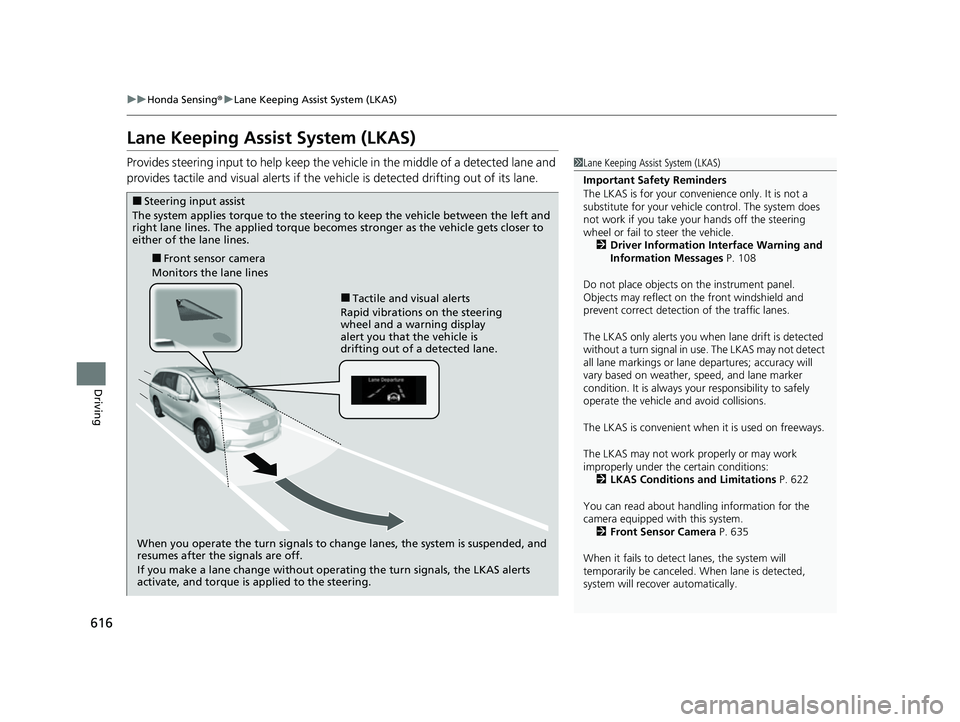
Provides steering input to help keep the vehicle in the middle of a detected lane and
provides tactile and visual alerts if the ve hicle is detected drifting out of its lane.1Lane Keeping Assist System (LKAS)
Important Safety Reminders
The LKAS is for your convenience only. It is not a
substitute for your vehicle control. The system does
not work if you take y our hands off the steering
wheel or fail to steer the vehicle. 2 Driver Information Interface Warning and
Information Messages P. 108
Do not place objects on the instrument panel.
Objects may reflect on th e front windshield and
prevent correct detectio n of the traffic lanes.
The LKAS only alerts you when lane drift is detected
without a turn signal in use. The LKAS may not detect
all lane markings or lane departures; accuracy will
vary based on weather, speed, and lane marker
condition. It is always your responsibility to safely
operate the vehicle an d avoid collisions.
The LKAS is convenient when it is used on freeways.
The LKAS may not work properly or may work
improperly under the certain conditions:
2 LKAS Conditions and Limitations P. 622
You can read about handling information for the
camera equipped with this system. 2 Front Sensor Camera P. 635
When it fails to detect lanes, the system will
temporarily be canceled. When lane is detected,
system will recover automatically.
■Tactile and visual alerts
Rapid vibrations on the steering
wheel and a warning display
alert you that the vehicle is
drifting out of a detected lane.
■Front sensor camera
Monitors the lane lines
■Steering input assist
The system applies torque to the steering to keep the vehicle between the left and
right lane lines. The applied torque becomes stronger as the vehicle gets closer to
either of the lane lines.
When you operate the turn signals to change lanes, the system is suspended, and
resumes after the signals are off.
If you make a lane change without operating the turn signals, the LKAS alerts
activate, and torque is applied to the steering.
22 US ODYSSEY-31THR6400.book 616 ページ 2020年11月16日 月曜日 午後1時41分
Page 620 of 782
619
uuHonda Sensing ®u Lane Keeping Assist System (LKAS)
Continued
Driving
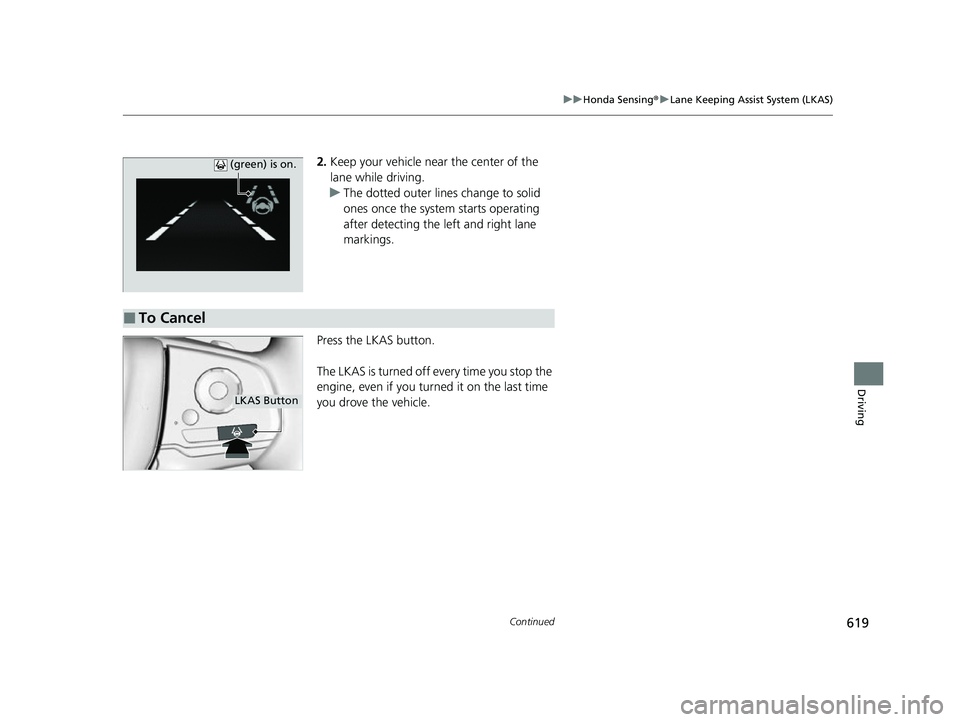
2. Keep your vehicle near the center of the
lane while driving.
u The dotted outer lines change to solid
ones once the system starts operating
after detecting the left and right lane
markings.
Press the LKAS button.
The LKAS is turned off every time you stop the
engine, even if you turned it on the last time
you drove the vehicle. (green) is on.
■To Cancel
LKAS Button
22 US ODYSSEY-31THR6400.book 619 ページ 2020年11月16日 月曜日 午後1時41分
Page 621 of 782
uuHonda Sensing ®u Lane Keeping Assist System (LKAS)
620
Driving
■The system operation is suspended if
you:
• Set the wipers to high speed.
u Turning the wipers off, setting it to LO,
or the wipers are operating intermittently
resumes the LKAS.
• Decrease the vehicle speed to about 40
mph (64 km/h) or less.
u Increasing the vehicle speed to about 45
mph (72 km/h) or more resumes the
LKAS.
• Depress the brake pedal.
u The LKAS resumes and starts detecting
the lane lines again once you release the
brake pedal.
• Your vehicle is driving to the right or the left
of the lane.1The system operation is suspended if you:
You can change the setting for the LKAS.
LKAS suspended beep ON and OFF can be selected.
2 Vehicle Customization P. 143
2 Customized Features P. 463
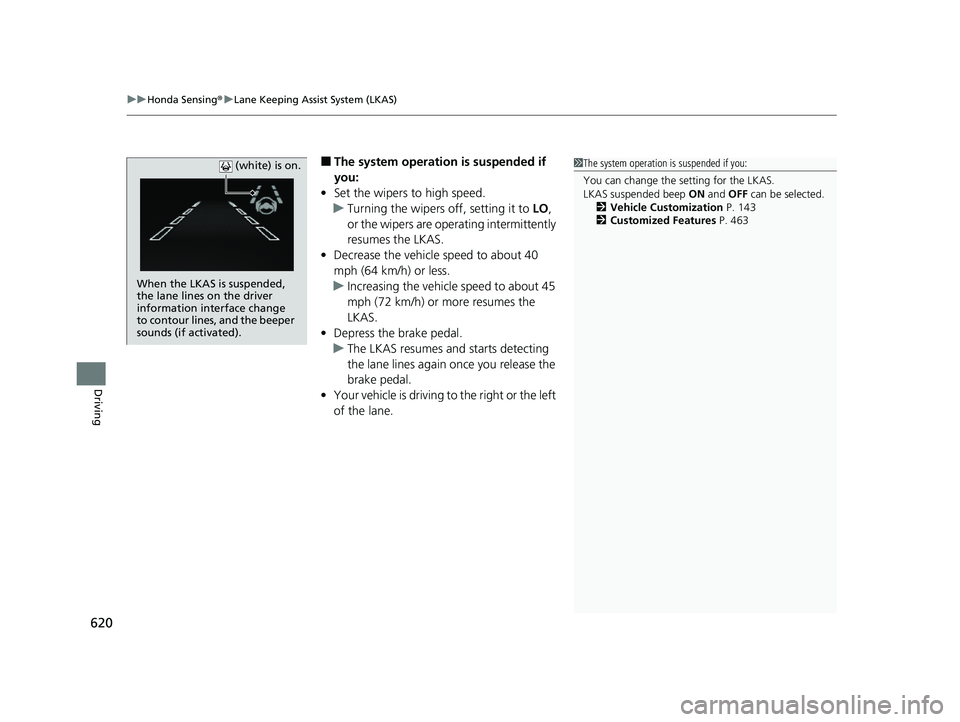
When the LKAS is suspended,
the lane lines on the driver
information interface change
to contour lines, and the beeper
sounds (if activated). (white) is on.
22 US ODYSSEY-31THR6400.book 620 ページ 2020年11月16日 月曜日 午後1時41分
Page 623 of 782
622
uuHonda Sensing ®u Lane Keeping Assist System (LKAS)
Driving
The system may not detect lane markings and therefore may not keep the vehicle in
the middle of a lane under certain conditions, including the following:
■Environmental conditions
• Driving in bad weather (rain, fog, snow, etc.).
• Sudden changes between light and dark, such as an entrance or exit of a tunnel.
• There is little contrast between la ne lines and the roadway surface.
• Driving into low sunlight (e.g., at dawn or dusk).
• Strong light is reflected onto the roadway.
• Driving in the shadows of trees, buildings, etc.
• Shadows of adjacent objects are parallel to lane markings.
• Roadway objects or structures are misinterpreted as lane markers.
• Reflections on the interi or of the windshield.
• Driving at night or in a dark condition such as a tunnel.
■LKAS Conditions and Limitations
22 US ODYSSEY-31THR6400.book 622 ページ 2020年11月16日 月曜日 午後1時41分
Page 628 of 782
Continued627
uuHonda Sensing ®u Road Departure Mitigation (RDM) System
Driving
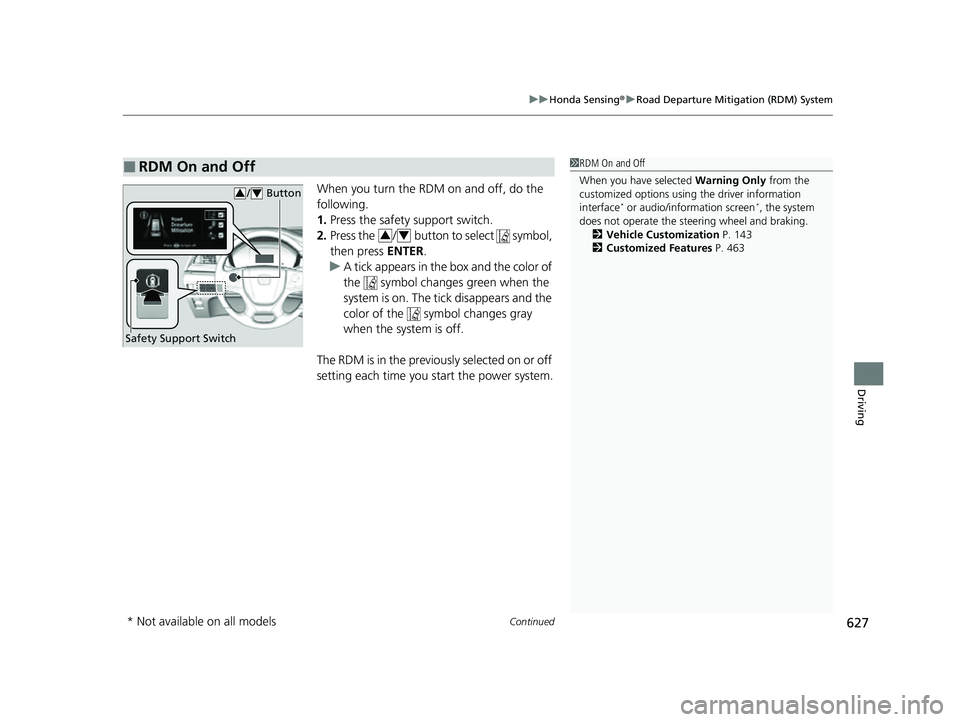
When you turn the RDM on and off, do the
following.
1. Press the safety support switch.
2. Press the / button to select symbol,
then press ENTER.
u A tick appears in the box and the color of
the symbol changes green when the
system is on. The tick disappears and the
color of the symbol changes gray
when the system is off.
The RDM is in the previous l y s e l e c t e d o n o r o f f
setting each time you start the power system.
■RDM On and Off1 RDM On and Off
When you have selected Warning Only from the
customized options using the driver information
interface
* or audio/information screen*, the system
does not operate the steering wheel and braking. 2 Vehicle Customization P. 143
2 Customized Features P. 463
Safety Support Switch
/ Button34
34
* Not available on all models
22 US ODYSSEY-31THR6400.book 627 ページ 2020年11月16日 月曜日 午後1時41分
Page 629 of 782
628
uuHonda Sensing ®u Road Departure Mitigation (RDM) System
Driving
The system may not properly detect lane markings and the position of your vehicle
under certain conditions. Some examples of these conditions are listed below.
■Environmental conditions
• Driving in bad weather (rain, fog, snow, etc.).
• Sudden changes between light and dark, such as an entrance or exit of a tunnel.
• There is little contrast between la ne lines and the roadway surface.
• Driving into low sunlight (e.g., at dawn or dusk).
• Strong light is reflected onto the roadway.
• Driving in the shadows of trees, buildings, etc.
• Shadows of adjacent objects are parallel to lane markings.
• Roadway objects or structures are misinterpreted as lane markers.
• Reflections on the interi or of the windshield.
• Driving at night or in a dark condition such as a tunnel.
■RDM Conditions and Limitations
22 US ODYSSEY-31THR6400.book 628 ページ 2020年11月16日 月曜日 午後1時41分