change HONDA ODYSSEY 2022 Owners Manual
[x] Cancel search | Manufacturer: HONDA, Model Year: 2022, Model line: ODYSSEY, Model: HONDA ODYSSEY 2022Pages: 782, PDF Size: 27.17 MB
Page 583 of 782
uuWhen Driving uBlind spot information System*
582
Driving
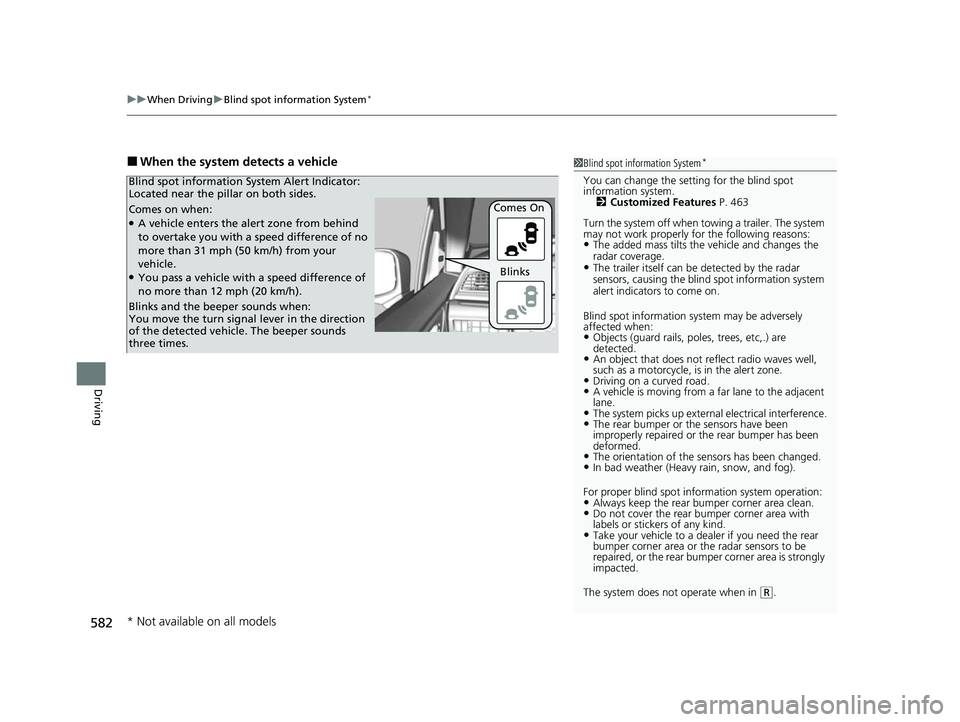
■When the system detects a vehicle1Blind spot information System*
You can change the setting for the blind spot
information system.
2 Customized Features P. 463
Turn the system off when to wing a trailer. The system
may not work properly fo r the following reasons:
•The added mass tilts the vehicle and changes the
radar coverage.
•The trailer itself can be detected by the radar
sensors, causing the blind spot information system
alert indicators to come on.
Blind spot information sy stem may be adversely
affected when:
•Objects (guard rails, poles, trees, etc,.) are
detected.
•An object that does not re flect radio waves well,
such as a motorcycle, is in the alert zone.
•Driving on a curved road.•A vehicle is moving from a far lane to the adjacent
lane.
•The system picks up external electrical interference.•The rear bumper or the sensors have been
improperly repaired or the rear bumper has been
deformed.
•The orientation of the sensors has been changed.•In bad weather (Heavy rain, snow, and fog).
For proper blind spot information system operation:
•Always keep the rear bumper corner area clean.•Do not cover the rear bumper corner area with
labels or sticke rs of any kind.
•Take your vehicle to a dealer if you need the rear
bumper corner area or the radar sensors to be
repaired, or the re ar bumper corner area is strongly
impacted.
The system does not operate when in
( R.
Comes on when:●A vehicle enters the alert zone from behind
to overtake you with a speed difference of no
more than 31 mph (50 km/h) from your
vehicle.
●You pass a vehicle with a speed difference of
no more than 12 mph (20 km/h). Comes On
Blind spot information System Alert Indicator:
Located near the pillar on both sides.
Blinks and the beeper sounds when:
You move the turn signal
lever in the direction
of the detected vehicle. The beeper sounds
three times. Blinks
* Not available on all models
22 US ODYSSEY-31THR6400.book 582 ページ 2020年11月16日 月曜日 午後1時41分
Page 584 of 782
583
uuWhen Driving uBlind spot information System*
Driving
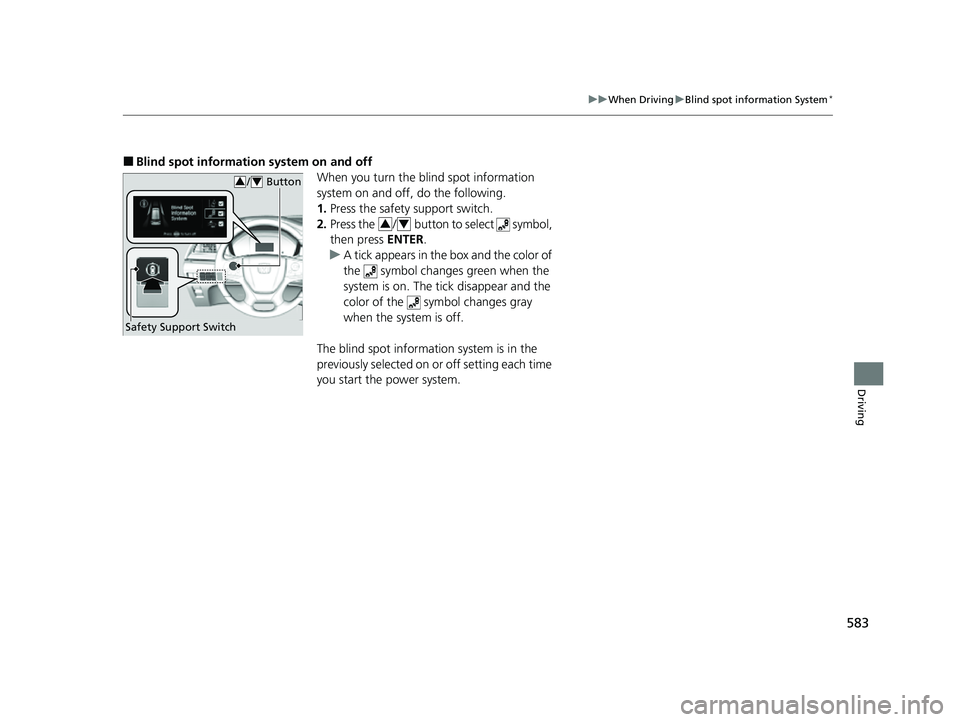
■Blind spot information system on and off
When you turn the blind spot information
system on and off, do the following.
1.Press the safety support switch.
2. Press the / button to select symbol,
then press ENTER.
u A tick appears in the box and the color of
the symbol changes green when the
system is on. The tick disappear and the
color of the symbol changes gray
when the system is off.
The blind spot information system is in the
previously selected on or off setting each time
you start the power system.
/ Button34
Safety Support Switch
34
22 US ODYSSEY-31THR6400.book 583 ページ 2020年11月16日 月曜日 午後1時41分
Page 585 of 782
584
uuWhen Driving uLaneWatchTM*
Driving
LaneWatchTM*
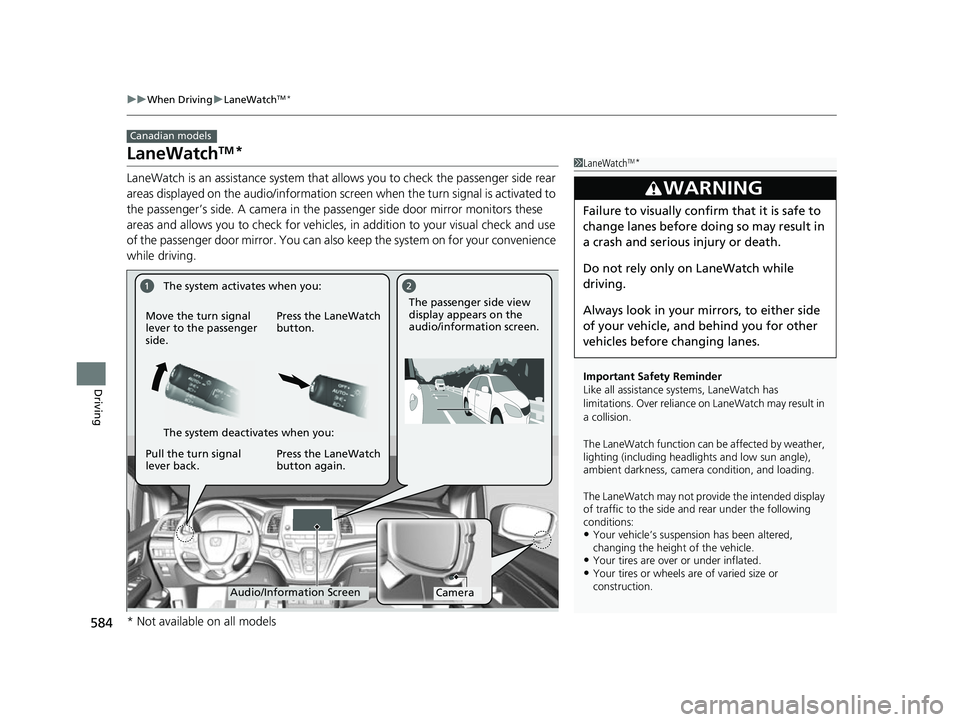
LaneWatch is an assistance system that allows you to check the passenger side rear
areas displayed on the audio/information screen when the turn signal is activated to
the passenger’s side. A camera in the pass enger side door mirror monitors these
areas and allows you to chec k for vehicles, in addition to your visual check and use
of the passenger door mirror. You can also keep the system on for your convenience
while driving.
Canadian models
1 LaneWatchTM*
Important Safety Reminder
Like all assistance systems, LaneWatch has
limitations. Over reliance on LaneWatch may result in
a collision.
The LaneWatch function can be affected by weather,
lighting (including headli ghts and low sun angle),
ambient darkness, camera condition, and loading.
The LaneWatch may not prov ide the intended display
of traffic to the side and rear under the following
conditions:
•Your vehicle’s suspensi on has been altered,
changing the height of the vehicle.
•Your tires are over or under inflated.•Your tires or wheels are of varied size or
construction.
3WARNING
Failure to visually confirm that it is safe to
change lanes before doing so may result in
a crash and serious injury or death.
Do not rely only on LaneWatch while
driving.
Always look in your mi rrors, to either side
of your vehicle, and behind you for other
vehicles before changing lanes.
CameraAudio/Information Screen
Move the turn signal
lever to the passenger
side.
Press the LaneWatch
button.
Pull the turn signal
lever back. Press the LaneWatch
button again. The passenger side view
display appears on the
audio/information screen.
The system activates when you:
The system deactivates when you:
* Not available on all models
22 US ODYSSEY-31THR6400.book 584 ページ 2020年11月16日 月曜日 午後1時41分
Page 586 of 782
585
uuWhen Driving uLaneWatchTM*
Driving
■Customizing the La neWatch settings
You can customize the following items using the audio/information screen.
• Show with Turn Signal : Selects whether LaneWatch monitor comes on when
you operate the tu rn signal lever.
• Show Reference Line : Selects whether the reference lines appear on the
LaneWatch monitor.
2 Customized Features P. 463
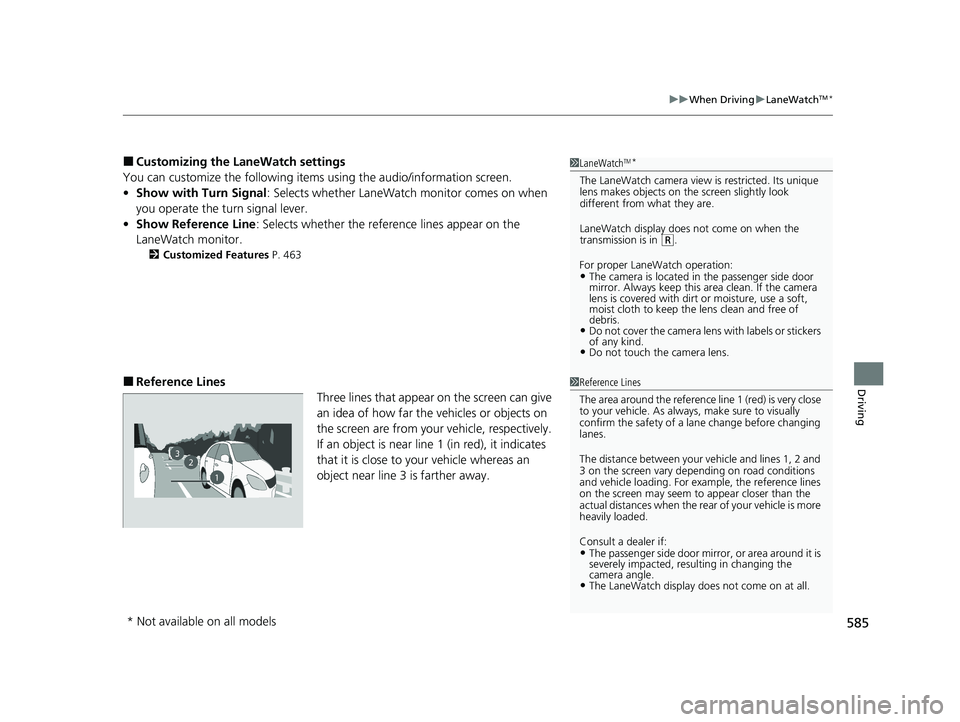
■Reference Lines
Three lines that appear on the screen can give
an idea of how far the vehicles or objects on
the screen are from your vehicle, respectively.
If an object is near line 1 (in red), it indicates
that it is close to your vehicle whereas an
object near line 3 is farther away.
1LaneWatchTM*
The LaneWatch camera view is restricted. Its unique
lens makes objects on the screen slightly look
different from what they are.
LaneWatch display does not come on when the
transmission is in
( R.
For proper LaneWatch operation:
•The camera is located in the passenger side door
mirror. Always keep this area clean. If the camera
lens is covered with dirt or moisture, use a soft,
moist cloth to keep the lens clean and free of
debris.
•Do not cover the camera lens with labels or stickers
of any kind.
•Do not touch the camera lens.
1 Reference Lines
The area around the reference line 1 (red) is very close
to your vehicle. As always, make sure to visually
confirm the safety of a la ne change before changing
lanes.
The distance betwee n your vehicle and lines 1, 2 and
3 on the screen vary depending on road conditions
and vehicle loading. For ex ample, the reference lines
on the screen may seem to appear closer than the
actual distances when the rear of your vehicle is more
heavily loaded.
Consult a dealer if:
•The passenger side door mirr or, or area around it is
severely impacted, resulting in changing the
camera angle.
•The LaneWatch display doe s not come on at all.
23
1
* Not available on all models
22 US ODYSSEY-31THR6400.book 585 ページ 2020年11月16日 月曜日 午後1時41分
Page 588 of 782
587
uuHonda Sensing ®u
Continued
Driving
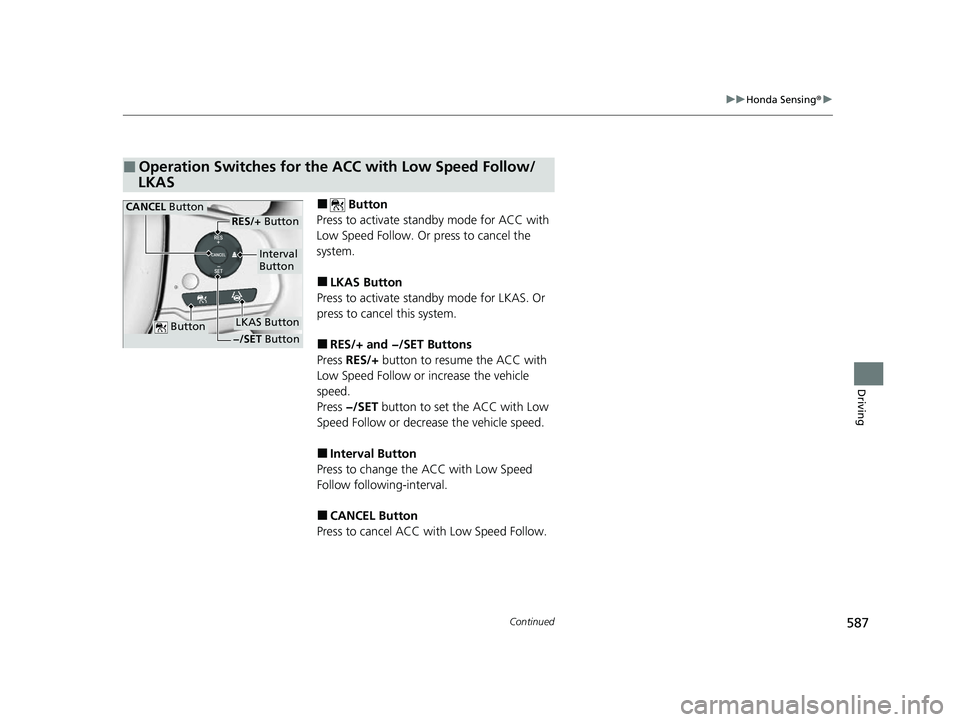
■ Button
Press to activate sta ndby mode for ACC with
Low Speed Follow. Or press to cancel the
system.
■LKAS Button
Press to activate standby mode for LKAS. Or
press to cancel this system.
■RES/+ and −/SET Buttons
Press RES/+ button to resume the ACC with
Low Speed Follow or increase the vehicle
speed.
Press −/SET button to set the ACC with Low
Speed Follow or decrea se the vehicle speed.
■Interval Button
Press to change the ACC with Low Speed
Follow following-interval.
■CANCEL Button
Press to cancel ACC wi th Low Speed Follow.
■Operation Switches for the ACC with Low Speed Follow/
LKAS
Button
Interval
Button
CANCEL Button
LKAS Button
RES/+ Button
−/SET Button
22 US ODYSSEY-31THR6400.book 587 ページ 2020年11月16日 月曜日 午後1時41分
Page 592 of 782
Continued591
uuHonda Sensing ®u Collision Mitigation Braking SystemTM (CMBSTM)
Driving
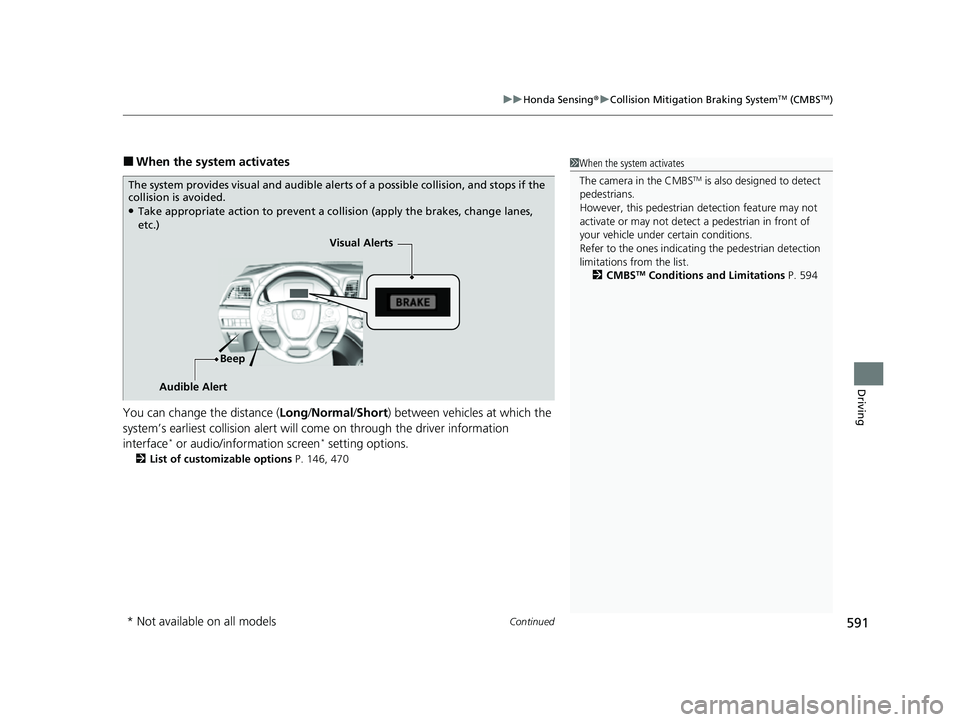
■When the system activates
You can change the distance ( Long/Normal /Short ) between vehicles at which the
system’s earliest collision alert will co me on through the driver information
interface
* or audio/information screen* setting options.
2 List of customizable options P. 146, 470
1When the system activates
The camera in the CMBS
TM is also designed to detect
pedestrians.
However, this pedestrian detection feature may not
activate or may not detect a pedestrian in front of
your vehicle under certain conditions.
Refer to the ones indicating the pedestrian detection
limitations from the list. 2 CMBS
TM Conditions and Limitations P. 594
The system provides visual and audible alerts of a possible collision, and stops if the
collision is avoided.
●Take appropriate action to prevent a collision (apply the brakes, change lanes,
etc.)
Visual Alerts
Beep
Audible Alert
* Not available on all models
22 US ODYSSEY-31THR6400.book 591 ページ 2020年11月16日 月曜日 午後1時41分
Page 594 of 782
Continued593
uuHonda Sensing ®u Collision Mitigation Braking SystemTM (CMBSTM)
Driving
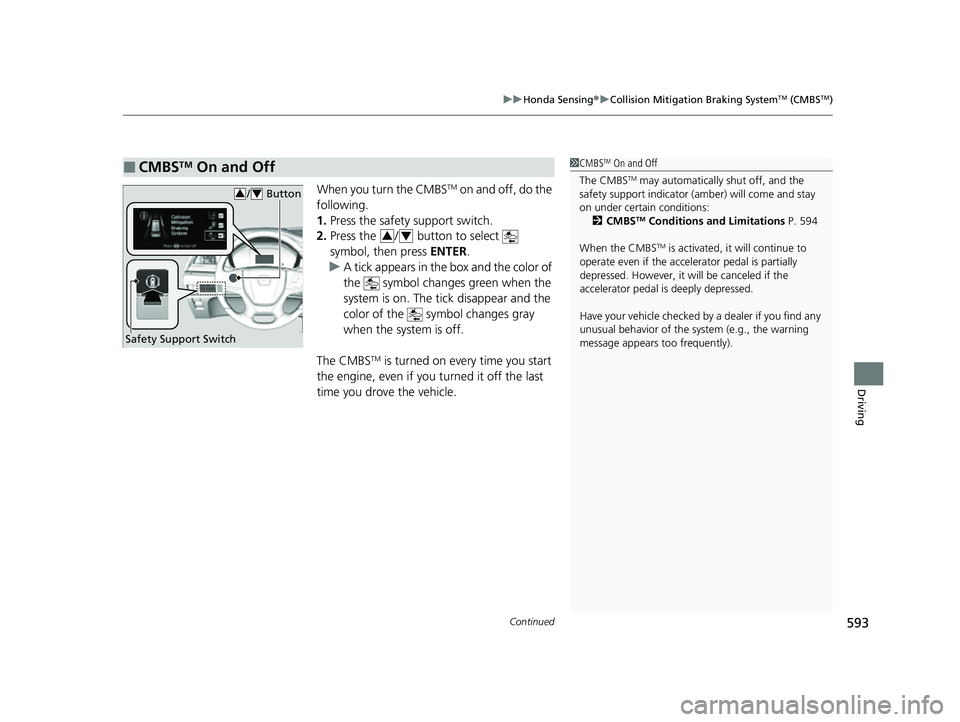
When you turn the CMBSTM on and off, do the
following.
1. Press the safety support switch.
2. Press the / button to select
symbol, then press ENTER.
u A tick appears in the box and the color of
the symbol changes green when the
system is on. The tick disappear and the
color of the symbol changes gray
when the system is off.
The CMBS
TM is turned on every time you start
the engine, even if you turned it off the last
time you drove the vehicle.
■CMBSTM On and Off1 CMBSTM On and Off
The CMBS
TM may automatically shut off, and the
safety support indicator (amb er) will come and stay
on under certain conditions: 2 CMBS
TM Conditions and Limitations P. 594
When the CMBS
TM is activated, it will continue to
operate even if the accele rator pedal is partially
depressed. However, it w ill be canceled if the
accelerator pedal is deeply depressed.
Have your vehicle checked by a dealer if you find any
unusual behavior of the system (e.g., the warning
message appears too frequently).
Safety Support Switch
/ Button34
34
22 US ODYSSEY-31THR6400.book 593 ページ 2020年11月16日 月曜日 午後1時41分
Page 595 of 782
594
uuHonda Sensing ®u Collision Mitigation Braking SystemTM (CMBSTM)
Driving
The system may automatically shut off and the safety support indicator (amber) will
come on under certain conditions. Some ex amples of these conditions are listed
below. Other conditions may reduce some of the CMBS
TM functions.
2 Front Sensor Camera P. 635
2 Radar Sensor P. 637
■Environmental conditions
• Driving in bad weather (rain, fog, snow, etc.).
• Sudden changes between light and dark, such as an entrance or exit of a tunnel.
• There is little contrast between objects and the background.
• Driving into low sunlight (e.g., at dawn or dusk).
• Strong light is reflected onto the roadway.
• Driving in the shadows of trees, buildings, etc.
• Roadway objects or structures are misint erpreted as vehicles and pedestrians.
• Reflections on the interi or of the windshield.
• Driving at night or in a dark condition such as a tunnel.
■Roadway conditions
• Driving on a snowy or wet roadway (obs cured lane marking, vehicle tracks,
reflected lights, road spray, high contrast).
• Driving on curvy, winding, or undulating roads.
• The road is hilly or the vehicle is approaching the crest of a hill.
■CMBSTM Conditions and Limitations
22 US ODYSSEY-31THR6400.book 594 ページ 2020年11月16日 月曜日 午後1時41分
Page 599 of 782
uuHonda Sensing ®u Collision Mitigation Braking SystemTM (CMBSTM)
598
Driving
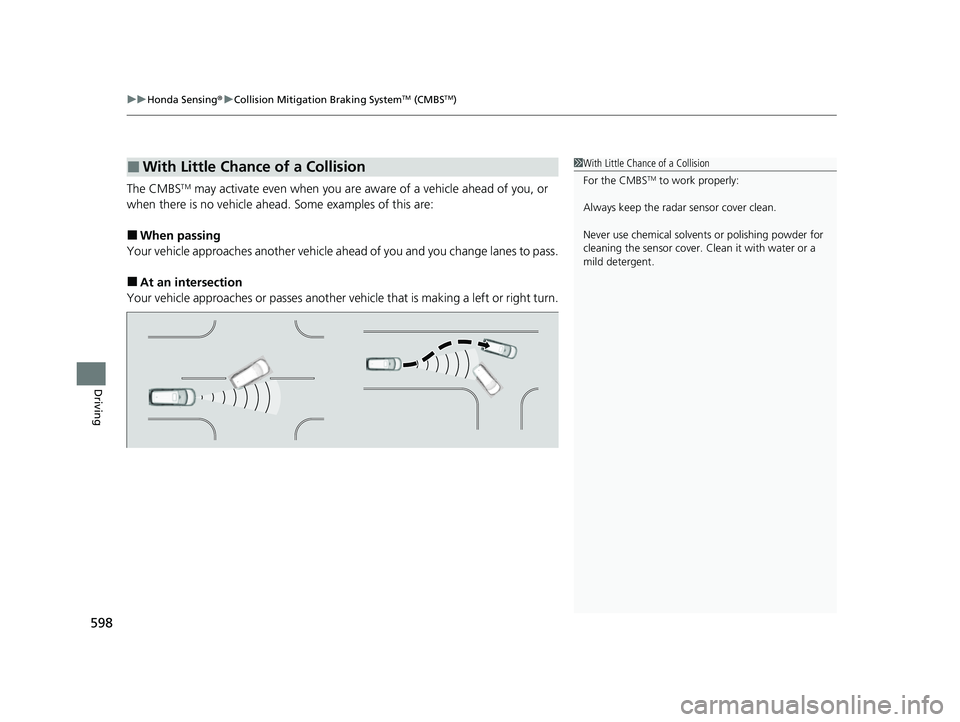
The CMBSTM may activate even when you are aw are of a vehicle ahead of you, or
when there is no vehicle ahead . Some examples of this are:
■When passing
Your vehicle approaches another vehicle ah ead of you and you change lanes to pass.
■At an intersection
Your vehicle approaches or passes another vehicle that is making a left or right turn.
■With Little Chance of a Collision1With Little Chance of a Collision
For the CMBS
TM to work properly:
Always keep the radar sensor cover clean.
Never use chemical solvents or polishing powder for
cleaning the sensor cover. Clean it with water or a
mild detergent.
22 US ODYSSEY-31THR6400.book 598 ページ 2020年11月16日 月曜日 午後1時41分
Page 605 of 782
uuHonda Sensing ®u Adaptive Cruise Control (ACC) with Low Speed Follow
604
Driving
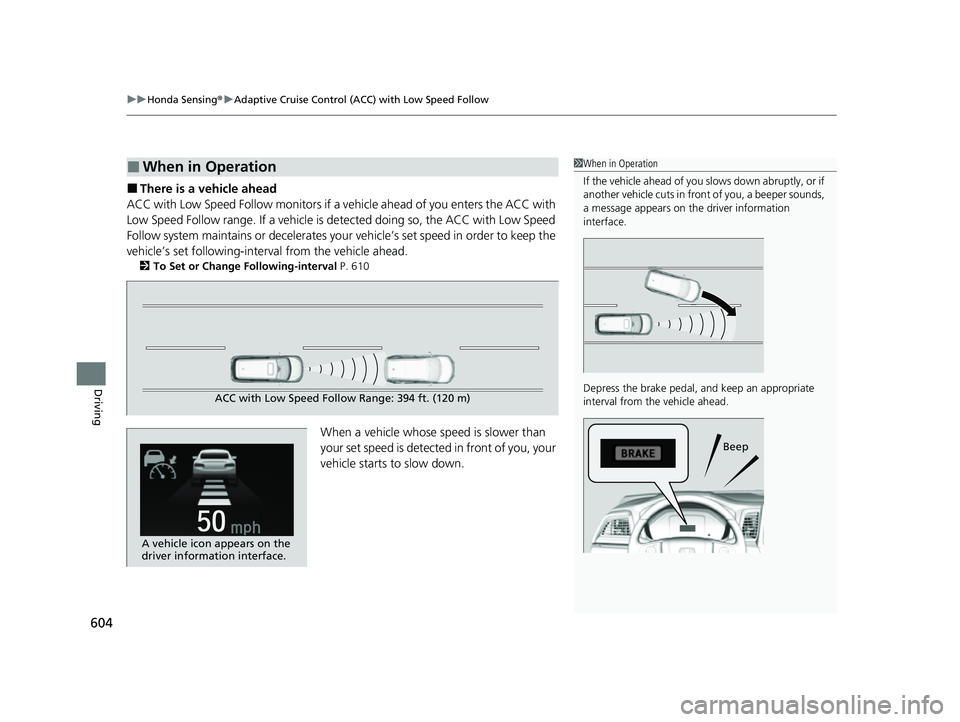
■There is a vehicle ahead
ACC with Low Speed Follow monitors if a ve hicle ahead of you enters the ACC with
Low Speed Follow range. If a vehicle is detected doing so, the ACC with Low Speed
Follow system maintains or decelerates your vehicle’s set speed in order to keep the
vehicle’s set followi ng-interval from the vehicle ahead.
2To Set or Change Following-interval P. 610
When a vehicle whose speed is slower than
your set speed is detected in front of you, your
vehicle starts to slow down.
■When in Operation1 When in Operation
If the vehicle ahead of you slows down abruptly, or if
another vehicle cuts in front of you, a beeper sounds,
a message appears on th e driver information
interface.
Depress the brake pedal, and keep an appropriate
interval from the vehicle ahead.
Beep
ACC with Low Speed Follow Range: 394 ft. (120 m)
A vehicle icon appears on the
driver information interface.
22 US ODYSSEY-31THR6400.book 604 ページ 2020年11月16日 月曜日 午後1時41分