fuel HONDA PASSPORT 2000 2.G User Guide
[x] Cancel search | Manufacturer: HONDA, Model Year: 2000, Model line: PASSPORT, Model: HONDA PASSPORT 2000 2.GPages: 267, PDF Size: 3.03 MB
Page 154 of 267
Drivin
g Tip s
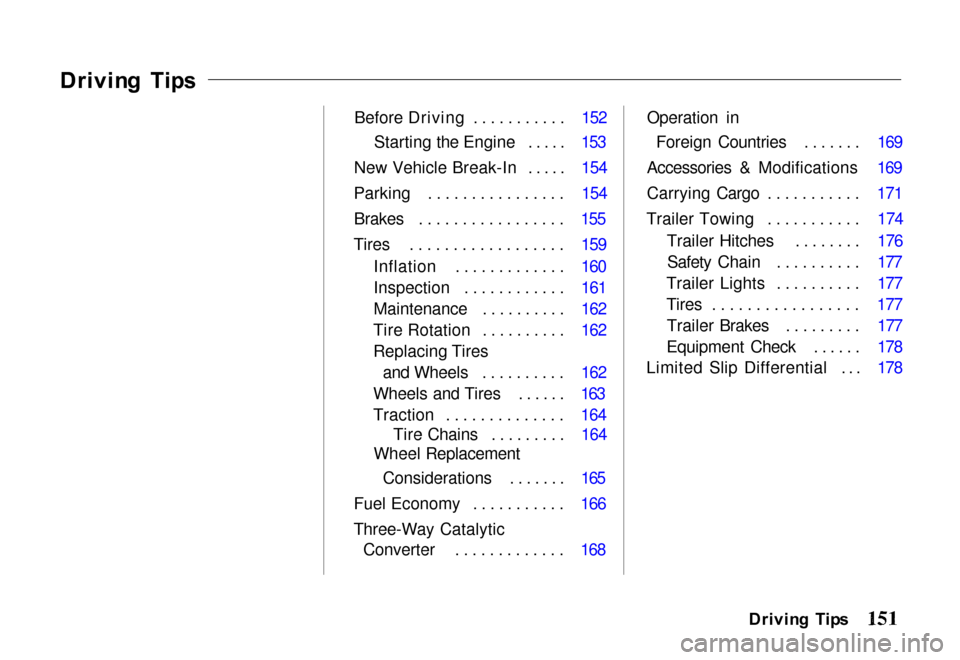
Before Driving ........... 152Starting the Engine ..... 153
New Vehicle Break-In ..... 154
Parking ................ 154 Brakes ................. 155
Tires .................. 159 Inflation ............. 160
Inspection ............ 161
Maintenance .......... 162
Tire Rotation .......... 162
Replacing Tires and Wheels .......... 162
Wheels and Tires ...... 163
Traction .............. 164 Tire Chains ......... 164
Wheel Replacement
Considerations ....... 165
Fuel Economy ........... 166
Three-Way Catalytic Converter ............. 168 Operation in
Foreign Countries ....... 169
Accessories & Modifications 169
Carrying Cargo ........... 171
Trailer Towing ........... 174 Trailer Hitches ........ 176Safety Chain .......... 177
Trailer Lights .......... 177
Tires ................. 177 Trailer Brakes ......... 177
Equipment Check ...... 178
Limited Slip Differential ... 178
Driving Tip s
Page 156 of 267

switch is turned to the "ON"
or "START" position.
5. Check all gauges (including
the fuel gauge).
6. Release the parking brake
(and make sure the "BRAKE"
light turns off).
See related topics in this manual if
you find any problems.
Startin g th e Engin e
1. Apply the parking brake.
2. Manual Transmission: Press
the clutc
h pedal to the floor
and shift the transmission to
the Neutral position. Hold the
clutch pedal to the floor while
you are starting the engine. A starter safety switch keeps the
starter from operating if the
clutch pedal is not fully
depressed.
Automatic Transmission:
Place the shift lever in "P"
or "N" position ("P" is
preferred). A starter safety switch prevents the starter
from operating if the shift lever is in any drive position.
If it is necessary to restart the
engine with the vehicle
moving, place the shift lever in "N" (never in "P").
3. Do not touch the accelerator pedal. Start the engine byturning the ignition switch to
"START."
If the engine does not start in 10 seconds, wait 15 seconds to let
the starter cool down. Then crank
the engine at wide open throttle
for a maximum of 10 seconds. If
the engine still does not start, wait
another 15 seconds and repeat the
entire procedure. Do not crank the engine for more
than 10 seconds at a time. Wait 15
seconds before trying again.
4. Return the ignition switch to
the "ON" position as soon as
the engine starts.
5. Apply the regular brakes and shift into the proper gear.
Release the parking brake and
brake pedal and drive off.
In models with an automatic
transmission, you cannot shift
from "P" (Park) position to any other position unless the
brake pedal is applied.
Driving Tip s
Page 161 of 267
Self-Adjustin
g Brake s
The brakes on this vehicle are self-adjusting. They have been
designed so that periodic brake
adjustment is not needed.
The brakes adjust themselves each time you firmly apply them.
Thus, if the brake pedal goes down
farther than normal due to a lack of adjustment, drive backward and
forward a few times. Apply the
brakes intermittently.
See your Honda dealer if the
brake pedal height does not return
to normal or if there is a rapidincrease in pedal travel. Either is a
sign of other brake trouble. Also,
see your Honda dealer if the
parking brake needs adjustment.
Brakin
g Tip s
Control your vehicle's speed on a steep or long downhill grade by
shifting the transmission to a
lower gear. Constantly using the
brakes can cause them to overheat
and lose effectiveness.
Resting your foot on the brake
pedal when you are not intending to brake ("riding the brakes") can
cause them to overheat. This
reduces their effectiveness, wears them out faster, and can reduce
fuel mileage. It also causes your
brake lights to stay on all the time, confusing drivers behind you.
Brak e Wea r Indicator s
The front and rear brakes have built-in wear indicators. These make a high-pitched squealing or
cricket-like warning sound when the brake pads or linings are worn
to the point of replacement. Thesound may come and go or be
heard all the time when the vehicle is moving, but may stop when the
brake pedal is pushed down firmly.
Expensive damage can result if
pads or linings are not replaced immediately when needed.
Drivin g o n Slipper y Surface s
Driving, steering, and braking
traction are reduced when the
road is coated with water, snow, ice, gravel, or other materials.
Slow down and adjust your
driving to such conditions. It is important to slow down when it is
slippery because stopping
Drivin g Tip s
Page 163 of 267
Inflatio
n
Keeping the tires properly inflated
provides the best combination of
handling, tread life, and riding
comfort. Underinflated tires wear
unevenly, adversely affect handling and fuel economy, and are more
likely to fail from being overheated. Overinflated tires can make your
vehicle ride more harshly, are
more prone to damage from road
hazards, and wear unevenly.
We recommend that you visually check your tires every day. If you
think a tire might be low, check it
immediately with a tire gauge.
Use a gauge to measure the air
pressure at least once a month. Even tires that are in good
condition may lose one to two psi
per month. Remember to checkthe spare tire at the same time you
check all the other tires. Check the pressure in the tires
when they are cold. This means
the vehicle has been parked for at
least three hours. If you have to
drive the vehicle before checking
the tire pressure, the tires can still be considered "cold" if you drive
less than 1 mile (1.6 km).
If you check the pressure when the tires are hot (the vehicle has
been driven several miles), you will see readings 4 to 6 psi (28 to
41 kPa, 0.3 to 0.4 kg/cm2) higher
than the cold reading. This is
normal. Do not let air out to
match the specified cold pressure.
The tire will be underinflated.
You should get your own tire
pressure gauge and use it at all times. That makes it easier for
you to tell if a pressure loss is
caused by a tire problem and not a
variation between gauges.
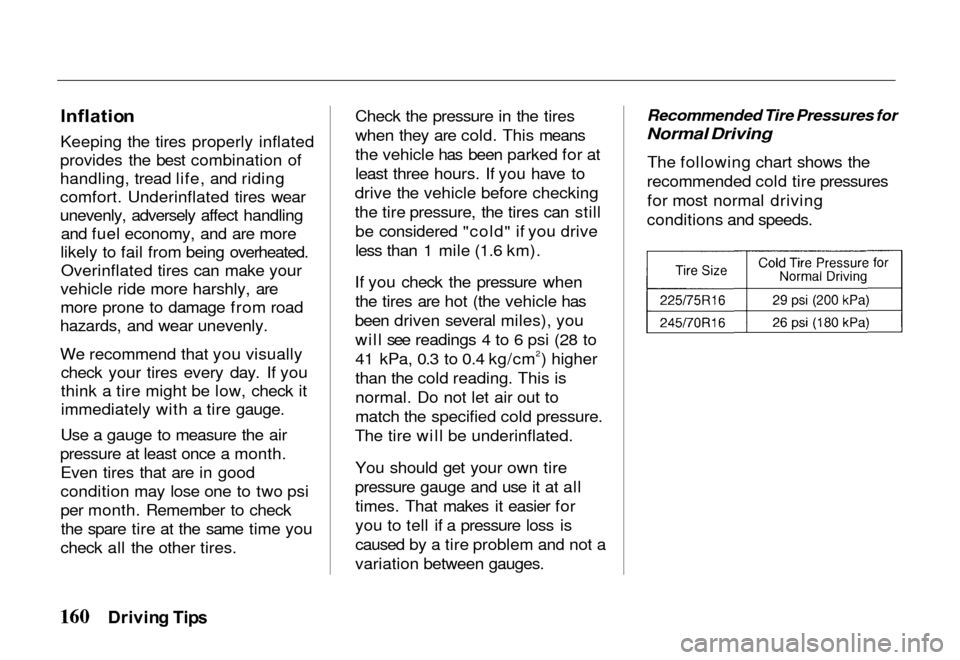
Recommended Tire Pressures for
Normal Driving
The
following chart shows the
recommended cold tire pressures for most normal driving
conditions and speeds.
Drivin g Tip s
Page 169 of 267
Drivin
g fo r Bes t Fue l
Econom y
How, where, and when you drive all affect how many miles/
kilometers you can get from a
gallon/liter of fuel. The careful attention you give your vehicle as
far as maintenance and repairs will also help fuel economy.
Fuel Selection Use only unleaded gasolinemeeting federal government
regulations. The federal
government specifies the
minimum octane rating number of
unleaded gasoline. Unleaded
gasoline must be used for proper
emissions control system
operation. It will also minimize spark plug fouling. The use of
leaded gasoline can damage the
emissions control system and could result in loss of warranty
coverage.
"Jackrabbit" Starts
You can save fuel (and prolong
engine and tire life) by avoiding fast starts away from lights andstop signs.
Stop-and-Go Driving Frequent stop-and-go driving
during a trip will cut down on
your miles per gallon (kilometers
per liter). Plan even your short shopping trips to take advantage
of through streets to avoid traffic
lights. Pace your driving to avoid
unplanned stops.
Excessive Idling
An idling engine uses fuel, too. If
you're faced with more than a few
minutes wait and you're not in traffic, it is better to turn off the
key and start the engine again
later.
Repetitive Harsh Stopping Harsh stops can also waste fuel;instead of moving the vehicle, the
energy is wasted as heat in
braking. Energy in the form of
fuel is also needed to accelerate
back to driving speed.
Lubricants A well-lubricated vehicle meansless friction between moving
parts. This manual lists the proper
lubrication intervals in the "Care
and Maintenance" section.
Air Cleaner Your vehicle gets its power from a
mixture of fuel and air. The air is
taken into the engine through the
Drivin g Tip s
Fue
l Econom y
Page 170 of 267

air cleaner, so it's important to
replace the air cleaner filter at
required intervals. See "Care and Maintenance." A dirty air cleaner
filter reduces engine performance
and can waste fuel.
Air Conditioning
Turn off the air conditioning whenit is not needed. The air
conditioning compressor is not on
in this position and the reduced
engine load can improve fuel
economy.
Tuned Engine
An engine that is properly
maintained will provide better
fuel economy than one that is not.
One misfiring spark plug will cut
fuel economy significantly, and
will make a difference in the
amount of pollution emitted from
your vehicle.
Excessive Weight
Fuel economy is related to thework the engine must do. The
heavier the load, the more fuel it takes to run your vehicle. Keep
weight to a minimum by removing
unnecessary luggage or cargo.
Tire Inflation
Underinflation not only causes
needless tire wear but can also
waste fuel. It's a good idea to
check tire pressure often and keep your tires inflated to the pressures
shown on the tire placard located
on the driver's doorjamb.
Wheel Alignment
Improper alignment will cause the
front tires to roll at an angle that
will result in faster tire wear. It takes power to overcome this
improper alignment, which, inturn, wastes fuel.
Use of 4-Wheel Drive
In normal driving, put the 4WD-2WD switch in the 2WD
position.
Driving Tip s
Page 171 of 267
Three-Wa
y Catalyti c Converte r
The three-way catalytic converter is an emissions control device
added to the exhaust system to
reduce exhaust gas pollutants. The
converter contains a ceramic material coated with noble metal
catalysts. To prevent contamination
of the catalysts, unleaded gasoline must be used. Unleaded gasoline
also reduces combustion chamber
deposits and exhaust system
corrosion.
The three-way catalytic converter requires the use of unleaded
gasoline. Use of leaded gasolinewill cause the converter to lose its
effectiveness.
T o Hel p Preven t Damag e
1. Keep your engine properly maintained. Engine
malfunctions involving the electrical, electronic fuel
injection or ignition systems
may result in unusually high
converter and exhaust system
temperatures. Do not keep
driving your vehicle if you
detect engine misfire,
noticeable loss of performance, or other unusual operating
conditions. Have it serviced
promptly. A properly
maintained engine willminimize malfunctions that
could damage the converter. It
will also help provide good
emissions control and fuel economy. (See theMaintenance Schedule on page
200 for information on inspecting and maintaining the
engine, exhaust system and
other components.) 2. Do not push or tow your
vehicle to start it. This could
damage the converter.
3. Do not park your vehicle over high grass, dry leaves or othercombustible materials. The
catalytic converter gets very
hot and could set fire to these materials.
Drivin g Tip s
Page 172 of 267
If you are planning to take your
Honda outside the U.S. or
Canada, contact the tourist
bureaus in the areas you will be
traveling in to find out about the availability of unleaded gasoline
with the proper octane rating.
If unleaded gasoline is not
available, be aware that using
leaded gasoline in your Honda
will affect performance and fuel
mileage, and damage its
emissions controls. It will no longer comply with U.S. and
Canadian emissions regulations,
and will be illegal to operate in
North America. To bring your
vehicle back into compliance will
require the replacement of several components, such as the oxygen sensor and the three-way catalyticconverter. These replacements
are not covered under warranty.
Accessorie
s & Modification s
Modifying your vehicle, or installing some non-Honda
accessories, can make your vehicle
unsafe. Before you make any
modifications or add any accessories, be sure to read the
following information.
Accessories
Your dealer has Genuine Honda
accessories that allow you to
personalize your vehicle. These accessories have been designed and
approved for your vehicle, and are
covered by warranty.
Non-Honda accessories are
usually designed for universal
applications. Although
aftermarket accessories may fit on
your vehicle, they may not meet
factory specifications, and could adversely affect your vehicle's
handling and stability. (See "Modifications" on the next page
for additional information.)
When properly installed, car
phones, alarms, two-way radios, and low-powered audio systems
should not interfere with your
vehicle's computer-controlled
Driving Tip s
Operatio
n i n
Foreig n Countrie s
Improper accessories or
modifications can affect
your vehicle's handling,
stability and performance,
and cause a crash in
which you can be hurt or killed.
Follow all instructions in
this owner's manual regarding accessories and
modifications.
Page 177 of 267
Traile
r Towin g
Your Honda vehicle is designed
for passenger and cargo transportation. With the proper
equipment installed, your vehicle
can also tow a trailer under certain
conditions, as detailed in this section. Be sure to read this entire
section and follow all
requirements.
Towing a trailer will have an
effect on handling, performance,
braking, durability and fuel
consumption.
Honda recommends that you do
not tow a trailer with a new Honda vehicle or one with a new
powertrain component (engine, transmission, differential) for the
first 500 miles. For your safety and the safety
of others, use equipment
specifically designed for your
vehicle. Improper towing
equipment and improper installation of same can cause
damage to your vehicle and may also result in personal injury.
Additional care and cautious
driving habits are essential to trailer towing.
Do not exceed 45 mph or the
posted towing speed limit, whichever is lower. Higher speed
may cause loss of vehicle control.
Drivin g Tip s
Improperly loading your
vehicle and trailer can seriously affect the steering
and braking performance,
causing a crash in which you
can be seriously injured.
Check the loading of your
vehicle and trailer carefully before starting to drive.
Page 194 of 267
Car
e an d Maintenanc e
This section explains why it is important to keep your vehicle
well maintained and to follow
basic maintenance safety
precautions.
This section also includes Maintenance Schedules for
normal driving and severe driving
conditions, a Maintenance
Record, and instructions for simple maintenance tasks you
may want to take care of yourself.
If you have the skills and tools
required to perform more complex
maintenance tasks on your Honda,
you may want to purchase the Service Manual. See page 249 for
information on how to obtain a
copy, or see your Honda dealer. Service Station Information . 193
Fuel Fill Cap .......... 193Fuel Recommendation ... 194
Fuel Tank Capacity ..... 194
Engine Oil Recommendation ...... 194
Windshield Washer ..... 194
Tire Inflation Pressures .. 194 Battery ............... 194
Hood Release .......... 195
Engine Oil Dipstick ..... 196
Fuel Requirements ........ 196 Oxygenated Fuels ...... 196
Maintenance Safety ....... 197 Important Safety
Precautions .......... 198
Maintenance Schedule ..... 199
Required Maintenance Record 202
Owner Safety Checks ...... 204
Engine Oil and Filter ...... 207 Proper Quality Oil ...... 207 Change Interval ........ 207
Oil
Change ........... 208
Oil Filter Installation . 208
Oil Viscosity .......... 209
Oil Level Check ....... 209
Engine Oil Additives ... 210
Air Cleaner Filter ........ 210
Manual Transmission Fluid 211
Automatic Transmission Fluid .................. 212
Front (4WD) and Rear Axles ............. 212
Engine Cooling System ... 213
Other Required Maintenance 215 Brake Master Cylinder . . 215
Shift-on-the-Fly System
. 216
Front Whee
l Bearings ... 216
Hood Latch and Hinges . 217
Air Conditioning ....... 217 Body Lubrication ...... 217
Car e an d Maintenanc e