light HONDA PASSPORT 2002 2.G Workshop Manual
[x] Cancel search | Manufacturer: HONDA, Model Year: 2002, Model line: PASSPORT, Model: HONDA PASSPORT 2002 2.GPages: 294, PDF Size: 3.97 MB
Page 144 of 294

141Comfort and Convenience Features
The APS, Repeat, and Skip
functions use silent periods on the
tape to find the end of a song or
passage. These features may not
work to your satisfaction if there
is almost no gap between
selections, a high noise level
between selections, or a silent
period in the middle of a
selection.
Caring for the Cassette Player
The cassette player picks up dirt
and oxides from the tape. This
contamination builds up over time
and causes the sound quality to
degrade. To prevent this, you
should clean the player after every
30 hours of use. Your dealer has a
cleaning kit available.
If you do not clean the cassette
player regularly, it may eventually
become impossible to remove the
contamination with a normal
cleaning kit.
Use 100-minute or shorter
cassettes. Cassettes longer than
that use thinner tape that may
break or jam the drive.
Look at a cassette before you
insert it. If the tape is loose,
tighten it by turning one of the
hubs with a pencil or your finger.
If the label is peeling off, remove
it from the cassette or it could
cause the cassette to jam in the
player. Never try to insert a
warped or damaged cassette in the
player.
The player automatically ejects
cassettes that do not play properly.
If it ejects a cassette before it
begins to play, it is probably
defective and should not be
inserted again. You may have a
cassette suddenly stop playing,
reverse directions once or twice,
and then eject. This is normally an
indication the tape is wound
unevenly. It should play after the
tape is manually rewound.
When they are not in use, store
cassettes in their cases to protect
them from dust and moisture.
Never place cassettes where they
will be exposed to direct sunlight,
high heat, or high humidity. If a
cassette is exposed to extreme
heat or cold, let it reach a
moderate temperature before
inserting it in the player.
Never try to insert foreign objects
into the cassette player.
Page 145 of 294
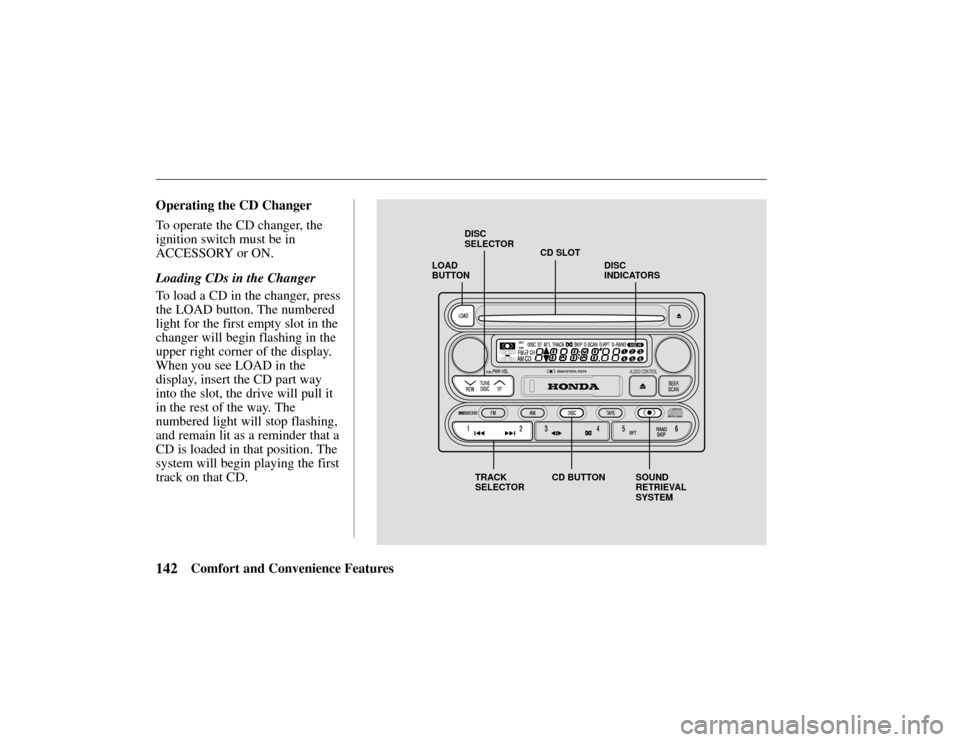
LOAD
BUTTONCD SLOT
DISC
SELECTOR
TRACK
SELECTOR CD BUTTON SOUND
RETRIEVAL
SYSTEMDISC
INDICATORS
142Comfort and Convenience Features
Operating the CD Changer
To operate the CD changer, the
ignition switch must be in
ACCESSORY or ON.
Loading CDs in the Changer
To load a CD in the changer, press
the LOAD button. The numbered
light for the first empty slot in the
changer will begin flashing in the
upper right corner of the display.
When you see LOAD in the
display, insert the CD part way
into the slot, the drive will pull it
in the rest of the way. The
numbered light will stop flashing,
and remain lit as a reminder that a
CD is loaded in that position. The
system will begin playing the first
track on that CD.
Page 146 of 294

143Comfort and Convenience Features
Repeat this procedure to load CDs
in the remaining positions in the
changer.
To load more than one CD in a
single operation, press and hold
the LOAD button until you hear a
beep. Load the first CD as
described above. After the first
CD loads, the light for the next
open position will begin blinking.
Insert the next CD part way into
the slot. Continue this procedure
until all six slots are loaded. If
you do not want to load CDs into
all six positions, press the LOAD
button again after the last CD has
loaded. That CD will begin
playing.
Playing CDs
Press the DISC button to switch to
the CD changer. The CD that is
currently loaded will begin
playing. The disc and track
numbers are shown in the display.
To select a different disc, press the
TUNE/DISC button:
to select
the next disc, or
to select the
previous disc.
To change tracks, press and
release the
(preset 2) button to
advance one track at a time, or the
(preset 1) button to return to
the beginning of the current track.
Press
again to select the
previous track.
To move rapidly within a track,
press and hold the
button to
move forward, or the
button
to move backward. Release the
button when the system reaches
the point you want.
You can switch to the radio or the
cassette player by pressing the
FM, AM, or TAPE button. To switch back to the CD changer,
press the DISC button. The CD
will begin playing where it left
off.
To remove a CD from the
changer, select the CD with the
TUNE/DISC button, then press
and release the EJECT button
next to the slot.
To remove all the CDs from the
changer, press and hold the
EJECT button until you hear a
beep. The CDs will eject in order.
Sound Retrieval System
– The
Sound Retrieval System function
adds richness to the sound of the
CDs. To activate it, press the
button. This turns on the first
level of sound expansion. Press
the button a second time to take it
to the second level. Press the
button again to turn off the
feature.
Page 149 of 294
146Comfort and Convenience Features
Protecting Compact Discs
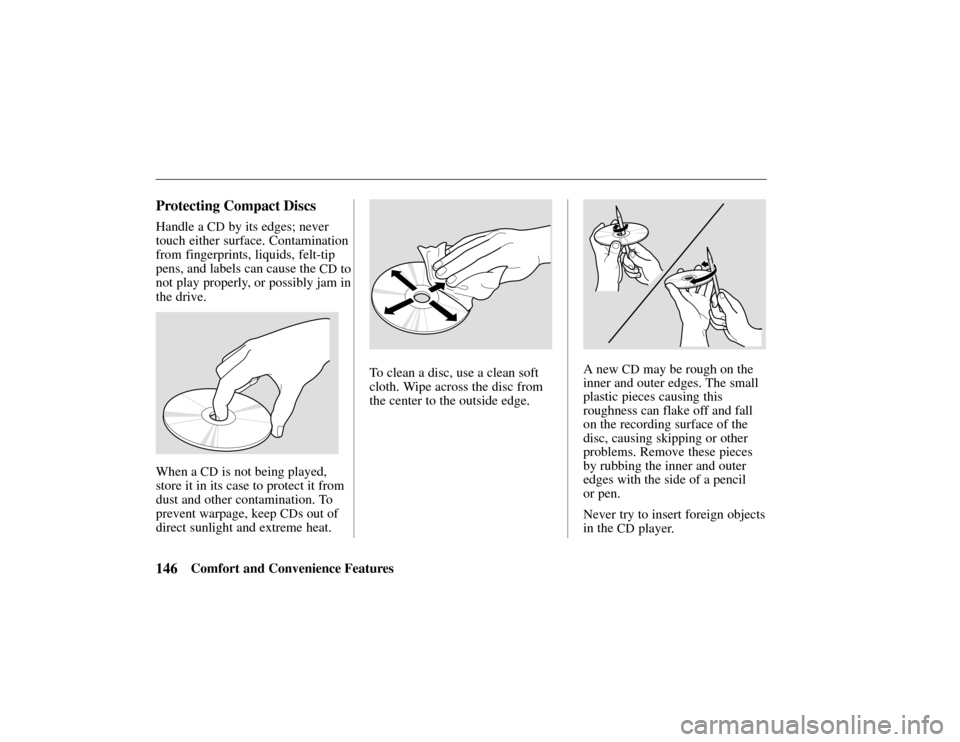
Handle a CD by its edges; never
touch either surface. Contamination
from fingerprints, liquids, felt-tip
pens, and labels can cause the
CD to
not play properly, or possibly jam in
the drive.
When a CD is not being played,
store it in its case to protect it from
dust and other contamination. To
prevent warpage, keep
CDs out of
direct sunlight and extreme heat.
To clean a disc, use a clean soft
cloth. Wipe across the disc from
the center to the outside edge.A new CD may be rough on the
inner and outer edges. The small
plastic pieces causing this
roughness can flake off and fall
on the recording surface of the
disc, causing skipping or other
problems. Remove these pieces
by rubbing the inner and outer
edges with the side of a pencil
or pen.
Never try to insert foreign objects
in the
CD player.
Page 150 of 294
147Comfort and Convenience Features
Cruise control allows you to
maintain a set speed above 25
mph (40 km/h) without keeping
your foot on the accelerator pedal.
It should be used for cruising on
straight open highways. It is not
recommended for conditions such
as city driving, winding roads,
slippery roads, heavy rain, or bad
weather. You should have full
control of the vehicle under those
conditions.
Improper use of the cruise
control can lead to a crash.
Use the cruise control only
when traveling on open
highways in good weather.
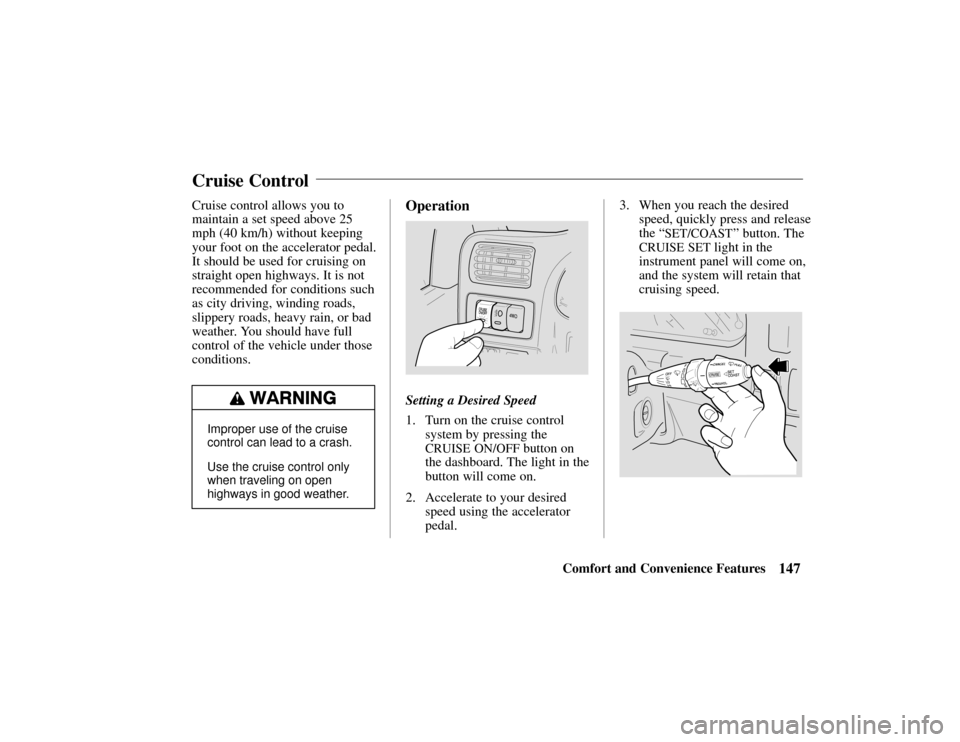
Operation
Setting a Desired Speed
1. Turn on the cruise control
system by pressing the
CRUISE ON/OFF button on
the dashboard. The light in the
button will come on.
2. Accelerate to your desired speed using the accelerator
pedal. 3. When you reach the desired
speed, quickly press and release
the “
SET/COAST” button. The
CRUISE SET light in the
instrument panel will come on,
and the system will retain that
cruising speed.
Cruise Control
Page 154 of 294
151Comfort and Convenience Features
(Standard on the
EX model)
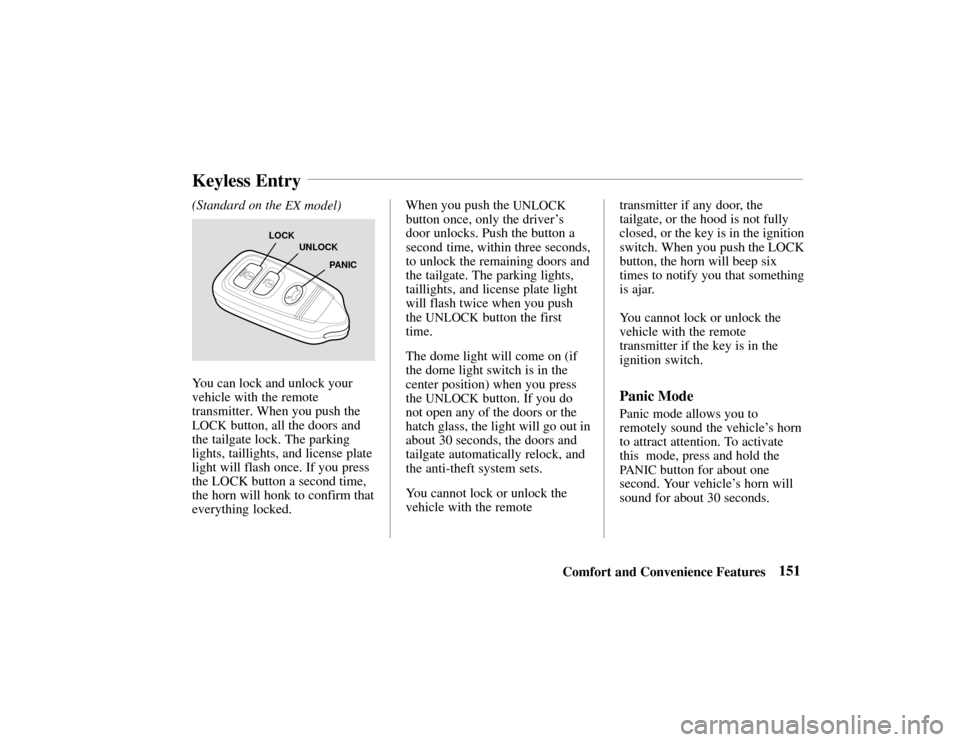
LOCK
UNLOCK
PANIC
You can lock and unlock your
vehicle with the remote
transmitter. When you push the
LOCK button, all the doors and
the tailgate lock. The parking
lights, taillights, and license plate
light will flash once. If you press
the LOCK button a second time,
the horn will honk to confirm that
everything locked. When you push the
UNLOCK
button once, only the driver
’s
door unlocks. Push the button a
second time, within three seconds,
to unlock the remaining doors and
the tailgate. The parking lights,
taillights, and license plate light
will flash twice when you push
the
UNLOCK button the first
time.
The dome light will come on (if
the dome light switch is in the
center position) when you press
the
UNLOCK button. If you do
not open any of the doors or the
hatch glass, the light will go out in
about 30 seconds, the doors and
tailgate automatically relock, and
the anti-theft system sets.
You cannot lock or unlock the
vehicle with the remote transmitter if any door, the
tailgate, or the hood is not fully
closed, or the key is in the ignition
switch. When you push the LOCK
button, the horn will beep six
times to notify you that something
is ajar.
You cannot lock or unlock the
vehicle with the remote
transmitter if the key is in the
ignition switch.Panic Mode
Panic mode allows you to
remotely sound the vehicle’
s horn
to attract attention. To activate
this mode, press and hold the
PA N I C button for about one
second. Your vehicle ’s horn will
sound for about 30 seconds.
Keyless Entry
Page 155 of 294
152Comfort and Convenience Features
To cancel panic mode before 30
seconds, press any button on the
remote transmitter. You can also
turn the ignition switch to
ACCESSORY.
The anti-theft system is designed
to protect your vehicle and its
contents from theft. Any attempt
to forcibly open any door, the
tailgate, or the hood without using
the key or the remote transmitter
will cause the system to alarm.
The horn sounds and the
headlights flash for approximately
three minutes. The starter motor
circuit is disabled so the engine
cannot be started. After three
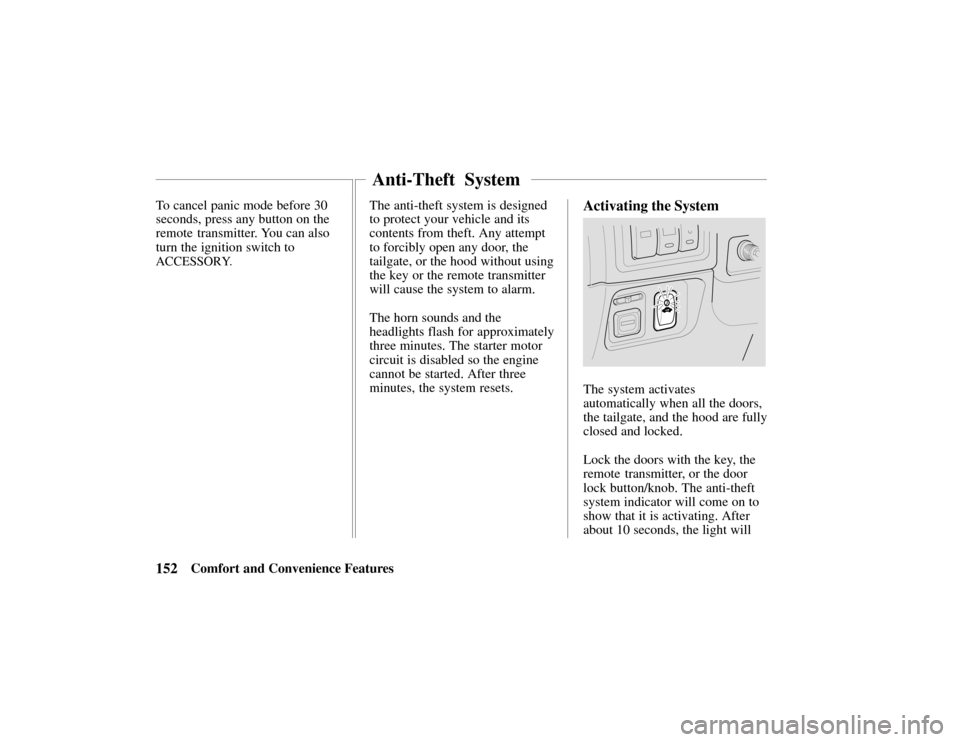
minutes, the system resets.Activating the System
The system activates
automatically when all the doors,
the tailgate, and the hood are fully
closed and locked.
Lock the doors with the key, the
remote transmitter, or the door
lock button/knob. The anti-theft
system indicator will come on to
show that it is activating. After
about 10 seconds, the light will
Anti-Theft System
Page 158 of 294
155Driving Tips
Before Driving156
. . . . . . . . . . .
Starting the Engine157 . . . . .
New Vehicle Break-In 158 . . . . .
Parking 158 . . . . . . . . . . . . . . . .
Brakes 159 . . . . . . . . . . . . . . . . .
Tires 163 . . . . . . . . . . . . . . . . . .
Inflation 164 . . . . . . . . . . . . .
Inspection 165 . . . . . . . . . . . .
Maintenance 166 . . . . . . . . . .
Tire Rotation 166 . . . . . . . . . .
Replacing Tires
and Wheels 166 . . . . . . . . . .
Wheels and Tires 167 . . . . . .
Traction 168 . . . . . . . . . . . . . .
Tire Chains 168 . . . . . . . . .
Wheel Replacement
Considerations 169 . . . . . . .
Fuel Economy 170 . . . . . . . . . . .
Three-Way Catalytic
Converter 172 . . . . . . . . . . . . . Operation in
Foreign Countries 173
. . . . . . .
Accessories & Modifications173
Carrying Cargo175 . . . . . . . . . . .
Trailer Towing 178 . . . . . . . . . . .
Trailer Hitches 180 . . . . . . . .
Safety Chain181 . . . . . . . . . .
Trailer Lights181 . . . . . . . . . .
Tires181 . . . . . . . . . . . . . . . . .
Trailer Brakes181 . . . . . . . . .
Equipment Check182 . . . . . .
Limited Slip Differential 182 . . .
Driving Tips
Page 159 of 294
156 Driving Tips
Driving Guidelines
Your Honda has higher ground
clearance than a passenger car
designed for use only on
pavement. Higher ground
clearance has many advantages
for off-road driving. It allows you
to travel over bumps, obstacles,
and rough terrain. It also provides
good visibility so you can
anticipate problems earlier.
These advantages come at some
cost. Because your vehicle is
taller and rides higher off the
ground, it has a high center of
gravity. This means that your
vehicle can tip or roll over if you
make abrupt turns. Utility
vehicles have a significantly
higher rollover rate than other
types of vehicles. To prevent rollover or loss of
control:
•
Take corners at slower speeds
than you would with a
passenger car.
• Avoid sharp turns and abrupt
maneuvers whenever possible.
• Do not modify your vehicle in
any way that would raise the
center of gravity (see page 174).
•Do not carry heavy cargo on
the roof (see page 177).
For off-road driving guidelines,
see the Off-Road Driving
Information booklet that came
with your vehicle.
Before Entering the Vehicle
1. Check that the windows, mirrors, lights and reflectors
are clean and unobstructed. 2. Check the tires to see if they
are low or flat. You will need
a pressure gauge to tell if tires
are properly inflated.
3. Check that all lights work.
4. Check for fluid leaks.
5. Be sure everything is properly stowed.
6. Check the area behind the vehicle if you are about to
back up.
Before Driving the Vehicle
1. Lock all doors.
2. Adjust the seat and anymovable head restraints.
3. Adjust the inside and outside mirrors.
4. Check that all the indicator lights work when the key
Before Driving
Page 160 of 294

157Driving Tips
switch is turned to the “
ON”
or “
START” position.
5. Check all gauges (including the fuel gauge).
6. Release the parking brake (and make sure the “
BRAKE”
light turns off).
See related topics in this manual if
you find any problems.
Starting the Engine
1. Apply the parking brake.
2. Manual Transmission: Press
the clutch pedal to the floor
and shift the transmission to
the Neutral position. Hold the
clutch pedal to the floor while
you are starting the engine. A
starter safety switch keeps the
starter from operating if the
clutch pedal is not fully
depressed. Automatic Transmission:
Place the shift lever in “P”
or “N” position (“P” is
preferred). A starter safety
switch prevents the starter
from operating if the shift
lever is in any drive position.
If it is necessary to restart the
engine with the vehicle
moving, place the shift lever
in “N” (never in “P”).
3. Do not touch the accelerator pedal. Start the engine by
turning the ignition switch to
“
START.”
If the engine does not start in
10 seconds, wait 15 seconds to let
the starter cool down. Then crank
the engine at wide open throttle
for a maximum of 10 seconds. If
the engine still does not start, wait
another 15 seconds and repeat the
entire procedure. Do not crank the engine for more
than 10 seconds at a time. Wait 15
seconds before trying again.
4. Return the ignition switch to
the “
ON” position as soon as
the engine starts.
5. Apply the regular brakes and shift into the proper gear.
Release the parking brake and
brake pedal and drive off.
In models with an automatic
transmission, you cannot shift
from “P” (Park) position to
any other position unless the
brake pedal is applied.