phone HONDA PILOT 2014 2.G Service Manual
[x] Cancel search | Manufacturer: HONDA, Model Year: 2014, Model line: PILOT, Model: HONDA PILOT 2014 2.GPages: 488, PDF Size: 12.11 MB
Page 306 of 488
Continued305
uu Bluetooth ® HandsFreeLink ® u HFL Menus
Features
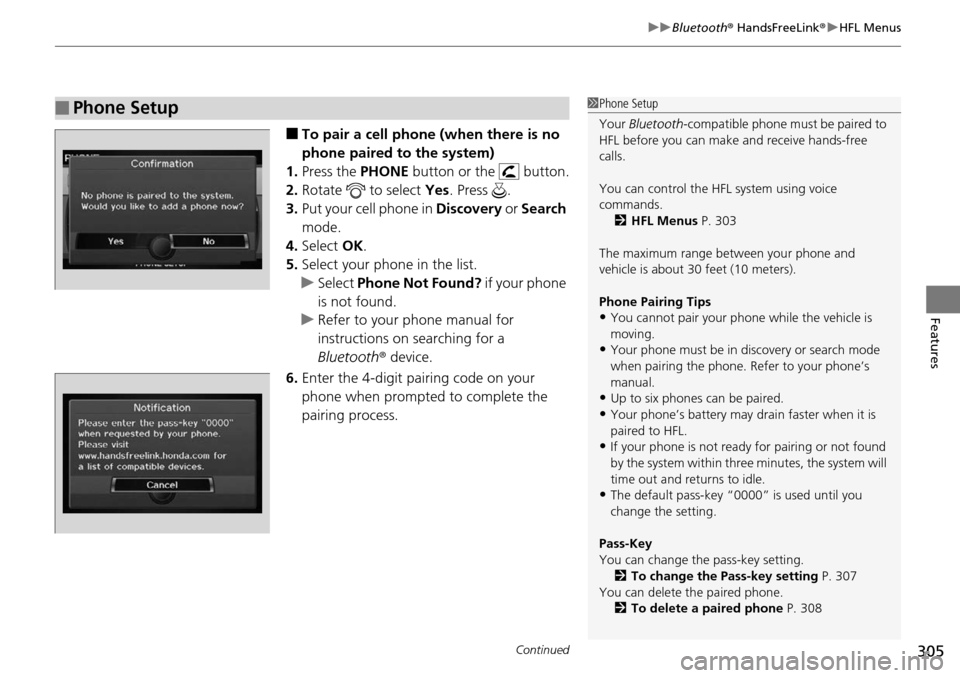
■To pair a cell phone (when there is no
phone paired to the system)
1. Press the PHONE b
utton or the button.
2. Ro
tate to select Yes. Press .
3. Put y
our cell phone in Discovery or Search
mode.
4. Select OK.
5. Select
your phone in the list.
u Select Ph
one Not Found? if your phone
is not found.
u R
efer to your phone manual for
instructions on searching for a
Bluetooth r device.
6. Enter th
e 4-digit pairing code on your
phone when prompted to complete the
pairing process.
■Phone Setup1Phone Setup
Your Bluetooth -compatible phone must be paired to
HFL before you can make and receive hands-free
calls.
You can control the HFL system using voice
commands. 2 HFL Menus P. 303
The maximum range be tween your phone and
vehicle is about 30 feet (10 meters).
Phone Pairing Tips
•You cannot pair your phone while the vehicle is
moving.
•Your phone must be in discovery or search mode
when pairing the phone. Refer to your phone’s
manual.
•Up to six phones can be paired.
•Your phone’s battery may dr ain faster when it is
paired to HFL.
•If your phone is not ready for pairing or not found
by the system within three minutes, the system will
time out and returns to idle.
•The default pass-key “0000” is used until you
change the setting.
Pass-Key
You can change the pass-key setting. 2 To change the Pass-key setting P. 307
You can delete the paired phone.
2 To delete a paired phone P. 308
Page 307 of 488
uu Bluetooth ® HandsFreeLink ® u HFL Menus
306
Features
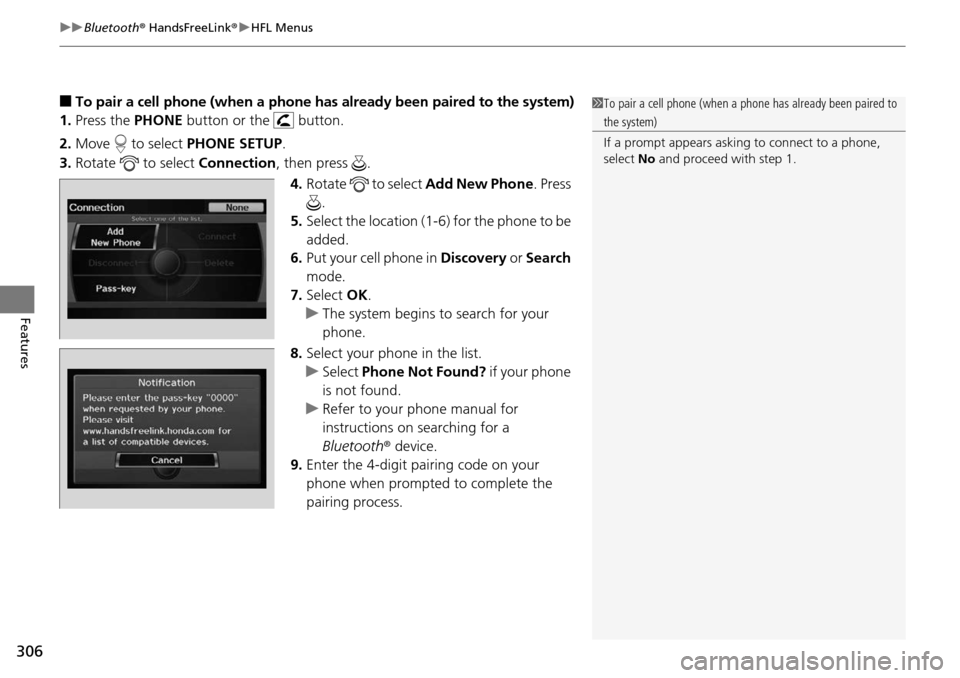
■To pair a cell phone (when a phone has al ready been paired to the system)
1. Press the PHONE bu
tton or the button.
2. Mo
ve to select PHON E SETUP.
3. Rotate
to select Co nnection, then press .
4. Ro
tate to select Ad d New Phone . Press
.
5. Select
the location (1-6) for the phone to be
added.
6. Put
your cell phone in Discovery or Search
mode.
7. Select OK.
u Th
e system begins to search for your
phone.
8. Selec
t your phone in the list.
u Se
lect Phone Not Found? if your phone
is not found.
u Refer to yo
ur phone manual for
instructions on searching for a
Bluetooth r device.
9. Enter the
4-digit pairing code on your
phone when prompted to complete the
pairing process.
1 To pair a cell phone (when a phone has already been paired to
the system)
If a prompt appears asking to connect to a phone,
select No and proceed with step 1.
Page 308 of 488
307
uu Bluetooth ® HandsFreeLink ® u HFL Menus
Continued
Features
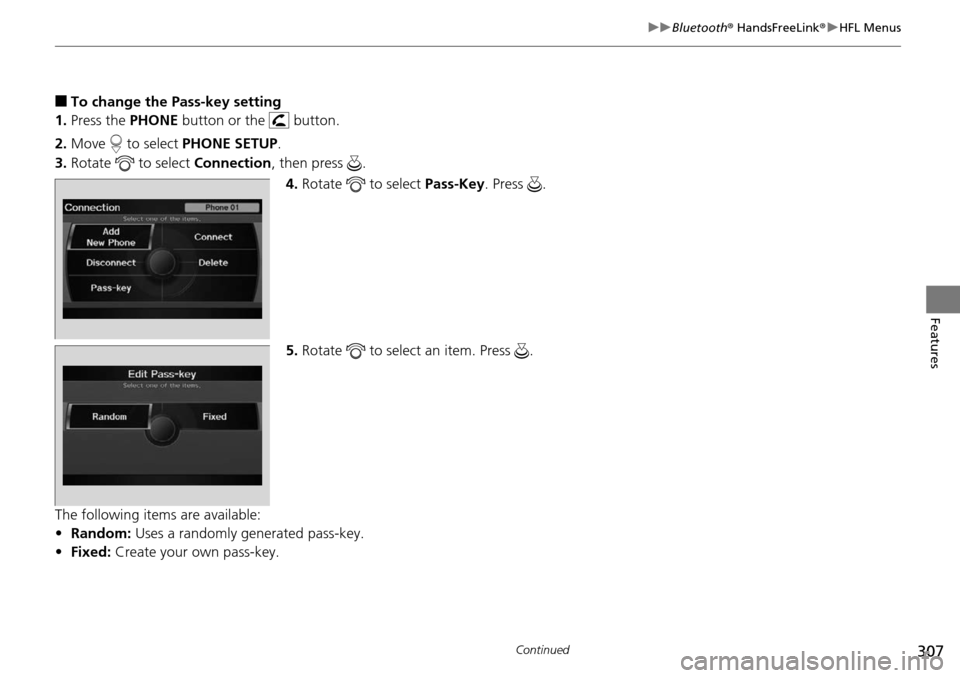
■To change the Pass-key setting
1. Press the PHONE button
or the button.
2. Mo
ve to select PH ONE SETUP.
3. Rota
te to select Co nnection, then press .
4. Ro
tate to select Pa ss-Key. Press .
5. Ro
tate to select an item. Press .
The following items are available:
• R
andom: Uses a randomly generated pass-key.
• Fixed: Create your own pass-key.
Page 309 of 488
308
uu Bluetooth ® HandsFreeLink ® u HFL Menus
Features
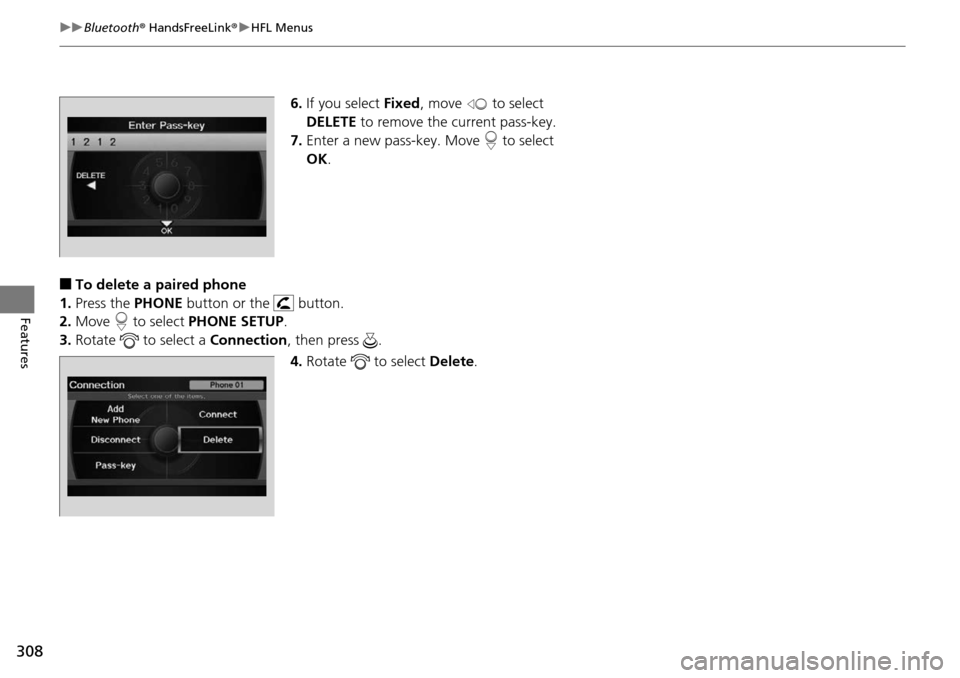
6. If you select Fixed, move to select
DELETE to rem
ove the current pass-key.
7. Enter a
new pass-key. Move to select
OK .
■To delete a paired phone
1. Press the PHONE bu
tton or the button.
2. Mo
ve to select PH ONE SETUP.
3. Rotate
to select a Co nnection, then press .
4. Ro
tate to select De lete.
Page 310 of 488
Continued309
uu Bluetooth ® HandsFreeLink ® u HFL Menus
Features
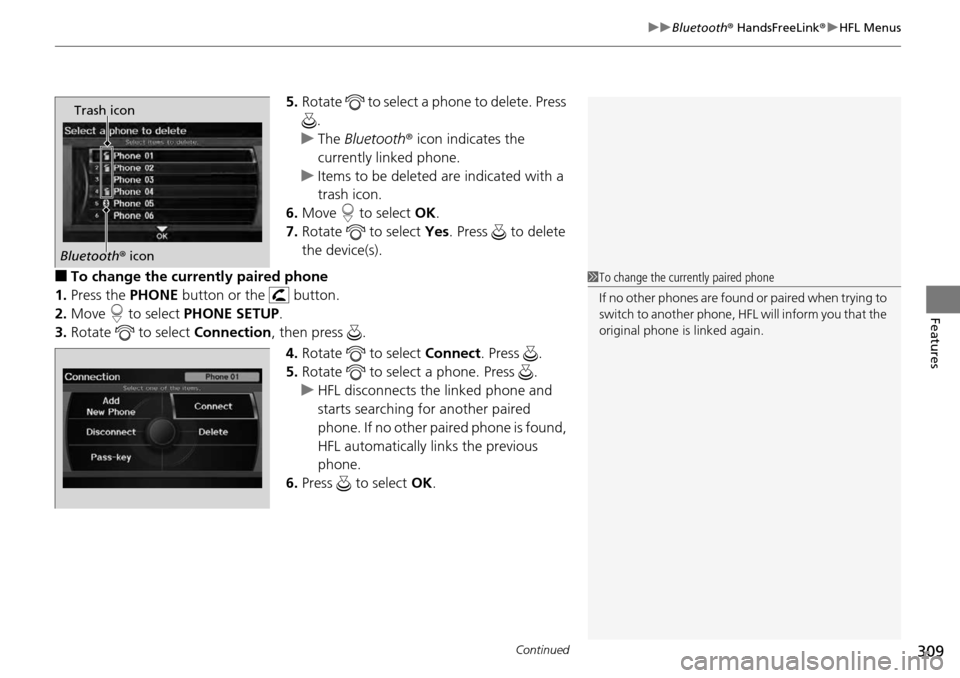
5. Rotate to select a phone to delete. Press
.
u The
Bluetooth r icon indicates the
currently linked phone.
u I
tems to be deleted are indicated with a
trash icon.
6. Move to select OK.
7. Ro
tate to select Yes. Pr ess to delete
the device(s).
■To change the currently paired phone
1. Press the PHONE button
or the button.
2. Mo
ve to select PHONE SE TUP.
3. Rota
te to select Co nnection, then press .
4. Ro
tate to select Connect . Press .
5. Ro
tate to select a phone. Press .
u HF
L disconnects the linked phone and
starts searching for another paired
phone. If no other paired phone is found,
HFL automatically links the previous
phone.
6. Press to select OK.
Trash icon
Bluetooth r icon
1 To change the currently paired phone
If no other phones are found or paired when trying to
switch to another phone, HFL will inform you that the
original phone is linked again.
Page 311 of 488
uu Bluetooth ® HandsFreeLink ® u HFL Menus
310
Features
1. Press the PHONE button or the button.
2. Mo
ve to select PH ONE SETUP.
3. Rotate
to select Phone Name/PIN , then press .
4. Ro
tate to select an item. Press .
The following items are available:
• Ph
one Name: Enter a name.
• PI
N: Enter a 4-digit PIN. Re-enter to confirm. You can select DO N OT USE PIN to
remove a PIN number.
■To Create Phone Name/PIN1 To Create Phone Name/PIN
You can control the HFL system using voice
commands.
2 HFL Menus P. 303
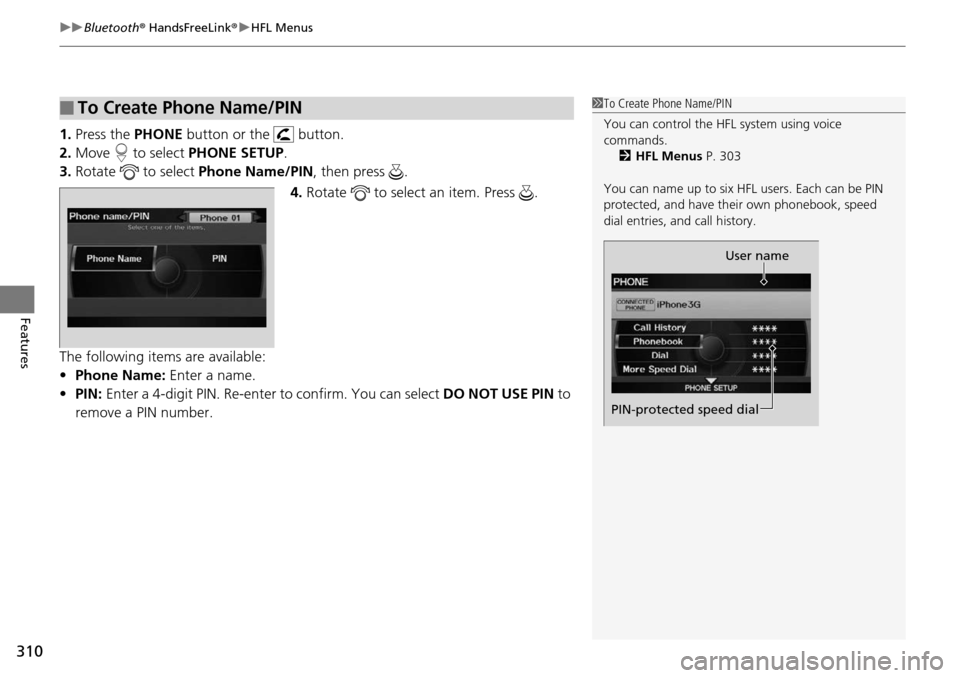
You can name up to six HFL users. Each can be PIN
protected, and have their own phonebook, speed
dial entries, a nd call history.
User name
PIN-protected speed dial
Page 312 of 488
311
uu Bluetooth ® HandsFreeLink ® u HFL Menus
Continued
Features
If you get into the vehicle while you are on the phone, the call can be automatically
transferred to HFL.
1. Press the PHONE button or the button.
2. Mo
ve to select PHONE SE TUP.
3. Rota
te to select Auto Tr ansfer, then press .
4. Rota
te to select On, then press .
You can choose when the HF L system
automatically answers incoming calls.
1. Press the PHONE button
or the button.
2. Mo
ve to select PHONE SE TUP.
3. Rota
te to select Auto Answ er, then press .
4. Rota
te to select a mode you want press .
■Automatic Transferring
■Automatic Answering
Page 313 of 488
uu Bluetooth ® HandsFreeLink ® u HFL Menus
312
Features
All paired phones, phonebook entries, sp eed dials, and pass-keys are erased.
1.Press the PHONE button or the button.
2. Mo
ve to select PH ONE SETUP.
3. Rotate
to select Cle ar Phone Information , then press .
u I
f more than one phone is paired to the system, select the phone you want to
clear. The Bluetooth icon indicates the currently linked phone. Move to
select OK.
4. Rotate
to select Yes, then pr ess .
5. You will receive
a notification message on the screen. Rotate to select Ye s,
then press .
6. You will receive
a notification message on the screen. Rotate to finish.
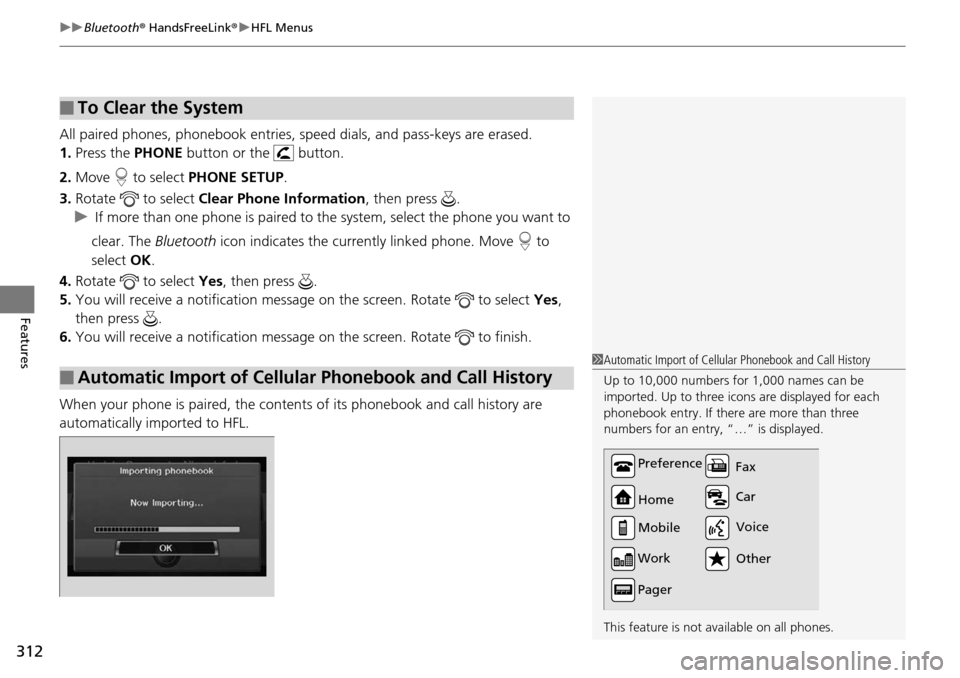
When your phone is paired, the contents of its phonebook and call history are
automatically importe
d to HFL.
■To Clear the System
■Automatic Import of Cellular Phonebook and Call History
1Automatic Import of Cellular Phonebook and Call History
Up to 10,000 numbers for 1,000 names can be
imported. Up to three icons are displayed for each
phonebook entry. If there are more than three
numbers for an entry, “…” is displayed.
This feature is not available on all phones.
Preference
Home
Mobile
Work
Pager Car Fax
Other Voice
Page 314 of 488
Continued313
uu Bluetooth ® HandsFreeLink ® u HFL Menus
Features
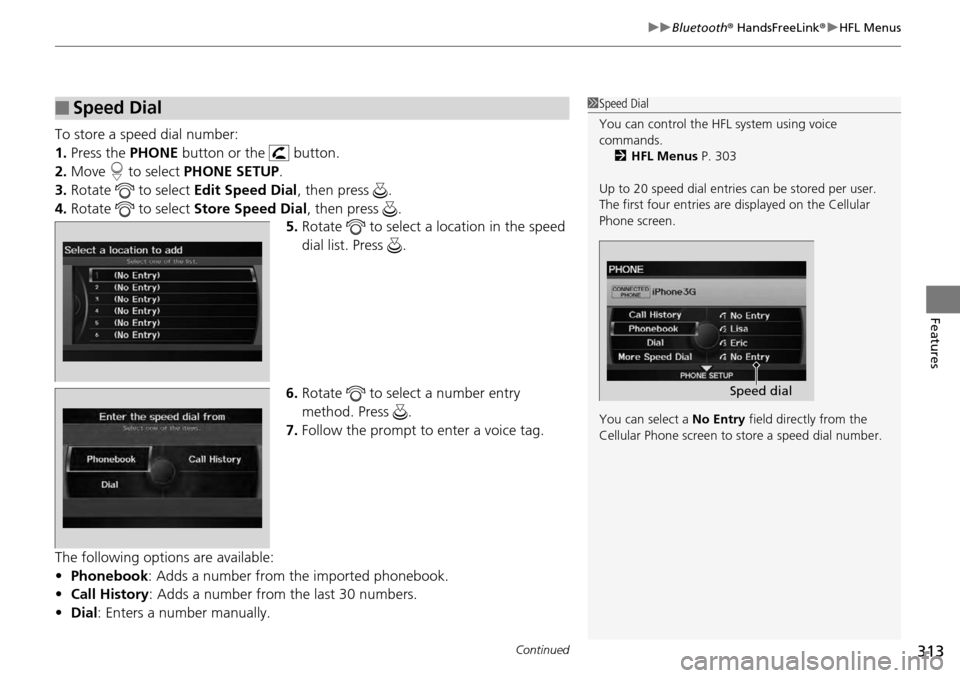
To store a speed dial number:
1. Press the PHONE button or the button.
2. Mo
ve to select PHONE SE TUP.
3. Rota
te to select Edit Speed Dial, then press .
4. Rota
te to select St ore Speed Dial , then press .
5. Ro
tate to select a location in the speed
dial list. Press .
6. Ro
tate to select a number entry
method. Press .
7. Follow
the prompt to enter a voice tag.
The following options are available:
• Phonebook :
Adds a number from the imported phonebook.
• Call
History : Adds a number from the last 30 numbers.
• Dial : Enters a
number manually.
■Speed Dial1Speed Dial
You can control the HFL system using voice
commands.
2 HFL Menus P. 303
Up to 20 speed dial entries can be stored per user.
The first four entries are displayed on th e Cellular
Phone screen.
You can select a No Entry field directly from the
Cellular Phone screen to store a speed dial number.
Speed dial
Page 315 of 488
uu Bluetooth ® HandsFreeLink ® u HFL Menus
314
Features
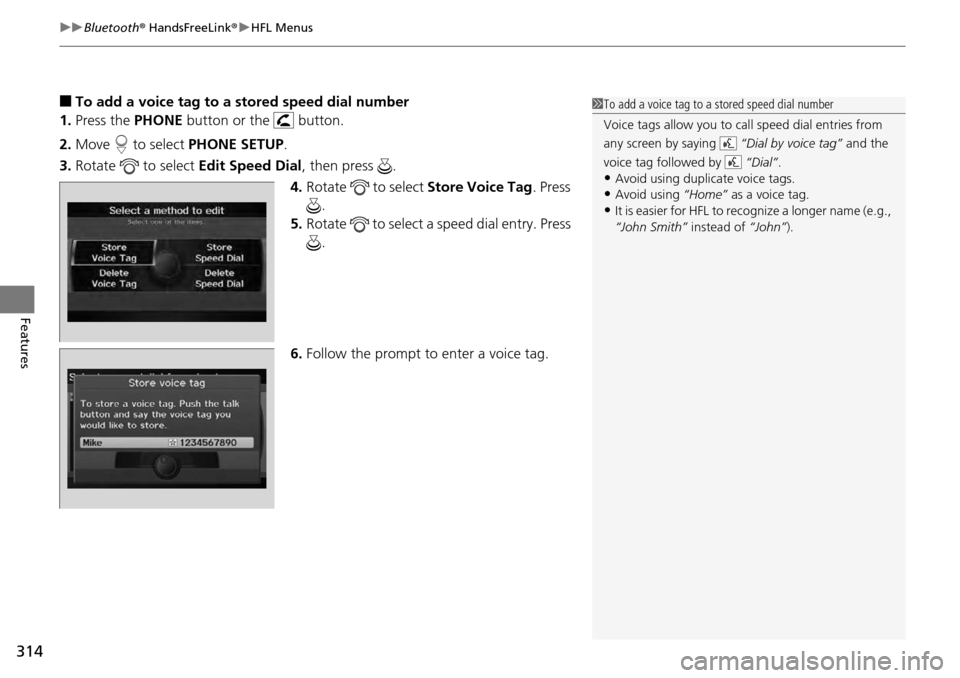
■To add a voice tag to a stored speed dial number
1. Press the PHONE bu
tton or the button.
2. Mo
ve to select PH ONE SETUP.
3. Rotate
to select Ed it Speed Dial , then press .
4. Ro
tate to select Store Voice Tag . Press
.
5. Ro
tate to select a speed dial entry. Press
.
6. F
ollow the prompt to enter a voice tag.
1To add a voice tag to a stored speed dial number
Voice tags allow you to call speed dial entries from
any screen by saying “Dial by voice tag” and the
voice tag followed by “Dial”.
•Avoid using duplicate voice tags.•Avoid using “Home” as a voice tag.
•It is easier for HFL to recognize a longer name (e.g.,
“John Smith” instead of “John”).