oil HONDA PILOT 2017 3.G Owner's Manual
[x] Cancel search | Manufacturer: HONDA, Model Year: 2017, Model line: PILOT, Model: HONDA PILOT 2017 3.GPages: 673
Page 582 of 673
581
uuMaintenance Under the Hood uChanging the Engine Oil and Oil Filter
Continued
Maintenance
Changing the Engine Oil and Oil Filter
You must change the engine oil and oil fi lter regularly in order to maintain the
engine’s lubrication. The engine may be damaged if they are not changed regularly.
Change the oil and filter in accordance with the maintenance message on the multi-
information display. 1.Run the engine until it reaches normal
operating temperature, and then turn the
engine off.
2. Open the hood and remove the engine oil
fill cap.
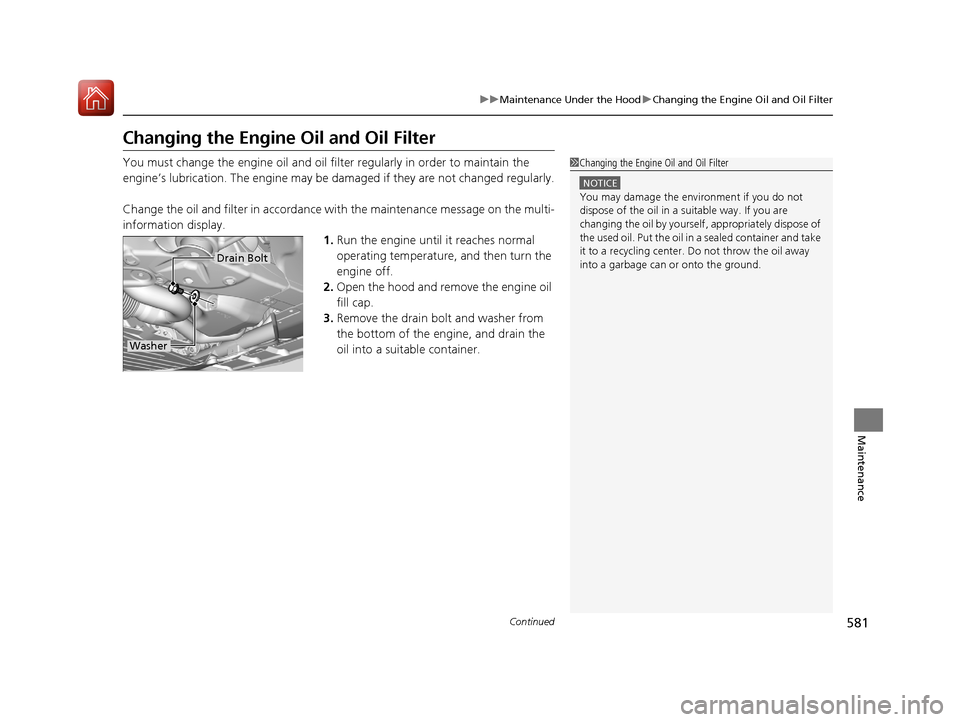
3. Remove the drain bolt and washer from
the bottom of the engine, and drain the
oil into a suitable container.1Changing the Engine Oil and Oil Filter
NOTICE
You may damage the environment if you do not
dispose of the oil in a suitable way. If you are
changing the oil by yourself , appropriately dispose of
the used oil. Put the oil in a sealed container and take
it to a recycling center. Do not throw the oil away
into a garbage can or onto the ground.
Drain Bolt
Washer
17 PILOT-31TG76100.book 581 ページ 2016年9月20日 火曜日 午後4時9分
Page 583 of 673
uuMaintenance Under the Hood uChanging the Engine Oil and Oil Filter
582
Maintenance
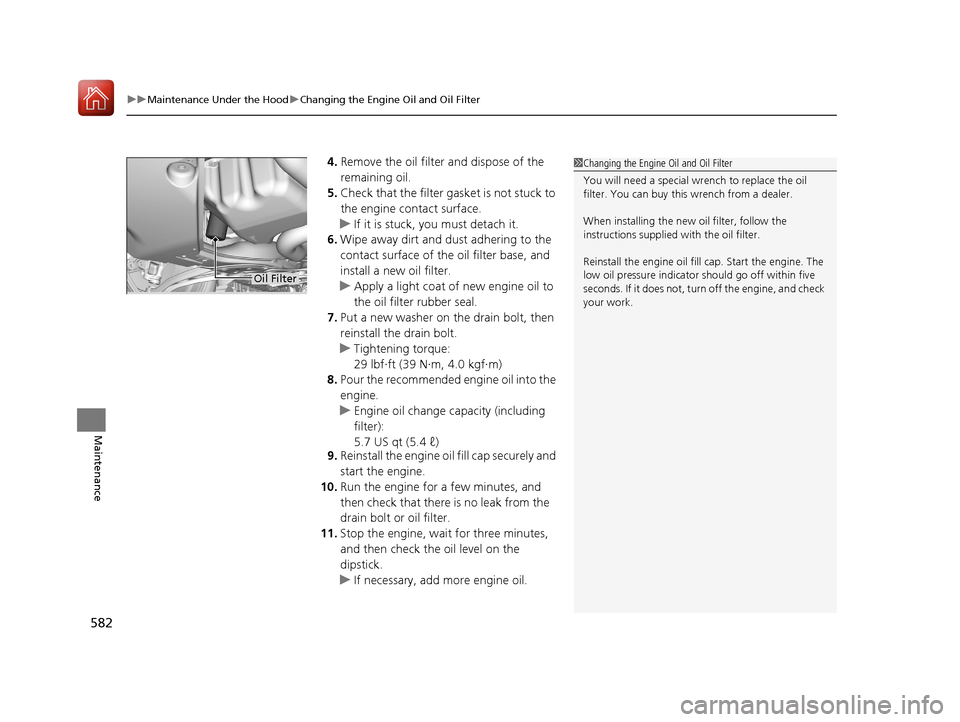
4. Remove the oil filter and dispose of the
remaining oil.
5. Check that the filter ga sket is not stuck to
the engine contact surface.
u If it is stuck, you must detach it.
6. Wipe away dirt and dust adhering to the
contact surface of the oil filter base, and
install a new oil filter.
u Apply a light coat of new engine oil to
the oil filter rubber seal.
7. Put a new washer on the drain bolt, then
reinstall the drain bolt.
u Tightening torque:
29 lbf∙ft (39 N∙m, 4.0 kgf∙m)
8. Pour the recommended engine oil into the
engine.
u Engine oil change capacity (including
filter):
5.7 US qt (5.4 ℓ)
9. Reinstall the engine oil fill cap securely and
start the engine.
10. Run the engine for a few minutes, and
then check that there is no leak from the
drain bolt or oil filter.
11. Stop the engine, wait for three minutes,
and then check the oil level on the
dipstick.
u If necessary, add more engine oil.1Changing the Engine Oil and Oil Filter
You will need a special wrench to replace the oil
filter. You can buy this wrench from a dealer.
When installing the new oil filter, follow the
instructions supplied with the oil filter.
Reinstall the engine oil fill cap. Start the engine. The
low oil pressure indicator should go off within five
seconds. If it does not, turn off the engine, and check
your work.
Oil Filter
17 PILOT-31TG76100.book 582 ページ 2016年9月20日 火曜日 午後4時9分
Page 588 of 673
587Continued
Maintenance
Replacing Light Bulbs
Headlight Bulbs
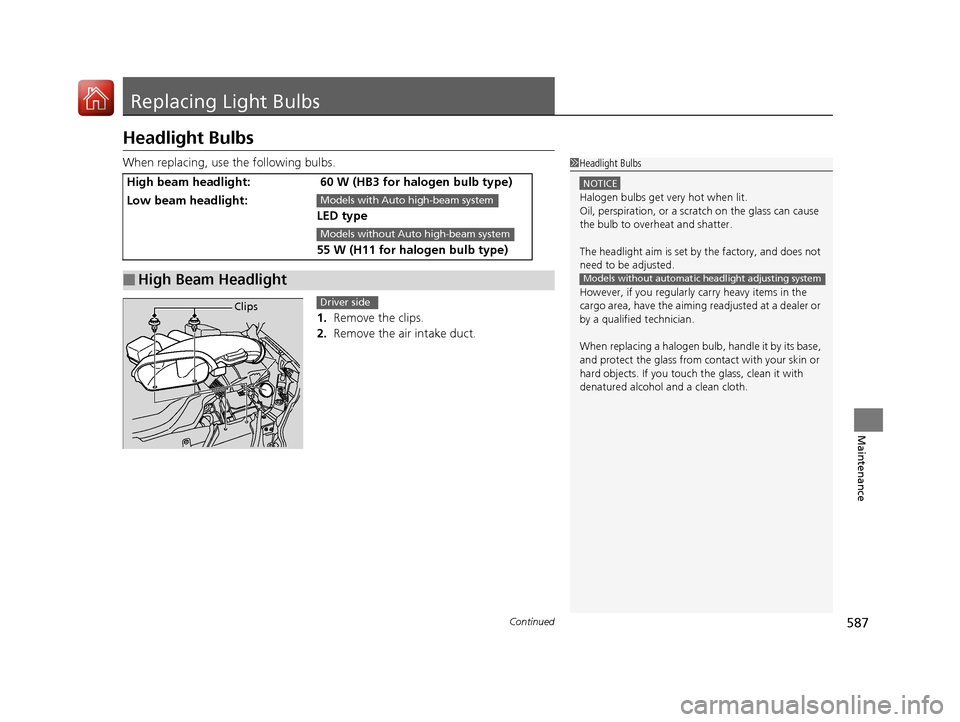
When replacing, use the following bulbs.1. Remove the clips.
2. Remove the air intake duct.
High beam headlight: 60 W (HB3 for halogen bulb type)
Low beam headlight:
LED type
55 W (H11 for halogen bulb type)
■High Beam Headlight
1Headlight Bulbs
NOTICE
Halogen bulbs get very hot when lit.
Oil, perspiration, or a scratch on the glass can cause
the bulb to overhe at and shatter.
The headlight aim is set by the factory, and does not
need to be adjusted.
However, if you regularly carry heavy items in the
cargo area, have the aiming readjusted at a dealer or
by a qualified technician.
When replacing a halogen bu lb, handle it by its base,
and protect the glass from c ontact with your skin or
hard objects. If you touch the glass, clean it with
denatured alcohol and a clean cloth.
Models without automatic headlight adjusting system
Models with Auto high-beam system
Models without Auto high-beam system
ClipsDriver side
17 PILOT-31TG76100.book 587 ページ 2016年9月20日 火曜日 午後4時9分
Page 612 of 673
611
Maintenance
Heating and Cooling System*/Climate Control System* Maintenance
Air Conditioning
To ensure proper and safe operation, the Society of Automotive Engineers (SAE
J2845) recommends that the refrigerant system only be serviced by trained and
certified technicians.
Never repair or replace the air conditio ning evaporator (cooling coil) with one
removed from a used or salvaged vehicle.
New replacement mobile air conditioning evaporators must be certified (and
labeled) as meeting SAE Standard J2842.1 Heating and Cooling System*/Climate Control System*
Maintenance
NOTICE
Vented refrigerant is harmful to the environment.
To avoid refrigerant from venting, never replace the
evaporator with one re moved from a used or
salvaged vehicle.
Refrigerant in your vehicle’s air conditioning system is
flammable and can be igni ted during servicing if
proper procedures are not followed.
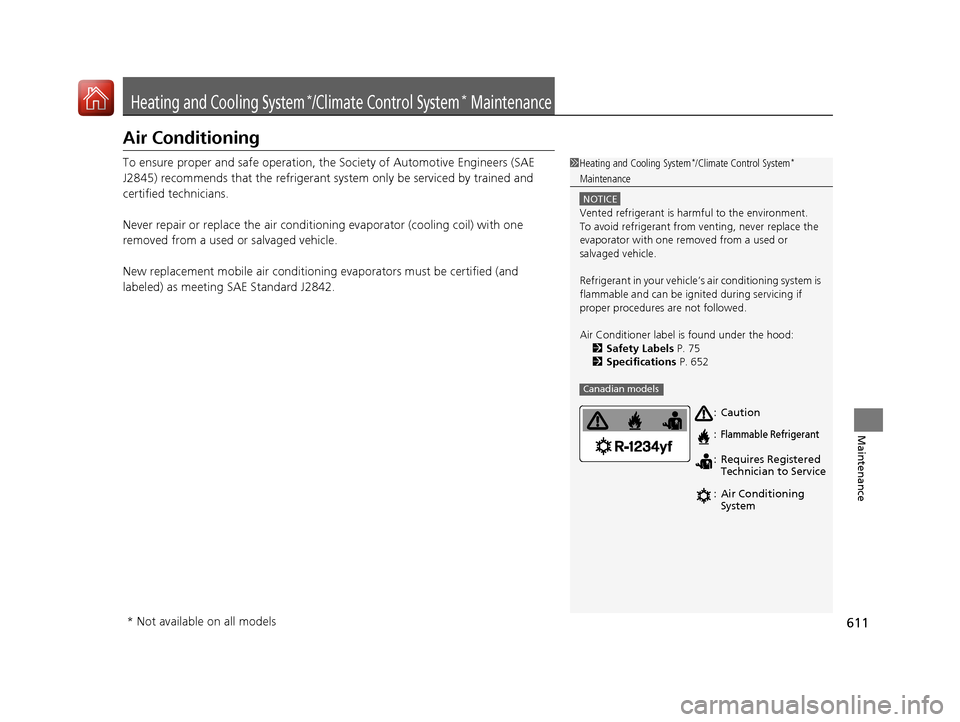
Air Conditioner label is found under the hood: 2 Safety Labels P. 75
2 Specifications P. 652
Canadian models
Caution
Flammable Refrigerant
Requires Registered
Technician to Service
Air Conditioning
System
:
:
:
:
* Not available on all models
17 PILOT-31TG76100.book 611 ページ 2016年9月20日 火曜日 午後4時9分
Page 617 of 673
uuCleaning uExterior Care
616
Maintenance
A good coat of automotive body wax helps protect your vehicle’s paint from the
elements. Wax will wear off over time and expose your vehicle’s paint to the
elements, so reapply as necessary.
If you get gasoline, oil, engine coolant, or battery fluid on resin coated parts, they
may be stained or the coating may peel. Prom ptly wipe it away using a soft cloth and
clean water.
Wipe using a glass cleaner.
Aluminum is susceptible to deterioration caused by salt and other road
contaminants. Use a sponge and mild detergent to wipe away promptly.
Be careful not to use harsh chemicals (inc luding some commercial wheel cleaners) or
a stiff brush. They can damage the clear coat of the aluminum alloy wheels that
helps keep the aluminum from corroding and tarnishing.
■Applying Wax
■Maintaining the Bumpers and Other Resin Coated Parts
■Cleaning the Window
■Maintaining Aluminum Wheels
1 Applying Wax
NOTICE
Chemical solvents and st rong cleaners can damage
the paint, metal, and plasti c on your vehicle. Wipe up
spills immediately.
1 Maintaining the Bumpers an d Other Resin Coated Parts
Ask a dealer about the correct coating material when
you want to repair the pa inted surface of the parts
made of resin.
17 PILOT-31TG76100.book 616 ページ 2016年9月20日 火曜日 午後4時9分
Page 620 of 673
619
Handling the Unexpected
This chapter explains how to handle unexpected troubles.
ToolsTypes of Tools .................................. 620
If a Tire Goes Flat Changing a Flat Tire ......................... 621
Engine Does Not Start Checking the Engine ........................ 629
If the Smart Entry Remote Battery is Weak .......................................... 630
Emergency Engine Stop ................... 631
Shift Lever Does Not Move*............ 632
Jump Starting .................................... 633 Overheating
How to Handle Overheating............. 636
Indicator, Coming On/Blinking
If the Low Oil Pressure Indicator Comes On ............................................. 638
If the Charging System Indicator Comes
On ................................................. 638
If the Malfunction Indicator Lamp Comes On or Blinks ................................... 639
If the Brake System Indicator (Red) Comes On .................................................... 640
If the Electric Power Steering (EPS) System
Indicator Comes On ............................... 640
If the Low Tire Pressure/Tire Pressure Monitoring System (TPMS) Indicator Comes
On or Blinks........................................ 641
If the Transmission I ndicator Blinks along
with the Warning Message*.......... 641
Fuses
Fuse Locations ................................. 642
Inspecting and Changing Fuses ........ 646
Emergency Towing ........................... 647
When You Cannot Unlock the Fuel Fill Door.. 648
RefuelingRefueling From a Portable Fuel Container .... 649
When You Cannot Open the Tailgate.. 650
* Not available on all models
17 PILOT-31TG76100.book 619 ページ 2016年9月20日 火曜日 午後4時9分
Page 639 of 673
638
Handling the Unexpected
Indicator, Coming On/Blinking
If the Low Oil Pressure Indicator Comes On
■Reasons for the indicator to come on
Comes on when the engine oil pressure is low.
■What to do as soon as the indicator comes on
1. Immediately park the vehicle on level ground in a safe place.
2. If necessary, turn the ha zard warning lights on.
■What to do after parking the vehicle
1. Stop the engine and let it sit for about three minutes.
2. Open the hood and check the oil level.
2 Oil Check P. 579
3.Start the engine and check the low oil pressure indicator.
u The indicator goes off: Start driving again.
u The indicator does not go off within 10 seconds: Stop the engine
and contact a dealer for repairs immediately.
If the Charging System Indicator Comes On
■Reasons for the indicator to come on
Comes on when the battery is not being charged.
■What to do when the indicator comes on
Turn off the climate con trol system, rear defogger, and other electrical
systems, and immediately contact a dealer for repairs.
1 If the Low Oil Pressure Indicator Comes On
NOTICE
Running the engine with low oil pressure can cause
serious mechanical damage almost immediately.
1If the Charging System Indicator Comes On
If you need to stop temporarily, do not turn off the
engine. Restarting the engi ne may rapidly discharge
the battery.
17 PILOT-31TG76100.book 638 ページ 2016年9月20日 火曜日 午後4時9分
Page 643 of 673
642
Handling the Unexpected
Fuses
Fuse Locations
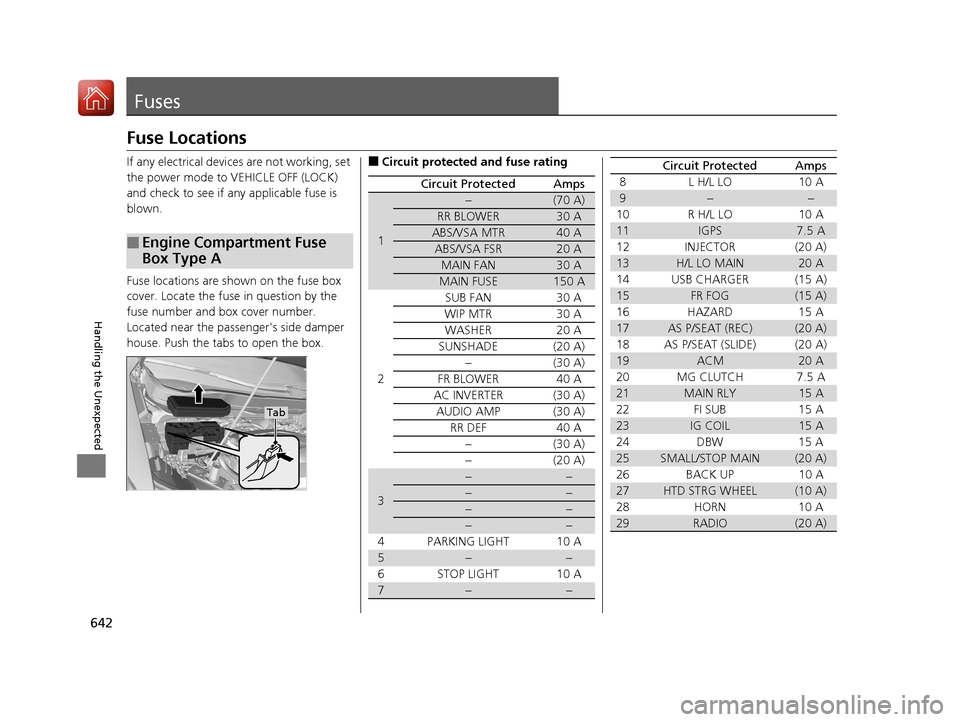
If any electrical devices are not working, set
the power mode to VEHICLE OFF (LOCK)
and check to see if any applicable fuse is
blown.
Fuse locations are shown on the fuse box
cover. Locate the fuse in question by the
fuse number and box cover number.
Located near the passenger's side damper
house. Push the tabs to open the box.
■Engine Compartment Fuse
Box Type A
Tab
■Circuit protected and fuse rating
Circuit ProtectedAmps
1
−(70 A)
RR BLOWER30 A
ABS/VSA MTR40 A
ABS/VSA FSR20 A
MAIN FAN30 A
MAIN FUSE150 A
2
SUB FAN30 A
WIP MTR30 A
WASHER20 A
SUNSHADE(20 A)
−(30 A)
FR BLOWER40 A
AC INVERTER(30 A)
AUDIO AMP(30 A)
RR DEF40 A
−(30 A)
−(20 A)
3
−−
−−
−−
−−
4 PARKING LIGHT 10 A
5−−
6 STOP LIGHT 10 A
7−−
8 L H/L LO 10 A
9−−
10 R H/L LO 10 A
11IGPS7.5 A
12 INJECTOR (20 A)
13H/L LO MAIN20 A
14 USB CHARGER (15 A)
15FR FOG(15 A)
16 HAZARD 15 A
17AS P/SEAT (REC)(20 A)
18 AS P/SEAT (SLIDE) (20 A)
19ACM20 A
20 MG CLUTCH 7.5 A
21MAIN RLY15 A
22 FI SUB 15 A
23IG COIL15 A
24 DBW 15 A
25SMALL/STOP MAIN(20 A)
26 BACK UP 10 A
27HTD STRG WHEEL(10 A)
28 HORN 10 A
29RADIO(20 A)
Circuit ProtectedAmps
17 PILOT-31TG76100.book 642 ページ 2016年9月20日 火曜日 午後4時9分
Page 654 of 673
653
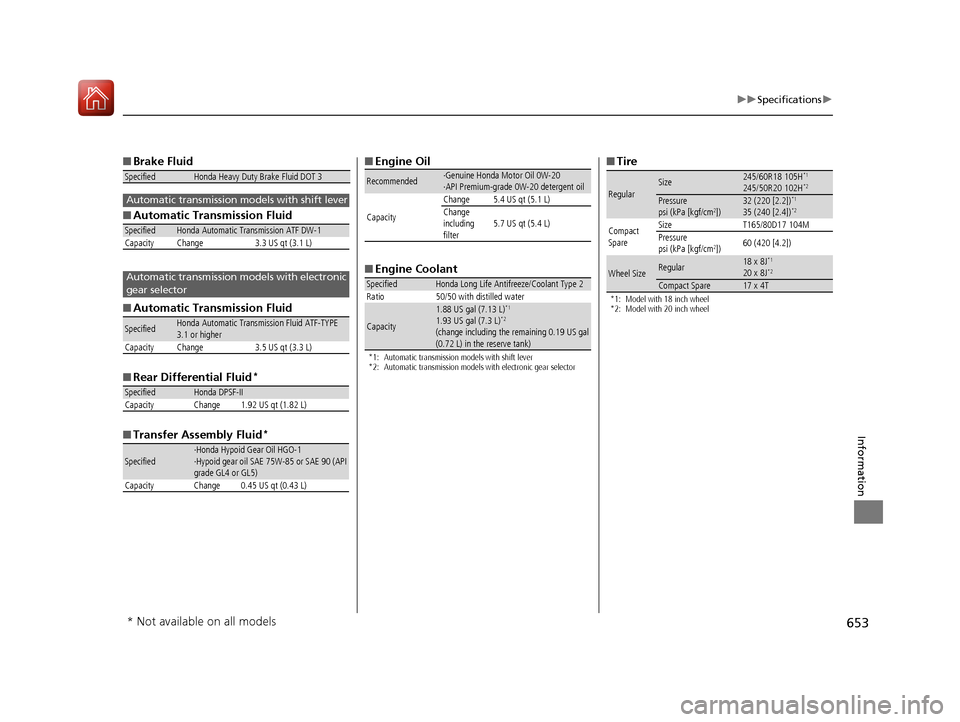
uuSpecifications u
Information
■Brake Fluid
■ Automatic Transmission Fluid
■ Automatic Transmission Fluid
■ Rear Differential Fluid
*
■Transfer Assembly Fluid*
SpecifiedHonda Heavy Duty Brake Fluid DOT 3
SpecifiedHonda Automatic Transmission ATF DW-1
Capacity Change 3.3 US qt (3.1 L)
SpecifiedHonda Automatic Transmission Fluid ATF-TYPE
3.1 or higher
Capacity Change 3.5 US qt (3.3 L)
SpecifiedHonda DPSF-II
Capacity Change 1.92 US qt (1.82 L)
Specified·Honda Hypoid Gear Oil HGO-1
·Hypoid gear oil SAE 75W-85 or SAE 90 (API
grade GL4 or GL5)
Capacity Change 0.45 US qt (0.43 L)
Automatic transmission models with shift lever
Automatic transmission models with electronic
gear selector
■ Engine Oil
■ Engine Coolant
*1: Automatic transmission models with shift lever
*2: Automatic transmission models with electronic gear selector
Recommended·Genuine Honda Motor Oil 0W-20
·API Premium-grade 0W-20 detergent oil
Capacity Change 5.4 US qt (5.1 L)
Change
including
filter5.7 US qt (5.4 L)
SpecifiedHonda Long Life Antifreeze/Coolant Type 2
Ratio 50/50 with distilled water
Capacity
1.88 US gal (7.13 L)*1
1.93 US gal (7.3 L)*2
(change including the remaining 0.19 US gal
(0.72 L) in the reserve tank)
■ Tire
*1: Model with 18 inch wheel
*2: Model with 20 inch wheel
RegularSize245/60R18 105H*1
245/50R20 102H*2
Pressure
psi (kPa [kgf/cm2])32 (220 [2.2])*1
35 (240 [2.4])*2
Compact
SpareSizeT165/80D17 104MPressure
psi (kPa [kgf/cm2])60 (420 [4.2])
Wheel SizeRegular18 x 8J*1
20 x 8J*2
Compact Spare17 x 4T
* Not available on all models
17 PILOT-31TG76100.book 653 ページ 2016年9月20日 火曜日 午後4時9分
Page 664 of 673
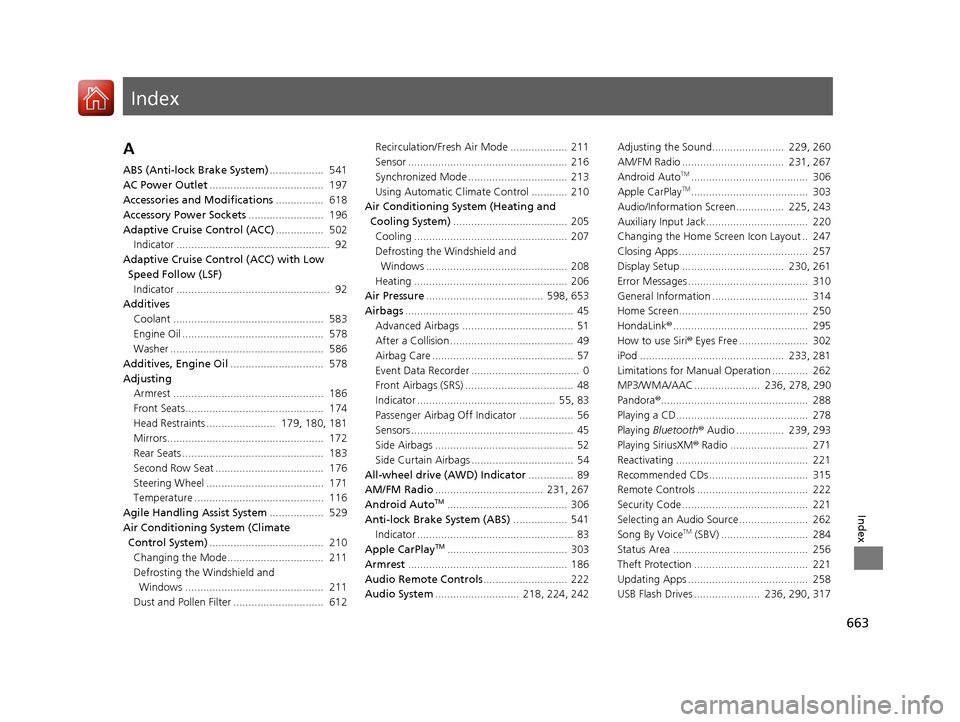
Index
663
Index
Index
A
ABS (Anti-lock Brake System).................. 541
AC Power Outlet ...................................... 197
Accessories and Modifications ................ 618
Accessory Power Sockets ......................... 196
Adaptive Cruise Control (ACC) ................ 502
Indicator ................................................... 92
Adaptive Cruise Control (ACC) with Low
Speed Follow (LSF) Indicator ................................................... 92
Additives
Coolant .................................................. 583
Engine Oil ............................................... 578
Washer ................................................... 586
Additives, Engine Oil ............................... 578
Adjusting Armrest .................................................. 186
Front Seats.............................................. 174
Head Restraints ....................... 179, 180, 181
Mirrors.................................................... 172
Rear Seats ............................................... 183
Second Row Seat .................................... 176
Steering Wheel ....................................... 171
Temperature ........................................... 116
Agile Handling Assist System .................. 529
Air Conditioning System (Climate Control System) ...................................... 210
Changing the Mode................................ 211
Defrosting the Windshield and Windows .............................................. 211
Dust and Pollen Filter .............................. 612 Recirculation/Fresh Air Mode ................... 211
Sensor ..................................................... 216
Synchronized Mode ................................. 213
Using Automatic Climate Control ............ 210
Air Conditioning System (Heating and
Cooling System) ...................................... 205
Cooling ................................................... 207
Defrosting the Windshield and
Windows ............................................... 208
Heating ................................................... 206
Air Pressure ....................................... 598, 653
Airbags ........................................................ 45
Advanced Airbags ..................................... 51
After a Collision ......................................... 49
Airbag Care ............................................... 57
Event Data Recorder .................................... 0
Front Airbags (SRS) .................................... 48
Indicator .............................................. 55, 83
Passenger Airbag Off Indicator .................. 56
Sensors ...................................................... 45
Side Airbags .............................................. 52
Side Curtain Airbags .................................. 54
All-wheel drive (AWD) Indicator ............... 89
AM/FM Radio .................................... 231, 267
Android Auto
TM........................................ 306
Anti-lock Brake System (ABS) .................. 541
Indicator .................................................... 83
Apple CarPlay
TM........................................ 303
Armrest ..................................................... 186
Audio Remote Controls ............................ 222
Audio System ............................ 218, 224, 242 Adjusting the Sound........................ 229, 260
AM/FM Radio .................................. 231, 267
Android Auto
TM....................................... 306
Apple CarPlayTM....................................... 303
Audio/Information Screen................ 225, 243
Auxiliary Input Jack.................................. 220
Changing the Home Screen Icon Layout .. 247
Closing Apps ........................................... 257
Display Setup .................................. 230, 261
Error Messages ........................................ 310
General Information ................................ 314
Home Screen........................................... 250
HondaLink ®............................................. 295
How to use Siri ® Eyes Free ....................... 302
iPod ................................................ 233, 281
Limitations for Manual Operation ............ 262
MP3/WMA/AAC ...................... 236, 278, 290
Pandora ®................................................. 288
Playing a CD............................................ 278
Playing Bluetooth ® Audio ................ 239, 293
Playing SiriusXM ® Radio .......................... 271
Reactivating ............................................ 221
Recommended CDs ................................. 315
Remote Controls ..................................... 222
Security Code .......................................... 221
Selecting an Audio Source ....................... 262
Song By Voice
TM (SBV) ............................. 284
Status Area ............................................. 256
Theft Protection ...................................... 221
Updating Apps ........................................ 258
USB Flash Drives ...................... 236, 290, 317
17 PILOT-31TG76100.book 663 ページ 2016年9月20日 火曜日 午後4時9分