ECO mode HONDA PILOT 2017 3.G Workshop Manual
[x] Cancel search | Manufacturer: HONDA, Model Year: 2017, Model line: PILOT, Model: HONDA PILOT 2017 3.GPages: 673
Page 129 of 673
uuLocking and Unlocking the Doors uLocking/Unlocking the Doors from the Outside
128
Controls
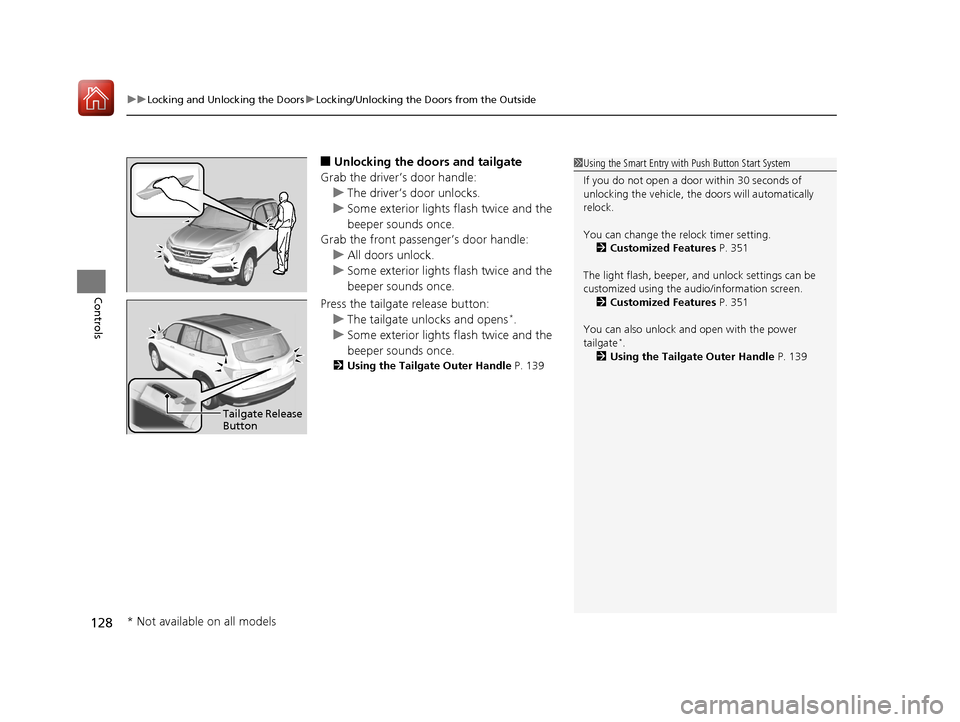
■Unlocking the doors and tailgate
Grab the driver’s door handle: u The driver’s door unlocks.
u Some exterior lights flash twice and the
beeper sounds once.
Grab the front passenger’s door handle:
u All doors unlock.
u Some exterior lights flash twice and the
beeper sounds once.
Press the tailgate release button: u The tailgate unlocks and opens
*.
u Some exterior lights flash twice and the
beeper sounds once.
2 Using the Tailgate Outer Handle P. 139
1Using the Smart Entry with Push Button Start System
If you do not open a door within 30 seconds of
unlocking the vehicle, th e doors will automatically
relock.
You can change the relock timer setting. 2 Customized Features P. 351
The light flash, beeper, a nd unlock settings can be
customized using the audio/information screen. 2 Customized Features P. 351
You can also unlock and open with the power
tailgate
*.
2 Using the Tailgate Outer Handle P. 139
Tailgate Release
Button
* Not available on all models
17 PILOT-31TG76100.book 128 ページ 2016年9月20日 火曜日 午後4時9分
Page 130 of 673
Continued129
uuLocking and Unlocking the Doors uLocking/Unlocking the Doors from the Outside
Controls
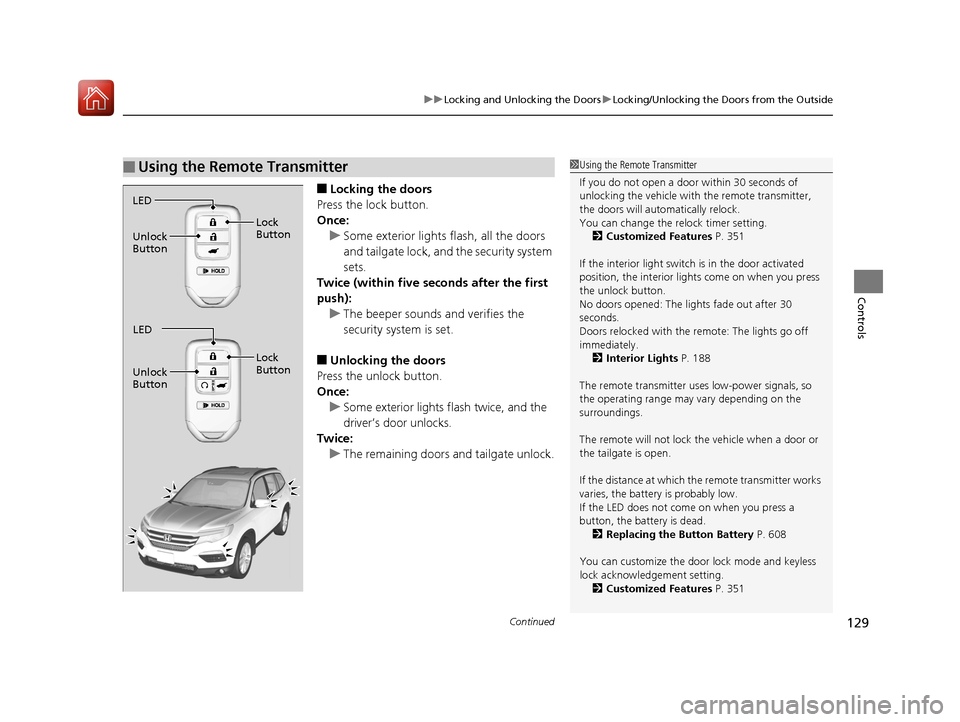
■Locking the doors
Press the lock button.
Once: u Some exterior lights flash, all the doors
and tailgate lock, and the security system
sets.
Twice (within five se conds after the first
push):
u The beeper sounds and verifies the
security system is set.
■Unlocking the doors
Press the unlock button.
Once: u Some exterior lights flash twice, and the
driver’s door unlocks.
Twice:
u The remaining doors and tailgate unlock.
■Using the Remote Transmitter1Using the Remote Transmitter
If you do not open a door within 30 seconds of
unlocking the vehicle with the remote transmitter,
the doors will auto matically relock.
You can change the relock timer setting.
2 Customized Features P. 351
If the interior light switch is in the door activated
position, the interior light s come on when you press
the unlock button.
No doors opened: The li ghts fade out after 30
seconds.
Doors relocked with the remote: The lights go off
immediately. 2 Interior Lights P. 188
The remote transmitter us es low-power signals, so
the operating range may vary depending on the
surroundings.
The remote will not lock th e vehicle when a door or
the tailgate is open.
If the distance at which the remote transmitter works
varies, the batter y is probably low.
If the LED does not come on when you press a
button, the battery is dead. 2 Replacing the Button Battery P. 608
You can customize the door lock mode and keyless
lock acknowledge ment setting.
2 Customized Features P. 351
LED
Unlock
Button Lock
Button
LED
Unlock
Button Lock
Button
17 PILOT-31TG76100.book 129 ページ 2016年9月20日 火曜日 午後4時9分
Page 131 of 673
uuLocking and Unlocking the Doors uLocking/Unlocking the Doors from the Outside
130
Controls
If the smart entry remote battery or the ve hicle battery is dead, use the key instead
of the smart entry remote. Fully insert the key and turn it.
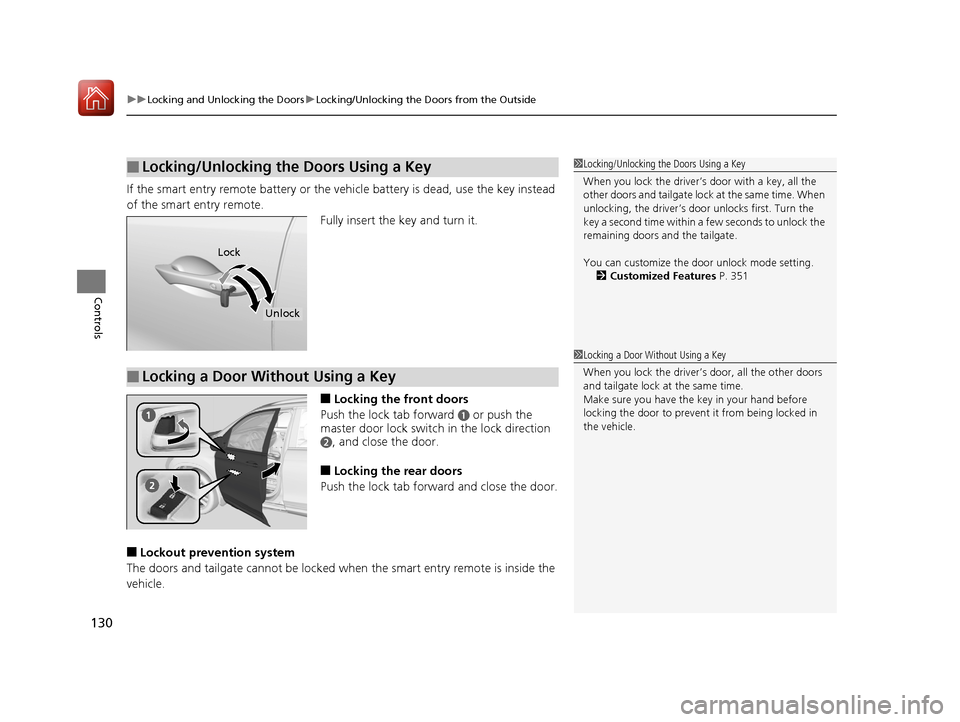
■Locking the front doors
Push the lock tab forward
a or push the
master door lock switch in the lock direction
b, and close the door.
■Locking the rear doors
Push the lock tab forward and close the door.
■Lockout prevention system
The doors and tailgate cannot be locked when the smart entry remote is inside the
vehicle.
■Locking/Unlocking the Doors Using a Key1 Locking/Unlocking the Doors Using a Key
When you lock the driver’s door with a key, all the
other doors and tail gate lock at the same time. When
unlocking, the driver’s door unlocks first. Turn the
key a second time within a few seconds to unlock the
remaining doors a nd the tailgate.
You can customize the door unlock mode setting. 2 Customized Features P. 351
Lock
Unlock
■Locking a Door Without Using a Key
1Locking a Door Without Using a Key
When you lock the driver’s door, all the other doors
and tailgate lock at the same time.
Make sure you have the key in your hand before
locking the door to prevent it from being locked in
the vehicle.
17 PILOT-31TG76100.book 130 ページ 2016年9月20日 火曜日 午後4時9分
Page 137 of 673
136
uuOpening and Closing the Tailgate uOpening/Closing the Tailgate Using the Tailgate Outer Handle
Controls
Opening/Closing the Tailgate Using the Tailgate
Outer Handle
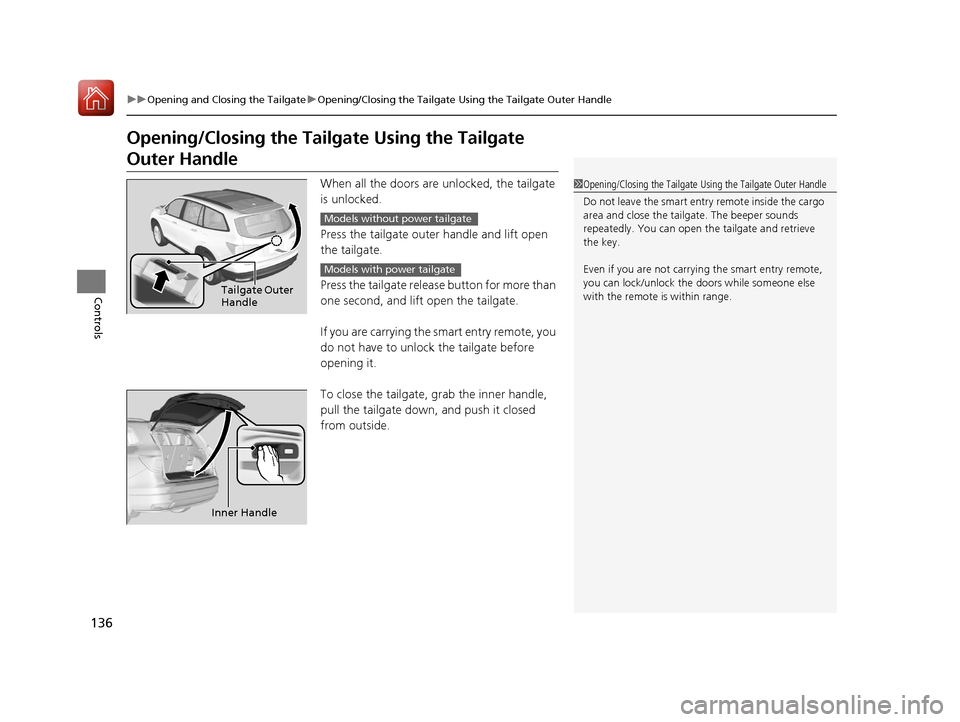
When all the doors are unlocked, the tailgate
is unlocked.
Press the tailgate outer handle and lift open
the tailgate.
Press the tailgate release button for more than
one second, and lift open the tailgate.
If you are carrying the smart entry remote, you
do not have to unlock the tailgate before
opening it.
To close the tailgate, grab the inner handle,
pull the tailgate down, and push it closed
from outside.1Opening/Closing the Tailgate Using the Tailgate Outer Handle
Do not leave the smart entry remote inside the cargo
area and close the tailga te. The beeper sounds
repeatedly. You can open th e tailgate and retrieve
the key.
Even if you are not carrying the smart entry remote,
you can lock/unlock the doors while someone else
with the remote is within range.
Tailgate Outer
Handle
Models without power tailgate
Models with power tailgate
Inner Handle
17 PILOT-31TG76100.book 136 ページ 2016年9月20日 火曜日 午後4時9分
Page 139 of 673
138
uuOpening and Closing the Tailgate uOpening/Closing the Power Tailgate*
Controls
Opening/Closing the Power Tailgate*
The power tailgate can be operated by pressing the power tailgate button on the
remote transmitter or driver's door, or pressing the button on the tailgate.
■The power tailgate can be opened when:
• The tailgate is fully closed.
• The transmission is in
(P.
• Press and hold the tailgat e button on the remote transmitter for about one
second when the power mode is in VEHICLE OFF (LOCK).
u If you have changed the Keyless Open Mode setting to When Unlocked ,
you need to unlock the tailgate before you press the tailgate button to open it.
2Customized Features P. 351
■The power tailgate can be closed when:
• The tailgate is fully open.
• Press and hold the tailgat e button on the remote transmitter for about one
second when the power mode is in VEHICLE OFF (LOCK).
1Opening/Closing the Power Tailgate*
NOTICE
Do not push or pull on the power tailgate when it is
being automatically opened or closed.
Forcibly opening or closing the power tailgate while
in operation can deform the tailgate frame.
When operating the power tailgate, make sure there is
enough space around your vehicle. People near the
tailgate may be seriously hurt if the tailgate hits or closes on
their heads. Be especially cautious if children are around.
The power tailgate may not open or close under the
following conditions:
•The vehicle is park ed on a steep hill.•The vehicle is swayed in a strong wind.•The tailgate or the roof is covered with snow or ice.
If you close the power tail gate when all the doors are
locked, the power tailgate locks automatically.
If you replace the battery or the power tailgate fuse while
the tailgate is open, the power tailgate may be disabled.
The power tailgate resumes once you manually close the
tailgate and wait for about five minutes.
Installing aftermarket com ponents other than Honda
genuine accessories on the power tailgate may
prevent it from fully opening or closing.
Make sure the power tailgate is fully open before you
get your luggage in and out.
Make sure the power tailgat e is fully closed before
you start the vehicle.
* Not available on all models
17 PILOT-31TG76100.book 138 ページ 2016年9月20日 火曜日 午後4時9分
Page 141 of 673
uuOpening and Closing the Tailgate uOpening/Closing the Power Tailgate*
140
Controls
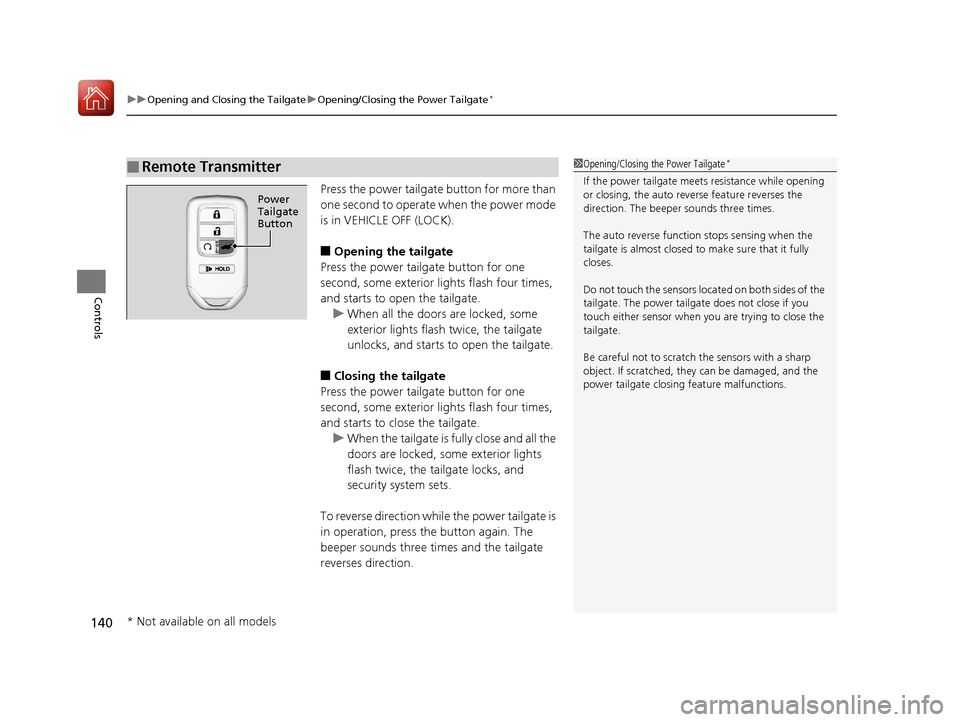
Press the power tailgate button for more than
one second to operate when the power mode
is in VEHICLE OFF (LOCK).
■Opening the tailgate
Press the power tailgate button for one
second, some exterior lights flash four times,
and starts to open the tailgate. u When all the doors are locked, some
exterior lights flash twice, the tailgate
unlocks, and starts to open the tailgate.
■Closing the tailgate
Press the power tailgate button for one
second, some exterior lights flash four times,
and starts to close the tailgate. u When the tailgate is fully close and all the
doors are locked, some exterior lights
flash twice, the tailgate locks, and
security system sets.
To reverse direction whil e the power tailgate is
in operation, press the button again. The
beeper sounds three times and the tailgate
reverses direction.
■Remote Transmitter1 Opening/Closing the Power Tailgate*
If the power tailgate meet s resistance while opening
or closing, the auto reverse feature reverses the
direction. The beeper sounds three times.
The auto reverse function stops sensing when the
tailgate is almost closed to make sure that it fully
closes.
Do not touch the sensors located on both sides of the
tailgate. The power tailga te does not close if you
touch either sensor when you are trying to close the
tailgate.
Be careful not to scratch the sensors with a sharp
object. If scratched, they can be damaged, and the
power tailgate closing feature malfunctions.
Power
Tailgate
Button
* Not available on all models
17 PILOT-31TG76100.book 140 ページ 2016年9月20日 火曜日 午後4時9分
Page 145 of 673
uuSecurity System uSecurity System Alarm
144
Controls
■To deactivate the security system alarm
Unlock the vehicle using the key, remote transmitter, or smart entry system. The
system, along with the horn and flashing lights, is deactivated.
■Setting the security system alarm
The security system alarm automatically sets when the following conditions have
been met:
• The power mode is set to VEHICLE OFF (LOCK).
• The hood is closed.
• All doors and the tailgate are locked from outside with the key, remote
transmitter, or smart entry system.
■When the security system alarm sets
The security system alarm indicator in the instrument panel blinks. When the
blinking interval changes after about 15 seconds, the security system alarm is set.
■To cancel the security system alarm
The security system alarm is canceled when the vehicle is unlocked using the key,
remote transmitter, smart entry system, or th e power mode is set to ON. The security
system alarm indicator goe s off at the same time.
1Security System Alarm
Do not set the security system alarm when someone
is in the vehicle or a window is open. The system can
accidentally activate when:
•Unlocking the door with the lock tab.•Opening the hood with the hood release.
If the battery goes dead after you have set the
security system alarm, the security alarm may go off
once the battery is re charged or replaced.
If this occurs, deactivate the security system alarm by
unlocking a door using the ke y, remote transmitter,
or smart entry system.
Do not attempt to alter th is system or add another
device to it.
17 PILOT-31TG76100.book 144 ページ 2016年9月20日 火曜日 午後4時9分
Page 146 of 673
145
uuSecurity System uSecurity System Alarm
Controls
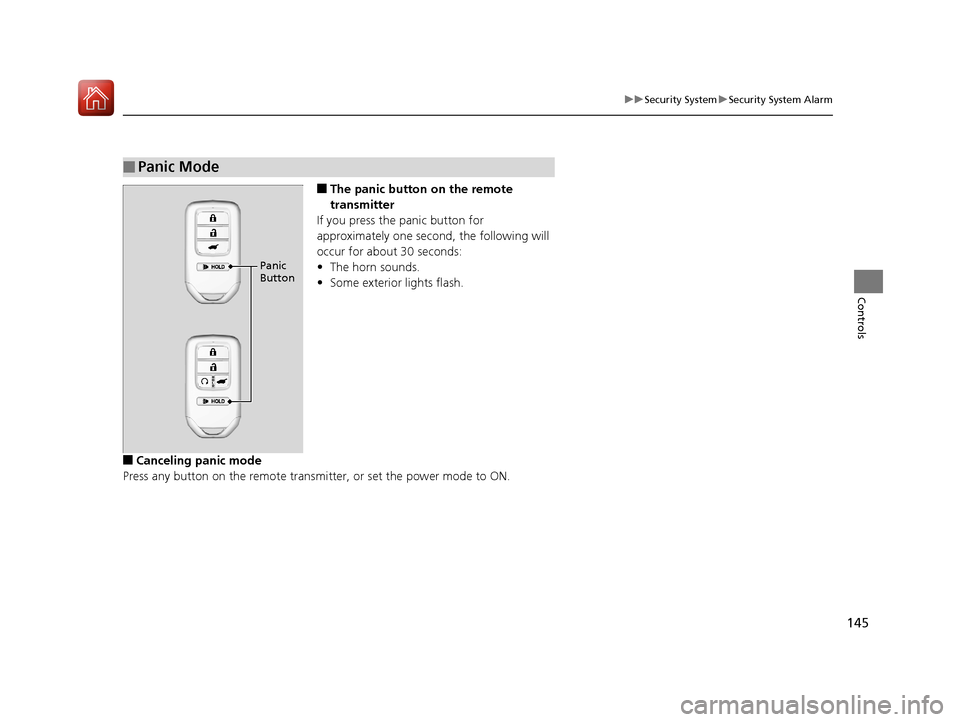
■The panic button on the remote
transmitter
If you press the panic button for
approximately one second, the following will
occur for about 30 seconds:
• The horn sounds.
• Some exterior lights flash.
■Canceling panic mode
Press any button on the remote transmi tter, or set the power mode to ON.
■Panic Mode
Panic
Button
17 PILOT-31TG76100.book 145 ページ 2016年9月20日 火曜日 午後4時9分
Page 148 of 673
147
uuOpening and Closing the Windows uOpening/Closing the Power Windows
Controls
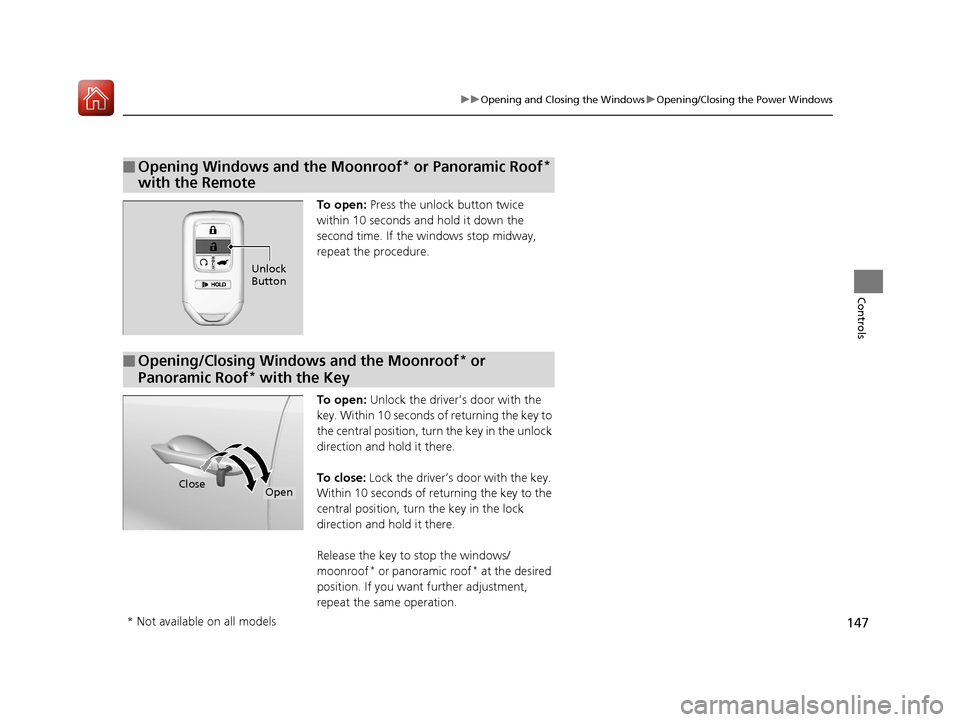
To open: Press the unlock button twice
within 10 seconds and hold it down the
second time. If the windows stop midway,
repeat the procedure.
To open: Unlock the driver’s door with the
key. Within 10 seconds of returning the key to
the central position, turn the key in the unlock
direction and hold it there.
To close: Lock the driver’s door with the key.
Within 10 seconds of re turning the key to the
central position, turn the key in the lock
direction and hold it there.
Release the key to stop the windows/
moonroof
* or panoramic roof* at the desired
position. If you want further adjustment,
repeat the same operation.
■Opening Windows and the Moonroof* or Panoramic Roof*
with the Remote
Unlock
Button
■Opening/Closing Windows and the Moonroof* or
Panoramic Roof
* with the Key
CloseOpen
* Not available on all models
17 PILOT-31TG76100.book 147 ページ 2016年9月20日 火曜日 午後4時9分
Page 158 of 673
Continued157
uuOperating the Switches Around the Steering Wheel uLight Switches
Controls
Automatic lighting control can be used when
the power mode is in ON.
When the light switch is in AUTO, the
headlights and other exterior lights will switch
on and off automatically depending on the
ambient brightness. u You can change the auto light sensitivity
setting.
2 Customized Features P. 351
■Automatic Lighting Control1Automatic Lighting Control
We recommend that you tu rn on the lights manually
when driving at night, in a dense fog, or in dark areas
such as long tunnels or parking facilities.
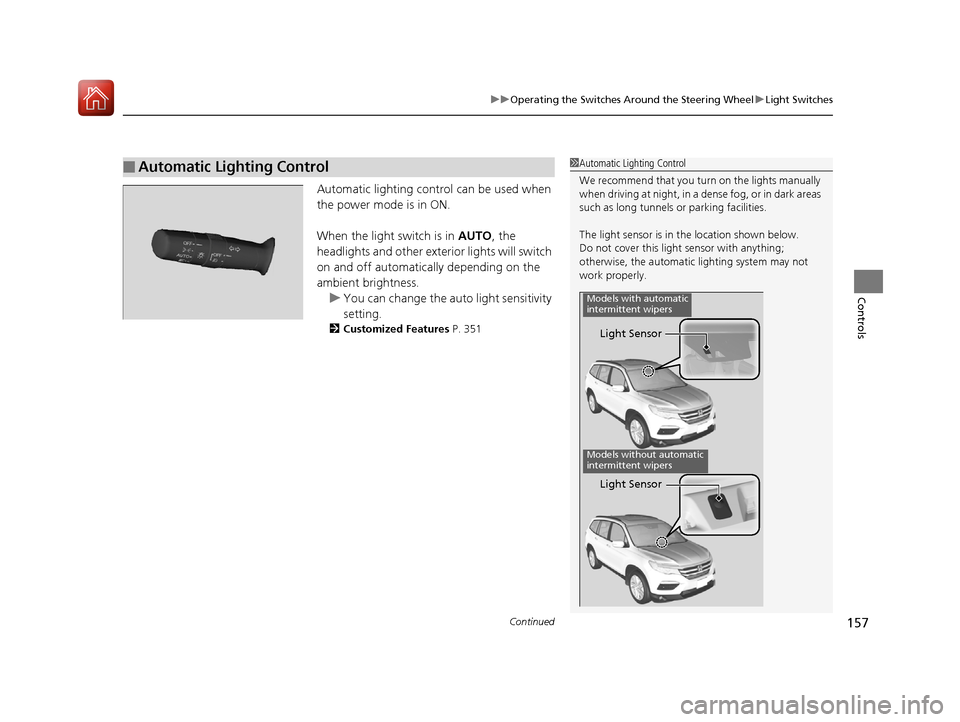
The light sensor is in the location shown below.
Do not cover this light sensor with anything;
otherwise, the automatic lighting system may not
work properly.
Light Sensor
Models with automatic
intermittent wipers
Models without automatic
intermittent wipers
Light Sensor
17 PILOT-31TG76100.book 157 ページ 2016年9月20日 火曜日 午後4時9分