lock HONDA PILOT 2023 Owners Manual
[x] Cancel search | Manufacturer: HONDA, Model Year: 2023, Model line: PILOT, Model: HONDA PILOT 2023Pages: 814, PDF Size: 29.02 MB
Page 423 of 814
422
uuCustomized Features u
Features
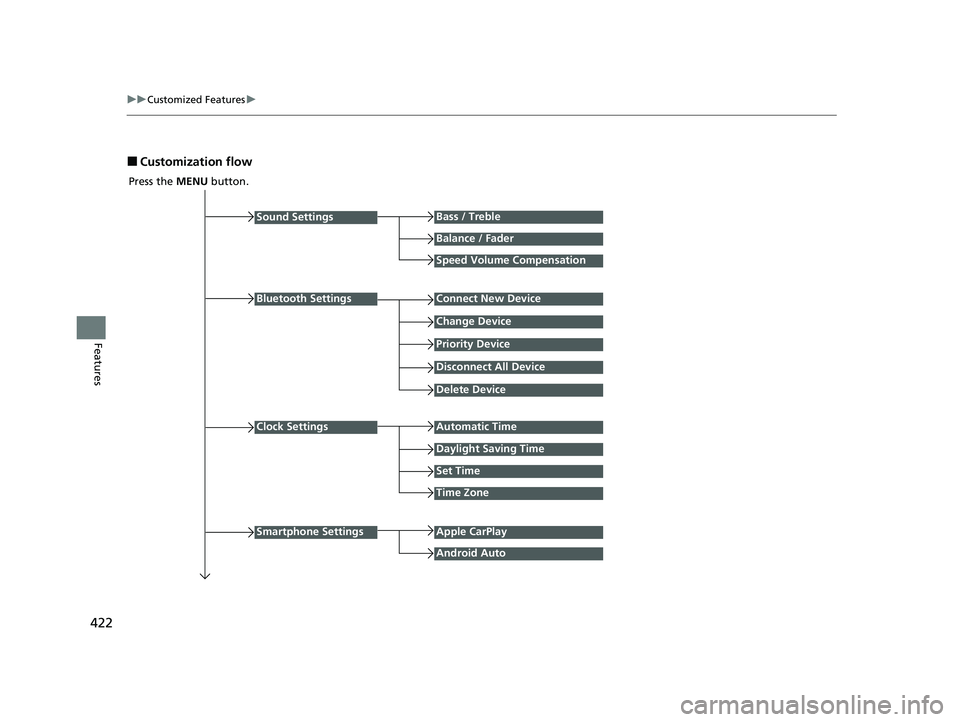
■Customization flow
Press the MENU button.
Sound Settings
Bluetooth Settings
Bass / Treble
Balance / Fader
Speed Volume Compensation
Connect New Device
Change Device
Priority Device
Clock Settings
Smartphone Settings
Disconnect All Device
Delete Device
Automatic Time
Set Time
Time Zone
Apple CarPlay
Android Auto
Daylight Saving Time
23 PILOT-31T906000_03.book 422 ページ 2022年10月31日 月曜日 午前10時26分
Page 426 of 814
425
uuCustomized Features u
Continued
Features
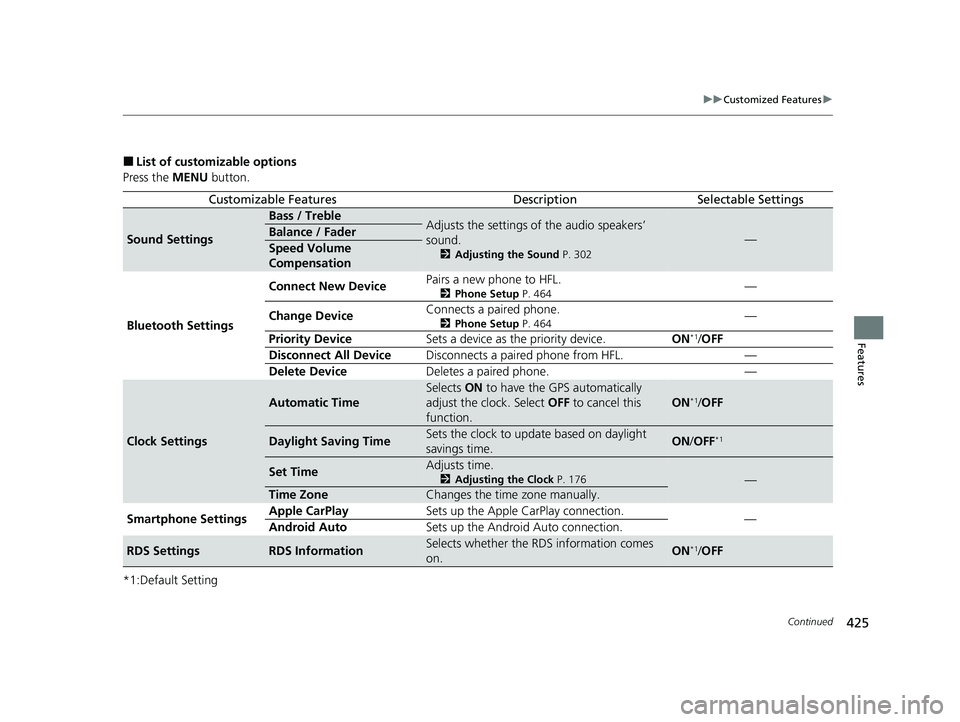
■List of customizable options
Press the MENU button.
*1:Default Setting
Customizable FeaturesDescriptionSelectable Settings
Sound Settings
Bass / TrebleAdjusts the settings of the audio speakers’
sound.
2 Adjusting the Sound P. 302
—Balance / Fader
Speed Volume
Compensation
Bluetooth Settings Connect New Device
Pairs a new phone to HFL.
2
Phone Setup P. 464—
Change Device Connects a paired phone.
2
Phone Setup P. 464—
Priority Device Sets a device as the priority device. ON
*1/OFF
Disconnect All Device Disconnects a paired phone from HFL. —
Delete Device Deletes a paired phone. —
Clock Settings
Automatic Time
Selects ON to have the GPS automatically
adjust the clock. Select OFF to cancel this
function.
ON*1/ OFF
Daylight Saving TimeSets the clock to update based on daylight
savings time.ON /OFF*1
Set TimeAdjusts time.
2 Adjusting the Clock P. 176—
Time ZoneChanges the time zone manually.
Smartphone Settings Apple CarPlay
Sets up the Apple CarPlay connection.
—
Android Auto Sets up the Android Auto connection.
RDS SettingsRDS InformationSelects whether the RDS information comes
on.ON*1/OFF
23 PILOT-31T906000_03.book 425 ページ 2022年10月31日 月曜日 午前10時26分
Page 436 of 814
435
uuCustomized Features u
Continued
Features
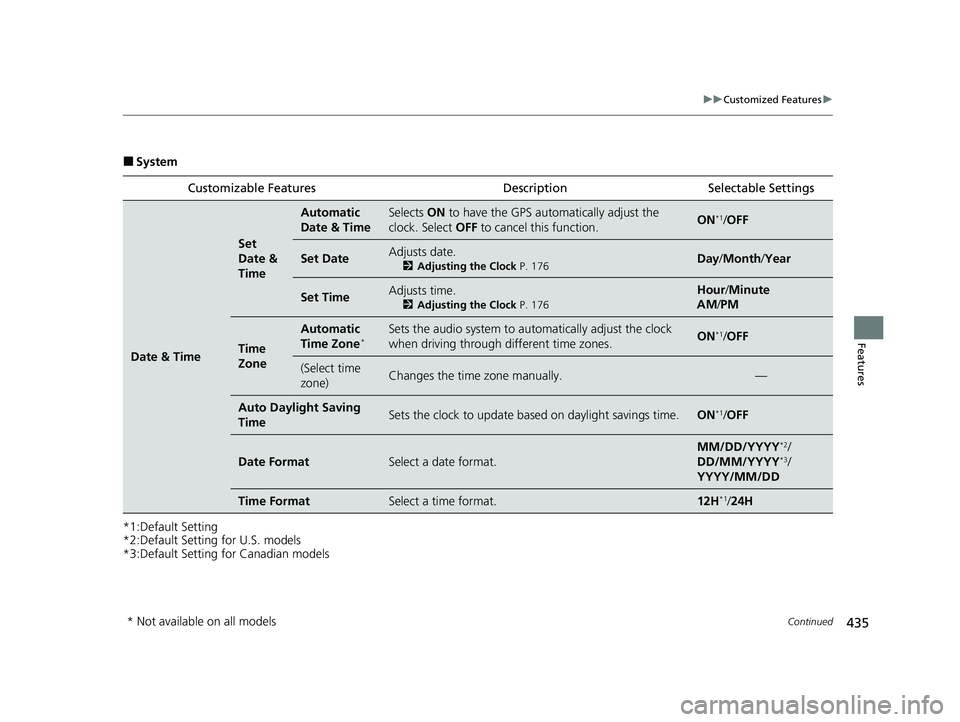
■System
*1:Default Setting
*2:Default Setting for U.S. models
*3:Default Setting for Canadian models Customizable Features Description Selectable Settings
Date & Time
Set
Date &
Time
Automatic
Date & TimeSelects
ON to have the GPS auto matically adjust the
clock. Select OFF to cancel this function.ON*1/OFF
Set DateAdjusts date.
2 Adjusting the Clock P. 176Day/Month/ Year
Set TimeAdjusts time.
2Adjusting the Clock P. 176
Hour/Minute
AM /PM
Time
Zone
Automatic
Time Zone*Sets the audio system to au tomatically adjust the clock
when driving through different time zones.ON*1/ OFF
(Select time
zone)Changes the time zone manually.—
Auto Daylig ht Saving
TimeSets the clock to update based on daylight savings time.ON*1/ OFF
Date FormatSelect a date format.
MM/DD/YYYY*2/
DD/MM/YYYY*3/
YYYY/MM/DD
Time FormatSelect a time format.12H*1/ 24H
* Not available on all models
23 PILOT-31T906000_03.book 435 ページ 2022年10月31日 月曜日 午前10時26分
Page 447 of 814
446
uuCustomized Features u
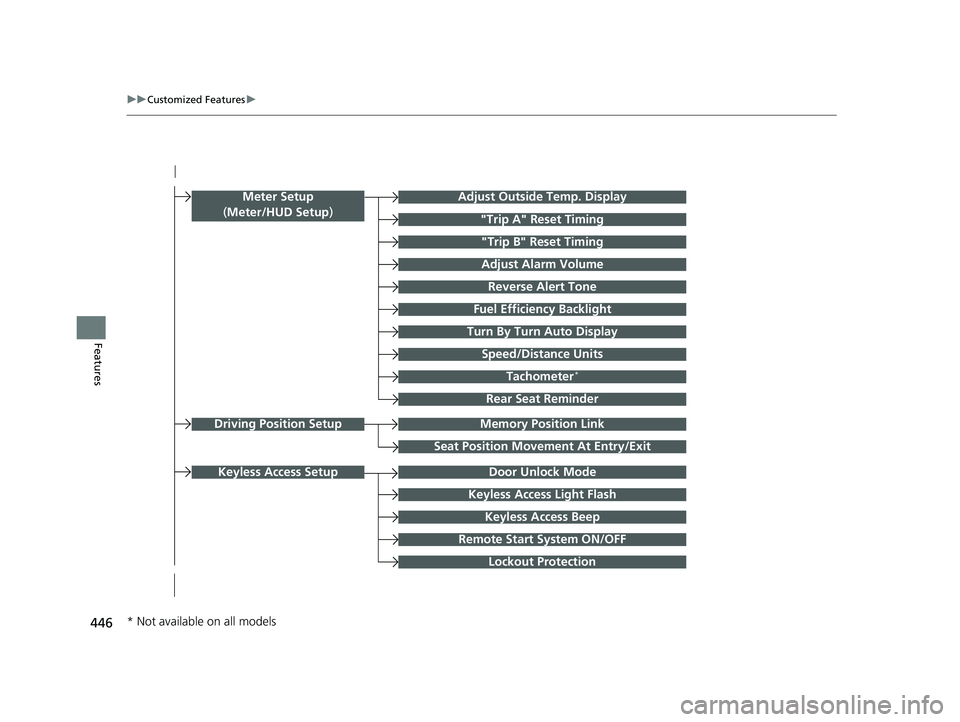
FeaturesTurn By Turn Auto Display
Speed/Distance Units
Keyless Access Light Flash
Rear Seat Reminder
Door Unlock Mode
Keyless Access Beep
Remote Start System ON/OFF
Lockout Protection
Keyless Access Setup
Meter Setup
(Meter/HUD Setup )Adjust Outside Temp. Display
"Trip A" Reset Timing
"Trip B" Reset Timing
Adjust Alarm Volume
Fuel Efficiency Backlight
Tachometer*
Reverse Alert Tone
Memory Position LinkDriving Position Setup
Seat Position Movement At Entry/Exit
* Not available on all models
23 PILOT-31T906000_03.book 446 ページ 2022年10月31日 月曜日 午前10時26分
Page 448 of 814
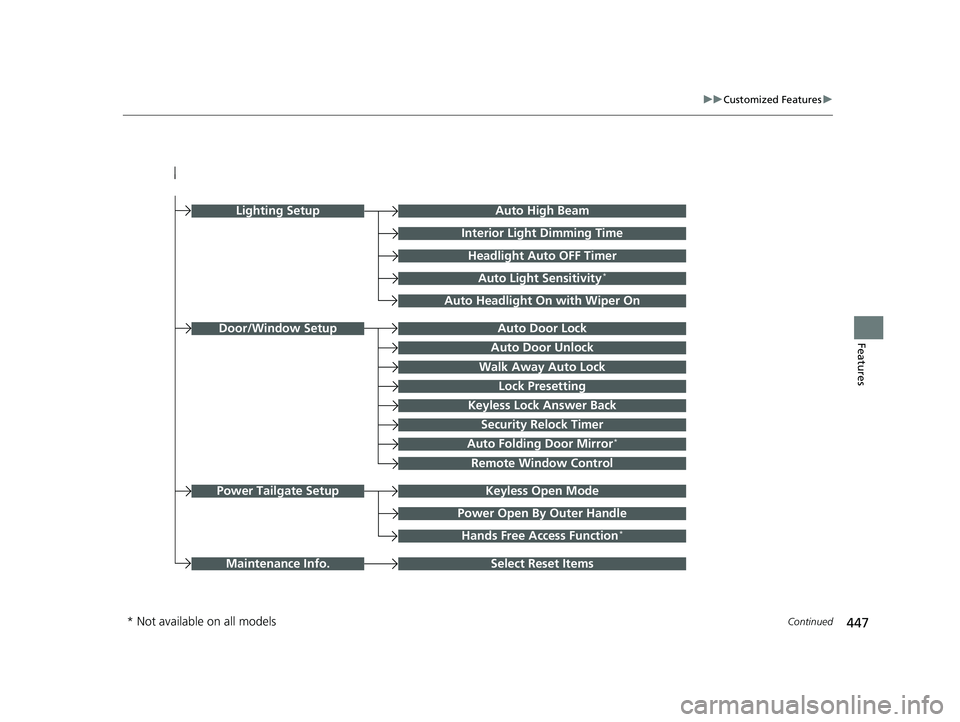
447
uuCustomized Features u
Continued
FeaturesAuto Door Unlock
Auto Door Lock
Walk Away Auto Lock
Lock Presetting
Keyless Lock Answer Back
Door/Window Setup
Auto High Beam
Interior Light Dimming Time
Headlight Auto OFF Timer
Auto Light Sensitivity*
Auto Headlight On with Wiper On
Auto Folding Door Mirror*
Keyless Open ModePower Tailgate Setup
Select Reset ItemsMaintenance Info.
Power Open By Outer Handle
Hands Free Access Function*
Remote Window Control
Lighting Setup
Security Relock Timer
* Not available on all models
23 PILOT-31T906000_03.book 447 ページ 2022年10月31日 月曜日 午前10時26分
Page 452 of 814
451
uuCustomized Features u
Continued
Features
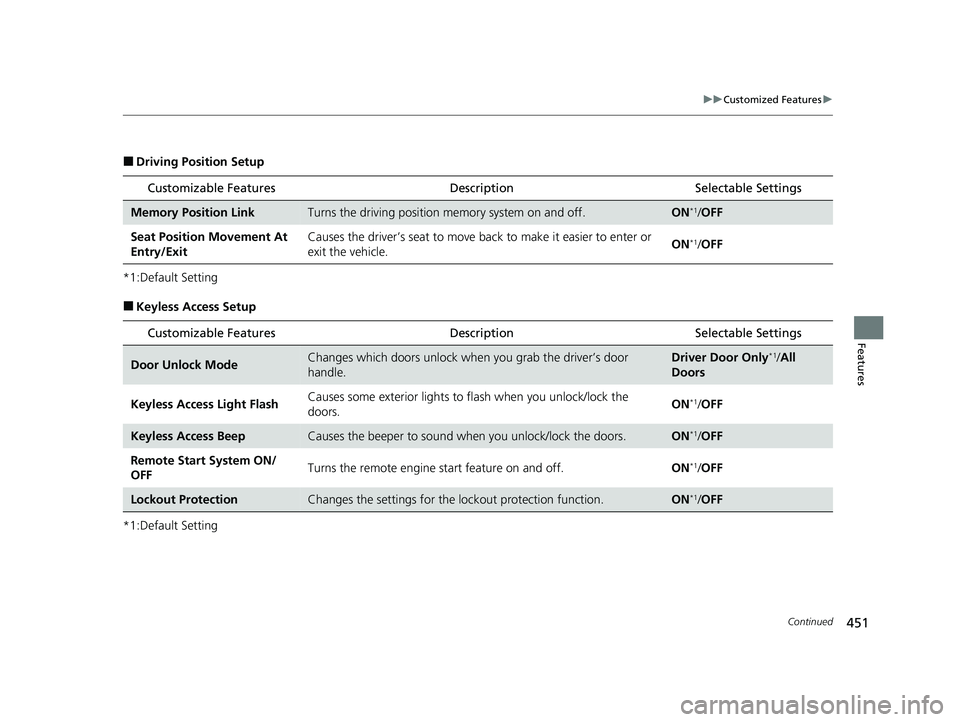
■Driving Position Setup
*1:Default Setting
■Keyless Access Setup
*1:Default Setting
Customizable Features Description Selectable Settings
Memory Position LinkTurns the driving position memory system on and off.ON*1/OFF
Seat Position Movement At
Entry/Exit Causes the driver’s seat to move ba
ck to make it easier to enter or
exit the vehicle. ON
*1/
OFF
Customizable Features Description Selectable Settings
Door Unlock ModeChanges which doors unlock when you grab the driver’s door
handle.Driver Door Only*1/All
Doors
Keyless Access Light Flash Causes some exterior lights to
flash when you unlock/lock the
doors. ON
*1/
OFF
Keyless Access BeepCauses the beeper to sound when you unlock/lock the doors.ON*1/OFF
Remote Start System ON/
OFF Turns the remote engine start feature on and off.
ON
*1/OFF
Lockout ProtectionChanges the settings for the lo ckout protection function.ON*1/OFF
23 PILOT-31T906000_03.book 451 ページ 2022年10月31日 月曜日 午前10時26分
Page 454 of 814
453
uuCustomized Features u
Continued
Features
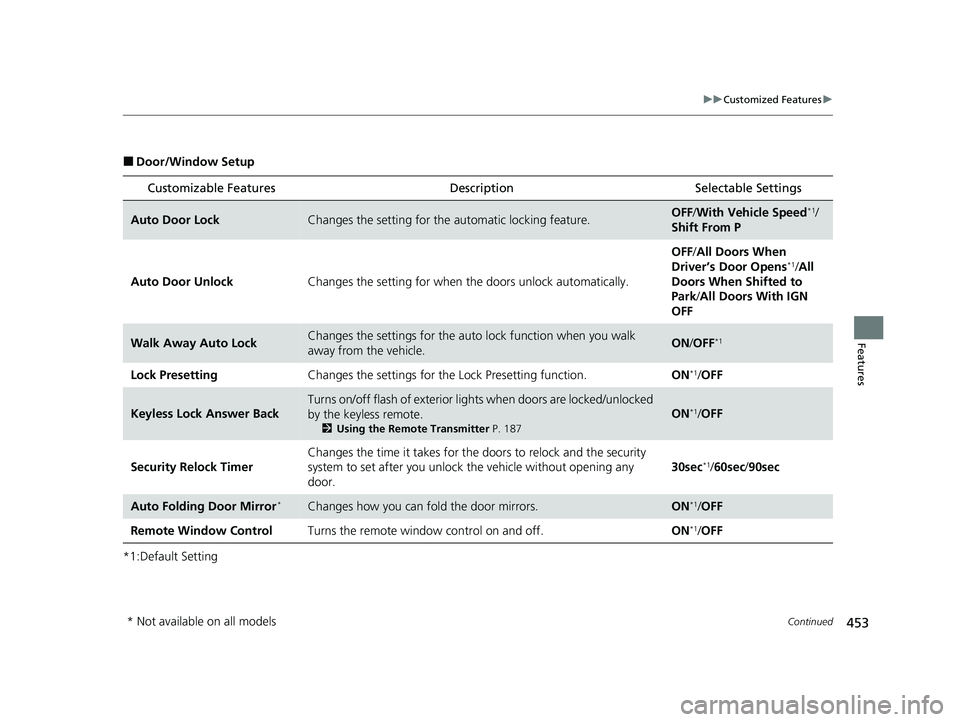
■Door/Window Setup
*1:Default Setting
Customizable Features Description Selectable Settings
Auto Door LockChanges the setting for the automatic locking feature.OFF/With Vehicle Speed*1/
Shift From P
Auto Door Unlock Changes the setting for when the doors unlock automatically. OFF
/All Doors When
Driver’s Door Opens
*1/ All
Doors When Shifted to
Park/ All Doors With IGN
OFF
Walk Away Auto LockChanges the settings for the auto lock function when you walk
away from the vehicle.ON /OFF*1
Lock Presetting Changes the settings for the Lock Presetting function. ON*1/OFF
Keyless Lock Answer Back
Turns on/off flash of exterior light s when doors are locked/unlocked
by the keyless remote.
2 Using the Remote Transmitter P. 187
ON*1/OFF
Security Relock Timer Changes the time it takes for the
doors to relock and the security
system to set after you unlock the vehicle without opening any
door. 30sec
*1/
60sec /90sec
Auto Folding Door Mirror*Changes how you can fold the door mirrors.ON*1/OFF
Remote Window Control Turns the remote window control on and off. ON
*1/OFF
* Not available on all models
23 PILOT-31T906000_03.book 453 ページ 2022年10月31日 月曜日 午前10時26分
Page 455 of 814
454
uuCustomized Features u
Features
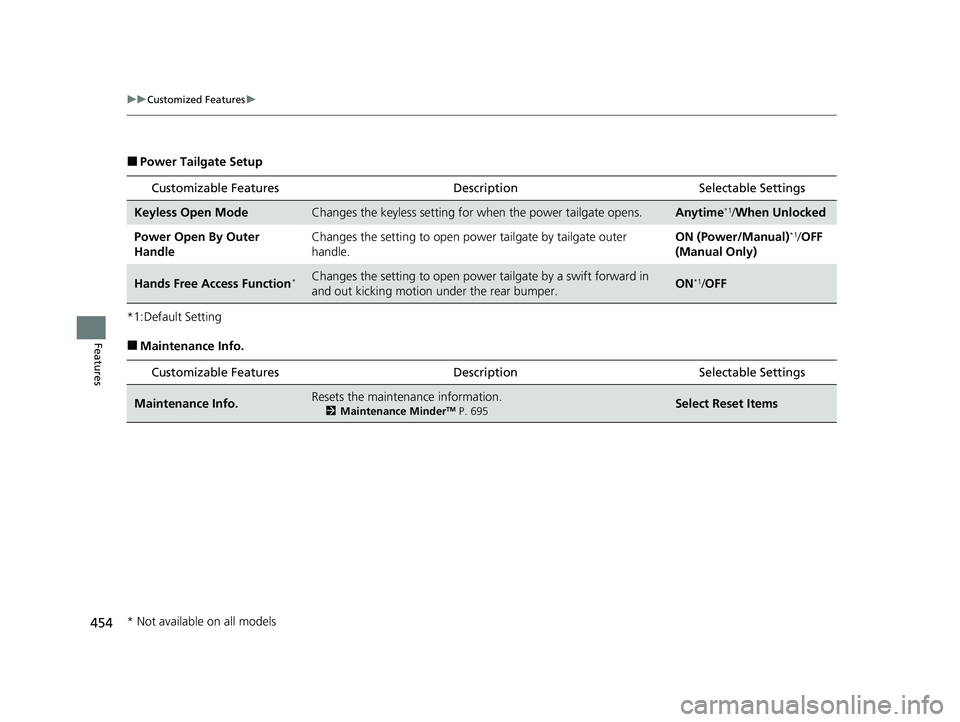
■Power Tailgate Setup
*1:Default Setting
■Maintenance Info. Customizable Features Desc
ription Selectable Settings
Keyless Open ModeChanges the keyless setting for when the power tailgate opens.Anytime*1/When Unlocked
Power Open By Outer
Handle Changes the setting to open power tailgate by tailgate outer
handle. ON (Power/Manual)
*1/
OFF
(Manual Only)
Hands Free Access Function*Changes the setting to open power tailgate by a swift forward in
and out kicking motion under the rear bumper.ON*1/ OFF
Customizable Features Desc ription Selectable Settings
Maintenance Info.Resets the maintenance information.
2Maintenance MinderTM P. 695Select Reset Items
* Not available on all models
23 PILOT-31T906000_03.book 454 ページ 2022年10月31日 月曜日 午前10時26分
Page 457 of 814
456
Features
HomeLink® Universal Transceiver*
The HomeLink ® Universal Transceiver can be pr ogrammed to operate up to three
remote controlled devices around your home , such as garage doors, lighting, or
home security systems.
Refer to the safety information that came wi th your garage door opener to test that
the safety features are functioning properly. If you do not have the safety
information, contac t the manufacturer.
Before programming HomeLink, make sure th at people and objects are out of the
way of the garage or gate to prevent potential injury or damage.
When programming a garage door opener, park just outside the garage door’s path.
■Important Safety Precautions
1HomeLink ® Universal Transceiver*
Before programming HomeLi nk to operate a garage
door opener, confirm that the opener has an external
entrapment protection system , such as an “electronic
eye,” or other safety and reverse stop features. If it
does not, HomeLink may not be able to operate it.
NOTE:
Some LED lightbulbs instal led in the garage door
opener can interfere with th e training and consistent
operation of your HomeLink device. Please consider
use of Low RF interference bulbs in your garage door
opener.
HomeLink will not operate when the vehicle security
is set or about 30 minutes after the power mode is
set to VEHICLE OFF. If Ho meLink indicator (LED) does
not show when a button is pressed, ensure doors are
unlocked or the power mode is set to ACCESSORY or
ON to return HomeLink to operation. 2 Setting the security system alarm P. 208
* Not available on all models
23 PILOT-31T906000_03.book 456 ページ 2022年10月31日 月曜日 午前10時26分
Page 502 of 814
501
Driving
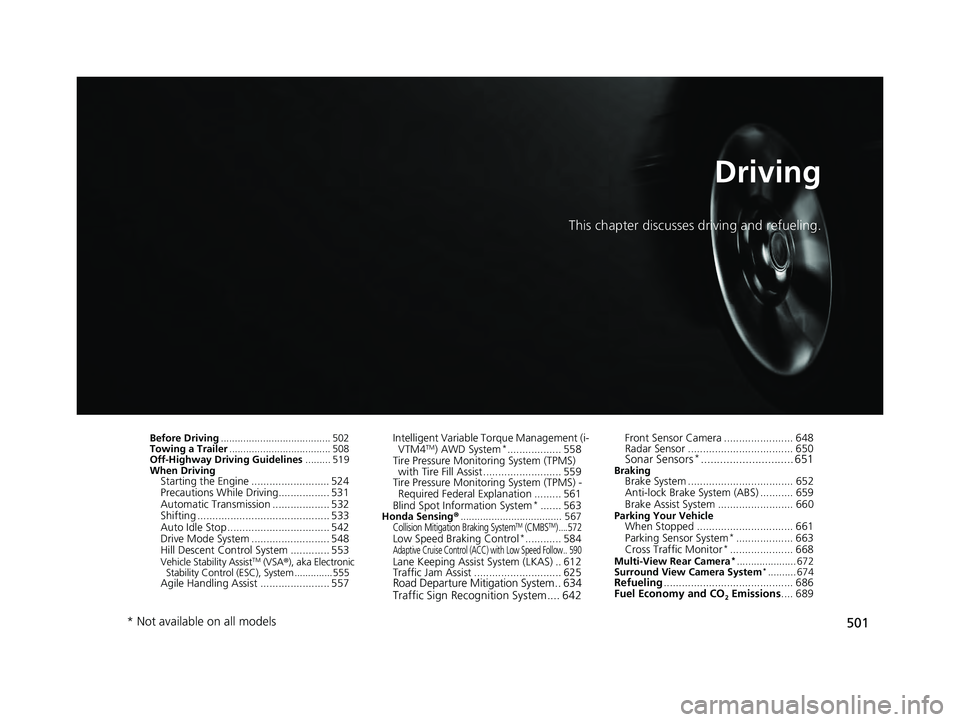
This chapter discusses driving and refueling.
Before Driving....................................... 502
Towing a Trailer .................................... 508
Off-Highway Driving Guidelines ......... 519
When Driving
Starting the Engine .......................... 524
Precautions While Driving................. 531
Automatic Transmission ................... 532
Shifting ............................................ 533
Auto Idle Stop .................................. 542
Drive Mode System .......................... 548
Hill Descent Control System ............. 553
Vehicle Stability AssistTM (VSA ®), aka Electronic
Stability Control (ESC), System ..............555
Agile Handling Assist ....................... 557 Intelligent Variable To
rque Management (i-
VTM4
TM) AWD System*.................. 558
Tire Pressure Monitoring System (TPMS) with Tire Fill Assist .......................... 559
Tire Pressure Monitoring System (TPMS) -
Required Federal Explanation ......... 561
Blind Spot Information System
*....... 563Honda Sensing ®.................................... 567Collision Mitigation Braking SystemTM (CMBSTM) ....572Low Speed Braking Control*............ 584Adaptive Cruise Control (ACC) with Low Speed Follow.. 590Lane Keeping Assist System (LKAS) .. 612
Traffic Jam Assist ............................. 625
Road Departure Mitigation System .. 634
Traffic Sign Recognition System.... 642
Front Sensor Camera ....................... 648
Radar Sensor ................................... 650
Sonar Sensors*............................. 651BrakingBrake System ................................... 652
Anti-lock Brake System (ABS) ........... 659
Brake Assist System ......................... 660
Parking Your VehicleWhen Stopped ................................ 661
Parking Sensor System*................... 663
Cross Traffic Monitor*..................... 668Multi-View Rear Camera*..................... 672
Surround View Camera System*.......... 674Refueling ........................................... 686
Fuel Economy and CO
2 Emissions .... 689
* Not available on all models
23 PILOT-31T906000_03.book 501 ページ 2022年10月31日 月曜日 午前10時26分