wheel HONDA PILOT 2023 Owners Manual
[x] Cancel search | Manufacturer: HONDA, Model Year: 2023, Model line: PILOT, Model: HONDA PILOT 2023Pages: 814, PDF Size: 29.02 MB
Page 758 of 814
757
uuIf a Tire Goes Flat uChanging a Flat Tire
Continued
Handling the Unexpected
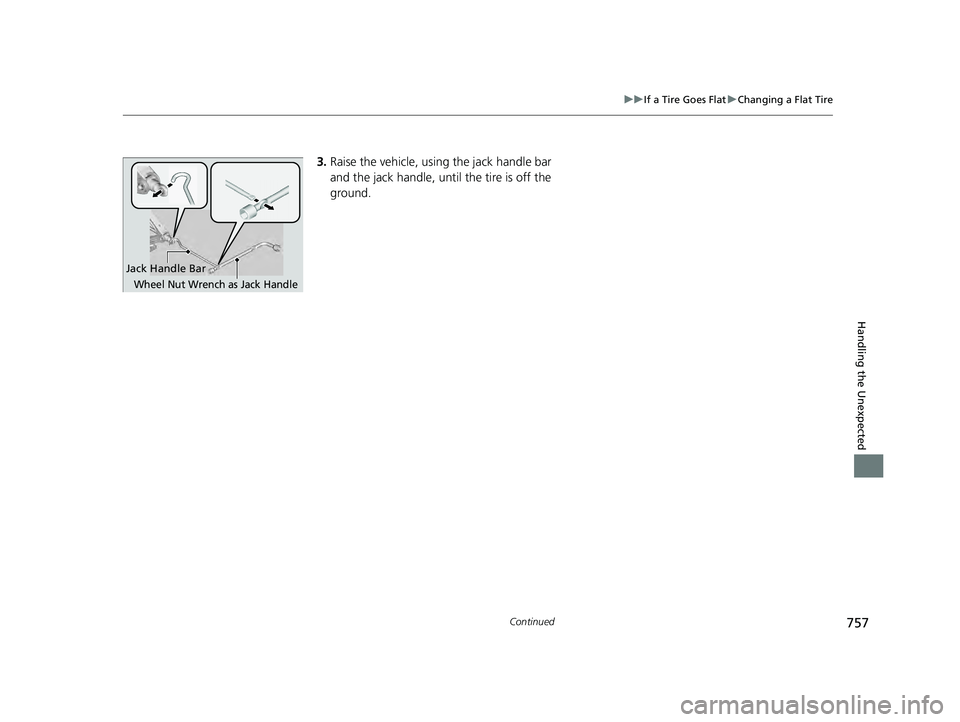
3. Raise the vehicle, using the jack handle bar
and the jack handle, until the tire is off the
ground.
Jack Handle Bar
Wheel Nut Wrench as Jack Handle
23 PILOT-31T906000_03.book 757 ページ 2022年10月31日 月曜日 午前10時26分
Page 759 of 814
uuIf a Tire Goes Flat uChanging a Flat Tire
758
Handling the Unexpected
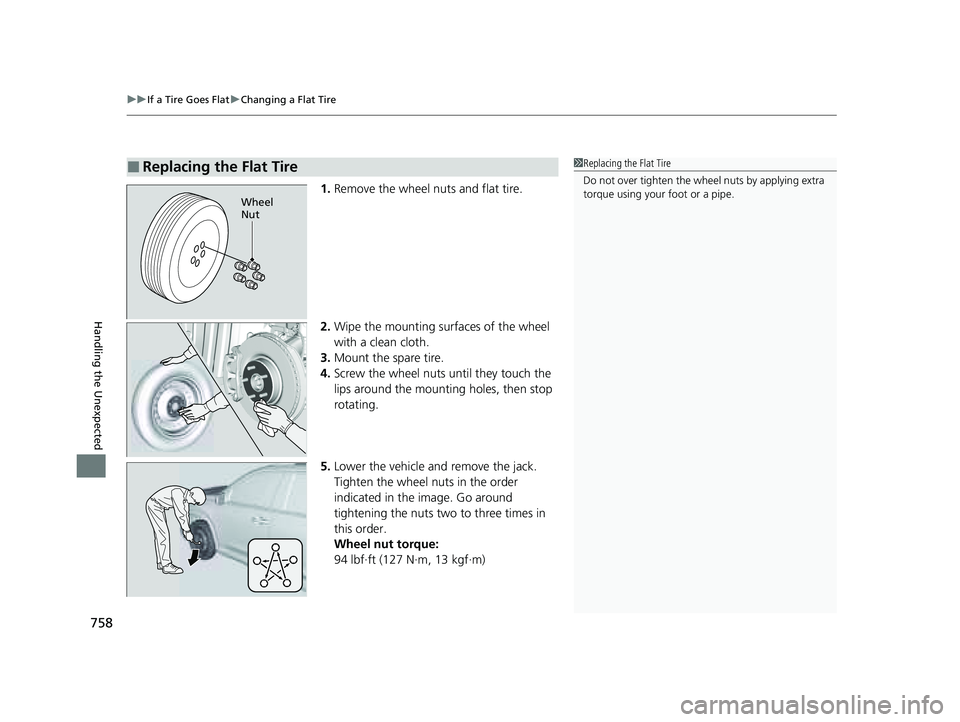
1. Remove the wheel nuts and flat tire.
2. Wipe the mounting surfaces of the wheel
with a clean cloth.
3. Mount the spare tire.
4. Screw the wheel nuts until they touch the
lips around the mounting holes, then stop
rotating.
5. Lower the vehicle and remove the jack.
Tighten the wheel nuts in the order
indicated in the image. Go around
tightening the nuts two to three times in
this order.
Wheel nut torque:
94 lbf∙ft (127 N∙m, 13 kgf∙m)
■Replacing the Flat Tire1Replacing the Flat Tire
Do not over tighten the wheel nuts by applying extra
torque using your foot or a pipe.
Wheel
Nut
23 PILOT-31T906000_03.book 758 ページ 2022年10月31日 月曜日 午前10時26分
Page 760 of 814
Continued759
uuIf a Tire Goes Flat uChanging a Flat Tire
Handling the Unexpected
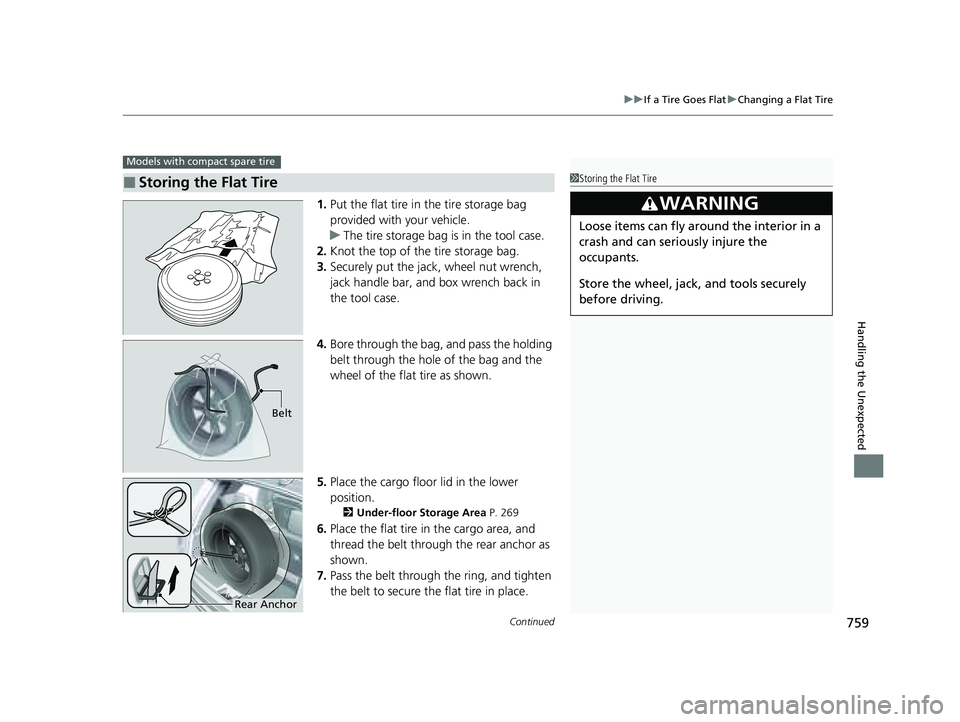
1. Put the flat tire in the tire storage bag
provided with your vehicle.
u The tire storage bag is in the tool case.
2. Knot the top of the tire storage bag.
3. Securely put the jack, wheel nut wrench,
jack handle bar, and box wrench back in
the tool case.
4. Bore through the bag, and pass the holding
belt through the hole of the bag and the
wheel of the flat tire as shown.
5. Place the cargo floor lid in the lower
position.
2 Under-floor Storage Area P. 269
6.Place the flat tire in the cargo area, and
thread the belt through the rear anchor as
shown.
7. Pass the belt through the ring, and tighten
the belt to secure the flat tire in place.
■Storing the Flat Tire
Models with compact spare tire
1Storing the Flat Tire
3WARNING
Loose items can fly around the interior in a
crash and can seriously injure the
occupants.
Store the wheel, jack, and tools securely
before driving.
Belt
Rear Anchor
23 PILOT-31T906000_03.book 759 ページ 2022年10月31日 月曜日 午前10時26分
Page 761 of 814
uuIf a Tire Goes Flat uChanging a Flat Tire
760
Handling the Unexpected
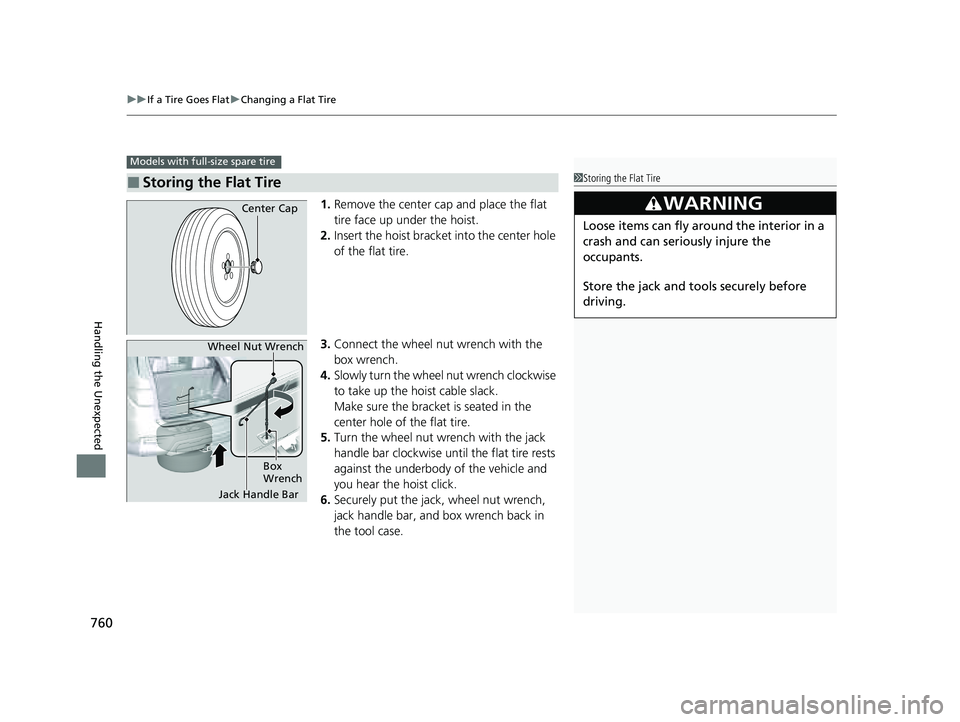
1. Remove the center cap and place the flat
tire face up under the hoist.
2. Insert the hoist bracket into the center hole
of the flat tire.
3. Connect the wheel nut wrench with the
box wrench.
4. Slowly turn the wheel nut wrench clockwise
to take up the hoist cable slack.
Make sure the bracket is seated in the
center hole of the flat tire.
5. Turn the wheel nut wrench with the jack
handle bar clockwise until the flat tire rests
against the underbody of the vehicle and
you hear the hoist click.
6. Securely put the jack , wheel nut wrench,
jack handle bar, and box wrench back in
the tool case.
■Storing the Flat Tire
Models with full-size spare tire
1 Storing the Flat Tire
3WARNING
Loose items can fly around the interior in a
crash and can seriously injure the
occupants.
Store the jack and tools securely before
driving.
Center Cap
Jack Handle Bar
Wheel Nut Wrench
Box
Wrench
23 PILOT-31T906000_03.book 760 ページ 2022年10月31日 月曜日 午前10時26分
Page 762 of 814
761
uuIf a Tire Goes Flat uChanging a Flat Tire
Handling the Unexpected
If you replace a flat tire with the spare tire, the low tire pressure/TPMS indicator
comes on while you are driving. After driving for a few miles (kilometers), Tire
pressure monitor system problem will appear on the driver information interface
and the indicator will start blinking for a s hort time and then stay on; however, this
is normal and is no cause for concern.
If you replace the tire with a full-size tire, the warning message on the driver
information interface and the low tire pre ssure/TPMS indicator will go off after a few
miles (kilometers).
■TPMS with Tire Fill Assist and the Spare Tire1 TPMS with Tire Fill Assist and the Spare Tire
The system cannot monitor th e pressure of the spare
tire. Manually check the spare tire pressure to be sure
that it is correct.
Use the TPMS specific wheels. Each is equipped with
a tire pressure sensor mount ed inside the tire behind
the valve stem.
23 PILOT-31T906000_03.book 761 ページ 2022年10月31日 月曜日 午前10時26分
Page 767 of 814
766
uuEngine Does Not StartuEmergency Engine Stop
Handling the Unexpected
Emergency Engine Stop
The ENGINE START/STOP button may be used to stop the engine due to an
emergency situation even while driving. If you must stop the engine, do either of the
following operations:
• Press and hold the ENGINE START/STOP button for about two seconds.
• Firmly press the ENGINE START/STOP button three times.
The steering wheel will not lock. However, because turning off the engine disables
the power assist the engine provides to the steering and braking systems, it will
require significantly more physical effort an d time to steer and slow the vehicle. Use
both feet on the brake pedal to slow down the vehicle and stop immediately in a
safe place.
The gear position automatically changes to
(P after the vehicle comes to a complete
stop. Then, the power mode changes to VEHICLE OFF.
1 Emergency Engine Stop
Do not press the ENGINE START/STOP button while
driving unless it is absolute ly necessary for the engine
to be turned off.
If you press the ENGINE START/STOP button while
driving, the beeper sounds.
23 PILOT-31T906000_03.book 766 ページ 2022年10月31日 月曜日 午前10時26分
Page 783 of 814
782
uuFuses uFuse Locations
Handling the Unexpected
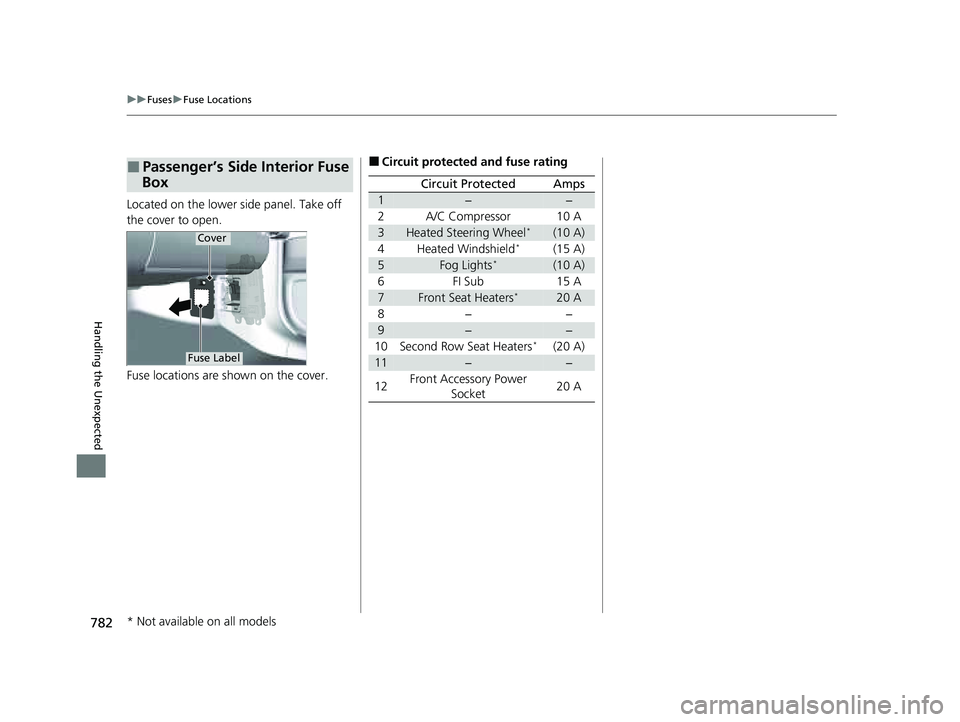
Located on the lower side panel. Take off
the cover to open.
Fuse locations are shown on the cover.
■Passenger’s Side Interior Fuse
Box
Cover
Fuse Label
■Circuit protected and fuse rating
Circuit ProtectedAmps
1−−
2A/C Compressor10 A
3Heated Steering Wheel*(10 A)
4Heated Windshield*(15 A)
5Fog Lights*(10 A)
6FI Sub15 A
7Front Seat Heaters*20 A
8−−
9−−
10Second Row Seat Heaters*(20 A)
11−−
12Front Accessory Power
Socket20 A
* Not available on all models
23 PILOT-31T906000_03.book 782 ページ 2022年10月31日 月曜日 午前10時26分
Page 786 of 814
785
Handling the Unexpected
Emergency Towing
Call a professional towing service if you need to tow your vehicle.
■Flatbed equipment
The operator loads your vehicle on the back of a truck.
This is the best way to transport your vehicle.
■Wheel lift equipment
The tow truck uses two pivoti ng arms that go under the front tires and lift them off
the ground. The rear tires remain on the ground. This is an acceptable way to
tow your vehicle.
1 Emergency Towing
NOTICE
Trying to lift or tow your vehicle by the bumpers will
cause serious damage. The bumpers are not designed
to support the vehicle’s weight.
NOTICE
Improper towing such as towing behind a
motorhome or other motor vehicle can damage the
transmission.
Never tow your vehicle with just a rope or chain.
It is very dangerous since ropes or chains may shift
from side to side or break.
Make sure the parking brake is released. If you
cannot release the parking brake, your vehicle must
be transported by the flatbed equipment. 2 Parking Brake P. 652
2WD models
All models
2WD models
23 PILOT-31T906000_03.book 785 ページ 2022年10月31日 月曜日 午前10時26分
Page 792 of 814
791
uuSpecifications u
Information
■
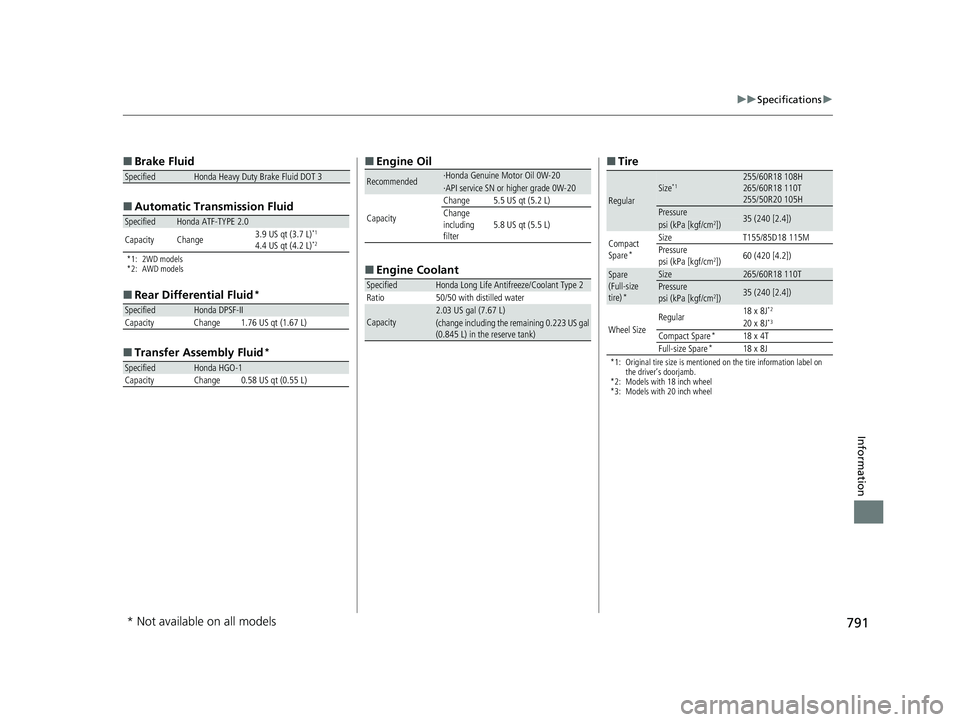
Brake Fluid
■ Automatic Tran smission Fluid
*1: 2WD models
*2: AWD models
■
Rear Differential Fluid*
■Transfer Assembly Fluid*
SpecifiedHonda Heavy Duty Brake Fluid DOT 3
SpecifiedHonda ATF-TYPE 2.0
Capacity Change 3.9 US qt (3.7 L)*1
4.4 US qt (4.2 L)*2
SpecifiedHonda DPSF-II
Capacity Change 1.76 US qt (1.67 L)
SpecifiedHonda HGO-1CapacityChange0.58 US qt (0.55 L)
■ Engine Oil
■ Engine Coolant
Recommended·Honda Genuine Motor Oil 0W-20·API service SN or higher grade 0W-20
Capacity
Change5.5 US qt (5.2 L)Change
including
filter5.8 US qt (5.5 L)
SpecifiedHonda Long Life Antifreeze/Coolant Type 2
Ratio 50/50 with distilled water
Capacity2.03 US gal (7.67 L)(change including the remaining 0.223 US gal
(0.845 L) in the reserve tank)
■ Tire
*1: Original tire size is mentioned on the tire information label on
the driver’s doorjamb.
*2: Models with 18 inch wheel
*3: Models with 20 inch wheel
RegularSize*1255/60R18 108H
265/60R18 110T
255/50R20 105H
Pressure35 (240 [2.4])psi (kPa [kgf/cm2])
Compact
Spare*
SizeT155/85D18 115MPressure
psi (kPa [kgf/cm2])60 (420 [4.2])
Spare
(Full-size
tire)
*
Size265/60R18 110TPressure
psi (kPa [kgf/cm2])35 (240 [2.4])
Wheel Size Regular
18 x 8J
*2
20 x 8J*3
Compact Spare*18 x 4T
Full-size Spare*18 x 8J
* Not available on all models
23 PILOT-31T906000_03.book 791 ページ 2022年10月31日 月曜日 午前10時26分
Page 805 of 814
Index
804
Index
Index
A
ABS (Anti-lock Brake System)................... 659
AC Power Outlet ....................................... 274
Accessories and Modifications ................. 747
Accessory Power Sockets .......................... 273
Adaptive Cruise Control (ACC) with Low Speed Follow ........................................... 590
Additives
Coolant ................................................... 714
Engine Oil ................................................ 709
Washer .................................................... 717
Additives, Engine Oil ................................ 709
Adjusting Armrest ................................................... 258
Clock ....................................................... 176
Front Seats .............................................. 239
Head Restraints................................ 253, 257
Mirrors .................................................... 236
Sound.............................................. 302, 346
Steering Wheel ........................................ 235
Third row seat ......................................... 249
Agile Handling Assist ................................ 557
Air Conditioning System (Climate Control System) .................................................... 283
Defrosting the Windshield and
Windows ............................................... 285
Dust and Pollen Filter ............................... 741
Sensor ..................................................... 289
Synchronized Mode ................................. 286
Using Automatic Climate Control ............ 283
Air Pressure ....................................... 729, 791 Airbags
........................................................ 59
Advanced Airbags ..................................... 65
After a Collision ........................................ 62
Airbag Care............................................... 76
Event Data Recorder .................................... 0
Front Airbags (SRS) .................................... 62
Indicator............................................ 73, 106
Knee Airbags............................................. 67
Passenger Airbag Off Indicator .................. 74
Sensors ..................................................... 59
Side Airbags .............................................. 70
Side Curtain Airbags.................................. 72
AM/FM Radio .................................... 304, 352
Android Auto
TM................................ 322, 392
Anti-lock Brake System (ABS) .................. 659
Indicator.................................................. 106
Apple CarPlay ................................... 318, 385
Armrest ..................................................... 258
AT&T Hotspot ........................................... 384
Audio ........................................................ 130
Audio Remote Controls ........................... 296
Audio System ............................ 292, 301, 326
Adjusting the Sound........................ 302, 346
Android Auto
TM............................... 322, 392
Audio/Information Screen........................ 328
Display Setup .................................. 303, 347
Error Messages ........................................ 398
General Information ................................ 400
Home Screen........................................... 334
How to Update ....................................... 340
How to Update Wirelessly ....................... 344 How to Update with a USB Device .......... 345
iPod ................................................ 306, 367
Limitations for Manual
Operation ............................. 348, 461, 481
MP3/WMA/AAC ............................. 309, 370
Reactivating ............................................ 295
Recommended Devices ........................... 401
Remote Controls ..................................... 296
Security Code ......................................... 295
Selecting an Audio Source ...................... 348
Start Up .................................................. 327
Status Area ............................................. 339
System Updates ...................................... 340
System Updates Settings ......................... 341
Theft Protection ...................................... 295
USB Flash Drives...................................... 401
USB Ports ................................................ 293
Wallpaper Setup ..................................... 332
Audio/Information Screen ....................... 328
Authorized Manuals ................................ 800
Auto Door Locking/Unlocking ................ 195
Auto High-Beam ...................................... 226
Indicator ................................................. 108
Auto Idle Stop .......................................... 542
OFF Button ............................................. 543
Automatic Brake Hold ............................. 656
Indicator ......................................... 102, 656
Automatic Brake Hold System
Indicator ......................................... 102, 656
Automatic Folding Door Mirror .............. 238
Automatic Intermittent Wipers .............. 230
23 PILOT-31T906000_03.book 804 ページ 2022年10月31日 月曜日 午前10時26分