wheel HONDA PILOT 2023 Owners Manual
[x] Cancel search | Manufacturer: HONDA, Model Year: 2023, Model line: PILOT, Model: HONDA PILOT 2023Pages: 814, PDF Size: 29.02 MB
Page 681 of 814
680
uuSurround View Camera System*uUsing the Surround View Camera System
Driving
Using the Surround Vi ew Camera System
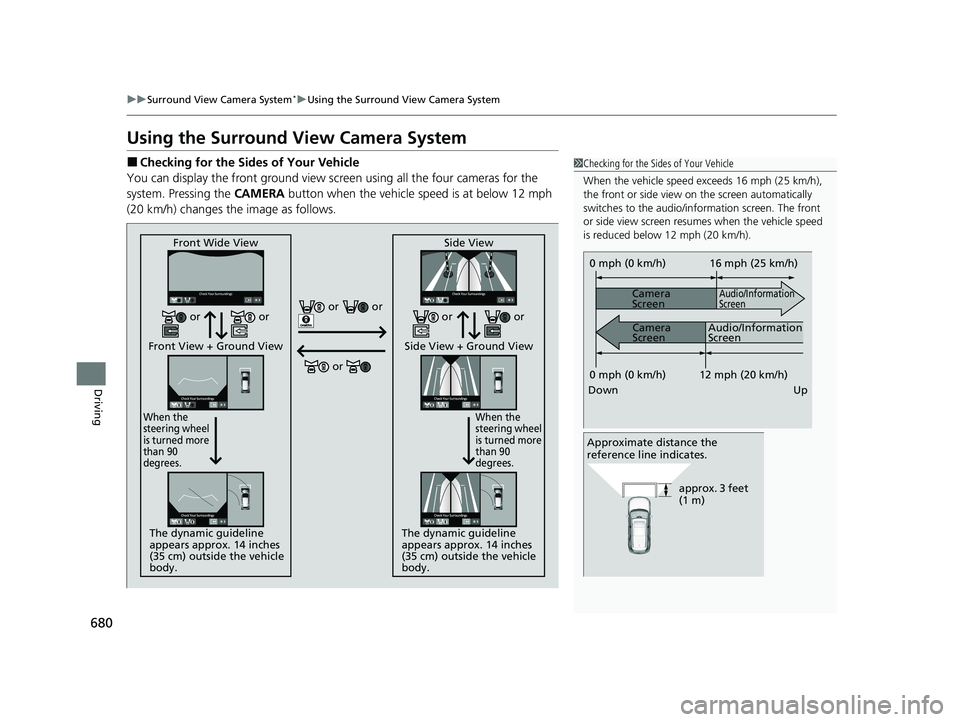
■Checking for the Sides of Your Vehicle
You can display the front ground view screen using all the four cameras for the
system. Pressing the CAMERA button when the vehicle speed is at below 12 mph
(20 km/h) changes the image as follows.1 Checking for the Sides of Your Vehicle
When the vehicle speed exceeds 16 mph (25 km/h),
the front or side view on the screen automatically
switches to the audio/information screen. The front
or side view screen resumes when the vehicle speed
is reduced below 12 mph (20 km/h).
0 mph (0 km/h)
Down Up Camera
Screen
Camera
Screen
Audio/Information
Screen
Audio/Information
Screen 16 mph (25 km/h)
12 mph (20 km/h)
0 mph (0 km/h)
Approximate distance the
reference line indicates.
approx. 3 feet
(1 m)
Front Wide View
Front View + Ground View
When the
steering wheel
is turned more
than 90
degrees.
The dynamic guideline
appears approx. 14 inches
(35 cm) outside the vehicle
body. Side View
Side View + Ground View
When the
steering wheel
is turned more
than 90
degrees.
The dynamic guideline
appears approx. 14 inches
(35 cm) outside the vehicle
body.
or or
or
or or or or
23 PILOT-31T906000_03.book 680 ページ 2022年10月31日 月曜日 午前10時26分
Page 684 of 814
Continued683
uuSurround View Camera System*uUsing the Surround View Camera System
Driving
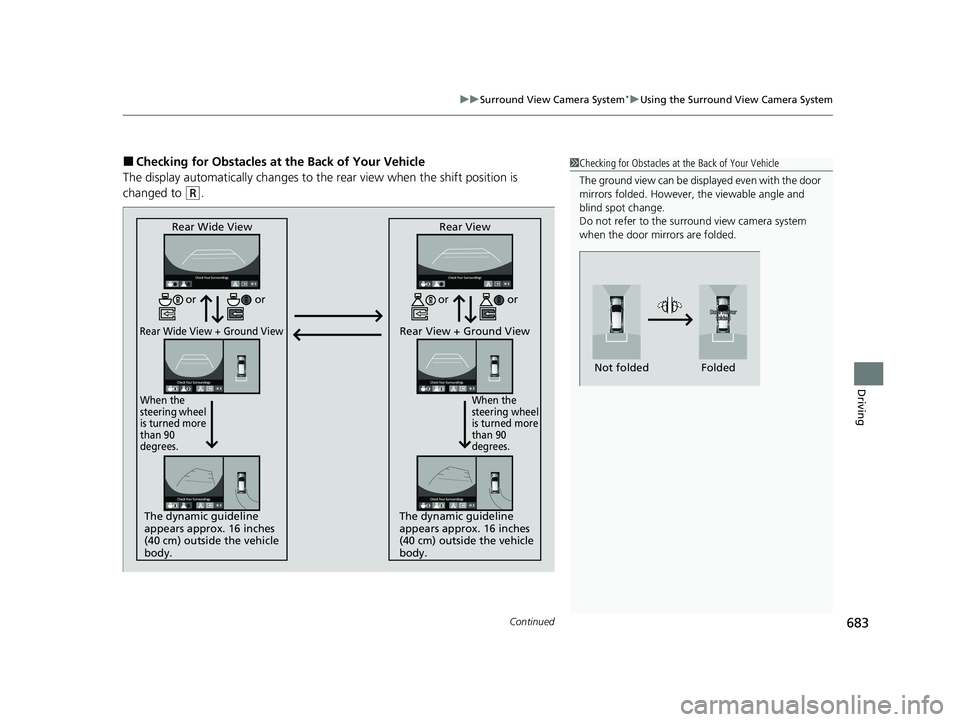
■Checking for Obstacles at the Back of Your Vehicle
The display automatically changes to the rear view when the shift position is
changed to
(R.
1 Checking for Obstacles at the Back of Your Vehicle
The ground view can be displayed even with the door
mirrors folded. However, the viewable angle and
blind spot change.
Do not refer to the surround view camera system
when the door mirrors are folded.
Folded
Not folded
Rear Wide View
Rear Wide View + Ground View
When the
steering wheel
is turned more
than 90
degrees.
The dynamic guideline
appears approx. 16 inches
(40 cm) outside the vehicle
body. Rear View
Rear View + Ground View
When the
steering wheel
is turned more
than 90
degrees.
The dynamic guideline
appears approx. 16 inches
(40 cm) outside the vehicle
body.
or
or or or
23 PILOT-31T906000_03.book 683 ページ 2022年10月31日 月曜日 午前10時26分
Page 692 of 814
691
Maintenance
This chapter discusses basic maintenance.
Before Performing MaintenanceInspection and Maintenance ............ 692
Safety When Performing Maintenance ..693
Parts and Fluids Used in Maintenance Service ........................................... 694
Maintenance Minder
TM..................... 695
Maintenance Under the Hood Maintenance Items Under the Hood .. 705
Opening the Hood ........................... 706
Engine Compartment Cover ............. 708
Recommended Engine Oil ................ 709
Oil Check ......................................... 710
Adding Engine Oil ............................ 711
Changing the Engine Oil and Oil Filter ....712
Engine Coolant ................................ 714
Transmission Fluid ............................ 716
Transfer Assembly Fluid
*.................. 716
Brake Fluid ....................................... 717
Refilling Window Wa sher Fluid......... 717
Replacing Light Bulbs ....................... 718
Checking and Maintaining Wiper
Blades .......................................... 723
Checking and Maintaining Tires
Checking Tires ................................. 728
Tire and Loading Information Label .. 729
Tire Labeling .................................... 729
DOT Tire Quality Grading (U.S. Vehicles) .. 731
Wear Indicators ............................... 733
Tire Service Life ................................ 733
Tire and Wheel Replacement ........... 734
Tire Rotation .................................... 735
Winter Tires ..................................... 736
Battery ............................................... 737
Remote Transmitter Care ................. 739
Climate Control System Maintenance .. 740Cleaning
Interior Care .................................... 742
Exterior Care.................................... 744
Accessories and Modifications ........ 747
* Not available on all models
23 PILOT-31T906000_03.book 691 ページ 2022年10月31日 月曜日 午前10時26分
Page 697 of 814
696
uuMaintenance MinderTMuTo Use Maintenance MinderTM
Maintenance
To Use Maintenance MinderTM
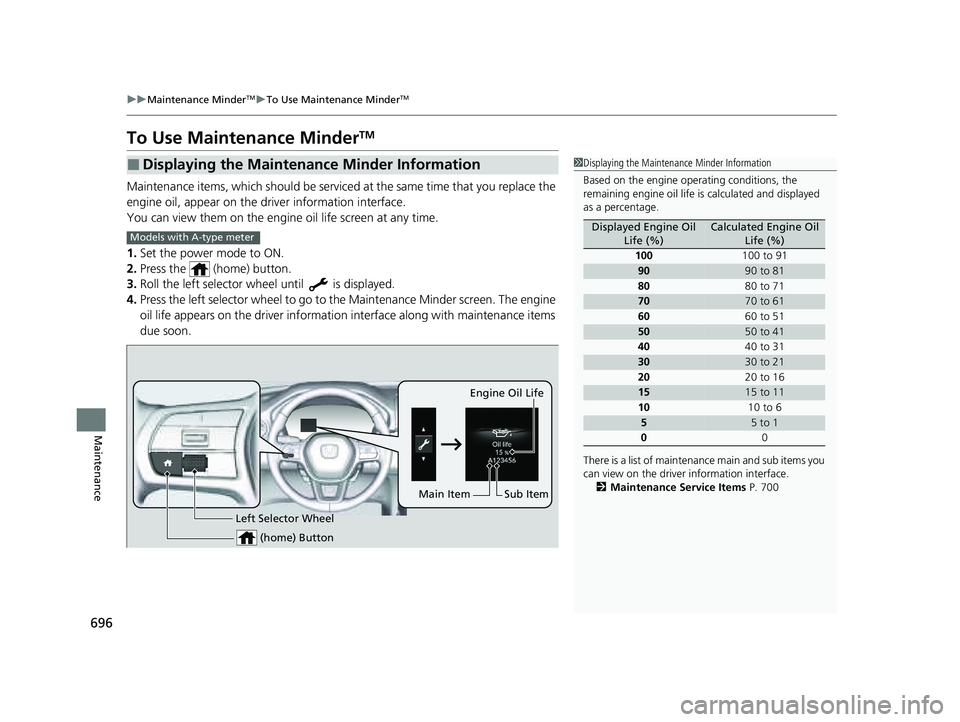
Maintenance items, which should be serviced at the same time that you replace the
engine oil, appear on the driver information interface.
You can view them on the engine oil life screen at any time.
1. Set the power mode to ON.
2. Press the (home) button.
3. Roll the left selector wheel until is displayed.
4. Press the left selector wheel to go to the Maintenance Minder screen. The engine
oil life appears on the driver information interface along with maintenance items
due soon.
■Displaying the Maintenance Minder Information1 Displaying the Maintena nce Minder Information
Based on the engine ope rating conditions, the
remaining engine oi l life is calculated and displayed
as a percentage.
There is a list of maintena nce main and sub items you
can view on the driver information interface.
2 Maintenance Service Items P. 700
Displayed Engine Oil
Life (%)Calculated Engine Oil Life (%)
100 100 to 91
9090 to 81
80 80 to 71
7070 to 61
60 60 to 51
5050 to 41
40 40 to 31
3030 to 21
20 20 to 16
1515 to 11
10 10 to 6
55 to 1
0 0
Models with A-type meter
(home) Button
Engine Oil Life
Sub Item
Left Selector Wheel
Main Item
23 PILOT-31T906000_03.book 696 ページ 2022年10月31日 月曜日 午前10時26分
Page 698 of 814
697
uuMaintenance MinderTMuTo Use Maintenance MinderTM
Continued
Maintenance
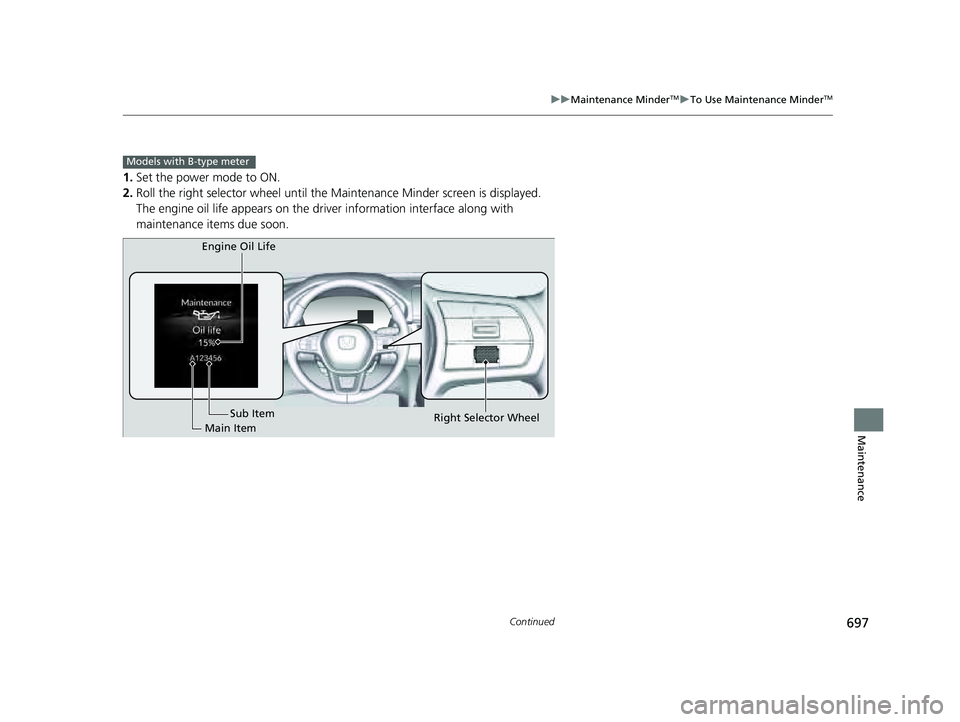
1. Set the power mode to ON.
2. Roll the right selector wheel until the Maintenance Minder screen is displayed.
The engine oil life appears on the driv er information interface along with
maintenance items due soon.
Models with B-type meter
Engine Oil Life
Main Item Sub Item
Right Selector Wheel
23 PILOT-31T906000_03.book 697 ページ 2022年10月31日 月曜日 午前10時26分
Page 699 of 814
698
uuMaintenance MinderTMuTo Use Maintenance MinderTM
Maintenance
*1:Models with A-type meter
*2:Models with B-type meter
■Maintenance Minder Messages on the Driver Information
Interface
Maintenance MessageOil Life DisplayExplanationInformation
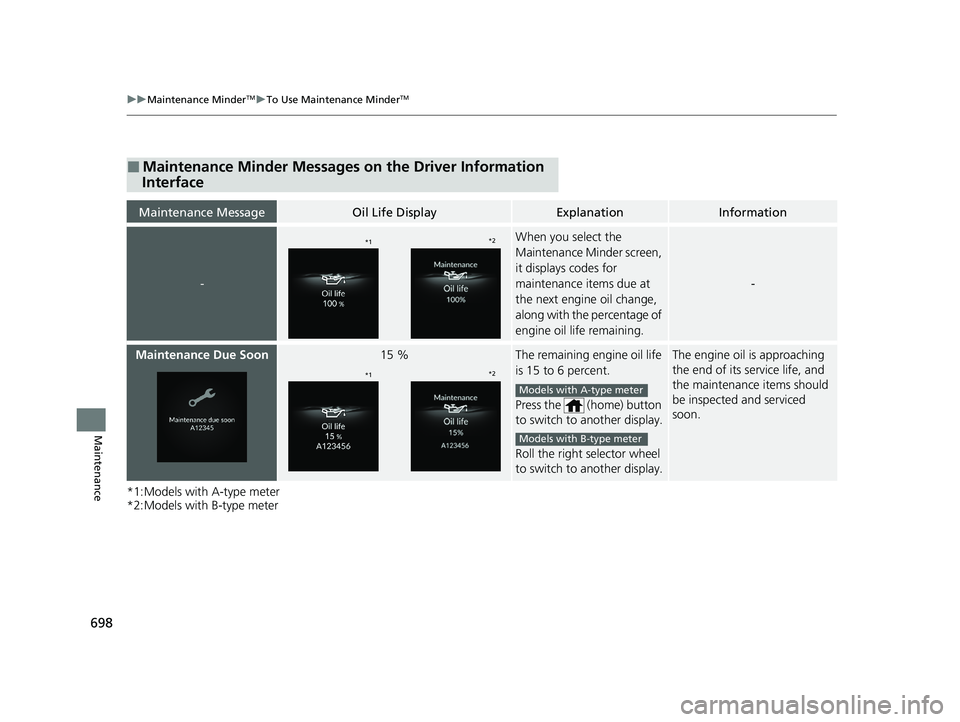
-
When you select the
Maintenance Minder screen,
it displays codes for
maintenance items due at
the next engine oil change,
along with the percentage of
engine oil life remaining.
-
Maintenance Due Soon15 %The remaining engine oil life
is 15 to 6 percent.
Press the (home) button
to switch to another display.
Roll the right selector wheel
to switch to another display.The engine oil is approaching
the end of its service life, and
the maintenance items should
be inspected and serviced
soon.
*1*2
*1*2
Models with A-type meter
Models with B-type meter
23 PILOT-31T906000_03.book 698 ページ 2022年10月31日 月曜日 午前10時26分
Page 700 of 814
699
uuMaintenance MinderTMuTo Use Maintenance MinderTM
Continued
Maintenance
*1:Models with A-type meter
*2:Models with B-type meter
The system message indicator ( ) comes on along with the Maintenance Minder
message.
Maintenance MessageOil Life DisplayExplanationInformation
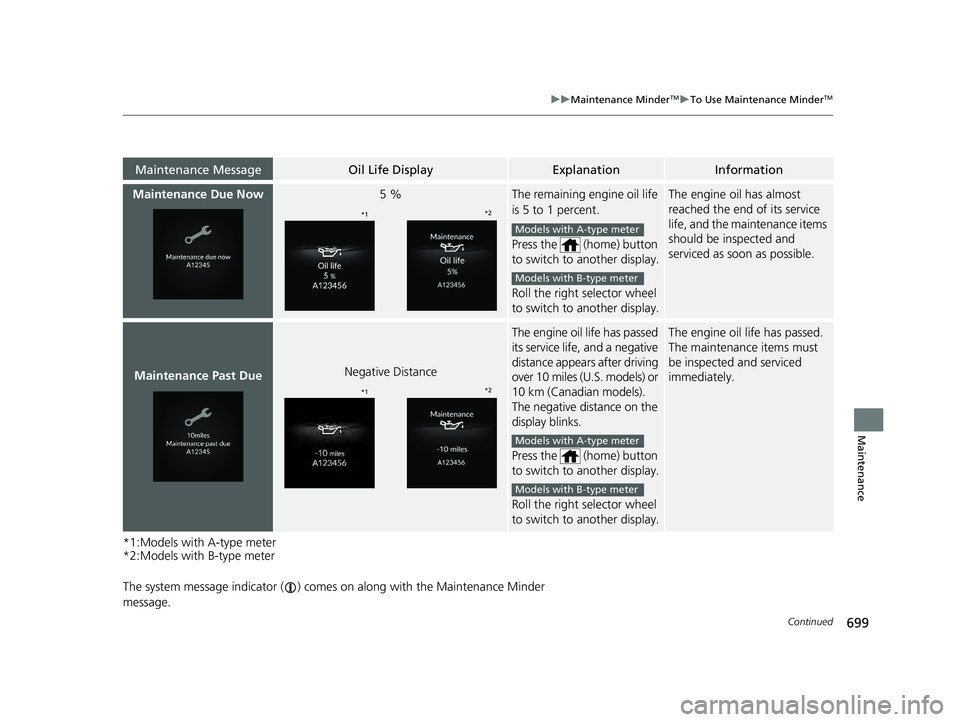
Maintenance Due Now5 %The remaining engine oil life
is 5 to 1 percent.
Press the (home) button
to switch to another display.
Roll the right selector wheel
to switch to another display.The engine oil has almost
reached the end of its service
life, and the maintenance items
should be inspected and
serviced as s oon as possible.
Maintenance Past DueNegative Distance
The engine oil life has passed
its service life, and a negative
distance appears after driving
over 10 miles (U.S. models) or
10 km (Canadian models).
The negative distance on the
display blinks.
Press the (home) button
to switch to another display.
Roll the right selector wheel
to switch to another display.The engine oil life has passed.
The maintenance items must
be inspected and serviced
immediately.
*1 *2
Models with A-type meter
Models with B-type meter
*1*2
Models with A-type meter
Models with B-type meter
23 PILOT-31T906000_03.book 699 ページ 2022年10月31日 月曜日 午前10時26分
Page 704 of 814
Continued703
uuMaintenance MinderTMuTo Use Maintenance MinderTM
Maintenance
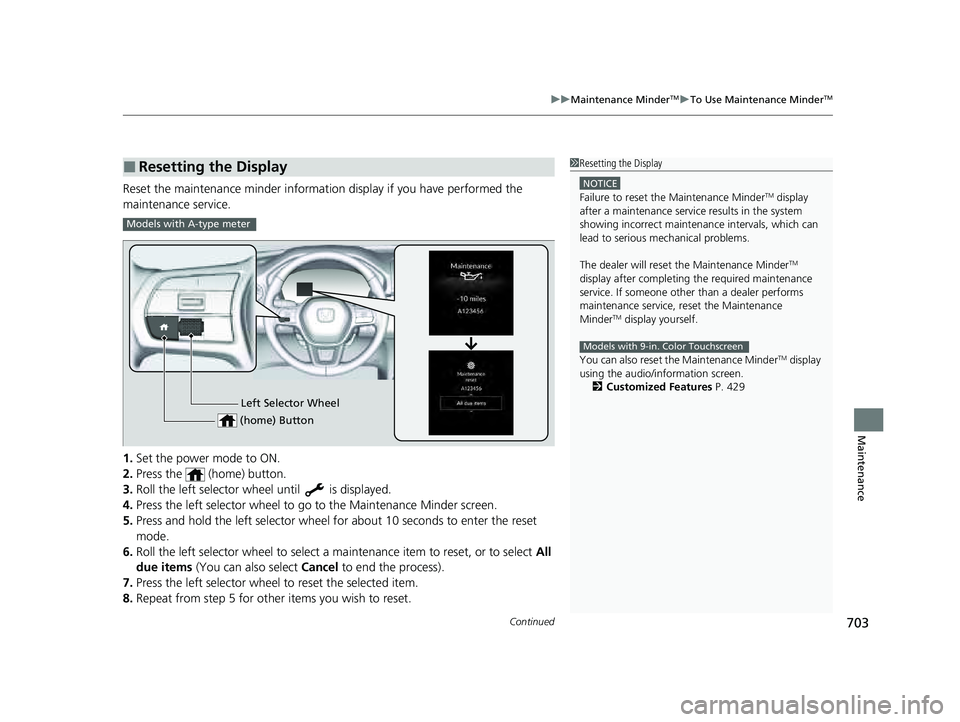
Reset the maintenance minder information display if you have performed the
maintenance service.
1. Set the power mode to ON.
2. Press the (home) button.
3. Roll the left selector wheel until is displayed.
4. Press the left selector wheel to go to the Maintenance Minder screen.
5. Press and hold the left selector wheel for about 10 seconds to enter the reset
mode.
6. Roll the left selector wheel to select a ma intenance item to reset, or to select All
due items (You can also select Cancel to end the process).
7. Press the left selector wheel to reset the selected item.
8. Repeat from step 5 for other items you wish to reset.
■Resetting the Display1Resetting the Display
NOTICE
Failure to reset the Maintenance MinderTM display
after a maintenance servic e results in the system
showing incorrect maintenance intervals, which can
lead to serious mechanical problems.
The dealer will reset the Maintenance Minder
TM
display after completing th e required maintenance
service. If someone other than a dealer performs
maintenance service, reset the Maintenance
Minder
TM display yourself.
You can also reset the Maintenance Minder
TM display
using the audio/information screen.
2 Customized Features P. 429
Models with 9-in. Color Touchscreen
Models with A-type meter
Left Selector Wheel
(home) Button
23 PILOT-31T906000_03.book 703 ページ 2022年10月31日 月曜日 午前10時26分
Page 705 of 814
704
uuMaintenance MinderTMuTo Use Maintenance MinderTM
Maintenance
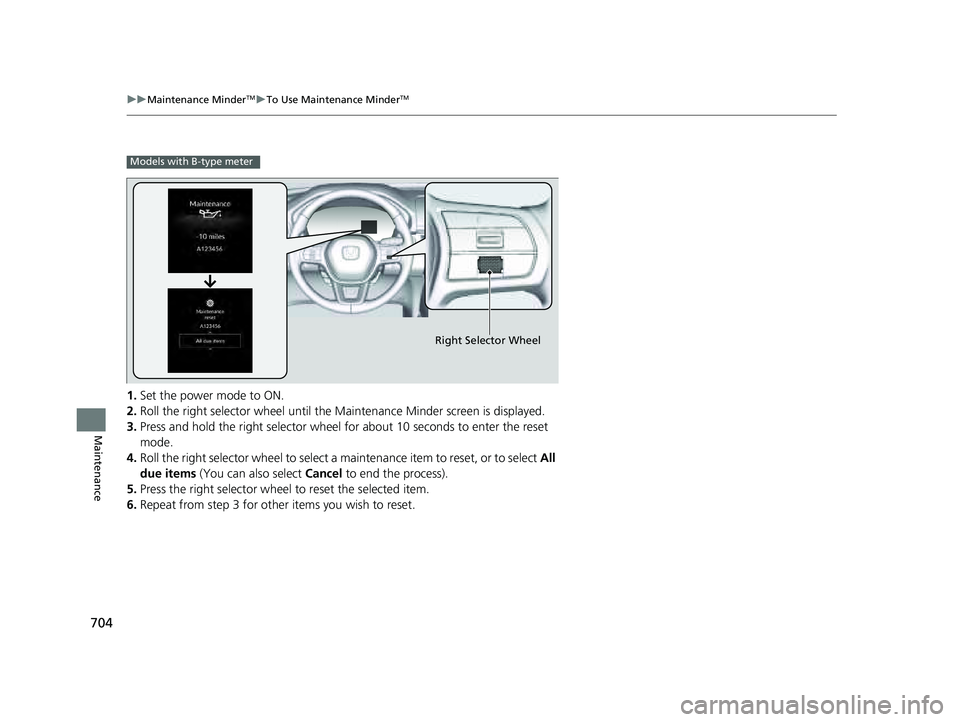
1. Set the power mode to ON.
2. Roll the right selector wheel until the Maintenance Minder screen is displayed.
3. Press and hold the right selector wheel for about 10 seconds to enter the reset
mode.
4. Roll the right selector wheel to select a maintenance item to reset, or to select All
due items (You can also select Cancel to end the process).
5. Press the right selector wheel to reset the selected item.
6. Repeat from step 3 for other items you wish to reset.
Models with B-type meter
Right Selector Wheel
23 PILOT-31T906000_03.book 704 ページ 2022年10月31日 月曜日 午前10時26分
Page 729 of 814
728
Maintenance
Checking and Maintaining Tires
Checking Tires
To safely operate your vehicle, your tires must be of the proper type and size, in
good condition with adequate tread, and properly inflated.
■Inflation guidelines
Properly inflated tires provide the best combination of handling, tread life, and comfort.
Refer to the driver’s doorjamb label or spec ifications page for the specified pressure.
Underinflated tires wear unevenly, adversely affect handling and fuel economy, and
are more likely to fail from overheating.
Overinflated tires make your vehicle ride harshly, are more prone to road hazards,
and wear unevenly.
Every day before you drive, look at each of the tires. If one looks lower than the
others, check the pressure with a tire gauge.
At least once a month or before long trips, use a gauge to measure the pressure in
all tires, including the spare. Even tires in good condition can lose 1-2 psi (10-20 kPa,
0.1-0.2 kgf/cm
2) per month.
■Inspection guidelines
Every time you check inflation, also examine the tires and valve stems.
Look for:
• Bumps or bulges on the side or in the tread. Replace the tire if you find any cuts,
splits, or cracks in the si de of the tire. Replace it if you see fabric or cord.
• Remove any foreign objects and inspect for air leaks.
• Uneven tread wear. Have a deal er check the wheel alignment.
• Excessive tread wear.
2 Wear Indicators P. 733
•Cracks or other damage around valve stem.
1Checking Tires
Measure the air pressure when tires are cold. This
means the vehicle has been parked for at least three
hours, or driven less than 1 mile (1.6 km). If
necessary, add or releas e air until the specified
pressure is reached.
If checked when hot, tire pressure can be as much as
4–6 psi (30–40 kPa, 0.3–0.4 kgf/cm
2) higher than if
checked when cold.
Have a dealer check the tires if you feel a consistent
vibration while driving. Ne w tires and any that have
been removed and reinst alled should be properly
balanced.
3WARNING
Using tires that are excessively worn or
improperly inflated can cause a crash in
which you can be seriously hurt or killed.
Follow all instruction s in this owner’s
manual regarding ti re inflation and
maintenance.
23 PILOT-31T906000_03.book 728 ページ 2022年10月31日 月曜日 午前10時26分