audio HONDA PILOT 2023 Owners Manual
[x] Cancel search | Manufacturer: HONDA, Model Year: 2023, Model line: PILOT, Model: HONDA PILOT 2023Pages: 814, PDF Size: 29.02 MB
Page 685 of 814
uuSurround View Camera System*uUsing the Surround View Camera System
684
Driving
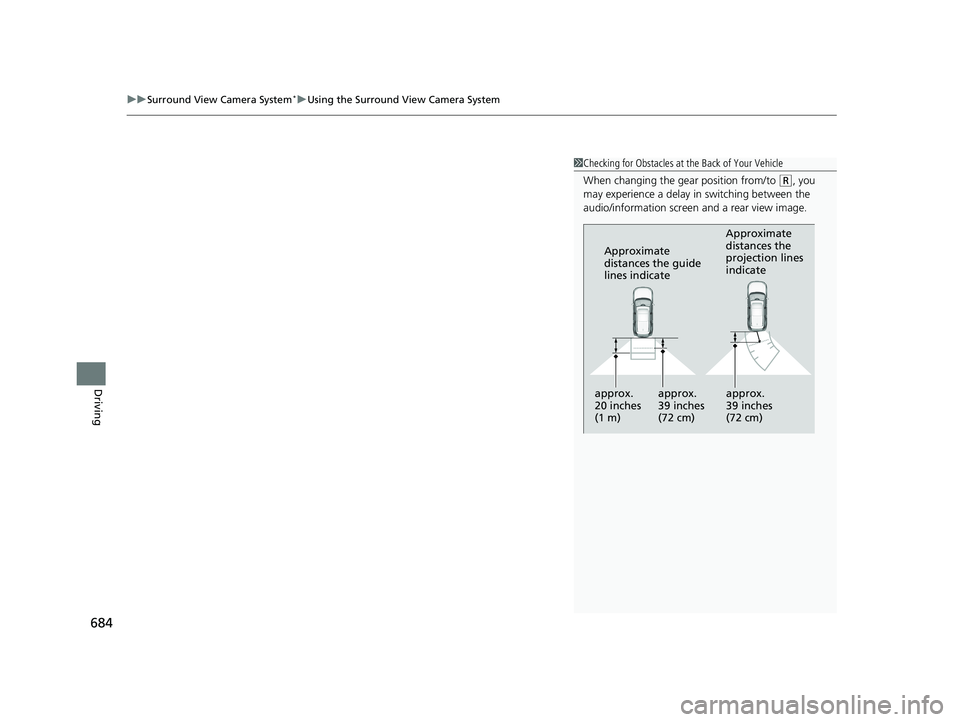
1Checking for Obstacles at the Back of Your Vehicle
When changing the gear position from/to
(R, you
may experience a delay in switching between the
audio/information screen and a rear view image.
Approximate
distances the guide
lines indicate Approximate
distances the
projection lines
indicate
approx.
20 inches
(1 m) approx.
39 inches
(72 cm) approx.
39 inches
(72 cm)
23 PILOT-31T906000_03.book 684 ページ 2022年10月31日 月曜日 午前10時26分
Page 686 of 814
685
uuSurround View Camera System*uUsing the Surround View Camera System
Driving
The system may not work properly under the following conditions.
■Surround View Camera System Limitations
ConditionsSolutions
The images may not
appear clearly when:●You activate the system in bad weather (heavy rain,
snow, fog, etc.) or in the dark.
●Camera temperatures are high.●A sudden change between light and dark such as an
entrance or exit of a tunnel.
●You drive into the sunlight (e.g., at dawn or dusk.)
Do not use the surround view camera system but rely
only on visual confirmation until the conditions allow
the system to work properly.
●A camera lens is covered with dirt, moisture, or
debris.
●A camera lens is scratched.
Clean camera lenses with the frontview or rearview
camera washer or a soft cloth moisturized with water,
mild detergent or glass cleaner.
2 Windshield Wipers/Washers P. 229
2 Rear Wiper/Washer P. 231
The audio/information screen is dirty.Wipe off the screen using a soft dry cloth.
A camera angle is
altered.A camera or the area around the camera has been
severely impacted.Do not use the surround view camera system and
contact a dealer.
An error message is displayed while the surround view camera system is in use.
23 PILOT-31T906000_03.book 685 ページ 2022年10月31日 月曜日 午前10時26分
Page 704 of 814
Continued703
uuMaintenance MinderTMuTo Use Maintenance MinderTM
Maintenance
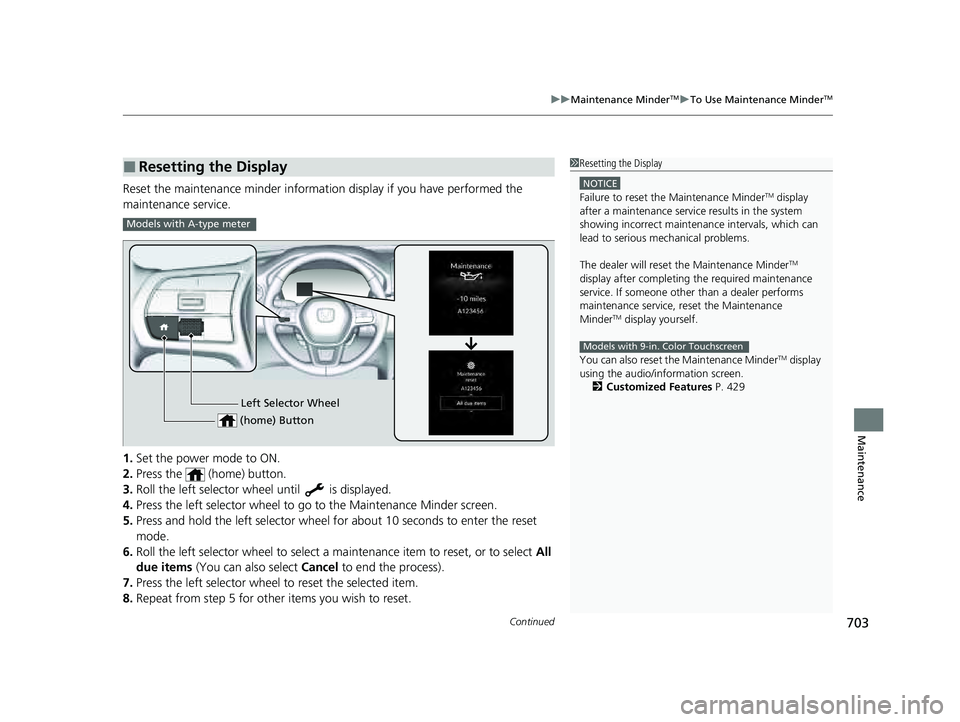
Reset the maintenance minder information display if you have performed the
maintenance service.
1. Set the power mode to ON.
2. Press the (home) button.
3. Roll the left selector wheel until is displayed.
4. Press the left selector wheel to go to the Maintenance Minder screen.
5. Press and hold the left selector wheel for about 10 seconds to enter the reset
mode.
6. Roll the left selector wheel to select a ma intenance item to reset, or to select All
due items (You can also select Cancel to end the process).
7. Press the left selector wheel to reset the selected item.
8. Repeat from step 5 for other items you wish to reset.
■Resetting the Display1Resetting the Display
NOTICE
Failure to reset the Maintenance MinderTM display
after a maintenance servic e results in the system
showing incorrect maintenance intervals, which can
lead to serious mechanical problems.
The dealer will reset the Maintenance Minder
TM
display after completing th e required maintenance
service. If someone other than a dealer performs
maintenance service, reset the Maintenance
Minder
TM display yourself.
You can also reset the Maintenance Minder
TM display
using the audio/information screen.
2 Customized Features P. 429
Models with 9-in. Color Touchscreen
Models with A-type meter
Left Selector Wheel
(home) Button
23 PILOT-31T906000_03.book 703 ページ 2022年10月31日 月曜日 午前10時26分
Page 738 of 814
737
Maintenance
Battery
Checking the Battery
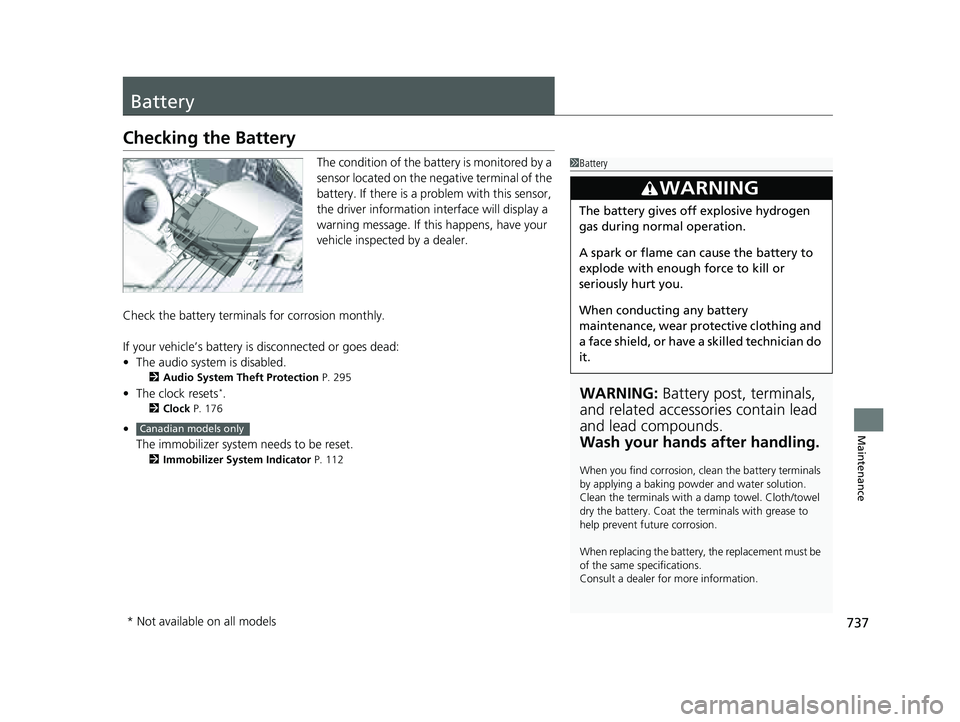
The condition of the battery is monitored by a
sensor located on the negative terminal of the
battery. If there is a problem with this sensor,
the driver information interface will display a
warning message. If this happens, have your
vehicle inspected by a dealer.
Check the battery termina ls for corrosion monthly.
If your vehicle’s battery is disconnected or goes dead:
• The audio system is disabled.
2 Audio System Theft Protection P. 295
•The clock resets*.
2 Clock P. 176
•
The immobilizer system needs to be reset.
2 Immobilizer System Indicator P. 112
1Battery
WARNING: Battery post, terminals,
and related accessories contain lead
and lead compounds.
Wash your hands after handling.
When you find corrosion, cl ean the battery terminals
by applying a baking powder and water solution.
Clean the terminals with a damp towel. Cloth/towel
dry the battery. Coat the terminals with grease to
help prevent future corrosion.
When replacing the battery, the replacement must be
of the same specifications.
Consult a dealer for more information.
3WARNING
The battery gives off explosive hydrogen
gas during normal operation.
A spark or flame can cause the battery to
explode with enough force to kill or
seriously hurt you.
When conducting any battery
maintenance, wear prot ective clothing and
a face shield, or have a skilled technician do
it.
Canadian models only
* Not available on all models
23 PILOT-31T906000_03.book 737 ページ 2022年10月31日 月曜日 午前10時26分
Page 743 of 814
742
Maintenance
Cleaning
Interior Care
Use a damp cloth with a mixture of mild detergent and warm water to remove dirt.
Use a clean cloth to remove detergent residue.
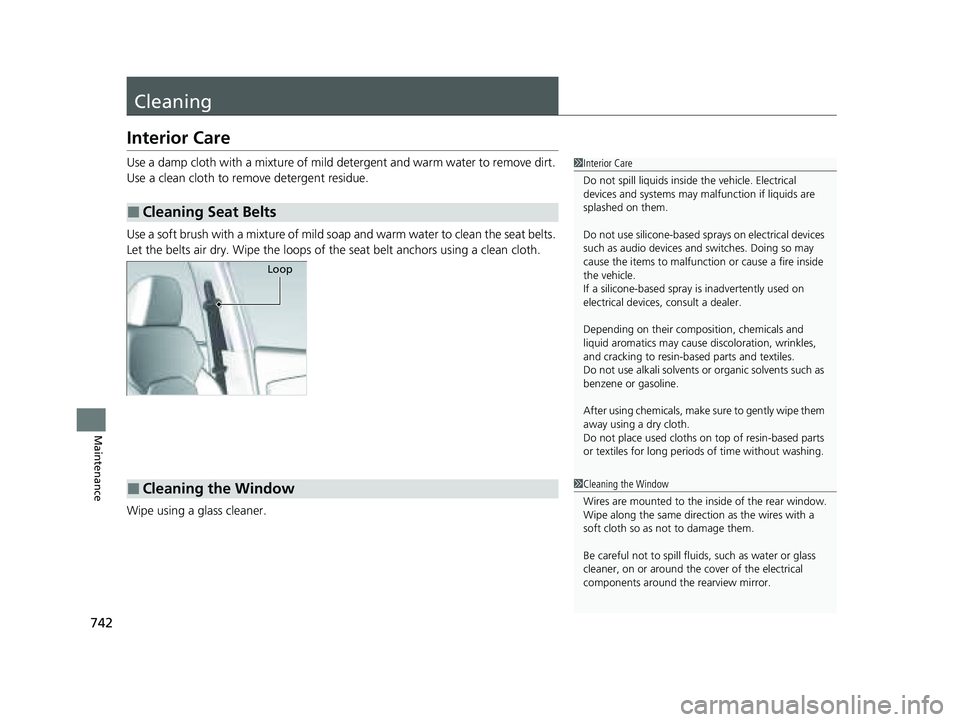
Use a soft brush with a mixture of mild soap and warm water to clean the seat belts.
Let the belts air dry. Wipe the loops of the seat belt anchors using a clean cloth.
Wipe using a glass cleaner.
■Cleaning Seat Belts
1 Interior Care
Do not spill liquids inside the vehicle. Electrical
devices and systems may ma lfunction if liquids are
splashed on them.
Do not use silicone-based sp rays on electrical devices
such as audio devices and switches. Doing so may
cause the items to malfunction or cause a fire inside
the vehicle.
If a silicone-based spray is inadvertently used on
electrical devices, consult a dealer.
Depending on their compos ition, chemicals and
liquid aromatics may cause discoloration, wrinkles,
and cracking to resin-ba sed parts and textiles.
Do not use alkali solvents or organic solvents such as
benzene or gasoline.
After using chemicals, make su re to gently wipe them
away using a dry cloth.
Do not place used cloths on top of resin-based parts
or textiles for long periods of time without washing.
Loop
■Cleaning the Window1Cleaning the Window
Wires are mounted to the in side of the rear window.
Wipe along the same direct ion as the wires with a
soft cloth so as not to damage them.
Be careful not to spill fluids, such as water or glass
cleaner, on or around the cover of the electrical
components around the rearview mirror.
23 PILOT-31T906000_03.book 742 ページ 2022年10月31日 月曜日 午前10時26分
Page 768 of 814
767Continued
Handling the Unexpected
If the Battery Is Dead
Jump Starting Procedure
Turn off the power to electric devices, such as audio and lights. Turn off the engine,
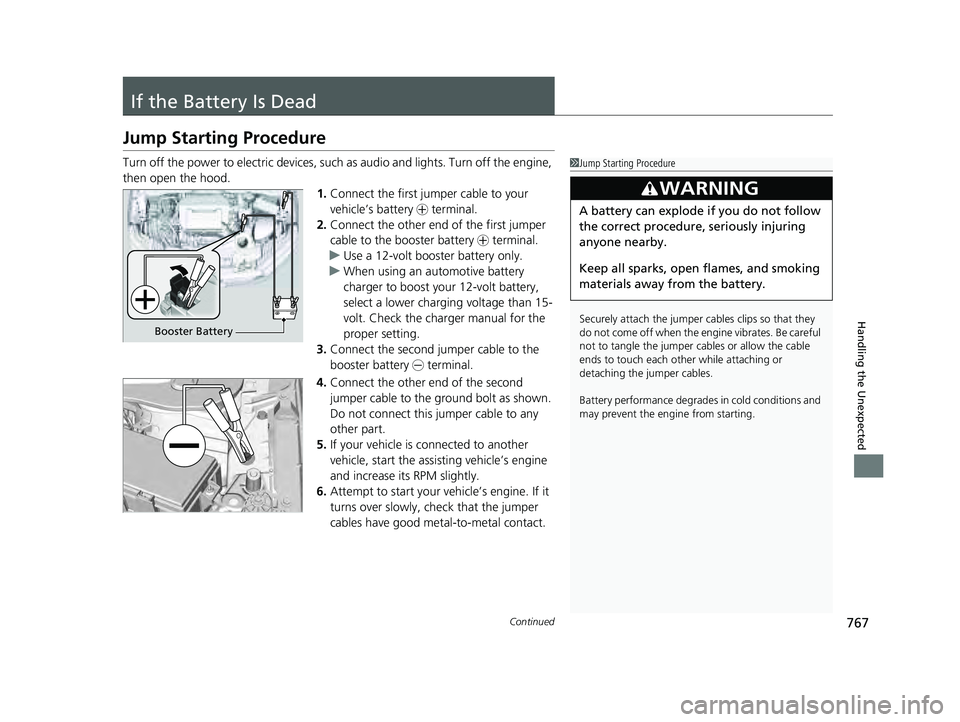
then open the hood. 1.Connect the first jumper cable to your
vehicle’s battery + terminal.
2. Connect the other end of the first jumper
cable to the booster battery + terminal.
u Use a 12-volt booster battery only.
u When using an automotive battery
charger to boost your 12-volt battery,
select a lower charging voltage than 15-
volt. Check the charger manual for the
proper setting.
3. Connect the second jumper cable to the
booster battery - terminal.
4. Connect the other end of the second
jumper cable to the ground bolt as shown.
Do not connect this jumper cable to any
other part.
5. If your vehicle is connected to another
vehicle, start the assisting vehicle’s engine
and increase its RPM slightly.
6. Attempt to start your ve hicle’s engine. If it
turns over slowly, check that the jumper
cables have good metal-to-metal contact.1 Jump Starting Procedure
Securely attach the jumper cables clips so that they
do not come off when the e ngine vibrates. Be careful
not to tangle the jumper cables or allow the cable
ends to touch each other while attaching or
detaching the jumper cables.
Battery performance degrades in cold conditions and
may prevent the engi ne from starting.
3WARNING
A battery can explode if you do not follow
the correct procedure, seriously injuring
anyone nearby.
Keep all sparks, open flames, and smoking
materials away from the battery.
Booster Battery
23 PILOT-31T906000_03.book 767 ページ 2022年10月31日 月曜日 午前10時26分
Page 780 of 814
779
uuFuses uFuse Locations
Continued
Handling the Unexpected
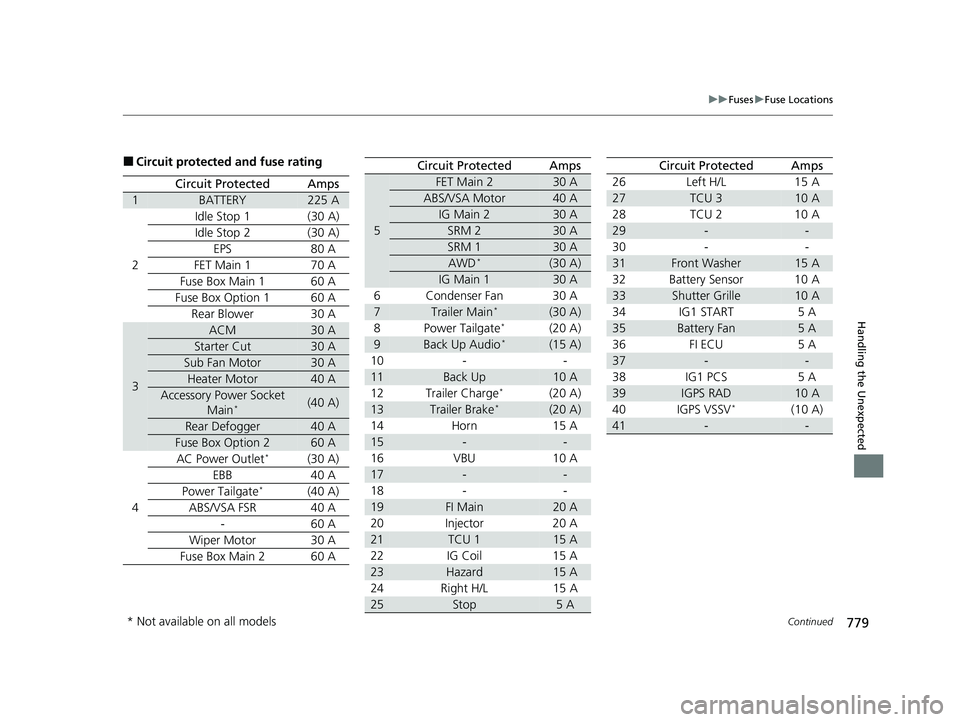
■Circuit protected and fuse rating
Circuit ProtectedAmps
1BATTERY225 A
2 Idle Stop 1 (30 A)
Idle Stop 2 (30 A)
EPS 80 A
FET Main 1 70 A
Fuse Box Main 1 60 A
Fuse Box Option 1 60 A Rear Blower 30 A
3
ACM30 A
Starter Cut30 A
Sub Fan Motor30 A
Heater Motor40 A
Accessory Power Socket Main*(40 A)
Rear Defogger40 A
Fuse Box Option 260 A
4 AC Power Outlet*(30 A)
EBB 40 A
Power Tailgate
*(40 A)
ABS/VSA FSR 40 A - 60 A
Wiper Motor 30 A
Fuse Box Main 2 60 A
5
FET Main 230 A
ABS/VSA Motor40 A
IG Main 230 A
SRM 230 A
SRM 130 A
AWD*(30 A)
IG Main 130 A
6 Condenser Fan 30 A
7Trailer Main*(30 A)
8 Power Tailgate*(20 A)
9Back Up Audio*(15 A)
10 - -
11Back Up10 A
12 Trailer Charge*(20 A)
13Trailer Brake*(20 A)
14 Horn 15 A
15--
16 VBU 10 A
17--
18 - -
19FI Main20 A
20 Injector 20 A
21TCU 115 A
22 IG Coil 15 A
23Hazard15 A
24 Right H/L 15 A
25Stop5 A
Circuit ProtectedAmps
26 Left H/L 15 A
27TCU 310 A
28 TCU 2 10 A
29--
30 - -
31Front Washer15 A
32 Battery Sensor 10 A
33Shutter Grille10 A
34 IG1 START 5 A
35Battery Fan5 A
36 FI ECU 5 A
37--
38 IG1 PCS 5 A
39IGPS RAD10 A
40 IGPS VSSV*(10 A)
41--
Circuit ProtectedAmps
* Not available on all models
23 PILOT-31T906000_03.book 779 ページ 2022年10月31日 月曜日 午前10時26分
Page 782 of 814
781
uuFuses uFuse Locations
Continued
Handling the Unexpected
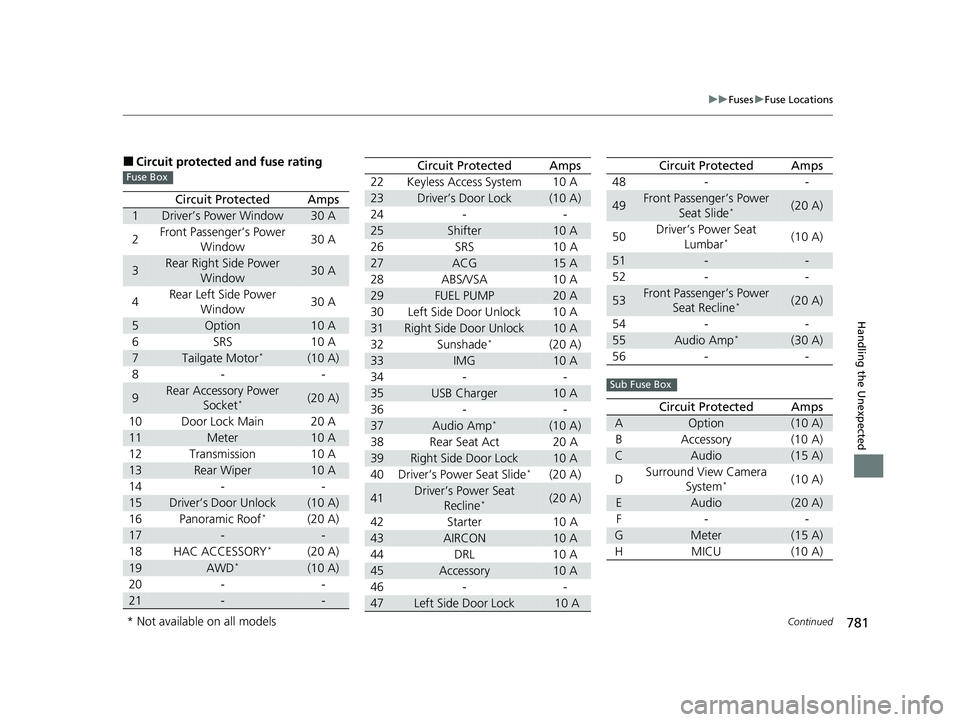
■Circuit protected and fuse rating
Circuit ProtectedAmps
1Driver’s Power Window30 A
2 Front Passenger’s Power
Window 30 A
3Rear Right Side Power
Window30 A
4 Rear Left Side Power
Window 30 A
5Option10 A
6 SRS 10 A
7Tailgate Motor*(10 A)
8- -
9Rear Accessory Power Socket*(20 A)
10 Door Lock Main 20 A
11Meter10 A
12 Transmission 10 A
13Rear Wiper10 A
14 - -
15Driver’s Door Unlock(10 A)
16 Panoramic Roof*(20 A)
17--
18 HAC ACCESSORY*(20 A)
19AWD*(10 A)
20 - -
21--
Fuse Box22 Keyless Access System 10 A
23Driver’s Door Lock(10 A)
24 - -
25Shifter10 A
26 SRS 10 A
27ACG15 A
28 ABS/VSA 10 A
29FUEL PUMP20 A
30 Left Side Door Unlock 10 A
31Right Side Door Unlock10 A
32 Sunshade*(20 A)
33IMG10 A
34 - -
35USB Charger10 A
36 - -
37Audio Amp*(10 A)
38 Rear Seat Act 20 A
39Right Side Door Lock10 A
40 Driver’s Power Seat Slide*(20 A)
41Driver’s Power Seat Recline*(20 A)
42 Starter 10 A
43AIRCON10 A
44 DRL 10 A
45Accessory10 A
46 - -
47Left Side Door Lock 10 A
Circuit ProtectedAmps
48 - -
49Front Passenger’s Power
Seat Slide*(20 A)
50 Driver’s Power Seat
Lumbar
*(10 A)
51--
52 - -
53Front Passenger’s Power Seat Recline*(20 A)
54 - -
55Audio Amp*(30 A)
56 - -
Circuit ProtectedAmps
AOption(10 A)
B Accessory (10 A)
CAudio(15 A)
D Surround View Camera
System
*(10 A)
EAudio(20 A)
F- -
GMeter(15 A)
HMICU (10 A)
Circuit ProtectedAmps
Sub Fuse Box
* Not available on all models
23 PILOT-31T906000_03.book 781 ページ 2022年10月31日 月曜日 午前10時26分
Page 805 of 814
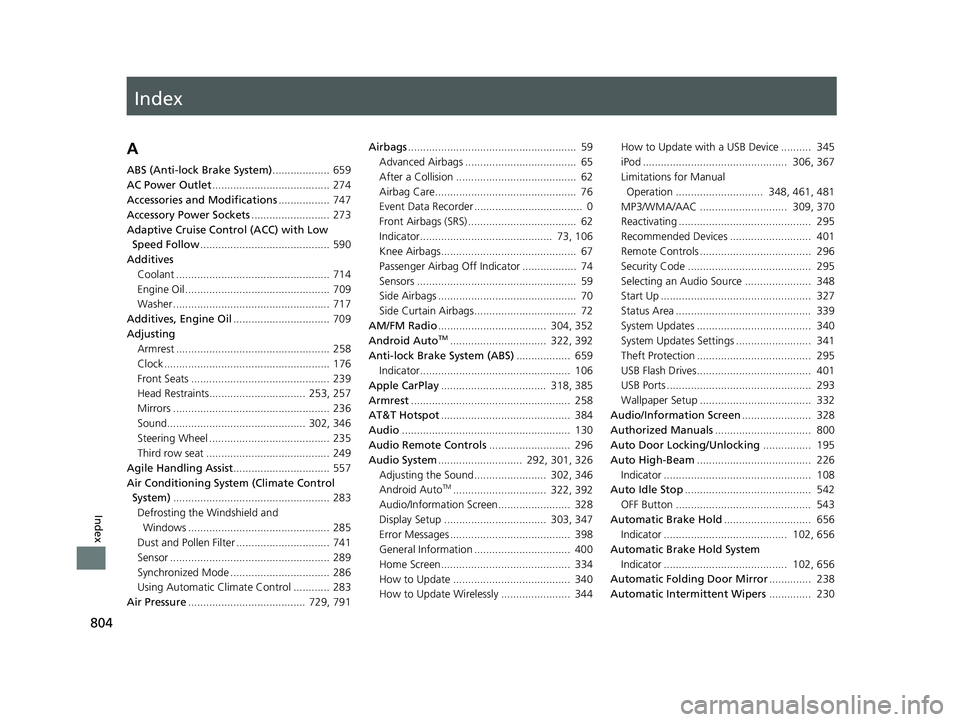
Index
804
Index
Index
A
ABS (Anti-lock Brake System)................... 659
AC Power Outlet ....................................... 274
Accessories and Modifications ................. 747
Accessory Power Sockets .......................... 273
Adaptive Cruise Control (ACC) with Low Speed Follow ........................................... 590
Additives
Coolant ................................................... 714
Engine Oil ................................................ 709
Washer .................................................... 717
Additives, Engine Oil ................................ 709
Adjusting Armrest ................................................... 258
Clock ....................................................... 176
Front Seats .............................................. 239
Head Restraints................................ 253, 257
Mirrors .................................................... 236
Sound.............................................. 302, 346
Steering Wheel ........................................ 235
Third row seat ......................................... 249
Agile Handling Assist ................................ 557
Air Conditioning System (Climate Control System) .................................................... 283
Defrosting the Windshield and
Windows ............................................... 285
Dust and Pollen Filter ............................... 741
Sensor ..................................................... 289
Synchronized Mode ................................. 286
Using Automatic Climate Control ............ 283
Air Pressure ....................................... 729, 791 Airbags
........................................................ 59
Advanced Airbags ..................................... 65
After a Collision ........................................ 62
Airbag Care............................................... 76
Event Data Recorder .................................... 0
Front Airbags (SRS) .................................... 62
Indicator............................................ 73, 106
Knee Airbags............................................. 67
Passenger Airbag Off Indicator .................. 74
Sensors ..................................................... 59
Side Airbags .............................................. 70
Side Curtain Airbags.................................. 72
AM/FM Radio .................................... 304, 352
Android Auto
TM................................ 322, 392
Anti-lock Brake System (ABS) .................. 659
Indicator.................................................. 106
Apple CarPlay ................................... 318, 385
Armrest ..................................................... 258
AT&T Hotspot ........................................... 384
Audio ........................................................ 130
Audio Remote Controls ........................... 296
Audio System ............................ 292, 301, 326
Adjusting the Sound........................ 302, 346
Android Auto
TM............................... 322, 392
Audio/Information Screen........................ 328
Display Setup .................................. 303, 347
Error Messages ........................................ 398
General Information ................................ 400
Home Screen........................................... 334
How to Update ....................................... 340
How to Update Wirelessly ....................... 344 How to Update with a USB Device .......... 345
iPod ................................................ 306, 367
Limitations for Manual
Operation ............................. 348, 461, 481
MP3/WMA/AAC ............................. 309, 370
Reactivating ............................................ 295
Recommended Devices ........................... 401
Remote Controls ..................................... 296
Security Code ......................................... 295
Selecting an Audio Source ...................... 348
Start Up .................................................. 327
Status Area ............................................. 339
System Updates ...................................... 340
System Updates Settings ......................... 341
Theft Protection ...................................... 295
USB Flash Drives...................................... 401
USB Ports ................................................ 293
Wallpaper Setup ..................................... 332
Audio/Information Screen ....................... 328
Authorized Manuals ................................ 800
Auto Door Locking/Unlocking ................ 195
Auto High-Beam ...................................... 226
Indicator ................................................. 108
Auto Idle Stop .......................................... 542
OFF Button ............................................. 543
Automatic Brake Hold ............................. 656
Indicator ......................................... 102, 656
Automatic Brake Hold System
Indicator ......................................... 102, 656
Automatic Folding Door Mirror .............. 238
Automatic Intermittent Wipers .............. 230
23 PILOT-31T906000_03.book 804 ページ 2022年10月31日 月曜日 午前10時26分
Page 806 of 814
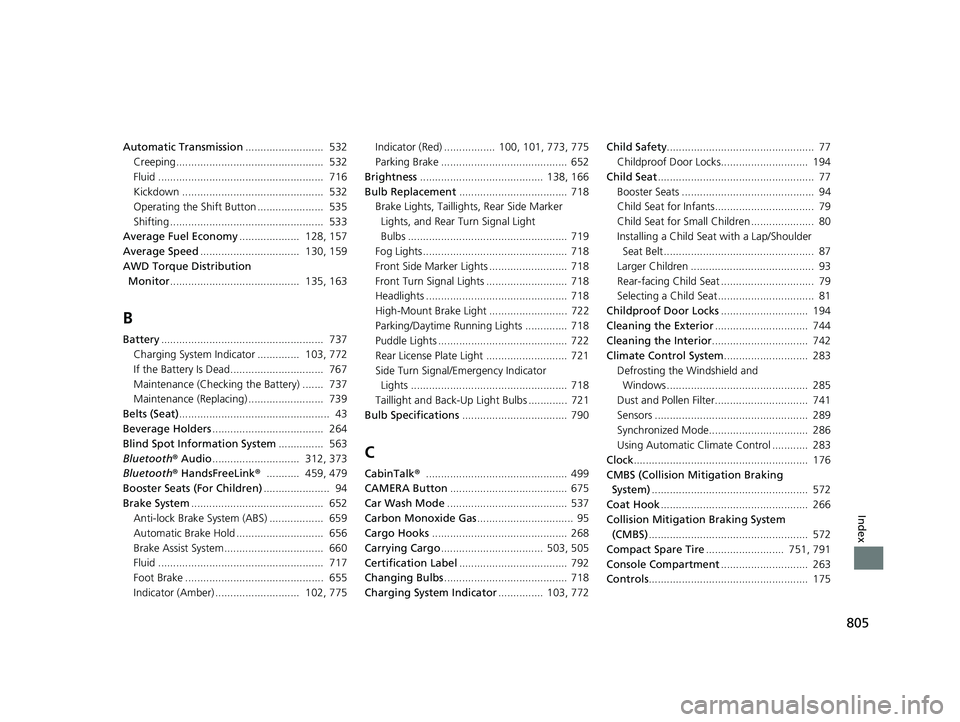
805
Index
Automatic Transmission.......................... 532
Creeping................................................. 532
Fluid ....................................................... 716
Kickdown ............................................... 532
Operating the Shift Button ...................... 535
Shifting ................................................... 533
Average Fuel Economy .................... 128, 157
Average Speed ................................. 130, 159
AWD Torque Distribution Monitor ........................................... 135, 163
B
Battery...................................................... 737
Charging System Indicator .............. 103, 772
If the Battery Is Dead............................... 767
Maintenance (Checking the Battery) ....... 737
Maintenance (Replacing) ......................... 739
Belts (Seat) .................................................. 43
Beverage Holders ..................................... 264
Blind Spot Information System ............... 563
Bluetooth ® Audio ............................. 312, 373
Bluetooth ® HandsFreeLink ®........... 459, 479
Booster Seats (For Children) ...................... 94
Brake System ............................................ 652
Anti-lock Brake System (ABS) .................. 659
Automatic Brake Hold ............................. 656
Brake Assist System................................. 660
Fluid ....................................................... 717
Foot Brake .............................................. 655
Indicator (Amber) ............................ 102, 775 Indicator (Red) ................. 100, 101, 773, 775
Parking Brake .......................................... 652
Brightness ......................................... 138, 166
Bulb Replacement .................................... 718
Brake Lights, Taillights, Rear Side Marker
Lights, and Rear Turn Signal Light
Bulbs ..................................................... 719
Fog Lights ................................................ 718
Front Side Marker Lights .......................... 718
Front Turn Signal Lights ........................... 718
Headlights ............................................... 718
High-Mount Brake Light .......................... 722
Parking/Daytime Running Lights .............. 718
Puddle Lights ........................................... 722
Rear License Plate Light ........................... 721
Side Turn Signal/Em ergency Indicator
Lights .................................................... 718
Taillight and Back-Up Light Bulbs ............. 721
Bulb Specifications ................................... 790
C
CabinTalk®............................................... 499
CAMERA Button ....................................... 675
Car Wash Mode ........................................ 537
Carbon Monoxide Gas ................................ 95
Cargo Hooks ............................................. 268
Carrying Cargo .................................. 503, 505
Certification Label .................................... 792
Changing Bulbs ......................................... 718
Charging System Indicator ............... 103, 772Child Safety
................................................. 77
Childproof Door Locks............................. 194
Child Seat .................................................... 77
Booster Seats ............................................ 94
Child Seat for Infants................................. 79
Child Seat for Small Children ..................... 80
Installing a Child Seat with a Lap/Shoulder
Seat Belt .................................................. 87
Larger Children ......................................... 93
Rear-facing Child Seat ............................... 79
Selecting a Child Seat ................................ 81
Childproof Door Locks ............................. 194
Cleaning the Exterior ............................... 744
Cleaning the Interior ................................ 742
Climate Control System ............................ 283
Defrosting the Windshield and Windows ............................................... 285
Dust and Pollen Filter............................... 741
Sensors ................................................... 289
Synchronized Mode................................. 286
Using Automatic Climate Control ............ 283
Clock .......................................................... 176
CMBS (Collision Mitigation Braking System) .................................................... 572
Coat Hook ................................................. 266
Collision Mitigation Braking System (CMBS) ..................................................... 572
Compact Spare Tire .......................... 751, 791
Console Compartment ............................. 263
Controls ..................................................... 175
23 PILOT-31T906000_03.book 805 ページ 2022年10月31日 月曜日 午前10時26分