reset HONDA PILOT 2023 Service Manual
[x] Cancel search | Manufacturer: HONDA, Model Year: 2023, Model line: PILOT, Model: HONDA PILOT 2023Pages: 814, PDF Size: 29.02 MB
Page 437 of 814
436
uuCustomized Features u
Features
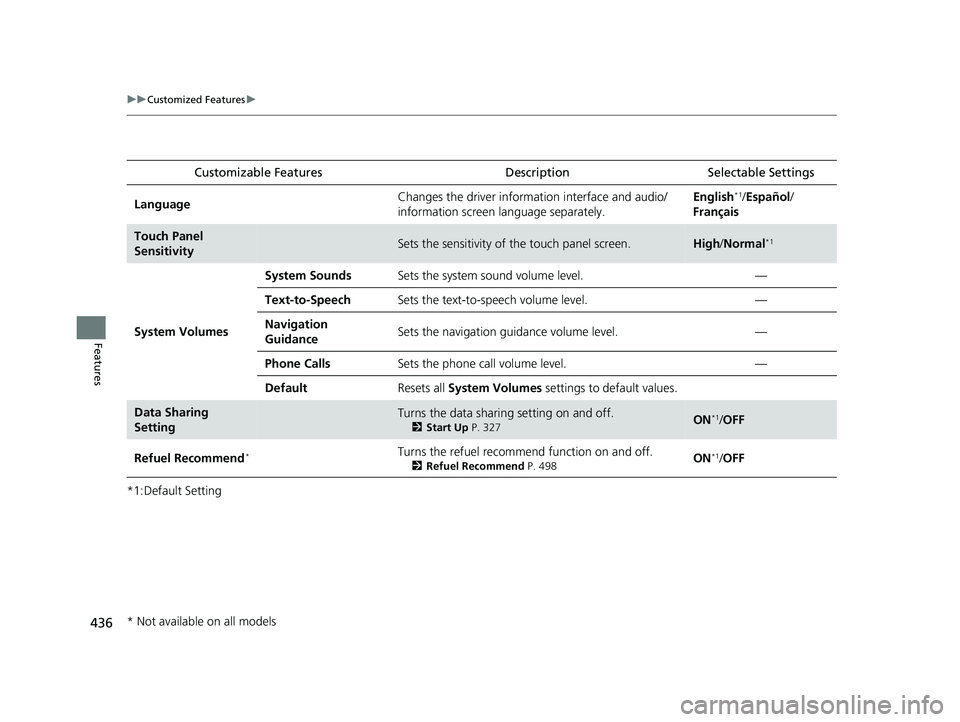
*1:Default SettingCustomizable Features
Description Selectable Settings
LanguageChanges the driver information interface and audio/
information screen language separately.English*1/Español /
Français
Touch Panel
SensitivitySets the sensitivity of the touch panel screen.High /Normal*1
System Volumes
System SoundsSets the system sound volume level.—
Text-to-SpeechSets the text-to-speech volume level.—
Navigation
GuidanceSets the navigation guidance volume level.—
Phone CallsSets the phone call volume level.—
DefaultResets all System Volumes settings to default values.
Data Sharing
SettingTurns the data sharing setting on and off.
2Start Up P. 327ON*1/OFF
Refuel Recommend*Turns the refuel recommend function on and off.
2 Refuel Recommend P. 498ON*1/OFF
* Not available on all models
23 PILOT-31T906000_03.book 436 ページ 2022年10月31日 月曜日 午前10時26分
Page 438 of 814
437
uuCustomized Features u
Continued
Features
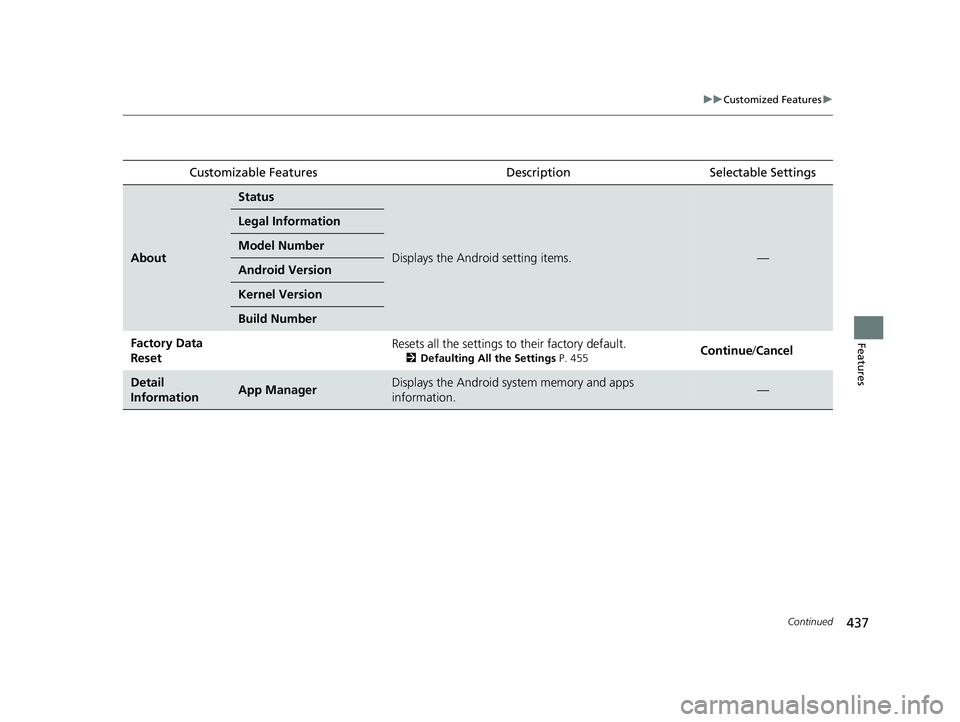
Customizable FeaturesDescriptionSelectable Settings
About
Status
Displays the Android setting items.—
Legal Information
Model Number
Android Version
Kernel Version
Build Number
Factory Data
ResetResets all the settings to their factory default.
2Defaulting All the Settings P. 455Continue /Cancel
Detail
InformationApp ManagerDisplays the Android system memory and apps
information.—
23 PILOT-31T906000_03.book 437 ページ 2022年10月31日 月曜日 午前10時26分
Page 441 of 814
440
uuCustomized Features u
Features
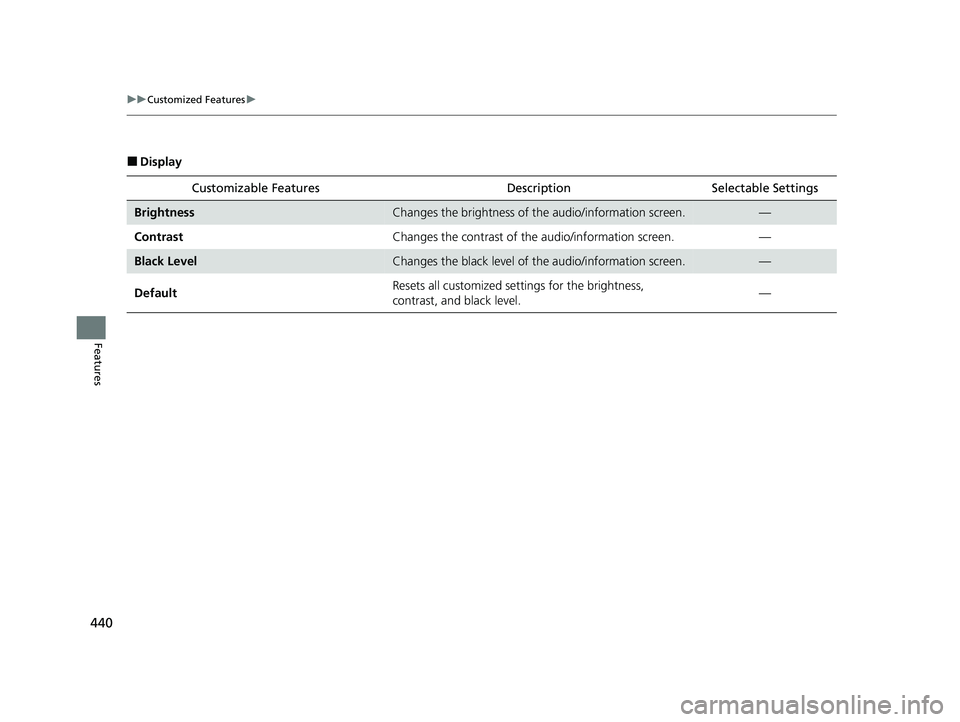
■Display
Customizable Features Descri ption Selectable Settings
BrightnessChanges the brightness of the audio/information screen.—
Contrast Changes the contrast of the audio/information screen. —
Black LevelChanges the black level of the audio/information screen.—
Default Resets all customized settings for the brightness,
contrast, and black level.
—
23 PILOT-31T906000_03.book 440 ページ 2022年10月31日 月曜日 午前10時26分
Page 447 of 814
446
uuCustomized Features u
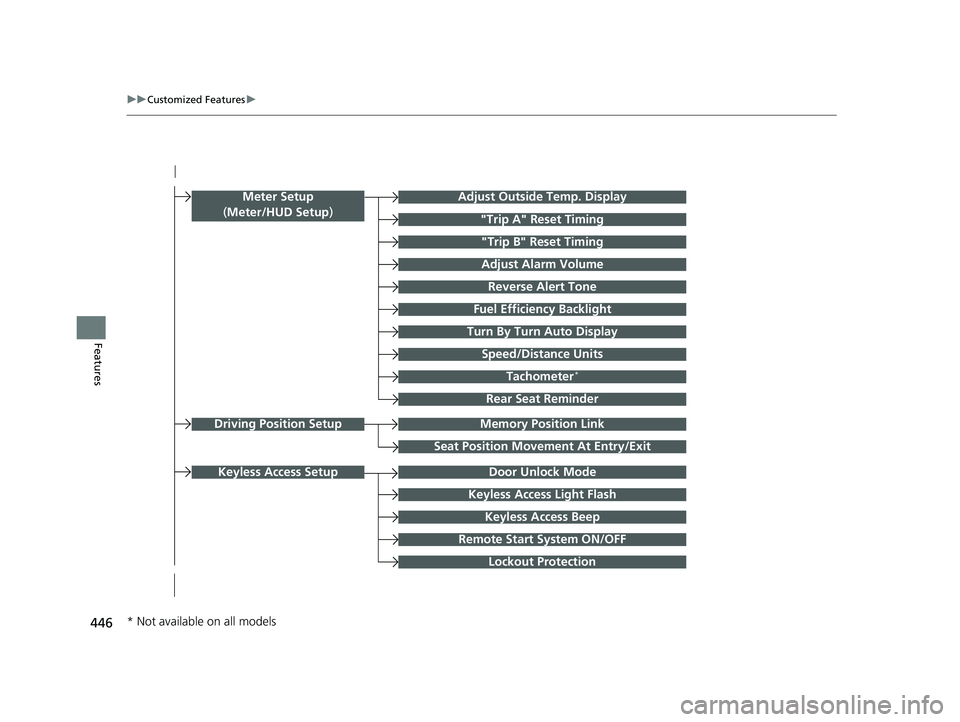
FeaturesTurn By Turn Auto Display
Speed/Distance Units
Keyless Access Light Flash
Rear Seat Reminder
Door Unlock Mode
Keyless Access Beep
Remote Start System ON/OFF
Lockout Protection
Keyless Access Setup
Meter Setup
(Meter/HUD Setup )Adjust Outside Temp. Display
"Trip A" Reset Timing
"Trip B" Reset Timing
Adjust Alarm Volume
Fuel Efficiency Backlight
Tachometer*
Reverse Alert Tone
Memory Position LinkDriving Position Setup
Seat Position Movement At Entry/Exit
* Not available on all models
23 PILOT-31T906000_03.book 446 ページ 2022年10月31日 月曜日 午前10時26分
Page 448 of 814
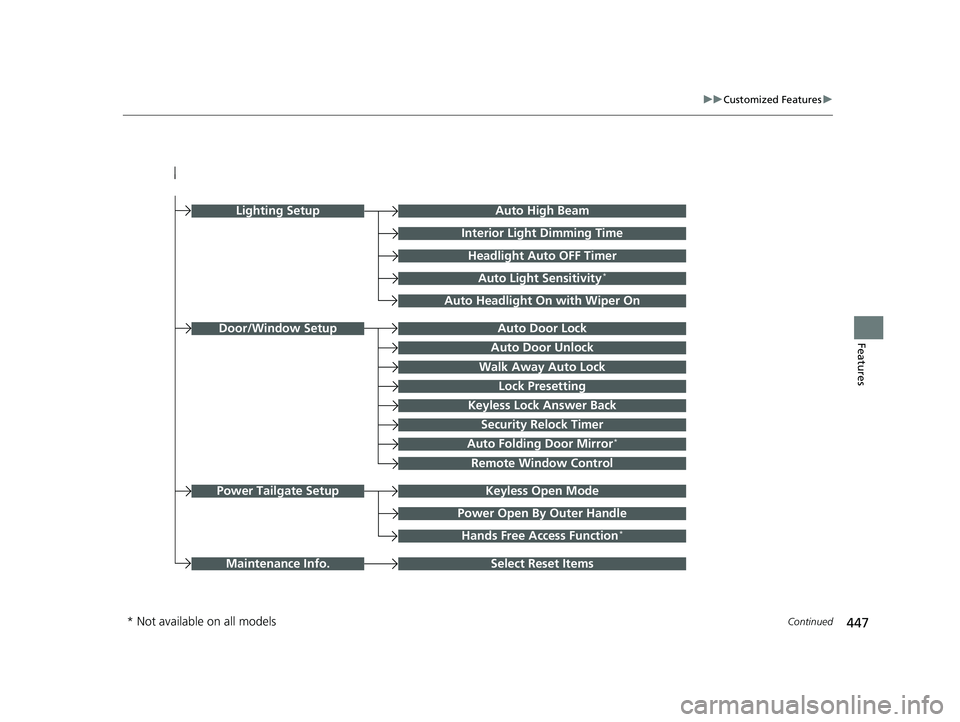
447
uuCustomized Features u
Continued
FeaturesAuto Door Unlock
Auto Door Lock
Walk Away Auto Lock
Lock Presetting
Keyless Lock Answer Back
Door/Window Setup
Auto High Beam
Interior Light Dimming Time
Headlight Auto OFF Timer
Auto Light Sensitivity*
Auto Headlight On with Wiper On
Auto Folding Door Mirror*
Keyless Open ModePower Tailgate Setup
Select Reset ItemsMaintenance Info.
Power Open By Outer Handle
Hands Free Access Function*
Remote Window Control
Lighting Setup
Security Relock Timer
* Not available on all models
23 PILOT-31T906000_03.book 447 ページ 2022年10月31日 月曜日 午前10時26分
Page 451 of 814
450
uuCustomized Features u
Features
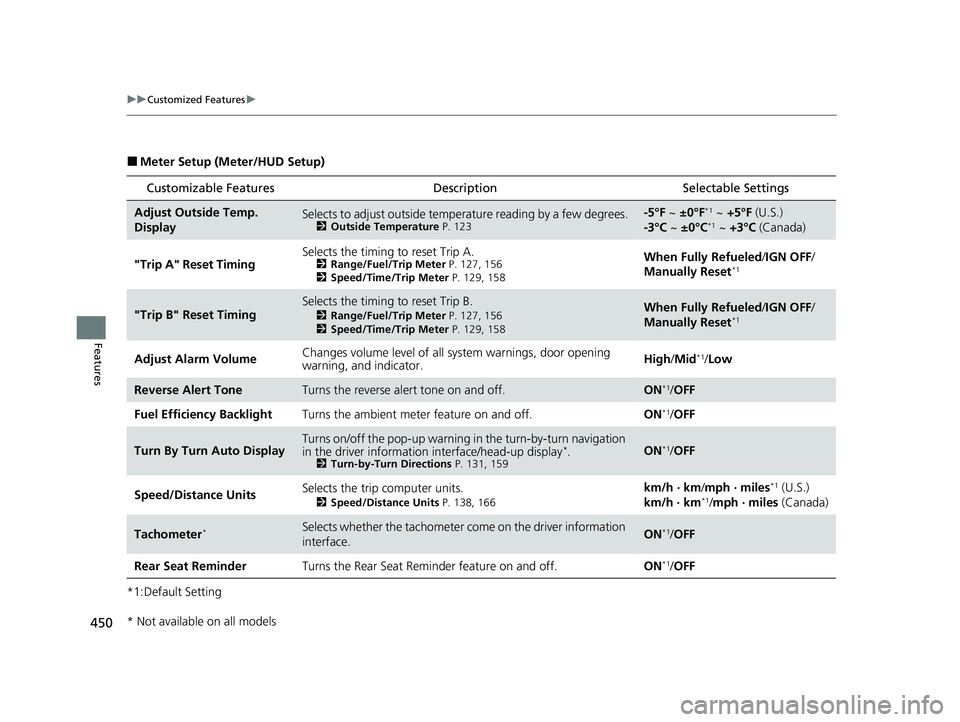
■Meter Setup (Meter/HUD Setup)
*1:Default Setting
Customizable Features Description Selectable Settings
Adjust Outside Temp.
DisplaySelects to adjust outside temperature reading by a few degrees.2Outside Temperature P. 123
-5°F ~ ±0°F*1 ~ +5°F (U.S.)
-3°C ~ ±0°C*1 ~ +3°C (Canada)
"Trip A" Reset Timing Selects the timing to reset Trip A.
2
Range/Fuel/Trip Meter P. 127, 156
2 Speed/Time/Trip Meter P. 129, 158When Fully Refueled /IGN OFF /
Manually Reset*1
"Trip B" Reset TimingSelects the timing to reset Trip B.
2 Range/Fuel/Trip Meter P. 127, 156
2 Speed/Time/Trip Meter P. 129, 158When Fully Refueled /IGN OFF /
Manually Reset*1
Adjust Alarm Volume Changes volume level of all system warnings, door opening
warning, and indicator. High/
Mid*1/Low
Reverse Alert ToneTurns the reverse alert tone on and off.ON*1/OFF
Fuel Efficiency Backlight Turns the ambient meter feature on and off. ON
*1/OFF
Turn By Turn Auto DisplayTurns on/off the pop-up warning in the turn-by-turn navigation
in the driver informatio n interface/head-up display*.2Turn-by-Turn Directions P. 131, 159ON*1/OFF
Speed/Distance Units Selects the trip computer units.
2
Speed/Distance Units P. 138, 166
km/h · km /mph · miles*1 (U.S.)
km/h · km*1/ mph · miles (Canada)
Tachometer*Selects whether the tachometer come on the driver information
interface.ON*1/ OFF
Rear Seat Reminder Turns the Rear Seat Reminder feature on and off. ON
*1/OFF
* Not available on all models
23 PILOT-31T906000_03.book 450 ページ 2022年10月31日 月曜日 午前10時26分
Page 454 of 814
453
uuCustomized Features u
Continued
Features
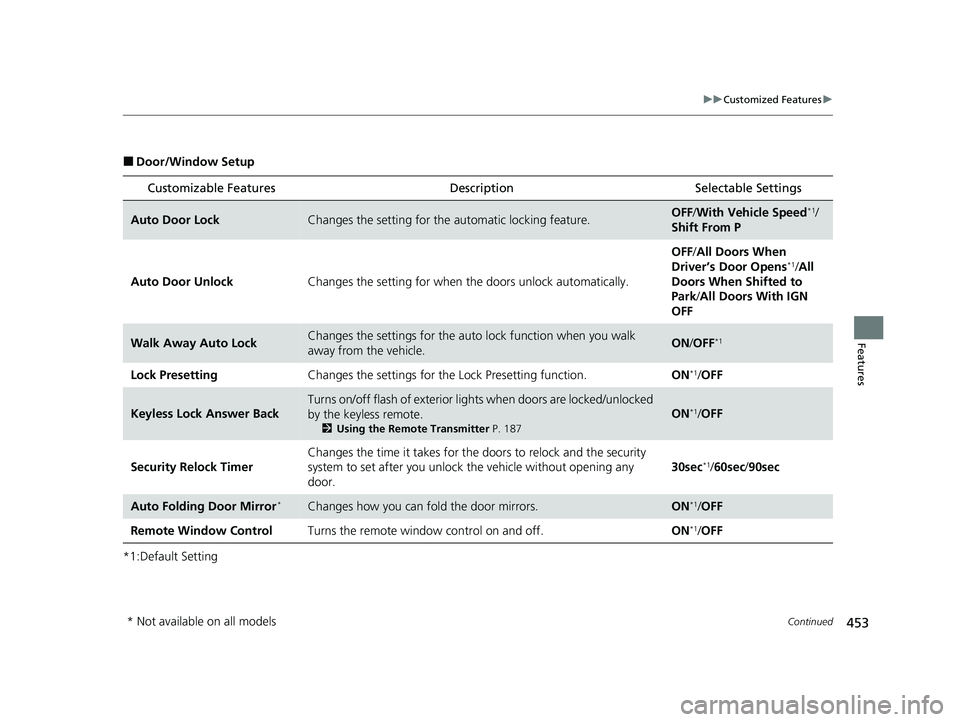
■Door/Window Setup
*1:Default Setting
Customizable Features Description Selectable Settings
Auto Door LockChanges the setting for the automatic locking feature.OFF/With Vehicle Speed*1/
Shift From P
Auto Door Unlock Changes the setting for when the doors unlock automatically. OFF
/All Doors When
Driver’s Door Opens
*1/ All
Doors When Shifted to
Park/ All Doors With IGN
OFF
Walk Away Auto LockChanges the settings for the auto lock function when you walk
away from the vehicle.ON /OFF*1
Lock Presetting Changes the settings for the Lock Presetting function. ON*1/OFF
Keyless Lock Answer Back
Turns on/off flash of exterior light s when doors are locked/unlocked
by the keyless remote.
2 Using the Remote Transmitter P. 187
ON*1/OFF
Security Relock Timer Changes the time it takes for the
doors to relock and the security
system to set after you unlock the vehicle without opening any
door. 30sec
*1/
60sec /90sec
Auto Folding Door Mirror*Changes how you can fold the door mirrors.ON*1/OFF
Remote Window Control Turns the remote window control on and off. ON
*1/OFF
* Not available on all models
23 PILOT-31T906000_03.book 453 ページ 2022年10月31日 月曜日 午前10時26分
Page 455 of 814
454
uuCustomized Features u
Features
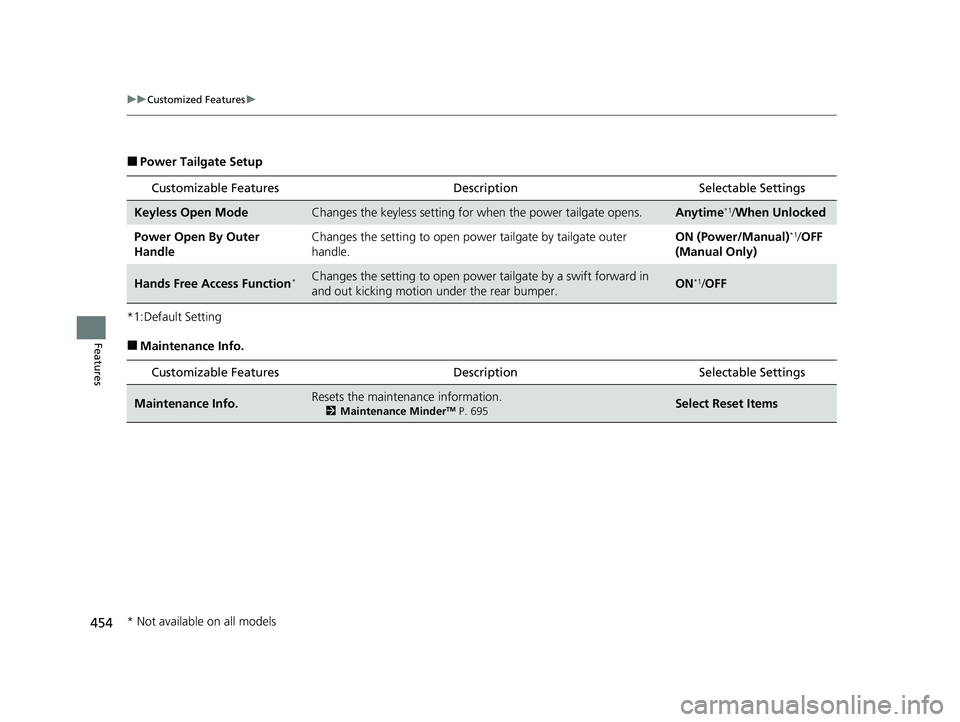
■Power Tailgate Setup
*1:Default Setting
■Maintenance Info. Customizable Features Desc
ription Selectable Settings
Keyless Open ModeChanges the keyless setting for when the power tailgate opens.Anytime*1/When Unlocked
Power Open By Outer
Handle Changes the setting to open power tailgate by tailgate outer
handle. ON (Power/Manual)
*1/
OFF
(Manual Only)
Hands Free Access Function*Changes the setting to open power tailgate by a swift forward in
and out kicking motion under the rear bumper.ON*1/ OFF
Customizable Features Desc ription Selectable Settings
Maintenance Info.Resets the maintenance information.
2Maintenance MinderTM P. 695Select Reset Items
* Not available on all models
23 PILOT-31T906000_03.book 454 ページ 2022年10月31日 月曜日 午前10時26分
Page 456 of 814
455
uuCustomized Features uDefaulting All the Settings
Features
Defaulting All the Settings
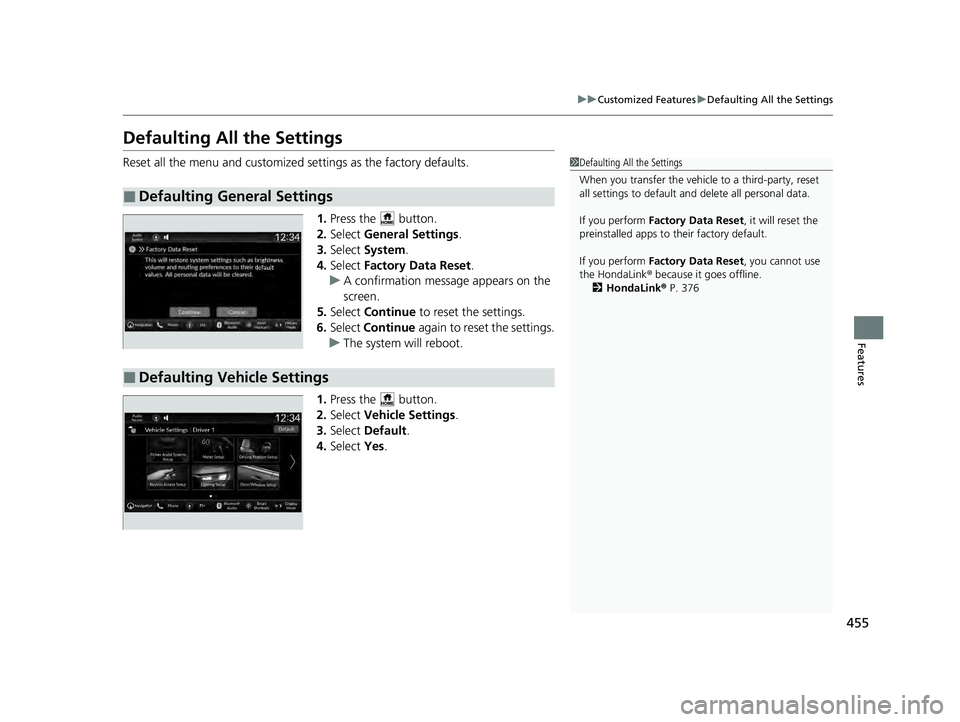
Reset all the menu and customized settings as the factory defaults.
1.Press the button.
2. Select General Settings .
3. Select System.
4. Select Factory Data Reset .
u A confirmation message appears on the
screen.
5. Select Continue to reset the settings.
6. Select Continue again to reset the settings.
u The system w ill reboot.
1. Press the button.
2. Select Vehicle Settings.
3. Select Default.
4. Select Yes.
■Defaulting General Settings
1Defaulting All the Settings
When you transfer the vehicle to a third-party, reset
all settings to default a nd delete all personal data.
If you perform Factory Data Reset , it will reset the
preinstalled apps to their factory default.
If you perform Factory Data Reset , you cannot use
the HondaLink ® because it goes offline.
2 HondaLink® P. 376
■Defaulting Vehicle Settings
23 PILOT-31T906000_03.book 455 ページ 2022年10月31日 月曜日 午前10時26分
Page 589 of 814
uuHonda Sensing ®u Low Speed Braking Control*
588
Driving
Conditions for assistive driving power suppression.
• When the accelerator is no longer depressed.
• When the accelerator is depressed for approximately four seconds.
• When the brake pedal is depressed.
Conditions for assistive braking cancellation.
• A certain amount of time ha s passed since activation.
The system may not operate correctly under the following conditions:
■Examples of obstacles the sonar sensors cannot detect
• Obstacles that do not refl ect sound waves well, such as people, snow, cloth,
sponges, etc.
• Thin obstacles such as fences, bicycles, sign posts, etc.
• Short or small obstacles.
• Obstacles immediately in front of the bumper.
• Obstacles that are not pe rpendicular to the ground.
• Moving objects or obstacles that suddenly enter the road.
■Conditions for Cancellation
■Low Speed Braking Control System Conditions and Limitations
1Conditions for Cancellation
After Low Speed Braking Control has activated once,
it will not activate again for the same obstacle.
It can be activated again after driving for a certain
distance after last activation.
Low Speed Braking Control ac tivates separately when
moving forward and reversing. (For example, if it
activates when moving forwar d, it can be activated
again immediately if reversing.)
However, if assistive braking has been activated, in
order to activate assistiv e driving power suppression
again, it is necessary to drive for a certain distance to
reset the system.
23 PILOT-31T906000_03.book 588 ページ 2022年10月31日 月曜日 午前10時26分