ignition HONDA PRELUDE 1990 User Guide
[x] Cancel search | Manufacturer: HONDA, Model Year: 1990, Model line: PRELUDE, Model: HONDA PRELUDE 1990Pages: 143, PDF Size: 2.07 MB
Page 29 of 143
Mirrors
Rearview Mirrors Keep the inside and outside mirrors clean and adjusted for best
visibility. Be sure to adjust mirrors before you start.
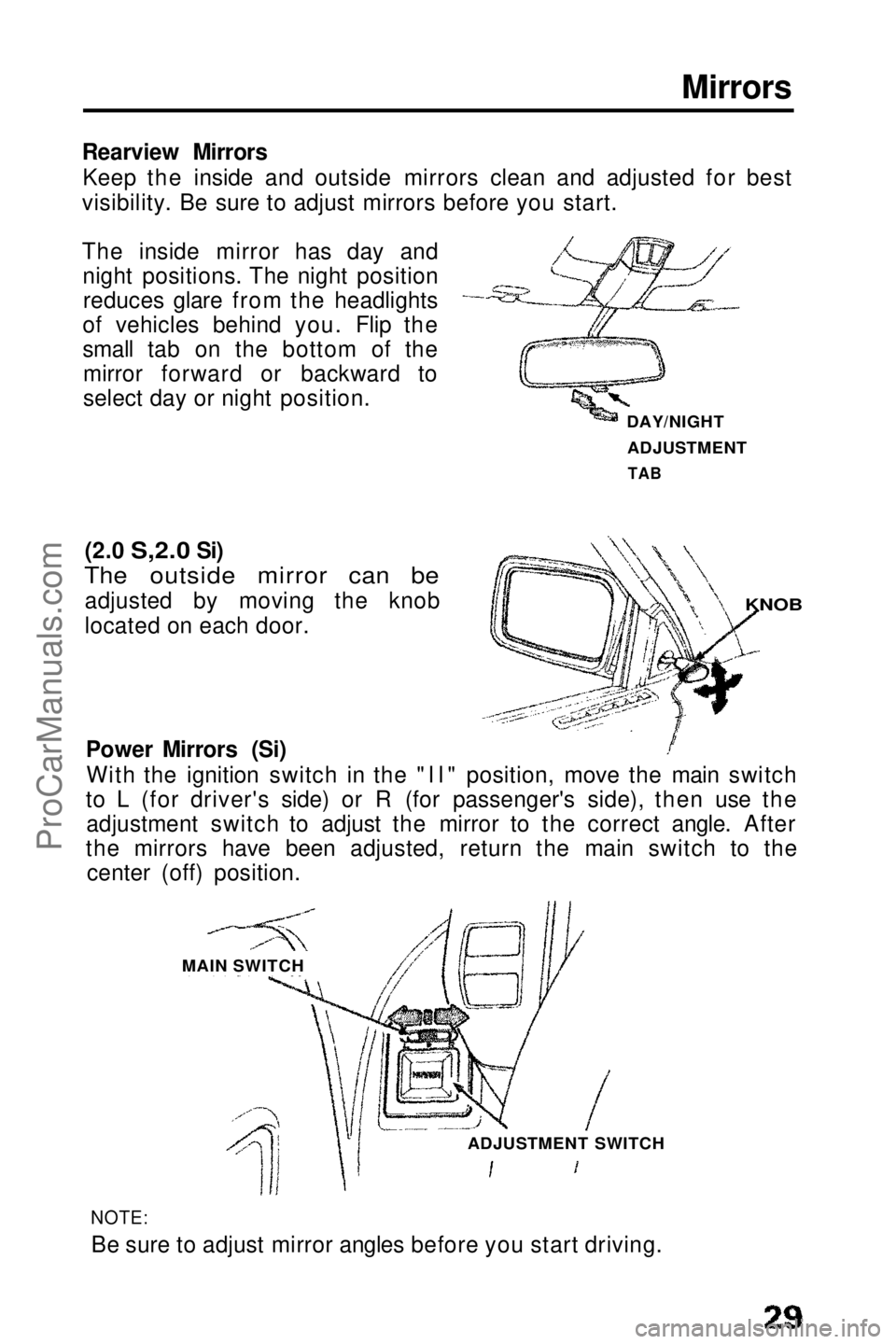
The inside mirror has day and night positions. The night positionreduces glare from the headlights
of vehicles behind you. Flip the
small tab on the bottom of the mirror forward or backward to
select day or night position.
(2.0
S,2.0
Si)
The outside mirror can be
adjusted by moving the knob
located on each door.
Power Mirrors (Si)With the ignition switch in the "II" position, move the main switch
to L (for driver's side) or R (for passenger's side), then use the adjustment switch to adjust the mirror to the correct angle. After
the mirrors have been adjusted, return the main switch to the center (off) position.
NOTE:Be sure to adjust mirror angles before you start driving.
DAY/NIGHT
ADJUSTMENT
TAB
KNOB
MAIN SWITCH ADJUSTMENT SWITCHProCarManuals.comMain Menu s t
Page 34 of 143
Lights (cont'd)
Keyhole tight (Si)
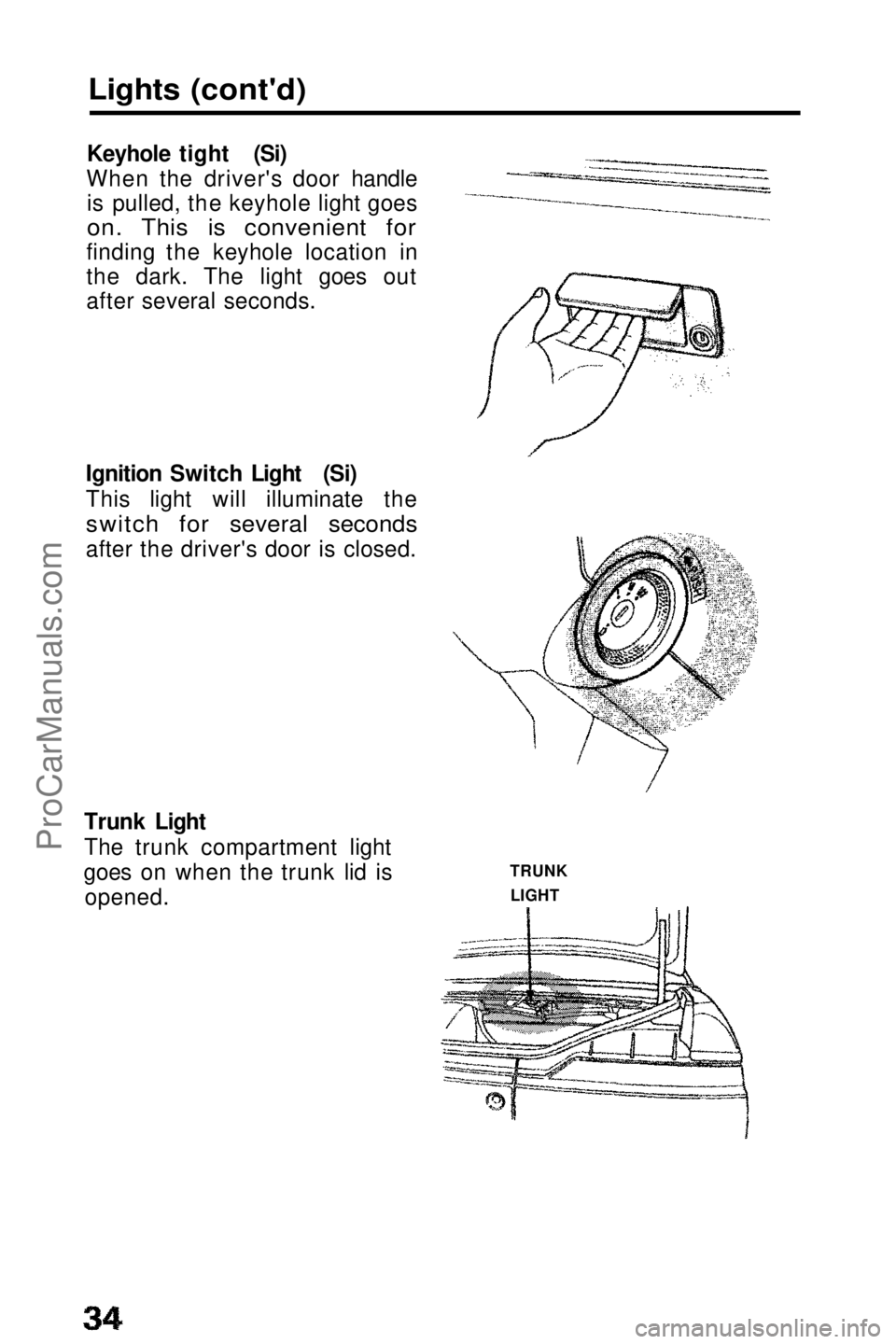
When the driver's door handle is pulled, the keyhole light goes
on. This is convenient for
finding the keyhole location in
the dark. The light goes out
after several seconds.
Ignition Switch Light (Si)
This light will illuminate the
switch for several seconds
after the driver's door is closed.
Trunk Light
The trunk compartment light
goes on when the trunk lid is opened. TRUNK
LIGHTProCarManuals.comMain Menu t s
Page 37 of 143
Clock
Digital Clock
The time is displayed continuously when the ignition is on. At all other times, push in on the lid to display the time.
To adjust the time:
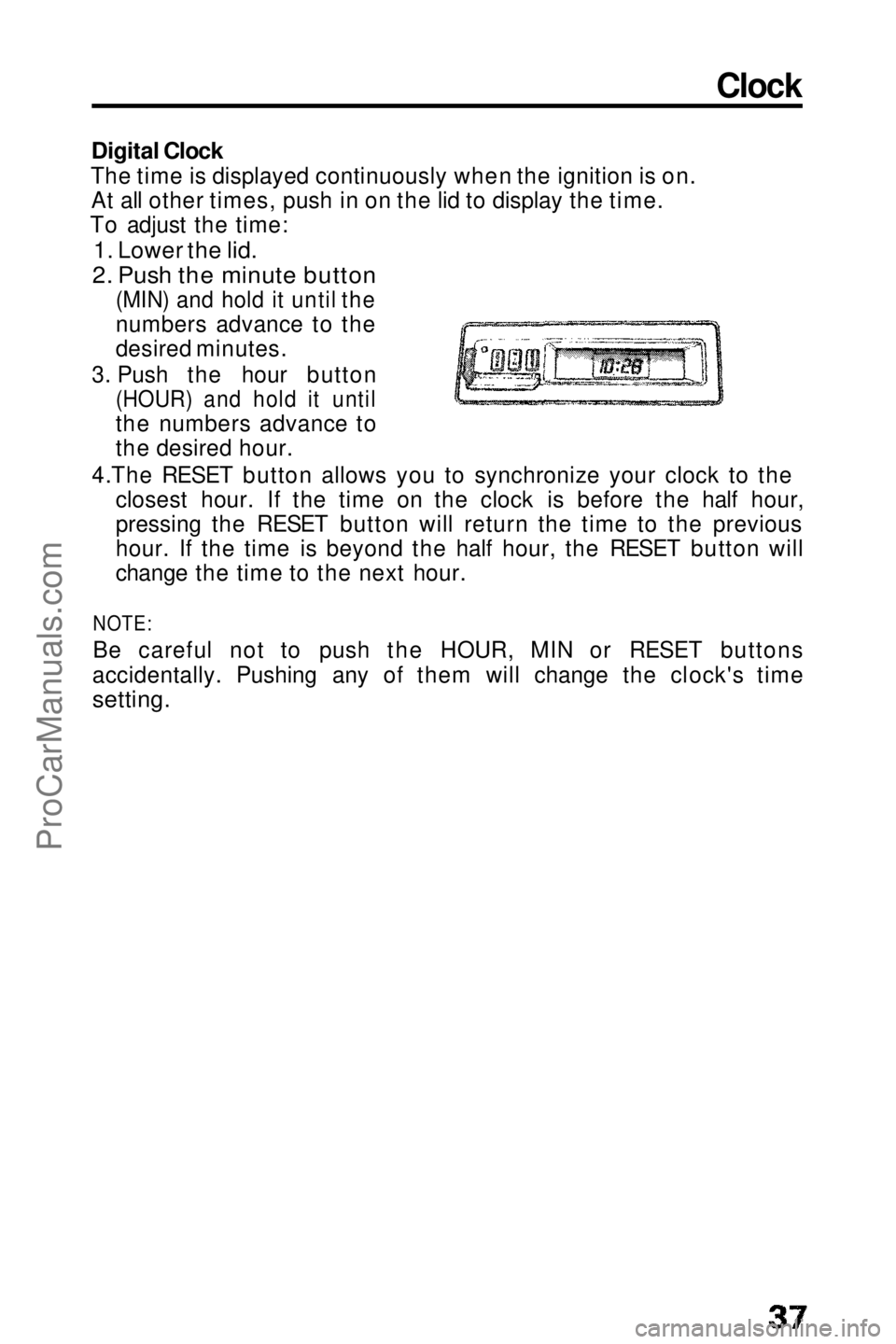
1. Lower the lid.
2. Push the minute button
(MIN) and hold it until the
numbers advance to the
desired minutes.
3. Push the hour button
(HOUR) and hold it until
the numbers advance to
the desired hour.
4.The RESET button allows you to synchronize your clock to the closest hour. If the time on the clock is before the half hour,
pressing the RESET button will return the time to the previous
hour. If the time is beyond the half hour, the RESET button will
change the time to the next hour.
NOTE:
Be careful not to push the HOUR, MIN or RESET buttons
accidentally. Pushing any of them will change the clock's time
setting.ProCarManuals.comMain Menu t s
Page 40 of 143
Power Windows (Si)
The power windows can be
operated only when the ignition
switch is in the "II" position.
The operation of the windows is
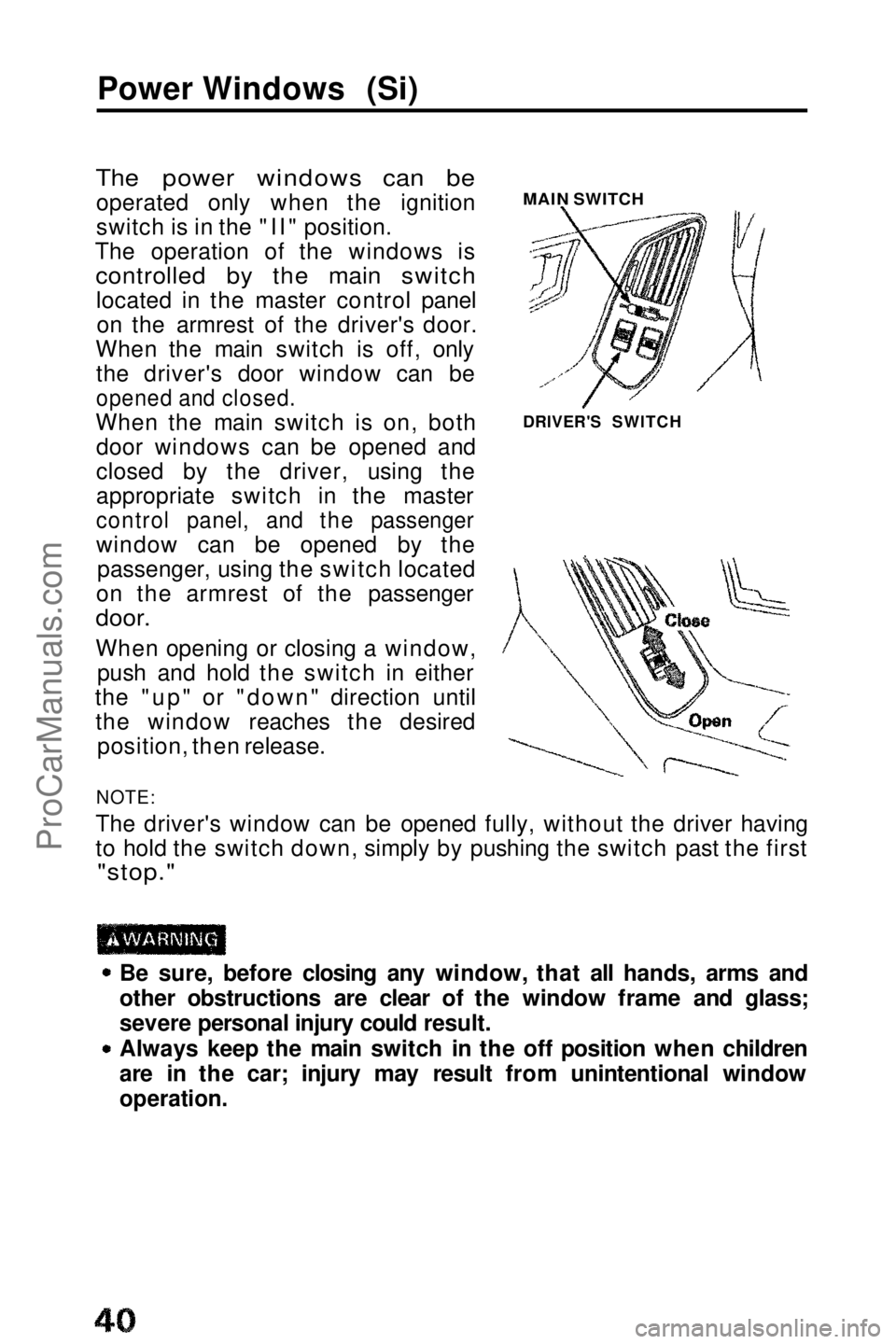
controlled by the main switch
located in the master control panelon the armrest of the driver's door.
When the main switch is off, only the driver's door window can be
opened and closed.
When the main switch is on, both door windows can be opened and
closed by the driver, using the
appropriate switch in the master
control panel, and the passenger
window can be opened by the passenger, using the switch located
on the armrest of the passenger
door.
When opening or closing a window, push and hold the switch in either
the "up" or "down" direction until the window reaches the desired position, then release.
NOTE:
The driver's window can be opened fully, without the driver having
to hold the switch down, simply by pushing the switch past the first
"stop."
Be sure, before closing any window, that all hands, arms and
other obstructions are clear of the window frame and glass;
severe personal injury could result.
Always keep the main switch in the off position when children
are in the car; injury may result from unintentional window
operation.
MAIN SWITCH
DRIVER'S SWITCHProCarManuals.comMain Menu t s
Page 47 of 143
Stereo Sound System
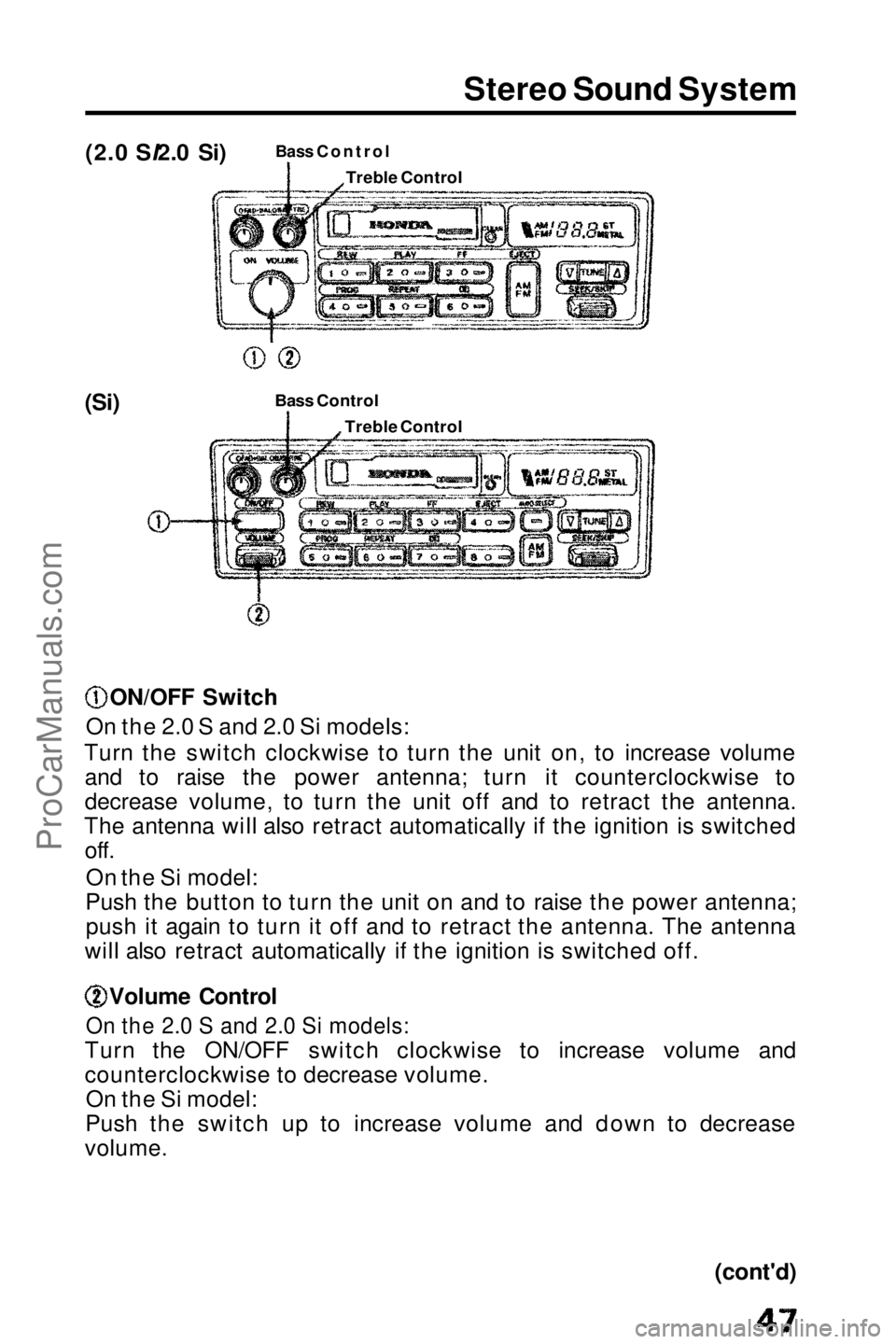
(2.0 SI2.0 Si)
Bass Control
(Si) Bass Contro
l
ON/OFF Switch
On the 2.0 S and 2.0 Si models:
Turn the switch clockwise to turn the unit on, to increase volume and to raise the power antenna; turn it counterclockwise to
decrease volume, to turn the unit off and to retract the antenna.
The antenna will also retract automatically if the ignition is switched off.
On the Si model:
Push the button to turn the unit on and to raise the power antenna; push it again to turn it off and to retract the antenna. The antenna
will also retract automatically if the ignition is switched off. Volume Control
On the 2.0 S and 2.0 Si models:
Turn the ON/OFF switch clockwise to increase volume and
counterclockwise to decrease volume. On the Si model:
Push the switch up to increase volume and down to decrease
volume.
(cont'd)
Treble Control
Treble ControlProCarManuals.comMain Menu t s
Page 51 of 143
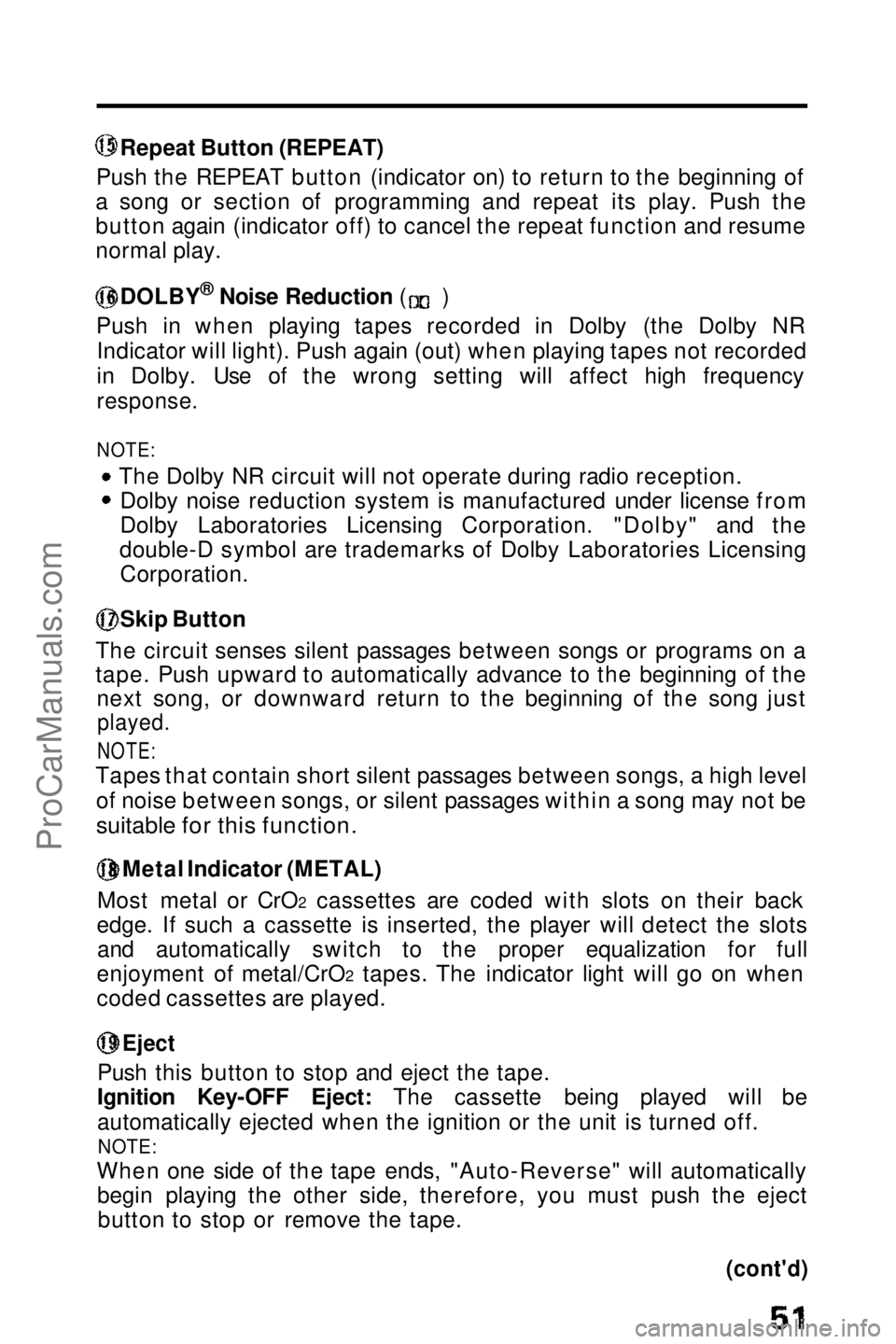
Repeat Button (REPEAT)
Push the REPEAT button (indicator on) to return to the beginning of
a song or section of programming and repeat its play. Push the
button again (indicator off) to cancel the repeat function and resume
normal play. DOLBY
®
Noise Reduction ( )
Push in when playing tapes recorded in Dolby (the Dolby NR Indicator will light). Push again (out) when playing tapes not recorded
in Dolby. Use of the wrong setting will affect high frequency
response.
NOTE:
The Dolby NR circuit will not operate during radio reception.Dolby noise reduction system is manufactured under license from
Dolby Laboratories Licensing Corporation. "Dolby" and the
double-D symbol are trademarks of Dolby Laboratories Licensing Corporation. Skip Button
The circuit senses silent passages between songs or programs on a
tape. Push upward to automatically advance to the beginning of the next song, or downward return to the beginning of the song just
played.
NOTE:
Tapes that contain short silent passages between songs, a high level
of noise between songs, or silent passages within a song may not be
suitable for this function.
Metal Indicator (METAL)
Most metal or CrO2 cassettes are coded with slots on their back
edge. If such a cassette is inserted, the player will detect the slots and automatically switch to the proper equalization for full
enjoyment of metal/CrO2 tapes. The indicator light will go on when
coded cassettes are played.
Eject
Push this button to stop and eject the tape.
Ignition Key-OFF Eject: The cassette being played will be
automatically ejected when the ignition or the unit is turned off.
NOTE:
When one side of the tape ends, "Auto-Reverse" will automatically begin playing the other side, therefore, you must push the ejectbutton to stop or remove the tape.
(cont'd)ProCarManuals.comMain Menu t s
Page 58 of 143
Ignition Switch
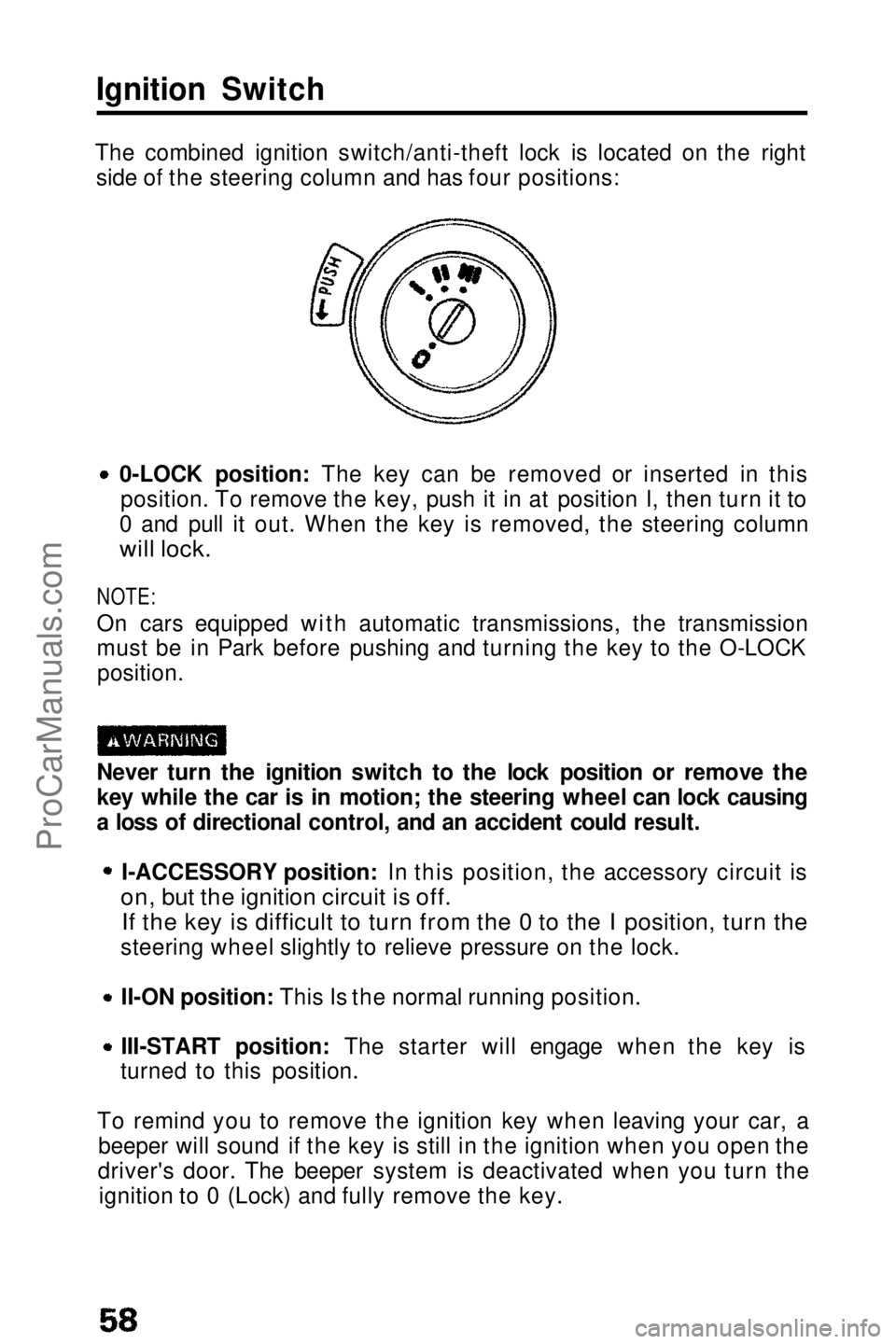
The combined ignition switch/anti-theft lock is located on the right side of the steering column and has four positions:
0-LOCK position: The key can be removed or inserted in thisposition. To remove the key, push it in at position I, then turn it to
0 and pull it out. When the key is removed, the steering column
will lock.
NOTE:
On cars equipped with automatic transmissions, the transmission
must be in Park before pushing and turning the key to the O-LOCK position.
Never turn the ignition switch to the lock position or remove the
key while the car is in motion; the steering wheel can lock causing
a loss of directional control, and an accident could result. I-ACCESSORY position: In this position, the accessory circuit is
on, but the ignition circuit is off.
If the key is difficult to turn from the 0 to the I position, turn the
steering wheel slightly to relieve pressure on the lock.
II-ON position: This Is the normal running position.
III-START position: The starter will engage when the key is
turned to this position.
To remind you to remove the ignition key when leaving your car, a beeper will sound if the key is still in the ignition when you open the
driver's door. The beeper system is deactivated when you turn the ignition to 0 (Lock) and fully remove the key.ProCarManuals.comMain Menu t s
Page 67 of 143
Shifting the Automatic
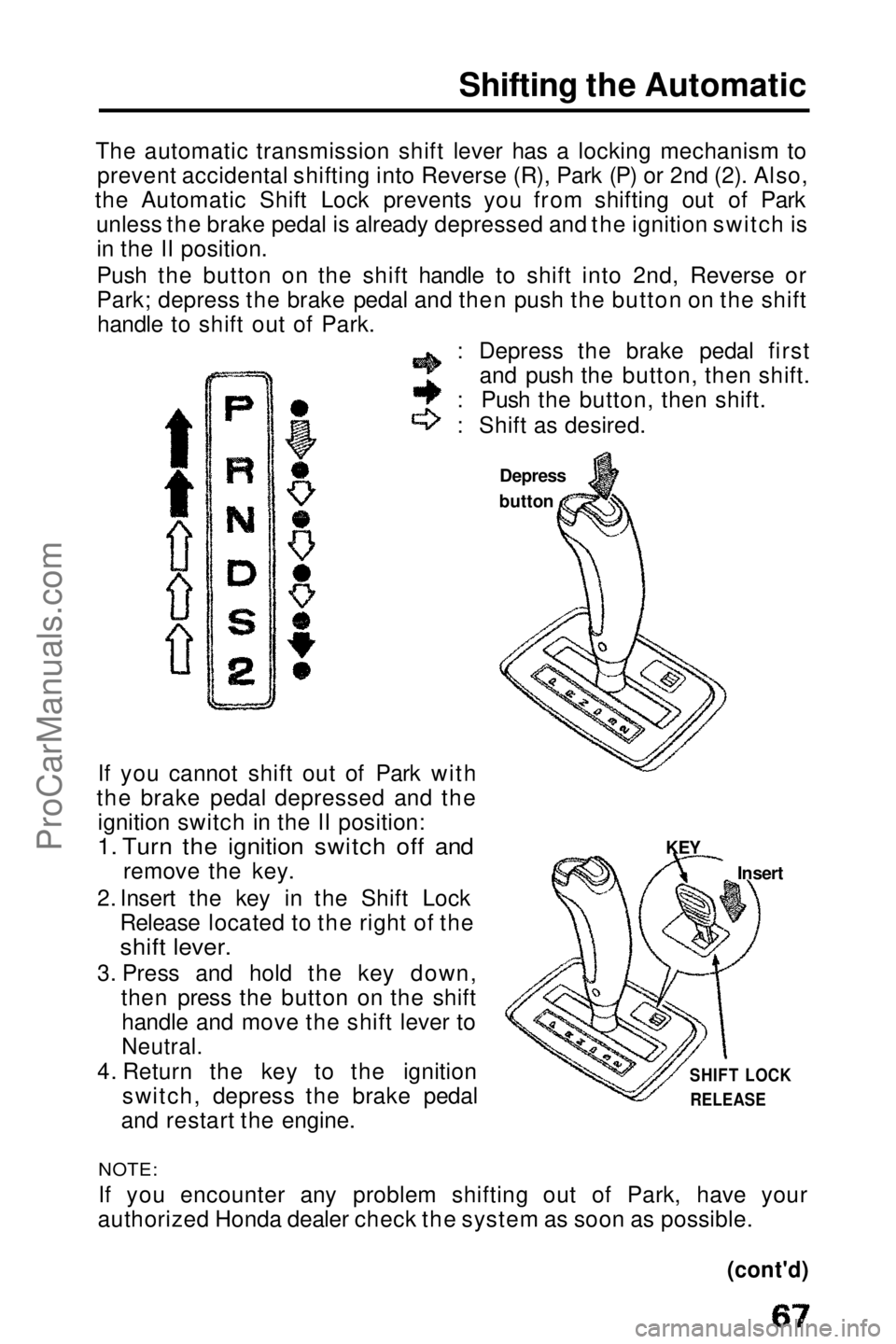
The automatic transmission shift lever has a locking mechanism to prevent accidental shifting into Reverse (R), Park (P) or 2nd (2). Also,
the Automatic Shift Lock prevents you from shifting out of Park unless the brake pedal is already depressed and the ignition switch isin the II position.
Push the button on the shift handle to shift into 2nd, Reverse or
Park; depress the brake pedal and then push the button on the shifthandle to shift out of Park.
: Depress the brake pedal first and push the button, then shift.
: Push the button, then shift.
: Shift as desired.
If you cannot shift out of Park with
the brake pedal depressed and the ignition switch in the II position:
1. Turn the ignition switch off and
remove the key.
2. Insert the key in the Shift Lock Release located to the right of the
shift lever.
3. Press and hold the key down, then press the button on the shifthandle and move the shift lever to
Neutral.
4. Return the key to the ignition switch, depress the brake pedal
and restart the engine. Depress
buttonNOTE:
If you
encounter any problem shifting out of Park, have your
authorized Honda dealer check the system as soon as possible. KEY
Insert
SHIFT LOCK RELEASE
(cont'd)ProCarManuals.comMain Menu t s
Page 101 of 143
Fuse Replacement
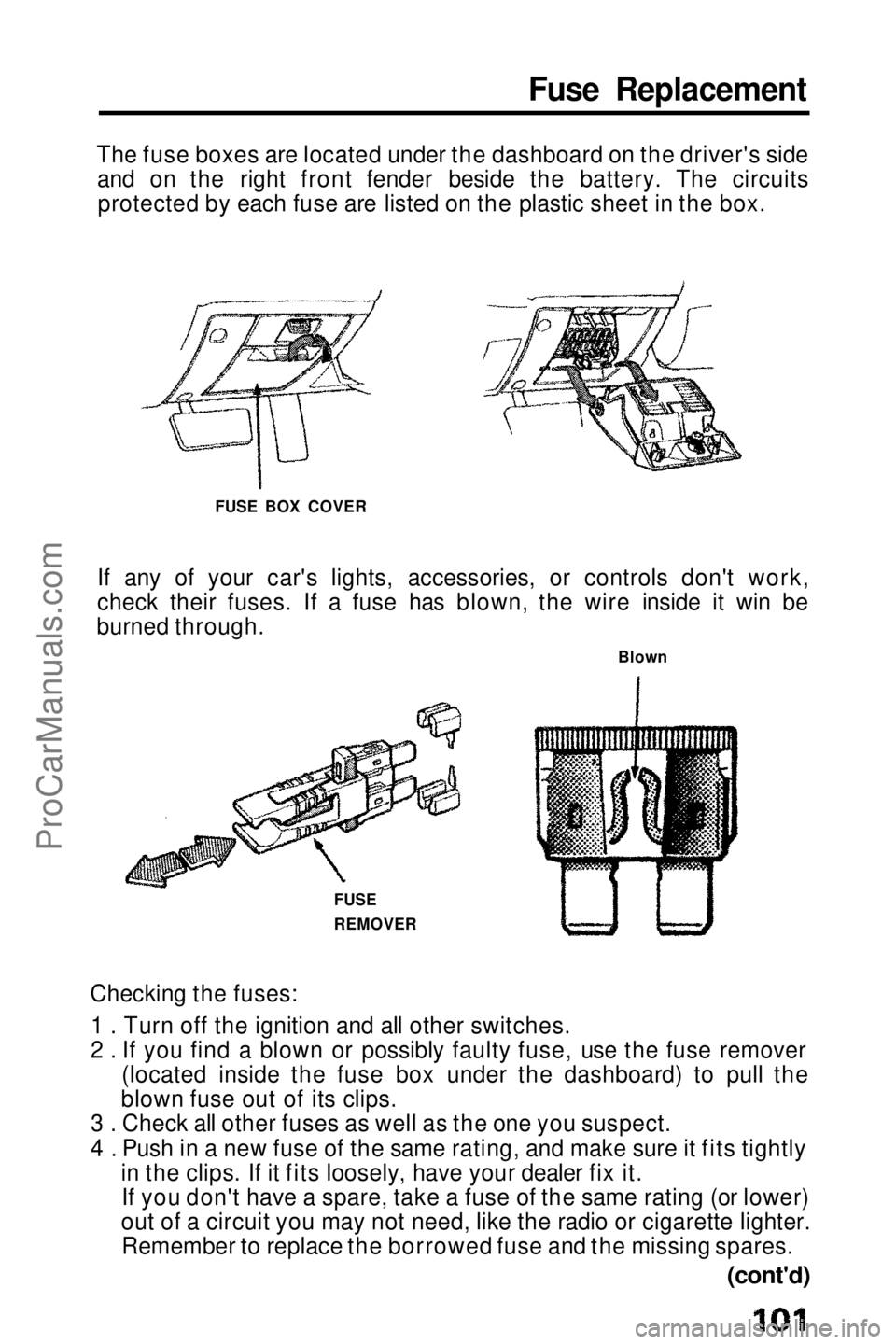
The fuse boxes are located under the dashboard on the driver's side and on the right front fender beside the battery. The circuitsprotected by each fuse are listed on the plastic sheet in the box.
If any of your car's lights, accessories, or controls don't work,
check their fuses. If a fuse has blown, the wire inside it win be
burned through.
Checking the fuses: 1 . Turn off the ignition and all other switches.
2 . If you find a blown or possibly faulty fuse, use the fuse remover (located inside the fuse box under the dashboard) to pull the
blown fuse out of its clips.
3 . Check all other fuses as well as the one you suspect.
4 . Push in a new fuse of the same rating, and make sure it fits tightly in the clips. If it fits loosely, have your dealer fix it.If you don't have a spare, take a fuse of the same rating (or lower)
out of a circuit you may not need, like the radio or cigarette lighter. Remember to replace the borrowed fuse and the missing spares. FUSE BOX COVER
Blown
FUSE
REMOVER
(cont'd)ProCarManuals.comMain Menu t s
Page 121 of 143
If towing is necessary, contact a professional towing service. Your
authorized Honda dealer can assist you with detailed towing
instructions.
Never use tow chains or rope to tow a car; your ability to safety
control the car may be adversely affected.
We recommend the following:
Flat Bed Equipment — Entire car is winched on a flat bed vehicle.
This is the best way of transporting your Honda.
Wheel Lift Type — Tow with the front wheels off the ground.
If the
car can only be towed with the front wheels on the ground:
make sure the transmission is full of fluid (see page 86 — 87)
and tow with the transmission in neutral (N) and the ignition key in
the I position.
CAUTION:
To avoid serious damage on automatic transmission cars, first start the engine and shift to D, then to N and shut the engine off. If
the engine does not run or the transmission cannot be shifted
while the engine is running, the car must be transported on flatbed equipment.
Check local regulations for towing.
CAUTION:
Do not exceed 35 mph (55 km/h) or tow for distances of more
than 50 miles (80 km). If a Sling Type tow is used, the tow truck driver should position
wood spacer blocks between your car's frame and the chains
and lift straps to avoid damaging the bumper and the body. Do not use the bumpers to lift the car or to support the car's
weight while towing.
When towing a car with 4WS even with the front wheels off the ground, turn the wheels straight ahead and tie the steering wheel in place. TowingProCarManuals.comMain Menu s t