lock HONDA RIDGELINE 2023 Owner's Manual
[x] Cancel search | Manufacturer: HONDA, Model Year: 2023, Model line: RIDGELINE, Model: HONDA RIDGELINE 2023Pages: 598, PDF Size: 12.34 MB
Page 70 of 598
uuChild Safety uSafety of Infants and Small Children
68
Safe Driving
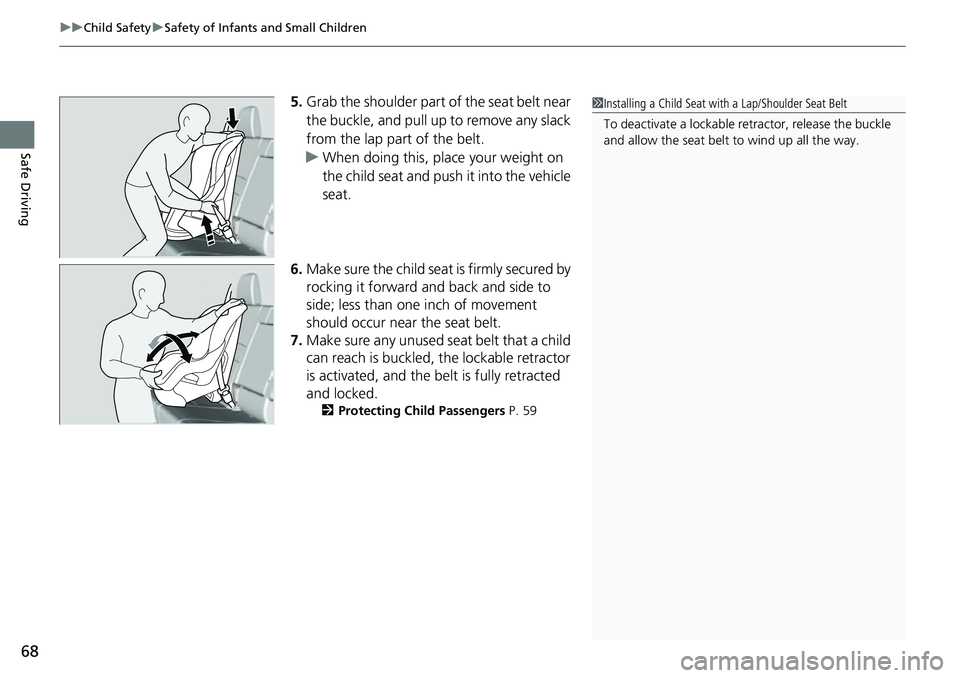
5. Grab the shoulder part of the seat belt near
the buckle, and pull up to remove any slack
from the lap part of the belt.
u When doing this, plac e your weight on
the child seat and push it into the vehicle
seat.
6. Make sure the child seat is firmly secured by
rocking it forward and back and side to
side; less than one inch of movement
should occur near the seat belt.
7. Make sure any unused seat belt that a child
can reach is buckled, the lockable retractor
is activated, and the be lt is fully retracted
and locked.
2 Protecting Child Passengers P. 59
1Installing a Child Seat with a Lap/Shoulder Seat Belt
To deactivate a lockable retractor, release the buckle
and allow the seat belt to wind up all the way.
Page 84 of 598
82
uuIndicators u
Instrument Panel
IndicatorNameOn/BlinkingExplanationMessage
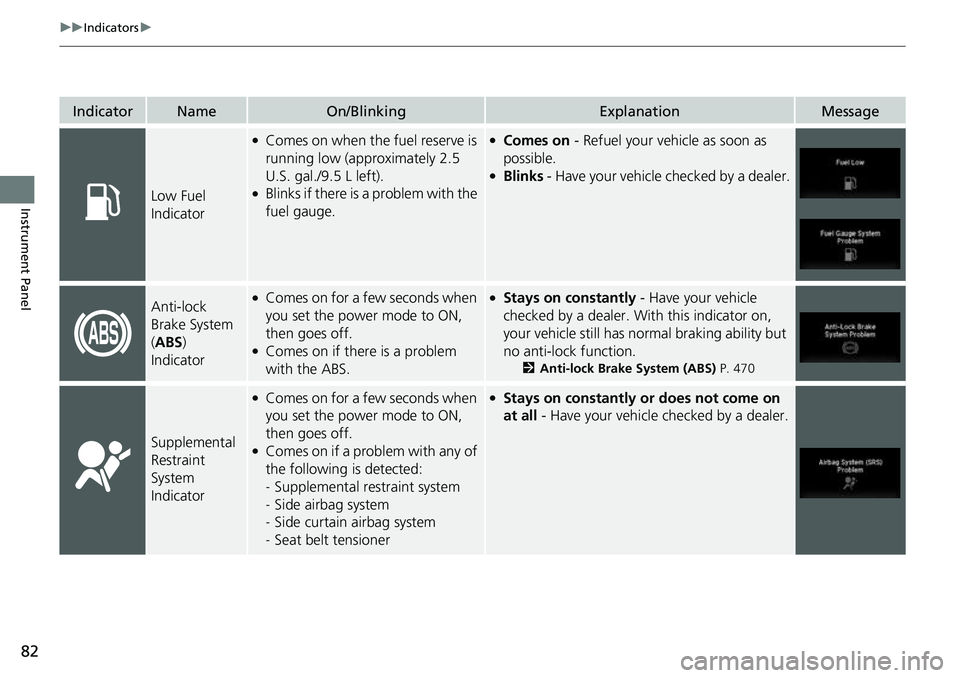
Low Fuel
Indicator
●Comes on when the fuel reserve is
running low (approximately 2.5
U.S. gal./9.5 L left).
●Blinks if there is a problem with the
fuel gauge.
●Comes on - Refuel your vehicle as soon as
possible.
●Blinks - Have your vehicle checked by a dealer.
Anti-lock
Brake System
(ABS )
Indicator●Comes on for a few seconds when
you set the power mode to ON,
then goes off.
●Comes on if there is a problem
with the ABS.
●Stays on constantly - Have your vehicle
checked by a dealer. Wi th this indicator on,
your vehicle still has normal braking ability but
no anti-lock function.
2 Anti-lock Brake System (ABS) P. 470
Supplemental
Restraint
System
Indicator
●Comes on for a few seconds when
you set the power mode to ON,
then goes off.
●Comes on if a problem with any of
the following is detected:
-Supplemental restraint system
- Side airbag system
- Side curtain airbag system
- Seat belt tensioner
●Stays on constantly or does not come on
at all - Have your vehicle checked by a dealer.
Page 92 of 598
90
uuIndicators u
Instrument Panel
IndicatorNameOn/BlinkingExplanationMessage
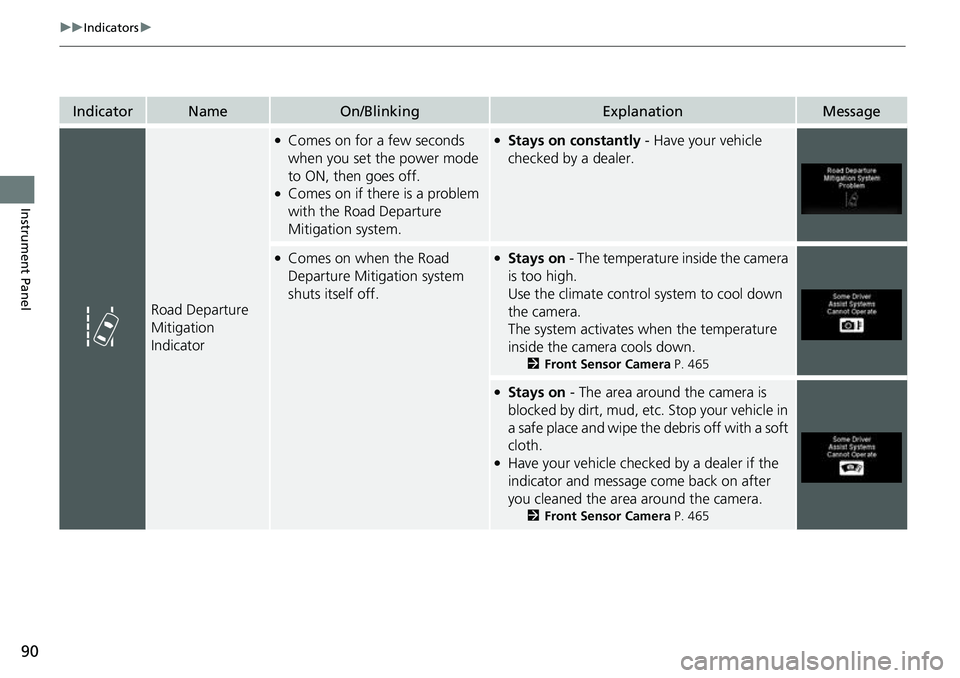
Road Departure
Mitigation
Indicator
●Comes on for a few seconds
when you set the power mode
to ON, then goes off.
●Comes on if there is a problem
with the Road Departure
Mitigation system.
●Stays on constantly - Have your vehicle
checked by a dealer.
●Comes on when the Road
Departure Mitigation system
shuts itself off.●Stays on - The temperature inside the camera
is too high.
Use the climate control system to cool down
the camera.
The system activates when the temperature
inside the camera cools down.
2 Front Sensor Camera P. 465
●Stays on - The area around the camera is
blocked by dirt, mud, etc. Stop your vehicle in
a safe place and wipe the debris off with a soft
cloth.
●Have your vehicle checked by a dealer if the
indicator and message come back on after
you cleaned the area around the camera.
2 Front Sensor Camera P. 465
Page 96 of 598
94
uuIndicators u
Instrument Panel
IndicatorNameOn/BlinkingExplanationMessage
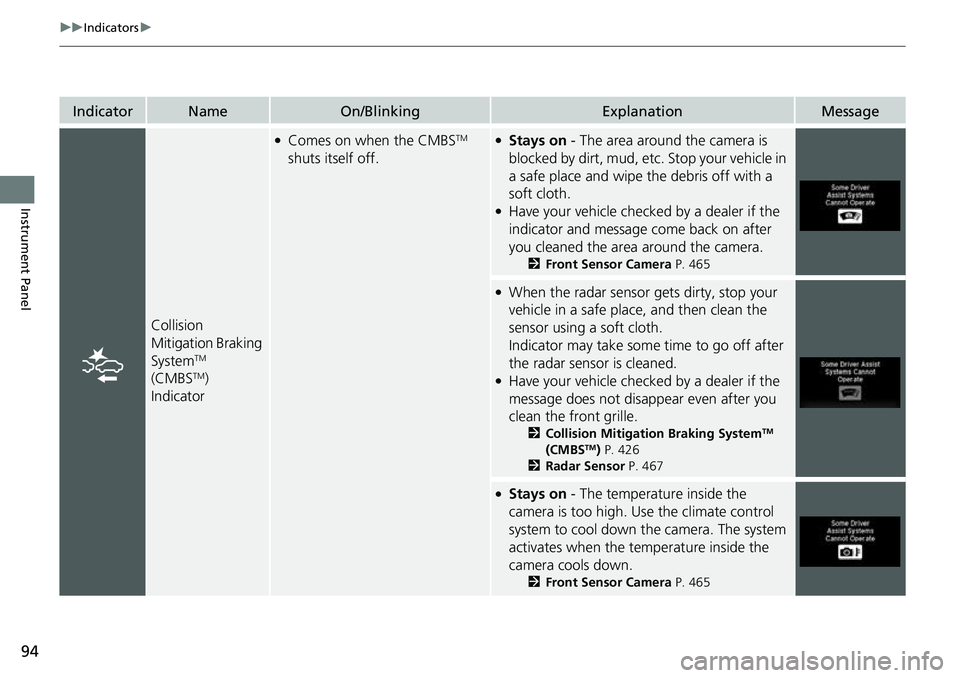
Collision
Mitigation Braking
System
TM
(CMBSTM)
Indicator
●Comes on when the CMBSTM
shuts itself off.●Stays on - The area around the camera is
blocked by dirt, mud, etc. Stop your vehicle in
a safe place and wipe the debris off with a
soft cloth.
●Have your vehicle checked by a dealer if the
indicator and message come back on after
you cleaned the area around the camera.
2 Front Sensor Camera P. 465
●When the radar sensor gets dirty, stop your
vehicle in a safe place, and then clean the
sensor using a soft cloth.
Indicator may take some time to go off after
the radar sensor is cleaned.
●Have your vehicle checked by a dealer if the
message does not disappear even after you
clean the front grille.
2 Collision Mitigation Braking SystemTM
(CMBSTM) P. 426
2 Radar Sensor P. 467
●Stays on - The temperature inside the
camera is too high. Use the climate control
system to cool down the camera. The system
activates when the temperature inside the
camera cools down.
2 Front Sensor Camera P. 465
Page 99 of 598
97
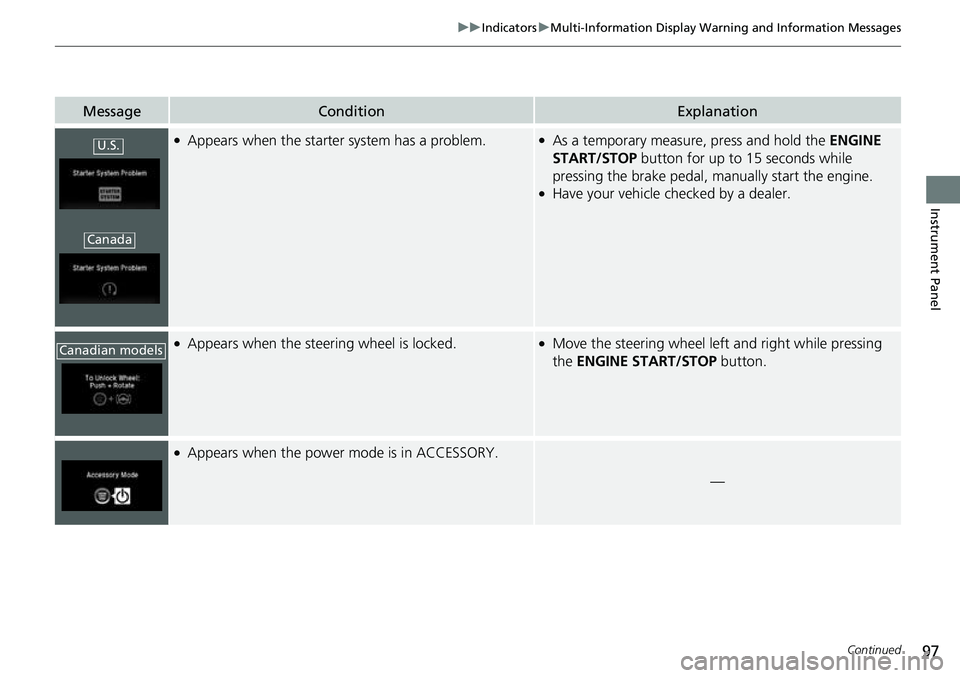
uuIndicators uMulti-Information Display Warning and Information Messages
Continued
Instrument Panel
MessageConditionExplanation
●Appears when the starter system has a problem.●As a temporary measure, press and hold the ENGINE
START/STOP button for up to 15 seconds while
pressing the brake pedal, ma nually start the engine.
●Have your vehicle checked by a dealer.
●Appears when the steering wheel is locked.●Move the steering wheel left and right while pressing
the ENGINE START/STOP button.
●Appears when the power mode is in ACCESSORY.
—
U.S.
Canada
Canadian models
Page 105 of 598
103
uuIndicators uMulti-Information Display Warning and Information Messages
Continued
Instrument Panel
MessageConditionExplanation
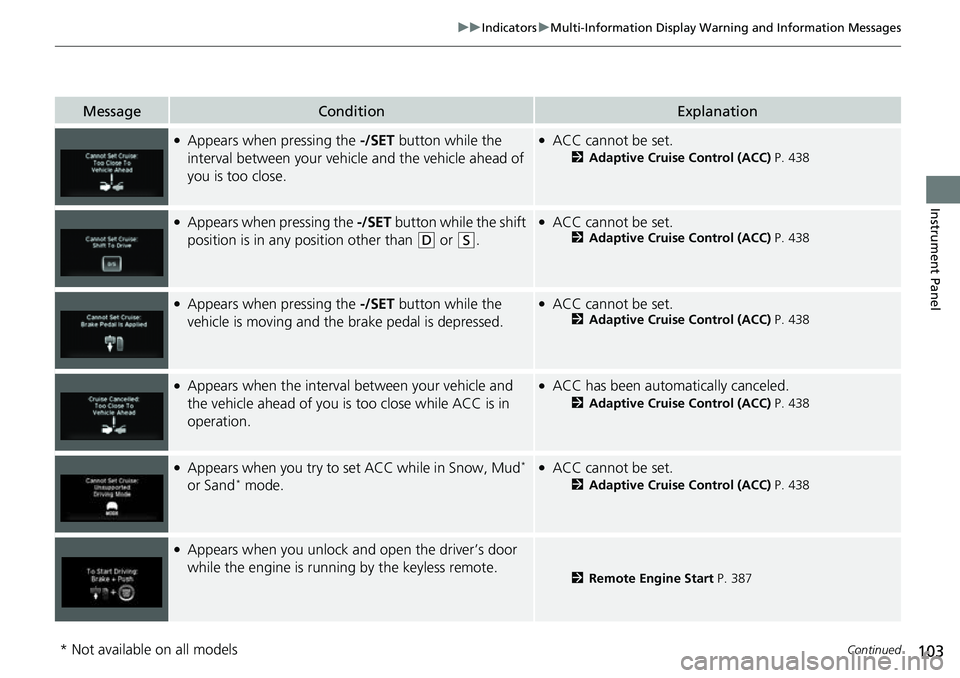
●Appears when pressing the -/SET button while the
interval between your vehicle and the vehicle ahead of
you is too close.●ACC cannot be set.
2 Adaptive Cruise Control (ACC) P. 438
●Appears when pressing the -/SET button while the shift
position is in any position other than
(D or (S.
●ACC cannot be set.2 Adaptive Cruise Control (ACC) P. 438
●Appears when pressing the -/SET button while the
vehicle is moving and the brake pedal is depressed.●ACC cannot be set.2 Adaptive Cruise Control (ACC) P. 438
●Appears when the interval between your vehicle and
the vehicle ahead of you is too close while ACC is in
operation.●ACC has been automatically canceled.
2 Adaptive Cruise Control (ACC) P. 438
●Appears when you try to set ACC while in Snow, Mud*
or Sand* mode.
●ACC cannot be set.
2 Adaptive Cruise Control (ACC) P. 438
●Appears when you unlock and open the driver’s door
while the engine is running by the keyless remote.
2 Remote Engine Start P. 387
* Not available on all models
Page 107 of 598
105
uuIndicators uMulti-Information Display Warning and Information Messages
Continued
Instrument Panel
MessageConditionExplanation
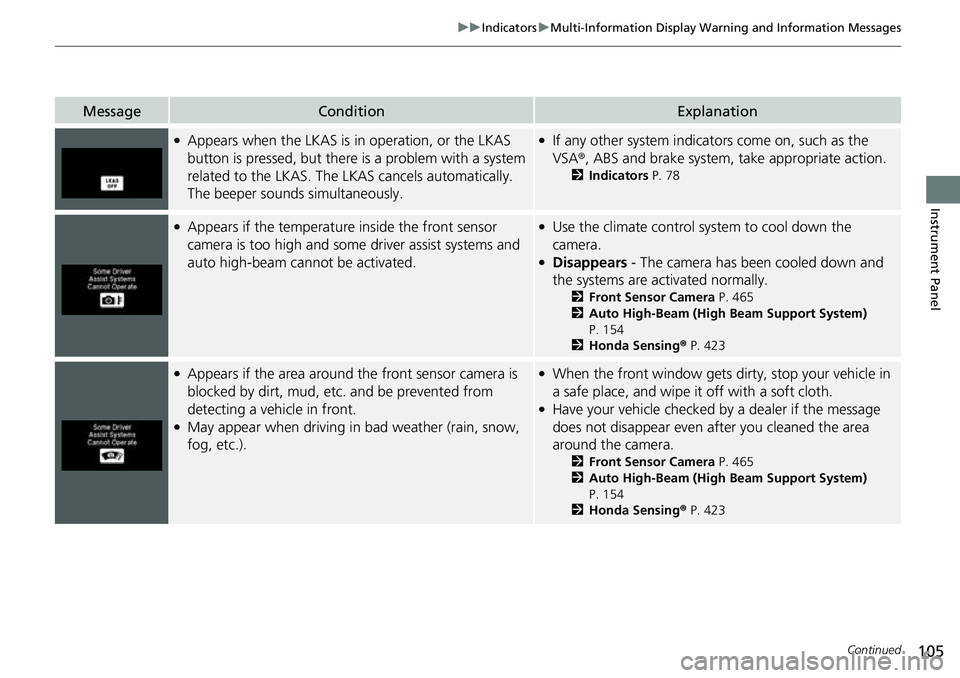
●Appears when the LKAS is in operation, or the LKAS
button is pressed, but there is a problem with a system
related to the LKAS. The LKAS cancels automatically.
The beeper sounds simultaneously.●If any other system indicators come on, such as the
VSA ®, ABS and brake system, take appropriate action.
2Indicators P. 78
●Appears if the temperature inside the front sensor
camera is too high and some driver assist systems and
auto high-beam cannot be activated.●Use the climate control system to cool down the
camera.
●Disappears - The camera has been cooled down and
the systems are activated normally.
2 Front Sensor Camera P. 465
2 Auto High-Beam (High Beam Support System)
P. 154
2 Honda Sensing ® P. 423
●Appears if the area around the front sensor camera is
blocked by dirt, mud, etc. and be prevented from
detecting a vehicle in front.
●May appear when driving in bad weather (rain, snow,
fog, etc.).
●When the front window gets dirty, stop your vehicle in
a safe place, and wipe it off with a soft cloth.
●Have your vehicle checked by a dealer if the message
does not disappear even after you cleaned the area
around the camera.
2 Front Sensor Camera P. 465
2 Auto High-Beam (High Beam Support System)
P. 154
2 Honda Sensing ® P. 423
Page 117 of 598
115
Controls
This chapter explains how to operate the various controls necessary for driving.
Clock.................................................. 116
Locking and Unlocking the Doors Key .................................................. 117
Low Keyless Remote Signal Strength .....119
Locking/Unlocking the Doors from the Outside .......................................... 120
Locking/Unlocking the Doors from the
Inside ............................................. 127
Childproof Door Locks ..................... 129
Auto Door Locking/Unlocking .......... 130
Tailgate .............................................. 131
Opening and Closing the Trunk ....... 133
Security System
Immobilizer System .......................... 136
Security System Alarm ...................... 136Windows ............................................... 139
Moonroof*............................................... 143Operating the Switches Around the Steering Wheel ENGINE START/STOP Button............. 145
Turn Signals ..................................... 148
Light Switches.................................. 149
Fog Lights ........................................ 152
Daytime Running Lights ................... 153
Auto High-Beam (H igh Beam Support
System) .......................................... 154
Wipers and Washers ........................ 157
Rear Defogger/Heat ed Door Mirror
*
Button ........................................... 159 Heated Windshield Button
*............. 159
Brightness Control ........................... 160
Driving Position Memory System
*.... 161
Adjusting the Steering Wheel .......... 163
Mirrors Interior Rearview Mirror ................... 164
Power Door Mirrors ......................... 165
Seats .................................................. 166
Interior/Exterior Convenience Items
Interior Lights .................................. 175
Storage Items .................................. 177
Other Interior Convenience Items..... 182
In-Bed Convenience Items................ 191
Climate Control System ................... 195
* Not available on all models
Page 118 of 598
116
Controls
Clock
Adjusting the Clock
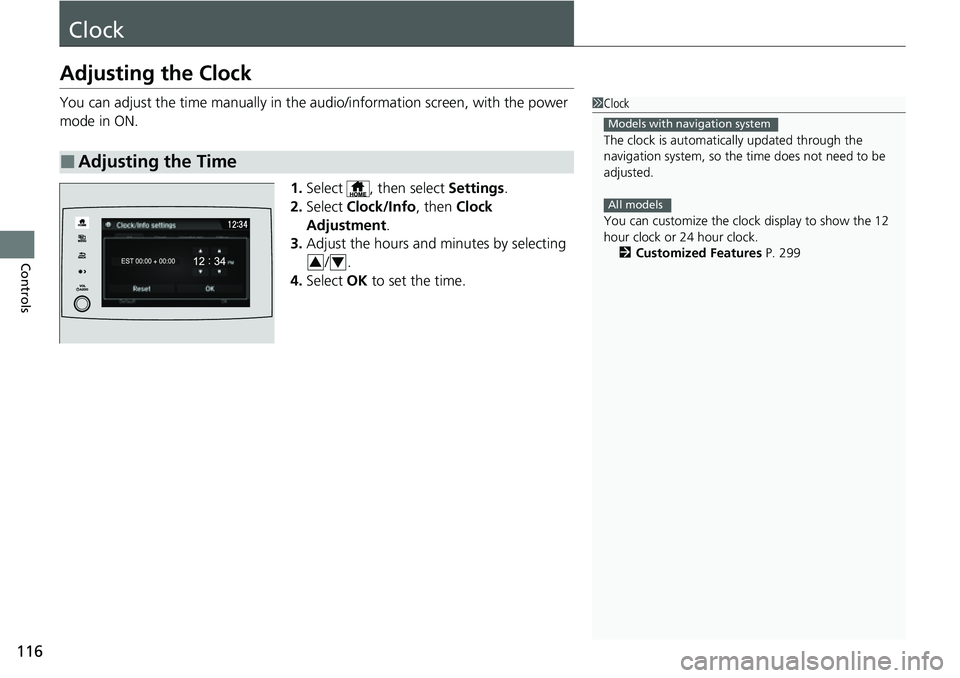
You can adjust the time manually in the audio/information screen, with the power
mode in ON.
1.Select , then select Settings.
2. Select Clock/Info , then Clock
Adjustment .
3. Adjust the hours and minutes by selecting
/.
4. Select OK to set the time.
■Adjusting the Time
1Clock
The clock is automatica lly updated through the
navigation system, so the ti me does not need to be
adjusted.
You can customize the clock display to show the 12
hour clock or 24 hour clock. 2 Customized Features P. 299
Models with navigation system
All models
34
Page 119 of 598
117Continued
Controls
Locking and Unlocking the Doors
Key
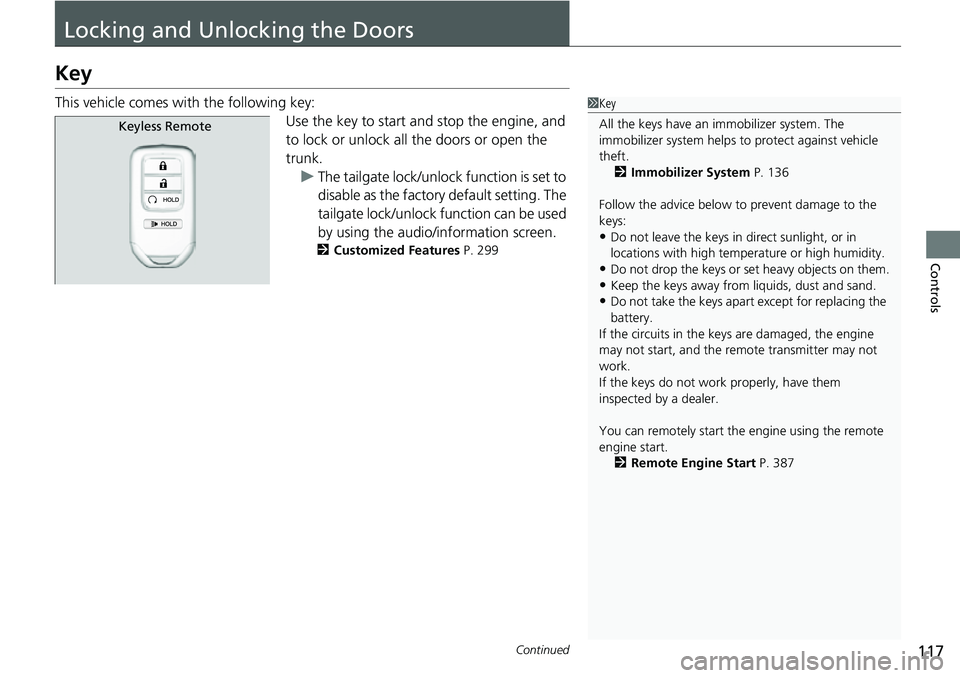
This vehicle comes with the following key:Use the key to start and stop the engine, and
to lock or unlock all the doors or open the
trunk.u The tailgate lock/unlock function is set to
disable as the factory default setting. The
tailgate lock/unlock f unction can be used
by using the audio/information screen.
2 Customized Features P. 299
1Key
All the keys have an immobilizer system. The
immobilizer system helps to protect against vehicle
theft. 2 Immobilizer System P. 136
Follow the advice below to prevent damage to the
keys:
•Do not leave the keys in direct sunlight, or in
locations with high temperature or high humidity.
•Do not drop the keys or set heavy objects on them.•Keep the keys away from liquids, dust and sand.
•Do not take the keys apart except for replacing the
battery.
If the circuits in the keys are damaged, the engine
may not start, and the remote transmitter may not
work.
If the keys do not work properly, have them
inspected by a dealer.
You can remotely start the engine using the remote
engine start. 2 Remote Engine Start P. 387
Keyless Remote