automatic HONDA RIDGELINE 2023 Manual Online
[x] Cancel search | Manufacturer: HONDA, Model Year: 2023, Model line: RIDGELINE, Model: HONDA RIDGELINE 2023Pages: 598, PDF Size: 12.34 MB
Page 363 of 598
Continued361
uuBluetooth ® HandsFreeLink ®u HFL Menus
Features
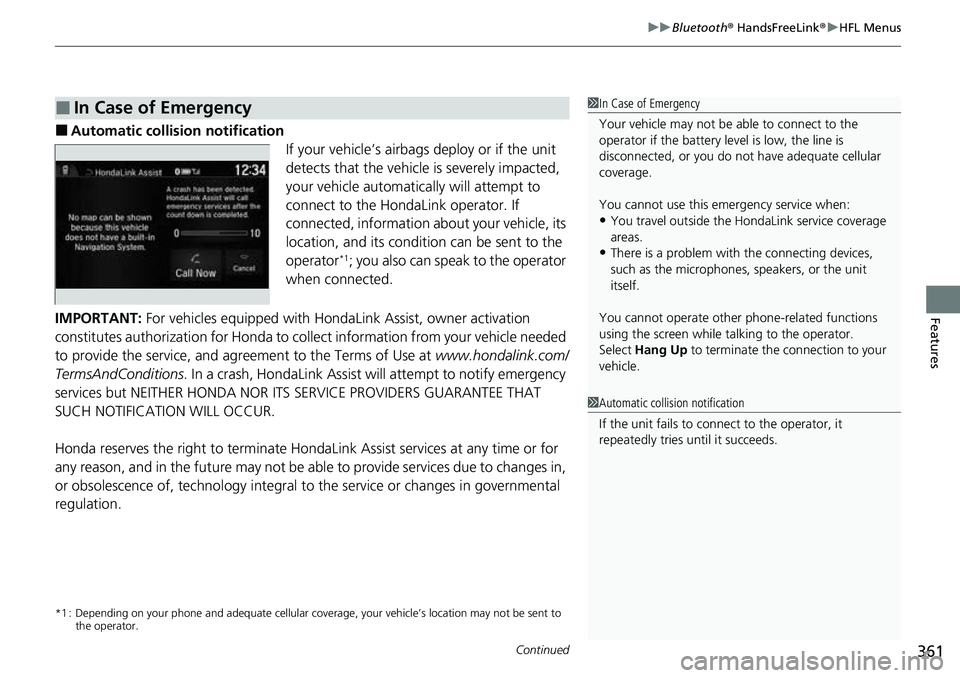
■Automatic collis ion notification
If your vehicle’s airbags deploy or if the unit
detects that the vehicle is severely impacted,
your vehicle automatically will attempt to
connect to the HondaLink operator. If
connected, information ab out your vehicle, its
location, and its condition can be sent to the
operator
*1; you also can speak to the operator
when connected.
IMPORTANT: For vehicles equipped with HondaLink Assist, owner activation
constitutes authorization for Honda to collect information from your vehicle needed
to provide the service, and agreement to the Terms of Use at www.hondalink.com/
TermsAndConditions . In a crash, HondaLink Assist will attempt to notify emergency
services but NEITHER HONDA NOR I TS SERVICE PROVIDERS GUARANTEE THAT
SUCH NOTIFICATION WILL OCCUR.
Honda reserves the right to terminate HondaLink Assist services at any time or for
any reason, and in the future may not be ab le to provide services due to changes in,
or obsolescence of, technology integral to the service or changes in governmental
regulation.
*1 : Depending on your phone and adequate cellular co verage, your vehicle’s location may not be sent to
the operator.
■In Case of Emergency1 In Case of Emergency
Your vehicle may not be able to connect to the
operator if the battery level is low, the line is
disconnected, or you do not have adequate cellular
coverage.
You cannot use this emergency service when:
•You travel outside the HondaLink service coverage
areas.
•There is a problem with the connecting devices,
such as the microphones, speakers, or the unit
itself.
You cannot operate othe r phone-related functions
using the screen while talking to the operator.
Select Hang Up to terminate the connection to your
vehicle.
1 Automatic collision notification
If the unit fails to connect to the operator, it
repeatedly tries until it succeeds.
Page 365 of 598
363
Driving
This chapter discusses driving and refueling.
Before Driving................................... 364
Towing a Trailer ................................ 372
Off-Highway Driving Guidelines ..... 383
When Driving Starting the Engine .......................... 385
Precautions While Driving................. 392
Automatic Transmission ................... 394
Shifting ............................................ 395
ECON Mode .................................... 403
Intelligent Traction Management...... 404
Auto Idle Stop .................................. 406
Vehicle Stability AssistTM (VSA ®), aka Electronic
Stability Control (ESC), System ..............412
Agile Handling Assist ....................... 414 Intelligent Variable To
rque Management (i-
VTM4
TM) AWD System*.................. 415
Tire Pressure Monitoring System (TPMS) with Tire Fill Assist .......................... 416
Tire Pressure Monitoring System (TPMS) -
Required Federal Explanation ......... 418
Blind spot information System
*........... 420
Honda Sensing ®................................ 423
Collision Mitigati on Braking System
TM
(CMBSTM) ....................................... 426
Adaptive Cruise Control (ACC)......... 438
Lane Keeping Assist System (LKAS).... 451
Road Departure Mitigation System ... 460
Front Sensor Camera ....................... 465 Radar Sensor ................................... 467
Braking Brake System ................................... 468
Anti-lock Brake System (ABS) ........... 470
Brake Assist System ......................... 471
Parking Your Vehicle When Stopped ................................ 472
Parking Sensor System
*................... 473
Cross Traffic Monitor*..................... 477
Multi-View Rear Camera .................. 481
Refueling Fuel Information .............................. 483
How to Refuel ................................. 484
Fuel Economy and CO
2 Emissions .... 486
* Not available on all models
Page 382 of 598
380
uuTowing a Trailer uTrailer Stability Assist
Driving
Trailer Stability Assist
Helps to stabilize the vehicle and tra iler when the trailer severely sways.
■How trailer stability assist works
When the vehicle and trailer become unstab le while driving, trailer stability assist
determines the cause. If the trailer oscillat ion is detected as the cause, and the
swaying increases, the system applies the brakes or controls engine output to reduce
vehicle speed.
Both the vehicle and trailer brake lights come on automatically if you brake to
reduce vehicle speed.
1 Trailer Stability Assist
Trailer stability assist is not a function that prevents
the vehicle and trailer from swaying. Avoid high
speeds, abrupt steering, improper trailer load, and
sudden braking to keep th e trailer from swaying.
When swayed too severely, the system becomes
ineffective, and you may lose control of your vehicle,
causing the trailer to ro ll over or get damaged.
2 Driving Safely with a Trailer P. 381
Trailer towing sway is caused by:
•Crosswinds
•Improper towbar down load
•Excessive speed
The VSA ® system indicator blinks during the trailer
stability assist operation. 2 VSA ® Operation P. 412
Page 384 of 598
uuTowing a Trailer uTowing Behind a Motorhome
382
Driving
• Monitor your temperature gauge. If it nears the mark, turn off the climate
control system and reduce speed. Pull to the side of the road safely to cool down
the engine if necessary.
• Shift to the
(S position if the transmission shifts frequently.
When retrieving a boat from the water, we recommend using the sequential mode
(S to utilize the transmissions lower gears.
Towing Behind a Motorhome
Your vehicle is not designed to be towed behind a motor home. If your vehicle needs
to be towed in an emergency, refe r to the emergency towing information.
2Emergency Towing P. 568
■Driving in Hilly Terrain
■Retrieving a Boat
1Driving in Hilly Terrain
If the automatic transmission fluid temperature
exceeds the specified limit, the transmission will also
automatically up shift, even in the sequential mode.
H
Page 392 of 598
uuWhen Driving uStarting the Engine
390
Driving
1Remote Engine Start
While the engine is running, the vehicle will
automatically preconditi on inside the vehicle.
When it is warm outside:
•The climate control system is activated in
recirculation mode.
•The seat ventilation* is activated.
When it is cold outside:
•The defroster is activated at a moderately warm
temperature.
•The rear defogger and door mirror heaters* are
activated.
•The seat heaters* and heated steering wheel* are
activated. 2Heated Steering Wheel
* P. 187
2 Front Seat Heaters* P. 188
2 Front Seat Heaters / Ventilators* P. 189
2 Rear Seat Heaters* P. 190
* Not available on all models
Page 396 of 598
394
uuWhen Driving uAutomatic Transmission
Driving
Automatic Transmission
When the engine runs at higher idle speeds, the creeping force increases.
Keep the brake pedal firmly depressed when stopped.
Quickly depressing the accelerator pedal while driving uphill may cause the
transmission to drop to a lower gear, unexpectedly increasing vehicle speed. Depress
the accelerator pedal carefully, especi ally on slippery roads and curves.
■Creeping
■Kickdown
Page 397 of 598
395
uuWhen Driving uShifting
Continued
Driving
Shifting
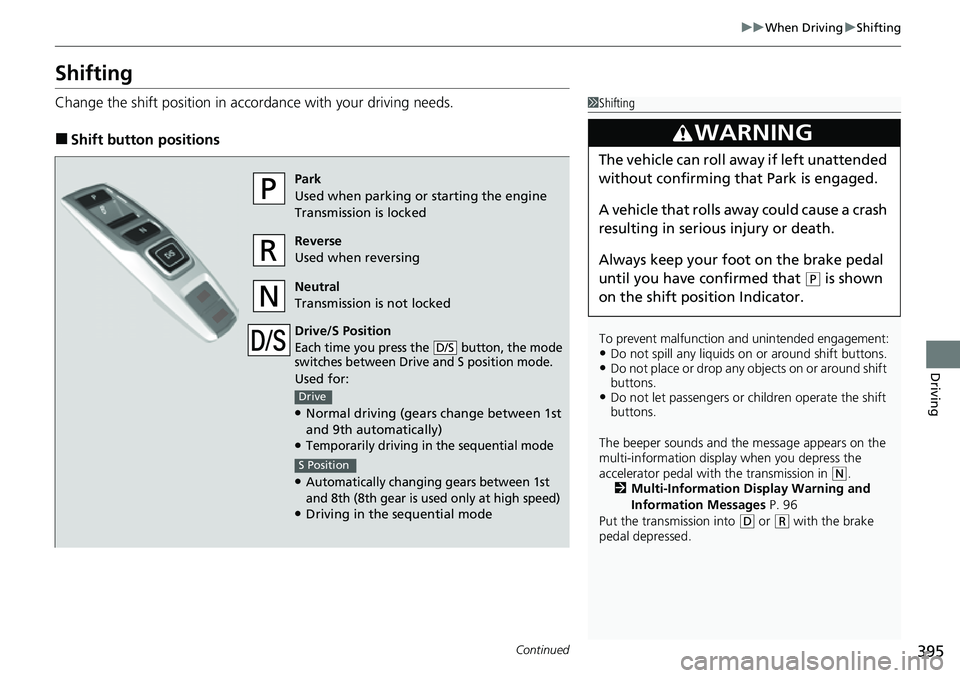
Change the shift position in accordance with your driving needs.
■Shift button positions
1Shifting
To prevent malfunction an d unintended engagement:
•Do not spill any liquids on or around shift buttons.•Do not place or drop any objects on or around shift
buttons.
•Do not let passengers or ch ildren operate the shift
buttons.
The beeper sounds and the message appears on the
multi-information display when you depress the
accelerator pedal with the transmission in
( N.
2 Multi-Information Display Warning and
Information Messages P. 96
Put the transmission into
( D or (R with the brake
pedal depressed.
3WARNING
The vehicle can roll aw ay if left unattended
without confirming that Park is engaged.
A vehicle that rolls away could cause a crash
resulting in seriou s injury or death.
Always keep your foot on the brake pedal
until you have confirmed that
( P is shown
on the shift posi tion Indicator.
Park
Used when parking or starting the engine
Transmission is locked
Reverse
Used when reversing
Neutral
Transmission is not locked
Drive/S Position
Each time you press the button, the mode
switches between Drive and S position mode.
Used for:
●Normal driving (gears change between 1st
and 9th automatically)
●Temporarily driving in the sequential mode
●Automatically changi ng gears between 1st
and 8th (8th gear is used only at high speed)
●Driving in the sequential mode
D/S
Drive
S Position
Page 400 of 598
uuWhen Driving uShifting
398
Driving
In freezing or sub-freezing conditions, the shift selection response may be slow.
Always depress the brake pedal befo re putting the transmission into
(P, and
confirm that
(P is shown on the shift position indicator before releasing the brake.
■When opening the driver’s door
If you open the driver’s door under the following conditions, the transmission
automatically changes to
(P.
• The vehicle is stationary with the engine running, or moving at 1 mph (2 km/h) or
slower.
• The transmission is in other than
(P.
• You have unfastened the driver side seat belt.
u If you manually put the transmissio n into any other position from
(P with the
brake pedal depressed, the transmission will automatically return to
(P once
you release the brake pedal.
■When turning o ff the power mode
If you turn the engine off while the vehicl e is stationary, and the transmission is in
other than
(P, the transmission automatically changes to (P.
1 Shift Operation
The beeper sounds once when you change to
(R.
2 Customized Features P. 299
1When opening the driver’s door
While the system is designed to automatically change
the transmission to
(P under the described
conditions, in the interest of safety you should always
select
( P before opening the driver’s door.
Make sure to park the vehicle in a safe place. 2 When Stopped P. 472
If you want to drive the ve hicle after the transmission
has automatically changed to
( P under the described
conditions, close the door, fasten the seat belt,
depress the brake pedal, then change the shift
position.
If you leave the vehicle, tu rn off the engine and lock
the doors.
Page 401 of 598
![HONDA RIDGELINE 2023 Manual Online Continued399
uuWhen Driving uShifting
Driving
■If you want to keep the transmission in (N position [car wash mode]
With the engine running:
1. Press and hold the brake pedal.
2. Select
(N, then rel](/img/13/58879/w960_58879-400.png "HONDA RIDGELINE 2023 Manual Online Continued399
uuWhen Driving uShifting
Driving
■If you want to keep the transmission in (N position [car wash mode]
With the engine running:
1. Press and hold the brake pedal.
2. Select
(N, then rel")
Continued399
uuWhen Driving uShifting
Driving
■If you want to keep the transmission in (N position [car wash mode]
With the engine running:
1. Press and hold the brake pedal.
2. Select
(N, then release the button to display (Neutral) (N hold mode on the
multi-information display.
3. Press and hold
(N again for two seconds.
u This puts the vehicle in car wash mode which must be used when your vehicle
is pulled through a conveyor type automatic car wash where you or an
attendant do not remain in the vehicle.
If the ENGINE STOP/START button is pressed
after car wash mode has been activated, the
power mode will change to ACCESSORY and a
message will be displayed on the multi-
information display. u For 15 minutes the transmission remains
in
(N with the power mode in
ACCESSORY. After that, the
transmission automatically changes to
(P and the power mode changes to OFF.
u Manually changing to
(P cancels
ACCESSORY mode. The
(P indicator
comes on and the power mode changes
to OFF. You must always put the
transmission into
(P when car wash
mode is no longer needed.
1If you want to keep the transmission in ( N position [car wash mode]
Note that the transmiss ion may not stay in (N
position while any of the following indicators is on:
•Transmission system indicator.
•Malfunction indicator lamp.•Charging system indicator.
Page 403 of 598
401
uuWhen Driving uShifting
Continued
Driving
Use the paddle shifters to change betwee n 1st and 9th gears without removing your
hands from the steering wheel. The transmission will switch to the sequential mode.
■When the transmi ssion is in (D:
The vehicle will go into th e sequential mode momentarily, and the sequential mode
gear selection indicator will come on.
Once you start traveling at a constant speed , the sequential mode will automatically
switch off, and the sequential mode gear selection indicator will go off.
Hold the
(+ paddle shifter for two seconds or push button to return to normal
drive.
■When the transmi ssion is in (S:
The vehicle will go into th e sequential mode, and the M (sequential mode) indicator
and sequential mode gear selection indicator will come on.
If the vehicle speed increases and the engi ne speed reaches near the tachometer’s
red zone, the transmission automatically shifts up to the next gear.
You can cancel this mode by holding the
(+ paddle shifter for two seconds or push
button. When the sequenti al mode is canceled, the M (sequential mode)
indicator and sequential mode gear selection indicator go off.
■Sequential Mode
D/S
D/S