automatic HONDA RIDGELINE 2023 Repair Manual
[x] Cancel search | Manufacturer: HONDA, Model Year: 2023, Model line: RIDGELINE, Model: HONDA RIDGELINE 2023Pages: 598, PDF Size: 12.34 MB
Page 302 of 598
300
uuCustomized Features u
Features
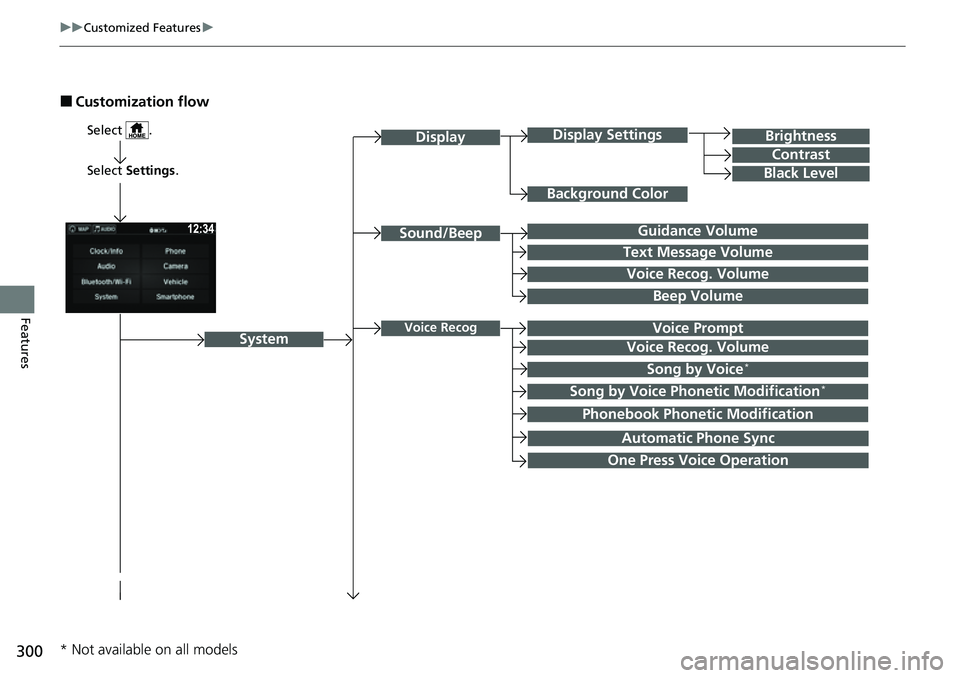
■Customization flow
Select Settings.
Brightness
Contrast
Black Level
Sound/Beep
System
DisplayDisplay Settings
Background Color
Guidance Volume
Text Message Volume
Select .
Voice RecogVoice Prompt
Voice Recog. Volume
Beep Volume
Voice Recog. Volume
Song by Voice*
Song by Voice Phonetic Modification*
Phonebook Phonetic Modification
Automatic Phone Sync
One Press Voice Operation
* Not available on all models
Page 308 of 598
306
uuCustomized Features u
Features
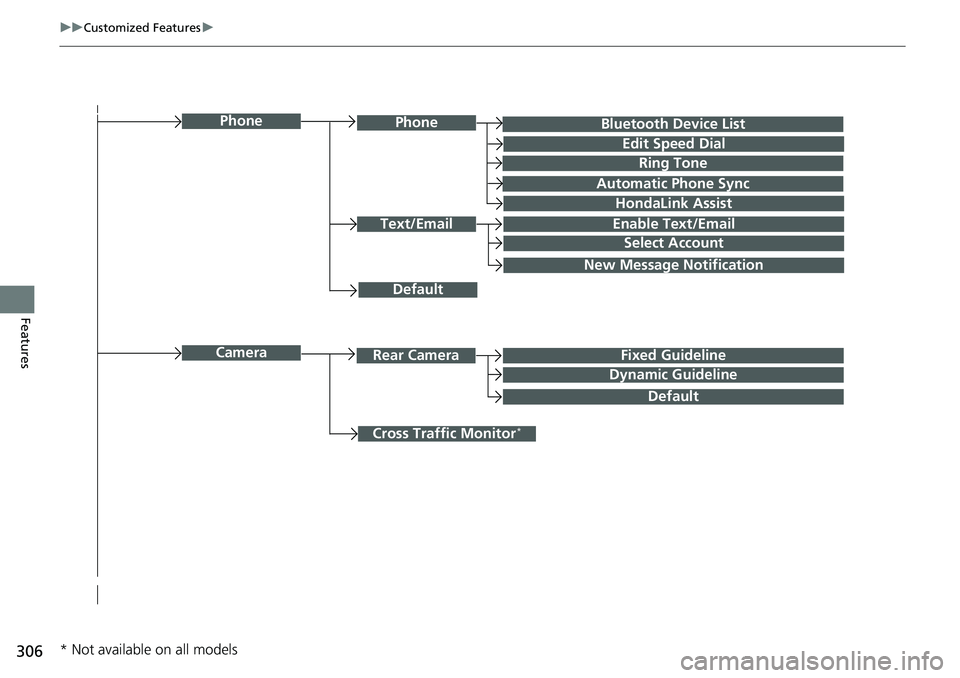
Bluetooth Device List
Default
PhonePhone
Edit Speed Dial
Ring Tone
Automatic Phone Sync
HondaLink Assist
Text/EmailEnable Text/Email
Select Account
New Message Notification
Cross Traffic Monitor*
CameraRear CameraFixed Guideline
Dynamic Guideline
Default
* Not available on all models
Page 311 of 598
309
uuCustomized Features u
Continued
Features
*1:Default SettingSetup
Group Customizable Features Descri
ption Selectable Settings
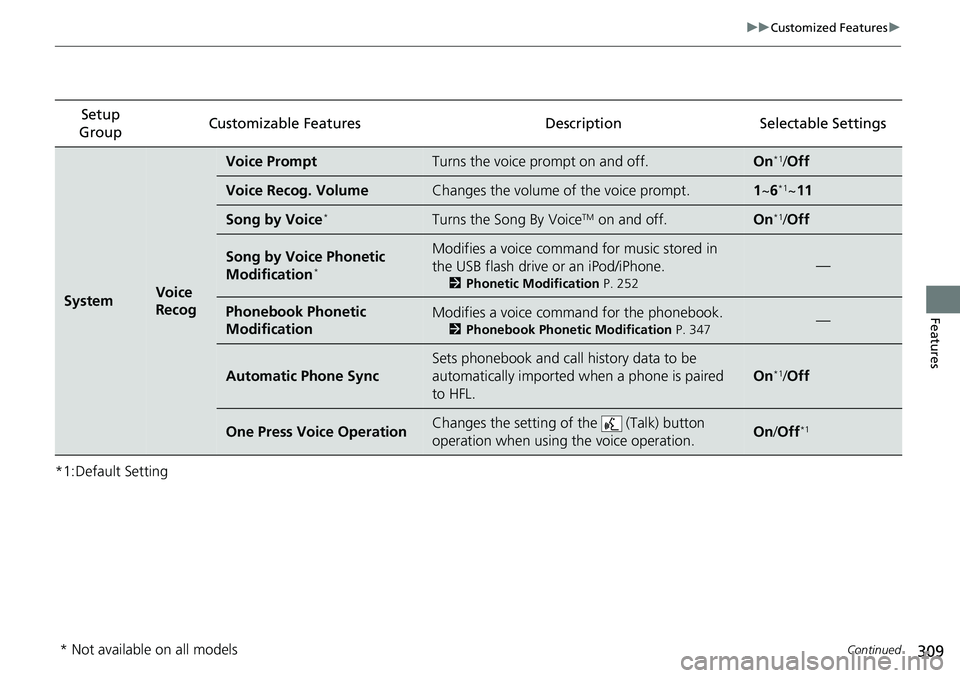
SystemVoice
Recog
Voice PromptTurns the voice prompt on and off.On*1/Off
Voice Recog. VolumeChanges the volume of the voice prompt.1 ~6*1~11
Song by Voice*Turns the Song By VoiceTM on and off.On*1/Off
Song by Voice Phonetic
Modification*
Modifies a voice command for music stored in
the USB flash drive or an iPod/iPhone.
2 Phonetic Modification P. 252
—
Phonebook Phonetic
ModificationModifies a voice command for the phonebook.
2Phonebook Phonetic Modification P. 347—
Automatic Phone Sync
Sets phonebook and call history data to be
automatically imported when a phone is paired
to HFL.
On*1/Off
One Press Voice OperationChanges the setting of the (Talk) button
operation when using the voice operation.On /Off*1
* Not available on all models
Page 312 of 598
310
uuCustomized Features u
Features
*1:Default SettingSetup
Group Customizable Featur
es Description Sel ectable Settings
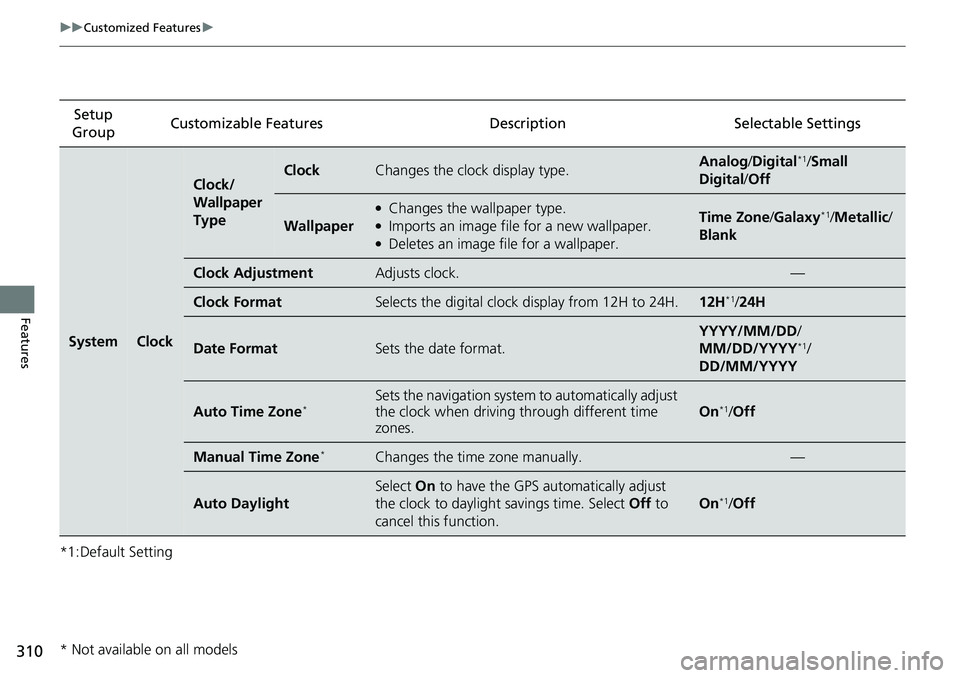
SystemClock
Clock/
Wallpaper
TypeClockChanges the clock display type.Analog/Digital*1/Small
Digital /Off
Wallpaper
●Changes the wallpaper type.●Imports an image file for a new wallpaper.●Deletes an image file for a wallpaper.
Time Zone /Galaxy*1/Metallic /
Blank
Clock AdjustmentAdjusts clock.—
Clock FormatSelects the digital clock display from 12H to 24H.12H*1/ 24H
Date FormatSets the date format.
YYYY/MM/DD/
MM/DD/YYYY*1/
DD/MM/YYYY
Auto Time Zone*Sets the navigation system to automatically adjust
the clock when driving through different time
zones.
On*1/ Off
Manual Time Zone*Changes the time zone manually.—
Auto Daylight
Select On to have the GPS automatically adjust
the clock to daylight savings time. Select Off to
cancel this function.
On*1/ Off
* Not available on all models
Page 316 of 598
314
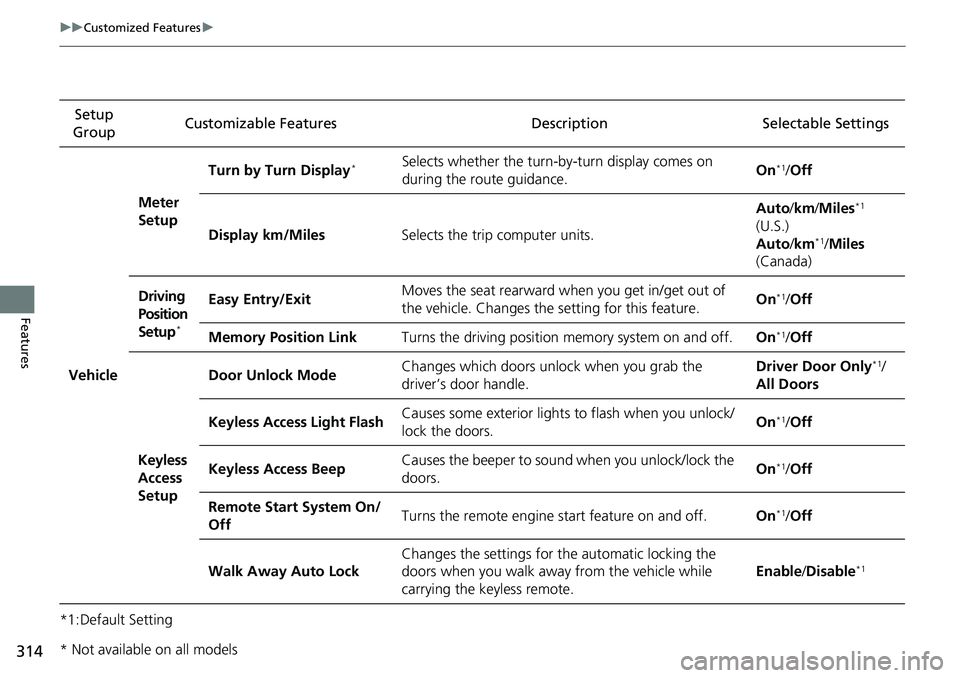
uuCustomized Features u
Features
*1:Default SettingSetup
Group Customizable Features Description Selectable Settings
Vehicle
Meter
SetupTurn by Turn Display
*Selects whether the turn-b
y-turn display comes on
during the route guidance. On*1/
Off
Display km/Miles Selects the trip computer units. Auto
/km /Miles
*1
(U.S.)
Auto /km*1/Miles
(Canada)
Driving
Position
Setup
*
Easy Entry/Exit Moves the seat rearward wh
en you get in/get out of
the vehicle. Changes the setting for this feature. On*1/
Off
Memory Position Link Turns the driving position memory system on and off. On
*1/Off
Keyless
Access
Setup Door Unlock Mode
Changes which doors unlock when you grab the
driver’s door handle. Driver Door Only
*1/
All Doors
Keyless Access Light FlashCauses some exterior lights to flash when you unlock/
lock the doors. On
*1/
Off
Keyless Access Beep Causes the beeper to sou
nd when you unlock/lock the
doors. On
*1/
Off
Remote Start System On/
Off Turns the remote engine start feature on and off.
On
*1/Off
Walk Away Auto Lock Changes the settings for the automatic locking the
doors when you walk away
from the vehicle while
carrying the keyless remote. Enable
/Disable
*1
* Not available on all models
Page 317 of 598
315
uuCustomized Features u
Continued
Features
*1:Default SettingSetup
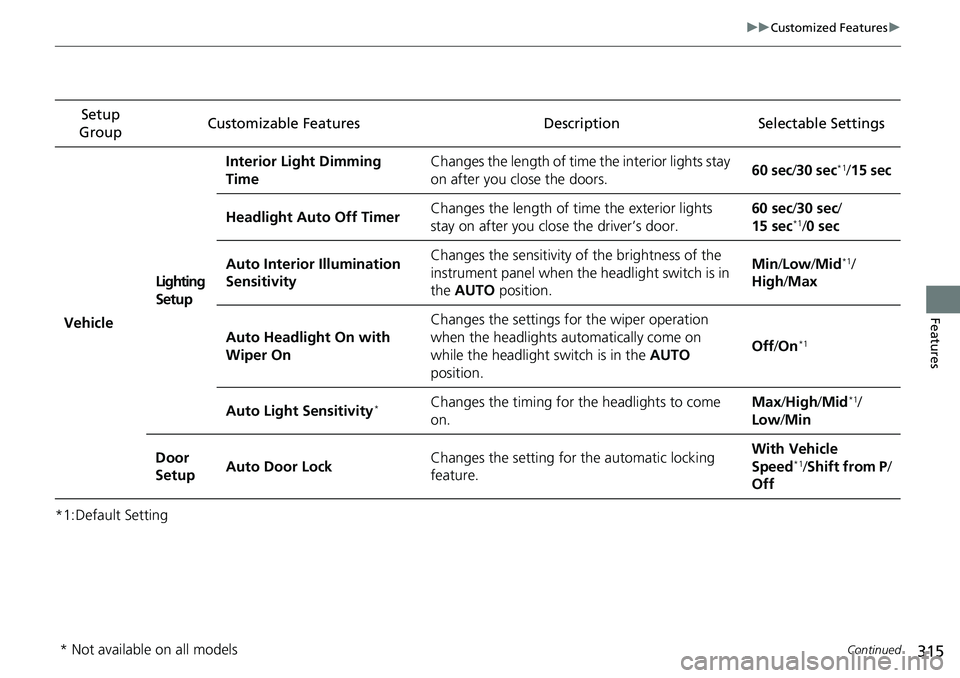
Group Customizable Features Description Selectable Settings
VehicleLighting
SetupInterior Light Dimming
Time
Changes the length of time the interior lights stay
on after you close the doors.
60 sec
/30 sec
*1/15 sec
Headlight Auto Off Timer Changes the length of time the exterior lights
stay on after you close the driver’s door. 60 sec/
30 sec/
15 sec
*1/ 0 sec
Auto Interior Illumination
Sensitivity Changes the sensitivity of the brightness of the
instrument panel when the headlight switch is in
the
AUTO position. Min
/Low /Mid
*1/
High /Max
Auto Headlight On with
Wiper On Changes the settings fo
r the wiper operation
when the headlights automatically come on
while the headlight switch is in the AUTO
position. Off
/On
*1
Auto Light Sensitivity*Changes the timing for the headlights to come
on. Max
/High /Mid*1/
Low /Min
Door
Setup Auto Door Lock Changes the setting for the automatic locking
feature. With Ve
hicle
Speed
*1/ Shift from P /
Off
* Not available on all models
Page 318 of 598
316
uuCustomized Features u
Features
*1:Default SettingSetup
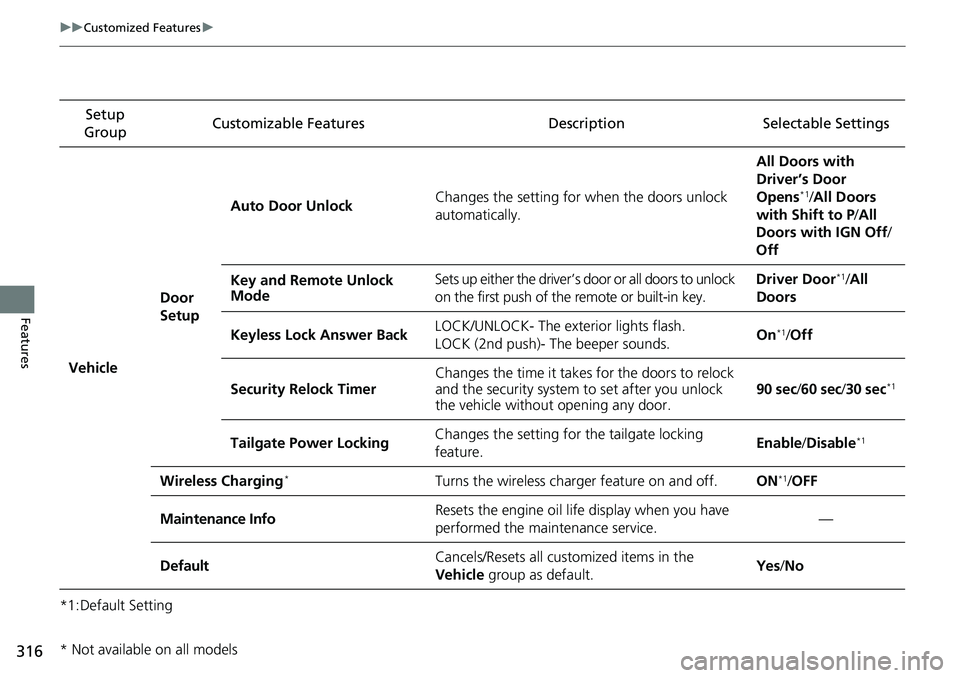
Group Customizable Features Descri
ption Selectable Settings
Vehicle
Door
SetupAuto Door Unlock
Changes the setting for when the doors unlock
automatically. All Doors with
Driver’s Door
Opens
*1/
All Doors
with Shift to P /All
Doors with IGN Off /
Off
Key and Remote Unlock
Mode Sets up either the driver’s door or all doors to unlock
on the first push of the remote or built-in key. Driver Door
*1/
All
Doors
Keyless Lock Answer Back LOCK/UNLOCK- The exterior lights flash.
LOCK (2nd push)- The beeper sounds. On
*1/
Off
Security Relock Timer Changes the time it takes for the doors to relock
and the security system to set after you unlock
the vehicle without opening any door.
90 sec
/60 sec /30 sec
*1
Tailgate Power Locking Changes the setting for the tailgate locking
feature. Enable
/Disable*1
Wireless Charging*Turns the wireless charger feature on and off.ON*1/OFF
Maintenance InfoResets the engine oil life display when you have
performed the maintenance service.—
DefaultCancels/Resets all cust omized items in the
Vehicle group as default.Yes/No
* Not available on all models
Page 319 of 598
317
uuCustomized Features u
Continued
Features
*1:Default SettingSetup
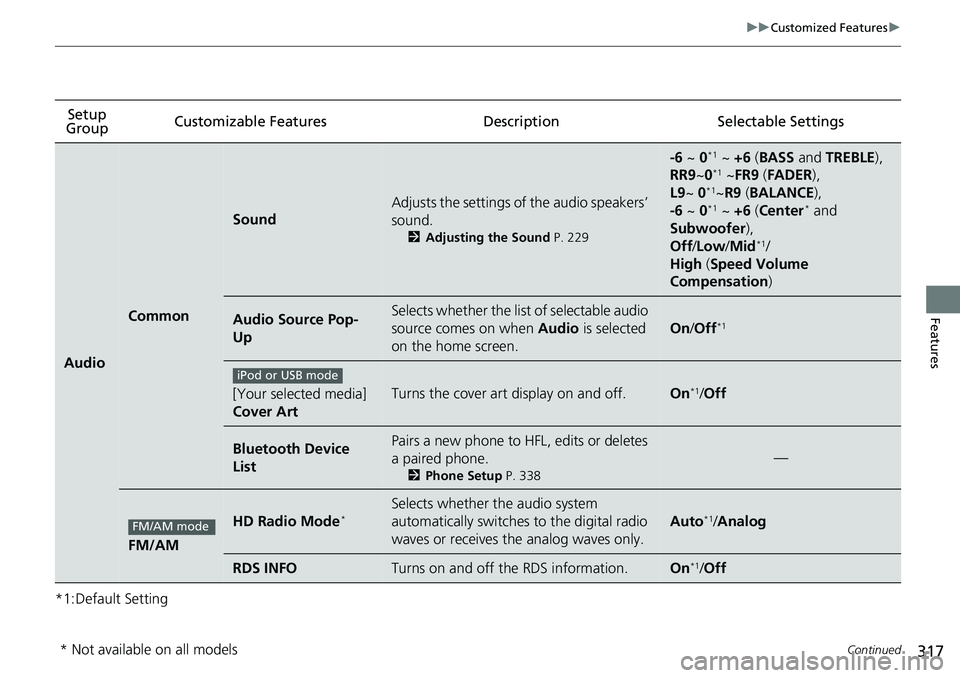
Group Customizable Features Description Selectable Settings
Audio
Common
Sound
Adjusts the settings of the audio speakers’
sound.
2
Adjusting the Sound P. 229
-6 ~ 0*1 ~ +6 (BASS and TREBLE ),
RR9 ~0*1 ~FR9 (FADER ),
L9 ~ 0*1~R9 (BALANCE ),
-6 ~ 0*1 ~ +6 (Center* and
Subwoofer ),
Off /Low /Mid
*1/
High (Speed Volume
Compensation )
Audio Source Pop-
UpSelects whether the list of selectable audio
source comes on when Audio is selected
on the home screen.
On /Off*1
[Your selected media]
Cover ArtTurns the cover art display on and off.On*1/Off
Bluetooth Device
ListPairs a new phone to HFL, edits or deletes
a paired phone.
2 Phone Setup P. 338
—
FM/AM
HD Radio Mode*Selects whether the audio system
automatically switches to the digital radio
waves or receives the analog waves only.
Auto*1/Analog
RDS INFOTurns on and off the RDS information.On*1/ Off
iPod or USB mode
FM/AM mode
* Not available on all models
Page 322 of 598
320
uuCustomized Features u
Features
*1:Default SettingSetup
Group Customizable Features Description Selectable Settings
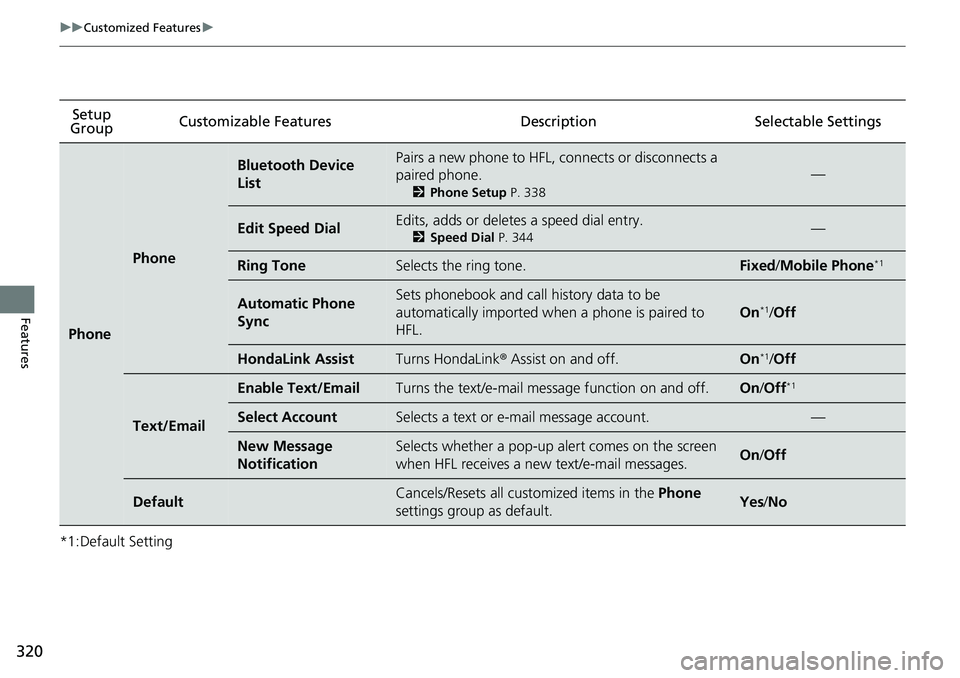
Phone
Phone
Bluetooth Device
ListPairs a new phone to HFL, connects or disconnects a
paired phone.
2
Phone Setup P. 338
—
Edit Speed DialEdits, adds or deletes a speed dial entry.
2Speed Dial P. 344—
Ring ToneSelects the ring tone.Fixed/Mobile Phone*1
Automatic Phone
SyncSets phonebook and call history data to be
automatically imported when a phone is paired to
HFL.
On*1/Off
HondaLink AssistTurns HondaLink ® Assist on and off.On*1/Off
Text/Email
Enable Text/EmailTurns the text/e-mail mess age function on and off.On/Off*1
Select AccountSelects a text or e-mail message account.—
New Message
NotificationSelects whether a pop-up al ert comes on the screen
when HFL receives a new text/e-mail messages.On /Off
DefaultCancels/Resets all cust omized items in the Phone
settings group as default.Yes /No
Page 327 of 598
325
uuHomeLink ® Universal Transceiver uTraining HomeLink
Continued
Features
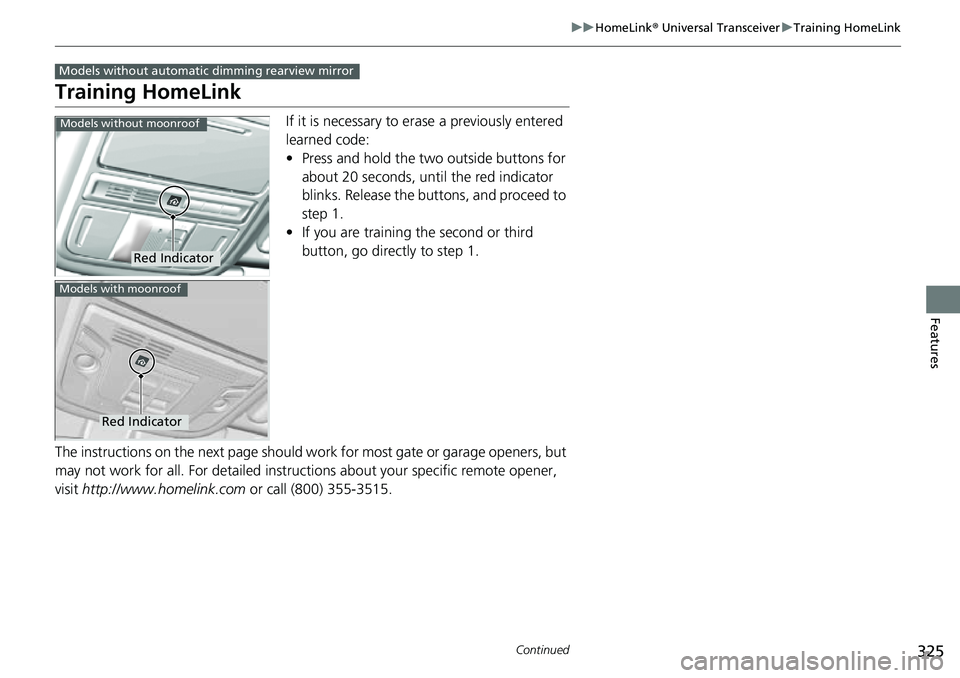
Training HomeLink
If it is necessary to er ase a previously entered
learned code:
• Press and hold the two outside buttons for
about 20 seconds, until the red indicator
blinks. Release the bu ttons, and proceed to
step 1.
• If you are training the second or third
button, go directly to step 1.
The instructions on the next page should work for most gate or garage openers, but
may not work for all. For detailed instructions about your specific remote opener,
visit http://www.homelink.com or call (800) 355-3515.
Models without automatic dimming rearview mirror
Red Indicator
Models without moonroof
Red Indicator
Models with moonroof