automatic HONDA RIDGELINE 2023 Owners Manual
[x] Cancel search | Manufacturer: HONDA, Model Year: 2023, Model line: RIDGELINE, Model: HONDA RIDGELINE 2023Pages: 598, PDF Size: 12.34 MB
Page 408 of 598
406
uuWhen Driving uAuto Idle Stop
Driving
Auto Idle Stop
To help maximize fuel econ omy, the engine automatica lly stops when the vehicle
comes to a stop, depending on environmen tal and vehicle operating conditions. The
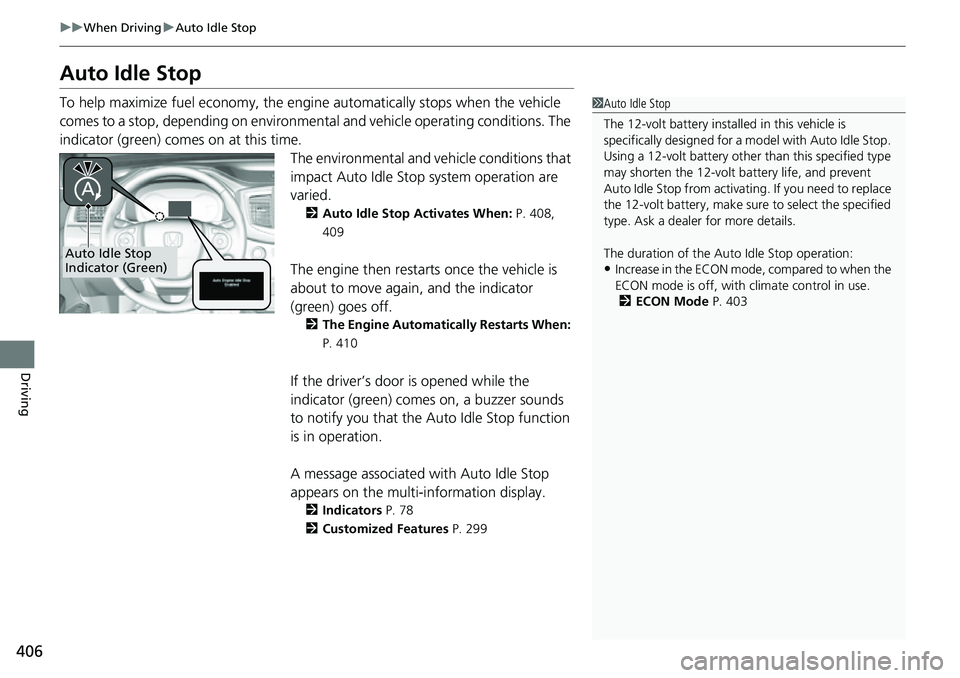
indicator (green) comes on at this time.
The environmental and vehicle conditions that
impact Auto Idle Stop system operation are
varied.
2Auto Idle Stop Activates When: P. 408,
409
The engine then restarts once the vehicle is
about to move again, and the indicator
(green) goes off.
2 The Engine Automatically Restarts When:
P. 410
If the driver’s door is opened while the
indicator (green) comes on, a buzzer sounds
to notify you that the Auto Idle Stop function
is in operation.
A message associated with Auto Idle Stop
appears on the multi-information display.
2 Indicators P. 78
2 Customized Features P. 299
1Auto Idle Stop
The 12-volt battery insta lled in this vehicle is
specifically designed for a m odel with Auto Idle Stop.
Using a 12-volt battery other than this specified type
may shorten the 12-volt ba ttery life, and prevent
Auto Idle Stop from activati ng. If you need to replace
the 12-volt battery, make sure to select the specified
type. Ask a dealer for more details.
The duration of the Au to Idle Stop operation:
•Increase in the ECON mode, compared to when the
ECON mode is off, with climate control in use.
2 ECON Mode P. 403Auto Idle Stop
Indicator (Green)
Page 410 of 598
uuWhen Driving uAuto Idle Stop
408
Driving
The vehicle stops with the transmission in (D and the brake pedal depressed.
When you put the transmission into
(P, the Auto Idle Stop continues to operate,
even if the brake pedal is released. u If you depress the brake pedal, the engine may automatically restart.
■Auto Idle Stop does not activate when:
• The Auto Idle Stop OFF button is pressed.
• The driver’s seat belt is not fastened.
• The engine is not adequately warmed up or coolant temperature is high.
• The transmission fluid temperature is low or high.
• The vehicle comes to a stop again befo re the vehicle speed reaches 3 mph (5
km/h) after the engine starts.
• The vehicle is stopped on a steep incline.
• The transmission is in a position other than
(D.
• The engine is started with the hood open.
u Turn off the engine. Close the hood before you restart the engine to activate
Auto Idle Stop.
• The battery charge is low.
• The internal temperature of the battery is 14°F (−10°C) or less.
• The climate control system is in use, an d the outside temperature is below −4°F
(−20°C) or over 104°F (40°C).
• The climate control system is in us e, and the temperature is set to Hi or Lo.
• is ON (indicator on).
• The Intelligent Traction Management is set to Snow, Mud
*, or Sand*.
• The AC power outlet is used.
■Auto Idle Stop Activates When:1Auto Idle Stop Activates When:
Do not open the hood while the Auto Idle Stop
function is activated. If the hood is opened, the
engine will not re start automatically.
In this case, restart the engine with the ENGINE
START/STOP button.
2 Starting the Engine P. 385
Pressing the ENGINE START/STOP button causes
the engine to no longer restart automatically.
Follow the standard proce dure to start the engine.
2 Starting the Engine P. 385
Models with AC Power Outlet
* Not available on all models
Page 412 of 598
uuWhen Driving uAuto Idle Stop
410
Driving
The brake pedal is released.
■The engine restarts even if the brake pedal is depressed when:
• The Auto Idle Stop OFF button is pressed.
• The steering wheel is operated.
• The transmission is put into
(R or (S, or when it is set from (N to (D.
u If you put the transmission into
(P after the Auto Idle Stop activates, the Auto
Idle Stop continues to operate. In this case, the engine restarts when you
depress the brake pedal.
• The pressure on the brake pedal is redu ced and the vehicle starts moving while
stopped on an incline.
• The pressure on the brake pedal is repeated ly applied and released slightly during
a stop.
• The battery charge becomes low.
• The accelerator pedal is depressed.
• The driver’s seat belt is unlatched.
• is ON (indicator on).
• The climate control system is in us e, and the difference between the set
temperature and actual interior temperature becomes significant.
• The climate control system is bein g used to dehumidify the interior.
• The Intelligent Traction Management is set to Snow, Mud
*, or Sand*.
• The AC power outlet is used.
■The Engine Automatically Restarts When:1The Engine Automatically Restarts When:
If you are using an electroni c device during Auto Idle
Stop, the device may tempor arily be turned off when
the engine restarts.
Models with AC Power Outlet
* Not available on all models
Page 417 of 598
415
uuWhen Driving uIntelligent Variable Torque Management (i-VTM4TM) AWD System*
Driving
Intelligent Variable Torque Management (i-VTM4TM)
AWD System*
The Intelligent Variable To rque Management (i-VTM4TM) AWD System is a full time
all wheel drive system that automatically controls and transfers varying amount of
engine torque to all wheels independently according to the driving conditions.
You still need to exercise the same care when accelerating, steering, and braking
that you would in a two wheel drive vehicle.
Avoid continuously driving on slippery surfaces where a wheel is likely to spin out,
and do not drive if the All-wheel drive ( AWD) Indicator starts blinking. Driving
continuously under such conditions can damage the system’s torque distribution
unit.
If the All-wheel drive (AWD ) Indicator blinks while driving, it indicates the
differential temperature is too high. If this happens, pull to the side of the road
when it is safe, shift to park, and idle the engine until the indicator goes out. If the
indicator does not go out, take your vehi cle to a dealer to have it checked.1Intelligent Variable Torq ue Management (i-VTM4TM) AWD
System*
NOTICE
Do not continuously spin the front tires of your
vehicle. Continuously spinning the front tires can
cause transmission or re ar differential damage.
The Intelligent Variable Torque Management (i-
VTM4
TM) AWD System may not function properly if
tire type and size are mixed. Make sure to use the
same size and type of tire , and the air pressures as
specified. 2 Tire and Wheel Replacement P. 522
* Not available on all models
Page 428 of 598
426
uuHonda Sensing ®u Collision Mitigation Braking SystemTM (CMBSTM)
Driving
Collision Mitigati on Braking SystemTM (CMBSTM)
The system can assist you when it determine s there is a possibility of your vehicle
colliding with a vehicle or a pedestrian de tected in front of your vehicle. The CMBSTM
is designed to alert you when the potential for a collision is determined, as well as to
reduce your vehicle speed to help minimize collision severity when a collision is
deemed unavoidable.
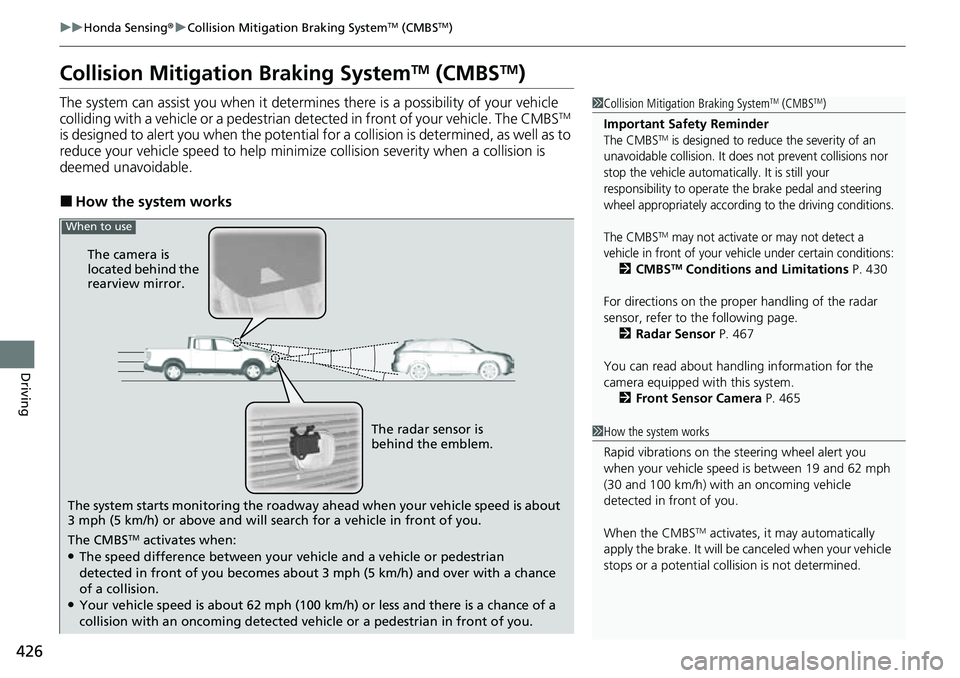
■How the system works
1 Collision Mitigation Braking SystemTM (CMBSTM)
Important Safety Reminder
The CMBSTM is designed to reduce the severity of an
unavoidable collision. It does not prevent collisions nor
stop the vehicle automatically. It is still your
responsibility to operate the brake pedal and steering
wheel appropriately according to the driving conditions.
The CMBS
TM may not activate or may not detect a
vehicle in front of your vehicle under certain conditions:
2 CMBSTM Conditions and Limitations P. 430
For directions on the prop er handling of the radar
sensor, refer to the following page. 2 Radar Sensor P. 467
You can read about handling information for the
camera equipped with this system. 2 Front Sensor Camera P. 465
1How the system works
Rapid vibrations on the st eering wheel alert you
when your vehicle speed is between 19 and 62 mph
(30 and 100 km/h) with an oncoming vehicle
detected in front of you.
When the CMBS
TM activates, it may automatically
apply the brake. It will be canceled when your vehicle
stops or a potential colli sion is not determined.
The system starts monitoring the roadway ah ead when your vehicle speed is about
3 mph (5 km/h) or above and will search for a vehicle in front of you. The radar sensor is
behind the emblem.
The CMBS
TM activates when:●The speed difference between your vehicle and a vehicle or pedestrian
detected in front of you becomes about 3 mph (5 km/h) and over with a chance
of a collision.
●Your vehicle speed is about 62 mph (100 km /h) or less and there is a chance of a
collision with an oncoming detected vehicle or a pedestrian in front of you. The camera is
located behind the
rearview mirror.
When to use
Page 431 of 598
Continued429
uuHonda Sensing ®u Collision Mitigation Braking SystemTM (CMBSTM)
Driving
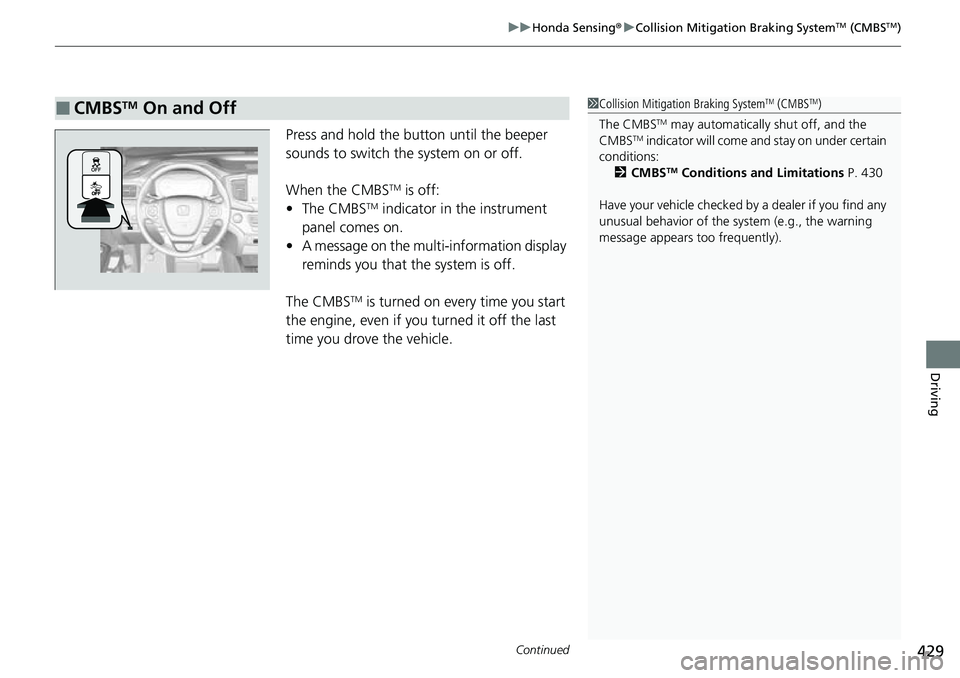
Press and hold the butt on until the beeper
sounds to switch the system on or off.
When the CMBS
TM is off:
• The CMBSTM indicator in the instrument
panel comes on.
• A message on the multi-information display
reminds you that the system is off.
The CMBS
TM is turned on every time you start
the engine, even if you turned it off the last
time you drove the vehicle.
■CMBSTM On and Off1 Collision Mitigation Braking SystemTM (CMBSTM)
The CMBS
TM may automatically shut off, and the
CMBSTM indicator will come and stay on under certain
conditions:
2 CMBS
TM Conditions and Limitations P. 430
Have your vehicle checked by a dealer if you find any
unusual behavior of the system (e.g., the warning
message appears too frequently).
Page 432 of 598
430
uuHonda Sensing ®u Collision Mitigation Braking SystemTM (CMBSTM)
Driving
The system may automatically shut off and the CMBSTM indicator will come on under
certain conditions. Some examples of th ese conditions are listed below. Other
conditions may reduce some of the CMBS
TM functions.
2 Front Sensor Camera P. 465
2 Radar Sensor P. 467
■Environmental conditions
• Driving in bad weather (rain, fog, snow, etc.).
• Sudden changes between light and dark, such as an entrance or exit of a tunnel.
• There is little contrast between objects and the background.
• Driving into low sunlight (e.g., at dawn or dusk).
• Strong light is reflected onto the roadway.
• Driving in the shadows of trees, buildings, etc.
• Roadway objects or structures are misint erpreted as vehicles and pedestrians.
• Reflections on the interi or of the windshield.
• Driving at night or in a dark condition such as a tunnel.
■Roadway conditions
• Driving on a snowy or wet roadway (obs cured lane marking, vehicle tracks,
reflected lights, road spray, high contrast).
• Driving on curvy, winding, or undulating roads.
• The road is hilly or the vehicle is approaching the crest of a hill.
■CMBSTM Conditions and Limitations
Page 436 of 598
434
uuHonda Sensing ®u Collision Mitigation Braking SystemTM (CMBSTM)
Driving
■Automatic shutoff
CMBSTM may automatically shut itself off and the CMBSTM indicator comes and stays
on when:
• The temperature inside the system is high.
• You drive off-road or on a mountain ro ad, or curved and winding road for an
extended period.
• An abnormal tire condition is detected (i ncorrect tire size, flat tire, etc.).
• The camera behind the rearview mirror, or the area around the camera, including
the windshield, gets dirty.
Once the conditions that caused the CMBS
TM to shut off improve or are addressed
(e.g., cleaning), the system comes back on.
Page 440 of 598
438
uuHonda Sensing ®u Adaptive Cruise Control (ACC)
Driving
Adaptive Cruise Control (ACC)
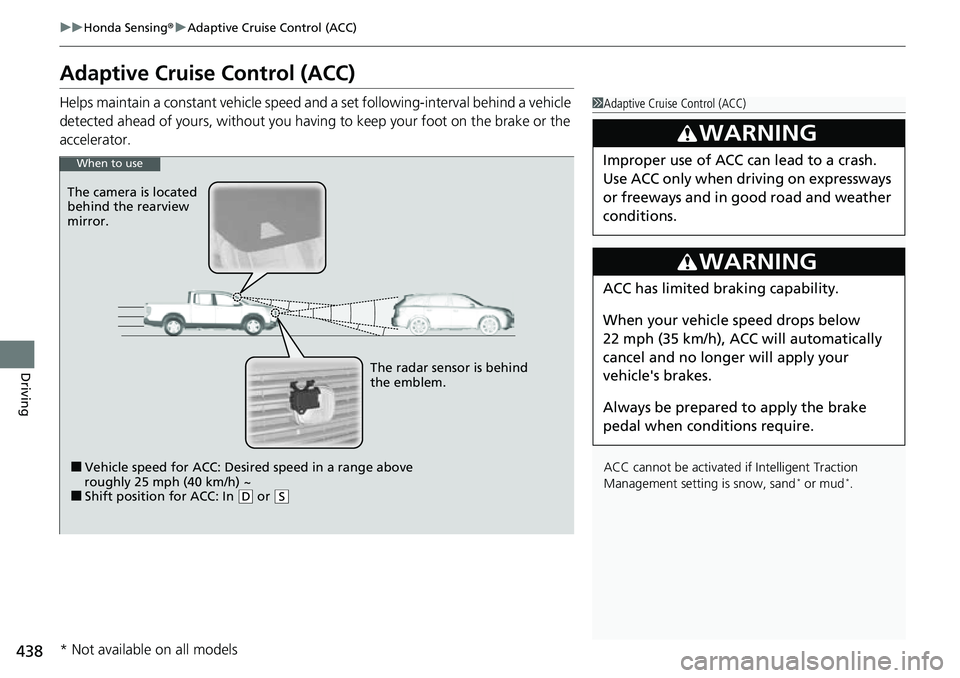
Helps maintain a constant vehicle speed a nd a set following-interval behind a vehicle
detected ahead of yours, without you havi ng to keep your foot on the brake or the
accelerator.1 Adaptive Cruise Control (ACC)
ACC cannot be activated if Intelligent Traction
Management settin g is snow, sand
* or mud*.
3WARNING
Improper use of ACC can lead to a crash.
Use ACC only when driving on expressways
or freeways and in go od road and weather
conditions.
3WARNING
ACC has limited braking capability.
When your vehicle speed drops below
22 mph (35 km/h), ACC will automatically
cancel and no longer will apply your
vehicle's brakes.
Always be prepared to apply the brake
pedal when conditions require.
When to use
■Vehicle speed for ACC: Desired speed in a range above
roughly 25 mph (40 km/h) ~
■Shift position for ACC: In ( D or (S
The radar sensor is behind
the emblem.
The camera is located
behind the rearview
mirror.
* Not available on all models
Page 445 of 598
Continued443
uuHonda Sensing ®u Adaptive Cruise Control (ACC)
Driving
The system may automatically shut off u nder certain conditions. Some examples of
these conditions are listed below. Othe r conditions may reduce some of the ACC
functions.
2 Front Sensor Camera P. 465
2 Radar Sensor P. 467
■Environmental conditions
Driving in bad weather (r ain, fog, snow, etc.).
■Roadway conditions
Driving on a snowy or wet roadway (obscured lane marking, vehicle tracks, reflected
lights, road spra y, high contrast).
■Vehicle conditions
• The outside of the windshield is blocked by dirt, mud, leaves, wet snow, etc.
• An abnormal tire or wheel condition (inco rrect sizes, varied sizes or construction,
improperly inflated, co mpact spare tire, etc.).
• The camera temperature gets too high.
• The parking brake is applied.
• The front grille is dirty.
• The vehicle is tilted due to a heavy load or suspension modifications.
• Tire chains are installed.
• The vehicle is towing a trailer.
■ACC Conditions and Limitations1ACC Conditions and Limitations
If you need the radar sensor to be repaired, or
removed, or the front grille is strongly impacted, turn
off the system by pressing the MAIN button and take
your vehicle to a dealer.
Have your vehicle checked by a dealer if you find any
unusual behavior of the system (e.g., the warning
message appears too frequently).