audio HONDA S2000 2000 1.G Owners Manual
[x] Cancel search | Manufacturer: HONDA, Model Year: 2000, Model line: S2000, Model: HONDA S2000 2000 1.GPages: 273, PDF Size: 21.58 MB
Page 1 of 273
 to navigate through\
this reference.
For a printed owners manual, click on authorized manuals or go to")
2000 S2000 Online Reference Owner's Manual Use these links (and links throughout this manual) to navigate through\
this reference.
For a printed owner's manual, click on authorized manuals or go to www.h\
elminc.com.
Contents
Introduction ........................................................................\
................................................................. i
A Few Words About Safety........................................................................\
........................................ .ii
Your Vehicle at a Glance........................................................................\
............................................ .2
Driver and Passenger Safety ........................................................................\
......................................5
Proper use and care of your vehicle's seat belts, and Supplemental Restr\
aint System.
Instruments and Controls........................................................................\
........................................ .41
Instrument panel indicator and gauge, and how to use dashboard and steering colu\
mn controls.
Comfort and Convenience Features ........................................................................\
....................... 85
How to operate the climate control system, the audio system, and other c\
onvenience features.
Before Driving........................................................................\
..........................................................115
What gasoline to use, how to break-in your new vehicle, and how to load luggage and other cargo.
Driving ........................................................................\
..................................................................... .129
The proper way to start the engine, shift the transmission, and park, pl\
us towing a trailer.
Maintenance........................................................................\
.............................................................143
The Maintenance Schedule shows you when you need to take yo ur vehicle to the dealer.
Appearance Care........................................................................\
..................................................... .203
Tips on cleaning and protecting your vehicle. Things to look for if your\
vehicle ever needs body repairs.
Taking Care of the Unexpected........................................................................\
..............................211
This section covers several problems motorists sometimes experience, a nd how to handle them.
Technical Information........................................................................\
............................................ .241
ID numbers, dimensions, capacities, and technical information.
Warranty and Customer Relations (U.S. and Canada)................................................................253
A summary of the warranties covering your new Acura, and how to contact \
us.
Authorized Manuals (U.S. only)........................................................................\
..............................259
How to order manuals and other technical literature.
Index........................................................................\
........................................................................\
...... I
Service Information Summary
A summary of information you need when you pull up to the fuel pump. Owner's Identification Form
Page 44 of 273
This section gives information about
the controls and displays
that
contribute to the daily operation of
your Honda.
All the essential
controls are within easy reach.
Control Locations ............................ 42
Indicator Lights ................................ 43
Gauges .............................................. 47
Speedometer ................................ 4 7
Select Button ................................ 4 7
Tachometer .................................. 4 7
Temperature Gauge ....................
47
Fuel Gauge ................................... 48
Odometer ...................................... 48
Trip Meter .................................... 48
Maintenance Required
Indicator ....................................
49
Controls Near the Steering
Wheel ........................................
50
Headlights .................................... 51
Daytime Running Lights ............. 52
Instrument Panel Brightness ..... 52
Turn Signals ................................. 53
Windshield Wipers ...................... 53
Windshield Washers ................... 54
Steering Wheel Controls ................ 55
Cruise Control .............................. 55
Keys and Locks ................................ 58
Keys ............................................... 58
Immobilizer System ..................... 59
Ignition Switch ............................. 60
Instruments and Controls
Power Door Locks ....................... 62
Remote Transmitter .................... 63
Trunk ............................................ 66
Console Compartments .............. 67
Seat Adjustments ............................. 68
Power Windows ............................... 69
Convertible Top ............................... 71
Opening the Convertible Top ..... 71
Closing the Convertible Top ...... 7 4
Convertible Top
Cover.. .............. 76
Maintenance ................................. 77
Hazard Warning ............................... 79
Mirrors .............................................. 79
Adjusting the Power Mirrors ..... 79
Parking Brake .................................. 80
Beverage Holder .............................. 81
Accessory Power Socket ................ 81
Audio Panel. ...................................... 82
Interior Lights .................................. 83
Instruments and Controls 41
Page 53 of 273
Controls Near the Steering Wheel I
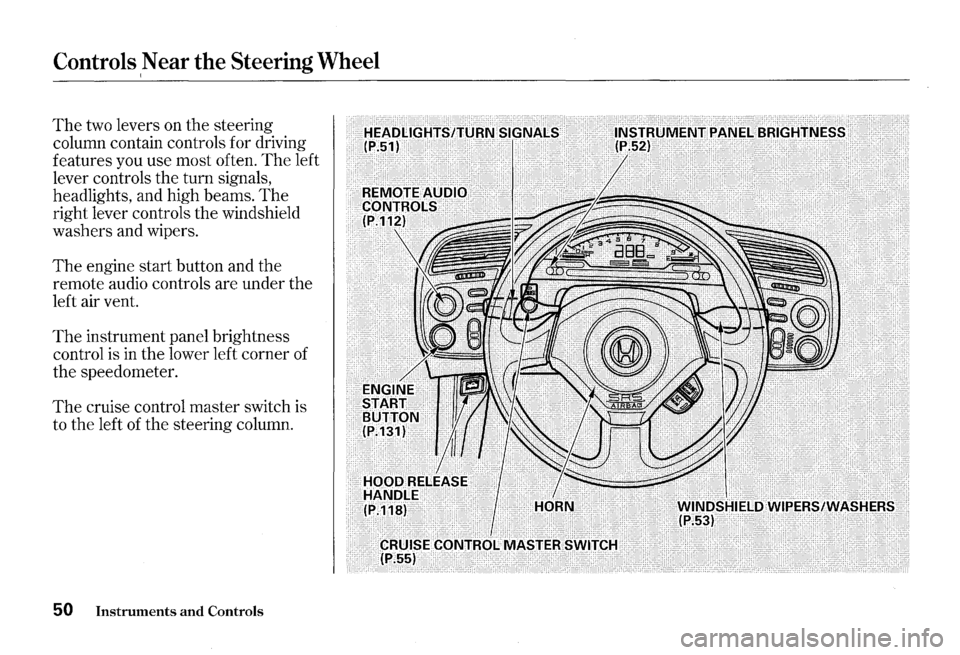
The two levers on the steering
column contain controls for driving
features you use most often.
The left
lever controls the turn signals,
headlights, and high beams.
The
right lever controls the windshield
washers and wipers.
The engine start button and the
remote audio controls are under the
left air vent.
The instrument panel brightness
control is
in the lower left corner of
the speedometer.
The cruise control master switch is
to the left
of the steering column.
50 Instruments and Controls
Page 64 of 273
ACCESSORY (I) -In this position,
you can operate
the audio system
and the accessory power socket.
ON (II) -This is the normal key
position when driving. All features
and accessories on
the car are usable.
Several of
the lights on the instru
ment panel come on as a test when
you
turn the ignition switch from
ACCESSORY to
ON.
The engine can be started with the
key in this position by pressing the
engine START button (see page
131 ).
The engine will not start if the
Immobilizer System does not
recognize the key's coding (see page
59).
You will hear a reminder beeper if
you leave
the key in the ignition
switch in
the LOCK (0) or
ACCESSORY (I) position and open
the driver's door. Remove the key to
turn off the beeper.
Keys and Locks
Instruments and Controls 61
Page 85 of 273
Audio Panel
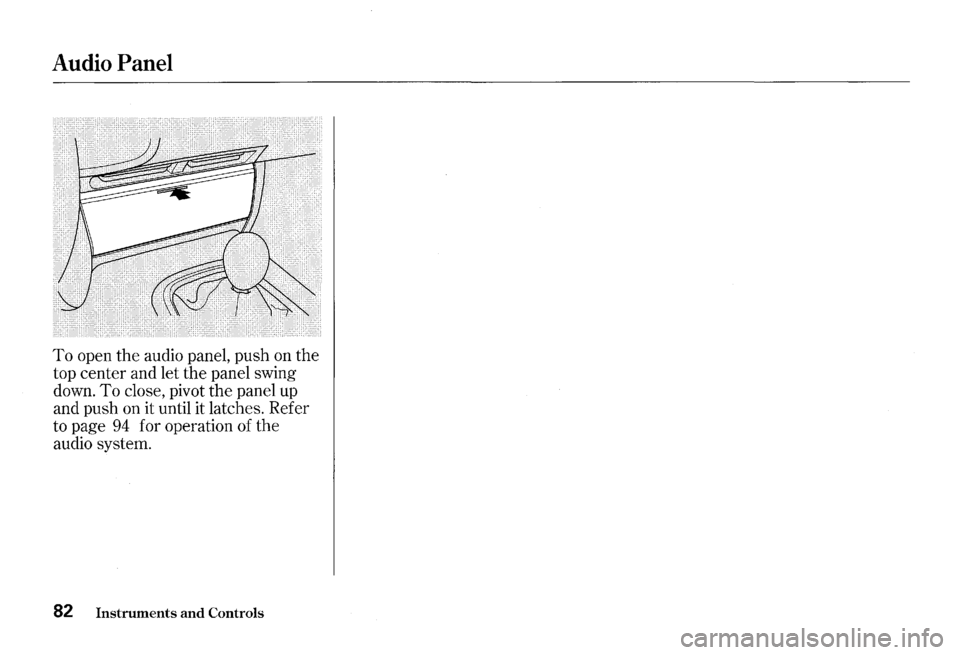
To open the audio panel, push on the
top center and let the panel swing
down.
To close, pivot the panel up
and push on it until it latches. Refer
to page
94 for operation of the
audio system.
82 Instruments and Controls
Page 88 of 273
Comfort and Convenience Features
The heating and air conditioning
systems
in your Honda provide a
comfortable driving environment
in
all weather conditions.
The standard audio system has
many features. This section de
scribes those features and how to
use them.
(If you selected an
optional audio system, refer to the
operating instructions that came
with it.) Heating
and Cooling ........................ 86
What Each Control Does ............
86
How to Use the System ............... 88
To Turn Everything Off ............. 93
Audio System
AM/FM/CD Audio System ....... 94
Operating the Radio .................... 95
Adjusting the Sound .................... 99
Audio System Lighting ............. 100
Radio Frequencies ..................... 100
Radio Reception ......................... 101
Operating the CD Player .......... 102
Operating the CD Changer ...... 107
Protecting Compact Discs ........ 108
CD Player Error Indications ..... 110
CD Changer Error
Indications ..............................
111
Remote Audio Controls ............ 112
Theft Protection ........................ 113
Comfort and Convenience Features 85
Page 90 of 273
Mode Control Dial
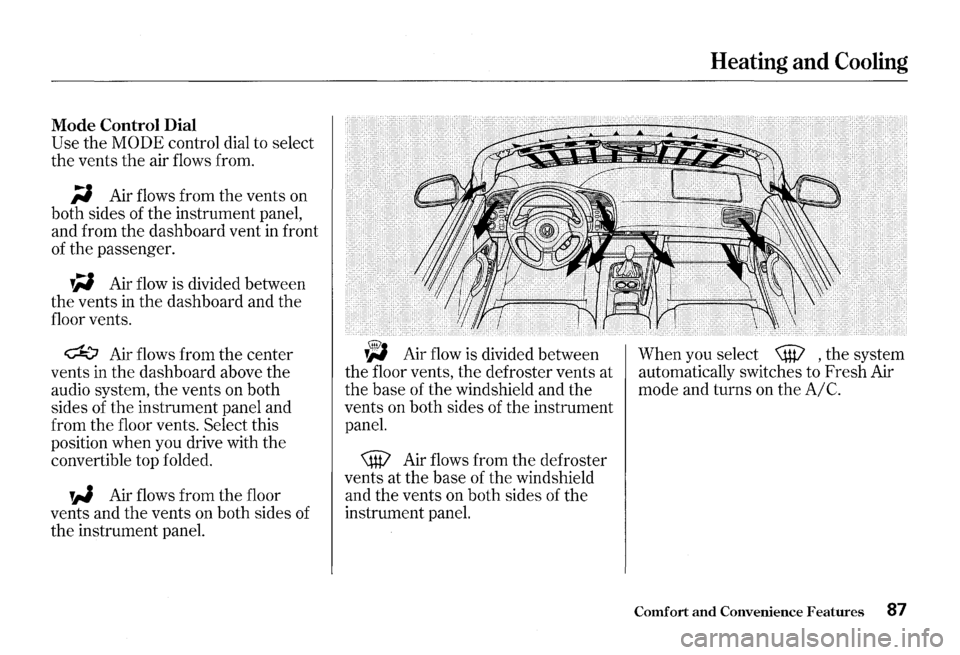
Use the MODE control dial to select
the vents
the air flows from.
;i Air flows from the vents on
both sides of the instrument panel,
and from the dashboard vent
in front
of the passenger.
W Air flow is divided between
the vents
in the dashboard and the
floor vents.
~ Air flows from the center
vents in the dashboard above the
audio system, the vents on both
sides of the instrument panel and
from the floor vents.
Select this
position when you drive with the
convertible top folded.
W Air flows from the floor
vents and
the vents on both sides of
the instrument panel.
~ Air flow is divided between
the floor vents, the defroster vents at
the base of the windshield and the
vents on both sides of the instrument
panel.
\W Air flows from the defroster
vents at the base of the windshield
and the vents on both sides of the
instrument panel.
Heating and Cooling
When you select \W , the system
automatically switches to Fresh Air
mode and turns on the
A/C.
Comfort and Convenience Features 87
Page 97 of 273
Audio System
AM/FM/CD Audio System
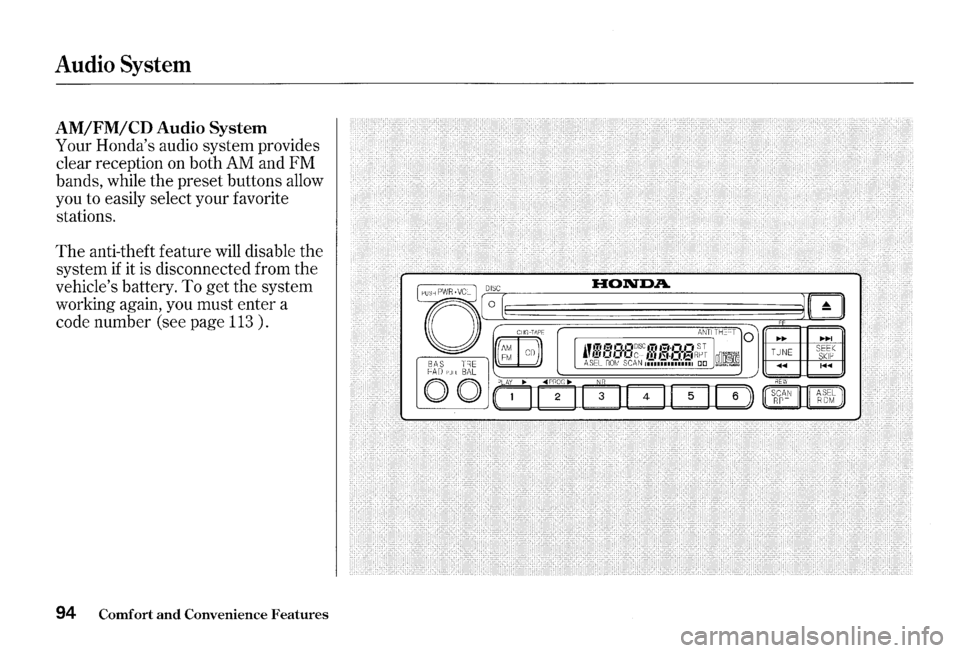
Your Honda's audio system provides
clear reception on both AM and FM
bands, while the preset buttons allow
you to easily select your favorite
stations.
The anti-theft feature will disable the
system
if it is disconnected from the
vehicle's battery.
To get the system
working again, you must enter a
code number (see page
113 ) .
94 Comfort and Convenience Features
0 BAS TRE C::A 0 ''ULL BAL
0 0
0 I
CHG TAPE
m 0
PUl.Y ~
.to
ANIIIHocl 0 ~~ -I " .... ~ .-. ,-, JIC;C ITo'~l·lll-iS-J! TIINE' SeEK f!..l CrcrcrcH 11~ 13:1·CI)3r
Page 98 of 273
Operating the Radio
The ignition switch must be in
ACCESSORY (I) or ON (II) to
operate the audio system.
Turn the
system on by pushing the
PWR/
VOL
knob. Adjust the volume by
turning the same knob.
The band and frequency that the
radio was last tuned to is displayed.
To change bands, press the
AM/FM
button. On the FM band, ST will be
displayed
if the station is broadcast
ing
in stereo. Stereo reproduction on
AM is not available.
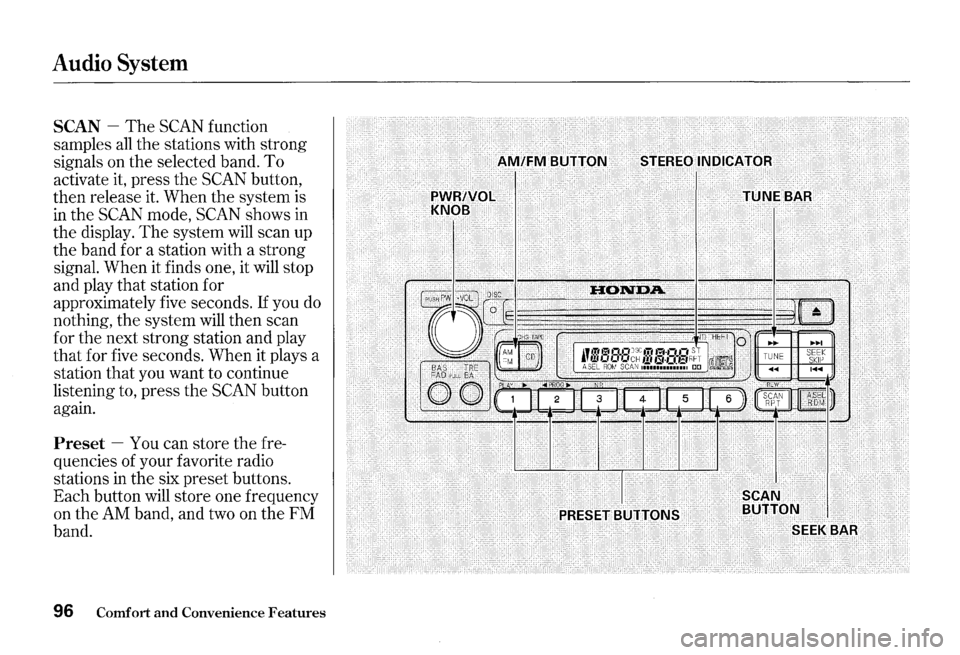
You can use any of four methods to
find radio stations on the selected
band:
TUNE, SEEK, SCAN or the
Preset buttons.
TUNE -Use the TUNE bar to tune
the radio to a desired frequency.
Press the ~ side of the bar to tune
to a higher frequency, and the
~ side to tune to a lower
frequency.
The frequency numbers
will start to change rapidly. Release
the bar when the display reaches the
desired frequency. To change
the
frequency in small increments, press
and release the
TUNE bar quickly.
Audio System
SEEK -The SEEK function
searches the band for a station with
a strong signal. To activate
it, press
the
SEEK bar on either the 1<111<111 or
~ side, then release it.
Depending on which side you press,
the system scans upward or
down
ward from the current frequency. It
stops when it finds a station with a
strong signal.
CONTINUED
Comfort and Convenience Features 95
Page 99 of 273
Audio System
SCAN -The SCAN function
samples
all the stations with strong
signals on the selected band.
To
activate it, press the SCAN button,
then release it. When the system is
in the SCAN mode, SCAN shows in
the display.
The system will scan up
the band for a station with a strong
signal. When it finds one, it will stop
and play that station for
approximately five seconds.
If you do
nothing, the system will then scan
for the next strong station and play
that for five seconds. When it plays a
station that you want to continue
listening to, press the
SCAN button
again.
Preset -You can store the fre
quencies of your favorite radio
stations in the six preset buttons.
Each button will store one frequency
on the
AM band, and two on the FM
band.
96 Comfort and Convenience Features