buttons HUMMER H3 2010 User Guide
[x] Cancel search | Manufacturer: HUMMER, Model Year: 2010, Model line: H3, Model: HUMMER H3 2010Pages: 410, PDF Size: 2.24 MB
Page 142 of 410
5-28 Instruments and Controls
4. The indicator light on theUniversal Home Remote will
flash slowly at first and then
rapidly after Universal Home
Remote successfully receives
the frequency signal from the
hand-held transmitter. Release
both buttons.
5. Press and hold the newly-trained Universal Home Remote button
and observe the indicator light.
.If the indicator light stays
on continuously, the
programming is complete
and the garage door should
move when the Universal
Home Remote button is
pressed and released.
There is no need to
continue programming
Steps 6 through 8.
.If the Universal Home
Remote indicator light
blinks rapidly for
two seconds and then
turns to a constant
light, continue with the
programming Steps 6
through 8.
It may be helpful to have
another person assist with
the remaining steps.
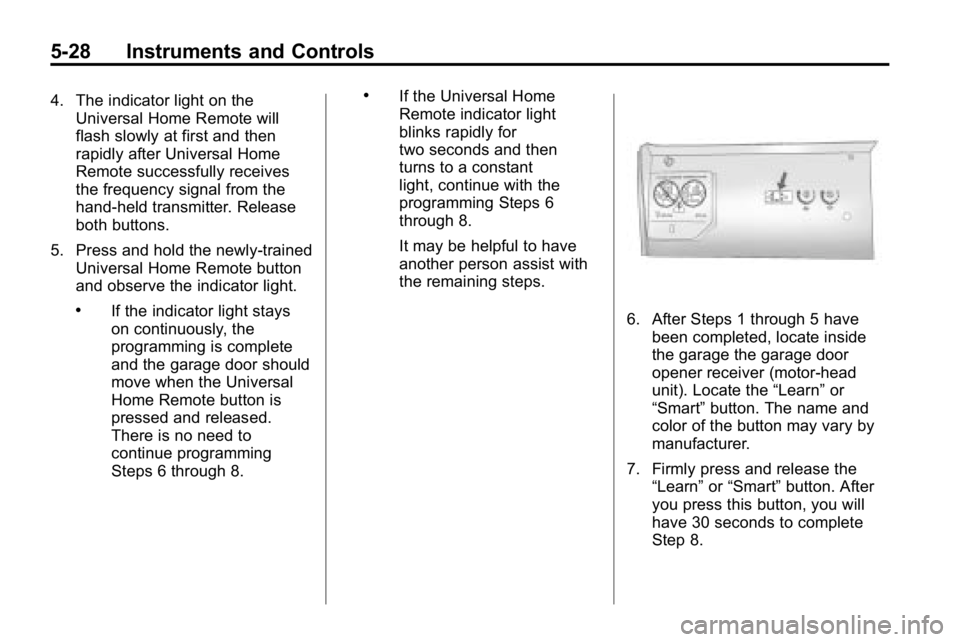
6. After Steps 1 through 5 havebeen completed, locate inside
the garage the garage door
opener receiver (motor-head
unit). Locate the “Learn”or
“Smart” button. The name and
color of the button may vary by
manufacturer.
7. Firmly press and release the “Learn” or“Smart” button. After
you press this button, you will
have 30 seconds to complete
Step 8.
Page 143 of 410
Instruments and Controls 5-29
8. Immediately return to thevehicle. Firmly press and hold
the Universal Home Remote
button, selected in Step 3 to
control the garage door, for
two seconds, and then release
it. If the garage door does not
move, press and hold the
same button a second time for
two seconds, and then release
it. Again, if the door does not
move, press and hold the
same button a third time for
two seconds, and then release.
The Universal Home Remote
should now activate the
garage door.
To program the remaining
two Universal Home Remote
buttons, begin with Step 2 of
“Programming the Universal Home
Remote System.” Do not repeat
Step 1, as this will erase all
previous programming from the
Universal Home Remote buttons.Gate Operator and Canadian
Programming
If you have questions or need
help programming the Universal
Home Remote System, call
1-800-355-3515 or go to
www.homelink.com.
Canadian radio-frequency laws
require transmitter signals to time
out or quit after several seconds
of transmission. This may not be
long enough for Universal Home
Remote to pick up the signal during
programming. Similarly, some U.S.
gate operators are manufactured to
time out in the same manner. If you live in Canada, or you are
having difficulty programming a gate
operator or garage door opener by
using the
“Programming Universal
Home Remote” procedures,
regardless of where you live,
replace Step 3 under “Programming
Universal Home Remote” with the
following:
Continue to press and hold the
Universal Home Remote button
while you press and release
every two seconds (cycle) the
hand-held transmitter button until
the frequency signal has been
successfully accepted by the
Universal Home Remote. The
Universal Home Remote indicator
light will flash slowly at first and then
rapidly. Proceed with Step 4 under
“Programming Universal Home
Remote” to complete the training
procedure.
Page 144 of 410
5-30 Instruments and Controls
Universal Remote System
Operation
Using Universal Remote
Press and hold the appropriate
Universal Remote button for at least
half of a second. The indicator light
will come on while the signal is
being transmitted.
Erasing Universal Remote
Buttons
All programmed buttons should be
erased when the vehicle is sold or
the lease ends.To erase all programmed buttons on
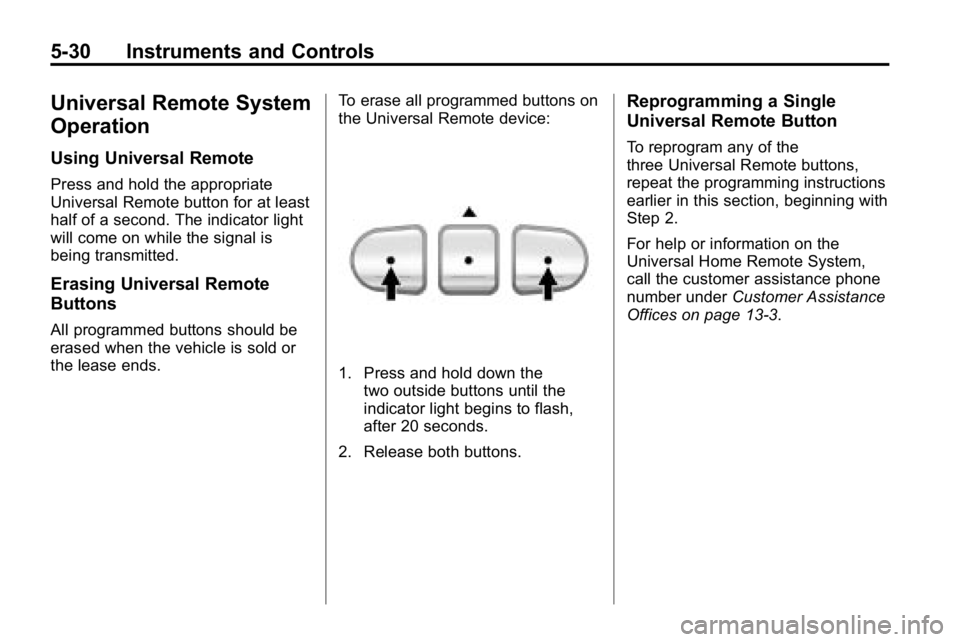
the Universal Remote device:
1. Press and hold down the
two outside buttons until the
indicator light begins to flash,
after 20 seconds.
2. Release both buttons.
Reprogramming a Single
Universal Remote Button
To reprogram any of the
three Universal Remote buttons,
repeat the programming instructions
earlier in this section, beginning with
Step 2.
For help or information on the
Universal Home Remote System,
call the customer assistance phone
number under Customer Assistance
Offices on page 13‑3.
Page 159 of 410
Infotainment System 7-5
Radio
AM-FM Radio
Finding a Station
BAND:Press to select FM1, FM2,
AM, XM1, if equipped, or XM2,
if equipped.
Manual Tuning
Single CD Radio:
e(Tune): Turn to select a radio
station.
Six-Disc CD Radio:
DISP: Turn to select a radio station.
Automatic Tuning
1-6 (Preset Pushbuttons): Press
to select preset stations.
tSEEKu: Press and release to
go to the previous or next station
and stay there. The radio only stops
at stations with a strong signal.
Press and hold to scan stations or
preset stations. To scan stations:
1. Press and hold
torufor more
than two seconds. SC or SCAN
displays and the radio beeps
once. The radio goes to a
station, plays for a few seconds,
then goes to the next station.
2. Press
toruagain or one of
the pushbuttons to stop
scanning presets.
To scan preset stations:
1. Press and hold
torufor
more than four seconds. PSC or
PSCN displays and the radio
beeps twice. The radio goes
to a preset station, plays for a
few seconds, then goes to the
next preset station.
2. Press
toruagain or one of
the pushbuttons to stop
scanning presets. Setting Preset Stations
Up to 30 stations (six FM1, six FM2,
and six AM, six XM1, if equipped,
and six XM2, if equipped), and
equalization settings for each
station can be programmed on the
six numbered pushbuttons.
To program presets:
1. Turn the radio on.
2. Press BAND to select FM1,
FM2, AM, or XM1 or XM2.
3. Tune in the desired station.
4. Press AUTO EQ to select the equalization.
5. Press and hold one of the six numbered pushbuttons
until the radio beeps once.
6. Repeat the steps for each pushbutton.
Page 160 of 410
7-6 Infotainment System
Satellite Radio
XM™Satellite Radio Service
For vehicles with XM, it is a satellite
radio service that is based in the
48 contiguous United States and
10 Canadian provinces. XM Satellite
Radio has a wide variety of
programming and commercial-free
music, coast-to-coast, and in
digital-quality sound. A service
fee is required to receive the XM
service. For more information,
contact XM at xmradio.com or
call 1-800-929-2100 in the
U.S. and xmradio.ca or call
1-877-438-9677 in Canada.
4(Information): Press to display
additional information current XM
station when
4is shown on the
display. When the complete
message has shown,
4disappears
from the display. The last message
can be viewed until a new message
is received or the station is
changed.
.Parts of the message appear
every three seconds if the entire
message cannot be shown on
the display at once.
.Press and release4to manually
scroll through the message.
.When4is pressed and a
message is not available from
the station, NO INFO is shown
on the display.
Finding a Station
BAND: Press to select FM1, FM2,
AM, XM1, or XM2.
Manual Tuning
Single CD Radio:
e(Tune): Turn to select a radio
station.
Six-Disc CD Radio:
DISP: Turn to select a radio station.
Automatic Tuning
1-6 (Preset Pushbuttons): Press
to select preset stations.
tSEEKu: Press and release to
go to the previous or next station
and stay there. The radio only stops
at stations with a strong signal.
Press and hold to scan stations or
preset stations.
Page 161 of 410
Infotainment System 7-7
To scan stations:
1. Press and hold
torufor more
than two seconds. SC or SCAN
displays and the radio beeps
once. The radio goes to a
station, plays for a few seconds,
then goes to the next station.
2. Press
toruagain or one of
the pushbuttons to stop
scanning presets.
To scan preset stations:
1. Press and hold
torufor more
than four seconds. PSC or
PSCN displays and the radio
beeps twice. The radio goes to a
preset station, plays for a few
seconds, then goes to the next
preset station.
2. Press
toruagain or one of
the pushbuttons to stop
scanning presets. Finding a Category (CAT) Station
To select an XM station by category
for the Single CD Radio:
1. Press CAT to select a
category mode.
2. Press CAT repeatedly to change the category.
3. Press
toruto select the
first station in the category.
4. To go to another station in the selected category:
.Press CAT once if the
category is displayed.
.Press CAT twice if the
category is not displayed.
5. Press CAT to exit program type select mode. If CAT times out
and is no longer on the display,
go back to Step 1.
If the desired program type cannot
be found, NONE or NOT FOUND
displays and the radio returns to the
previous station. To select an XM station by category
for the Six-Disc CD Radio:
1. Press CAT to select a
category mode.
2. Turn
eto select a category.
3. Press
toruto select the
first station in the category.
4. Press
toruto go to another
station within the category if
category is displayed. If CAT
times out and is no longer on the
display, go back to Step 1.
5. Press CAT to exit program type select mode.
If the desired program type cannot
be found, NONE or NOT FOUND
displays and the radio returns to the
previous station.
Page 162 of 410
7-8 Infotainment System
Setting Preset Stations
Up to 30 stations (six FM1, six FM2,
and six AM, six XM1 and six XM2)
and equalization settings for each
station can be programmed on the
six numbered pushbuttons.
To program presets:
1. Turn the radio on.
2. Press BAND to select FM1,FM2, AM, or XM1 or XM2.
3. Tune in the desired station.
4. Press AUTO EQ to select the equalization.
5. Press and hold one of the six numbered pushbuttons until
the radio beeps once.
6. Repeat the steps for each pushbutton.XM Messages
XL (Explicit Language
Channels): These channels, or any
others, can be blocked by calling
1-800-852-XMXM (9696).
Updating: The encryption code in
the receiver is being updated, and
no action is required. This process
should take no longer than
30 seconds.
No Signal: The system is
functioning correctly, but the vehicle
is in a location that is blocking the
XM signal. When the vehicle is
moved into an open area, the signal
should return.
Loading XM: The audio system is
acquiring and processing audio and
text data. No action is needed. This
message should disappear shortly.
CH Off Air: This channel is not
currently in service. Tune in to
another channel.
CH Unauth: This channel is
blocked or cannot be received with
your XM Subscription package. CH Unavail:
This previously
assigned channel is no longer
assigned. Tune to another station.
If this station was one of the
presets, choose another station for
that preset button.
No Info: No artist, song title,
category, or text information is
available at this time on this
channel. The system is working
properly.
Not Found: There are no channels
available for the selected category.
The system is working properly.
XM Locked: The XM receiver in
the vehicle may have previously
been in another vehicle. For security
purposes, XM receivers cannot be
swapped between vehicles. If this
message is received after having
the vehicle serviced, check with
your dealer.
Radio ID: If tuned to channel 0, this
message will alternate with the XM
Radio 8 digit radio ID label. This
label is needed to activate the
service.
Page 230 of 410

9-46 Driving and Operating
Shift Speeds
{WARNING
If you skip a gear when you
downshift, you could lose control
of the vehicle. You could injure
yourself or others. Do not shift
down more than one gear at a
time when you downshift.
Hill Start Assist
H3 and H3T vehicles have a Hill
Start Assist feature, which may be
useful when stopped on a grade.
SeeBraking
on page 9‑3for more
information.
Drive Systems
Four-Wheel Drive
Full-Time Four-Wheel Drive sends
engine power to all four wheels for
extra traction. To get the most out of
Full-Time Four-Wheel Drive, you
must be familiar with its operation.
Transfer Case Buttons
The transfer case buttons are
located to the right of the instrument
panel cluster. Use these switches
to shift into and out of the different
Full-Time Four-Wheel Drive modes. 4
m(Four-Wheel High):
This
setting is used for driving in most
street and highway situations. You
can also use this setting for light or
variable off-road conditions.
N (Neutral): Shift the transfer case
to Neutral only when towing the
vehicle. See Driving Characteristics
and Towing Tips
on page 9‑70for
more information.
Notice: Driving on pavement
in Four-Wheel High Lock or
Four Wheel Low Lock for
extended periods may cause
premature wear on the vehicle
powertrain and tires. Do not
drive in Four-Wheel High Lock
or Four-Wheel Low Lock on
pavement for extended periods.
4
m Q(Four-Wheel-High Lock):
Use this setting when you need
extra traction in most off-road
situations such as sand, mud,
snow or level, rocky trails.
Page 231 of 410
Driving and Operating 9-47
Notice:Operating the vehicle
in Four-Wheel-Low Lock above
48 km/h (30 mph) for any
extended period of time could
cause damage to the transfer
case. Do not operate the vehicle
in Four-Wheel-Low Lock above
48 km/h (30 mph) for extended
periods.
4
n Q(Four-Wheel-Low Lock):
This setting delivers extra torque
to all four wheels and is used for
extreme off-road conditions.
If the vehicle has locking axles,
they can be locked for additional
traction in extreme off-road
situations. See Locking Rear Axle
on page 9‑54andLocking Front
Axle on page 9‑55.
Indicator lights in the buttons show
which setting the transfer case is
in. The indicator lights will come
on briefly when the ignition is in
ON/RUN. The If the lights do not
come on, take the vehicle to your
dealer for service. An indicator light will flash while shifting the transfer
case. If the transfer case cannot
make a requested shift, it will return
to the last chosen setting.
If the SERV 4WD message on the
Driver Information Center (DIC)
stays on, take the vehicle to your
dealer for service. See Service 4WD
message under
Driver Information
Center (DIC) on page 5‑18.
Shifting between Four-Wheel High
and Four-Wheel-High Lock
With the vehicle traveling less than
120 km/h (75 mph), press and
release the Four-Wheel High or
Four-Wheel-High Lock button.
It may be necessary to drive
backwards while turning for a
distance of 7.5 m (25 feet) to get
the lock feature to disengage.
Shifting into Four-Wheel Low Lock
Notice: Shifting the transmission
into gear before the indicator
light stops flashing could cause
damage to the transfer case. Always wait until the indicator
light stops flashing before putting
the transmission back in gear.
To shift into Four-Wheel-Low Lock,
the ignition must be in ON/RUN and
the vehicle must be stopped or
moving less than 5 km/h (3 mph)
with the transmission in N (Neutral).
The preferred method for shifting
into Four-Wheel Low is to have
the vehicle moving 1.6 to 3.2 km/h
(1 to 2 mph). Press and release
the Four-Wheel-Low Lock button.
If the vehicle has a manual
transmission, the clutch pedal must
be pressed to the floor while you
press the Four-Wheel-Low Lock
button, or the shift will not be
completed. You must wait for the
Four-Wheel-Low Lock indicator light
to stop flashing and remain lit before
shifting the transmission into gear.
It is normal for the vehicle to have
engagement noise and bump when
shifting between Four-Wheel Low
and Four-Wheel High ranges or
from Neutral.
Page 233 of 410

Driving and Operating 9-49
5. Simultaneously press andhold the Four-Wheel High and
Four-Wheel-Low Lock buttons
for 10 seconds. The Neutral light
will come on when the transfer
case shift to Neutral is complete.
6. Press and hold the regular brake pedal and shift the transmission
to R (Reverse), then shift the
transmission to D (Drive) for
an automatic transmission,
or 1 (First) for vehicles have a
manual transmission and then
let out the clutch. This is to
ensure the transfer case is in
Neutral. If not, repeat this
procedure starting at Step 3.
7. Turn the engine off. 8. Place the transmission shift
lever in P (Park) for an automatic
transmission, or 1 (First) for
vehicles that have a manual
transmission.
9. Turn the ignition to LOCK/OFF.
Shifting Out of Neutral
To shift out of Neutral:
1. Set the parking brake and apply the regular brake pedal.
2. Shift the transmission to N (Neutral) for an automatic
transmission, or press the clutch
pedal for vehicles that have a
manual transmission. Then turn
the ignition to ON/RUN but do
not start the engine. 3. Press the button for the
desired transfer case shift
position (Four-Wheel High,
Four-Wheel-High Lock or
Four-Wheel-Low Lock).
After the transfer case has
shifted out of Neutral the light
will go out.
4. Release the parking brake.
Notice: Shifting the transmission
into gear before the indicator
light stops flashing could cause
damage to the transfer case.
Always wait until the indicator
light stops flashing before putting
the transmission back in gear.
5. You may start the engine and shift the transmission to the
desired position.