bulb Hyundai Accent 2006 User Guide
[x] Cancel search | Manufacturer: HYUNDAI, Model Year: 2006, Model line: Accent, Model: Hyundai Accent 2006Pages: 599, PDF Size: 17.59 MB
Page 278 of 599

10INDEX
2
A Airbag ........................................................................ 1-35
Dual-stage A irbag.................................................. 1-41
Side Impact Airbag ................................................ 1-45
Air Cleaner Filter ....................................................... 6-17
Air Conditioning Care ....................................................................... 6-24
Filter ............................................................. 1-92, 6-25 Operation ............................................................... 1-91
Switch ..................................................................... 1-91
Antenna ................................................................... 1-113
Ashtray ...................................................................... 1-68
Audio Fault Code .................................................... 1-110
B
Battery ............................................................. 2-19, 6-30 Brake Anti-lock system ..................................................... 2-16
Checking the brakes .............................................. 6-22
Fluid ....................................................................... 6-22
Pedal clearance ..................................................... 6-27
Pedal freepl ay ........................................................ 6-27
Practices ................................................................ 2-14
Breaking-In your New Hyundai ................................... 1-3
Bulbs Repl acement ................................................... 6-35
Bulbs Wat tage ........................................................... 6-41C
Care of Cassette Tapes ....................
..................... 1-111
Care of Disc ............................................................ 1-111
Cargo Area Cover ..................................................... 1-81
Cassette Tape Player O peration (H225)................1-102
Catalytic Converter ..................................................... 7-3
Child-Protector Rear Door Lock ................................. 1-8
Child Restraint System............................................. 1-26
Cigarette Lighter ....................................................... 1-68
Clock ......................................................................... 1-67
Clutch
Checking the cluch fluid ............... .......................... 6-23
Pedal freepl ay ........................................................ 6-26
Combination Light Daytime running light ............................................. 1-62
Headlight flasher .................................................... 1-62
Headlight swi tch ..................................................... 1-62
High-beam swi tch .................................................. 1-62
Lane change si gnal ................................................ 1-61
Turn signal oper ation............................................. 1-61
Compact Disc Player Operation (H 265) .................1-107
Cooling Fans ............................................................. 6-31
Corrosion protection
Cleaning the interior ................................................. 4-6
Protecting your Hyundai from corrosion .................. 4-2
Washing and waxing ................................................ 4-4
Page 343 of 599

1
FEATURES OF YOUR HYUNDAI
61COMBINATION TURN SIGNAL, HEADLIGHT AND HIGH-BEAMSWITCH
B340A01A-AAT Turn Signal Operation Pulling down on the lever causes the turn signals on the left side of the car toblink. Pushing upwards on the lever causes the turn signals on the right side of the car to blink. As the turn is com-pleted, the lever will automatically re- turn to the center position and turn off the turn signals at the same time. Ifeither turn signal indicator light blinks more rapidly than usual, goes on but does not blink, or does not go on at all,there is a malfunction in the system. Check for a burned-out fuse or bulb or see your Hyundai dealer.
NOTE:
o If the distance to empty is less
than 50km (30 miles), a blinking "----" symbol will be dispalyed.
o The distance to empty can differ from the actual tripmeter accord-ing to driving conditions.
o The distance to empty can vary according to the driving condi-tions, driving pattern or vehiclespeed. B340B01A-AAT Lane Change Signal To indicate a lane change, move the lever up or down to a point where it begins flashing.The lever will automatically return to the center position when released.
HLC2072
Page 493 of 599
2
DRIVING YOUR HYUNDAI
3TO START THE ENGINEBEFORE STARTING THE ENGINE
!
C020A01O-EAT Before you start the engine, you should always:
1. Look around the vehicle to be sure
there are no flat tyres, puddles of oil or water or other indications of pos- sible trouble.
2. After entering the car, check to be sure the parking brake is engaged.
3. Check that all windows, and lights are clean.
4. Check that the interior and exterior
mirrors are clean and in position.
5. Check your seat, seatback and headrestraint to be sure they are intheir proper positions.
6. Close all the doors.
7. Fasten your seat belt and be sure
that all other occupants have fas- tened theirs.
8. Turn off all lights and accessories
that are not needed.
9. When you turn the ignition switch to "ON" check that all appropriate warn-ing lights are operating and that youhave sufficient fuel. 10.Check the operation of warning
lights and all bulbs when key is inthe "ON" position.
WARNING: (DIESEL ENGINE)
To ensure that sufficient vacuum exists within the brake system dur- ing cold weather start-up condi- tions, it is necessary to run theengine at idle for several seconds after starting the engine. SC040A1-F COMBINATION IGNITION SWITCH AND STEERING LOCK
o If your Hyundai is equipped with a
manual transaxle, place the shift lever in neutral and depress the clutch pedal fully.
o If your Hyundai has an automatic
transaxle, place the shift lever in "P"(park).
o To start the engine, insert the igni- tion key and turn it to the "START"position. Release it as soon as the engine starts. Do not hold the key inthe "START" position for more than 15 seconds.
NOTE: For safety, the engine will not start if the shift lever is not in "P" or "N" position (Automatic Transaxle).
Page 543 of 599
Engine Compartment .................................................... 6-2
Daily Operating Checks ............................................... 6-5
Engine Oil ..................................................................... 6-5
Engine Oil and Filter Replacement ............................... 6-8
Engine Coolant Checking and Replacing ..................... 6-9
Sparking Plug Replacement ........................................6-12
Air Cleaner Element Replacement ............................... 6-13
Manual Transaxle Lubricant .................... ....................6-15
Automatic Transaxle Fl uid........................................... 6-16
Brake System Checking .............................................. 6-18
Checking the Clutch Fluid ............................................ 6-19
Air Conditioning System Maintenance ......................... 6-20
Changing the Pollen Filter
(For Evaporator and Blower U nit) .............................6-21
Drive Belts ................................................................... 6-23
Fusible Links ............................................................... 6-24
Power Steering Fluid Level .......................................... 6-27
Replacing Light Bulbs .................................................. 6-30
Fuse Panel Description ............................................... 6-37
OWNER MAINTENANCE
6
6
Page 572 of 599
6OWNER MAINTENANCE
30REPLACING LIGHT BULBS
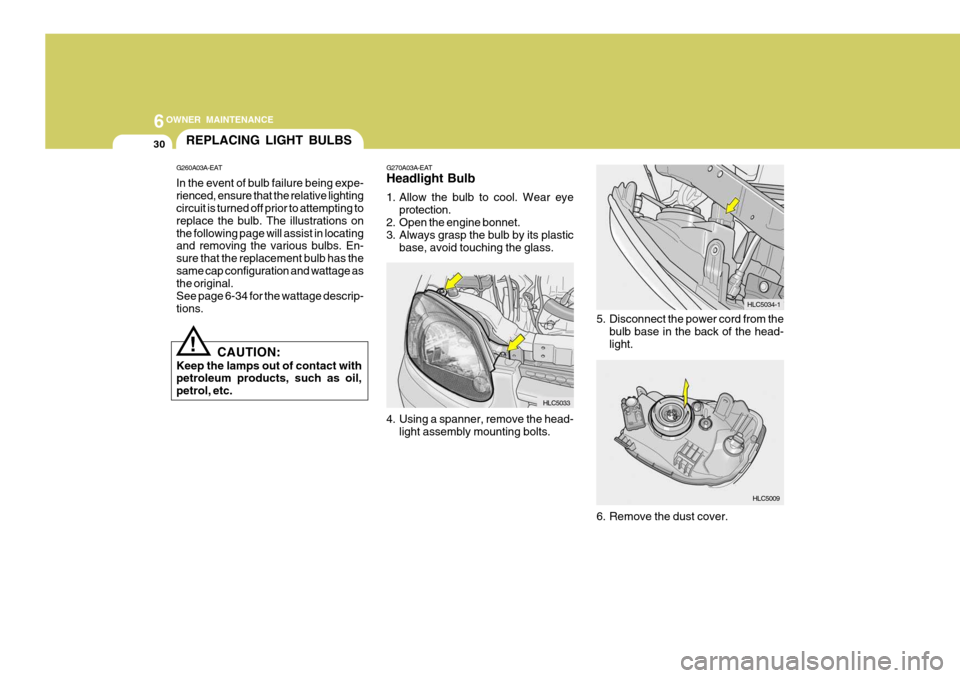
G270A03A-EAT Headlight Bulb
1. Allow the bulb to cool. Wear eyeprotection.
2. Open the engine bonnet.
3. Always grasp the bulb by its plastic
base, avoid touching the glass.
4. Using a spanner, remove the head- light assembly mounting bolts. 5. Disconnect the power cord from the
bulb base in the back of the head-light.
6. Remove the dust cover.
G260A03A-EAT In the event of bulb failure being expe- rienced, ensure that the relative lighting circuit is turned off prior to attempting to replace the bulb. The illustrations onthe following page will assist in locating and removing the various bulbs. En- sure that the replacement bulb has thesame cap configuration and wattage as the original. See page 6-34 for the wattage descrip-tions.
!
CAUTION:
Keep the lamps out of contact with petroleum products, such as oil, petrol, etc. HLC5033
HLC5009
HLC5034-1
Page 573 of 599
6
OWNER MAINTENANCE
31
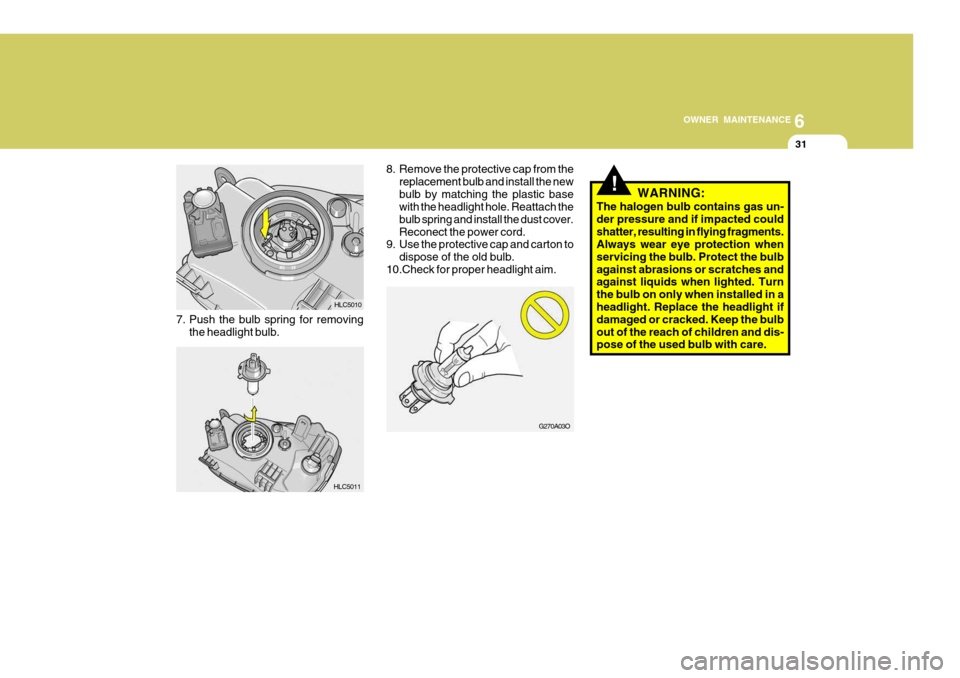
7. Push the bulb spring for removing
the headlight bulb.
!
8. Remove the protective cap from thereplacement bulb and install the new bulb by matching the plastic base with the headlight hole. Reattach the bulb spring and install the dust cover.Reconect the power cord.
9. Use the protective cap and carton to
dispose of the old bulb.
10.Check for proper headlight aim. WARNING:
The halogen bulb contains gas un-der pressure and if impacted couldshatter, resulting in flying fragments. Always wear eye protection when servicing the bulb. Protect the bulbagainst abrasions or scratches and against liquids when lighted. Turn the bulb on only when installed in aheadlight. Replace the headlight if damaged or cracked. Keep the bulb out of the reach of children and dis- pose of the used bulb with care.
HLC5011 HLC5010
G270A03O
Page 574 of 599
6OWNER MAINTENANCE
32
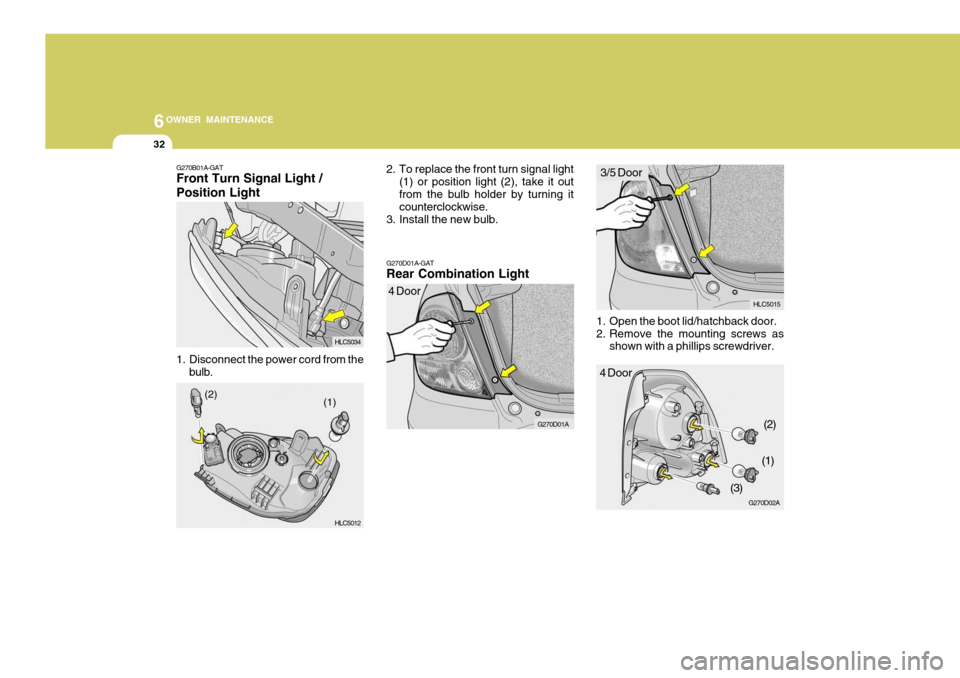
1. Open the boot lid/hatchback door.
2. Remove the mounting screws as
shown with a phillips screwdriver.
G270D01A-GAT Rear Combination Light
2. To replace the front turn signal light
(1) or position light (2), take it out from the bulb holder by turning it counterclockwise.
3. Install the new bulb.
G270B01A-GAT Front Turn Signal Light / Position Light
1. Disconnect the power cord from the
bulb.
G270D01A
HLC5034 HLC5012 4 Door
(1)
(2)
HLC5015
G270D02A
4 Door 3/5 Door
(2)
(1)
(3)
Page 575 of 599
6
OWNER MAINTENANCE
33
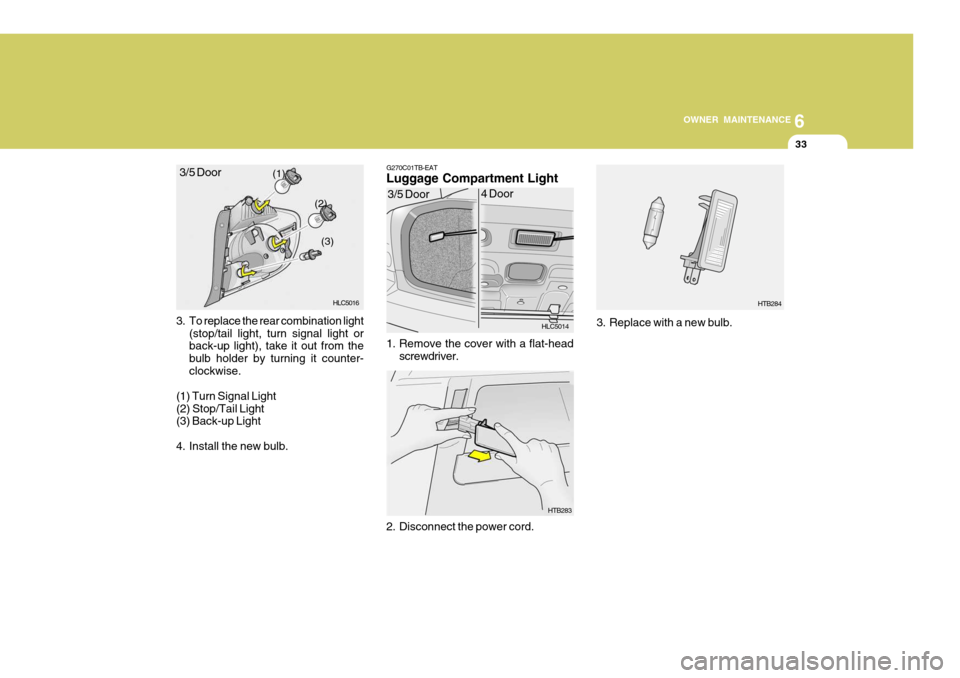
3. To replace the rear combination light (stop/tail light, turn signal light or back-up light), take it out from the bulb holder by turning it counter-clockwise.
(1) Turn Signal Light(2) Stop/Tail Light (3) Back-up Light
4. Install the new bulb. G270C01TB-EAT Luggage Compartment Light
1. Remove the cover with a flat-head
screwdriver.
2. Disconnect the power cord.
(1) (2)
(3)
HLC5016
3/5 Door
HLC5014
HTB283
3/5 Door
4 Door3. Replace with a new bulb.
HTB284
Page 576 of 599
6OWNER MAINTENANCE
34
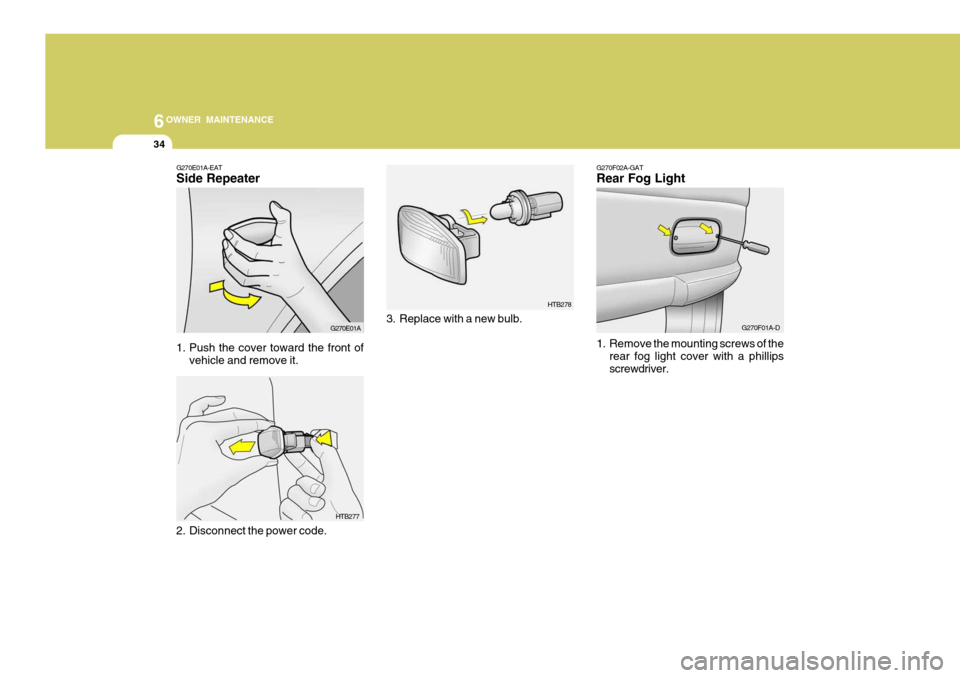
G270F02A-GAT Rear Fog Light
1. Remove the mounting screws of the rear fog light cover with a phillips screwdriver.
3. Replace with a new bulb.
G270E01A-EAT Side Repeater
1. Push the cover toward the front of
vehicle and remove it.
2. Disconnect the power code.
HTB278
HTB277
G270E01A
G270F01A-D
Page 577 of 599
6
OWNER MAINTENANCE
35
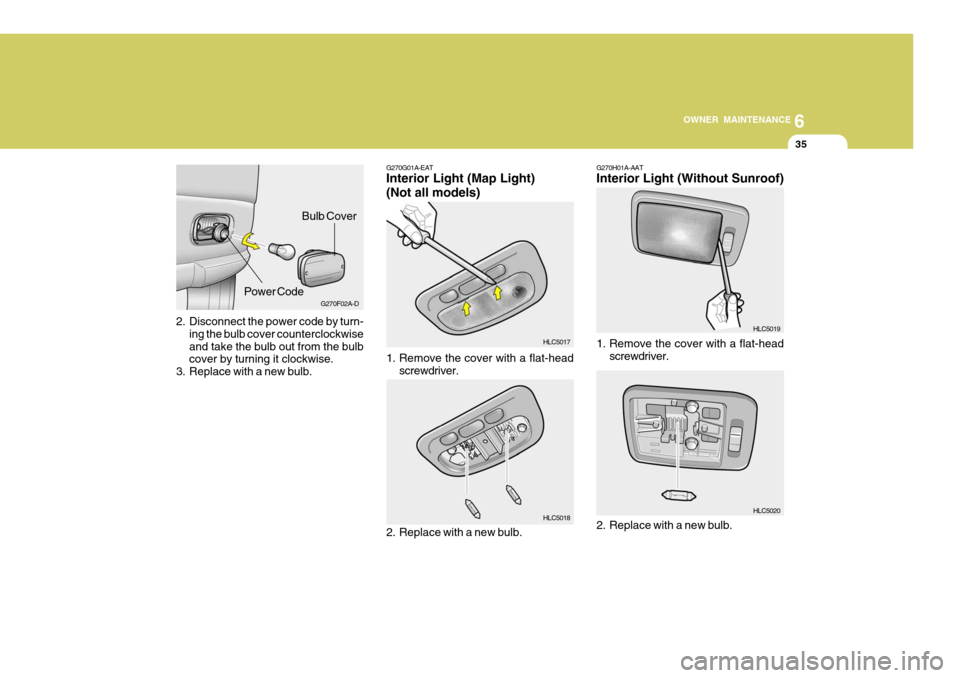
2. Disconnect the power code by turn-
ing the bulb cover counterclockwise and take the bulb out from the bulb cover by turning it clockwise.
3. Replace with a new bulb. G270F02A-D
Bulb Cover
Power Code G270G01A-EAT Interior Light (Map Light) (Not all models)
1. Remove the cover with a flat-head screwdriver.
2. Replace with a new bulb.
HLC5017 HLC5018 G270H01A-AAT Interior Light (Without Sunroof)
1. Remove the cover with a flat-head screwdriver.
2. Replace with a new bulb.
HLC5019 HLC5020