display Hyundai Accent 2006 Owner's Guide
[x] Cancel search | Manufacturer: HYUNDAI, Model Year: 2006, Model line: Accent, Model: Hyundai Accent 2006Pages: 599, PDF Size: 17.59 MB
Page 340 of 599
1FEATURES OF YOUR HYUNDAI
58
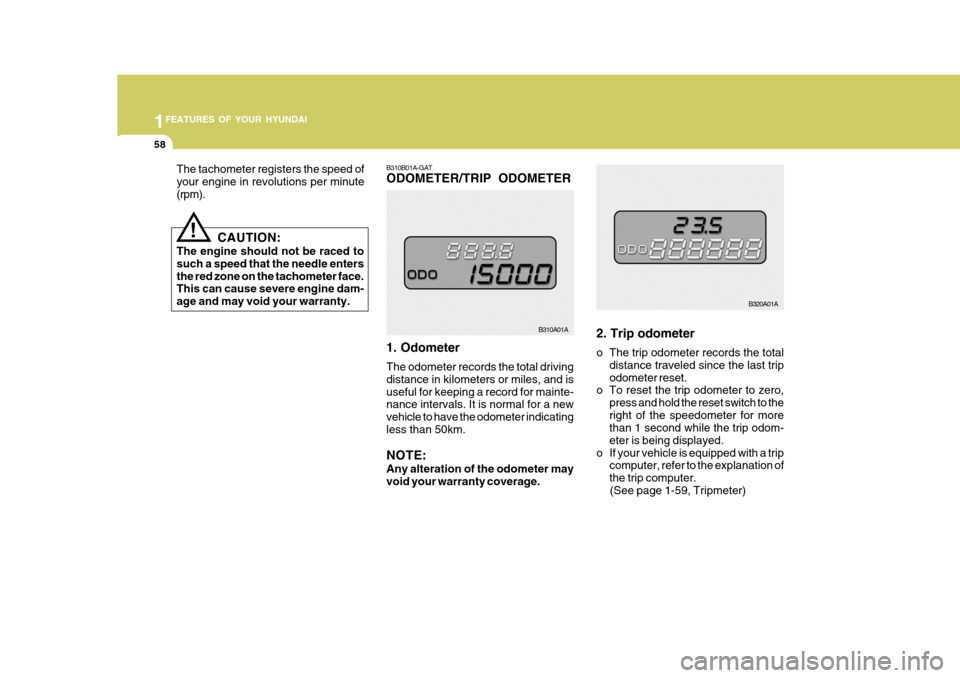
B310B01A-GAT ODOMETER/TRIP ODOMETER 1. Odometer The odometer records the total driving distance in kilometers or miles, and isuseful for keeping a record for mainte- nance intervals. It is normal for a new vehicle to have the odometer indicatingless than 50km. NOTE: Any alteration of the odometer may void your warranty coverage.2. Trip odometer
o The trip odometer records the total
distance traveled since the last trip odometer reset.
o To reset the trip odometer to zero,
press and hold the reset switch to theright of the speedometer for more than 1 second while the trip odom- eter is being displayed.
o If your vehicle is equipped with a trip computer, refer to the explanation ofthe trip computer.
(See page 1-59, Tripmeter)
B310A01A B320A01A
The tachometer registers the speed of your engine in revolutions per minute(rpm).
!
CAUTION:
The engine should not be raced to such a speed that the needle entersthe red zone on the tachometer face. This can cause severe engine dam- age and may void your warranty.
Page 341 of 599
1
FEATURES OF YOUR HYUNDAI
59TRIP COMPUTER
B400B01A
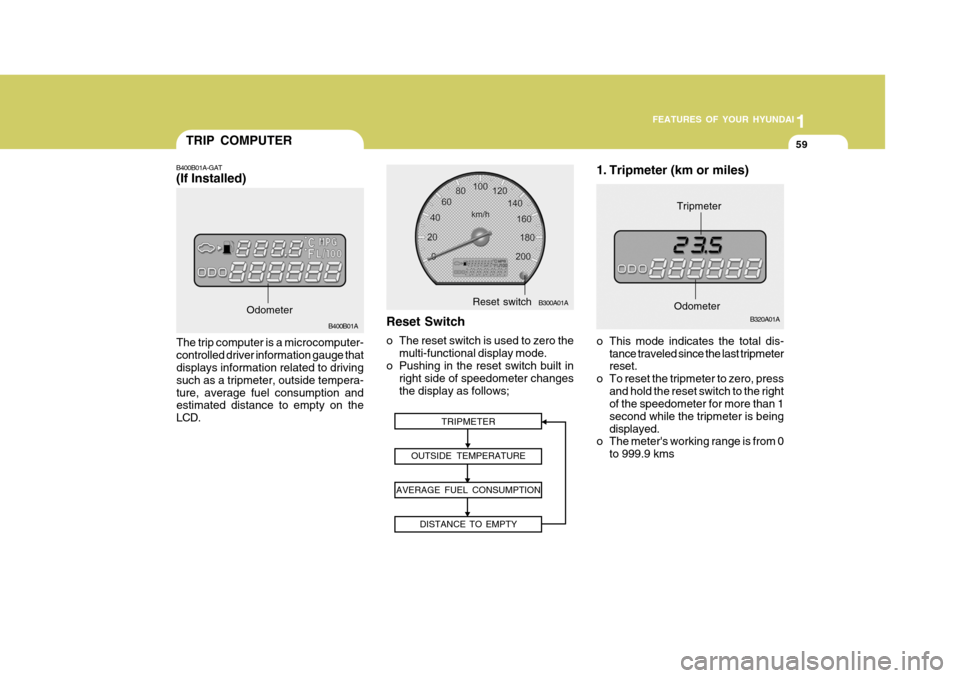
The trip computer is a microcomputer- controlled driver information gauge that displays information related to driving such as a tripmeter, outside tempera-ture, average fuel consumption and estimated distance to empty on the LCD.
B400B01A-GAT (If Installed)
Odometer
1. Tripmeter (km or miles)
TRIPMETER
OUTSIDE TEMPERATURE
AVERAGE FUEL CONSUMPTION DISTANCE TO EMPTY
o This mode indicates the total dis-tance traveled since the last tripmeter reset.
o To reset the tripmeter to zero, press
and hold the reset switch to the rightof the speedometer for more than 1 second while the tripmeter is beingdisplayed.
o The meter's working range is from 0
to 999.9 kms
B320A01A
Odometer
Tripmeter
Reset Switch
o The reset switch is used to zero the multi-functional display mode.
o Pushing in the reset switch built in
right side of speedometer changes the display as follows;
B300A01AReset switch
Page 379 of 599
1
FEATURES OF YOUR HYUNDAI
97
H210B04O-AAT
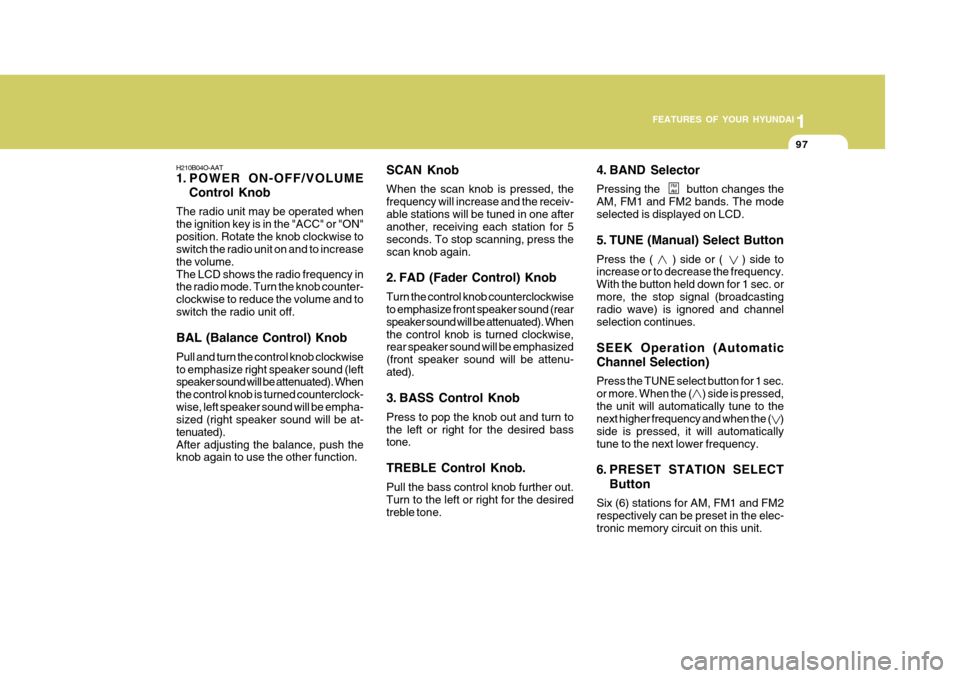
1. POWER ON-OFF/VOLUME Control Knob
The radio unit may be operated when the ignition key is in the "ACC" or "ON"position. Rotate the knob clockwise to switch the radio unit on and to increase the volume.The LCD shows the radio frequency in the radio mode. Turn the knob counter- clockwise to reduce the volume and toswitch the radio unit off. BAL (Balance Control) Knob Pull and turn the control knob clockwise to emphasize right speaker sound (left speaker sound will be attenuated). When the control knob is turned counterclock-wise, left speaker sound will be empha- sized (right speaker sound will be at- tenuated).After adjusting the balance, push the knob again to use the other function. SCAN Knob When the scan knob is pressed, the frequency will increase and the receiv-able stations will be tuned in one after another, receiving each station for 5 seconds. To stop scanning, press thescan knob again.
2. FAD (Fader Control) Knob Turn the control knob counterclockwise to emphasize front speaker sound (rear speaker sound will be attenuated). Whenthe control knob is turned clockwise, rear speaker sound will be emphasized (front speaker sound will be attenu-ated).
3. BASS Control Knob Press to pop the knob out and turn to the left or right for the desired bass tone. TREBLE Control Knob. Pull the bass control knob further out. Turn to the left or right for the desiredtreble tone.4. BAND Selector Pressing the button changes the AM, FM1 and FM2 bands. The modeselected is displayed on LCD.
5. TUNE (Manual) Select Button Press the ( ) side or ( ) side to increase or to decrease the frequency. With the button held down for 1 sec. ormore, the stop signal (broadcasting radio wave) is ignored and channel selection continues. SEEK Operation (Automatic Channel Selection) Press the TUNE select button for 1 sec. or more. When the ( ) side is pressed,the unit will automatically tune to the next higher frequency and when the ( ) side is pressed, it will automaticallytune to the next lower frequency.
6. PRESET STATION SELECT
Button
Six (6) stations for AM, FM1 and FM2 respectively can be preset in the elec- tronic memory circuit on this unit.
FM AM
Page 382 of 599
1FEATURES OF YOUR HYUNDAI
100
H210B04O-AAT
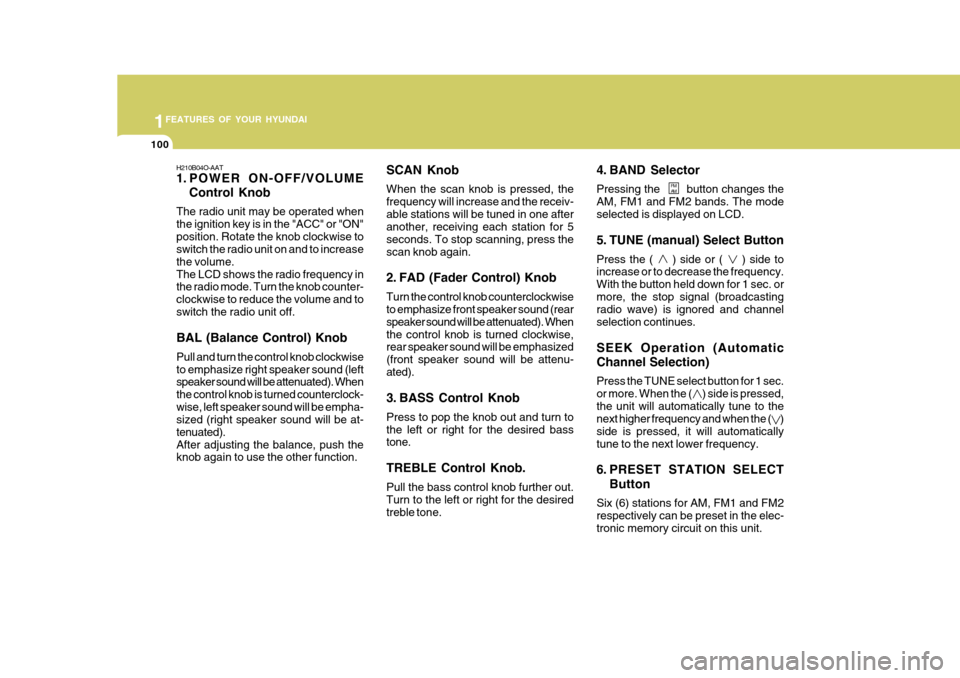
1. POWER ON-OFF/VOLUMEControl Knob
The radio unit may be operated when the ignition key is in the "ACC" or "ON"position. Rotate the knob clockwise to switch the radio unit on and to increase the volume.The LCD shows the radio frequency in the radio mode. Turn the knob counter- clockwise to reduce the volume and toswitch the radio unit off. BAL (Balance Control) Knob Pull and turn the control knob clockwise to emphasize right speaker sound (left speaker sound will be attenuated). When the control knob is turned counterclock-wise, left speaker sound will be empha- sized (right speaker sound will be at- tenuated).After adjusting the balance, push the knob again to use the other function. SCAN Knob When the scan knob is pressed, the frequency will increase and the receiv-able stations will be tuned in one after another, receiving each station for 5 seconds. To stop scanning, press thescan knob again.
2. FAD (Fader Control) Knob Turn the control knob counterclockwise to emphasize front speaker sound (rear speaker sound will be attenuated). Whenthe control knob is turned clockwise, rear speaker sound will be emphasized (front speaker sound will be attenu-ated).
3. BASS Control Knob Press to pop the knob out and turn to the left or right for the desired bass tone. TREBLE Control Knob. Pull the bass control knob further out. Turn to the left or right for the desiredtreble tone. 4. BAND Selector Pressing the button changes the AM, FM1 and FM2 bands. The modeselected is displayed on LCD.
5. TUNE (manual) Select Button Press the ( ) side or ( ) side to increase or to decrease the frequency. With the button held down for 1 sec. ormore, the stop signal (broadcasting radio wave) is ignored and channel selection continues. SEEK Operation (Automatic Channel Selection) Press the TUNE select button for 1 sec. or more. When the ( ) side is pressed,the unit will automatically tune to the next higher frequency and when the ( ) side is pressed, it will automaticallytune to the next lower frequency.
6. PRESET STATION SELECT
Button
Six (6) stations for AM, FM1 and FM2 respectively can be preset in the elec- tronic memory circuit on this unit.
FM AM
Page 387 of 599
1
FEATURES OF YOUR HYUNDAI
105
H260B04O-AAT
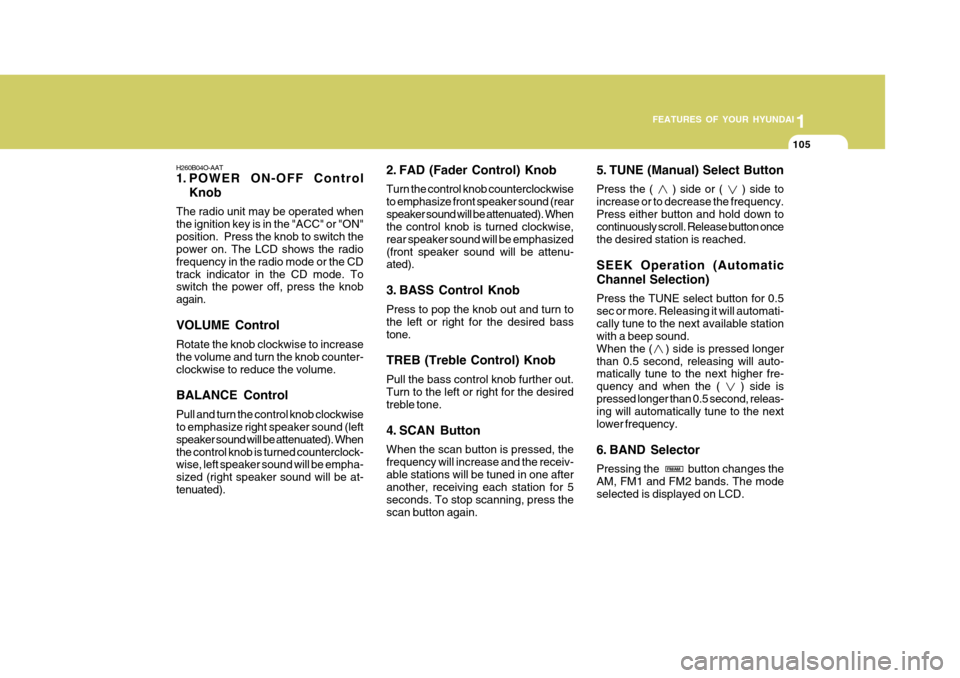
1. POWER ON-OFF Control Knob
The radio unit may be operated when the ignition key is in the "ACC" or "ON"position. Press the knob to switch the power on. The LCD shows the radio frequency in the radio mode or the CDtrack indicator in the CD mode. To switch the power off, press the knob again. VOLUME Control Rotate the knob clockwise to increase the volume and turn the knob counter-clockwise to reduce the volume. BALANCE Control Pull and turn the control knob clockwise to emphasize right speaker sound (left speaker sound will be attenuated). Whenthe control knob is turned counterclock- wise, left speaker sound will be empha- sized (right speaker sound will be at-tenuated). 2. FAD (Fader Control) Knob Turn the control knob counterclockwise to emphasize front speaker sound (rearspeaker sound will be attenuated). When the control knob is turned clockwise, rear speaker sound will be emphasized(front speaker sound will be attenu- ated).
3. BASS Control Knob Press to pop the knob out and turn to the left or right for the desired basstone. TREB (Treble Control) Knob Pull the bass control knob further out. Turn to the left or right for the desired treble tone.
4. SCAN Button When the scan button is pressed, the frequency will increase and the receiv-able stations will be tuned in one after another, receiving each station for 5 seconds. To stop scanning, press thescan button again.5. TUNE (Manual) Select Button Press the ( ) side or ( ) side to increase or to decrease the frequency.Press either button and hold down to continuously scroll. Release button once the desired station is reached. SEEK Operation (Automatic Channel Selection) Press the TUNE select button for 0.5 sec or more. Releasing it will automati-cally tune to the next available station with a beep sound. When the ( ) side is pressed longerthan 0.5 second, releasing will auto- matically tune to the next higher fre- quency and when the ( ) side ispressed longer than 0.5 second, releas- ing will automatically tune to the next lower frequency.
6. BAND Selector Pressing the button changes the AM, FM1 and FM2 bands. The mode selected is displayed on LCD.
FM/AM
Page 388 of 599
1FEATURES OF YOUR HYUNDAI
106
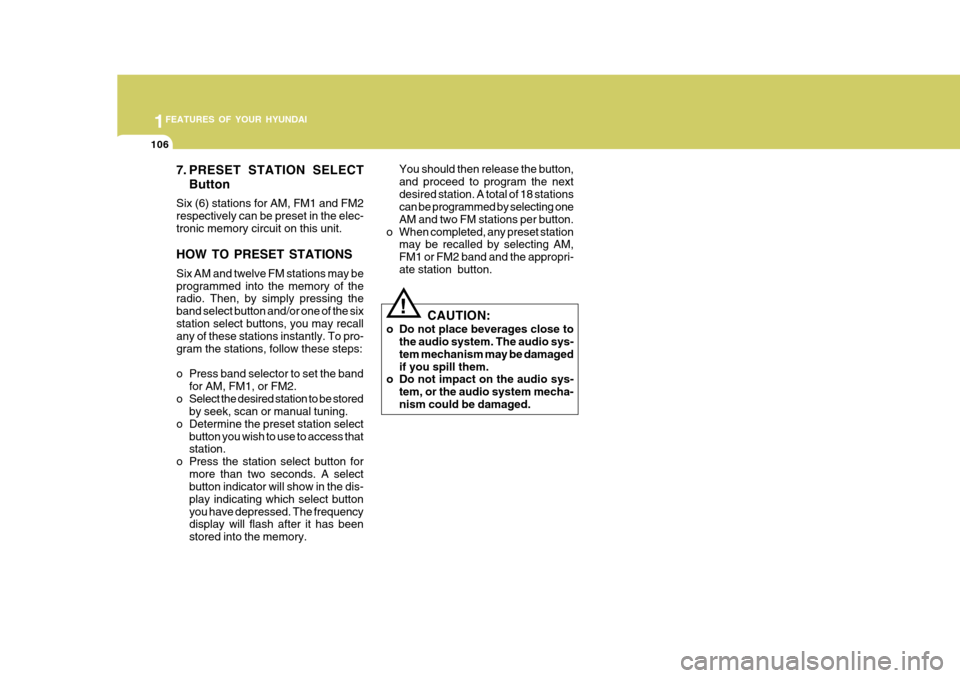
7. PRESET STATION SELECTButton
Six (6) stations for AM, FM1 and FM2 respectively can be preset in the elec-tronic memory circuit on this unit. HOW TO PRESET STATIONS Six AM and twelve FM stations may be programmed into the memory of the radio. Then, by simply pressing the band select button and/or one of the sixstation select buttons, you may recall any of these stations instantly. To pro- gram the stations, follow these steps:
o Press band selector to set the band for AM, FM1, or FM2.
o Select the desired station to be stored by seek, scan or manual tuning.
o Determine the preset station select button you wish to use to access that station.
o Press the station select button for more than two seconds. A selectbutton indicator will show in the dis- play indicating which select buttonyou have depressed. The frequency display will flash after it has been stored into the memory. You should then release the button,and proceed to program the nextdesired station. A total of 18 stations can be programmed by selecting one AM and two FM stations per button.
o When completed, any preset station may be recalled by selecting AM,FM1 or FM2 band and the appropri-ate station button.
! CAUTION:
o Do not place beverages close to the audio system. The audio sys- tem mechanism may be damagedif you spill them.
o Do not impact on the audio sys-
tem, or the audio system mecha-nism could be damaged.
Page 390 of 599
1FEATURES OF YOUR HYUNDAI
108
B260D04O-AAT
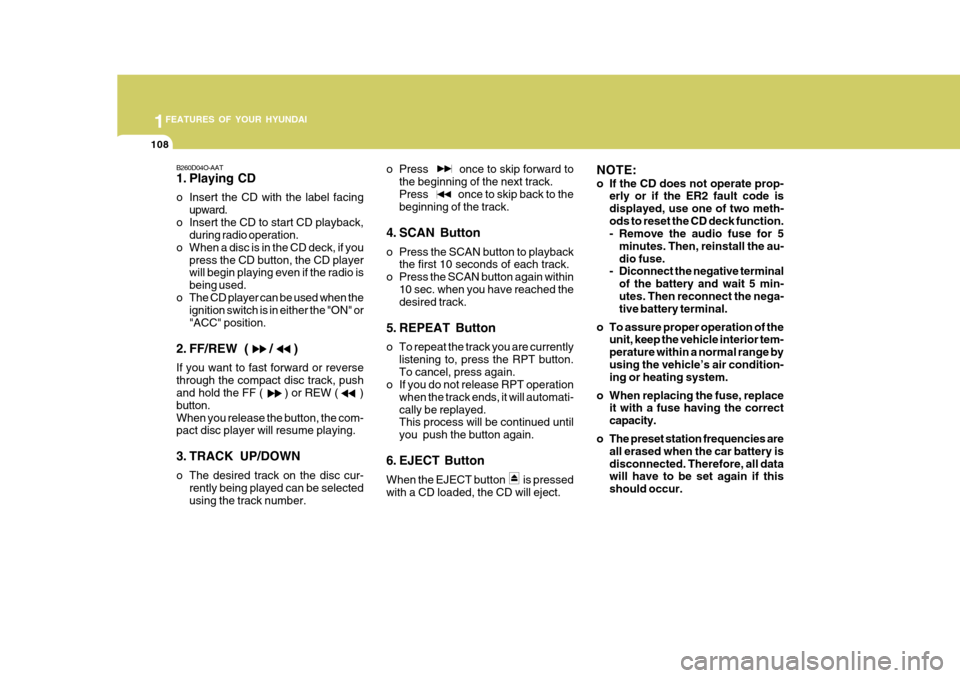
1. Playing CD
o Insert the CD with the label facingupward.
o Insert the CD to start CD playback, during radio operation.
o When a disc is in the CD deck, if you press the CD button, the CD player will begin playing even if the radio is being used.
o The CD player can be used when the ignition switch is in either the "ON" or"ACC" position.
2. FF/REW ( / ) If you want to fast forward or reverse through the compact disc track, push and hold the FF ( ) or REW ( ) button.When you release the button, the com- pact disc player will resume playing.
3. TRACK UP/DOWN
o The desired track on the disc cur- rently being played can be selected using the track number. o Press once to skip forward to
the beginning of the next track.Press once to skip back to the beginning of the track.
4. SCAN Button
o Press the SCAN button to playback the first 10 seconds of each track.
o Press the SCAN button again within 10 sec. when you have reached the desired track.
5. REPEAT Button
o To repeat the track you are currently listening to, press the RPT button. To cancel, press again.
o If you do not release RPT operation
when the track ends, it will automati-cally be replayed. This process will be continued until you push the button again.
6. EJECT Button When the EJECT button is pressed with a CD loaded, the CD will eject. NOTE:
o If the CD does not operate prop-
erly or if the ER2 fault code is displayed, use one of two meth-ods to reset the CD deck function.
- Remove the audio fuse for 5
minutes. Then, reinstall the au- dio fuse.
- Diconnect the negative terminal
of the battery and wait 5 min-utes. Then reconnect the nega- tive battery terminal.
o To assure proper operation of the unit, keep the vehicle interior tem- perature within a normal range byusing the vehicle’s air condition- ing or heating system.
o When replacing the fuse, replace it with a fuse having the correct capacity.
o The preset station frequencies are all erased when the car battery isdisconnected. Therefore, all data will have to be set again if this should occur.
Page 392 of 599
1FEATURES OF YOUR HYUNDAI
110
INDICATIONEr2 Er3
Er6
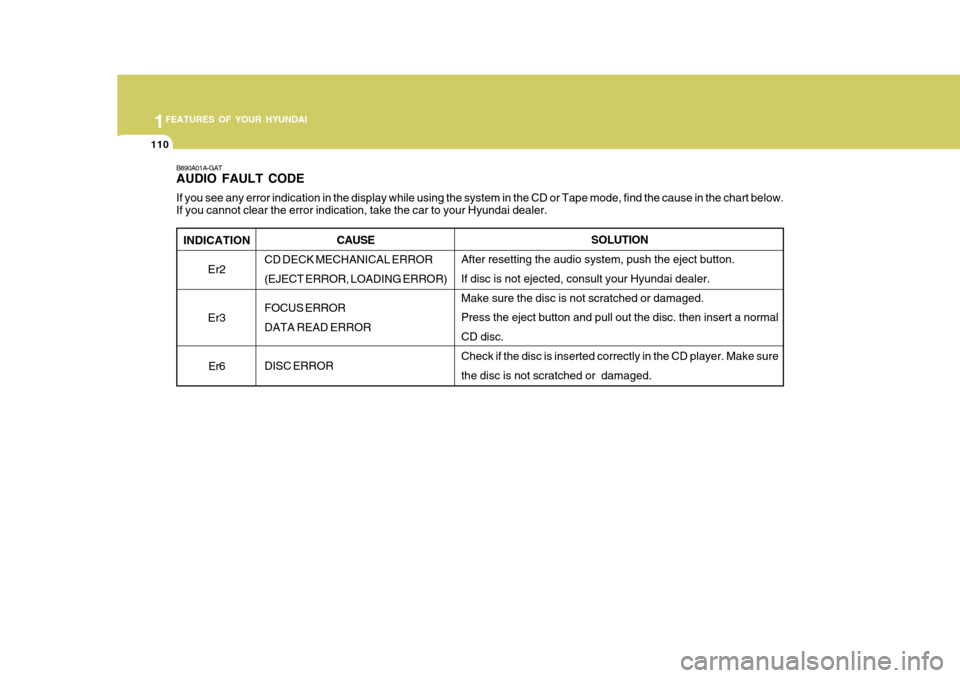
B890A01A-GAT AUDIO FAULT CODE If you see any error indication in the display while using the system in the CD or Tape mode, find the cause in the chart below .
If you cannot clear the error indication, take the car to your Hyundai dealer.
SOLUTION
After resetting the audio system, push the eject button. If disc is not ejected, consult your Hyundai dealer.Make sure the disc is not scratched or damaged. Press the eject button and pull out the disc. then insert a normal CD disc. Check if the disc is inserted correctly in the CD player. Make sure the disc is not scratched or damaged.
CAUSE
CD DECK MECHANICAL ERROR(EJECT ERROR, LOADING ERROR) FOCUS ERROR DATA READ ERROR DISC ERROR
Page 455 of 599
1CONTROLS AND EQUIPMENT
48TRIP COMPUTER
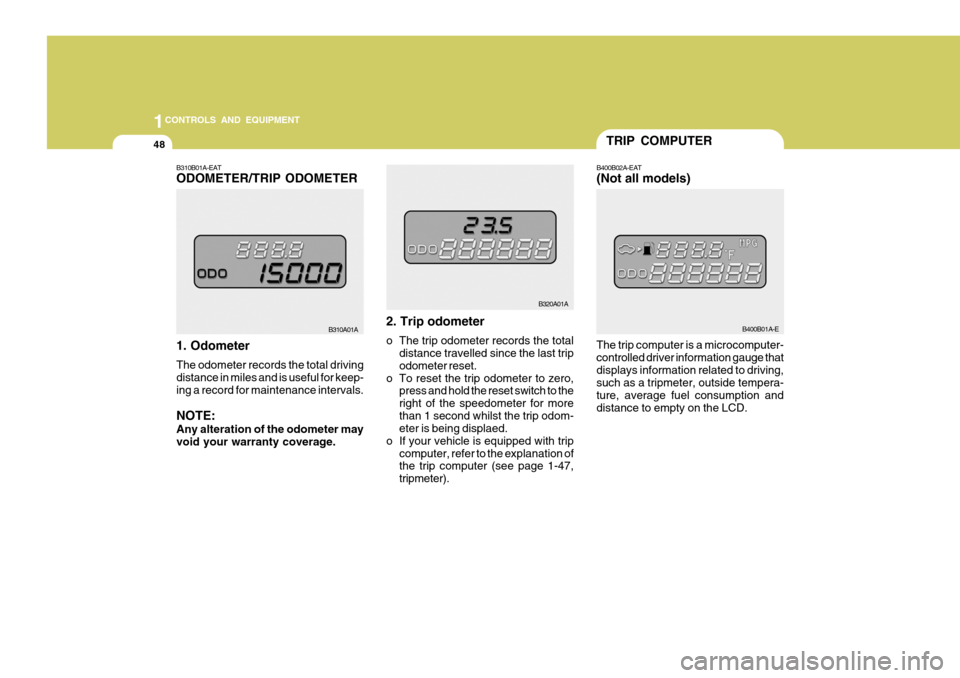
The trip computer is a microcomputer- controlled driver information gauge thatdisplays information related to driving, such as a tripmeter, outside tempera- ture, average fuel consumption anddistance to empty on the LCD.B400B02A-EAT (Not all models)
B400B01A-E
B310B01A-EAT ODOMETER/TRIP ODOMETER 1. Odometer The odometer records the total driving distance in miles and is useful for keep-ing a record for maintenance intervals. NOTE: Any alteration of the odometer may void your warranty coverage. 2. Trip odometer
o The trip odometer records the total
distance travelled since the last trip odometer reset.
o To reset the trip odometer to zero, press and hold the reset switch to theright of the speedometer for morethan 1 second whilst the trip odom- eter is being displaed.
o If your vehicle is equipped with trip
computer, refer to the explanation ofthe trip computer (see page 1-47, tripmeter).
B310A01A
B320A01A
Page 456 of 599
49
1
CONTROLS AND EQUIPMENT
B320A01A
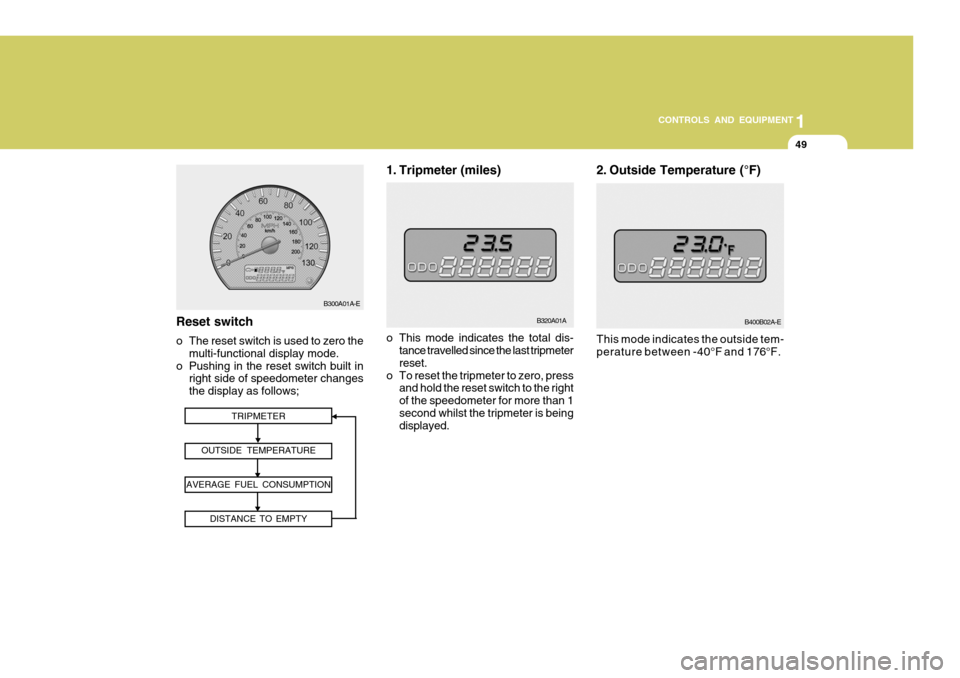
1. Tripmeter (miles)
TRIPMETER
OUTSIDE TEMPERATURE
AVERAGE FUEL CONSUMPTION DISTANCE TO EMPTYReset switch
o The reset switch is used to zero themulti-functional display mode.
o Pushing in the reset switch built in right side of speedometer changes the display as follows; o This mode indicates the total dis-
tance travelled since the last tripmeterreset.
o To reset the tripmeter to zero, press and hold the reset switch to the rightof the speedometer for more than 1second whilst the tripmeter is being displayed.
B300A01A-EB400B02A-E
This mode indicates the outside tem-
perature between -40°F and 176°F.
2. Outside Temperature (°F)