lock Hyundai Accent 2006 Service Manual
[x] Cancel search | Manufacturer: HYUNDAI, Model Year: 2006, Model line: Accent, Model: Hyundai Accent 2006Pages: 599, PDF Size: 17.59 MB
Page 121 of 599
1
FEATURES OF YOUR HYUNDAI
107
1
FEATURES OF YOUR HYUNDAI
107
1
FEATURES OF YOUR HYUNDAI
107
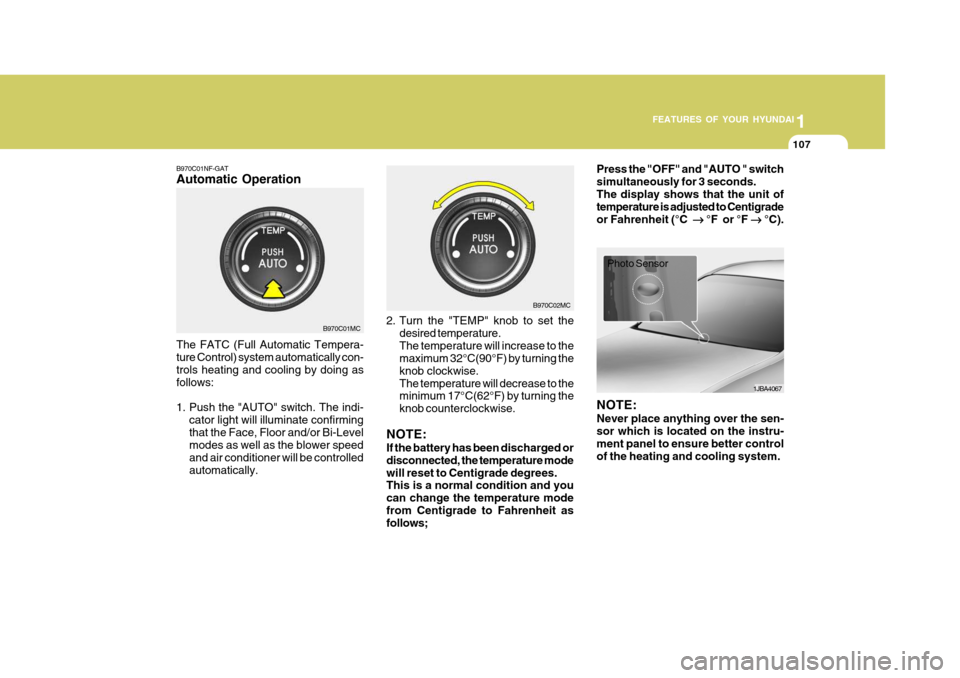
B970C01NF-GAT Automatic Operation The FATC (Full Automatic Tempera- ture Control) system automatically con- trols heating and cooling by doing as follows:
1. Push the "AUTO" switch. The indi-
cator light will illuminate confirming that the Face, Floor and/or Bi-Level modes as well as the blower speed and air conditioner will be controlledautomatically. 2. Turn the "TEMP" knob to set the
desired temperature.The temperature will increase to the maximum 32°C(90°F) by turning the knob clockwise.The temperature will decrease to the minimum 17°C(62°F) by turning the knob counterclockwise.
NOTE: If the battery has been discharged or disconnected, the temperature modewill reset to Centigrade degrees. This is a normal condition and you can change the temperature modefrom Centigrade to Fahrenheit as follows; Press the "OFF" and "AUTO " switch simultaneously for 3 seconds.The display shows that the unit of temperature is adjusted to Centigrade or Fahrenheit (°C
°F or °F
°C).
B970C01MC B970C02MC
1JBA4067
Photo Sensor
NOTE: Never place anything over the sen- sor which is located on the instru- ment panel to ensure better control of the heating and cooling system.
Page 128 of 599
1FEATURES OF YOUR HYUNDAI
114
!
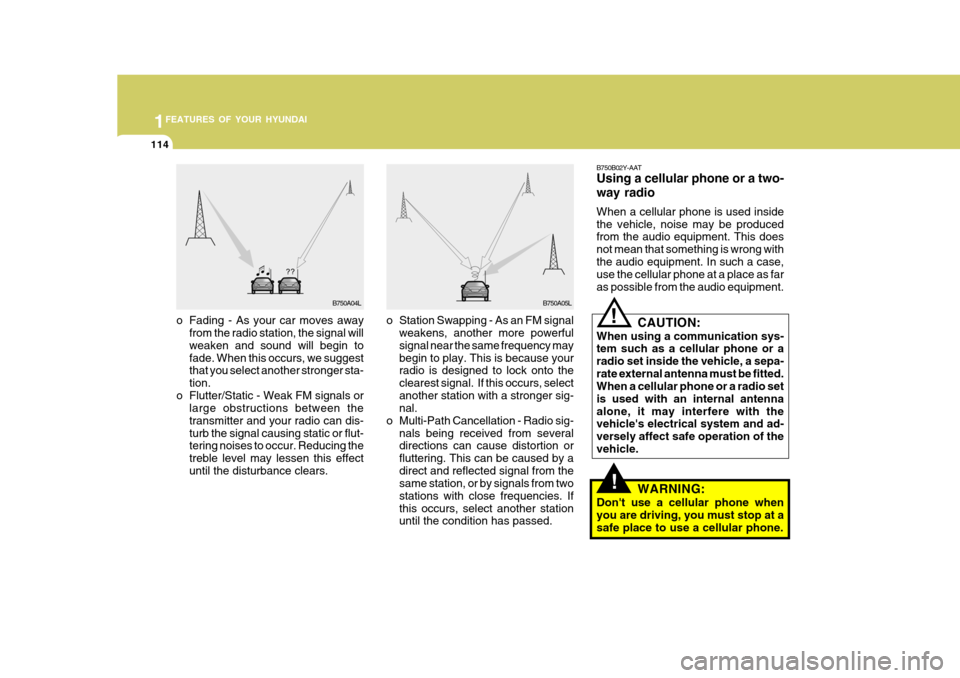
o Station Swapping - As an FM signal
weakens, another more powerful signal near the same frequency may begin to play. This is because your radio is designed to lock onto the clearest signal. If this occurs, selectanother station with a stronger sig- nal.
o Multi-Path Cancellation - Radio sig- nals being received from severaldirections can cause distortion or fluttering. This can be caused by adirect and reflected signal from the same station, or by signals from two stations with close frequencies. Ifthis occurs, select another station until the condition has passed.
o Fading - As your car moves away
from the radio station, the signal willweaken and sound will begin to fade. When this occurs, we suggest that you select another stronger sta- tion.
o Flutter/Static - Weak FM signals or large obstructions between thetransmitter and your radio can dis-turb the signal causing static or flut- tering noises to occur. Reducing the treble level may lessen this effectuntil the disturbance clears. B750B02Y-AAT Using a cellular phone or a two- way radio When a cellular phone is used inside the vehicle, noise may be produced from the audio equipment. This does not mean that something is wrong withthe audio equipment. In such a case, use the cellular phone at a place as far as possible from the audio equipment.!
CAUTION:
When using a communication sys- tem such as a cellular phone or a radio set inside the vehicle, a sepa-rate external antenna must be fitted. When a cellular phone or a radio set is used with an internal antennaalone, it may interfere with the vehicle's electrical system and ad- versely affect safe operation of thevehicle.
WARNING:
Don't use a cellular phone whenyou are driving, you must stop at asafe place to use a cellular phone.
B750A04L B750A05L
Page 130 of 599
1FEATURES OF YOUR HYUNDAI
116
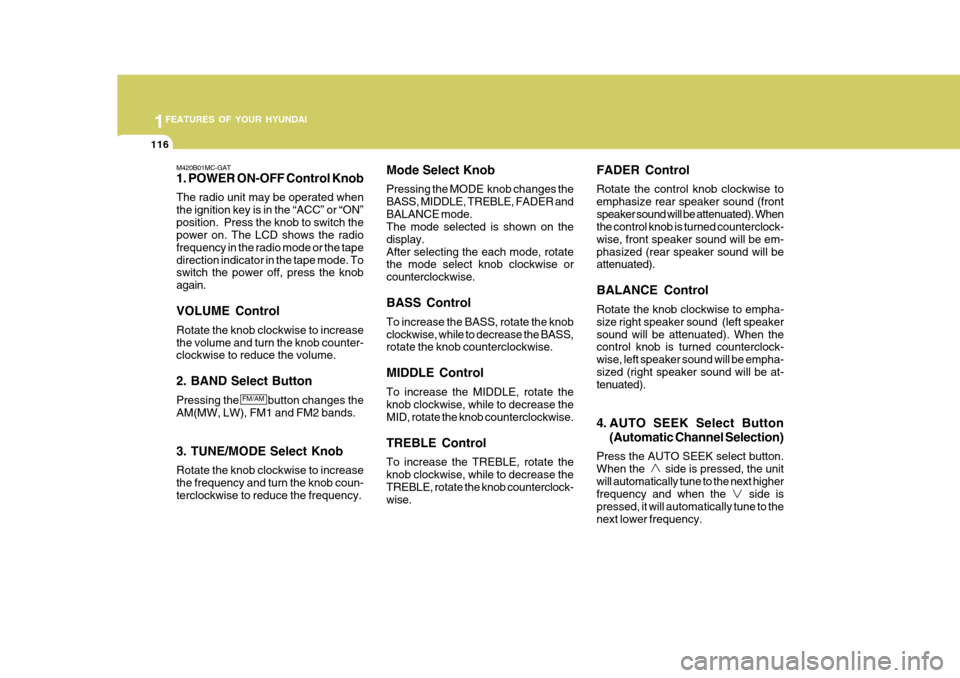
M420B01MC-GAT 1. POWER ON-OFF Control Knob The radio unit may be operated when the ignition key is in the “ACC” or “ON”position. Press the knob to switch the power on. The LCD shows the radio frequency in the radio mode or the tapedirection indicator in the tape mode. To switch the power off, press the knob again. VOLUME Control Rotate the knob clockwise to increase the volume and turn the knob counter- clockwise to reduce the volume. 2. BAND Select Button Pressing the button changes the AM(MW, LW), FM1 and FM2 bands. 3. TUNE/MODE Select Knob Rotate the knob clockwise to increase the frequency and turn the knob coun- terclockwise to reduce the frequency. Mode Select Knob Pressing the MODE knob changes the BASS, MIDDLE, TREBLE, FADER andBALANCE mode. The mode selected is shown on the display.After selecting the each mode, rotate the mode select knob clockwise or counterclockwise. BASS Control To increase the BASS, rotate the knob clockwise, while to decrease the BASS, rotate the knob counterclockwise. MIDDLE Control To increase the MIDDLE, rotate the knob clockwise, while to decrease the MID, rotate the knob counterclockwise. TREBLE Control To increase the TREBLE, rotate the knob clockwise, while to decrease the TREBLE, rotate the knob counterclock- wise. FADER Control Rotate the control knob clockwise to emphasize rear speaker sound (frontspeaker sound will be attenuated). When the control knob is turned counterclock- wise, front speaker sound will be em-phasized (rear speaker sound will be attenuated). BALANCE Control Rotate the knob clockwise to empha- size right speaker sound (left speakersound will be attenuated). When the control knob is turned counterclock- wise, left speaker sound will be empha-sized (right speaker sound will be at- tenuated).
4. AUTO SEEK Select Button
(Automatic Channel Selection)
Press the AUTO SEEK select button. When the side is pressed, the unitwill automatically tune to the next higher frequency and when the side is pressed, it will automatically tune to thenext lower frequency.
FM/AM
Page 135 of 599
1
FEATURES OF YOUR HYUNDAI
121
1
FEATURES OF YOUR HYUNDAI
121
1
FEATURES OF YOUR HYUNDAI
121
1
FEATURES OF YOUR HYUNDAI
121
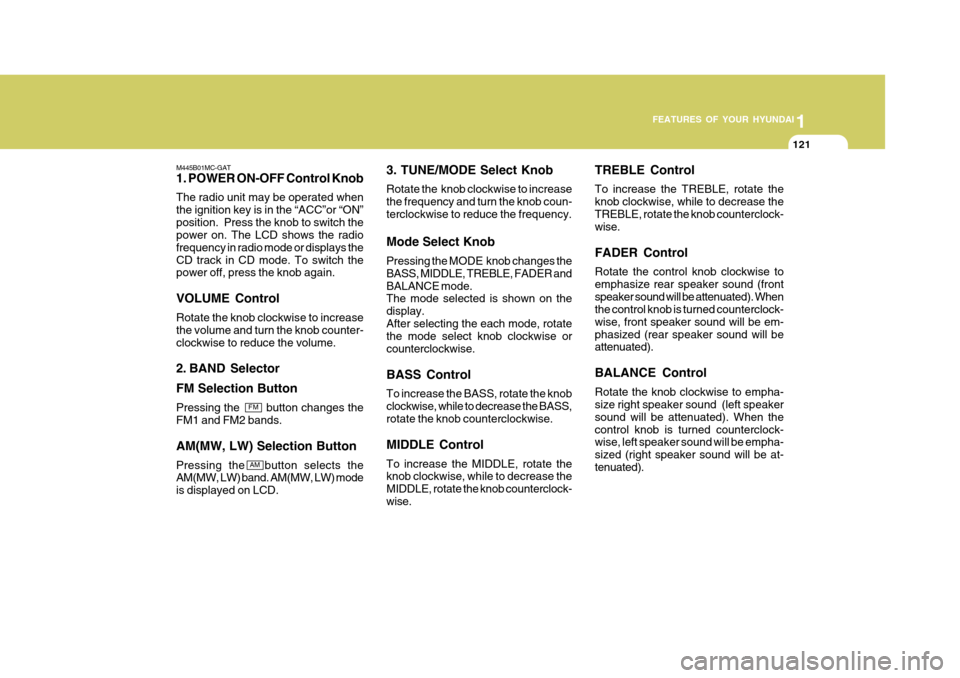
M445B01MC-GAT 1. POWER ON-OFF Control Knob The radio unit may be operated when the ignition key is in the “ACC”or “ON”position. Press the knob to switch the power on. The LCD shows the radio frequency in radio mode or displays theCD track in CD mode. To switch the power off, press the knob again. VOLUME Control Rotate the knob clockwise to increase the volume and turn the knob counter-clockwise to reduce the volume.
2. BAND Selector FM Selection Button Pressing the button changes the FM1 and FM2 bands. AM(MW, LW) Selection Button Pressing the button selects the AM(MW, LW) band. AM(MW, LW) mode is displayed on LCD. 3. TUNE/MODE Select Knob Rotate the knob clockwise to increase the frequency and turn the knob coun-terclockwise to reduce the frequency. Mode Select Knob Pressing the MODE knob changes the BASS, MIDDLE, TREBLE, FADER andBALANCE mode. The mode selected is shown on the display.After selecting the each mode, rotate the mode select knob clockwise or counterclockwise. BASS Control To increase the BASS, rotate the knob clockwise, while to decrease the BASS, rotate the knob counterclockwise. MIDDLE Control To increase the MIDDLE, rotate the knob clockwise, while to decrease the MIDDLE, rotate the knob counterclock-wise.TREBLE Control To increase the TREBLE, rotate the knob clockwise, while to decrease theTREBLE, rotate the knob counterclock- wise. FADER Control Rotate the control knob clockwise to emphasize rear speaker sound (frontspeaker sound will be attenuated). When the control knob is turned counterclock- wise, front speaker sound will be em-phasized (rear speaker sound will be attenuated). BALANCE Control Rotate the knob clockwise to empha- size right speaker sound (left speaker sound will be attenuated). When thecontrol knob is turned counterclock- wise, left speaker sound will be empha- sized (right speaker sound will be at-tenuated).
FM
AM
Page 141 of 599
1
FEATURES OF YOUR HYUNDAI
127
1
FEATURES OF YOUR HYUNDAI
127
1
FEATURES OF YOUR HYUNDAI
127
1
FEATURES OF YOUR HYUNDAI
127
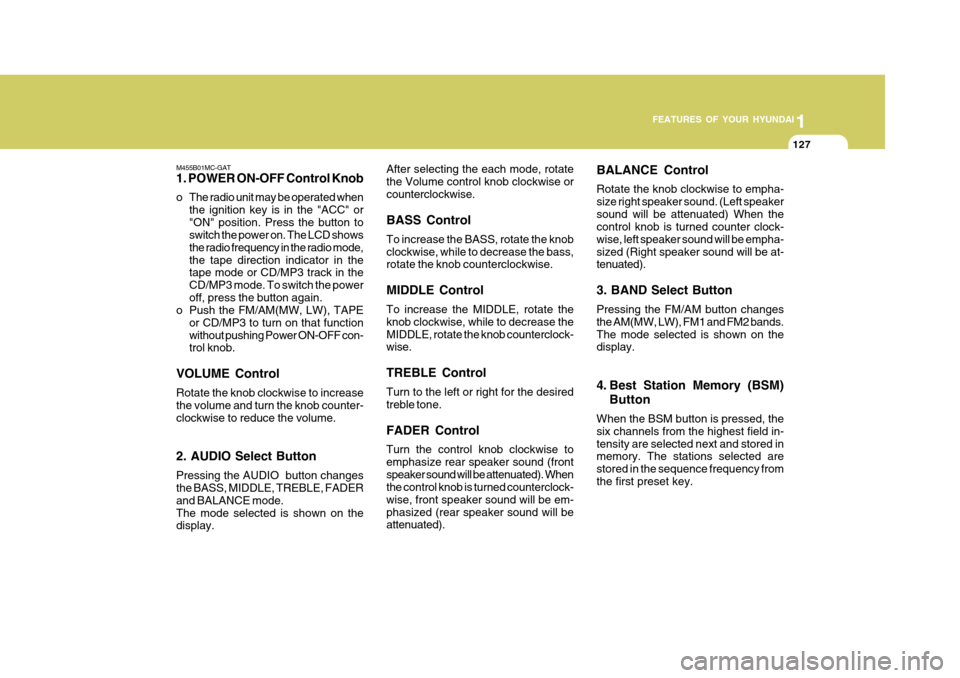
M455B01MC-GAT 1. POWER ON-OFF Control Knob
o The radio unit may be operated when the ignition key is in the "ACC" or "ON" position. Press the button to switch the power on. The LCD shows the radio frequency in the radio mode,the tape direction indicator in the tape mode or CD/MP3 track in the CD/MP3 mode. To switch the poweroff, press the button again.
o Push the FM/AM(MW, LW), TAPE
or CD/MP3 to turn on that functionwithout pushing Power ON-OFF con- trol knob.
VOLUME Control Rotate the knob clockwise to increase the volume and turn the knob counter-clockwise to reduce the volume. 2. AUDIO Select Button Pressing the AUDIO button changes the BASS, MIDDLE, TREBLE, FADER and BALANCE mode.The mode selected is shown on the display. After selecting the each mode, rotate the Volume control knob clockwise orcounterclockwise. BASS Control To increase the BASS, rotate the knob clockwise, while to decrease the bass, rotate the knob counterclockwise. MIDDLE Control To increase the MIDDLE, rotate the knob clockwise, while to decrease theMIDDLE, rotate the knob counterclock- wise. TREBLE Control Turn to the left or right for the desired treble tone. FADER Control Turn the control knob clockwise to emphasize rear speaker sound (frontspeaker sound will be attenuated). When the control knob is turned counterclock- wise, front speaker sound will be em-phasized (rear speaker sound will be attenuated).
BALANCE Control Rotate the knob clockwise to empha- size right speaker sound. (Left speakersound will be attenuated) When the control knob is turned counter clock- wise, left speaker sound will be empha-sized (Right speaker sound will be at- tenuated). 3. BAND Select Button Pressing the FM/AM button changes the AM(MW, LW), FM1 and FM2 bands.The mode selected is shown on the display.
4. Best Station Memory (BSM)
Button
When the BSM button is pressed, the six channels from the highest field in-tensity are selected next and stored in memory. The stations selected are stored in the sequence frequency fromthe first preset key.
Page 142 of 599
1FEATURES OF YOUR HYUNDAI
128
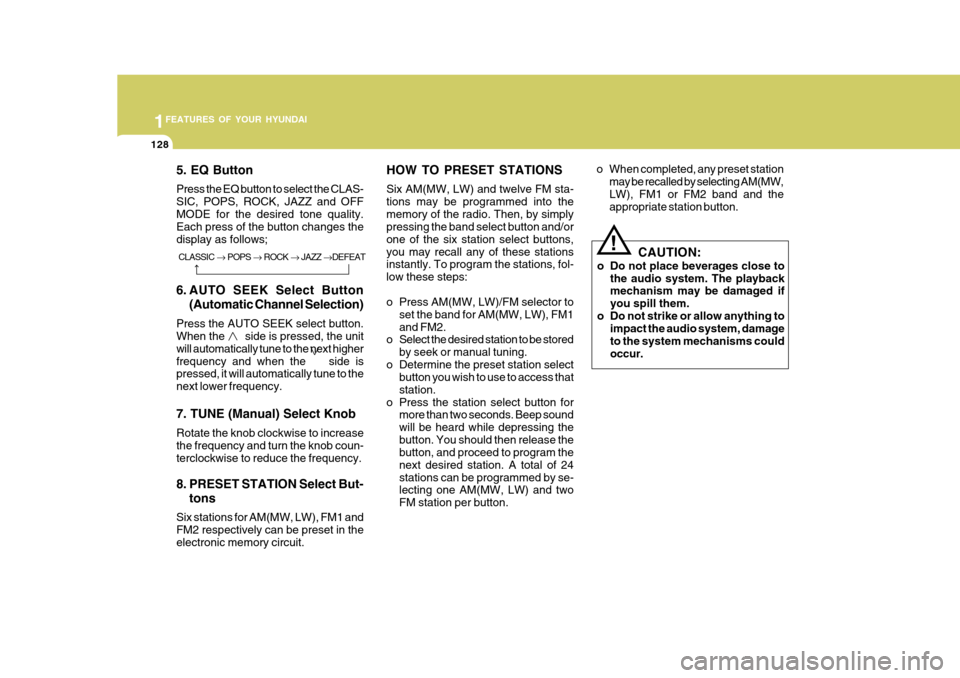
5. EQ Button Press the EQ button to select the CLAS- SIC, POPS, ROCK, JAZZ and OFFMODE for the desired tone quality. Each press of the button changes the display as follows;
6. AUTO SEEK Select Button(Automatic Channel Selection)
Press the AUTO SEEK select button. When the side is pressed, the unit will automatically tune to the next higherfrequency and when the side is pressed, it will automatically tune to the next lower frequency. 7. TUNE (Manual) Select Knob Rotate the knob clockwise to increase the frequency and turn the knob coun- terclockwise to reduce the frequency.
8. PRESET STATION Select But- tons
Six stations for AM(MW, LW), FM1 and FM2 respectively can be preset in theelectronic memory circuit. HOW TO PRESET STATIONS Six AM(MW, LW) and twelve FM sta- tions may be programmed into thememory of the radio. Then, by simply pressing the band select button and/or one of the six station select buttons,you may recall any of these stations instantly. To program the stations, fol- low these steps:
o Press AM(MW, LW)/FM selector to
set the band for AM(MW, LW), FM1 and FM2.
o Select the desired station to be stored
by seek or manual tuning.
o Determine the preset station select button you wish to use to access thatstation.
o Press the station select button for more than two seconds. Beep soundwill be heard while depressing thebutton. You should then release the button, and proceed to program the next desired station. A total of 24stations can be programmed by se- lecting one AM(MW, LW) and two FM station per button. o When completed, any preset station
may be recalled by selecting AM(MW,LW), FM1 or FM2 band and the appropriate station button.
! CAUTION:
o Do not place beverages close to the audio system. The playback mechanism may be damaged if you spill them.
o Do not strike or allow anything to impact the audio system, damageto the system mechanisms couldoccur.CLASSIC POPS ROCK JAZZ DEFEAT
Page 148 of 599
1FEATURES OF YOUR HYUNDAI
134
o To listen the music within the se-lected folder in random order, press the RDM button within a second. To cancel, press it again or or turn the power OFF then ON. (MP3 CD only)
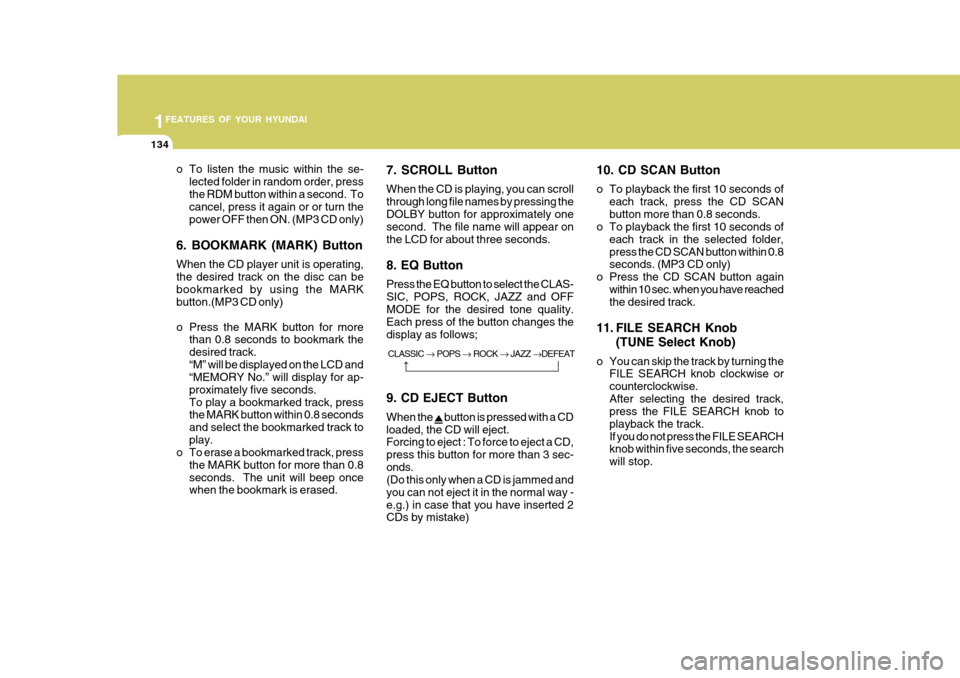
6. BOOKMARK (MARK) Button When the CD player unit is operating, the desired track on the disc can bebookmarked by using the MARK button.(MP3 CD only)
o Press the MARK button for more than 0.8 seconds to bookmark the desired track.“M” will be displayed on the LCD and “MEMORY No.” will display for ap- proximately five seconds.To play a bookmarked track, press the MARK button within 0.8 seconds and select the bookmarked track toplay.
o To erase a bookmarked track, press
the MARK button for more than 0.8seconds. The unit will beep once when the bookmark is erased. 7. SCROLL Button When the CD is playing, you can scroll through long file names by pressing theDOLBY button for approximately one second. The file name will appear on the LCD for about three seconds. 8. EQ Button Press the EQ button to select the CLAS- SIC, POPS, ROCK, JAZZ and OFF MODE for the desired tone quality. Each press of the button changes thedisplay as follows; 9. CD EJECT Button When the
button is pressed with a CD
loaded, the CD will eject. Forcing to eject : To force to eject a CD, press this button for more than 3 sec-onds. (Do this only when a CD is jammed and you can not eject it in the normal way -e.g.) in case that you have inserted 2 CDs by mistake) 10. CD SCAN Button
o To playback the first 10 seconds of
each track, press the CD SCAN button more than 0.8 seconds.
o To playback the first 10 seconds of
each track in the selected folder,press the CD SCAN button within 0.8 seconds. (MP3 CD only)
o Press the CD SCAN button again within 10 sec. when you have reachedthe desired track.
11. FILE SEARCH Knob (TUNE Select Knob)
o You can skip the track by turning the FILE SEARCH knob clockwise or counterclockwise.After selecting the desired track, press the FILE SEARCH knob to playback the track.If you do not press the FILE SEARCH knob within five seconds, the search will stop.
CLASSIC
POPS ROCK JAZZ DEFEAT
Page 151 of 599
1
FEATURES OF YOUR HYUNDAI
137
1
FEATURES OF YOUR HYUNDAI
137
1
FEATURES OF YOUR HYUNDAI
137
1
FEATURES OF YOUR HYUNDAI
137
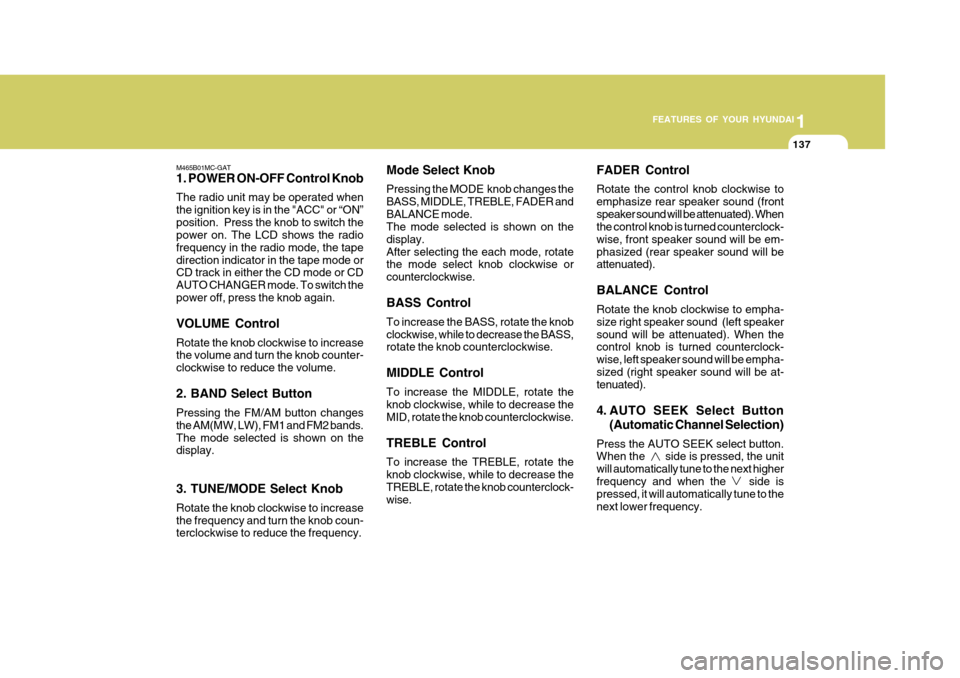
M465B01MC-GAT 1. POWER ON-OFF Control Knob The radio unit may be operated when the ignition key is in the "ACC" or “ON”position. Press the knob to switch the power on. The LCD shows the radio frequency in the radio mode, the tapedirection indicator in the tape mode or CD track in either the CD mode or CD AUTO CHANGER mode. To switch thepower off, press the knob again. VOLUME Control Rotate the knob clockwise to increase the volume and turn the knob counter- clockwise to reduce the volume. 2. BAND Select Button Pressing the FM/AM button changes the AM(MW, LW), FM1 and FM2 bands.The mode selected is shown on the display. 3. TUNE/MODE Select Knob Rotate the knob clockwise to increase the frequency and turn the knob coun- terclockwise to reduce the frequency. Mode Select Knob Pressing the MODE knob changes the BASS, MIDDLE, TREBLE, FADER andBALANCE mode. The mode selected is shown on the display.After selecting the each mode, rotate the mode select knob clockwise or counterclockwise. BASS Control To increase the BASS, rotate the knob clockwise, while to decrease the BASS, rotate the knob counterclockwise. MIDDLE Control To increase the MIDDLE, rotate the knob clockwise, while to decrease the MID, rotate the knob counterclockwise. TREBLE Control To increase the TREBLE, rotate the knob clockwise, while to decrease the TREBLE, rotate the knob counterclock- wise.
FADER Control Rotate the control knob clockwise to emphasize rear speaker sound (frontspeaker sound will be attenuated). When the control knob is turned counterclock- wise, front speaker sound will be em-phasized (rear speaker sound will be attenuated). BALANCE Control Rotate the knob clockwise to empha- size right speaker sound (left speakersound will be attenuated). When the control knob is turned counterclock- wise, left speaker sound will be empha-sized (right speaker sound will be at- tenuated).
4. AUTO SEEK Select Button
(Automatic Channel Selection)
Press the AUTO SEEK select button. When the side is pressed, the unit will automatically tune to the next higherfrequency and when the side is pressed, it will automatically tune to the next lower frequency.
Page 162 of 599
1FEATURES OF YOUR HYUNDAI
148
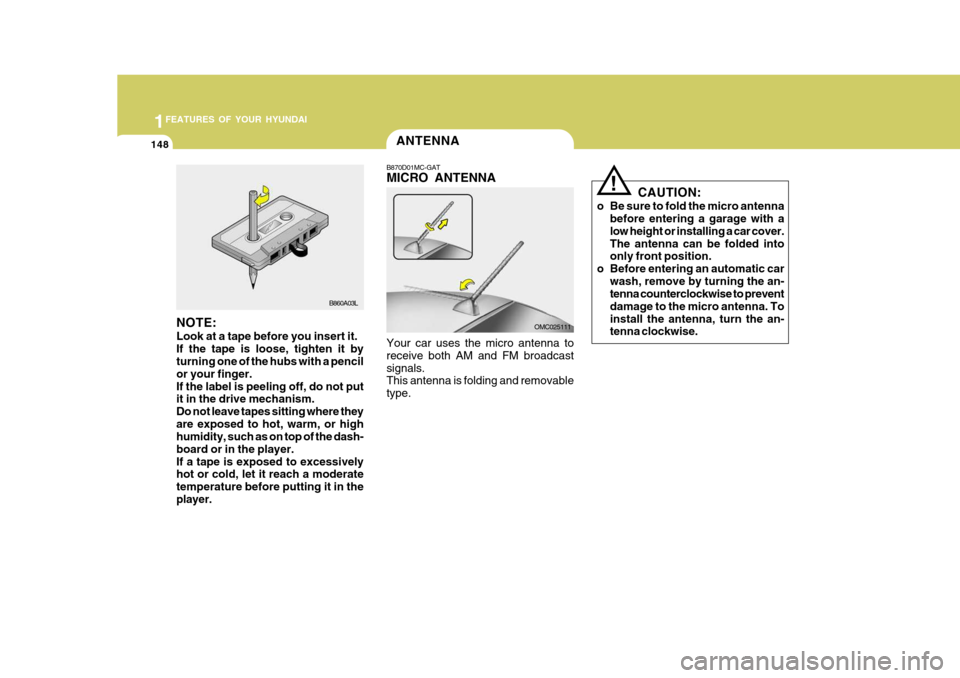
NOTE: Look at a tape before you insert it. If the tape is loose, tighten it by turning one of the hubs with a pencil or your finger.If the label is peeling off, do not put it in the drive mechanism. Do not leave tapes sitting where theyare exposed to hot, warm, or high humidity, such as on top of the dash- board or in the player.If a tape is exposed to excessively hot or cold, let it reach a moderate temperature before putting it in theplayer.
B860A03L
ANTENNA
B870D01MC-GAT MICRO ANTENNA Your car uses the micro antenna to receive both AM and FM broadcastsignals. This antenna is folding and removable type. OMC025111CAUTION:
o Be sure to fold the micro antenna before entering a garage with alow height or installing a car cover.The antenna can be folded into only front position.
o Before entering an automatic car wash, remove by turning the an-tenna counterclockwise to prevent damage to the micro antenna. Toinstall the antenna, turn the an- tenna clockwise.
!
Page 163 of 599
2
Before Starting the Engine ........................................... 2-3
Key Position ................................................................. 2-4Starting......................................................................... 2-5
Operating the Manual Transaxle ................................. 2-9
Automatic Transaxle .................................................. 2-11
Good Braking Practices ............................................. 2-15
Anti-lock Brake System (ABS) ...................................2-16
Driving for Economy ................................................... 2-17
Winter Driving ............................................................. 2-18
Trailer or Vehicle Towing ........................................... 2-21
DRIVING YOUR HYUNDAI
2