Radio Hyundai Accent 2006 Owner's Manual
[x] Cancel search | Manufacturer: HYUNDAI, Model Year: 2006, Model line: Accent, Model: Hyundai Accent 2006Pages: 599, PDF Size: 17.59 MB
Page 6 of 599
TWO-WAY RADIO OR CELLULAR TELEPHONE INSTALLATION
Your vehicle is equipped with electronic fuel injection and other electronic compo- nents. It is possible for an improperly installed/adjusted two-way radio or cellular telephone to adversely affect electronic systems. For this reason, we recommendthat you carefully follow the radio manufacturer's instructions or consult your Hyundai dealer for precautionary measures or special instructions if you choose to install one of these devices.
A080A01S-AAT
A070A01A-GAT!
CAUTION: MODIFICATIONS TO YOUR HYUNDAI
Modification of components may void the manufacturer's warranty Your Hyundai should not be modified in any way. Modifications may adversely affect the safety, durability and performance of your Hyundai. Components which are subjected to modification or are added to the vehicle resulting in consequentialdamage are not covered by the vehicle manufacturer's warranty.
Page 127 of 599
1
FEATURES OF YOUR HYUNDAI
113
1
FEATURES OF YOUR HYUNDAI
113
1
FEATURES OF YOUR HYUNDAI
113STEREO SOUND SYSTEM
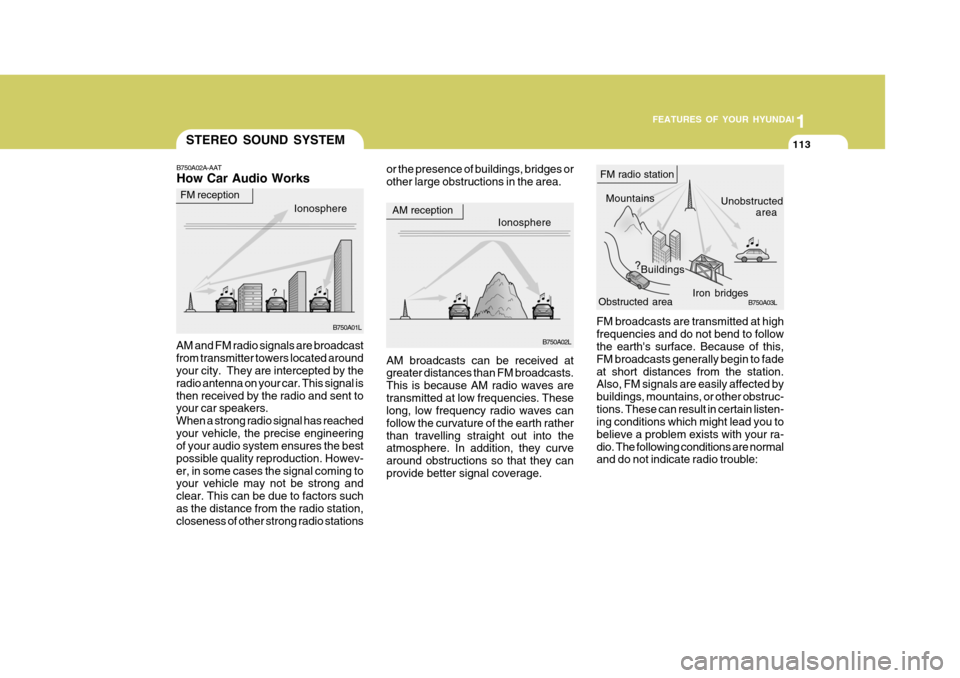
or the presence of buildings, bridges or other large obstructions in the area.
FM broadcasts are transmitted at highfrequencies and do not bend to follow the earth's surface. Because of this, FM broadcasts generally begin to fadeat short distances from the station. Also, FM signals are easily affected by buildings, mountains, or other obstruc-tions. These can result in certain listen- ing conditions which might lead you to believe a problem exists with your ra-dio. The following conditions are normal and do not indicate radio trouble:
AM broadcasts can be received atgreater distances than FM broadcasts. This is because AM radio waves aretransmitted at low frequencies. These long, low frequency radio waves can follow the curvature of the earth ratherthan travelling straight out into the atmosphere. In addition, they curve around obstructions so that they canprovide better signal coverage.
B750A02A-AAT How Car Audio Works
AM and FM radio signals are broadcast from transmitter towers located around your city. They are intercepted by the radio antenna on your car. This signal isthen received by the radio and sent to your car speakers. When a strong radio signal has reachedyour vehicle, the precise engineering of your audio system ensures the best possible quality reproduction. Howev-er, in some cases the signal coming to your vehicle may not be strong and clear. This can be due to factors suchas the distance from the radio station, closeness of other strong radio stations
Ionosphere B750A02L
AM reception
Mountains
Buildings Unobstructed
area
FM radio station
B750A03L
Ionosphere
FM reception
B750A01L Obstructed area
Iron bridges
Page 128 of 599
1FEATURES OF YOUR HYUNDAI
114
!
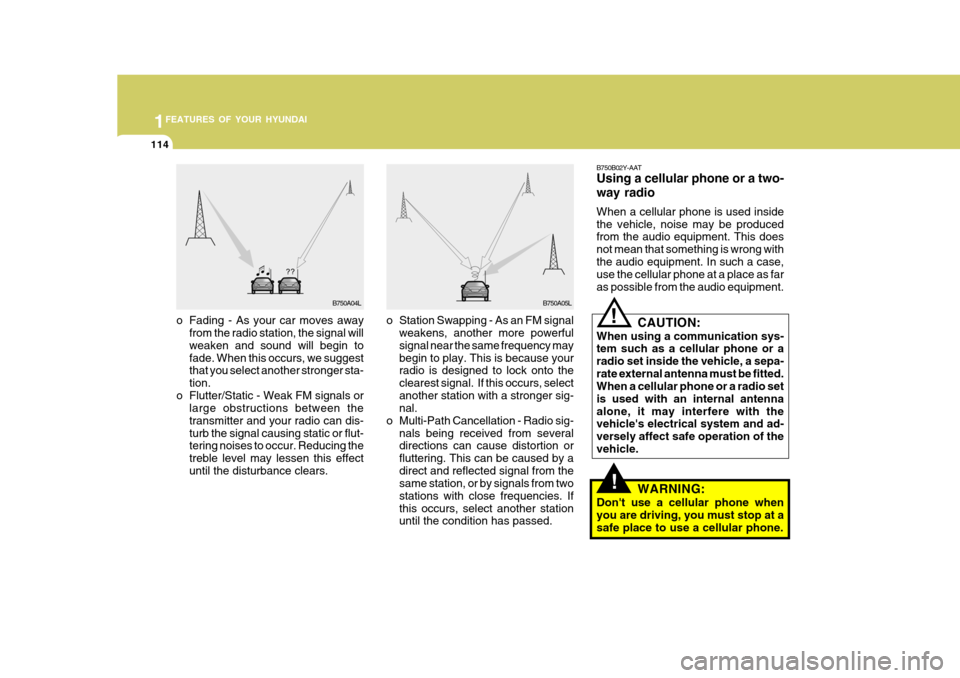
o Station Swapping - As an FM signal
weakens, another more powerful signal near the same frequency may begin to play. This is because your radio is designed to lock onto the clearest signal. If this occurs, selectanother station with a stronger sig- nal.
o Multi-Path Cancellation - Radio sig- nals being received from severaldirections can cause distortion or fluttering. This can be caused by adirect and reflected signal from the same station, or by signals from two stations with close frequencies. Ifthis occurs, select another station until the condition has passed.
o Fading - As your car moves away
from the radio station, the signal willweaken and sound will begin to fade. When this occurs, we suggest that you select another stronger sta- tion.
o Flutter/Static - Weak FM signals or large obstructions between thetransmitter and your radio can dis-turb the signal causing static or flut- tering noises to occur. Reducing the treble level may lessen this effectuntil the disturbance clears. B750B02Y-AAT Using a cellular phone or a two- way radio When a cellular phone is used inside the vehicle, noise may be produced from the audio equipment. This does not mean that something is wrong withthe audio equipment. In such a case, use the cellular phone at a place as far as possible from the audio equipment.!
CAUTION:
When using a communication sys- tem such as a cellular phone or a radio set inside the vehicle, a sepa-rate external antenna must be fitted. When a cellular phone or a radio set is used with an internal antennaalone, it may interfere with the vehicle's electrical system and ad- versely affect safe operation of thevehicle.
WARNING:
Don't use a cellular phone whenyou are driving, you must stop at asafe place to use a cellular phone.
B750A04L B750A05L
Page 129 of 599
1
FEATURES OF YOUR HYUNDAI
115
1
FEATURES OF YOUR HYUNDAI
115
1
FEATURES OF YOUR HYUNDAI
115
1
FEATURES OF YOUR HYUNDAI
115AUDIO SYSTEM
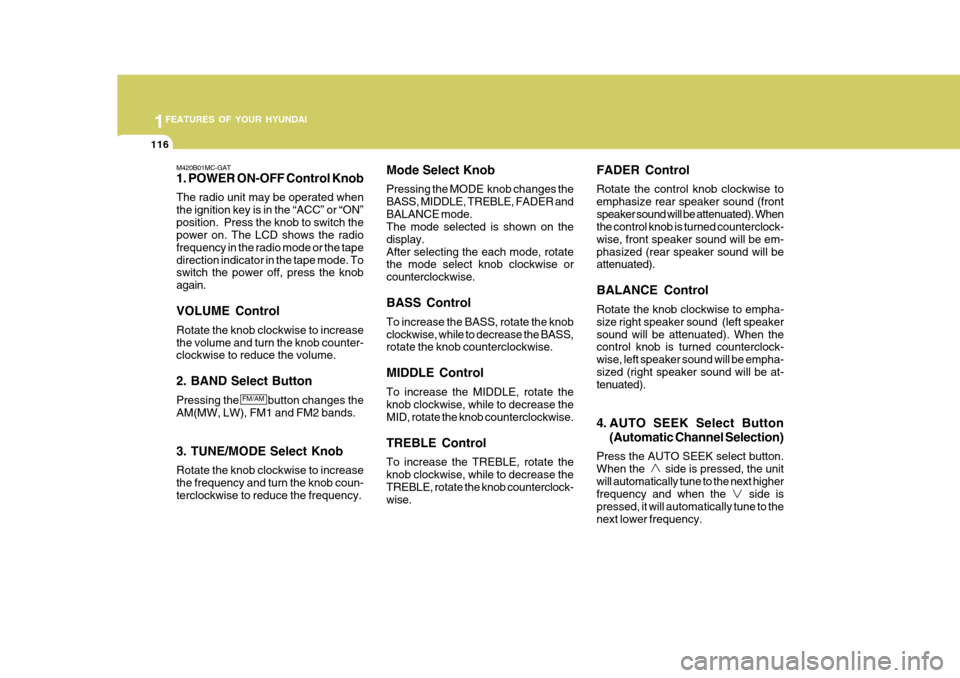
M420A01MC-GAT STEREO RADIO PLAYER OPERATION (M420) (If Installed)
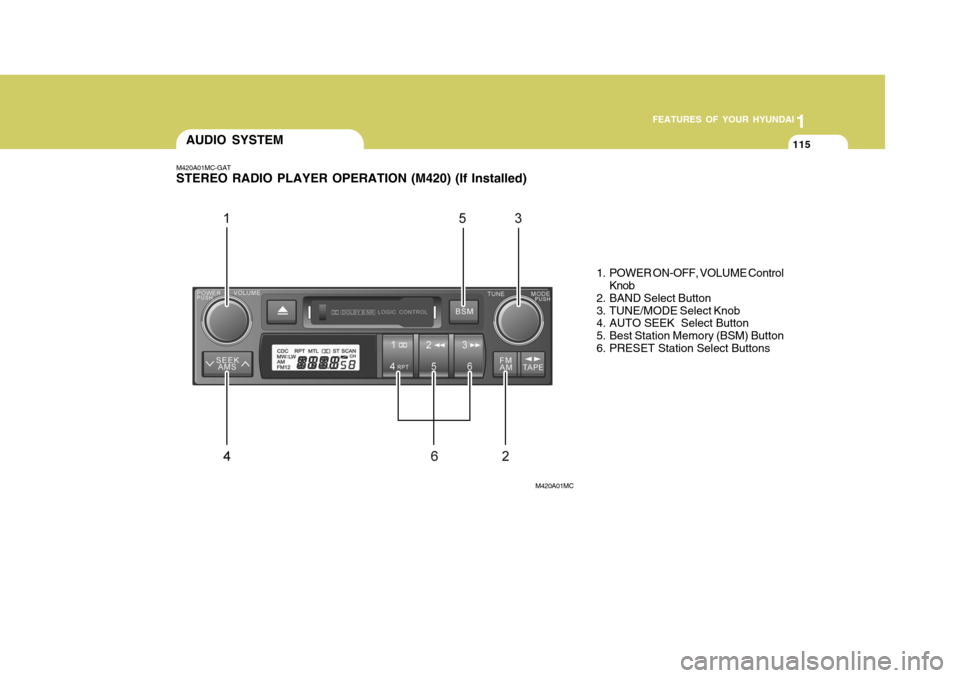
M420A01MC1. POWER ON-OFF, VOLUME Control
Knob
2. BAND Select Button
3. TUNE/MODE Select Knob
4. AUTO SEEK Select Button
5. Best Station Memory (BSM) Button
6. PRESET Station Select Buttons
Page 130 of 599
1FEATURES OF YOUR HYUNDAI
116
M420B01MC-GAT 1. POWER ON-OFF Control Knob The radio unit may be operated when the ignition key is in the “ACC” or “ON”position. Press the knob to switch the power on. The LCD shows the radio frequency in the radio mode or the tapedirection indicator in the tape mode. To switch the power off, press the knob again. VOLUME Control Rotate the knob clockwise to increase the volume and turn the knob counter- clockwise to reduce the volume. 2. BAND Select Button Pressing the button changes the AM(MW, LW), FM1 and FM2 bands. 3. TUNE/MODE Select Knob Rotate the knob clockwise to increase the frequency and turn the knob coun- terclockwise to reduce the frequency. Mode Select Knob Pressing the MODE knob changes the BASS, MIDDLE, TREBLE, FADER andBALANCE mode. The mode selected is shown on the display.After selecting the each mode, rotate the mode select knob clockwise or counterclockwise. BASS Control To increase the BASS, rotate the knob clockwise, while to decrease the BASS, rotate the knob counterclockwise. MIDDLE Control To increase the MIDDLE, rotate the knob clockwise, while to decrease the MID, rotate the knob counterclockwise. TREBLE Control To increase the TREBLE, rotate the knob clockwise, while to decrease the TREBLE, rotate the knob counterclock- wise. FADER Control Rotate the control knob clockwise to emphasize rear speaker sound (frontspeaker sound will be attenuated). When the control knob is turned counterclock- wise, front speaker sound will be em-phasized (rear speaker sound will be attenuated). BALANCE Control Rotate the knob clockwise to empha- size right speaker sound (left speakersound will be attenuated). When the control knob is turned counterclock- wise, left speaker sound will be empha-sized (right speaker sound will be at- tenuated).
4. AUTO SEEK Select Button
(Automatic Channel Selection)
Press the AUTO SEEK select button. When the side is pressed, the unitwill automatically tune to the next higher frequency and when the side is pressed, it will automatically tune to thenext lower frequency.
FM/AM
Page 131 of 599
1
FEATURES OF YOUR HYUNDAI
117
1
FEATURES OF YOUR HYUNDAI
117
1
FEATURES OF YOUR HYUNDAI
117
1
FEATURES OF YOUR HYUNDAI
117
5. Best Station Memory (BSM) Button
When the BSM button is pressed, the six channels from the highest field in-tensity are selected next and stored in memory. The stations selected are stored in the sequence of frequencyfrom the first preset key.
6. PRESET STATION Select Buttons
Six stations for AM(MW, LW), FM1 and FM2 respectively can be preset in the electronic memory circuit. HOW TO PRESET STATIONS Six AM(MW, LW) and twelve FM sta- tions may be programmed into thememory of the radio. Then, by simply pressing the AM(MW, LW) / FM select button and/or one of the six stationselect buttons, you may recall any of these stations instantly. To program the stations, follow these steps: o Press AM(MW, LW)/FM selector to
set the band for AM(MW, LW), FM1and FM2.
o Select the desired station to be stored
by seek or manual tuning.
o Determine the preset station select button you wish to use to access thatstation.
o Press the station select button for more than two seconds. A selectbutton indicator will show in the dis-play indicating which select button you have depressed. The frequency display will flash after it has beenstored into the memory. You should then release the button, and proceed to program the next desired station.A total of 24 stations can be pro- grammed by selecting one AM(MW, LW) and two FM station per button.
o When completed, any preset station may be recalled by selecting AM(MW,LW), FM1 or FM2 band and theappropriate station button.
! CAUTION:
o Do not place beverages close to the audio system. The audio sys- tem mechanism may be damaged if you spill them.
o Do not strike or allow anything to impact the audio system, damageto the system mechanisms could occur.
Page 134 of 599
1FEATURES OF YOUR HYUNDAI
120
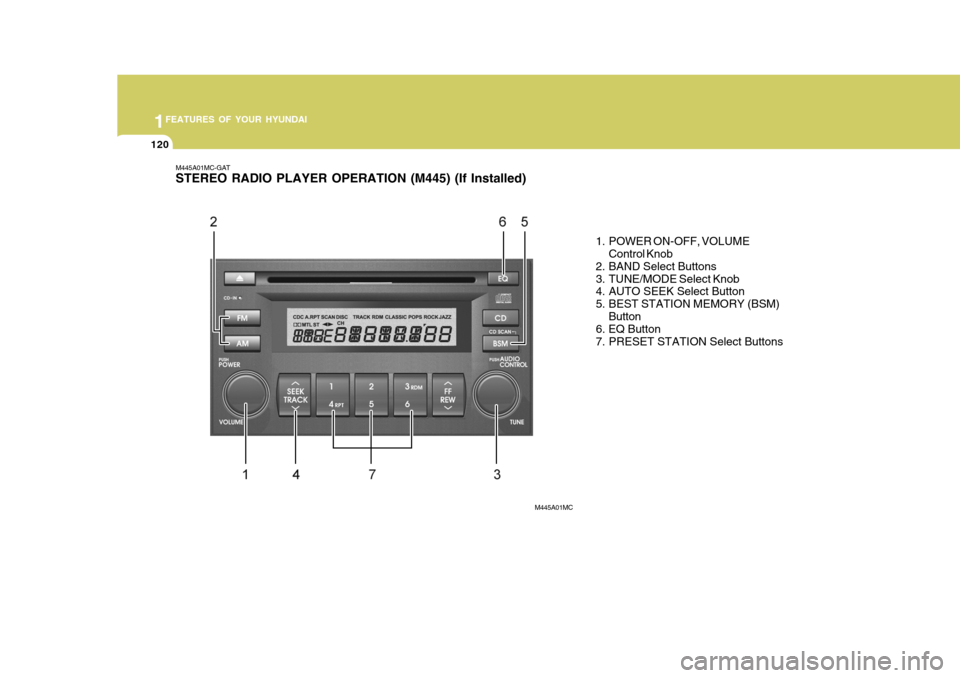
M445A01MC-GAT STEREO RADIO PLAYER OPERATION (M445) (If Installed)
1. POWER ON-OFF, VOLUMEControl Knob
2. BAND Select Buttons
3. TUNE/MODE Select Knob
4. AUTO SEEK Select Button
5. BEST STATION MEMORY (BSM)
Button
6. EQ Button
7. PRESET STATION Select Buttons
M445A01MC
Page 135 of 599
1
FEATURES OF YOUR HYUNDAI
121
1
FEATURES OF YOUR HYUNDAI
121
1
FEATURES OF YOUR HYUNDAI
121
1
FEATURES OF YOUR HYUNDAI
121
M445B01MC-GAT 1. POWER ON-OFF Control Knob The radio unit may be operated when the ignition key is in the “ACC”or “ON”position. Press the knob to switch the power on. The LCD shows the radio frequency in radio mode or displays theCD track in CD mode. To switch the power off, press the knob again. VOLUME Control Rotate the knob clockwise to increase the volume and turn the knob counter-clockwise to reduce the volume.
2. BAND Selector FM Selection Button Pressing the button changes the FM1 and FM2 bands. AM(MW, LW) Selection Button Pressing the button selects the AM(MW, LW) band. AM(MW, LW) mode is displayed on LCD. 3. TUNE/MODE Select Knob Rotate the knob clockwise to increase the frequency and turn the knob coun-terclockwise to reduce the frequency. Mode Select Knob Pressing the MODE knob changes the BASS, MIDDLE, TREBLE, FADER andBALANCE mode. The mode selected is shown on the display.After selecting the each mode, rotate the mode select knob clockwise or counterclockwise. BASS Control To increase the BASS, rotate the knob clockwise, while to decrease the BASS, rotate the knob counterclockwise. MIDDLE Control To increase the MIDDLE, rotate the knob clockwise, while to decrease the MIDDLE, rotate the knob counterclock-wise.TREBLE Control To increase the TREBLE, rotate the knob clockwise, while to decrease theTREBLE, rotate the knob counterclock- wise. FADER Control Rotate the control knob clockwise to emphasize rear speaker sound (frontspeaker sound will be attenuated). When the control knob is turned counterclock- wise, front speaker sound will be em-phasized (rear speaker sound will be attenuated). BALANCE Control Rotate the knob clockwise to empha- size right speaker sound (left speaker sound will be attenuated). When thecontrol knob is turned counterclock- wise, left speaker sound will be empha- sized (right speaker sound will be at-tenuated).
FM
AM
Page 136 of 599
1FEATURES OF YOUR HYUNDAI
122
4. AUTO SEEK Select Button(Automatic Channel Selection)
Press the AUTO SEEK select button. When the side is pressed, the unitwill automatically tune to the next higher frequency and when the side is pressed, it will automatically tune to thenext lower frequency.
5. Best Station Memory (BSM) Button
When the BSM button is pressed, the six channels from the highest field intensity are selected next and stored in memory. The stations selected arestored in the sequence frequency from the first preset key. 6. EQ Button Press the EQ button to select the CLASSIC, POPS, ROCK, JAZZ and OFF MODE for the desired tone qual-ity. Each press of the button changes the display as follows; 7. PRESET STATION Select
Buttons
Six stations for AM(MW, LW), FM1 and FM2 respectively can be preset in theelectronic memory circuit. HOW TO PRESET STATIONS Six AM(MW, LW) and twelve FM sta- tions may be programmed into the memory of the radio. Then, by simply pressing the AM(MW, LW) / FM selectbuttons and/or one of the six station select buttons, you may recall any of these stations instantly. To programthe stations, follow these steps:
o Press AM(MW, LW)/FM selector to set the band for AM(MW, LW), FM1 and FM2.
o Select the desired station to be stored by seek or manual tuning.
o Determine the preset station select
button you wish to use to access that station. o Press the station select button for
more than two seconds. A selectbutton indicator will show in the dis- play indicating which select button you have depressed. The frequencydisplay will flash after it has been stored into the memory. You should then release the button, and proceedto program the next desired station. A total of 24 stations can be pro- grammed by selecting one AM(MW,LW) and two FM station per button.
o When completed, any preset station
may be recalled by selecting AM(MW,LW), FM1 or FM2 band and the appropriate station button.
! CAUTION:
o Do not place beverages close to the audio system. The audio sys- tem mechanism may be damagedif you spill them.
o Do not strike or allow anything to
impact the audio system, damageto the system mechanisms could occur.
CLASSIC POPS ROCK JAZZ DEFEAT
Page 138 of 599
1FEATURES OF YOUR HYUNDAI
124
M445D01MC-GAT 1. CD Select Button
o Insert the CD with the label facingupward.
o Insert the CD to start CD playback, during radio operation.
o When a disc is in the CD deck, if you press the CD button the CD player will begin playing even if the radio player is being used.
o The CD player can be used when the ignition switch is in either the “ON” or“ACC” position.
o Push the CD button to start CD playback without pushing PowerON-OFF control knob. (Only when aCD is in the deck.
NOTE:
o Do not stick paper or tape etc., on the label side or the recording side of any discs, as it may cause a malfunction.
o The unit cannot play a CD- R(Recordable CD) and CD-RW(Rewritable CD) that is not fi-nalized. Please refer to the manual of CD-R/CD-RW recoder or CD-R/ CD-RW software for more informa-tion on finalization process. o Depending on the recording sta-
tus, some CD-Rs/CD-RWs may notbe played on this unit.
2. TRACK UP/DOWN Button
o The desired track on the disc cur- rently being played can be selected using the track number.
o Press button once to skip forward to the beginning of the next track.Press within a second after play- back begins to quickly move back-ward through a CD. If you press after more than a second, it will take you to the begin-ning of the track you are now listen- ing to.
3. FF/REW Button If you want to fast forward or reverse through the compact disc track, pushand hold the FF or REW button. When you release the button, the com- pact disc player will resume playing. 4. REPEAT (RPT) Button
o To repeat the track you are currently
listening to, press the RPT button. To cancel, press it again.
o If you do not release RPT operation
when the track ends, it will automati-cally be replayed. This process will be continued until you push the button again or turn theradio OFF then ON.
5. CD SCAN Button
o To playback the first 10 seconds of each track, press the CD SCAN button.
o Press the CD SCAN button again within 10 sec. when you have reachedthe desired track.
6. CD EJECT Button When the
button is pressed with a
CD loaded, the CD will eject. Forcing to eject : To force to eject a CD,press this button for more than 3 sec- onds. (Do this only when a CD is jammed andyou can not eject it in the normal way - e.g.) in case that you have inserted 2 CDs by mistake)