Automatic Hyundai Accent 2016 User Guide
[x] Cancel search | Manufacturer: HYUNDAI, Model Year: 2016, Model line: Accent, Model: Hyundai Accent 2016Pages: 456, PDF Size: 16.41 MB
Page 58 of 456
341
Safety features of your vehicle
Main components of occupant
detection system
A detection device located within thefront passenger seat.
Electronic system to determine whether the front passenger air bag system
should be activated or deactivated.
A warning light located on the instru- ment panel which illuminates the words
PASSENGER AIR BAG "OFF" indicat-
ing the front passenger air bag system
is deactivated.
The instrument panel air bag warning light is interconnected with the occupant
detection system.
The ODS is designed to detect the pres-
ence of a properly-seated front passen-
ger and determine if the passenger's
front air bag should be enabled (may
inflate) or not. The purpose is to help reduce the risk of
injury or death from an inflating air bag to
certain front passenger seat occupants,
such as children, by requiring the air bag
to be automatically turned OFF.
For example, if a child restraint of the
type specified in the regulations is on the
seat, the occupant detection sensor can
detect it and cause the air bag to turn
OFF.
Front passenger seat adult occupants
who are properly seated and wearing the
seat belt properly, should not cause the
passenger air bag to be automatically
turned OFF. For small adults it may be
turned OFF, however, if the occupant
does not sit in the seat properly (for
example, by not sitting upright, by sitting
on the edge of the seat, or by otherwise
being out of position), this could cause
the sensor to turn the air bag OFF.
Always be sure that you and all vehicle
occupants are seated and restrained
properly (sitting upright with the seat in
an upright position, centered on the seat
cushion, with the person's legs comfort-
ably extended, feet on the floor, and
wearing the safety belt properly) for the
most effective protection by the air bag
and the safety belt. The ODS may not function properly if
the passenger takes actions which can
affect the detection system. These
include:
(1) Failing to sit in an upright position.
(2) Leaning against the door or center console.
(3) Sitting towards the sides or the front of the seat.
(4) Putting legs on the dashboard or resting them on other locations.
(5) Improperly wearing the safety belt.
(6) Reclining the seat back.
(7) Unauthorized replacement of seat cover.
(8) Covering seat with blanket
Page 78 of 456
4Features of your vehicle
Keys / 4-3
Remote keyless entry / 4-4
Door locks / 4-7
Trunk / 4-12
Tailgate / 4-14
Windows / 4-16
Hood / 4-21
Fuel filler lid / 4-23
Sunroof / 4-26
Steering wheel / 4-30
Mirrors / 4-32
Instrument cluster / 4-36
Hazard warning flasher / 4-53
Lighting / 4-53
Wipers and washers / 4-59
Interior light / 4-63
Defroster / 4-66
Manual climate control system / 4-67
Automatic climate control system / 4-76
Windshield defrosting and defogging / 3-83
Storage compartments / 4-87
Page 81 of 456
Features of your vehicle
44
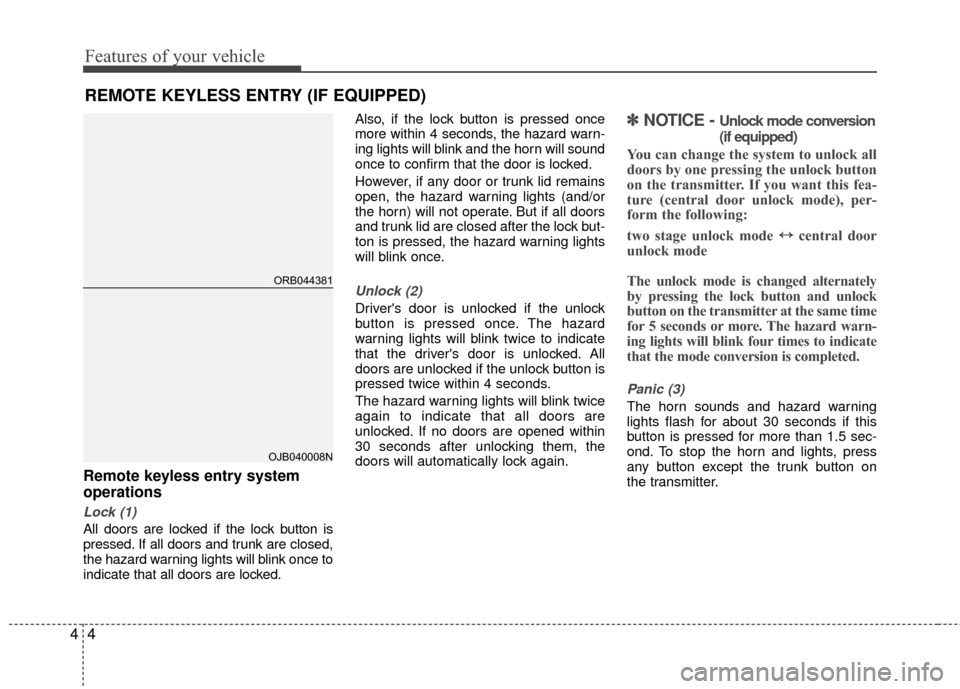
Remote keyless entry system
operations
Lock (1)
All doors are locked if the lock button is
pressed. If all doors and trunk are closed,
the hazard warning lights will blink once to
indicate that all doors are locked.Also, if the lock button is pressed once
more within 4 seconds, the hazard warn-
ing lights will blink and the horn will sound
once to confirm that the door is locked.
However, if any door or trunk lid remains
open, the hazard warning lights (and/or
the horn) will not operate. But if all doors
and trunk lid are closed after the lock but-
ton is pressed, the hazard warning lights
will blink once.
Unlock (2)
Driver's door is unlocked if the unlock
button is pressed once. The hazard
warning lights will blink twice to indicate
that the driver's door is unlocked. All
doors are unlocked if the unlock button is
pressed twice within 4 seconds.
The hazard warning lights will blink twice
again to indicate that all doors are
unlocked. If no doors are opened within
30 seconds after unlocking them, the
doors will automatically lock again.
✽ ✽
NOTICE - Unlock mode conversion
(if equipped)
You can change the system to unlock all
doors by one pressing the unlock button
on the transmitter. If you want this fea-
ture (central door unlock mode), per-
form the following:
two stage unlock mode ↔ ↔
central door
unlock mode
The unlock mode is changed alternately
by pressing the lock button and unlock
button on the transmitter at the same time
for 5 seconds or more. The hazard warn-
ing lights will blink four times to indicate
that the mode conversion is completed.
Panic (3)
The horn sounds and hazard warning
lights flash for about 30 seconds if this
button is pressed for more than 1.5 sec-
ond. To stop the horn and lights, press
any button except the trunk button on
the transmitter.
REMOTE KEYLESS ENTRY (IF EQUIPPED)
ORB044381
OJB040008N
Page 84 of 456
47
Features of your vehicle
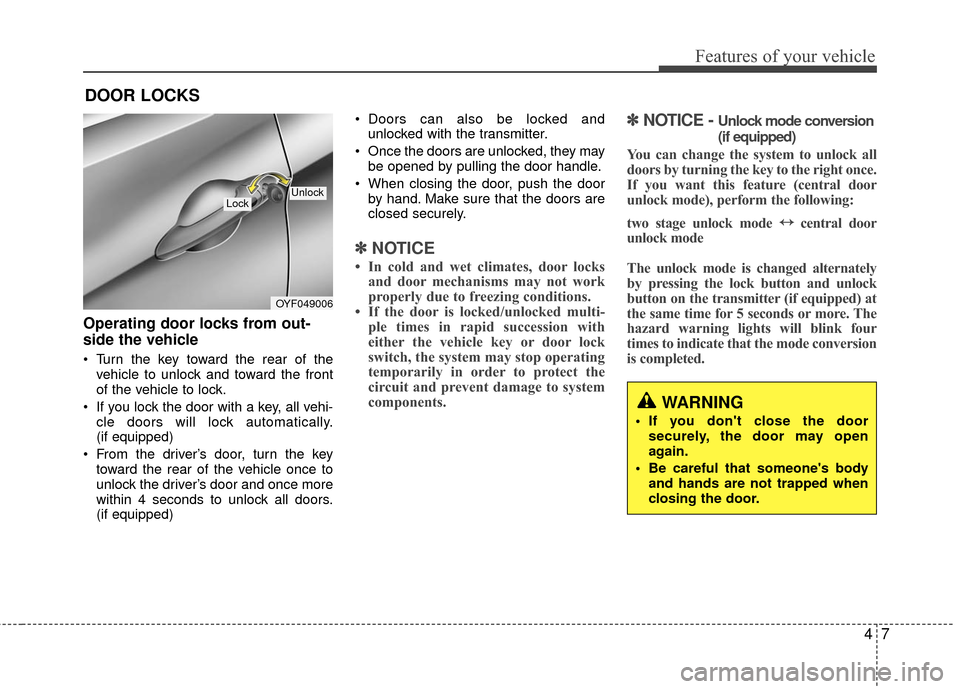
Operating door locks from out-
side the vehicle
• Turn the key toward the rear of thevehicle to unlock and toward the front
of the vehicle to lock.
If you lock the door with a key, all vehi- cle doors will lock automatically.
(if equipped)
From the driver’s door, turn the key toward the rear of the vehicle once to
unlock the driver’s door and once more
within 4 seconds to unlock all doors.
(if equipped) Doors can also be locked and
unlocked with the transmitter.
Once the doors are unlocked, they may be opened by pulling the door handle.
When closing the door, push the door by hand. Make sure that the doors are
closed securely.
✽ ✽ NOTICE
• In cold and wet climates, door locks
and door mechanisms may not work
properly due to freezing conditions.
• If the door is locked/unlocked multi- ple times in rapid succession with
either the vehicle key or door lock
switch, the system may stop operating
temporarily in order to protect the
circuit and prevent damage to system
components.
✽ ✽ NOTICE - Unlock mode conversion
(if equipped)
You can change the system to unlock all
doors by turning the key to the right once.
If you want this feature (central door
unlock mode), perform the following:
two stage unlock mode ↔ ↔
central door
unlock mode
The unlock mode is changed alternately
by pressing the lock button and unlock
button on the transmitter (if equipped) at
the same time for 5 seconds or more. The
hazard warning lights will blink four
times to indicate that the mode conversion
is completed.
DOOR LOCKS
OYF049006
LockUnlock
WARNING
If you don't close the door
securely, the door may open
again.
Be careful that someone's body and hands are not trapped when
closing the door.
Page 85 of 456
Features of your vehicle
84
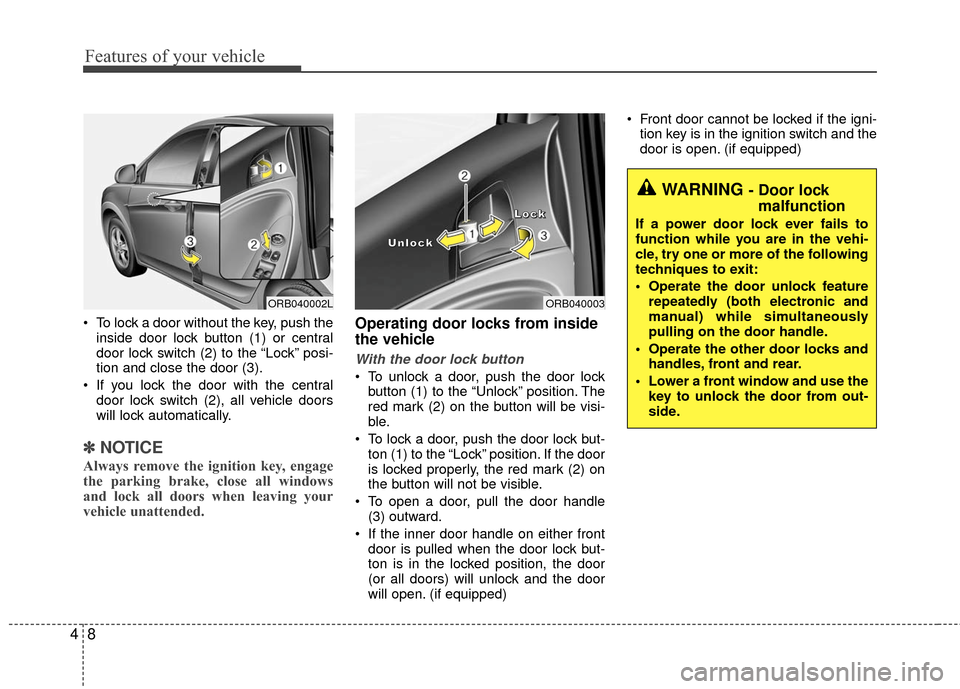
To lock a door without the key, push theinside door lock button (1) or central
door lock switch (2 ) to the “Lock” posi-
tion and close the door (3).
If you lock the door with the central door lock switch (2), all vehicle doors
will lock automatically.
✽ ✽ NOTICE
Always remove the ignition key, engage
the parking brake, close all windows
and lock all doors when leaving your
vehicle unattended.
Operating door locks from inside
the vehicle
With the door lock button
To unlock a door, push the door lock
button (1) to the “Unlock” position. The
red mark (2) on the button will be visi-
ble.
To lock a door, push the door lock but- ton (1) to the “Lock” position. If the door
is locked properly, the red mark (2) on
the button will not be visible.
To open a door, pull the door handle (3) outward.
If the inner door handle on either front door is pulled when the door lock but-
ton is in the locked position, the door
(or all doors) will unlock and the door
will open. (if equipped) Front door cannot be locked if the igni-
tion key is in the ignition switch and the
door is open. (if equipped)
ORB040003
L
L
L
L
o
o
o
o
c
c
c
c
k
k
k
k
U
U
U
U
n
n
n
n
l
l
l
l
o
o
o
o
c
c
c
c
k
k
k
k
WARNING - Door lock
malfunction
If a power door lock ever fails to
function while you are in the vehi-
cle, try one or more of the following
techniques to exit:
Operate the door unlock feature
repeatedly (both electronic and
manual) while simultaneously
pulling on the door handle.
Operate the other door locks and handles, front and rear.
Lower a front window and use the key to unlock the door from out-
side.
ORB040002L
Page 87 of 456
Features of your vehicle
10
4
Impact sensing door unlock system
(if equipped)
All doors will be automatically unlocked
when the impact is delivered to impact
sensors while the ignition switch is ON.
However, the doors may not be unlocked
if mechanical problems occur with the
door lock system or battery.
Speed sensing door lock system
(if equipped)
All doors will be automatically locked
after the vehicle speed exceeds 9 mph
(15 km/h). And all doors will be automat-
ically unlocked when you turn the engine
off or when you remove the ignition key.
(if equipped)
Auto door lock/unlock feature
(Automatic transaxle)
(if equipped)
All doors will automatically lock when
the shift lever is moved out of P (Park).
All doors will automatically unlock when the shift lever is moved into P
(Park).
WARNING- Unattendedchildren
An enclosed vehicle can become
extremely hot, causing death or
severe injury to unattended chil-
dren or animals who cannot escape
the vehicle. Furthermore, children
might operate features of the vehi-
cle that could injure them, or they
could encounter other harm, possi-
bly from someone gaining entry to
the vehicle. Never leave children or
animals unattended in your vehicle.
Page 89 of 456
Features of your vehicle
12
4
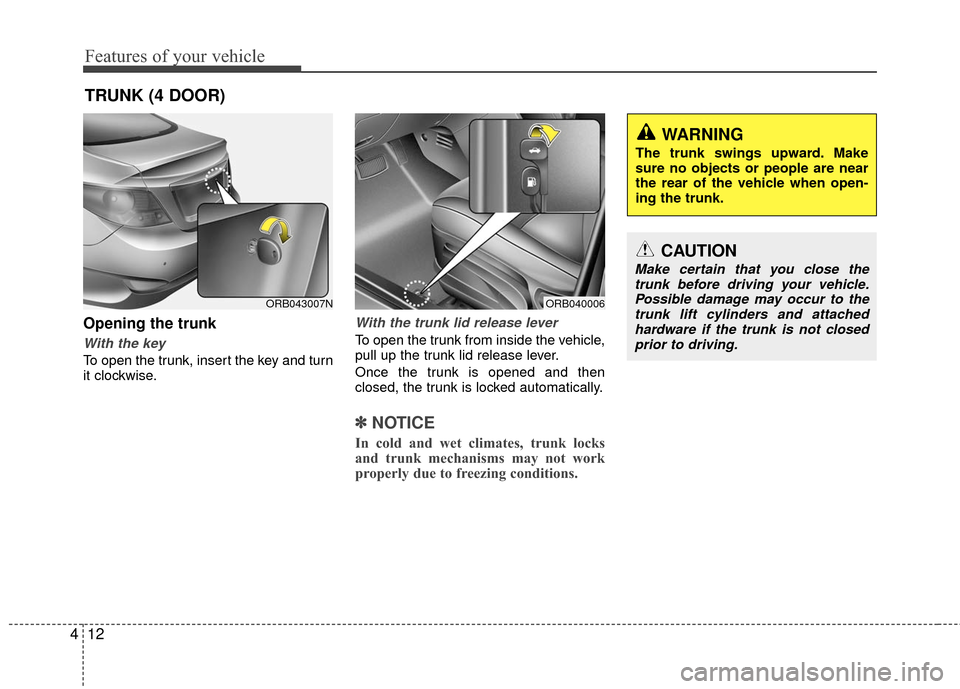
Opening the trunk
With the key
To open the trunk, insert the key and turn
it clockwise.
With the trunk lid release lever
To open the trunk from inside the vehicle,
pull up the trunk lid release lever.
Once the trunk is opened and then
closed, the trunk is locked automatically.
✽ ✽
NOTICE
In cold and wet climates, trunk locks
and trunk mechanisms may not work
properly due to freezing conditions.
TRUNK (4 DOOR)
ORB040006
CAUTION
Make certain that you close the
trunk before driving your vehicle.Possible damage may occur to thetrunk lift cylinders and attached hardware if the trunk is not closedprior to driving.
WARNING
The trunk swings upward. Make
sure no objects or people are near
the rear of the vehicle when open-
ing the trunk.
ORB043007N
Page 93 of 456
Features of your vehicle
16
4
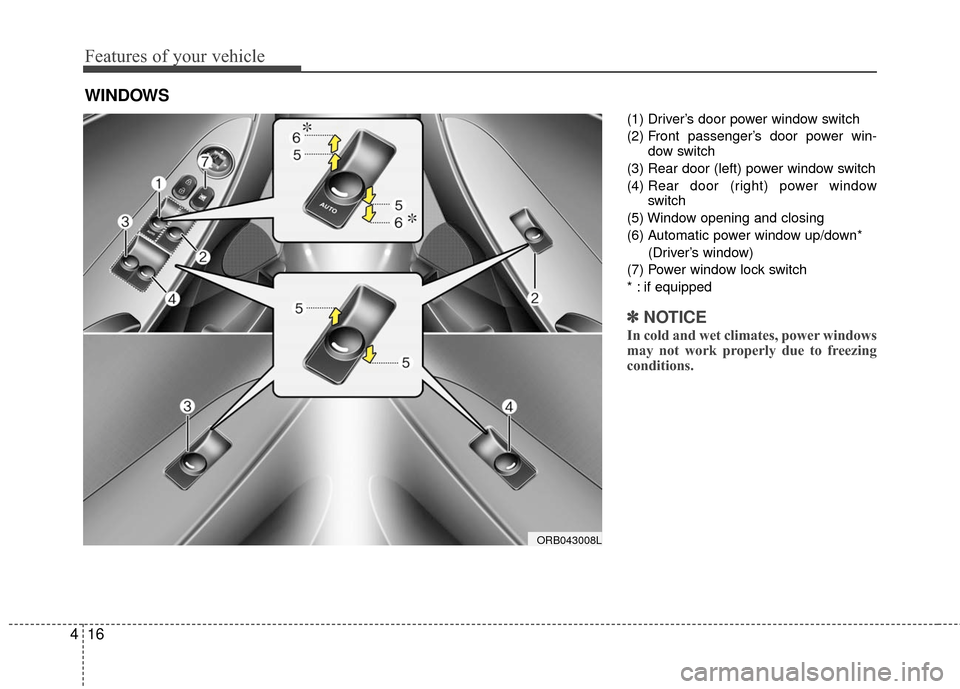
(1) Driver’s door power window switch
(2) Front passenger’s door power win-
dow switch
(3) Rear door (left) power window switch
(4) Rear door (right) power window
switch
(5) Window opening and closing
(6) Automatic power window up/down* (Driver’s window)
(7) Power window lock switch
* : if equipped
✽ ✽ NOTICE
In cold and wet climates, power windows
may not work properly due to freezing
conditions.
WINDOWS
ORB043008L
Page 95 of 456
Features of your vehicle
18
4
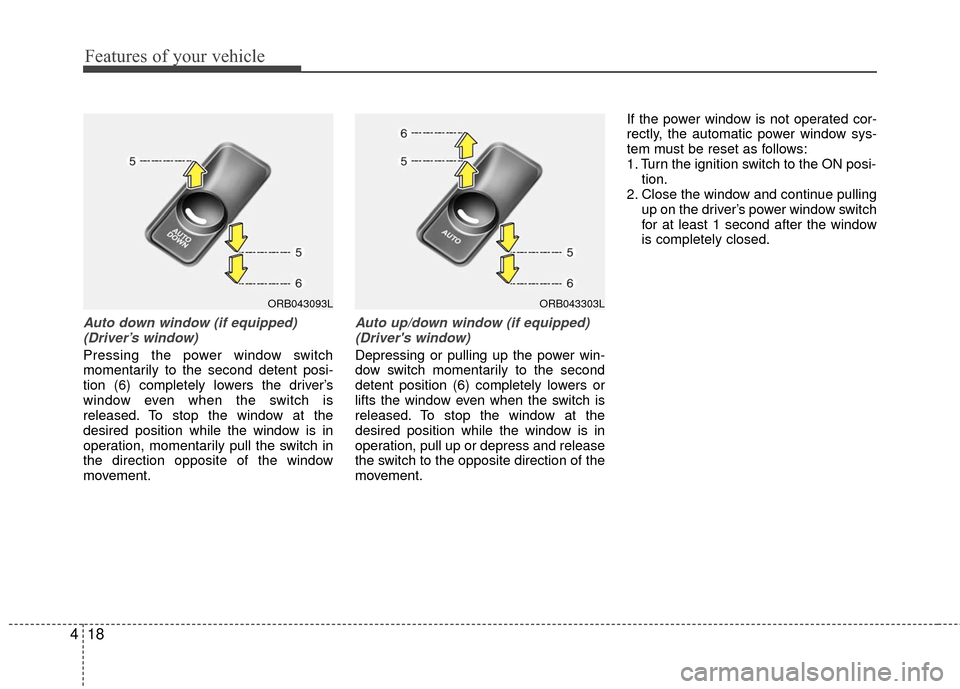
Auto down window (if equipped)
(Driver’s window)
Pressing the power window switch
momentarily to the second detent posi-
tion (6) completely lowers the driver’s
window even when the switch is
released. To stop the window at the
desired position while the window is in
operation, momentarily pull the switch in
the direction opposite of the window
movement.
Auto up/down window (if equipped)(Driver's window)
Depressing or pulling up the power win-
dow switch momentarily to the second
detent position (6) completely lowers or
lifts the window even when the switch is
released. To stop the window at the
desired position while the window is in
operation, pull up or depress and release
the switch to the opposite direction of the
movement. If the power window is not operated cor-
rectly, the automatic power window sys-
tem must be reset as follows:
1. Turn the ignition switch to the ON posi-
tion.
2. Close the window and continue pulling up on the driver’s power window switch
for at least 1 second after the window
is completely closed.
ORB043093LORB043303L
Page 96 of 456
419
Features of your vehicle
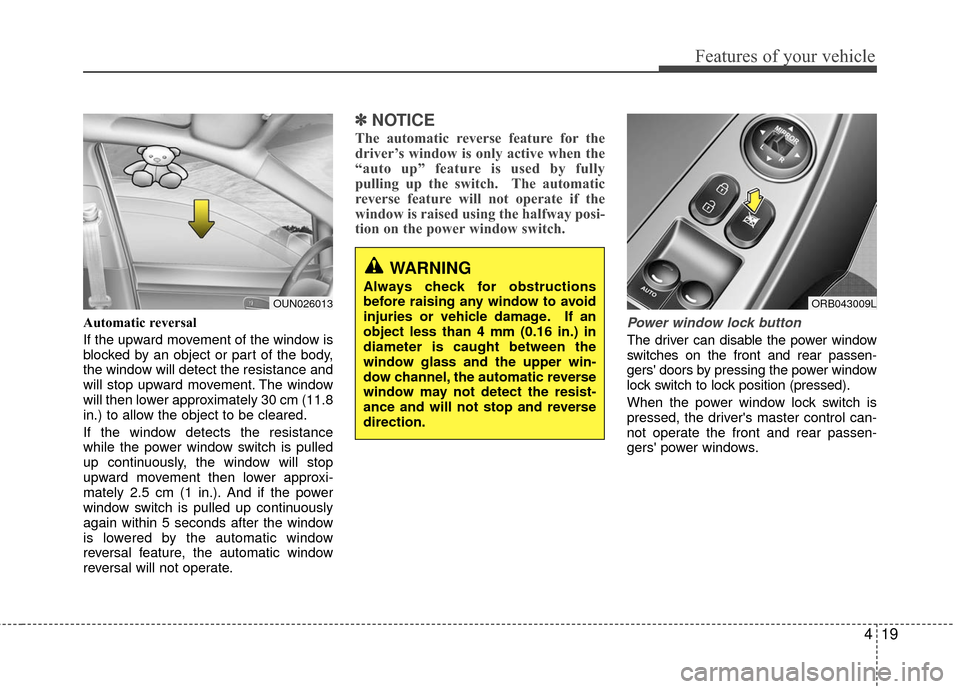
Automatic reversal
If the upward movement of the window is
blocked by an object or part of the body,
the window will detect the resistance and
will stop upward movement. The window
will then lower approximately 30 cm (11.8
in.) to allow the object to be cleared.
If the window detects the resistance
while the power window switch is pulled
up continuously, the window will stop
upward movement then lower approxi-
mately 2.5 cm (1 in.). And if the power
window switch is pulled up continuously
again within 5 seconds after the window
is lowered by the automatic window
reversal feature, the automatic window
reversal will not operate.
✽ ✽NOTICE
The automatic reverse feature for the
driver’s window is only active when the
“auto up” feature is used by fully
pulling up the switch. The automatic
reverse feature will not operate if the
window is raised using the halfway posi-
tion on the power window switch.
Power window lock button
The driver can disable the power window
switches on the front and rear passen-
gers' doors by pressing the power window
lock switch to lock position (pressed).
When the power window lock switch is
pressed, the driver's master control can-
not operate the front and rear passen-
gers' power windows.
ORB043009L
WARNING
Always check for obstructions
before raising any window to avoid
injuries or vehicle damage. If an
object less than 4 mm (0.16 in.) in
diameter is caught between the
window glass and the upper win-
dow channel, the automatic reverse
window may not detect the resist-
ance and will not stop and reverse
direction.
OUN026013