turn signal Hyundai Accent 2017 Owner's Manual
[x] Cancel search | Manufacturer: HYUNDAI, Model Year: 2017, Model line: Accent, Model: Hyundai Accent 2017Pages: 380, PDF Size: 12.45 MB
Page 15 of 380
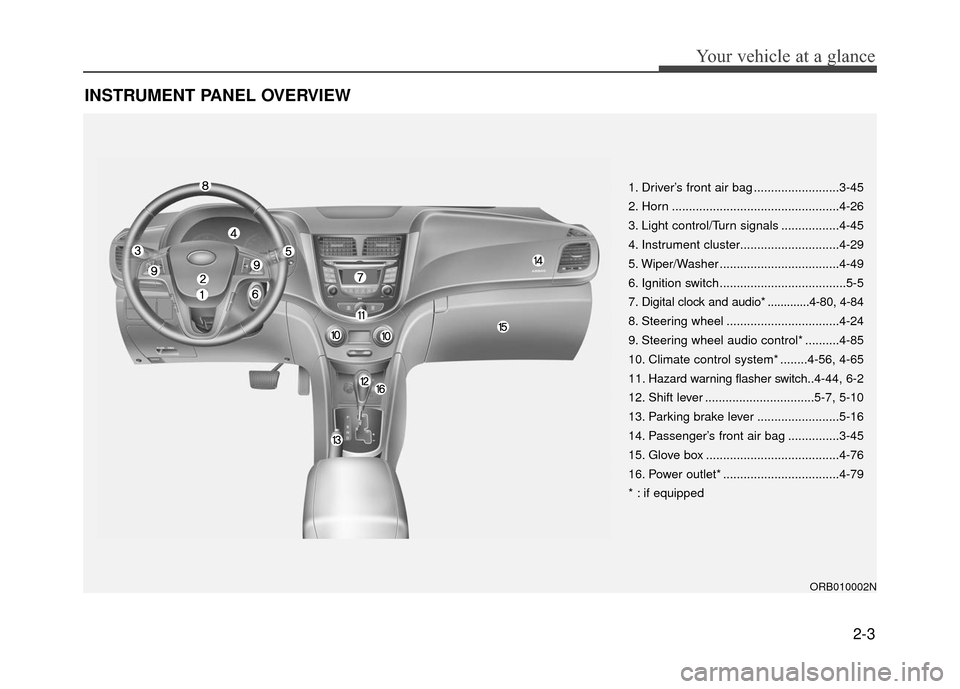
INSTRUMENT PANEL OVERVIEW
2-3
Your vehicle at a glance
1. Driver’s front air bag .........................3-45
2. Horn .................................................4-26
3. Light control/Turn signals .................4-45
4. Instrument cluster.............................4-29
5. Wiper/Washer ...................................4-49
6. Ignition switch .....................................5-5
7. Digital clock and audio* .............4-80, 4-84
8. Steering wheel .................................4-24
9. Steering wheel audio control* ..........4-85
10. Climate control system* ........4-56, 4-65
11. Hazard warning flasher switch..4-44, 6-2
12. Shift lever ................................5-7, 5-10
13. Parking brake lever ........................5-16
14. Passenger’s front air bag ...............3-45
15. Glove box .......................................4-76
16. Power outlet* ..................................4-79
* : if equipped
ORB010002N
Page 50 of 380
Safety features of your vehicle
3-34
How does the air bag system
operate
Air bags are activated (able to inflate ifnecessary) only when the ignition
switch is turned to the ON or START
position.
Air bags inflate instantly in the event of serious frontal or side collision in order
to help protect the occupants from seri-
ous physical injury.
There is no single speed at which the air bags will inflate.
Generally, air bags are designed to
inflate by the severity of a collision and
its direction. These two factors deter-
mine whether the sensors send out an
electronic deployment/ inflation signal.
Air bag deployment depends on a number of factors including vehicle
speed, angles of impact and the densi-
ty and stiffness of the vehicles or
objects which your vehicle hits in the
collision. Though, factors are not limit-
ed to those mentioned above.
The front air bags will completely inflate and deflate in an instant.
It is virtually impossible for you to see
the air bags inflate during an accident.
It is much more likely that you will sim-
ply see the deflated air bags hanging
out of their storage compartments after
the collision. In addition to inflating in certain side
collisions, vehicles equipped with a
rollover sensor, side impact air bags
and curtain air bags will inflate if the
sensing system detects a rollover.
When a rollover is detected, side
impact air bags and curtain air bags
will remain inflated longer to help pro-
vide protection from ejection, especial-
ly when used in conjunction with the
seat belts.
In order to help provide protection in a severe collision, the air bags must
inflate rapidly. The speed of air bag
inflation is a consequence of the
extremely short time in which a collision
occurs and the need to get the air bag
between the occupant and the vehicle
structures before the occupant impacts
those structures. This speed of inflation
reduces the risk of serious or life-
threatening injuries in a severe collision
and is thus a necessary part of air bag
design.
However, air bag inflation can also
cause injuries which normally can
include facial abrasions, bruises and
broken bones because the inflation
speed also causes the air bags to
expand with a great deal of force. There are even circumstances
under which contact with the air bag
can cause fatal injuries, especially if
the occupant is positioned exces-
sively close to the air bag.
WARNING
To avoid severe personal injuryor death caused by deploying air
bags in a collision, the driver
should sit as far back from the
steering wheel air bag as possi-
ble (at least 10 inches (250 mm)
away). The front passengers
should always move their seats
as far back as possible and sit
back in their seat.
Air bags inflate instantly in the event of collision, and passen-
gers may be injured by the air bag
expansion force if they are not in
proper position.
Air bag inflation may cause injuries which normally include
facial or bodily abrasions,
injuries from broken glasses or
burns by the air bag inflation
gasses.
Page 103 of 380
4-29
Features of your vehicle
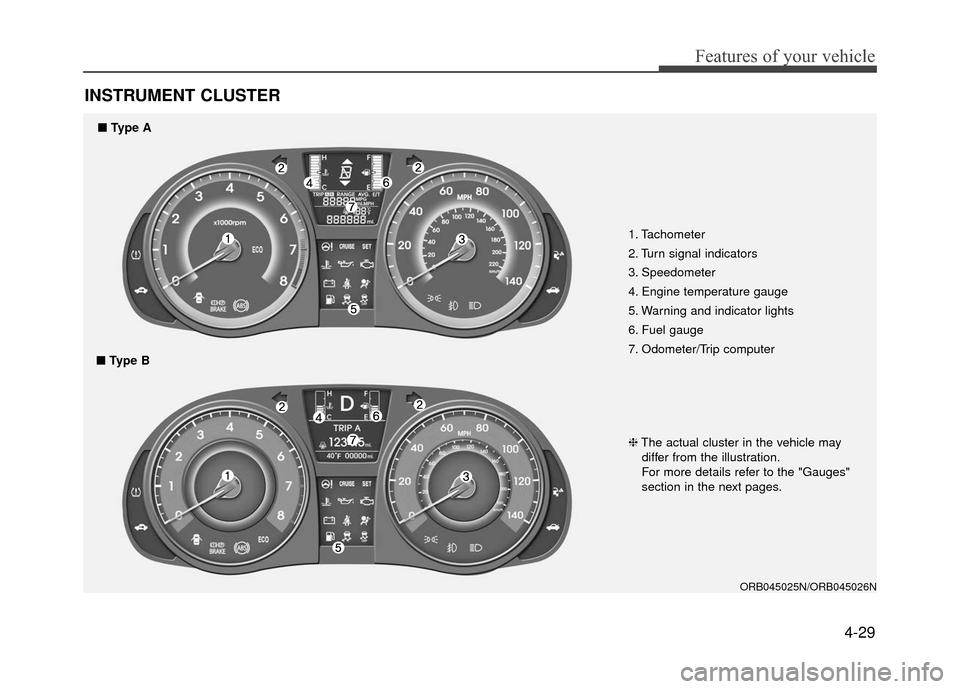
INSTRUMENT CLUSTER
1. Tachometer
2. Turn signal indicators
3. Speedometer
4. Engine temperature gauge
5. Warning and indicator lights
6. Fuel gauge
7. Odometer/Trip computer
ORB045025N/ORB045026N
❈The actual cluster in the vehicle may
differ from the illustration.
For more details refer to the "Gauges"
section in the next pages.
■ Type A
■ Type B
Page 113 of 380
4-39
Features of your vehicle
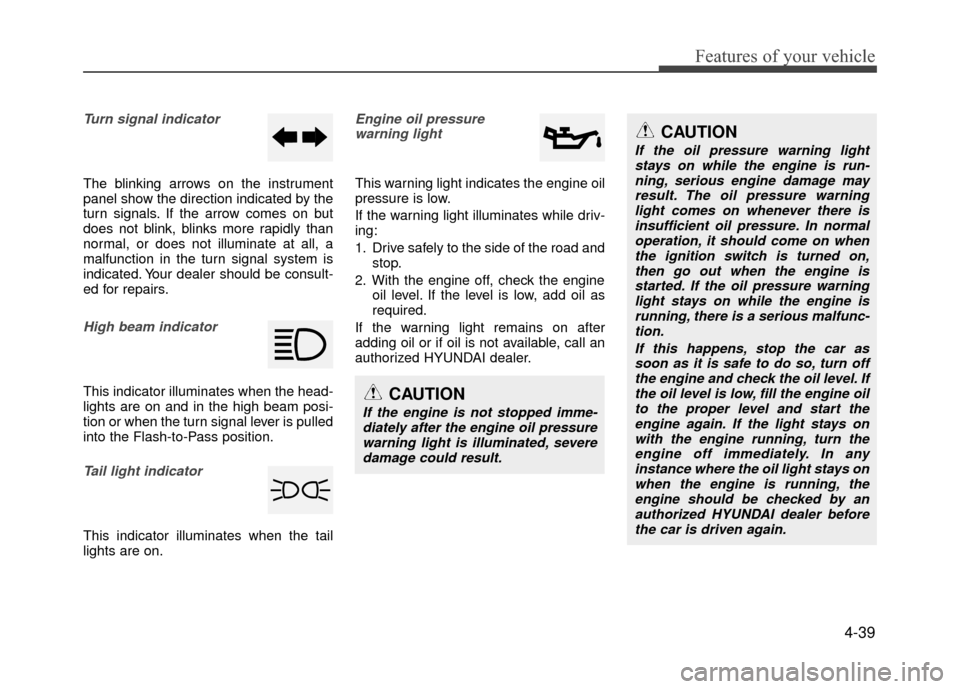
Turn signal indicator
The blinking arrows on the instrument
panel show the direction indicated by the
turn signals. If the arrow comes on but
does not blink, blinks more rapidly than
normal, or does not illuminate at all, a
malfunction in the turn signal system is
indicated. Your dealer should be consult-
ed for repairs.
High beam indicator
This indicator illuminates when the head-
lights are on and in the high beam posi-
tion or when the turn signal lever is pulled
into the Flash-to-Pass position.
Tail light indicator
This indicator illuminates when the tail
lights are on.
Engine oil pressure warning light
This warning light indicates the engine oil
pressure is low.
If the warning light illuminates while driv-
ing:
1. Drive safely to the side of the road and stop.
2. With the engine off, check the engine oil level. If the level is low, add oil as
required.
If the warning light remains on after
adding oil or if oil is not available, call an
authorized HYUNDAI dealer.
CAUTION
If the engine is not stopped imme- diately after the engine oil pressure warning light is illuminated, severedamage could result.
CAUTION
If the oil pressure warning lightstays on while the engine is run-ning, serious engine damage may result. The oil pressure warninglight comes on whenever there isinsufficient oil pressure. In normal operation, it should come on whenthe ignition switch is turned on, then go out when the engine isstarted. If the oil pressure warning light stays on while the engine isrunning, there is a serious malfunc-tion.
If this happens, stop the car assoon as it is safe to do so, turn offthe engine and check the oil level. If the oil level is low, fill the engine oilto the proper level and start the engine again. If the light stays onwith the engine running, turn theengine off immediately. In any instance where the oil light stays onwhen the engine is running, theengine should be checked by an authorized HYUNDAI dealer beforethe car is driven again.
Page 118 of 380
Features of your vehicle
4-44
Engine coolant tempera-ture warning light
The warning light illuminates if the tem-
perature of the engine coolant is above
257±4.5°F (125±2.5°C).
Do not continue driving with an overheat-
ed engine. If your vehicle overheats, refer
to "Overheating" in section 6.
✽ ✽ NOTICE
If the engine coolant temperature warn-
ing light illuminates, it indicates over-
heating that may damage the engine.
Fuel cap open warning
indicator (if equipped)
This warning light indicates the fuel filler
cap is not tightened securely.
Always make sure that the fuel filler cap
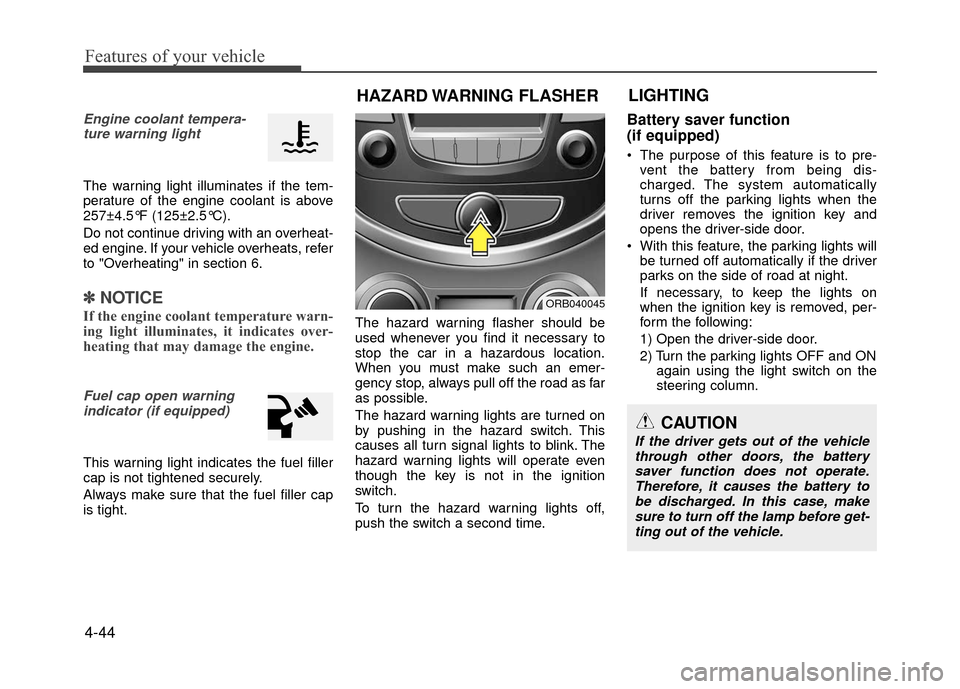
is tight. The hazard warning flasher should be
used whenever you find it necessary to
stop the car in a hazardous location.
When you must make such an emer-
gency stop, always pull off the road as far
as possible.
The hazard warning lights are turned on
by pushing in the hazard switch. This
causes all turn signal lights to blink. The
hazard warning lights will operate even
though the key is not in the ignition
switch.
To turn the hazard warning lights off,
push the switch a second time.
Battery saver function
(if equipped)
The purpose of this feature is to pre-
vent the battery from being dis-
charged. The system automatically
turns off the parking lights when the
driver removes the ignition key and
opens the driver-side door.
With this feature, the parking lights will be turned off automatically if the driver
parks on the side of road at night.
If necessary, to keep the lights on
when the ignition key is removed, per-
form the following:
1) Open the driver-side door.
2) Turn the parking lights OFF and ON again using the light switch on the
steering column.
HAZARD WARNING FLASHER LIGHTING
ORB040045
CAUTION
If the driver gets out of the vehicle
through other doors, the battery saver function does not operate.Therefore, it causes the battery tobe discharged. In this case, make sure to turn off the lamp before get-ting out of the vehicle.
Page 121 of 380
4-47
Features of your vehicle
High beam operation
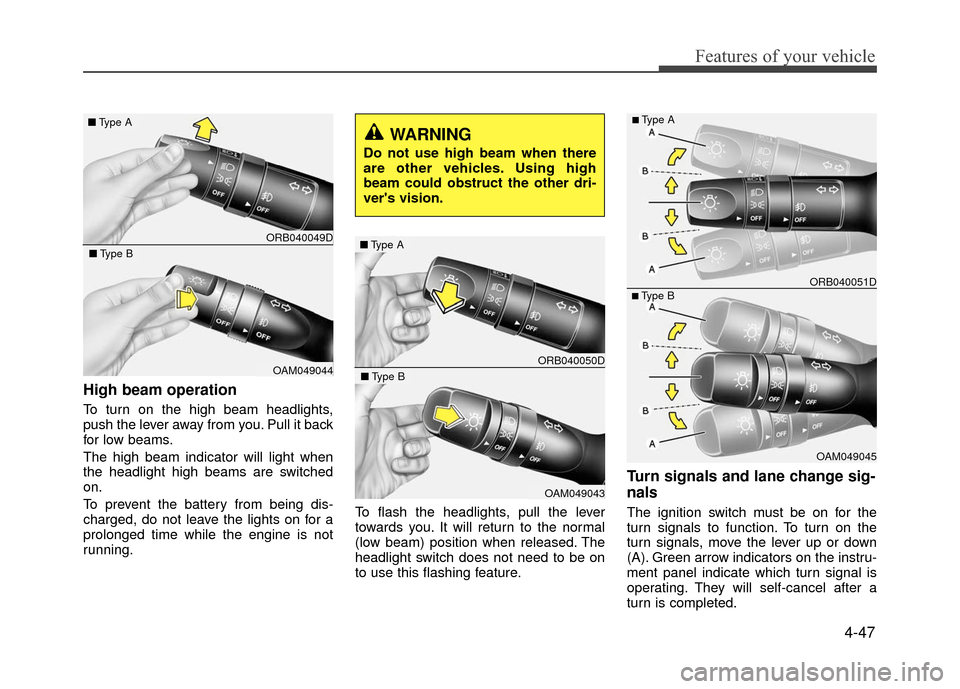
To turn on the high beam headlights,
push the lever away from you. Pull it back
for low beams.
The high beam indicator will light when
the headlight high beams are switched
on.
To prevent the battery from being dis-
charged, do not leave the lights on for a
prolonged time while the engine is not
running.To flash the headlights, pull the lever
towards you. It will return to the normal
(low beam) position when released. The
headlight switch does not need to be on
to use this flashing feature.
Turn signals and lane change sig-
nals
The ignition switch must be on for the
turn signals to function. To turn on the
turn signals, move the lever up or down
(A). Green arrow indicators on the instru-
ment panel indicate which turn signal is
operating. They will self-cancel after a
turn is completed.
ORB040049D
■
Type A
OAM049044
■Type B
WARNING
Do not use high beam when there
are other vehicles. Using high
beam could obstruct the other dri-
ver's vision.
ORB040050D
■Type A
OAM049043
■Type B
OAM049045
■Type B ORB040051D
■Type A
Page 122 of 380
Features of your vehicle
4-48
If the indicator continues to flash after a
turn, manually return the lever to the OFF
position.
To signal a lane change, move the turn
signal lever slightly and hold it in position
(B). The lever will return to the OFF posi-
tion when released.
If an indicator stays on and does not
flash or if it flashes abnormally, one of the
turn signal bulbs may be burned out and
will require replacement.
One-touch lane change function
To activate an one-touch lane change
function, move the turn signal lever
slightly and then release it. The lane
change signals will blink 3 times.
✽ ✽NOTICE
If an indicator flash is abnormally quick
or slow, a bulb may be burned out or
have a poor electrical connection in the
circuit.
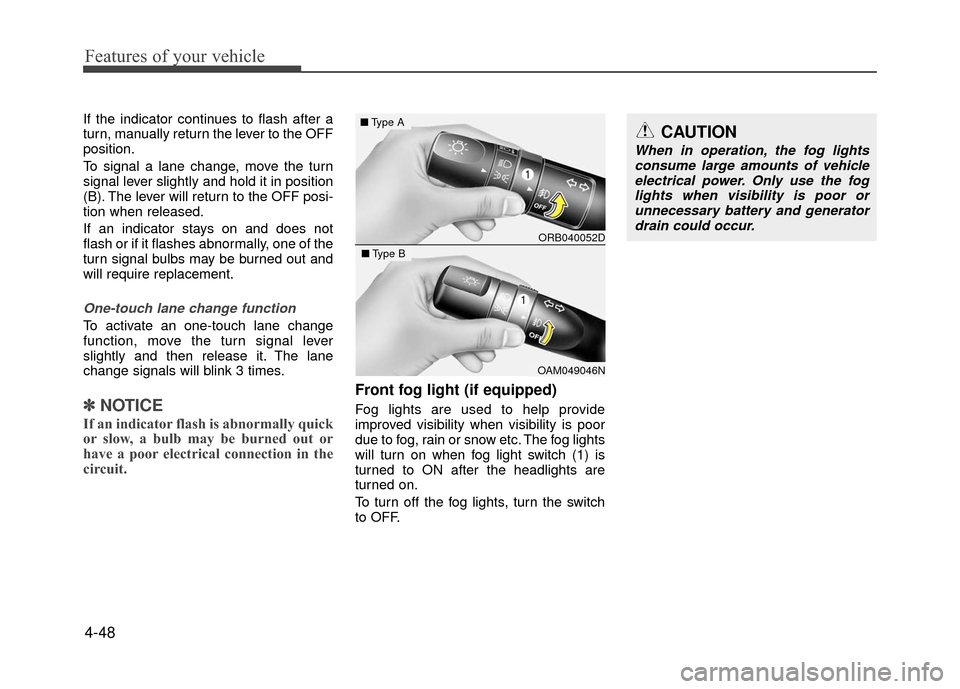
Front fog light (if equipped)
Fog lights are used to help provide
improved visibility when visibility is poor
due to fog, rain or snow etc. The fog lights
will turn on when fog light switch (1) is
turned to ON after the headlights are
turned on.
To turn off the fog lights, turn the switch
to OFF.
CAUTION
When in operation, the fog lights
consume large amounts of vehicleelectrical power. Only use the fog lights when visibility is poor orunnecessary battery and generatordrain could occur.
ORB040052D
■ Type A
OAM049046N
■Type B
Page 158 of 380
Features of your vehicle
4-84
✽
✽NOTICE
If you install an after market HID (high
intensity discharge) head lamp, your
vehicle's audio and electronic device
may malfunction.
Antenna
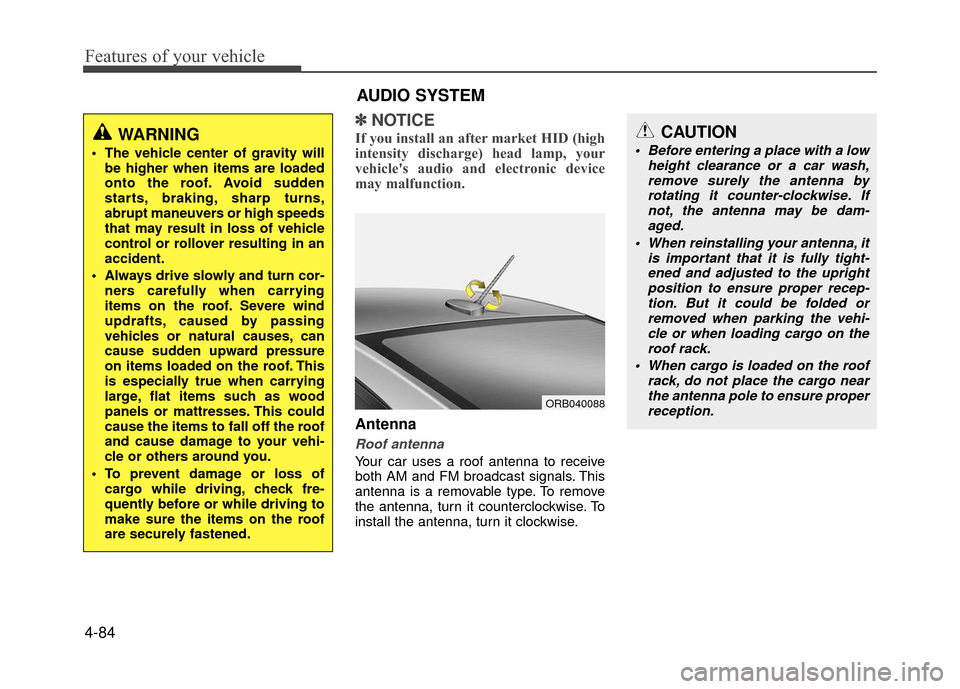
Roof antenna
Your car uses a roof antenna to receive
both AM and FM broadcast signals. This
antenna is a removable type. To remove
the antenna, turn it counterclockwise. To
install the antenna, turn it clockwise.
WARNING
The vehicle center of gravity will
be higher when items are loaded
onto the roof. Avoid sudden
starts, braking, sharp turns,
abrupt maneuvers or high speeds
that may result in loss of vehicle
control or rollover resulting in an
accident.
Always drive slowly and turn cor- ners carefully when carrying
items on the roof. Severe wind
updrafts, caused by passing
vehicles or natural causes, can
cause sudden upward pressure
on items loaded on the roof. This
is especially true when carrying
large, flat items such as wood
panels or mattresses. This could
cause the items to fall off the roof
and cause damage to your vehi-
cle or others around you.
To prevent damage or loss of cargo while driving, check fre-
quently before or while driving to
make sure the items on the roof
are securely fastened.
AUDIO SYSTEM
ORB040088
CAUTION
Before entering a place with a low height clearance or a car wash,remove surely the antenna by rotating it counter-clockwise. Ifnot, the antenna may be dam-aged.
When reinstalling your antenna, it is important that it is fully tight-ened and adjusted to the upright position to ensure proper recep-tion. But it could be folded or removed when parking the vehi-cle or when loading cargo on the roof rack.
When cargo is loaded on the roof rack, do not place the cargo nearthe antenna pole to ensure properreception.
Page 250 of 380
What to do in an emergency
6-2
ROAD WARNING
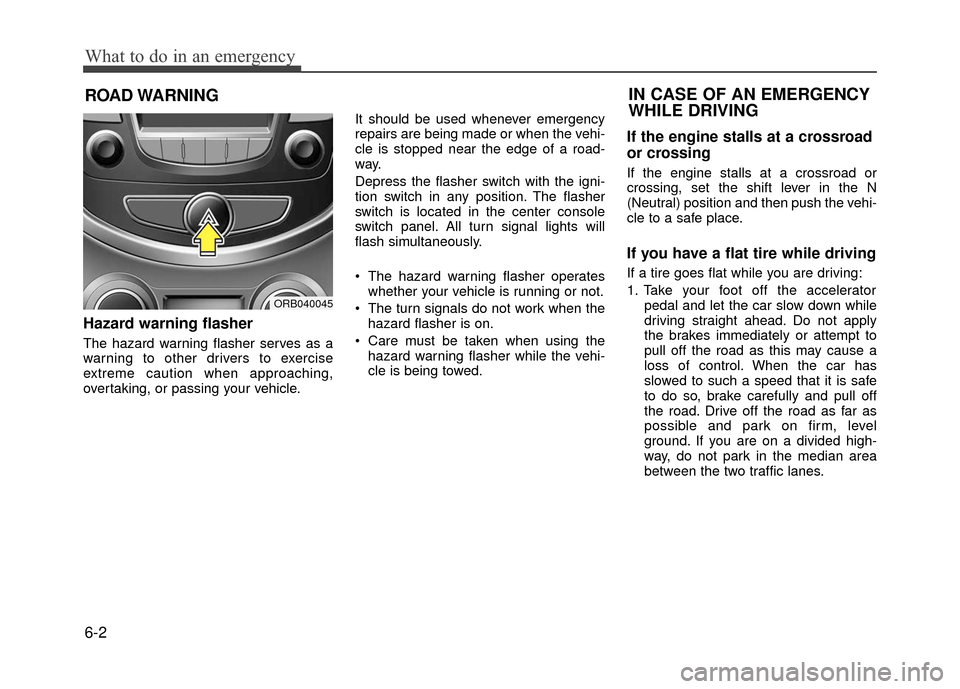
Hazard warning flasher
The hazard warning flasher serves as a
warning to other drivers to exercise
extreme caution when approaching,
overtaking, or passing your vehicle.It should be used whenever emergency
repairs are being made or when the vehi-
cle is stopped near the edge of a road-
way.
Depress the flasher switch with the igni-
tion switch in any position. The flasher
switch is located in the center console
switch panel. All turn signal lights will
flash simultaneously.
• The hazard warning flasher operates
whether your vehicle is running or not.
The turn signals do not work when the hazard flasher is on.
Care must be taken when using the hazard warning flasher while the vehi-
cle is being towed.
If the engine stalls at a crossroad
or crossing
If the engine stalls at a crossroad or
crossing, set the shift lever in the N
(Neutral) position and then push the vehi-
cle to a safe place.
If you have a flat tire while driving
If a tire goes flat while you are driving:
1. Take your foot off the accelerator pedal and let the car slow down while
driving straight ahead. Do not apply
the brakes immediately or attempt to
pull off the road as this may cause a
loss of control. When the car has
slowed to such a speed that it is safe
to do so, brake carefully and pull off
the road. Drive off the road as far as
possible and park on firm, level
ground. If you are on a divided high-
way, do not park in the median area
between the two traffic lanes.
IN CASE OF AN EMERGENCY
WHILE DRIVING
ORB040045
Page 340 of 380
7-57
Maintenance
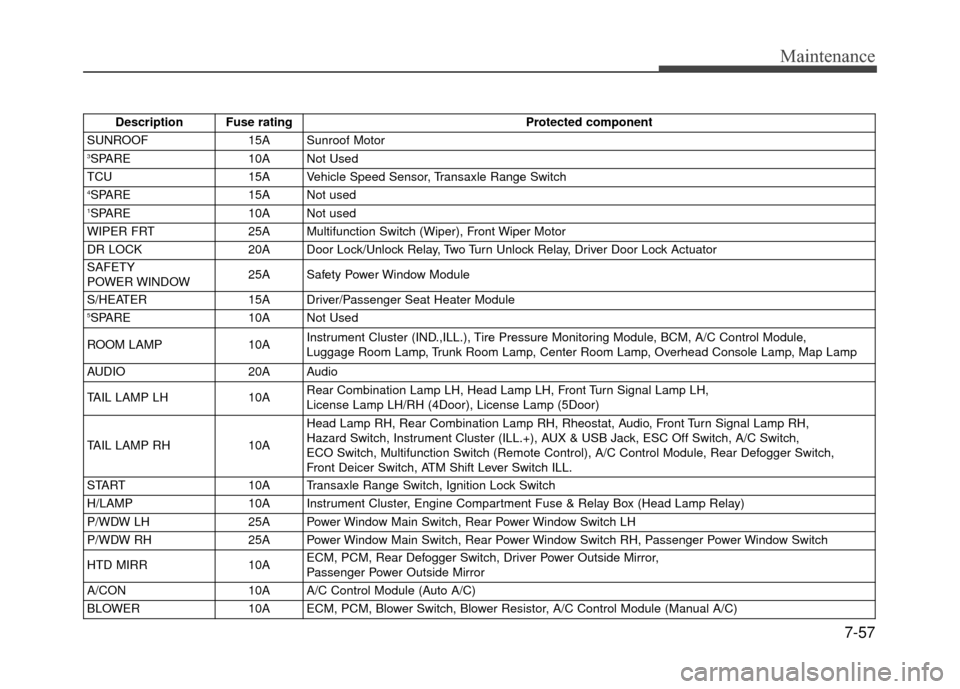
Description Fuse ratingProtected component
SUNROOF 15A Sunroof Motor
3SPARE10A Not Used
TCU 15A Vehicle Speed Sensor, Transaxle Range Switch
4SPARE15A Not used1SPARE10A Not used
WIPER FRT 25A Multifunction Switch (Wiper), Front Wiper Motor
DR LOCK 20A Door Lock/Unlock Relay, Two Turn Unlock Relay, Driver Door Lock Actuator
SAFETY
POWER WINDOW 25A Safety Power Window Module
S/HEATER 15A Driver/Passenger Seat Heater Module
5SPARE10A Not Used
ROOM LAMP 10AInstrument Cluster (IND.,ILL.), Tire Pressure Monitoring Module, BCM, A/C Control Module,
Luggage Room Lamp, Trunk Room Lamp, Center Room Lamp, Overhead Console Lamp, Map Lamp
AUDIO 20A Audio
TAIL LAMP LH 10ARear Combination Lamp LH, Head Lamp LH, Front Turn Signal Lamp LH,
License Lamp LH/RH (4Door), License Lamp (5Door)
TAIL LAMP RH 10AHead Lamp RH, Rear Combination Lamp RH, Rheostat, Audio, Front Turn Signal Lamp RH,
Hazard Switch, Instrument Cluster (ILL.+), AUX & USB Jack, ESC Off Switch, A/C Switch,
ECO Switch, Multifunction Switch (Remote Control), A/C Control Module, Rear Defogger Switch,
Front Deicer Switch, ATM Shift Lever Switch ILL.
START 10A Transaxle Range Switch, Ignition Lock Switch
H/LAMP 10A Instrument Cluster, Engine Compartment Fuse & Relay Box (Head Lamp Relay)
P/WDW LH 25A Power Window Main Switch, Rear Power Window Switch LH
P/WDW RH 25A Power Window Main Switch, Rear Power Window Switch RH, Passenger Power Window Switch
HTD MIRR 10AECM, PCM, Rear Defogger Switch, Driver Power Outside Mirror,
Passenger Power Outside Mirror
A/CON 10A A/C Control Module (Auto A/C)
BLOWER 10A ECM, PCM, Blower Switch, Blower Resistor, A/C Control Module (Manual A/C)