battery Hyundai Azera 2006 User Guide
[x] Cancel search | Manufacturer: HYUNDAI, Model Year: 2006, Model line: Azera, Model: Hyundai Azera 2006Pages: 307, PDF Size: 12.62 MB
Page 139 of 307
1
FEATURES OF YOUR HYUNDAI
1251
FEATURES OF YOUR HYUNDAI
125
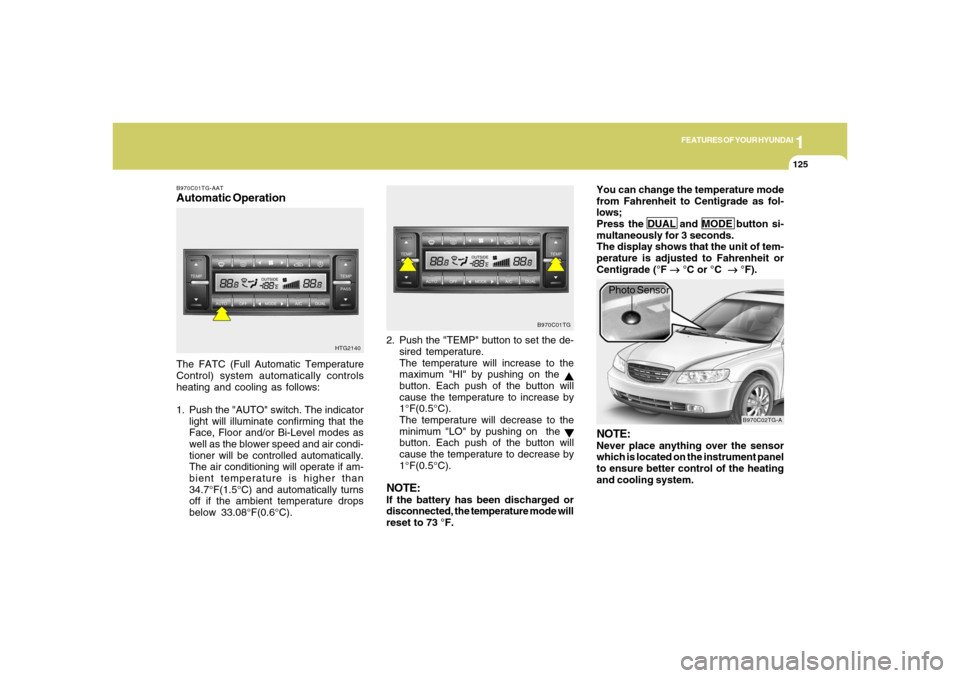
B970C01TG-AATAutomatic OperationThe FATC (Full Automatic Temperature
Control) system automatically controls
heating and cooling as follows:
1. Push the "AUTO" switch. The indicator
light will illuminate confirming that the
Face, Floor and/or Bi-Level modes as
well as the blower speed and air condi-
tioner will be controlled automatically.
The air conditioning will operate if am-
bient temperature is higher than
34.7°F(1.5°C) and automatically turns
off if the ambient temperature drops
below 33.08°F(0.6°C).2. Push the "TEMP" button to set the de-
sired temperature.
The temperature will increase to the
maximum "HI" by pushing on the
button. Each push of the button will
cause the temperature to increase by
1°F(0.5°C).
The temperature will decrease to the
minimum "LO" by pushing on the button. Each push of the button will
cause the temperature to decrease by
1°F(0.5°C).
NOTE:If the battery has been discharged or
disconnected, the temperature mode will
reset to 73 °F.You can change the temperature mode
from Fahrenheit to Centigrade as fol-
lows;
Press the DUAL and MODE button si-
multaneously for 3 seconds.
The display shows that the unit of tem-
perature is adjusted to Fahrenheit or
Centigrade (°F
→ →→ →
→ °C or °C
→ →→ →
→ °F).
HTG2140B970C01TG
B970C02TG-A
Photo Sensor
NOTE:Never place anything over the sensor
which is located on the instrument panel
to ensure better control of the heating
and cooling system.
Page 156 of 307
1FEATURES OF YOUR HYUNDAI
142
!
CAUTION:
o Do not insert warped or poor quality
discs into the CD player as damage to
the unit may occur.
o Do not insert anything like coins into
the player slot as damage to the unit
may occur.
o Do not place beverages close to the
audio system. The playback mecha-
nism may be damaged if you spill
them.
o Do not impact on the audio system, or
the playback mechanism could be
damaged.
o Driving on the off-roads or other vi-
brations may skip your compact disc.
Do not use the audio system on off-
roads as the discs could be scratched
and damaged.
o Do not grip or pull out the disc with
your hand while the disc is being pulled
into the unit by the self loading mecha-
nism. These can cause disc scratch-
ing to occur or trouble in the compact
disc player.
NOTE:o To assure proper operation of the
unit, keep the vehicle interior tem-
perature within a normal range by
using the vehicle’s air conditioning or
heating system.
o When replacing the fuse, replace it
with a fuse having the correct capac-
ity.
o The bookmarks are all erased when
the car battery is disconnected or
power off. Therefore, all data will have
to be set again if this should occur.
o This equipment is designed to be used
only in a 12 volt DC battery system
with negative ground.
o This unit is made of precision parts.
Do not attempt to disassemble or
adjust any parts.
o When driving your vehicle, be sure to
keep the volume of the unit set low
enough to allow you to hear sounds
coming from the outside.
o Do not expose this equipment (includ-
ing the speakers and tape) to water or
excessive moisture.o Avoid using home-made CD-Record-
able or CD-Rewritable discs as the
player may not operate properly. When
using the compact disc player, genu-
ine CDs are recommended.
Page 161 of 307
1
FEATURES OF YOUR HYUNDAI
1471
FEATURES OF YOUR HYUNDAI
147
M455D01TG-GAT1. TAPE PROGRAM Buttono This allows you to play the reverse side
of the tape by merely depressing the
program button. An arrow will appear in
the display to show tape direction.
o Push the TAPE button to turn on that
function without pushing power ON-
OFF control knob.2. TAPE EJECT Buttono When the button is pressed with a cas-
sette loaded, the cassette will eject.
o When the button is pressed during FF/
REW mode, the cassette will eject.3. AUTO MUSIC Search ButtonPress the button to find the starting point of
each song in a prerecorded music tape.
The quiet space between songs (must
have at least 4 sec. gap) can be accepted
by the AUTO MUSIC search button.
o Pressing the button (
) will play the
beginning of the next music segment.
o Pressing the button (
) will start
replay at the beginning of the music just
listened to.
4. FF/REW Buttono Fast forward tape winding starts when
the FF button is pressed during PLAY or
REW mode.
o Tape PLAY starts when the FF button is
pressed again during FF mode.
o Tape rewinding starts when the REW
button is pressed during PLAY or FF
mode.
o Tape PLAY starts when the REW button
pressed again during REW mode.5. REPEAT Buttono To repeat the track you are currently
listening to, press the RPT button. To
cancel, press again.
o If you do not release RPT operation
when the track ends, it will automati-
cally be replayed.
This process will be continued until you
push the button again.6. DOLBY ButtonIf you get background noise during tape
PLAY, you can reduce this considerably
by merely pressing the DOLBY button. If
you want to cancel the DOLBY feature,
press the button again.
7. EQUALIZER (EQ) ButtonPress the EQ button to select the CLAS-
SIC, POPS, ROCK, JAZZ and DEFEAT
MODE for the desired tone quality. Each
press of the button changes the display as
follows;NOTE:o To assure proper operation of the
unit, keep the vehicle interior tem-
perature within a normal range by
using the vehicle’s air conditioning or
heating system.
o When replacing the fuse, replace it
with a fuse having the correct capac-
ity.
o The preset station frequencies are all
erased when the car battery is dis-
connected. Therefore, all data will have
to be set again if this should occur.
o Do not add any oil to the rotating parts.
Keep magnets, screwdrivers and
other metallic objects away from the
tape mechanism and head. CLASSIC → POPS → ROCK → JAZZ →DEFEAT
Page 162 of 307
1FEATURES OF YOUR HYUNDAI
148
o This equipment is designed to be used
only in a 12 volt DC battery system
with negative ground.
o This unit is made of precision parts.
Do not attempt to disassemble or ad-
just any parts.
o When driving your vehicle, be sure to
keep the volume of the unit set low
enough to allow you to hear sounds
coming from the outside.
o Do not expose this equipment (in-
cluding the speakers and tape) to
water or excessive moisture.
CAUTION:
o Do not insert anything like coins into
the player slot as damage to the unit
may occur.
o Do not place beverages close to the
audio system. The playback mecha-
nism may be damaged if you spill
them.
o Do not impact on the audio system, or
the playback mechanism could be
damaged.
!
Page 166 of 307
1FEATURES OF YOUR HYUNDAI
152
!
12. CHANGE DIRECTORY(DIR) But-
tono You can move through the folder by
pushing the DIR button to up (
) and
down (
).
After moving the desired folder, press the
FILE SEARCH knob to playback the first
file in the selected folder.
If you do not press the FILE SEARCH knob
within 5 seconds, the folder searching
function will be released.
It is not operated in single folder.
NOTE:o To assure proper operation of the
unit, keep the vehicle interior tem-
perature within a normal range by
using the vehicle’s air conditioning or
heating system.
o When replacing the fuse, replace it
with a fuse having the correct capac-
ity.
o The bookmarks are all erased when
the car battery is disconnected or
power off. Therefore, all data will have
to be set again if this should occur.o This equipment is designed to be used
only in a 12 volt DC battery system
with negative ground.
o This unit is made of precision parts.
Do not attempt to disassemble or ad-
just any parts.
o When driving your vehicle, be sure to
keep the volume of the unit set low
enough to allow you to hear sounds
coming from the outside.
o Do not expose this equipment (includ-
ing the speakers and tape) to water or
excessive moisture.
CAUTION:
o Do not insert warped or poor quality
discs into the CD player as damage to
the unit may occur.
o Do not insert anything like coins into
the player slot as damage to the unit
may occur.
o Do not place beverages close to the
audio system. The playback mecha-
nism may be damaged if you spill
them.o Do not impact on the audio system, or
the playback mechanism could be
damaged.
o Driving on the off-roads or other vi-
brations may skip your compact disc.
Do not use the audio system on off-
roads as the discs could be scratched
and damaged.
o Do not grip or pull out the disc with
your hand while the disc is being pulled
into the unit by the self loading mecha-
nism. These can cause disc scratch-
ing to occur or trouble in the compact
disc player.
o Avoid home-made using CD-Record-
able or CD-Rewritable discs as the
player may not operate properly. When
using the compact disc player, genu-
ine CDs are recommended.
Page 177 of 307
1
FEATURES OF YOUR HYUNDAI
1631
FEATURES OF YOUR HYUNDAI
163
CAUTION
o Do not insert warped or poor quality
discs into the CD player as damage to
the unit may occur.
o Do not insert anything like coins into
the player slot as damage to the unit
may occur.
o Do not place beverages close to the
audio system. The playback mecha-
nism may be damaged if you spill
them.
o Do not strike or allow anything to im-
pact the audio system, damage to the
system mechanisms could occur.
!
o All stored bookmarks are all erased
when the car battery is disconnected
or power to the vehicle is lost. If this
occurs, the bookmarks will have to be
reset.
o Do not add any oil to the rotating parts.
Keep magnets, screwdrivers and
other metallic objects away from the
tape mechanism and head.
o Off-road or rough surface driving may
cause the com- pact disc to skip. Do
not use the compact disc when driv-
ing in such conditions as damage to
the compact disc face could occur.
o Do not attempt to grab or pull the
compact disc out while the disc is
being pulled into the audio unit by the
self-loading mechanism. Damage to
the audio unit and compact disc could
occur.
o This equipment is designed to be used
only in a 12 volt DC battery system
with negative ground.
o This unit is made of precision parts.
Do not attempt to disassemble or ad-
just any parts.
o When driving your vehicle, be sure to
keep the volume of the unit set low
enough to allow you to hear sounds
coming from the outside.
o Do not expose this equipment (includ-
ing the speakers and tape) to water or
excessive oisture.o Avoid using home-made recorded
compact discs in your audio unit. Origi-
nal compact discs are recommended.
o The unit may not play CD-RW
(Rewritable) discs.
Page 183 of 307
2
DRIVING YOUR HYUNDAI
3
!
PROPOSITION 65 WARNING:
Engine exhaust and a wide variety of
automobile components and parts, in-
cluding components found in the interior
furnishings in a vehicle, contain or emit
chemicals known to the State of Califor-
nia to cause cancer and birth defects
and reproductive harm. In addition, cer-
tain fluids contained in vehicles and cer-
tain products of component wear con-
tain or emit chemicals known to the State
of California to cause cancer and birth
defects or other reproductive harm.
BEFORE STARTING
THE ENGINEC020A01A-AATBefore you start the engine, you should
always:
1. Look around the vehicle to be sure
there are no flat tires, puddles of oil,
water or other indications of possible
trouble.
2. After entering the car, check to be sure
the parking brake is engaged.
3. Check that all windows and lights are
clean.
4. Check that the interior and exterior
mirrors are clean and in position.
5. Check your seat, seatback and head-
rest to be sure they are in their proper
positions.
6. Lock all the doors.
7. Fasten your seat belt and be sure that
all other occupants have fastened
theirs.
8. Turn off all lights and accessories that
are not needed.
9. When you turn the ignition switch to
"ON", check that all appropriate warn-
ing lights are operating and that you
have sufficient fuel.
10. Check the operation of warning lights
and all bulbs when key is in the "ON"
position.
TO START THE ENGINEC030A01TG-AATCOMBINATION IGNITION SWITCHo Place the shift lever in "P" (park) and
depress the brake pedal fully.
o To start the engine, insert the ignition
key and turn it to the "START" position.
Release it as soon as the engine starts.
Do not hold the key in the "START"
position for more than 15 seconds.NOTE:o For safety, the engine will not start if
the shift lever is not in "P" or "N"
Position.
o The ignition key cannot be turned from
"ACC" position to "LOCK" position
unless the shift lever is in the "P"
(Park) position or the negative bat-
tery terminal is disconnected from
the battery. To remove the key, al-
ways confirm that the shift lever is
securely positioned in "P" (Park).
o For additional information about start-
ing, see page 2-5.
Page 184 of 307
2
DRIVING YOUR HYUNDAI
4
NOTE:Do not hold the key in the "START" posi-
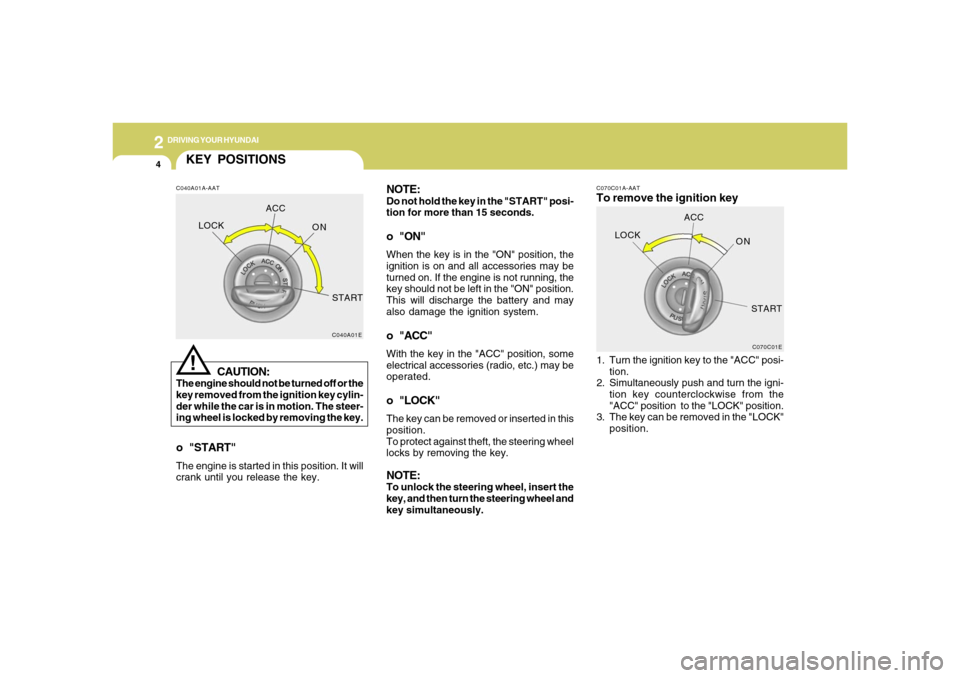
tion for more than 15 seconds.o "ON"When the key is in the "ON" position, the
ignition is on and all accessories may be
turned on. If the engine is not running, the
key should not be left in the "ON" position.
This will discharge the battery and may
also damage the ignition system.o "ACC"With the key in the "ACC" position, some
electrical accessories (radio, etc.) may be
operated.o "LOCK"The key can be removed or inserted in this
position.
To protect against theft, the steering wheel
locks by removing the key.NOTE:To unlock the steering wheel, insert the
key, and then turn the steering wheel and
key simultaneously.
C070C01A-AATTo remove the ignition key1. Turn the ignition key to the "ACC" posi-
tion.
2. Simultaneously push and turn the igni-
tion key counterclockwise from the
"ACC" position to the "LOCK" position.
3. The key can be removed in the "LOCK"
position.
C070C01E
LOCKACC
ON
START
KEY POSITIONSC040A01A-AAT
CAUTION:
The engine should not be turned off or the
key removed from the ignition key cylin-
der while the car is in motion. The steer-
ing wheel is locked by removing the key.
!
o "START"The engine is started in this position. It will
crank until you release the key.
C040A01E
LOCKACC
ON
START
Page 186 of 307
2
DRIVING YOUR HYUNDAI
6
!
CAUTION:
Never shift into "R" or "P" position while
the vehicle is moving.
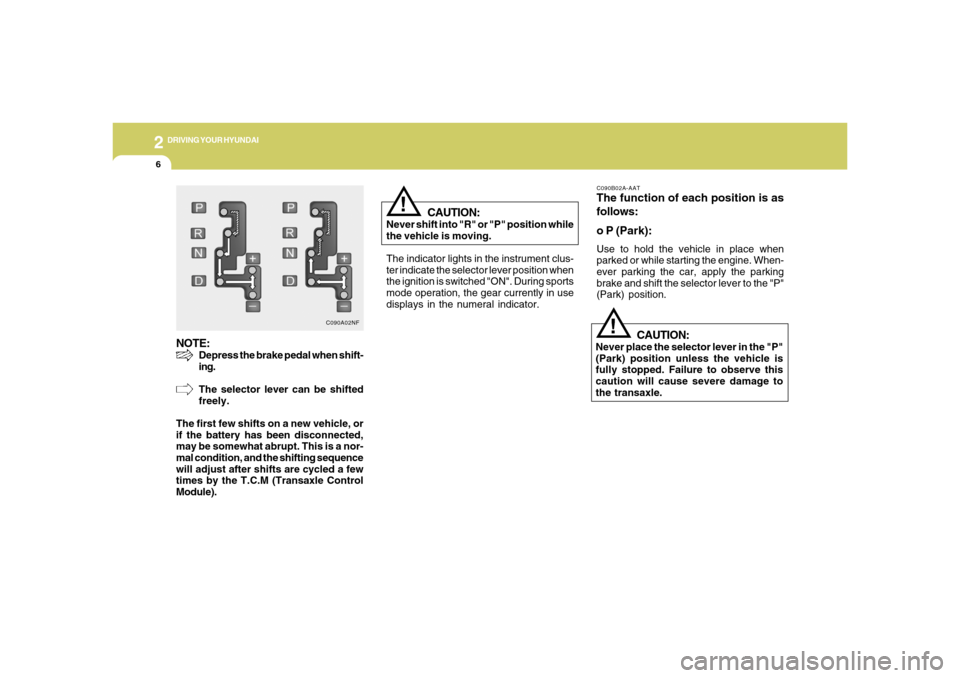
The indicator lights in the instrument clus-
ter indicate the selector lever position when
the ignition is switched "ON". During sports
mode operation, the gear currently in use
displays in the numeral indicator.
C090B02A-AATThe function of each position is as
follows:
o P (Park):Use to hold the vehicle in place when
parked or while starting the engine. When-
ever parking the car, apply the parking
brake and shift the selector lever to the "P"
(Park) position.
CAUTION:
Never place the selector lever in the "P"
(Park) position unless the vehicle is
fully stopped. Failure to observe this
caution will cause severe damage to
the transaxle.
!
NOTE:
Depress the brake pedal when shift-
ing.
The selector lever can be shifted
freely.
The first few shifts on a new vehicle, or
if the battery has been disconnected,
may be somewhat abrupt. This is a nor-
mal condition, and the shifting sequence
will adjust after shifts are cycled a few
times by the T.C.M (Transaxle Control
Module).
C090A02NF
Page 196 of 307
2
DRIVING YOUR HYUNDAI
16
C160D01A-AATCheck Battery and CablesWinter puts additional burdens on the
battery system. Visually inspect the battery
and cables as described in Section 6. The
level of charge in your battery can be
checked by your Hyundai dealer or a ser-
vice station.C160C01A-AATUse High Quality Ethylene Glycol
CoolantYour Hyundai is delivered with high qual-
ity ethylene glycol coolant in the cooling
system. It is the only type of coolant that
should be used because it helps prevent
corrosion in the cooling system, lubricates
the water pump and prevents freezing. Be
sure to replace or replenish your coolant in
accordance with the maintenance sched-
ule in Section 5. Before winter, have your
coolant tested to assure that its freezing
point is sufficient for the temperatures an-
ticipated during the winter.
C160A01A-AATThe more severe weather conditions of
winter result in greater wear and other
problems. To minimize the problems of
winter driving, you should follow these
suggestions:
C160B01A-AATSnowy or Icy ConditionsTo drive your vehicle in deep snow, it may
be necessary to use snow tires or to install
tire chains on your tires. If snow tires are
needed, it is necessary to select tires
equivalent in size and type of the original
equipment tires. Failure to do so may ad-
versely affect the safety and handling of
your car. Furthermore, speeding, rapid
acceleration, sudden brake applications,
and sharp turns are potentially very haz-
ardous practices.
During deceleration, use engine braking
to the fullest extent. Sudden brake applica-
tions on snowy or icy roads may cause
skids to occur. You need to keep sufficient
distance between the vehicle in operation
in front and your vehicle. Also, apply the
brake gently. It should be noted that install-
ing tire chains on the tire will provide a
greater driving force, but will not prevent
side skids.NOTE:Tire chains are not legal in all states.
Check state laws before fitting tire
chains.
WINTER DRIVING