ESP Hyundai Azera 2016 User Guide
[x] Cancel search | Manufacturer: HYUNDAI, Model Year: 2016, Model line: Azera, Model: Hyundai Azera 2016Pages: 521, PDF Size: 16.54 MB
Page 133 of 521
453
Features of your vehicle
Reprogramming a single
HomeLink®button
To program a device to HomeLink®
using a HomeLink®button previously
trained, follow these steps:
1. Press and hold the desired HomeLink
®button. DO NOT
release the button.
2. The indicator light will begin to flash after 20 seconds. Without
releasing the HomeLink
®button,
proceed with "Programming" step
2.
For questions or comments, contact
HomeLink
®at www.homelink.comor
1-800-355-3515. Erasing HomeLink
®buttons
Individual buttons cannot be erased.
However, to erase all three pro-
grammed buttons:
1. Press and hold the two outer HomeLink
®buttons until the indi-
cator light begins to flash after 10
seconds.
2. Release both buttons. Do not hold for longer than 20 seconds.
The Integrated HomeLink
®Wireless
Control System is now in the training
(learn) mode and can be pro-
grammed at any time following the
appropriate steps in the Programming
sections above. FCC ID: NZLTLMHL4
IC: 4112A-TLMHL4
This device complies with Part 15
of the FCC Rules.
Operation is subject to the following
two conditions:
1. This device may not cause harm-
ful interference, and
2. This device must accept any inter- ference received, including inter-
ference that may cause undesired
operation.
WARNING
The transceiver has been tested
and complies with FCC and
Industry Canada rules. Changes
or modifications not expressly
approved by the party responsi-
ble for compliance could void
the user's authority to operate
the device.
Page 135 of 521
455
Features of your vehicle
Blind zone mirror (if equipped)
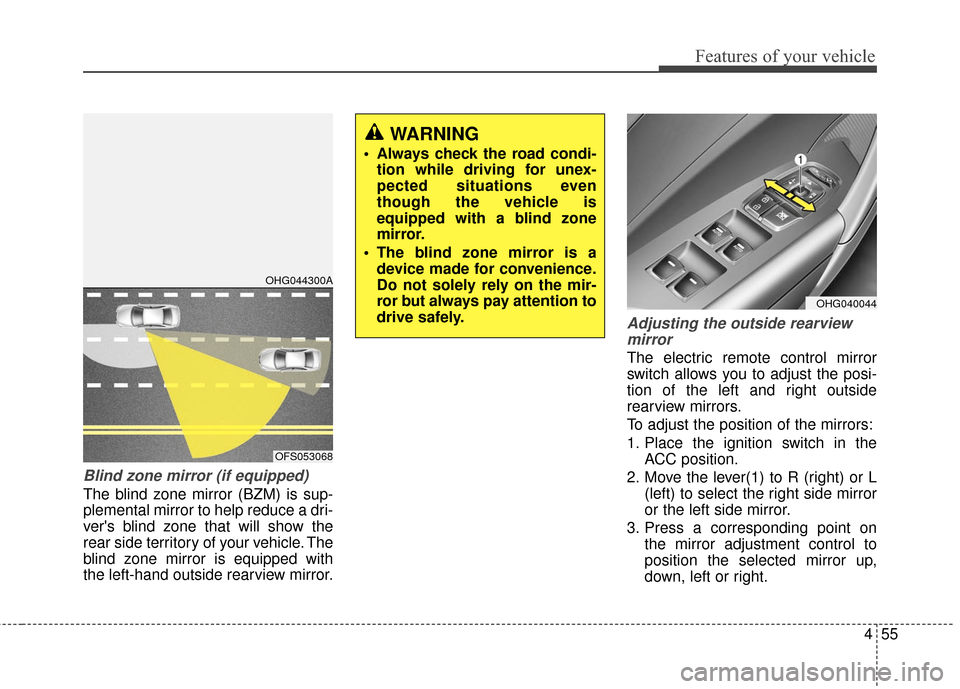
The blind zone mirror (BZM) is sup-
plemental mirror to help reduce a dri-
ver's blind zone that will show the
rear side territory of your vehicle. The
blind zone mirror is equipped with
the left-hand outside rearview mirror.
Adjusting the outside rearviewmirror
The electric remote control mirror
switch allows you to adjust the posi-
tion of the left and right outside
rearview mirrors.
To adjust the position of the mirrors:
1. Place the ignition switch in the ACC position.
2. Move the lever(1) to R (right) or L (left) to select the right side mirror
or the left side mirror.
3. Press a corresponding point on the mirror adjustment control to
position the selected mirror up,
down, left or right.
WARNING
Always check the road condi-tion while driving for unex-
pected situations even
though the vehicle is
equipped with a blind zone
mirror.
The blind zone mirror is a device made for convenience.
Do not solely rely on the mir-
ror but always pay attention to
drive safely.
OHG044300A
OFS053068
OHG040044
Page 178 of 521
Features of your vehicle
98
4
This system can only sense objects
within the range and location of the
sensors; it can not detect objects in
other areas where sensors are not
installed. Also, small or slim objects,
such as poles or objects located
between sensors may not be detect-
ed by the sensors.
Always visually check behind the
vehicle when backing up.
Be sure to inform any drivers of the
vehicle that may be unfamiliar with
the system regarding the systems
capabilities and limitations.Self-diagnosis
When you shift the gear to the R
(Reverse) position and if one or more
of the below occurs you may have a
malfunction in the rear parking assist
system.
You do not hear an audible warning
sound or if the buzzer sounds inter-
mittently.
If this occurs, have your vehicle
checked by an authorized HYUNDAI
dealer as soon as possible.
✽ ✽ NOTICE
Your new vehicle warranty does not
cover any accidents or damage to
the vehicle or injuries to its occu-
pants due to a rear parking assist
system malfunction. Always drive
safely and cautiously.
WARNING - Objects
Pay close attention when the
vehicle is driven close to
objects on the road, particularly
pedestrians, and especially
children. Be aware that some
objects may not be detected by
the sensors, due to the object’s
distance, size or material, all of
which can limit the effective-
ness of the sensor. To avoid col-
lisions with children, pedistri-
ans, objects, and vehicles,
always perform a visual inspec-
tion to make sure the vehicle is
clear of all obstructions before
moving the vehicle in any direc-
tion. Otherwise serious injuries
could occur.
(blinks)
is displayed.
Page 179 of 521
499
Features of your vehicle
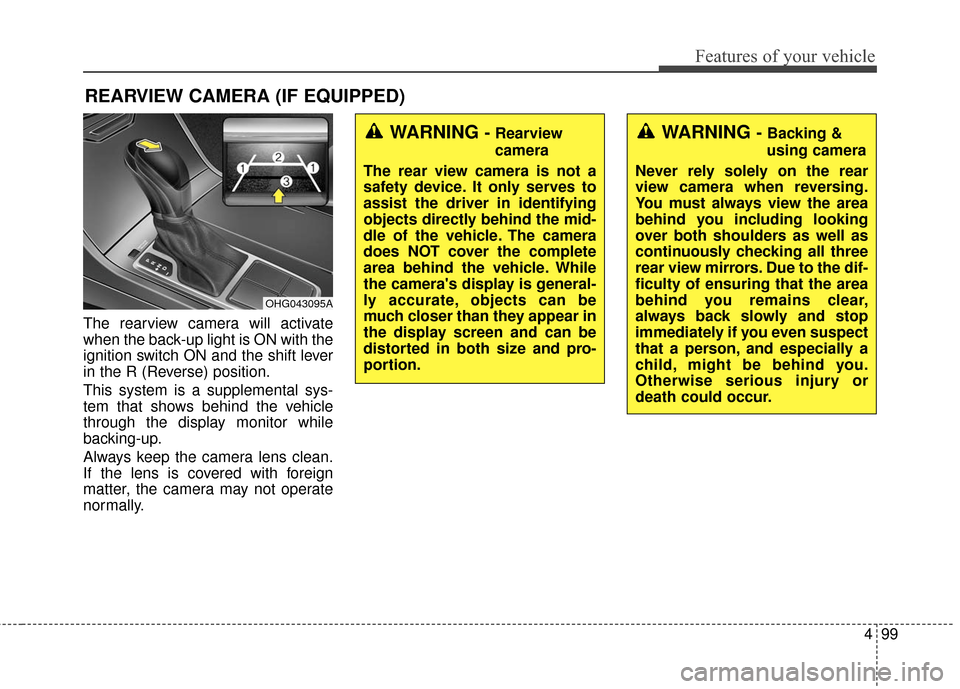
The rearview camera will activate
when the back-up light is ON with the
ignition switch ON and the shift lever
in the R (Reverse) position.
This system is a supplemental sys-
tem that shows behind the vehicle
through the display monitor while
backing-up.
Always keep the camera lens clean.
If the lens is covered with foreign
matter, the camera may not operate
normally.
REARVIEW CAMERA (IF EQUIPPED)
OHG043095A
WARNING - Rearview
camera
The rear view camera is not a
safety device. It only serves to
assist the driver in identifying
objects directly behind the mid-
dle of the vehicle. The camera
does NOT cover the complete
area behind the vehicle. While
the camera's display is general-
ly accurate, objects can be
much closer than they appear in
the display screen and can be
distorted in both size and pro-
portion.WARNING - Backing &
using camera
Never rely solely on the rear
view camera when reversing.
You must always view the area
behind you including looking
over both shoulders as well as
continuously checking all three
rear view mirrors. Due to the dif-
ficulty of ensuring that the area
behind you remains clear,
always back slowly and stop
immediately if you even suspect
that a person, and especially a
child, might be behind you.
Otherwise serious injury or
death could occur.
Page 181 of 521
4101
Features of your vehicle
Headlight (Headlamp) escort
function
If you turn the ignition switch to the
ACC or OFF position with the head-
lights ON, the headlights (and/or
parking light) remain on for about 5
minutes. However, if the driver’s door
is opened and closed, the headlights
(and/or parking light) turn off after 15
seconds.
The headlights (and/or parking light)
can be turned off by pressing the
lock button on the smart key twice or
turning the light switch to the OFF or
Parking light position.
You can activate or deactivate this
feature. Refer to “User Settings
Mode” in this section.
Headlight (Headlamp) welcome
function
When the headlight is in the ON or
AUTO position and all doors (and
trunk) are closed and locked, if you
press the door unlock button on the
smart key, the headlights (and/or
parking light) will come on for about
15 seconds. At this time, if you press
the door lock or unlock button, the
headlights (and/or parking light) will
turn off immediately.
You can activate or deactivate this
feature. Refer to “User Settings
Mode” in this section.
Daytime running light
Daytime Running Lights (DRL) can
make it easier for others to see the
front of your vehicle during the day.
DRL can be helpful in many different
driving conditions, and it is especially
helpful after dawn and before sunset.
The DRL system turns ON when:1. The light switch is in the AUTO light position.
2. The light switch is in the Parking light position.
The DRL system turns OFF when: 1. The multifunction switch is in the DRL OFF position.
2. The headlights are ON.
3. The turn signal is ON. (the blink- ing side of the DRL will turn off)
4. The hazard warning light is ON.
5. The parking brake is applied.
6. Engine stops.
Page 217 of 521
4137
Features of your vehicle
4. The air conditioning will be turnedon according to the detected
ambient temperature and outside
(fresh) air position will be selected
automatically.
If the air conditioning and outside
(fresh) air position are not selected
automatically, adjust the correspon-
ding button manually. If the posi-
tion is selected, lower fan speed is
adjusted to a higher fan speed.
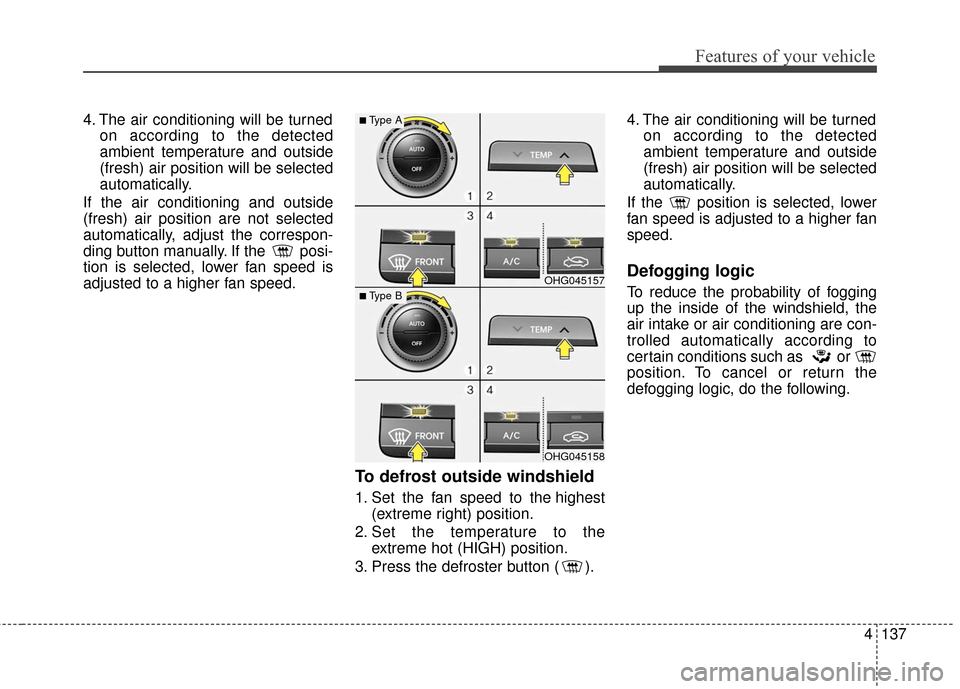
To defrost outside windshield
1. Set the fan speed to the highest (extreme right) position.
2. Set the temperature to the extreme hot (HIGH) position.
3. Press the defroster button ( ). 4. The air conditioning will be turned
on according to the detected
ambient temperature and outside
(fresh) air position will be selected
automatically.
If the position is selected, lower
fan speed is adjusted to a higher fan
speed.
Defogging logic
To reduce the probability of fogging
up the inside of the windshield, the
air intake or air conditioning are con-
trolled automatically according to
certain conditions such as or
position. To cancel or return the
defogging logic, do the following.OHG045157
OHG045158
■Type A
■Type B
Page 242 of 521
✽
✽NOTICE - USING THE Voice
Recognition
• When using the voice recognition feature, only commands listed
within the user's manual are sup-
ported.
• Be aware that during the opera- tion of the voice recognition sys-
tem, pressing any key other than
the key or touching the screen
will terminate voice recognition
mode.
• For superior voice recognition performance, position the micro-
phone used for voice recognition
above the head of the driver’s seat
and maintain a proper position
when saying commands.
• Within the following situations, voice recognition may not function
properly due to external sound.
- When the windows and sunroofare open
- When the wind of the cooling / heating device is strong
- When entering and passing through tunnels (Continued)(Continued)
- When driving on rugged anduneven roads
- During severe rain (heavy rains, windstorms)
• Phone related voice commands can be used only when a
Bluetooth
®Wireless Technology
device is connected.
• When making calls by stating a name, the corresponding contact
must be downloaded and stored
within the audio system.
• After downloading the Bluetooth
®
Wireless Technology phone book,
it takes some times to convert the
phone book data into voice infor-
mation. During this time, voice
recognition may not properly
operate.
• Pronounce the voice commands naturally and clearly as if in a nor-
mal conversation.
4162
Features of your vehicle
Page 246 of 521
4166
Features of your vehicle
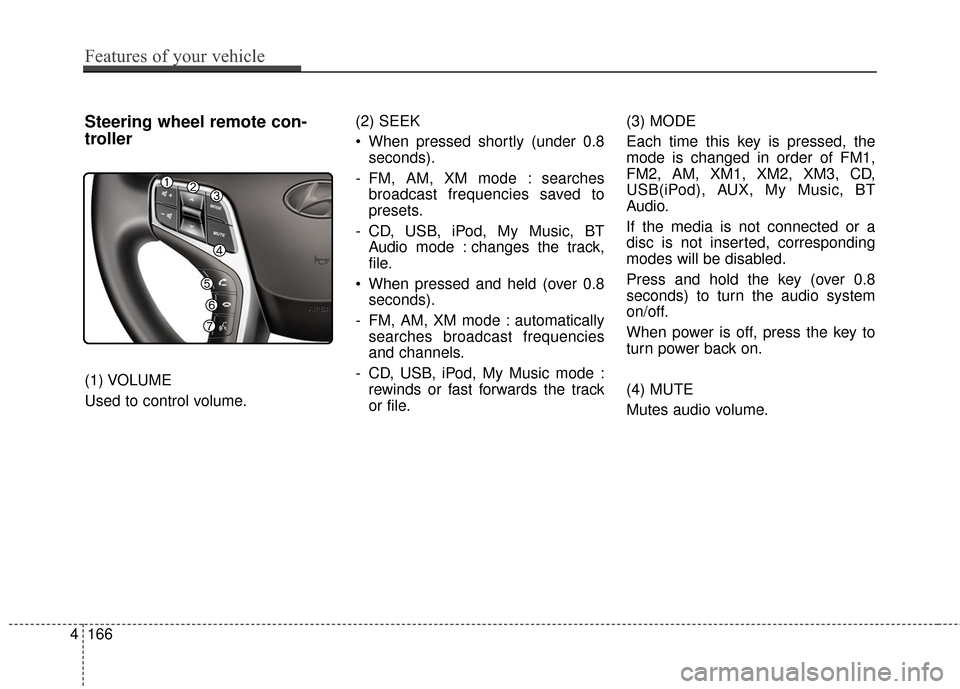
Steering wheel remote con-
troller
(1) VOLUME
Used to control volume.(2) SEEK
When pressed shortly (under 0.8
seconds).
- FM, AM, XM mode : searches broadcast frequencies saved to
presets.
- CD, USB, iPod, My Music, BT Audio mode : changes the track,
file.
When pressed and held (over 0.8 seconds).
- FM, AM, XM mode : automatically searches broadcast frequencies
and channels.
- CD, USB, iPod, My Music mode : rewinds or fast forwards the track
or file. (3) MODE
Each time this key is pressed, the
mode is changed in order of FM1,
FM2, AM, XM1, XM2, XM3, CD,
USB(iPod), AUX, My Music, BT
Audio.
If the media is not connected or a
disc is not inserted, corresponding
modes will be disabled.
Press and hold the key (over 0.8
seconds) to turn the audio system
on/off.
When power is off, press the key to
turn power back on.
(4) MUTE
Mutes audio volume.
Page 277 of 521
4197
Features of your vehicle
✽
✽NOTICE
•Bluetooth®Wireless Technology
features supported within the
vehicle are as follows. Some fea-
tures may not be supported
depending on your Bluetooth
®
Wireless Technology device.
- Outgoing/Incoming Handsfree
calls
- Operations during a call (Switch to Private, Switch to call waiting,
MIC on/off)
- Downloading Call History
- Downloading Mobile Contacts
- Bluetooth
®Wireless Technology
device auto connection
- Bluetooth Audio Streaming
• Up to five Bluetooth
®Wireless
Technology devices can be paired
to the Car Handsfree system.
• Only one Bluetooth
®Wireless
Technology device can be connect-
ed at a time.
• Other devices cannot be paired while a Bluetooth
®Wireless
Technology device is connected. (Continued)(Continued)
• Only
Bluetooth
®Wireless
Technology Handsfree and
Bluetooth audio related features
are supported.
• Bluetooth related operations are possible only within devices that
support Handsfree or audio fea-
tures, such as a Bluetooth
®
Wireless Technology mobile phone
or a Bluetooth audio device.
• If a connected Bluetooth
®Wireless
Technology device becomes dis-
connected due to being out of com-
munication range, turning the
device OFF, or a Bluetooth
®
Wireless Technology communica-
tion error, corresponding
Bluetooth
®Wireless Technology
devices are automatically searched
and reconnected.
• If the system becomes unstable due to communication errors
between the car Handsfree and the
Bluetooth
®Wireless Technology
device, reset the device by turning
off and back on again. Upon reset-
ting Bluetooth
®Wireless
Technology device, the system will
be restored. (Continued)(Continued)
• After pairing is complete, a con-
tacts download request is sent
once to the mobile phone. Some
mobile phones may require confir-
mation upon receiving a download
request, ensure your mobile phone
accepts the connection. Refer to
your phones user’s manual for
additional information regarding
phone pairing and connections.
Page 287 of 521
4207
Features of your vehicle
CommandFunction
More Help Provides guidance on commands that can be
used anywhere in the system.
Help Provides guidance on commands that can be
used within the current mode.
Call
Ex) Call “John Smith”
Phone Provides guidance on Phone related com- mands. After saying this command, say
“Favorites”,“Dial Number”, “Call History” or
“Contacts” execute corresponding functions.
Favorites Display the Favorite screen.
Call History Displays the Call History screen.
Contacts Displays the Contacts screen. After sayingthis command, say the name of a contact
saved in the Contacts to automatically con-
nect the call.
Dial Number Display the Dial number screen. After saying this command, you can say the number that
you want to call.
RedialConnects the most recently called number.
Tutorial Pro vide guidance on how to use voice
recognition and Bluetooth®connections.
Command Function
When listening to the radio, displays the
next radio screen. (FM1➟FM2➟AM➟XM1➟XM2➟XM3➟FM1)
Radio
When listening to a different mode, displays
the most recently played radio screen.
When currently listening to the FM radio,
maintains the current state.
When listening to a different mode, displaysthe most recently played FM screen.
FM1(FM One) Displays the FM1 screen.
FM2(FM Two) Displays the FM2 screen.
AM Displays the AM screen.
FM Preset 1~6 Plays the most recently played broadcast
saved in FM Preset 1~6.
AM Preset 1~6 Plays the broadcast saved in AM Preset 1~6.
FM 87.5~107.9 Plays the FM broadcast of the corresponding
frequency.
AM 530~1710 Plays the AM broadcast of the corresponding
frequency.
XM (Satellite)
When currently listening to the XM, main-
tains the current state.
When listening to a different mode, displaysthe most recently played XM screen.
(Call by Name)
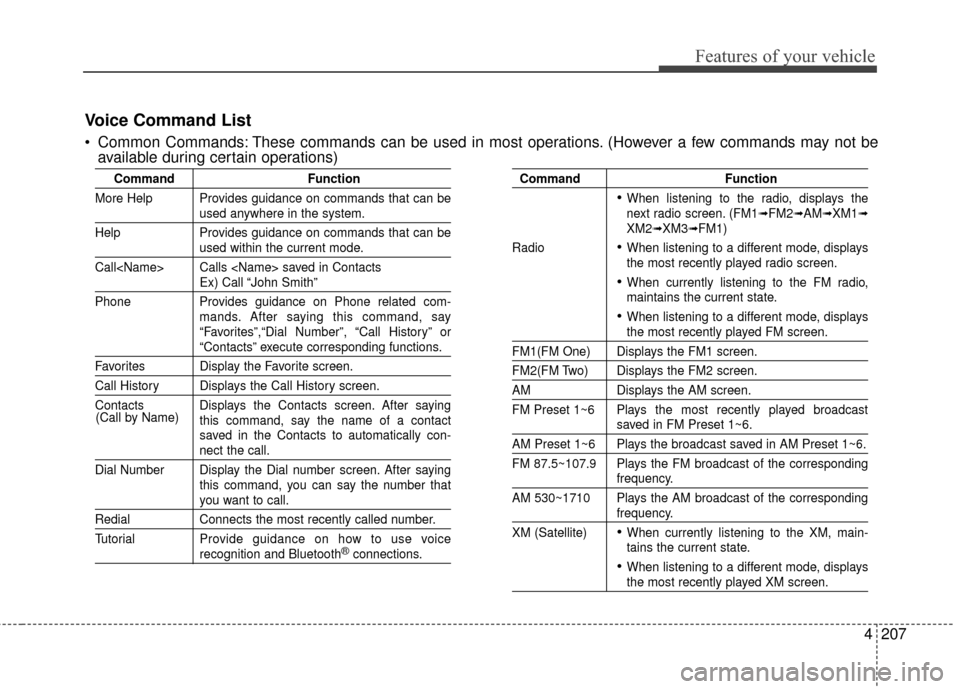
Voice Command List
Common Commands: These commands can be used in most operations. (However a few commands may not be
available during certain operations)