display Hyundai Azera 2017 Service Manual
[x] Cancel search | Manufacturer: HYUNDAI, Model Year: 2017, Model line: Azera, Model: Hyundai Azera 2017Pages: 520, PDF Size: 16.33 MB
Page 247 of 520
Features of your vehicle
168
4
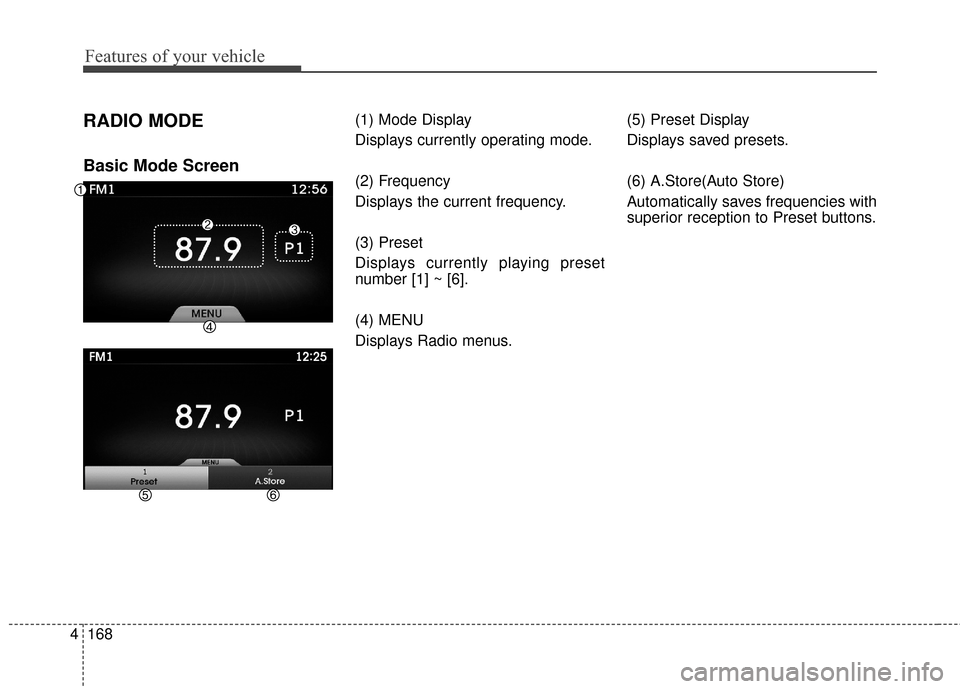
RADIO MODE
Basic Mode Screen
(1) Mode Display
Displays currently operating mode.
(2) Frequency
Displays the current frequency.
(3) Preset
Displays currently playing preset
number [1] ~ [6].
(4) MENU
Displays Radio menus. (5) Preset Display
Displays saved presets.
(6) A.Store(Auto Store)
Automatically saves frequencies with
superior reception to Preset buttons.
Page 248 of 520
![Hyundai Azera 2017 Service Manual 4169
Features of your vehicle
Switching to Radio Mode
Pressing the key will change
the operating mode in order of FM1
➟ FM2 ➟ AM ➟ XM1 ➟ XM2 ➟ XM3.
If [Mode Pop up] is turned on within [Dis](/img/35/14459/w960_14459-247.png "Hyundai Azera 2017 Service Manual 4169
Features of your vehicle
Switching to Radio Mode
Pressing the key will change
the operating mode in order of FM1
➟ FM2 ➟ AM ➟ XM1 ➟ XM2 ➟ XM3.
If [Mode Pop up] is turned on within [Dis")
4169
Features of your vehicle
Switching to Radio Mode
Pressing the key will change
the operating mode in order of FM1
➟ FM2 ➟ AM ➟ XM1 ➟ XM2 ➟ XM3.
If [Mode Pop up] is turned on within [Display], then pressing thekey will display the Radio
mode pop up screen.
Use TUNE knob to move the
focus. Press the TUNE knob to
select.
✽ ✽ NOTICE
If the key is pressed with the
system power off, then the power
will turn on and the most recently
played broadcast will be played.
Searching Radio Frequencies
Using Seek
Press the , key to
play the previous/next frequency.
Using TUNE
Turn the TUNE knob to select the
frequency.
Increases/decreased by
200kHz
Increases/decreased by 10kHz
Using Radio Mode
Selecting Presets
Press the key Select
The 6 presets are displayed.
Press the ~ key to play the
desired preset.
6 1
PresetMENU
TRACKSEEK
RADIO
RADIO
SETUP
RADIO
Page 250 of 520
4171
Features of your vehicle
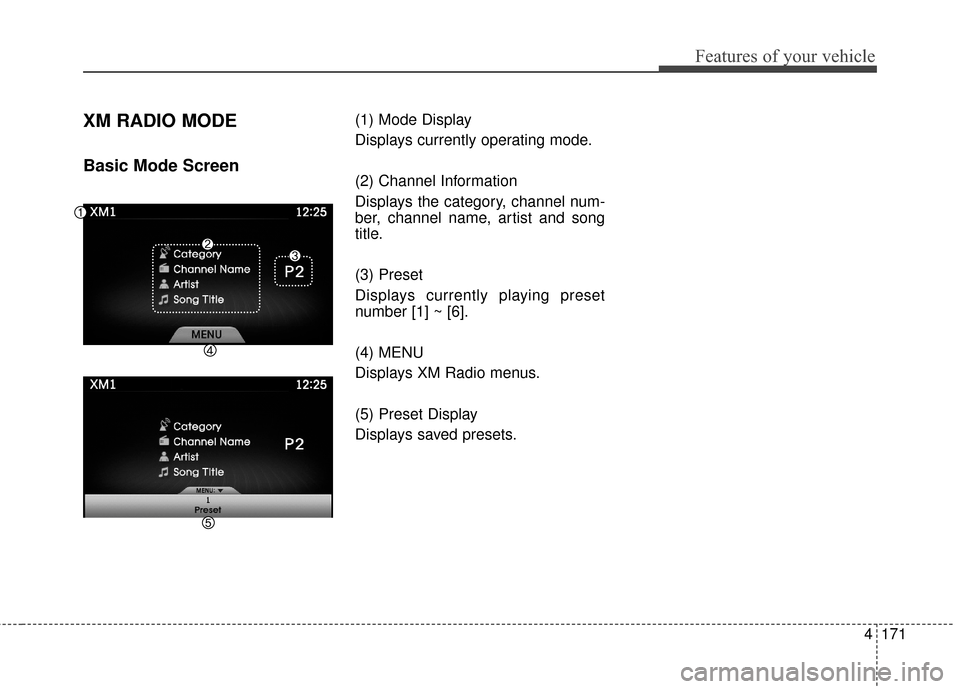
XM RADIO MODE
Basic Mode Screen
(1) Mode Display
Displays currently operating mode.
(2) Channel Information
Displays the category, channel num-
ber, channel name, artist and song
title.
(3) Preset
Displays currently playing preset
number [1] ~ [6].
(4) MENU
Displays XM Radio menus.
(5) Preset Display
Displays saved presets.
Page 251 of 520
Using SEEK
Press the , keys to
play the previous/next channel.
❈If the “Category” icon is displayed,
channels are changed within the
current category.
Using Tune
Press the TUNE knob to search
all channels.
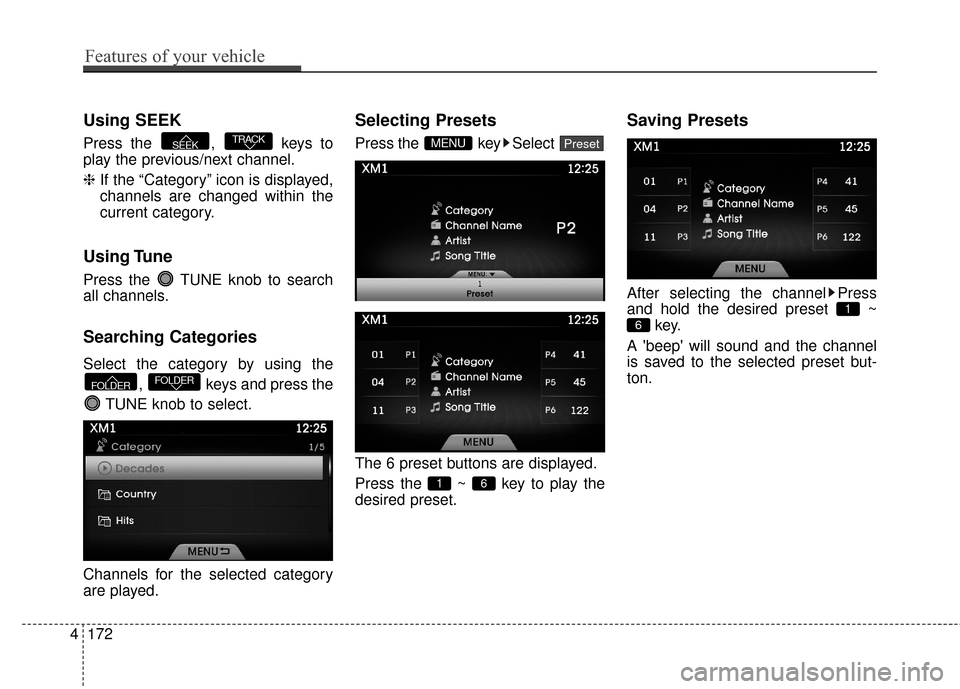
Searching Categories
Select the category by using the
, keys and press the
TUNE knob to select.
Channels for the selected category
are played.
Selecting Presets
Press the key Select
The 6 preset buttons are displayed.
Press the ~ key to play the
desired preset.
Saving Presets
After selecting the channel Press
and hold the desired preset ~ key.
A 'beep' will sound and the channel
is saved to the selected preset but-
ton.
6
1
6 1
PresetMENU
FOLDERFOLDER
TRACKSEEK
4172
Features of your vehicle
Page 252 of 520
SCAN
Press the key to scan all
channels with superior reception for
10 seconds each.
Once scan is complete, the previous-
ly played channel will be restored.
During Scan, pressing the
key again will cancel the scan opera-
tion and restore the previously
played channel.
If the “Category” icon is displayed,
channels are changed within the cur-
rent category.
SCAN
SCAN
Features of your vehicle
173
4
Page 253 of 520
![Hyundai Azera 2017 Service Manual MEDIA MODE
Pressing the key will change
the operating mode in order of
CD
➟USB(iPod)➟AUX➟My Music ➟
BT Audio.
If [Mode Pop up] is turned on within[Display], then pressing thekey will display](/img/35/14459/w960_14459-252.png "Hyundai Azera 2017 Service Manual MEDIA MODE
Pressing the key will change
the operating mode in order of
CD
➟USB(iPod)➟AUX➟My Music ➟
BT Audio.
If [Mode Pop up] is turned on within[Display], then pressing thekey will display")
MEDIA MODE
Pressing the key will change
the operating mode in order of
CD
➟USB(iPod)➟AUX➟My Music ➟
BT Audio.
If [Mode Pop up] is turned on within[Display], then pressing thekey will display the Media
mode Pop-up screen.
Use the TUNE knob to move the
focus. Press the knob to select.
✽ ✽ NOTICE
• If the key is pressed with
the system power off, then the
power will turn on and the most
recently played media mode will
be played.
• The media mode pop up screen can be displayed only when there
are two or more media modes
turned on.MEDIA
MEDIA
SETUP
MEDIA
4174
Features of your vehicle
Page 254 of 520
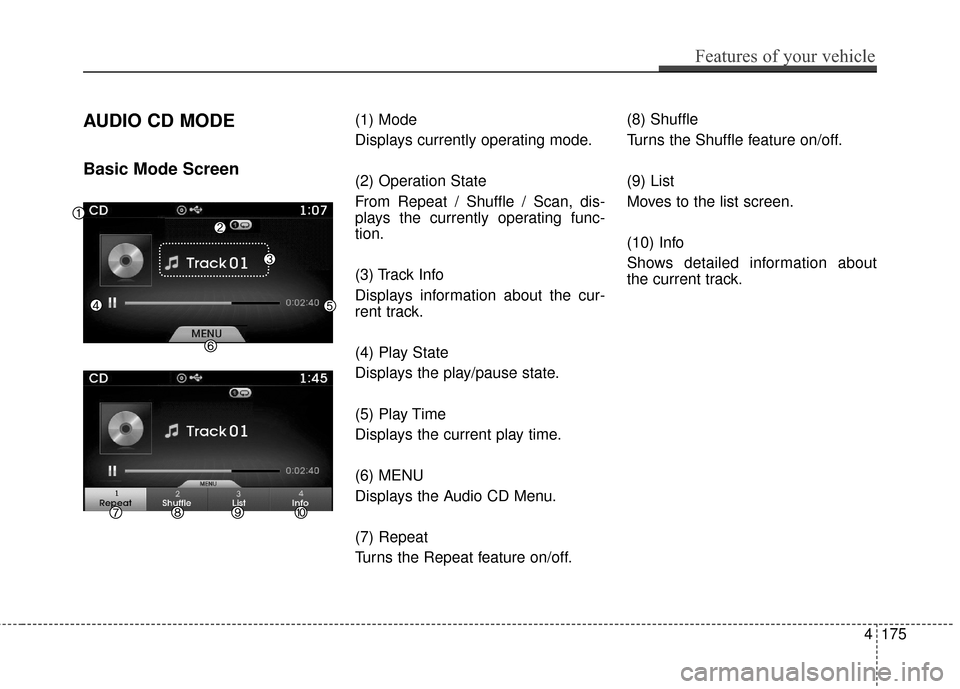
AUDIO CD MODE
Basic Mode Screen
(1) Mode
Displays currently operating mode.
(2) Operation State
From Repeat / Shuffle / Scan, dis-
plays the currently operating func-
tion.
(3) Track Info
Displays information about the cur-
rent track.
(4) Play State
Displays the play/pause state.
(5) Play Time
Displays the current play time.
(6) MENU
Displays the Audio CD Menu.
(7) Repeat
Turns the Repeat feature on/off.(8) Shuffle
Turns the Shuffle feature on/off.
(9) List
Moves to the list screen.
(10) Info
Shows detailed information about
the current track.
Features of your vehicle
175
4
Page 255 of 520
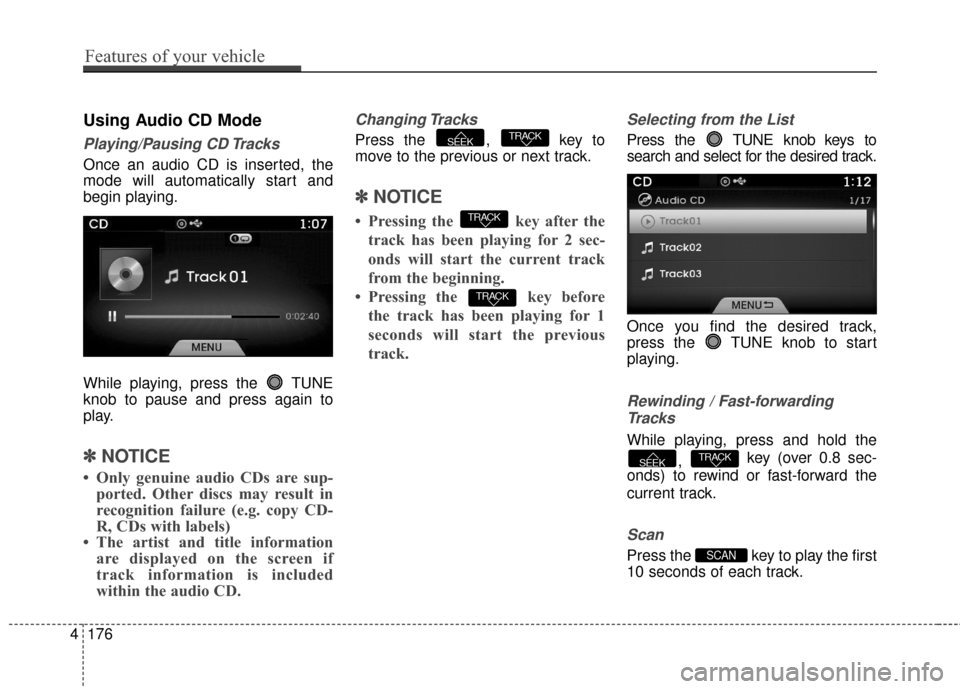
Using Audio CD Mode
Playing/Pausing CD Tracks
Once an audio CD is inserted, the
mode will automatically start and
begin playing.
While playing, press the TUNE
knob to pause and press again to
play.
✽ ✽NOTICE
• Only genuine audio CDs are sup-
ported. Other discs may result in
recognition failure (e.g. copy CD-
R, CDs with labels)
• The artist and title information are displayed on the screen if
track information is included
within the audio CD.
Changing Tracks
Press the , key to
move to the previous or next track.
✽ ✽ NOTICE
• Pressing the key after the
track has been playing for 2 sec-
onds will start the current track
from the beginning.
• Pressing the key before the track has been playing for 1
seconds will start the previous
track.
Selecting from the List
Press the TUNE knob keys to
search and select for the desired track.
Once you find the desired track,
press the TUNE knob to start
playing.
Rewinding / Fast-forwardingTracks
While playing, press and hold the
, key (over 0.8 sec-
onds) to rewind or fast-forward the
current track.
Scan
Press the key to play the first
10 seconds of each track.SCAN
TRACKSEEK
TRACK
TRACK
TRACKSEEK
4176
Features of your vehicle
Page 256 of 520
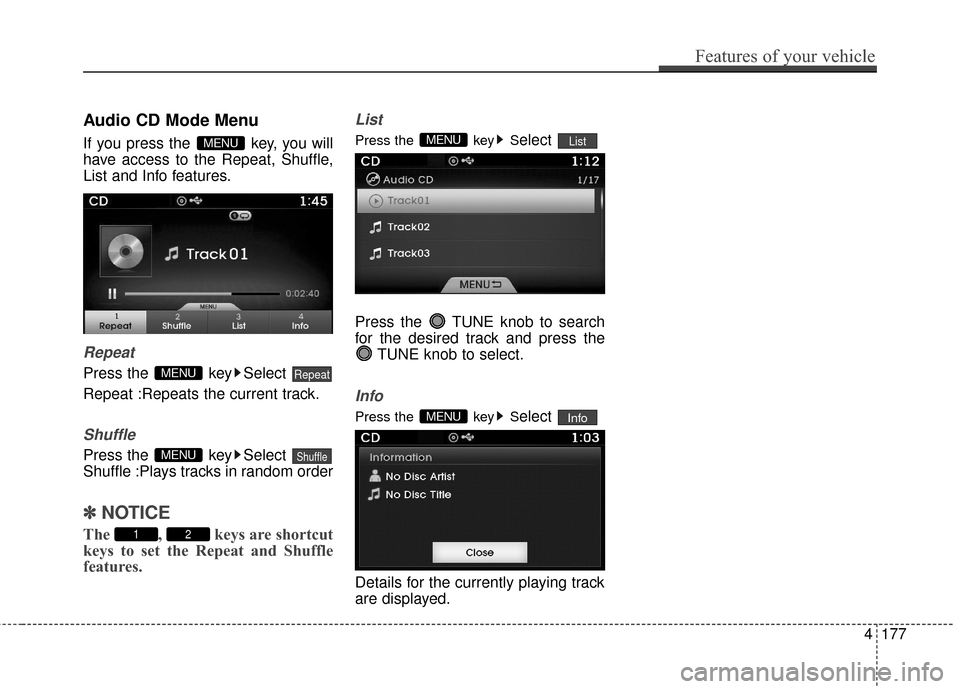
Audio CD Mode Menu
If you press the key, you will
have access to the Repeat, Shuffle,
List and Info features.
Repeat
Press the key Select
Repeat :Repeats the current track.
Shuffle
Press the key Select
Shuffle :Plays tracks in random order
✽ ✽NOTICE
The , keys are shortcut
keys to set the Repeat and Shuffle
features.
List
Press the key Select
Press the TUNE knob to search
for the desired track and press the TUNE knob to select.
Info
Press the key Select
Details for the currently playing track
are displayed.InfoMENU
ListMENU
21
ShuffleMENU
RepeatMENU
MENU
Features of your vehicle
177
4
Page 257 of 520
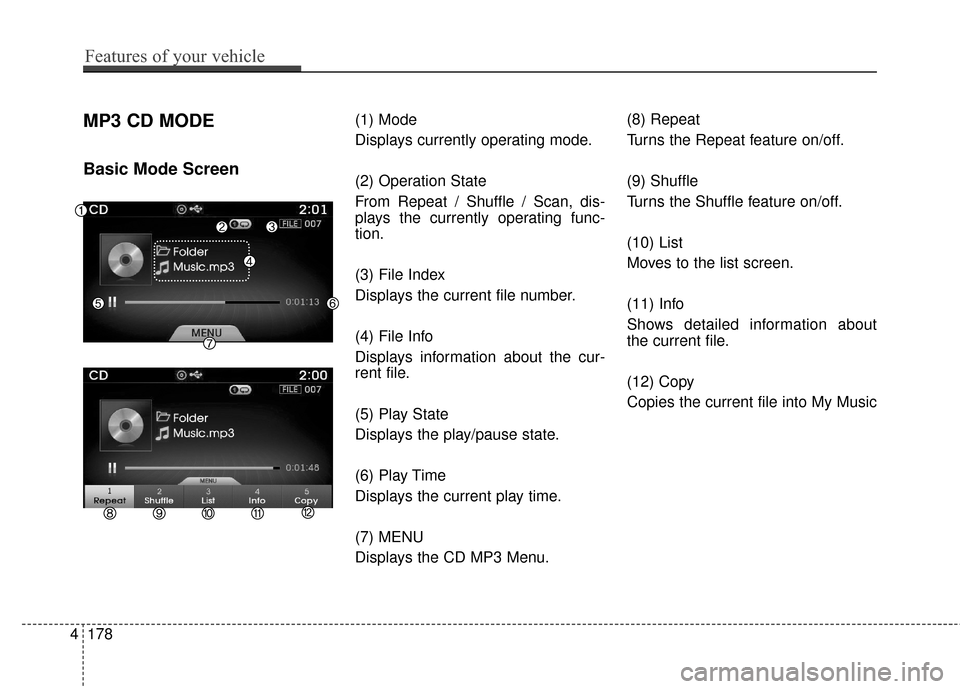
MP3 CD MODE
Basic Mode Screen
(1) Mode
Displays currently operating mode.
(2) Operation State
From Repeat / Shuffle / Scan, dis-
plays the currently operating func-
tion.
(3) File Index
Displays the current file number.
(4) File Info
Displays information about the cur-
rent file.
(5) Play State
Displays the play/pause state.
(6) Play Time
Displays the current play time.
(7) MENU
Displays the CD MP3 Menu.(8) Repeat
Turns the Repeat feature on/off.
(9) Shuffle
Turns the Shuffle feature on/off.
(10) List
Moves to the list screen.
(11) Info
Shows detailed information about
the current file.
(12) Copy
Copies the current file into My Music
4178
Features of your vehicle