display Hyundai Azera 2017 Owner's Guide
[x] Cancel search | Manufacturer: HYUNDAI, Model Year: 2017, Model line: Azera, Model: Hyundai Azera 2017Pages: 520, PDF Size: 16.33 MB
Page 178 of 520
499
Features of your vehicle
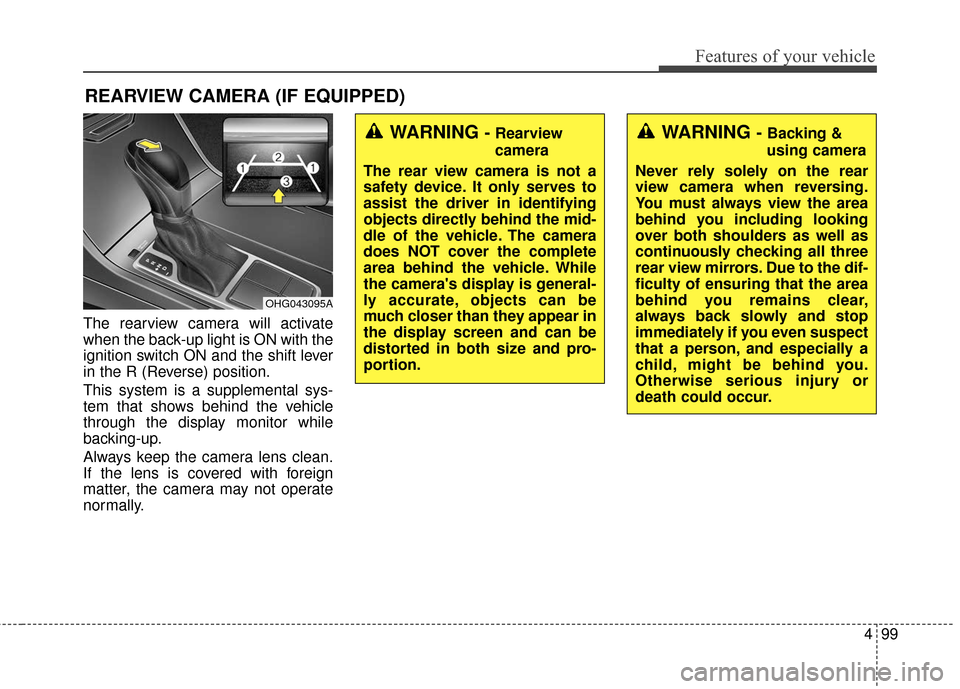
The rearview camera will activate
when the back-up light is ON with the
ignition switch ON and the shift lever
in the R (Reverse) position.
This system is a supplemental sys-
tem that shows behind the vehicle
through the display monitor while
backing-up.
Always keep the camera lens clean.
If the lens is covered with foreign
matter, the camera may not operate
normally.
REARVIEW CAMERA (IF EQUIPPED)
OHG043095A
WARNING - Rearview
camera
The rear view camera is not a
safety device. It only serves to
assist the driver in identifying
objects directly behind the mid-
dle of the vehicle. The camera
does NOT cover the complete
area behind the vehicle. While
the camera's display is general-
ly accurate, objects can be
much closer than they appear in
the display screen and can be
distorted in both size and pro-
portion.WARNING - Backing &
using camera
Never rely solely on the rear
view camera when reversing.
You must always view the area
behind you including looking
over both shoulders as well as
continuously checking all three
rear view mirrors. Due to the dif-
ficulty of ensuring that the area
behind you remains clear,
always back slowly and stop
immediately if you even suspect
that a person, and especially a
child, might be behind you.
Otherwise serious injury or
death could occur.
Page 185 of 520
Features of your vehicle
106
4
One-touch turn signal
To activate the one-touch turn signal
move the turn signal lever slightly
and then release it. The lane change
signals will blink 3, 5 or 7 times.
You can activate or deactivate the
One-touch turn signal function or
choose the number of blinking (3, 5,
or 7) from the User Settings Mode on
the LCD display.
✽ ✽
NOTICE
If an indicator flash is abnormally
quick or slow, a bulb may be burned
out or have a poor electrical connec-
tion in the circuit.
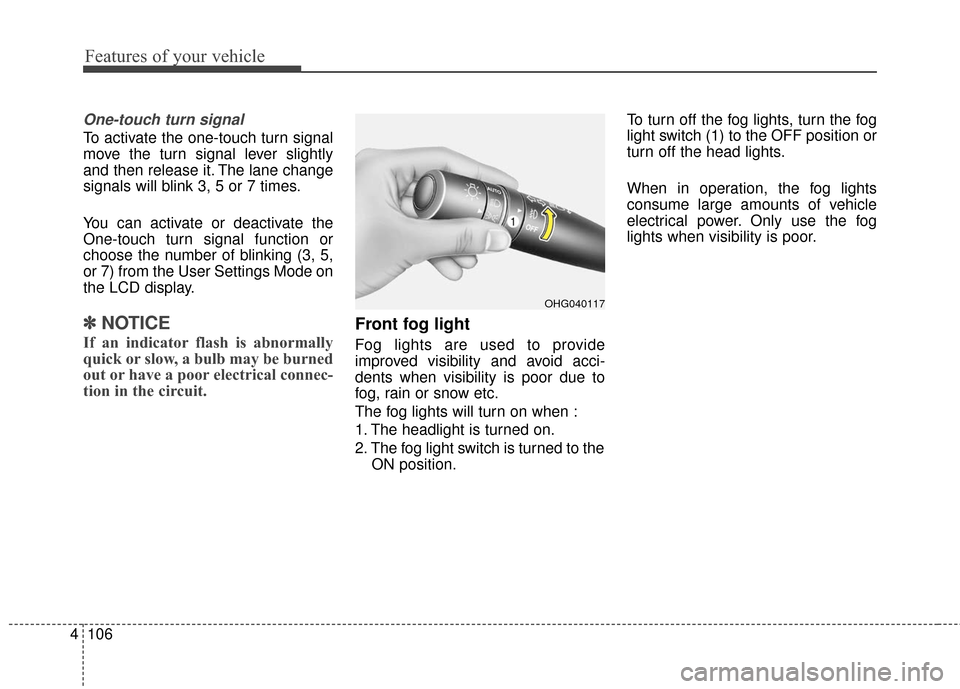
Front fog light
Fog lights are used to provide
improved visibility and avoid acci-
dents when visibility is poor due to
fog, rain or snow etc.
The fog lights will turn on when :
1. The headlight is turned on.
2. The fog light switch is turned to the
ON position. To turn off the fog lights, turn the fog
light switch (1) to the OFF position or
turn off the head lights.
When in operation, the fog lights
consume large amounts of vehicle
electrical power. Only use the fog
lights when visibility is poor.
OHG040117
Page 193 of 520
Features of your vehicle
114
4
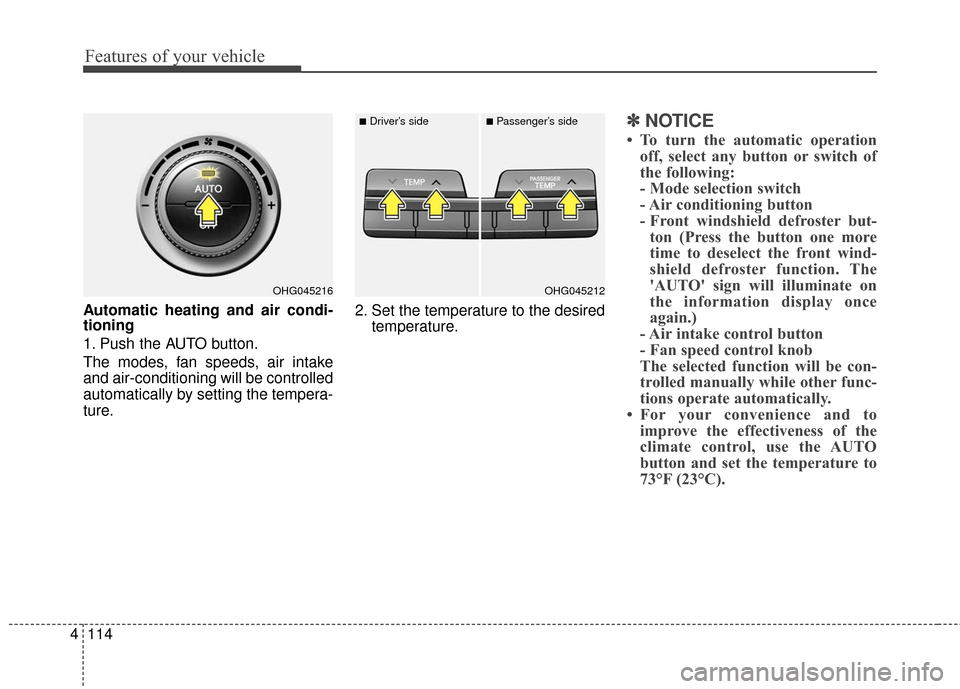
Automatic heating and air condi-
tioning
1. Push the AUTO button.
The modes, fan speeds, air intake
and air-conditioning will be controlled
automatically by setting the tempera-
ture. 2. Set the temperature to the desired
temperature.
✽ ✽NOTICE
• To turn the automatic operation
off, select any button or switch of
the following:
- Mode selection switch
- Air conditioning button
- Front windshield defroster but-ton (Press the button one more
time to deselect the front wind-
shield defroster function. The
'AUTO' sign will illuminate on
the information display once
again.)
- Air intake control button
- Fan speed control knob
The selected function will be con-
trolled manually while other func-
tions operate automatically.
• For your convenience and to improve the effectiveness of the
climate control, use the AUTO
button and set the temperature to
73°F (23°C).
OHG045216OHG045212
■Driver’s side■Passenger’s side
Page 197 of 520
Features of your vehicle
118
4
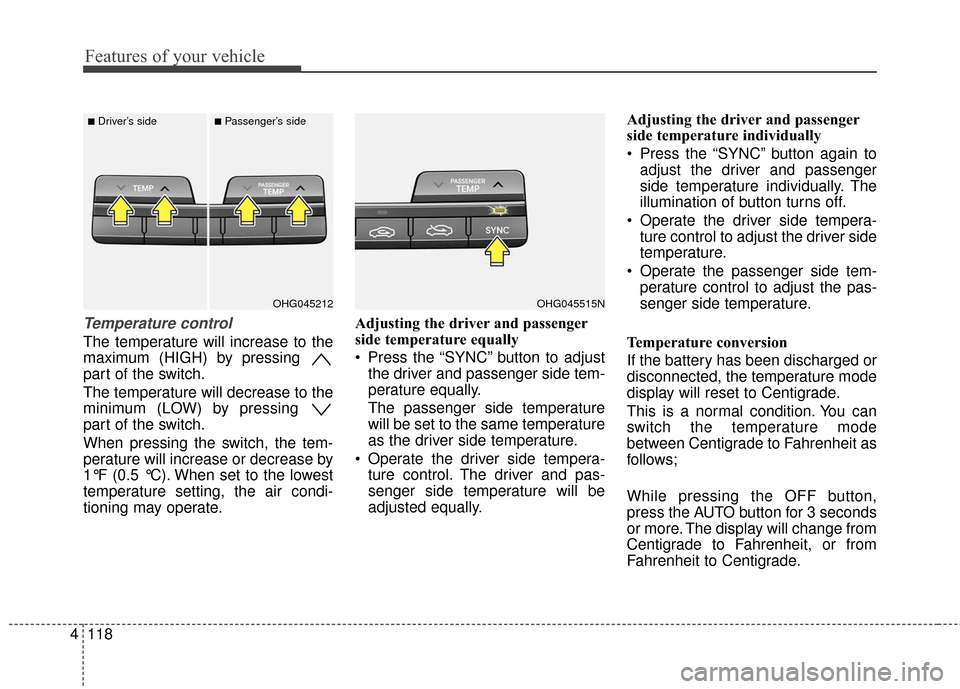
Temperature control
The temperature will increase to the
maximum (HIGH) by pressing
part of the switch.
The temperature will decrease to the
minimum (LOW) by pressing
part of the switch.
When pressing the switch, the tem-
perature will increase or decrease by
1°F (0.5 °C). When set to the lowest
temperature setting, the air condi-
tioning may operate. Adjusting the driver and passenger
side temperature equally
Press the “SYNC” button to adjust
the driver and passenger side tem-
perature equally.
The passenger side temperature
will be set to the same temperature
as the driver side temperature.
Operate the driver side tempera- ture control. The driver and pas-
senger side temperature will be
adjusted equally. Adjusting the driver and passenger
side temperature individually
Press the “SYNC” button again to
adjust the driver and passenger
side temperature individually. The
illumination of button turns off.
Operate the driver side tempera- ture control to adjust the driver side
temperature.
Operate the passenger side tem- perature control to adjust the pas-
senger side temperature.
Temperature conversion
If the battery has been discharged or
disconnected, the temperature mode
display will reset to Centigrade.
This is a normal condition. You can
switch the temperature mode
between Centigrade to Fahrenheit as
follows;
While pressing the OFF button,
press the AUTO button for 3 seconds
or more. The display will change from
Centigrade to Fahrenheit, or from
Fahrenheit to Centigrade.
OHG045515NOHG045212
■Driver’s side■Passenger’s side
Page 204 of 520

4125
Features of your vehicle
Automatic heating and air condi-
tioning
1. Push the AUTO button.
The modes, fan speeds, air intake
and air-conditioning will be controlled
automatically by setting the tempera-
ture.2. Set the temperature to the desired
temperature.
✽ ✽NOTICE
• To turn the automatic operation
off, select any button or switch of
the following:
- Mode selection switch
- Air conditioning button
- Front windshield defroster but-ton (Press the button one more
time to deselect the front wind-
shield defroster function. The
'AUTO' sign will illuminate on
the information display once
again.)
- Air intake control button
- Fan speed control knob
The selected function will be con-
trolled manually while other func-
tions operate automatically.
• For your convenience and to improve the effectiveness of the
climate control, use the AUTO
button and set the temperature to
73°F (23°C).
OHG045216OHG045212
■Driver’s side■Passenger’s side
Page 208 of 520
4129
Features of your vehicle
Temperature control
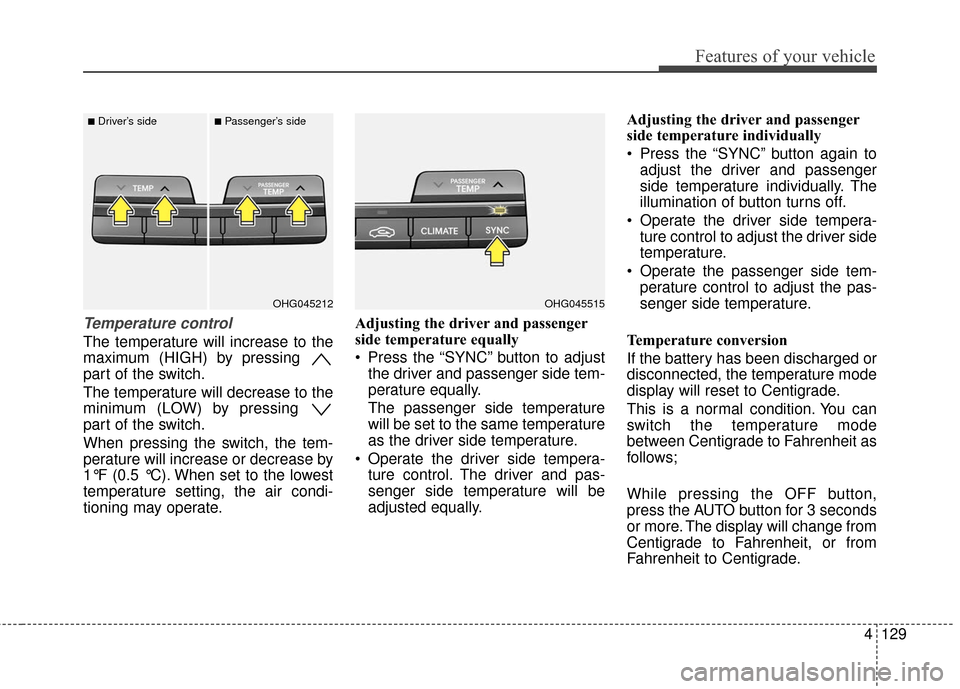
The temperature will increase to the
maximum (HIGH) by pressing
part of the switch.
The temperature will decrease to the
minimum (LOW) by pressing
part of the switch.
When pressing the switch, the tem-
perature will increase or decrease by
1°F (0.5 °C). When set to the lowest
temperature setting, the air condi-
tioning may operate.Adjusting the driver and passenger
side temperature equally
Press the “SYNC” button to adjust
the driver and passenger side tem-
perature equally.
The passenger side temperature
will be set to the same temperature
as the driver side temperature.
Operate the driver side tempera- ture control. The driver and pas-
senger side temperature will be
adjusted equally. Adjusting the driver and passenger
side temperature individually
Press the “SYNC” button again to
adjust the driver and passenger
side temperature individually. The
illumination of button turns off.
Operate the driver side tempera- ture control to adjust the driver side
temperature.
Operate the passenger side tem- perature control to adjust the pas-
senger side temperature.
Temperature conversion
If the battery has been discharged or
disconnected, the temperature mode
display will reset to Centigrade.
This is a normal condition. You can
switch the temperature mode
between Centigrade to Fahrenheit as
follows;
While pressing the OFF button,
press the AUTO button for 3 seconds
or more. The display will change from
Centigrade to Fahrenheit, or from
Fahrenheit to Centigrade.
OHG045515OHG045212
■Driver’s side■Passenger’s side
Page 211 of 520
Features of your vehicle
132
4
OFF mode
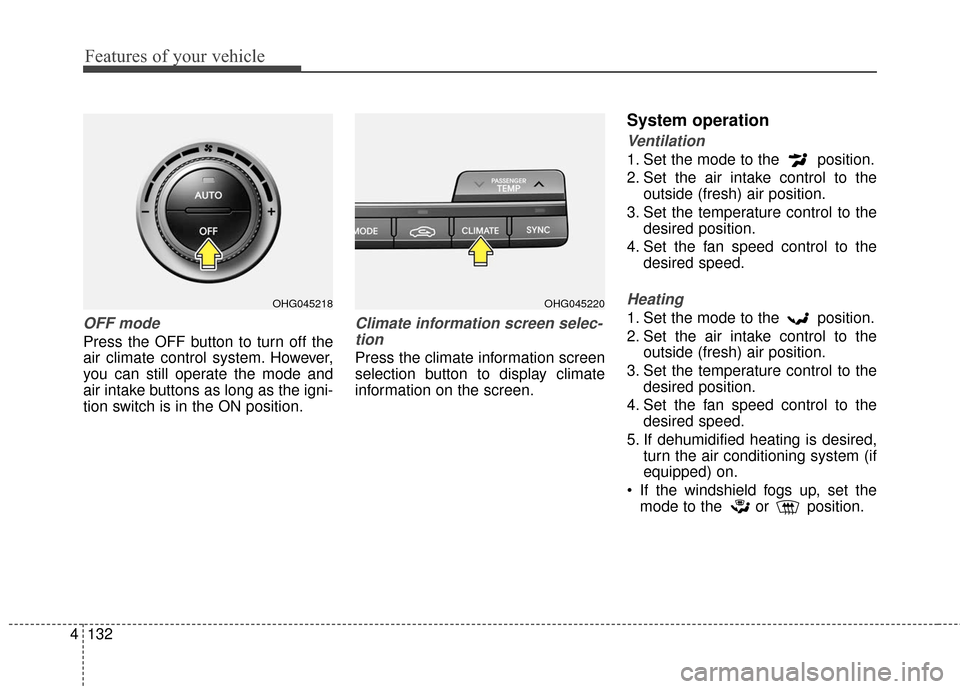
Press the OFF button to turn off the
air climate control system. However,
you can still operate the mode and
air intake buttons as long as the igni-
tion switch is in the ON position.
Climate information screen selec-
tion
Press the climate information screen
selection button to display climate
information on the screen.
System operation
Ventilation
1. Set the mode to the position.
2. Set the air intake control to the outside (fresh) air position.
3. Set the temperature control to the desired position.
4. Set the fan speed control to the desired speed.
Heating
1. Set the mode to the position.
2. Set the air intake control to theoutside (fresh) air position.
3. Set the temperature control to the desired position.
4. Set the fan speed control to the desired speed.
5. If dehumidified heating is desired, turn the air conditioning system (if
equipped) on.
If the windshield fogs up, set the mode to the or position.
OHG045218OHG045220
Page 231 of 520
4152
Features of your vehicle
Depending on the type of CD-R/CD-RW CDs, certain CDs may
not operate normally according to
the manufacturing companies. In
such circumstances, continued
use may cause malfunctions to
your audio system.
✽ ✽
NOTICE - Playing an
Incompatible Copy Protected
Audio CD
Some copy protected CDs, which do
not comply with international audio
CD standards (Red Book), may not
play on your car audio. Please note
that inabilities to properly play a
copy protected CD may indicate
that the CD is defective, not the CD
player.
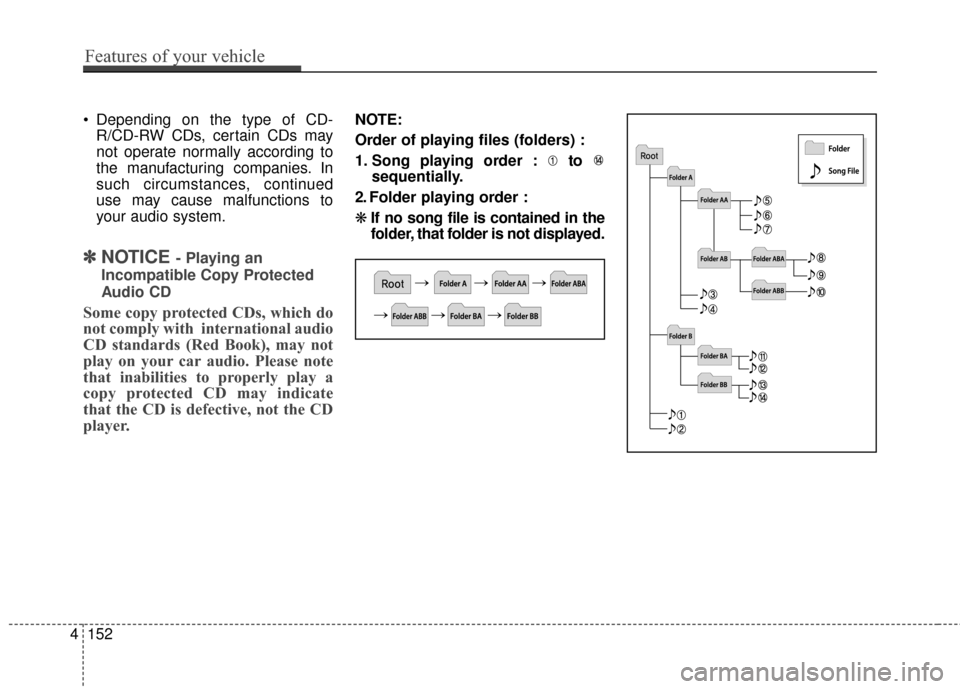
NOTE:
Order of playing files (folders) :
1. Song playing order : to sequentially.
2. Folder playing order :
❋ If no song file is contained in the
folder, that folder is not displayed.
Page 244 of 520
Features of your vehicle
165
4
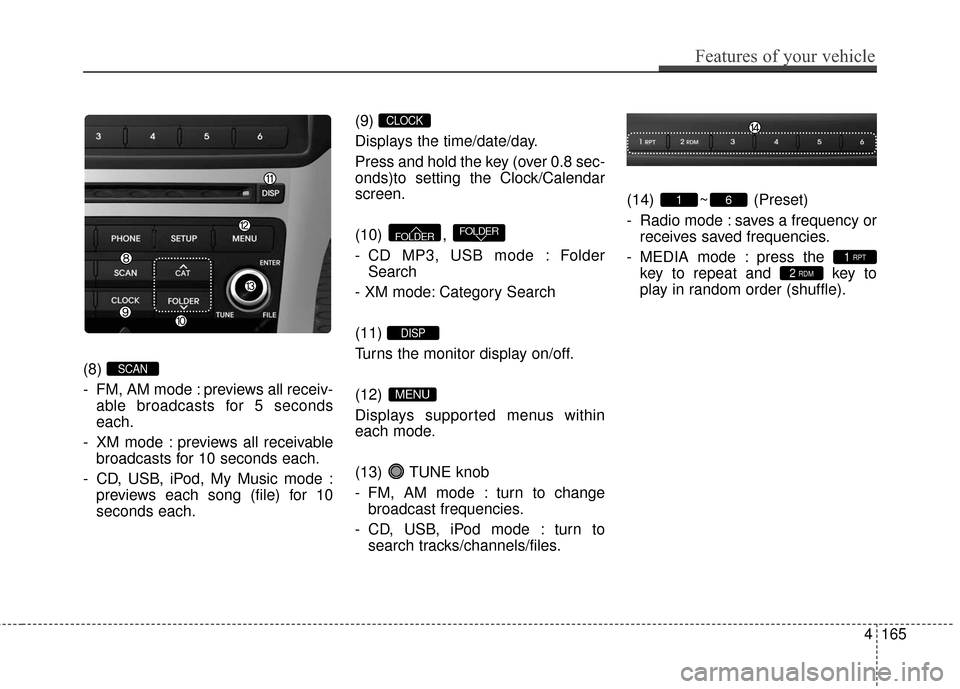
(8)
- FM, AM mode : previews all receiv-
able broadcasts for 5 seconds
each.
- XM mode : previews all receivable broadcasts for 10 seconds each.
- CD, USB, iPod, My Music mode : previews each song (file) for 10
seconds each. (9)
Displays the time/date/day.
Press and hold the key (over 0.8 sec-
onds)to setting the Clock/Calendar
screen.
(10) ,
- CD MP3, USB mode : Folder
Search
- XM mode: Category Search
(11)
Turns the monitor display on/off.
(12)
Displays supported menus within
each mode.
(13) TUNE knob
- FM, AM mode : turn to change broadcast frequencies.
- CD, USB, iPod mode : turn to search tracks/channels/files. (14) ~ (Preset)
- Radio mode : saves a frequency or
receives saved frequencies.
- MEDIA mode : press the key to repeat and key to
play in random order (shuffle).
2 RDM1 RPT
61
MENU
DISP
FOLDERFOLDER
CLOCK
SCAN
Page 246 of 520
(5)
When pressed shortly.- When pressed in the phonescreen, displays call history
screen.
- When pressed in the dial screen, makes a call.
- When pressed in the incoming call screen, answers the call.
- When pressed during call wait- ing, switches to waiting call (Call
Waiting).
When pressed and held (over 0.8 seconds).
- When pressed in the
Bluetooth®
Wireless Technology Handsfree
wait mode, redials the last call.
- When pressed during a
Bluetooth®Wireless Technology
Handsfree call, switches call
back to mobile phone (Private).
- When pressed while calling on the mobile phone, switches call
back to
Bluetooth®Wireless
Technology Handsfree (Operates
only when
Bluetooth®Wireless
Technology Handsfree is con-
nected). (6)
Ends phone call.
(7)
When pressed shortly
- Starts voice recognition
- When selecting during a voiceprompt, stops the prompt and
converts to voice command wait-
ing state
When pressed and held (over 0.8 seconds)
- Ends voice recognition
Features of your vehicle
167
4