battery Hyundai Coupe 2003 Owner's Manual
[x] Cancel search | Manufacturer: HYUNDAI, Model Year: 2003, Model line: Coupe, Model: Hyundai Coupe 2003Pages: 310, PDF Size: 2.87 MB
Page 14 of 310

FEATURES OF YOUR HYUNDAI
1- 6
B070D03GK-AAT Disarmed Stage The system will be disarmed when either of the following steps are taken:
1) The driver's or passenger's door is unlocked by depressing the "UNLOCK" button on the transmitter.
2) In the middle of alarming or after alarming, it disarms after 30 seconds if the key is turnedto and kept in the "ON" position.
3) If after disarming the system with the trans- mitter the doors are not opened within 30seconds, the system will automatically re-arm.
After completing one of steps above, the turnsignal light will blink twice to indicate that thesystem is disarmed. HGK102B070E02GK-GAT Replacing the batteryWhen the transmitter's battery begins to get weak, it may take several pushes on the buttonto lock or unlock the doors, and the LED will notlight. Replace the battery as soon as possible. Battery type : CR2032Replacement instructions:
1. Carefully separate the case with a blade
screwdriver as shown in the illustration.
HGK122
Screwdriver
HGK121
Battery
2. Remove the old battery from the case and note the polarity. Make sure the polarity of the new battery is the same(+side facing down),then insert it in the transmitter.
NOTE: Install a new battery within 30 seconds after removing the old one. If installing a newbattery takes more than 30 seconds, take thefollowing steps.
1) Turn the ignition key to the "ACC" posi- tion.
2) Make sure that the turn signal lights blink once by pushing the "LOCK" or "UN- LOCK" button on the transmitter.
Page 30 of 310
FEATURES OF YOUR HYUNDAI
1- 22
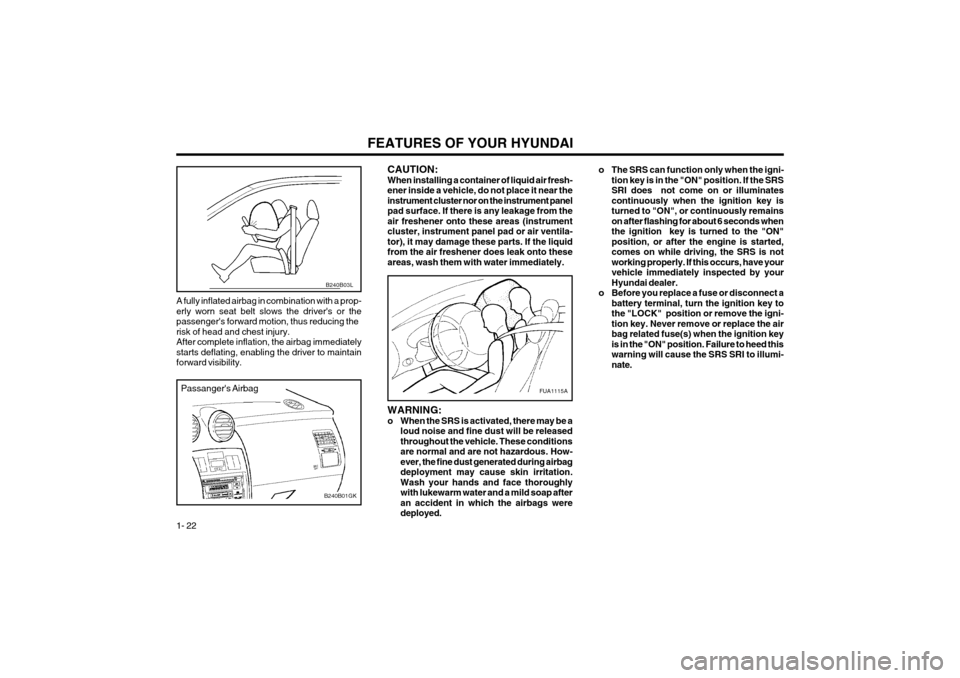
A fully inflated airbag in combination with a prop- erly worn seat belt slows the driver's or thepassenger's forward motion, thus reducing therisk of head and chest injury.After complete inflation, the airbag immediatelystarts deflating, enabling the driver to maintainforward visibility.
Passanger's Airbag
B240B01GK
FUA1115A
CAUTION: When installing a container of liquid air fresh-ener inside a vehicle, do not place it near theinstrument cluster nor on the instrument panelpad surface. If there is any leakage from theair freshener onto these areas (instrumentcluster, instrument panel pad or air ventila-tor), it may damage these parts. If the liquidfrom the air freshener does leak onto theseareas, wash them with water immediately.
B240B03L
o The SRS can function only when the igni- tion key is in the "ON" position. If the SRS SRI does not come on or illuminatescontinuously when the ignition key isturned to "ON", or continuously remainson after flashing for about 6 seconds whenthe ignition key is turned to the "ON"position, or after the engine is started,comes on while driving, the SRS is notworking properly. If this occurs, have yourvehicle immediately inspected by yourHyundai dealer.
o Before you replace a fuse or disconnect a battery terminal, turn the ignition key tothe "LOCK" position or remove the igni-tion key. Never remove or replace the airbag related fuse(s) when the ignition keyis in the "ON" position. Failure to heed thiswarning will cause the SRS SRI to illumi-nate.
WARNING:
o When the SRS is activated, there may be a loud noise and fine dust will be releasedthroughout the vehicle. These conditionsare normal and are not hazardous. How-ever, the fine dust generated during airbagdeployment may cause skin irritation.Wash your hands and face thoroughlywith lukewarm water and a mild soap afteran accident in which the airbags weredeployed.
Page 39 of 310

FEATURES OF YOUR HYUNDAI 1- 31
The trip computer is a microcomputer-controlled driver information gauge that displays informa-tion related to driving, such as estimated dis-tance to empty, average speed and drive time onthe LCD. RESET SWITCH
o The reset switch is used to zero the multi-functional display mode.
o Pushing in the reset switch on the left side of tacometer changes the display as follows;
HGK095A
B400B01GK-GAT TRIP COMPUTER
1. DISTANCE TO EMPTYDISTANCE TO EMPTY
AVERAGE SPEED DRIVE TIME
o This mode provides the estimated distance to empty from the current fuel in the fuel level tank.
o The trip computer may not register additional fuel if less than 6 liters of fuel are added to thevehicle.
o When the battery has been reinstalled after being discharged or disconnected, drive morethan 32km for an accurate distance to empty. HGK056
1. Odometer The odometer records the total driving distance in kilometers or miles, and is useful for keeping arecord for maintenance intervals. NOTE: Any alteration of the odometer may void yourwarranty coverage. 2,3 Trip odometer Records the distance of 2 trips in kilometers or miles.TRIP A:
First distance you have traveled from
your origination point to a first destination.TRIP B: Second distance from the first destina-
tion to the final destination. To shift from TRIP A to TRIP B, press the reset switch. When pressed for 1 second, it will resetto 0. A Type
B Type
A Type
B Type
Page 48 of 310

FEATURES OF YOUR HYUNDAI
1- 40
3. Push and turn the wrench clockwise to close
or counterclockwise to open the sunroof. B480A01GK-GAT MAP LIGHT
HGK034
(1) Push in the map light switch to turn on the driver side light.
(2) In the "DOOR" position, the interior courtesy light comes on when any door is opened regardless of the ignition key position. Thelight goes out gradually 6 seconds after thedoor is closed.
(3) Push in the map light switch to turn on the passenger side light. B491A01F-GAT SPECTACLE CASE (If Installed)HGK036
The spectacle case is located on the front over- head console.Push the end of the cover to open the spectaclecase. WARNING: Do not open the spectacle case while thevehicle is moving. The rear view mirror of thevehicle can be blocked by an open spectaclecase.(1) (2) (3)
B460E02GK-GAT Resetting the Sunroof SystemIf the battery has been recharged, disconnected or if the sunroof is operated with the hexagonalhead wrench manually, you may need to resetthe sunroof. To do this;
1. Turn the ignition switch "OFF".
2. With pressing "open" "up" button at the same
time, turn the ignition switch "ON". The resetting is failed when the ignition key to the "OFF" within 1.5 seconds.
3. If the sunroof is set like this, the sunroof is reset with tilting up/down automatically oncefor all.
CAUTION:If the sunroof is not reset, it may not beoperated properly.
Page 66 of 310

FEATURES OF YOUR HYUNDAI
1- 58
B970C02E-GAT Automatic Operation
HGK020
The FATC (Full Automatic Temperature Control) system automatically controls heating and cool-ing as follows:
1. Push the "AUTO" switch. The indicator light will illuminate confirming that the Face, Floor and/or Bi-Level modes as well as the blowerspeed and, air conditioner will be controlledautomatically. 2. Push the "TEMP" button to set the desired
temperature.The temperature will increase to the maxi-mum 32°C(90°F) by pushing on the button.Each push of the button will cause the tem-perature to increase by 0.5°C(1°F).The temperature will decrease to the mini-mum 17°C(62°F) by pushing on the button.Each push of the button will cause the tem-perature to decrease by 0.5°C(1°F).
G280A01GK
Photo sensor
HGK014
NOTE: Never place anything over the sensor whichis located on the instrument panel to ensurebetter control of the heating and coolingsystem.
NOTE: If the battery has been discharged or discon-nected, the temperature mode will reset tocentigrade degrees.This is a normal condition and you can changethe temperature mode from centigrade tofarenheit as follows;Press the TEMP button down 3 seconds ormore with the button held down. Thedisplay shows that the unit of temperature isadjusted to centigrade or fahrenheit.(°C °F or °F °C)
OUTSIDETEMP
Page 79 of 310

FEATURES OF YOUR HYUNDAI 1- 71
B260F01GK-AAT The CD auto changer is located in the right side of the quarter trim.
o To use the CD auto changer.
1. Open the sliding lid of the CD auto chang- er.
2. To eject the compact disc magazine, press the EJECT button located inside the CD auto changer.
3. Insert the discs into the magazine.
4. Push the magazine into the CD auto chang- er and close the sliding lid.
o The CD auto changer can be used when the ignition switch is in either the "ON" or "ACC"position.
1. CD Select Button When the CD changer magazine contains discs, press the "CDC" button and the CD changer canbe used even if the radio is being used. TheHyundai CD changer can hold up to eight discs.The disc number will be lit, and the track number,and elapsed time will be displayed. 2. DISC Select Button To select the CD you want, push " " to cha- nge the disc number. NOTE:
o When replacing the fuse, replace it with a
fuse having the correct capacity.
o This equipment is designed to be used only in a 12 volt DC battery system withnegative ground.
o This unit is made of precision parts. Do not attempt to disassemble or adjust anyparts.
o When driving your vehicle, be sure to keep the volume of the unit set low enough toallow you to hear sounds coming from theoutside.
CAUTION:Do not insert warped or poor quality discsinto the CD changer as damage to the unitmay occur.
TUNE DISC
3. TRACK UP/DOWN
o The desired track on the disc currently being
played can be selected using the track num- ber.
o Press once to skip forward to the begin- ning of the next track. Press once to skipback to the beginning of the track.
4. FF/REW ( / ) If you want to fast forward or reverse through the compact disc track, push and hold in FF ( )or REW ( ) button.When you release the button, the compact discplayer will resume playing. 5. REPEAT
o To repeat the track you are listening to, press the RPT button. To cancel , press again.
o If you do not release RPT operation when the track ends, it will automatically be replayed. This process will be continued until you pushthe button again.
6. SCAN Button
o Press the SCAN button to playback the first 10 seconds of each track.
o Press the SCAN button again within 10 sec. for the desired track.
Page 84 of 310

FEATURES OF YOUR HYUNDAI
1- 76
B260D02O-AAT
1. Playing CD
o Insert the CD with the label facing upward.
o Insert the CD to start CD playback, during
radio operation.
o When a disc is in the CD deck, if you press the play button, the CD player will begin playingeven if the radio is being used.
o The CD player can be used when the ignition switch is in either the "ON" or "ACC" position.
2. FF/REW ( / ) If you want to fast forward or reverse through the compact disc track, push and hold the FF ( )or REW ( ) button.When you release the button, the compact discplayer will resume playing.
3. TRACK UP/DOWN
o The desired track on the disc currently being played can be selected using the track num- ber.
o Press once to skip forward to the beginn- ing of the next track. Press once to skipback to the beginning of the track.
4. SCAN Button
o Press the SCAN button to playback the first 10 seconds of each track.
o Press the SCAN button again within 10 sec. when you have reached the desired track. 5. REPEAT Button
o To repeat the track you are currently listening
to, press the RPT button. To cancel , press again.
o If you do not release RPT operation when the track ends, it will automatically be replayed.This process will be continued until you pushthe button again.
6. EJECT Button When the EJECT button is pressed with a CD loaded, the CD will eject. NOTE:
o If the CD does not operate properly or if the ER2 fault code is displayed, use one oftwo methods to reset the CD deck func-tion.
- Remove the audio fuse for 5 minutes. Then, reinstall the audio fuse.
- Diconnect the negative terminal of the battery and wait 5 minutes. Then re-connect the negative battery terminal.
o To assure proper operation of the unit, keep the vehicle interior temperaturewithin a normal range by using thevehicle's air conditioning or heating sys-tem.
o When replacing the fuse, replace it with a fuse having the correct capacity.
o The preset station frequencies are allerased when the car battery is discon- nected. Therefore, all data will have to beset again if this should occur.
o Do not add any oil to the rotating parts. Keep magnets, screwdrivers and othermetallic objects away from the tape mecha-nism and head.
o This equipment is designed to be used only in a 12 volt DC battery system withnegative ground.
o This unit is made of precision parts. Do not attempt to disassemble or adjust anyparts.
o When driving your vehicle, be sure to keep the volume of the unit set low enough toallow you to hear sounds coming from theoutside.
o Do not expose this equipment (including the speakers) to water or excessive mois-ture.
CAUTION:Do not insert warped or poor quality discsinto the CD player as damage to the unit mayoccur.
Page 86 of 310

FEATURES OF YOUR HYUNDAI
1- 78
B260F01GK-AAT The CD auto changer is located in the right side of the quarter trim.
o To use the CD auto changer. 1. Open the sliding lid of the CD auto chang- er.
2. To eject the compact disc magazine, press the EJECT button located inside the CD auto changer.
3. Insert the discs into the magazine.
4. Push the magazine into the CD auto chang- er and close the sliding lid.
o The CD auto changer can be used when the ignition switch is in either the "ON" or "ACC"position.
1. CD Select Button When the CD changer magazine contains discs, press the "CD" button and the CD changer canbe used even if the radio is being used. TheHyundai CD changer can hold up to eight discs.The disc number will be lit, and the track number,and elapsed time will be displayed. 2. DISC Select Button To select the CD you want, push " " to change the disc number. NOTE:
o When replacing the fuse, replace it with a
fuse having the correct capacity.
o This equipment is designed to be used only in a 12 volt DC battery system withnegative ground.
o This unit is made of precision parts. Do not attempt to disassemble or adjust anyparts.
o When driving your vehicle, be sure to keep the volume of the unit set low enough toallow you to hear sounds coming from theoutside.
CAUTION:Do not insert warped or poor quality discsinto the CD changer as damage to the unitmay occur.
TUNE DISC
3. TRACK UP/DOWN
o The desired track on the disc currently being
played can be selected using the track num- ber.
o Press once to skip forward to the begin- ning of the next track. Press once to skipback to the beginning of the track.
4. FF/REW ( / ) If you want to fast forward or reverse through the compact disc track, push and hold in the FF ( )or REW ( ) button.When you release the button, the compact discplayer will resume playing. 5. REPEAT
o To repeat the track you are listening to, press the RPT button. To cancel , press again.
o If you do not release RPT operation when the track ends, it will automatically be replayed. This process will be continued until you pushthe button again.
6. SCAN Button
o Press the SCAN button to playback the first 10 seconds of each track.
o Press the SCAN button again within 10 sec. for the desired track.
Page 97 of 310

DRIVING YOUR HYUNDAI
2- 2 C040A01A-AAT KEY POSITIONS WARNING: The engine should not be turned off or thekey removed from the ignition key cylinderwhile the vehicle is in motion. The steeringwheel is locked by removing the key.
C020A01A-AAT BEFORE STARTING THE ENGINEBefore you start the engine, you should always:
1. Look around the vehicle to be sure there are
no flat tires, puddles of oil, water or other indications of possible trouble.
2. After entering the car, check to be sure the parking brake is engaged.
3. Check that all windows, and lights are clean.
4. Check that the interior and exterior mirrors are clean and in position.
5. Check your seat, seatback and headrest to be sure they are in their proper positions.
6. Close all the doors.
7. Fasten your seat belt and be sure that all other occupants have fastened theirs.
8. Turn off all lights and accessories that are not needed.
9. When you turn the ignition switch to "ON", check that all appropriate warning lights areoperating and that you have sufficient fuel.
10. Check the operation of warning lights and all bulbs when key is in the "ON" position. o To start the engine, insert the ignition key and
turn it to the "START" position. Release it assoon as the engine starts. Do not hold the keyin the "START" position for more than 15seconds.
NOTE:For safety, the engine will not start if the shiftlever is not in "P" or "N" Position (AutomaticTransaxle).
C030A01A-GAT COMBINATION IGNITION SWITCH To Start the Engine
o If your Hyundai is equipped with a manual transaxle, place the shift lever in neutral and depress the clutch pedal fully.
o If your Hyundai has an automatic transaxle, place the shift lever in "P" (park). o "START"The engine is started in this position. It will crankuntil you release the key. NOTE: Do not hold the key in the "START" positionfor more than 15 seconds.
o "ON" When the key is in the "ON" position, the ignition is on and all accessories may be turned on. If theengine is not running, the key should not be leftin the "ON" position. This will discharge thebattery and may also damage the ignition sys-tem.
o "ACC" With the key in the "ACC" position, some electri-cal accessories (radio, etc.) may be operated.
o "LOCK" The key can be removed or inserted in thisposition.To protect against theft, the steering wheel locksby removing the key. NOTE: To unlocking the steering wheel, insert thekey, and then turn the steering wheel and keysimultaneously.
C040A01E
LOCK
ACC
ON
START
Page 101 of 310

DRIVING YOUR HYUNDAI
2- 6 C090B01A-AAT The function of each position is as follows: o P (Park): Use to hold the vehicle in place when parked orwhile starting the engine. Whenever parking thecar, apply the parking brake and shift the selectorlever to the "P" (Park) position. CAUTION: Never place the selector lever in the "P"(Park) position unless the vehicle is fullystopped. Failure to observe this caution willcause severe damage to the transaxle. C090C01A-AAT o R(Reverse): Use for backing up the vehicle. Bring the car to a complete stop before shifting the selector lever to"R" position. C090D02O-AAT o N (Neutral): In the "N" position, the transaxle is in neutral, which means that no gears are engaged. Theengine can be started with the shift lever in "N"position, although this is not recommended ex-cept if the engine stalls while the car is moving.
HGK174
C090A04Y-GAT AUTOMATIC TRANSAXLE The highly efficient Hyundai automatic transaxle has four forward speeds and one reverse speed.The individual speeds are selected automatical-ly, depending on the position of the speed selec-tor lever. The selector lever has 2 gates; the maingate and the manual gate. NOTE: For information on manual gate operation,refer to "Sports Mode". In the main gate, the selector lever has 4 posi- tions, and is equipped with a button to avoidinadvertent wrong selection. NOTE:
Depress the brake pedal and push the button when shifting.Push the button when shifting.The selector lever can be shifted freely.
The first few shifts on a new vehicle, or if the battery has been disconnected, may be some-what abrupt. This is a normal condition, andthe shifting sequence will adjust after shiftsare cycled a few times by the T.C.M (Trans-mission Control Module). CAUTION: Never shift into "R" or "P" position while thevehicle is moving.
The indicator lights in the instrument cluster indicate the selector lever position when theignition is switched "ON". During "D" or sportsmode operation, the gear currently in use dis-plays in the numeral indicator.
C090A02L