ECO mode Hyundai Creta 2016 User Guide
[x] Cancel search | Manufacturer: HYUNDAI, Model Year: 2016, Model line: Creta, Model: Hyundai Creta 2016Pages: 512, PDF Size: 11.54 MB
Page 222 of 512
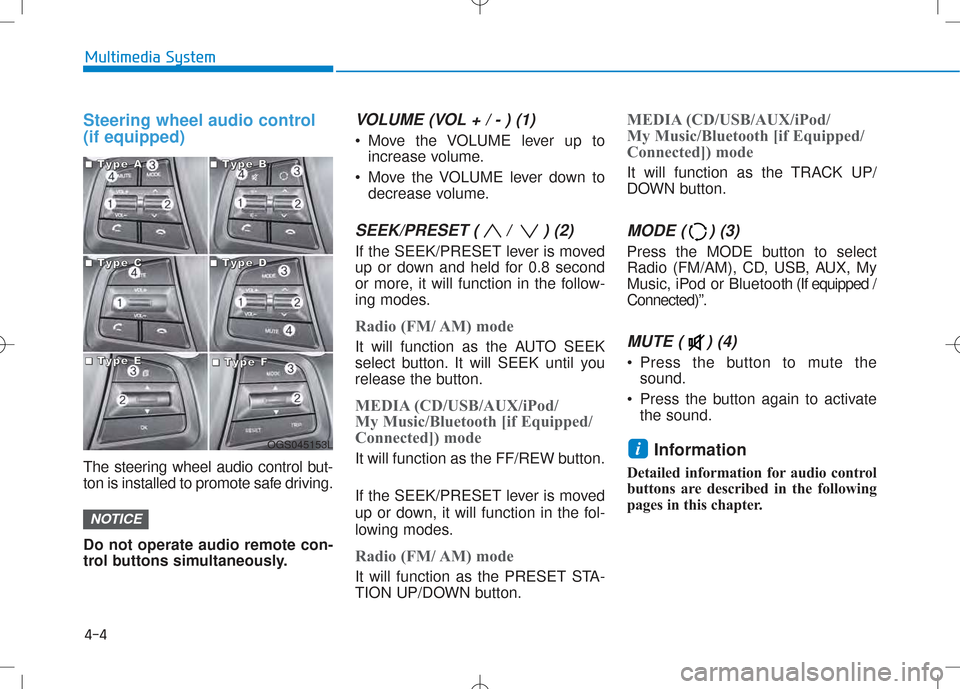
Steering wheel audio control (if equipped)
The steering wheel audio control but-
ton is installed to promote safe driving. Do not operate audio remote con-
trol buttons simultaneously.
VOLUME (VOL + / - ) (1)
Move the VOLUME lever up toincrease volume.
Move the VOLUME lever down to decrease volume.
SEEK/PRESET ( / ) (2)
If the SEEK/PRESET lever is moved
up or down and held for 0.8 second
or more, it will function in the follow-
ing modes.
Radio (FM/ AM) mode
It will function as the AUTO SEEK
select button. It will SEEK until you
release the button.
MEDIA (CD/USB/AUX/iPod/
My Music/Bluetooth [if Equipped/
Connected]) mode
It will function as the FF/REW button.
If the SEEK/PRESET lever is moved
up or down, it will function in the fol-
lowing modes.
Radio (FM/ AM) mode
It will function as the PRESET STA-
TION UP/DOWN button.
MEDIA (CD/USB/AUX/iPod/
My Music/Bluetooth [if Equipped/
Connected]) mode
It will function as the TRACK UP/
DOWN button.
MODE ( ) (3)
Press the MODE button to select
Radio (FM/AM), CD, USB, AUX, My
Music, iPod or Bluetooth (If equipped /
Connected)”.
MUTE ( ) (4)
Press the button to mute the sound.
Press the button again to activate the sound.
Information
Detailed information for audio control
buttons are described in the following
pages in this chapter.
i
NOTICE
4-4
Multimedia System
OGS045153L
■■■■TTTTyyyyppppeeee AAAA■■■■TTTTyyyyppppeeee BBBB
■■■■TTTTyyyyppppeeee CCCC■■■■TTTTyyyyppppeeee DDDD
■■■■TTTTyyyyppppeeee EEEE■■■■TTTTyyyyppppeeee FFFF
Page 232 of 512
4-14
Multimedia System
(Continued)
Charging through the USB may notwork for some mobile devices.
The device may not support normal operation when using a USB memo-
ry type besides (Metal Cover Type)
USB Memory.
The device may not support normal operation when using formats such
as HDD Type, CF, or SD Memory.
The device will not support files locked by DRM (Digital Rights
Management.)
USB memory sticks used by con- necting an Adaptor (SD Type or CF
Type) may not be properly recog-
nized.
The device may not operate properly when using USB HDDs or USBs sub-
ject to connection failures caused by
vehicle vibrations. (e.g. i-stick type)
(Continued)(Continued)
Avoid use of USB mem-
ory products that can
also be used as key
chains or mobile phone
accessories. Use of such products
may cause damage to the USB jack.
Connecting an MP3 device or phone through various channels, such as
AUX/BT or Audio/ USB mode may
result in pop noises or abnormal
operation. Information
- Using the
iPod ®
device
iPod ®
is a registered trademark of
Apple Inc.
In order to use the iPod ®
while oper-
ating the keys, you must use a dedi-
cated iPod ®
cable. (the cable that is
supplied when purchasing iPod ®
/
iPhone ®
products)
If the iPod ®
is connected to the vehi-
cle while it is playing, a high pitch
sound could occur for approximately
1-2 seconds immediately after con-
necting. If possible, connect the iPod
to the vehicle with the iPod ®
stopped/
paused.
During ACC ON state, connecting the iPod ®
through the iPod ®
cable
will charge the iPod ®
through the
car audio system.
When connecting with the iPod ®
cable, make sure to fully insert the
jack to prevent communication
interference.
(Continued)i
Page 233 of 512
4-15
Multimedia System
4
(Continued)
When the EQ features of an exter-nal device, such as the iPod ®
, and
the audio system are both active,
EQ effects could overlap and cause
sound deterioration and distortion.
Whenever possible, turn off the EQ
feature within the external device
upon use by connecting with the
audio system.
Noise may occur when an iPod ®
or
AUX device is connected. When
such devices are not being used, dis-
connect the device for storage.
When the iPod ®
or AUX device
power is connected to the power
jack, playing the external device
may result in noise. In such cases,
disconnect the power connection
before use.
Skipping or improper operation may occur depending on the characteris-
tics of your iPod ®
/Phone ®
device.
(Continued) (Continued)
If your iPhone
®
is connected to both
the Bluetooth ®
Wireless Technology
and USB, the sound may not be
properly played. In your iPhone ®
,
select the Dock connector or
Bluetooth ®
Wireless Technology to
change the sound output (source).
iPod mode cannot be operated when the iPod ®
cannot be recognized due
to versions that do not support com-
munication protocols.
For fifth generation iPod ®
Nano
devices, the iPod ®
may not be recog-
nized when the battery level is low.
Please charge the iPod ®
for use.
Search/play orders shown within the iPod ®
device may differ with the
orders shown within the audio sys-
tem.
If the iPod ®
malfunctions due to an
iPod ®
device defect, reset the iPod ®
and try again. (To learn more, refer
to your iPod ®
manual)
(Continued) (Continued)
Some iPod
®
s may not sync with the
System depending on its version. If
the Media is removed before the
Media is recognized, then the sys-
tem may not properly restore the
previously operated mode. (iPad ®
charging is not supported.)
Beside support 1M cable when pur- chasing iPod/iPhone products, Long
Cable cannot be recognized.
Page 235 of 512
4-17
Multimedia System
4
Information -When connect-
ing a Bluetooth ®
phone
Before connecting the head unit with the mobile phone, check to see
that the mobile phone supports
Bluetooth ®
features.
Even if the phone supports Bluetooth ®
, the phone will not be
found during device searches if the
phone has been set to hidden state
or the Bluetooth ®
power is turned
off. Disable the hidden state or turn
on the Bluetooth ®
power prior to
searching/connecting with the Head
unit.
Bluetooth phone is automatically connected when the ignition on.
If you do not want automatic con- nection with your Bluetooth ®
device, turn off the Bluetooth ®
fea-
ture within your mobile phone.
The Handsfree call volume and quality may differ depending on the
mobile phone.
(Continued)(Continued)
Park the vehicle when connecting
the head unit with the mobile phone.
Bluetooth ®
connection may become
intermittently disconnected in some
mobile phones. Follow these steps to
try again.
1. Within the mobile phone, turn the Bluetooth ®
function off/on and try
again.
2. Turn the mobile phone power Off/On and try again.
3. Completely remove the mobile phone battery, reboot, and then
again.
4. Reboot the Audio System and try again.
5. Delete all paired devices, pair and try again.
Handsfree call quality and volume may differ depending on the model
of your mobile phone.i
Page 237 of 512
4-19
Multimedia System
4
NameDescription
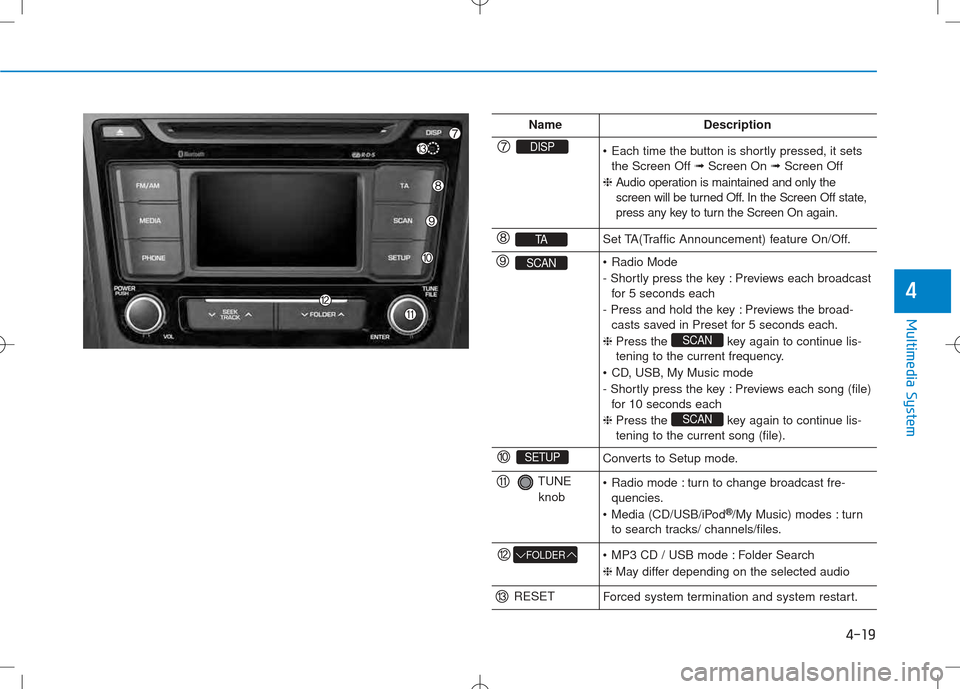
DISP Each time the button is shortly pressed, it setsthe Screen Off ➟Screen On ➟Screen Off
❈ Audio operation is maintained and only the
screen will be turned Off. In the Screen Off state,
press any key to turn the Screen On again.
TASet TA(Traffic Announcement) feature On/Off.
SCAN Radio Mode
- Shortly press the key : Previews each broadcast
for 5 seconds each
- Press and hold the key : Previews the broad- casts saved in Preset for 5 seconds each.
❈ Press the key again to continue lis-
tening to the current frequency.
CD, USB, My Music mode
- Shortly press the key : Previews each song (file) for 10 seconds each
❈ Press the key again to continue lis- tening to the current song (file).
SCAN
SCAN
SETUPConverts to Setup mode.
TUNE
knob Radio mode : turn to change broadcast fre- quencies.
Media (CD/USB/iPod ®
/My Music) modes : turn
to search tracks/ channels/files.
FOLDER MP3 CD / USB mode : Folder Search ❈ May differ depending on the selected audio
RESETForced system termination and system restart.
Page 239 of 512
4-21
Multimedia System
4
NameDescription
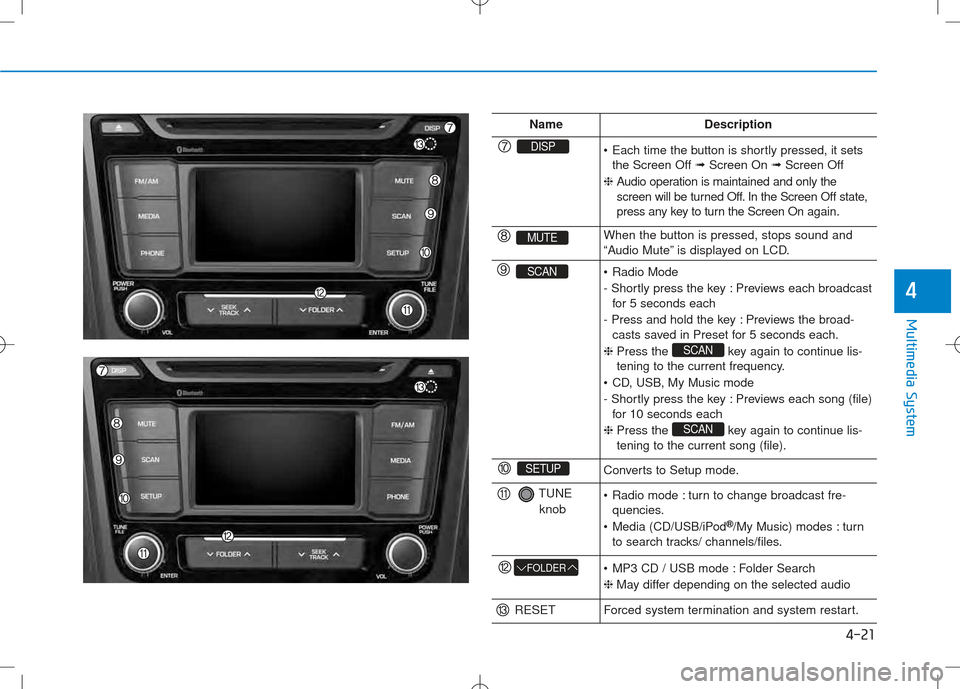
DISP Each time the button is shortly pressed, it setsthe Screen Off ➟Screen On ➟Screen Off
❈ Audio operation is maintained and only the
screen will be turned Off. In the Screen Off state,
press any key to turn the Screen On again.
MUTEWhen the button is pressed, stops sound and
“Audio Mute” is displayed on LCD.
SCAN Radio Mode
- Shortly press the key : Previews each broadcast
for 5 seconds each
- Press and hold the key : Previews the broad- casts saved in Preset for 5 seconds each.
❈ Press the key again to continue lis-
tening to the current frequency.
CD, USB, My Music mode
- Shortly press the key : Previews each song (file) for 10 seconds each
❈ Press the key again to continue lis- tening to the current song (file).
SCAN
SCAN
SETUPConverts to Setup mode.
TUNE
knob Radio mode : turn to change broadcast fre- quencies.
Media (CD/USB/iPod ®
/My Music) modes : turn
to search tracks/ channels/files.
FOLDER MP3 CD / USB mode : Folder Search ❈ May differ depending on the selected audio
RESETForced system termination and system restart.
Page 240 of 512
4-22
Multimedia System
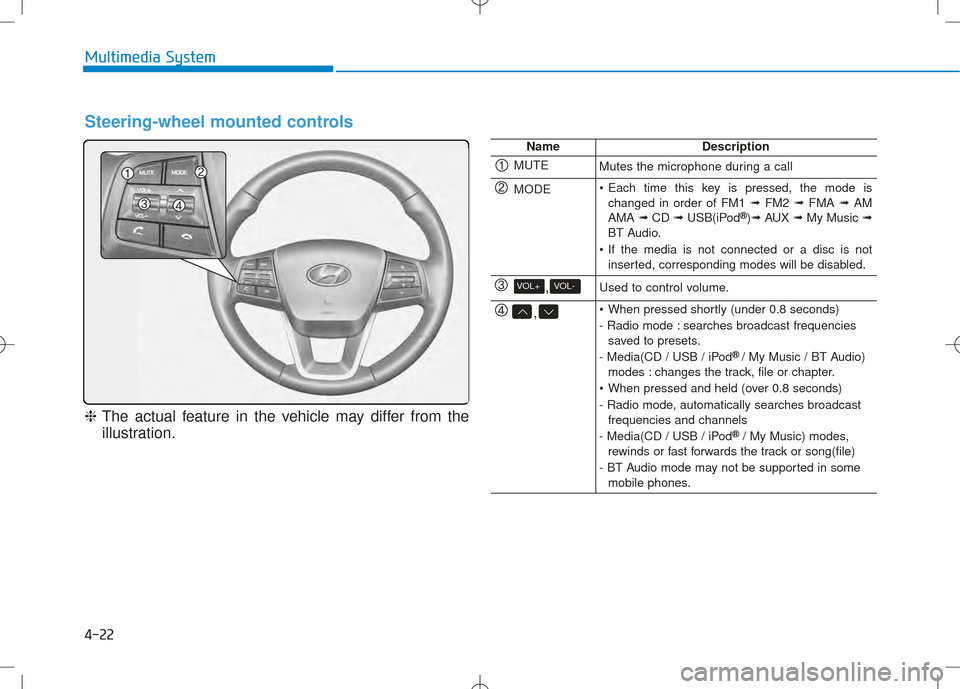
Steering-wheel mounted controls
❈The actual feature in the vehicle may differ from the
illustration.
NameDescription
MUTEMutes the microphone during a call
MODE Each time this key is pressed, the mode is changed in order of FM1 ➟FM2 ➟FMA ➟AM
AMA ➟CD ➟USB(iPod ®
)➟ AUX ➟My Music ➟
BT Audio.
If the media is not connected or a disc is not inserted, corresponding modes will be disabled.
,VOL-VOL+Used to control volume.
, When pressed shortly (under 0.8 seconds)
- Radio mode : searches broadcast frequenciessaved to presets.
- Media(CD / USB / iPod ®
/ My Music / BT Audio)
modes : changes the track, file or chapter.
When pressed and held (over 0.8 seconds)
- Radio mode, automatically searches broadcast frequencies and channels
- Media(CD / USB / iPod ®
/ My Music) modes,
rewinds or fast forwards the track or song(file)
- BT Audio mode may not be supported in some mobile phones.
Page 244 of 512
4-26
Multimedia System
Using Radio Mode
Selecting /Saving Presets
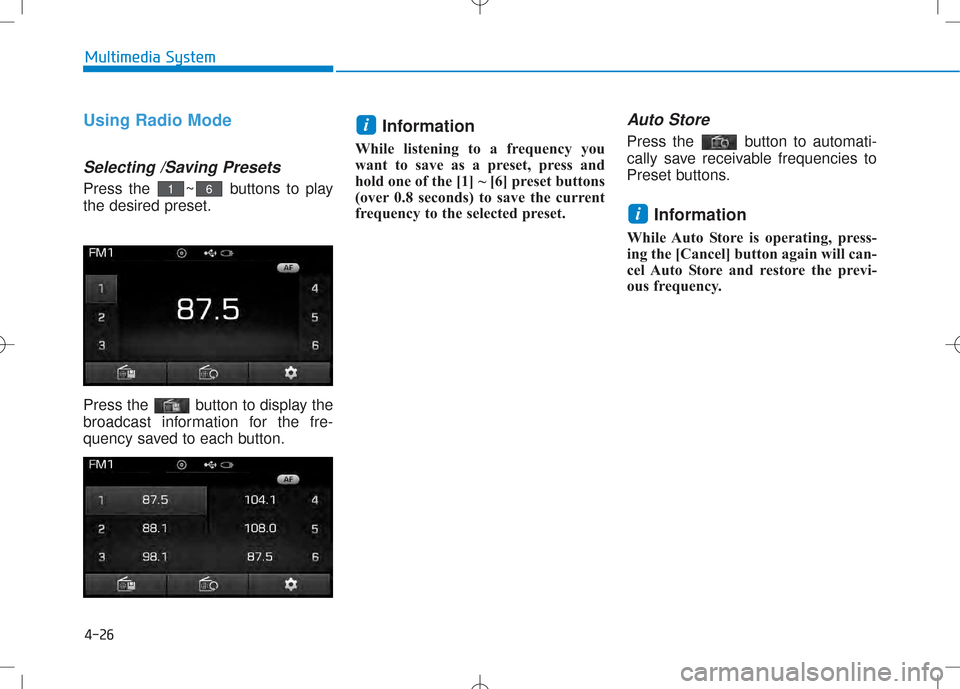
Press the ~ buttons to play the desired preset.
Press the button to display the
broadcast information for the fre-
quency saved to each button.Information
While listening to a frequency you
want to save as a preset, press and
hold one of the [1] ~ [6] preset buttons
(over 0.8 seconds) to save the current
frequency to the selected preset.
Auto Store
Press the button to automati-
cally save receivable frequencies to
Preset buttons.
Information
While Auto Store is operating, press-
ing the [Cancel] button again will can-
cel Auto Store and restore the previ-
ous frequency.
i
i
61
Page 245 of 512
4-27
Multimedia System
4
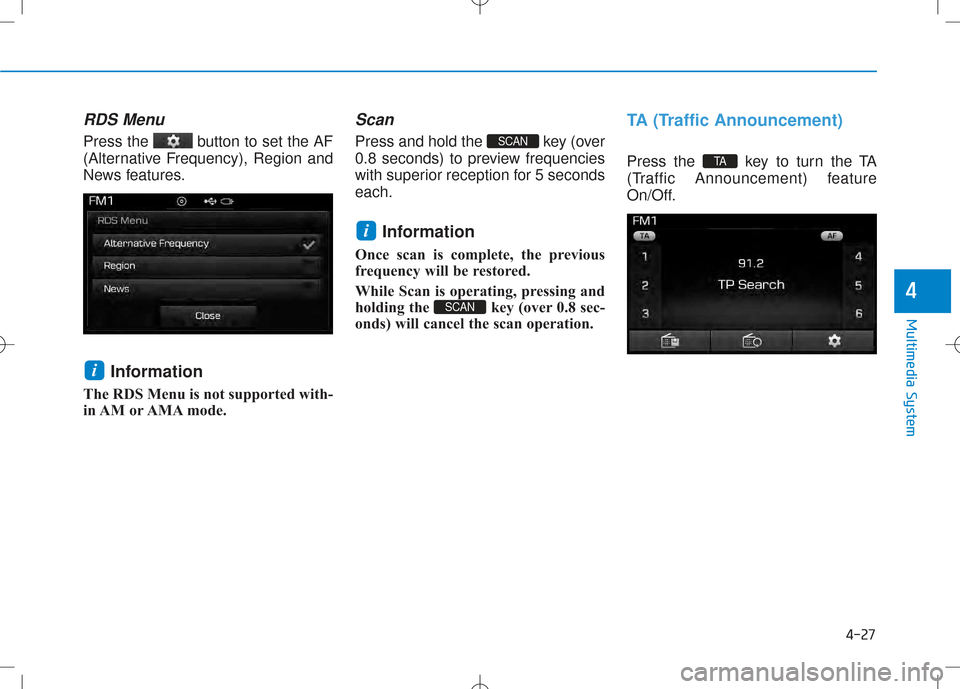
RDS Menu
Press the button to set the AF
(Alternative Frequency), Region and
News features.Information
The RDS Menu is not supported with-
in AM or AMA mode.
Scan
Press and hold the key (over
0.8 seconds) to preview frequencies
with superior reception for 5 secondseach.
Information
Once scan is complete, the previous
frequency will be restored.
While Scan is operating, pressing and
holding the key (over 0.8 sec-
onds) will cancel the scan operation.
TA (Traffic Announcement)
Press the key to turn the TA
(Traffic Announcement) feature
On/Off.TA
SCAN
i
SCAN
i
Page 247 of 512
4-29
Multimedia System
4
Searching Radio Frequencies
Using Seek
Press the key to play the
previous/next frequency.
Using TUNE
Turn the TUNE knob to select the
desired frequency.
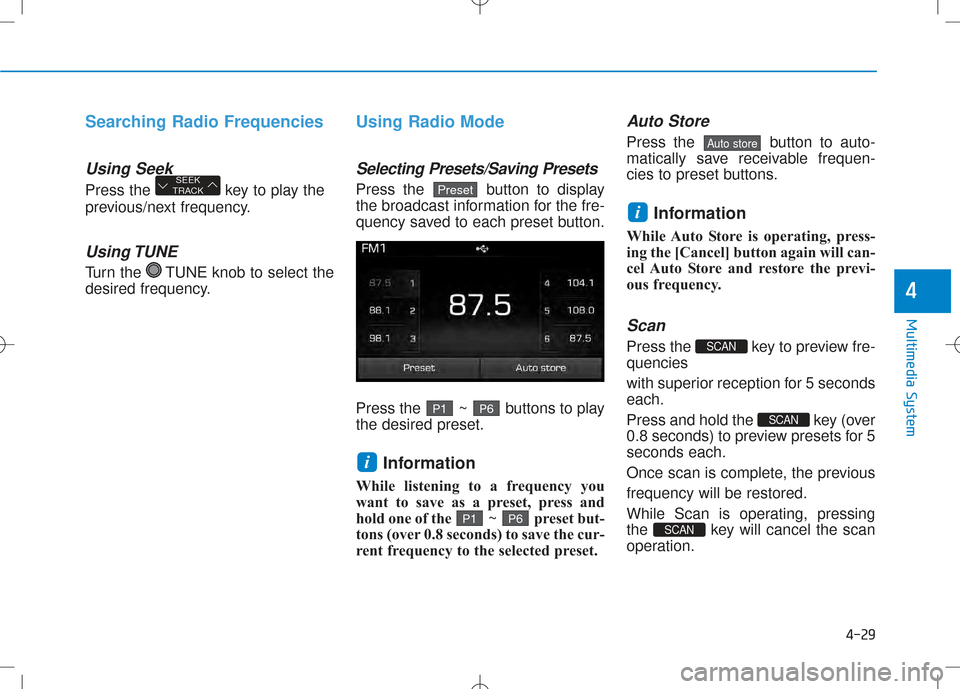
Using Radio Mode
Selecting Presets/Saving Presets
Press the button to display
the broadcast information for the fre-
quency saved to each preset button.
Press the ~ buttons to play the desired preset.Information
While listening to a frequency you
want to save as a preset, press and
hold one of the ~ preset but-
tons (over 0.8 seconds) to save the cur-
rent frequency to the selected preset.
Auto Store
Press the button to auto-
matically save receivable frequen-
cies to preset buttons.
Information
While Auto Store is operating, press-
ing the [Cancel] button again will can-
cel Auto Store and restore the previ-
ous frequency.
Scan
Press the key to preview fre-quencies
with superior reception for 5 seconds each.
Press and hold the key (over
0.8 seconds) to preview presets for 5seconds each.
Once scan is complete, the previousfrequency will be restored.
While Scan is operating, pressing
the key will cancel the scan
operation.
SCAN
SCAN
SCAN
i
Auto store
P 6P1
i
P 6P1
PresetSEEK
TRACK