key Hyundai Elantra 2016 Owners Manual
[x] Cancel search | Manufacturer: HYUNDAI, Model Year: 2016, Model line: Elantra, Model: Hyundai Elantra 2016Pages: 669, PDF Size: 31.96 MB
Page 316 of 669
![Hyundai Elantra 2016 Owners Manual Features of your vehicle
230
4
Deleting a Device
Press the key Select
[Phone] Select [Paired Phone List]
From the paired phone list, select the
device you want to delete and press
the button.
✽ âœ](/img/35/14551/w960_14551-315.png "Hyundai Elantra 2016 Owners Manual Features of your vehicle
230
4
Deleting a Device
Press the key Select
[Phone] Select [Paired Phone List]
From the paired phone list, select the
device you want to delete and press
the button.
✽ âœ")
Features of your vehicle
230
4
Deleting a Device
Press the key Select
[Phone] Select [Paired Phone List]
From the paired phone list, select the
device you want to delete and press
the button.
✽ ✽
NOTICE
• When deleting the currently con-
nected device, the device will auto-
matically be disconnected to pro-
ceed with the deleting process.
• If a paired Bluetooth
®Wireless
Technology device is deleted, the
device’s call history and contacts
data will also be deleted.
• To re-use a deleted device, you must pair the device again.
Delete
SETUP
Page 317 of 669
4231
Features of your vehicle
USING Bluetooth®Wireless
Technology
Phone Menu Screen
Phone Menus
With a Bluetooth®Wireless Technology
device connected, press the
key to display the Phone menu screen.
(For USA)
(For CANADA)
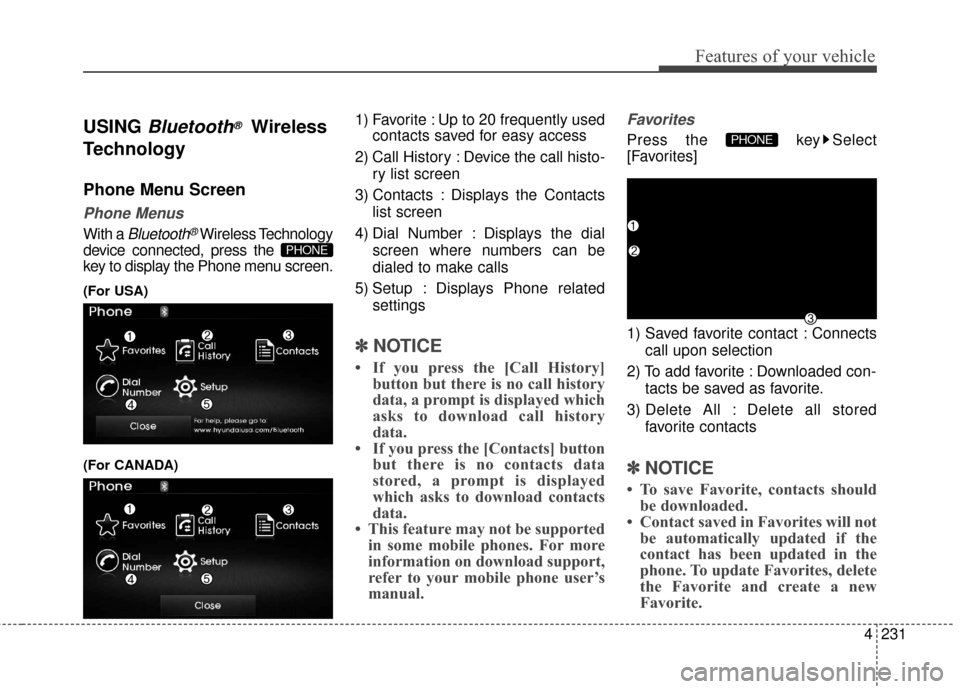
1) Favorite : Up to 20 frequently used contacts saved for easy access
2) Call History : Device the call histo- ry list screen
3) Contacts : Displays the Contacts list screen
4) Dial Number : Displays the dial screen where numbers can be
dialed to make calls
5) Setup : Displays Phone related settings
✽ ✽NOTICE
• If you press the [Call History]
button but there is no call history
data, a prompt is displayed which
asks to download call history
data.
• If you press the [Contacts] button but there is no contacts data
stored, a prompt is displayed
which asks to download contacts
data.
• This feature may not be supported in some mobile phones. For more
information on download support,
refer to your mobile phone user’s
manual.
Favorites
Press the key Select
[Favorites]
1) Saved favorite contact : Connects
call upon selection
2) To add favorite : Downloaded con- tacts be saved as favorite.
3) Delete All : Delete all stored favorite contacts
✽ ✽NOTICE
• To save Favorite, contacts should
be downloaded.
• Contact saved in Favorites will not be automatically updated if the
contact has been updated in the
phone. To update Favorites, delete
the Favorite and create a new
Favorite.
PHONE
PHONE
Page 318 of 669
![Hyundai Elantra 2016 Owners Manual Features of your vehicle
232
4
Call History
Press the key Select [Call
History]
A list of incoming, outgoing and
missed calls is displayed.
Press the button to down-
load the call history.
1) Call](/img/35/14551/w960_14551-317.png "Hyundai Elantra 2016 Owners Manual Features of your vehicle
232
4
Call History
Press the key Select [Call
History]
A list of incoming, outgoing and
missed calls is displayed.
Press the button to down-
load the call history.
1) Call")
Features of your vehicle
232
4
Call History
Press the key Select [Call
History]
A list of incoming, outgoing and
missed calls is displayed.
Press the button to down-
load the call history.
1) Call History :
- Displays recent calls (call history)
- Connects call upon selection
2) Download : Download Recent Call History
• Call history may not be saved in the call history list in some mobile
phones. Calls received with hidden caller ID
will not be saved in the call history
list.
Calling through the call history is not possible when there is no call
history stored or a
Bluetooth®
Wireless Technology phone is not
connected.
Up to 50 received, dialed and missed calls are stored in Call
History.
Time of received/dialed calls and call time information are not saved.
Contacts
Press the key Select
[Contacts] The list of saved phone book entries
is displayed. Press the but-
ton to download the call history.
1) Contacts List :
- Displays downloaded contactsentries
- Connects call upon selection
2) Sort by : Find a contact in an alphabetical order.
3) Download : Download contacts entries
Download
PHONEDownload
PHONE
Page 319 of 669
4233
Features of your vehicle
✽
✽NOTICE
• Up to 1,000 contacts saved in your
Bluetooth®Wireless Technology
phone can be downloaded into the
car contacts. Contacts that have
been downloaded to the car cannot
be edited or deleted on the phone.
• Mobile phone contacts are man- aged separately for each paired
Bluetooth
®Wireless Technology
device (max 5 devices x 1,000 con-
tacts each). Previously downloaded
data is maintained even if the
Bluetooth
®Wireless Technology
device has been disconnected.
(However, the contacts and call his-
tory saved to the phone will be
deleted if a paired phone is deleted.)
• It is possible to download contacts during Bluetooth streaming audio.
• When downloading contacts, the icon will be displayed within the
status bar. (Continued)(Continued)
• It is not possible to begin down-
loading a contact list when the
contact download feature has been
turned off within the Bluetooth
®
Wireless Technology device. In
addition, some devices may
require device authorization upon
attempting to download contacts.
If downloading does not normally
occur, check the Bluetooth
®
Wireless Technology device set-
tings or the screen state.
• The contacts download feature may not be supported in some
mobile phones. For more informa-
tion of supported Bluetooth
®
devices and function support,
refer to your phone’s user manual.
Calling by Dialing a Number
Press the key Select [Dial
Number]
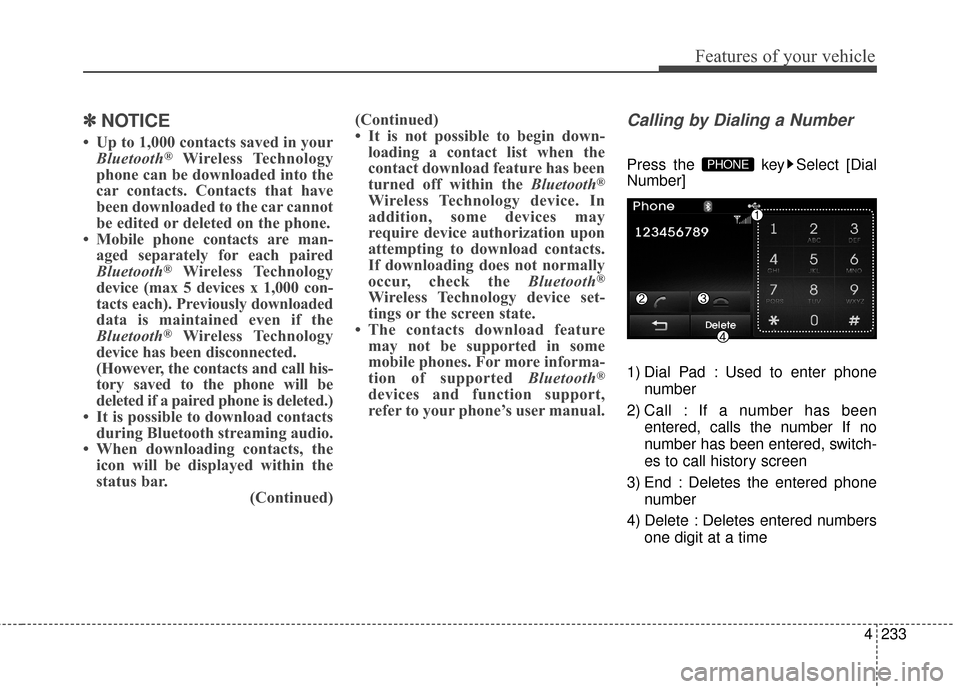
1) Dial Pad : Used to enter phone
number
2) Call : If a number has been entered, calls the number If no
number has been entered, switch-
es to call history screen
3) End : Deletes the entered phone number
4) Delete : Deletes entered numbers one digit at a timePHONE
Page 321 of 669
![Hyundai Elantra 2016 Owners Manual 4235
Features of your vehicle
Bluetooth®Wireless
Technology Setting
Pairing a New Device
Press the key Select
[Phone] Select [Pair Phone]
(For USA)
(For CANADA)
Bluetooth®Wireless Technology
device](/img/35/14551/w960_14551-320.png "Hyundai Elantra 2016 Owners Manual 4235
Features of your vehicle
Bluetooth®Wireless
Technology Setting
Pairing a New Device
Press the key Select
[Phone] Select [Pair Phone]
(For USA)
(For CANADA)
Bluetooth®Wireless Technology
device")
4235
Features of your vehicle
Bluetooth®Wireless
Technology Setting
Pairing a New Device
Press the key Select
[Phone] Select [Pair Phone]
(For USA)
(For CANADA)
Bluetooth®Wireless Technology
devices can be paired with the audio
system.
For more information, refer to the
"Pairing through Phone Setup" sec-
tion within
Bluetooth®Wireless
Technology.
Viewing Paired Phone List
Press the key Select
[Phone] Select [Paired Phone List]
This feature is used to view mobile
phones that have been paired with
the audio system. Upon selecting a
paired phone, the setup menu is dis-
played. For more information, refer to the
"Setting
Bluetooth®Wireless
Technology Connection" section
within
Bluetooth®Wireless
Technology.
1) : Moves to the previous
screen
2) Connect/Disconnect Phone : Connect/ disconnects currently
selected phone
3) Delete : Deletes the currently selected phone
4) Change Priority : Sets currently selected phone to highest connec-
tion priority
SETUP
SETUP
Page 322 of 669
Features of your vehicle
236
4
✽
✽
NOTICE BEFORE DOWN-
LOADING CONTACTS
• Only contacts within connected
phones can be downloaded. Also
check to see that your mobile
phone supports the download fea-
ture.
• To learn more about whether your mobile phone supports contacts
downloads, refer to your mobile
phone user’s manual.
• The contacts for only the connect- ed phone can be downloaded.
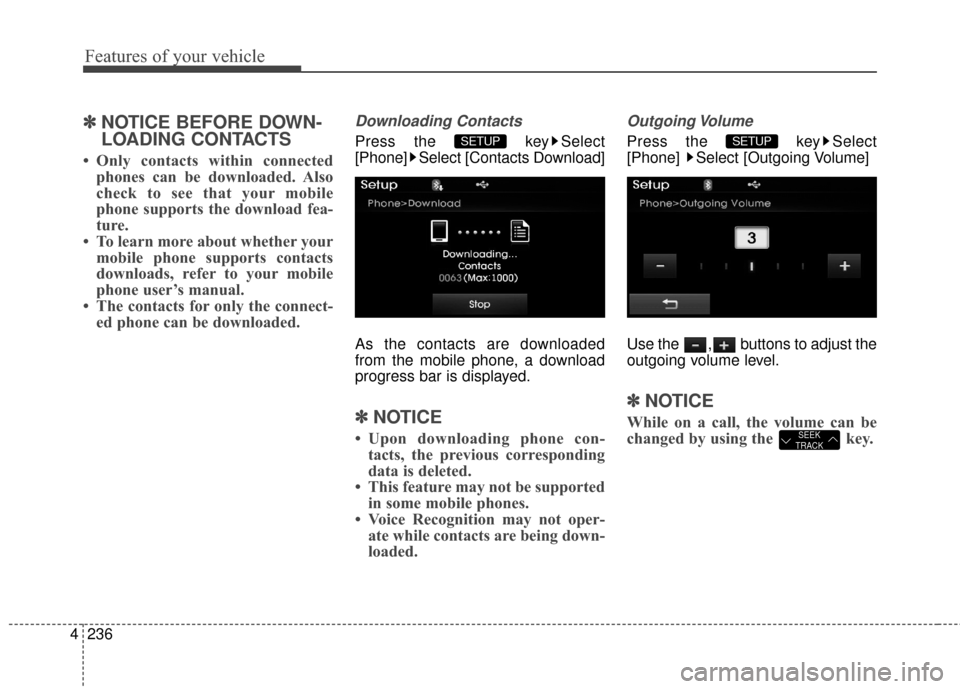
Downloading Contacts
Press the key Select
[Phone] Select [Contacts Download]
As the contacts are downloaded
from the mobile phone, a download
progress bar is displayed.
✽ ✽ NOTICE
• Upon downloading phone con-
tacts, the previous corresponding
data is deleted.
• This feature may not be supported in some mobile phones.
• Voice Recognition may not oper- ate while contacts are being down-
loaded.
Outgoing Volume
Press the key Select
[Phone] Select [Outgoing Volume]
Use the , buttons to adjust the
outgoing volume level.
✽ ✽ NOTICE
While on a call, the volume can be
changed by using the key.SEEK
TRACK
SETUP SETUP
Page 323 of 669
![Hyundai Elantra 2016 Owners Manual 4237
Features of your vehicle
Turning Bluetooth System Off
Press the key Select
[Phone] Select [Bluetooth System Off]
Once
Bluetooth®Wireless Technology
is turned off,
Bluetooth®Wireless
Technolo](/img/35/14551/w960_14551-322.png "Hyundai Elantra 2016 Owners Manual 4237
Features of your vehicle
Turning Bluetooth System Off
Press the key Select
[Phone] Select [Bluetooth System Off]
Once
Bluetooth®Wireless Technology
is turned off,
Bluetooth®Wireless
Technolo")
4237
Features of your vehicle
Turning Bluetooth System Off
Press the key Select
[Phone] Select [Bluetooth System Off]
Once
Bluetooth®Wireless Technology
is turned off,
Bluetooth®Wireless
Technology related features will not
be supported within the audio system.
(For USA)
(For CANADA)
✽ ✽ NOTICE
To turn Bluetooth®Wireless
Technology back on, go to
[Phone] and press "Yes".SETUP
SETUP
Page 324 of 669
Features of your vehicle
238
4
VOICE RECOGNITION
Using Voice Recognition
Starting Voice Recognition
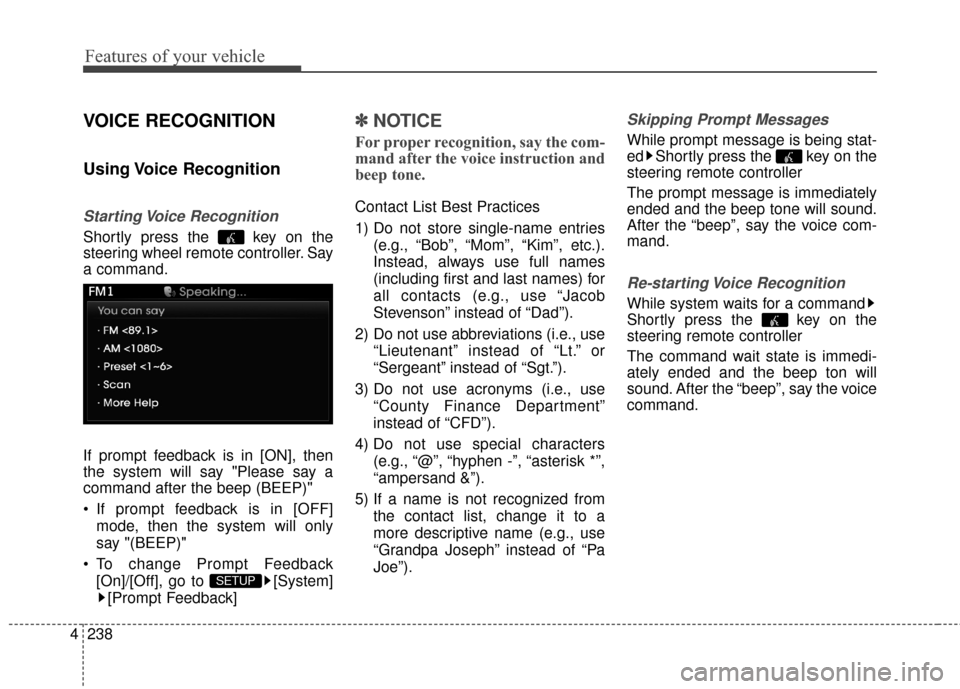
Shortly press the key on the
steering wheel remote controller. Say
a command.
If prompt feedback is in [ON], then
the system will say "Please say a
command after the beep (BEEP)"
If prompt feedback is in [OFF]
mode, then the system will only
say "(BEEP)"
To change Prompt Feedback [On]/[Off], go to [System][Prompt Feedback]
✽ ✽ NOTICE
For proper recognition, say the com-
mand after the voice instruction and
beep tone.
Contact List Best Practices
1) Do not store single-name entries
(e.g., “Bob”, “Mom”, “Kim”, etc.).
Instead, always use full names
(including first and last names) for
all contacts (e.g., use “Jacob
Stevenson” instead of “Dad”).
2) Do not use abbreviations (i.e., use “Lieutenant” instead of “Lt.” or
“Sergeant” instead of “Sgt.”).
3) Do not use acronyms (i.e., use “County Finance Department”
instead of “CFD”).
4) Do not use special characters (e.g., “@”, “hyphen -”, “asterisk *”,
“ampersand &”).
5) If a name is not recognized from the contact list, change it to a
more descriptive name (e.g., use
“Grandpa Joseph” instead of “Pa
Joe”).
Skipping Prompt Messages
While prompt message is being stat-
ed Shortly press the key on the
steering remote controller
The prompt message is immediately
ended and the beep tone will sound.
After the “beep”, say the voice com-
mand.
Re-starting Voice Recognition
While system waits for a command
Shortly press the key on the
steering remote controller
The command wait state is immedi-
ately ended and the beep ton will
sound. After the “beep”, say the voice
command.
SETUP
Page 325 of 669
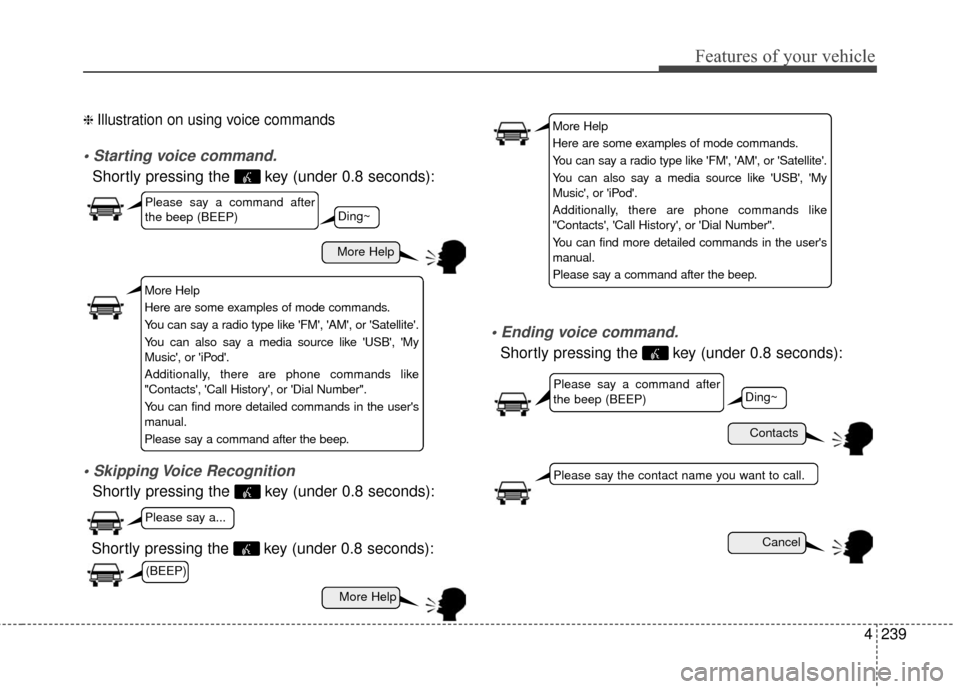
4239
Features of your vehicle
❈ Illustration on using voice commands
Shortly pressing the key (under 0.8 seconds):
Shortly pressing the key (under 0.8 seconds):
voice command.
Shortly pressing the key (under 0.8 seconds):
More Help
Contacts
Cancel
More Help
Please say a command after
the beep (BEEP)
Please say a command after
the beep (BEEP)
Please say a...
Please say the contact name you want to call.
Ding~
Ding~
Shortly pressing the key (under 0.8 seconds):
More Help
Here are some examples of mode commands.
You can say a radio type like 'FM', 'AM', or 'Satellite'.
You can also say a media source like 'USB', 'My
Music', or 'iPod'.
Additionally, there are phone commands like
"Contacts', 'Call History', or 'Dial Number".
You can find more detailed commands in the user's
manual.
Please say a command after the beep.
More Help
Here are some examples of mode commands.
You can say a radio type like 'FM', 'AM', or 'Satellite'.
You can also say a media source like 'USB', 'My
Music', or 'iPod'.
Additionally, there are phone commands like
"Contacts', 'Call History', or 'Dial Number".
You can find more detailed commands in the user's
manual.
Please say a command after the beep.
(BEEP)
Page 331 of 669
![Hyundai Elantra 2016 Owners Manual 4245
Features of your vehicle
SETUP
Starting Mode
Press the key to display the
Setup screen.
You can select and control options
related to [Display], [Sound],
[Clock/Calendar], [Phone] and
[System].](/img/35/14551/w960_14551-330.png "Hyundai Elantra 2016 Owners Manual 4245
Features of your vehicle
SETUP
Starting Mode
Press the key to display the
Setup screen.
You can select and control options
related to [Display], [Sound],
[Clock/Calendar], [Phone] and
[System].")
4245
Features of your vehicle
SETUP
Starting Mode
Press the key to display the
Setup screen.
You can select and control options
related to [Display], [Sound],
[Clock/Calendar], [Phone] and
[System].
Display Settings
Adjusting the Brightness
Press the key Select
[Display] Select [Brightness]
Use the , buttons to adjust the
screen brightness or set the
Brightness on Automatic, Daylight, or
Night mode.
Press the button to reset.
1) Automatic : Adjusts the brightnessautomatically
2) Daylight : Always maintains the brightness on high
3) Night : Always maintains the
brightness on low
Mode pop up
Press the key Select
[Display] Select [Mode Pop up]
This feature is used to display the
Pop-up Mode screen when entering
radio and media modes.
When this feature is turned on,
pressing the or key
will display the Pop-up Mode screen.
✽ ✽ NOTICE
The media Mode pop up screen can
be displayed only when two or more
media modes have been connected.
MEDIA RADIO
SETUP
Default
SETUP SETUP