remote control Hyundai Elantra 2016 User Guide
[x] Cancel search | Manufacturer: HYUNDAI, Model Year: 2016, Model line: Elantra, Model: Hyundai Elantra 2016Pages: 669, PDF Size: 31.96 MB
Page 365 of 669
4279
Features of your vehicle
PHONE (IF EQUIPPED)
Before using the Bluetooth®Wireless
Technology phone features
In order to use
Bluetooth®Wireless
Technology phone, you must first
pair and connect the
Bluetooth®
Wireless Technology mobile phone.
If the mobile phone is not paired or connected, it is not possible to
enter Phone mode. Once a phone
is paired or connected, the guid-
ance screen will be displayed.
If Priority is set upon vehicle igni- tion(IGN/ACC ON), the
Bluetooth®
Wireless Technology phone will be
automatically connected. Even if
you are outside, the first
Bluetooth®Wireless Technology
phone will be automatically connect-
ed once you are in the vicinity of the
vehicle. If you do not want automatic
Bluetooth®Wireless Technology
phone connection, set the
Bluetooth®Wireless Technology
power to OFF.
Making a call using the Steering
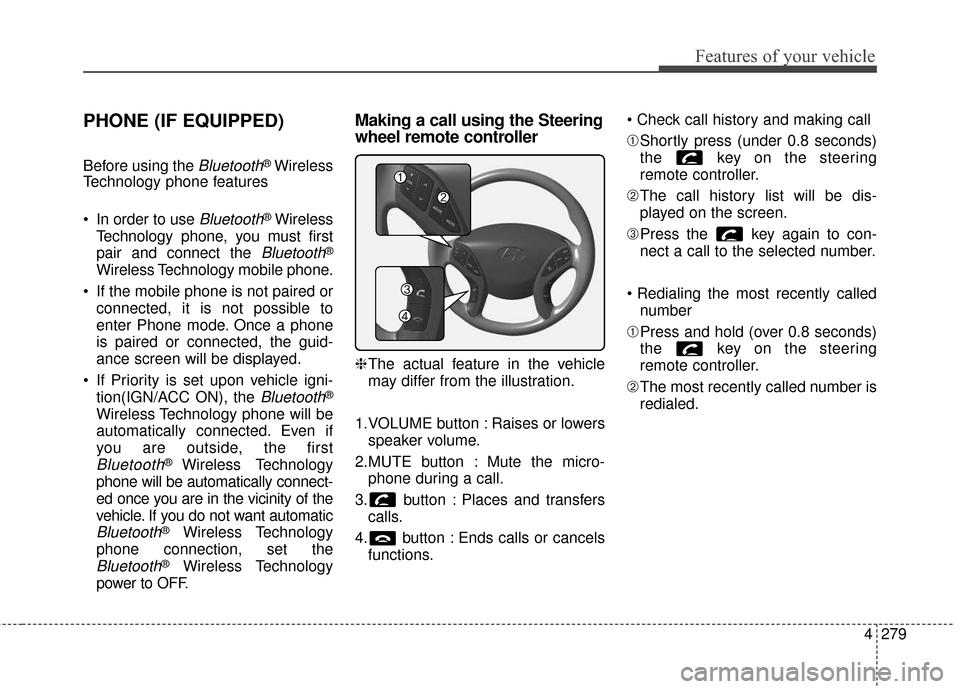
wheel remote controller
❈ The actual feature in the vehicle
may differ from the illustration.
1.VOLUME button : Raises or lowers speaker volume.
2.MUTE button : Mute the micro- phone during a call.
3. button : Places and transfers calls.
4. button : Ends calls or cancels functions.
➀
Shortly press (under 0.8 seconds)
the key on the steering
remote controller.
➁ The call history list will be dis-
played on the screen.
\b Press the key again to con-
nect a call to the selected number.
number
➀ Press and hold (over 0.8 seconds)
the key on the steering
remote controller.
➁ The most recently called number is
redialed.
Page 367 of 669
4281
Features of your vehicle
Pairing Key / Key
on the Steering Remote
Controller
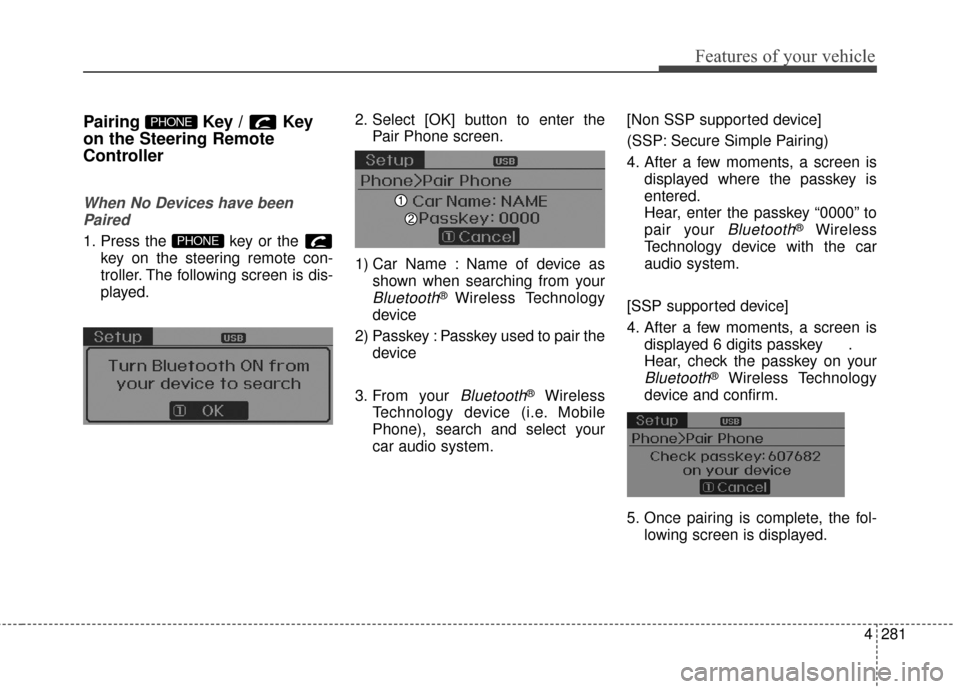
When No Devices have beenPaired
1. Press the key or the key on the steering remote con-
troller. The following screen is dis-
played. 2. Select [OK] button to enter the
Pair Phone screen.
1) Car Name : Name of device as shown when searching from your
Bluetooth®Wireless Technology
device
2) Passkey : Passkey used to pair the device
3. From your
Bluetooth®Wireless
Technology device (i.e. Mobile
Phone), search and select your
car audio system. [Non SSP supported device]
(SSP: Secure Simple Pairing)
4. After a few moments, a screen is
displayed where the passkey is
entered.
Hear, enter the passkey “0000” to
pair your
Bluetooth®Wireless
Technology device with the car
audio system.
[SSP supported device]
4. After a few moments, a screen is displayed 6 digits passkey .
Hear, check the passkey on your
Bluetooth®Wireless Technology
device and confirm.
5. Once pairing is complete, the fol- lowing screen is displayed.
PHONE
PHONE
Page 379 of 669
![Hyundai Elantra 2016 User Guide 4293
Features of your vehicle
VOICE RECOGNITION
Using Voice Recognition
Starting Voice Recognition
Shortly press the key on the
steering wheel. Say a command.
If prompt feedback is in [ON], then
th](/img/35/14551/w960_14551-378.png "Hyundai Elantra 2016 User Guide 4293
Features of your vehicle
VOICE RECOGNITION
Using Voice Recognition
Starting Voice Recognition
Shortly press the key on the
steering wheel. Say a command.
If prompt feedback is in [ON], then
th")
4293
Features of your vehicle
VOICE RECOGNITION
Using Voice Recognition
Starting Voice Recognition
Shortly press the key on the
steering wheel. Say a command.
If prompt feedback is in [ON], then
the system will say “Please say a
command after the beep (BEEP)”
If prompt feedback is in [OFF]mode, then the system will only
say “(BEEP)”
To change Prompt Feedback [On]/[Off], go to [System][Prompt Feedback]
✽ ✽ NOTICE
For proper recognition, say the com-
mand after the voice instruction and
beep tone.
Contact List Best Practices
1) Do not store single-name entries
(e.g., “Bob”, “Mom”, “Kim”, etc.).
Instead, always use full names
(including first and last names) for
all contacts (e.g., use “Jacob
Stevenson” instead of “Dad”).
2) Do not use abbreviations (i.e., use “Lieutenant” instead of “Lt.” or
“Sergeant” instead of “Sgt.”).
3) Do not use acronyms (i.e., use “County Finance Department”
instead of “CFD”).
4) Do not use special characters (e.g., “@”, “hyphen -”, “asterisk *”,
“ampersand &”).
5) If a name is not recognized from the contact list, change it to a
more descriptive name (e.g., use
“Grandpa Joseph” instead of “Pa
Joe”).
Skipping Prompt Messages
While prompt message is being stat-
ed Shortly press the key on the
steering remote controller
The prompt message is immediately
ended and the beep tone will sound.
After the “beep”, say the voice com-
mand.
Re-starting Voice Recognition
While system waits for a command
Shortly press the key on the
steering remote controller
The command wait state is immedi-
ately ended and the beep ton will
sound. After the “beep”, say the voice
command.
SETUP
Page 380 of 669
Features of your vehicle
294
4
ENDING VOICE
RECOGNITION
While Voice Recognition is operating
Press and hold the key on the
steering remote controller
✽ ✽ NOTICE
• While using voice command,
pressing any steering wheel con-
trol or a different key will end
voice command.
• When the system is waiting for a voice command, say “cancel” or
“end” to end voice command.
• When the system is waiting for a voice command, press and hold
the key on the steering wheel
to end voice command.
Voice Recognition and Phone
Contact Tips:
The Hyundai Voice Recognition
System may have difficulty under-
standing some accents or uncom-
mon names.
When using Voice Recognition to
place a call, speak in a moderate
tone, with clear pronunciation To
maximize the use of Voice
Recognition, consider these guide-
lines when storing contacts:
Do not store single-name entries
(e.g., “Bob”, “Mom”, etc.). Instead,
always use full names (including first
and last names) for these contacts
Do not use special characters (e.g., '@', '-', '*', '&', etc.)
Do not use abbreviations (i.e., use "Lieutenant" instead of "Lt.") or
acronyms (i.e., use "County Finance
Department" instead of "C. F. D."; Be
sure to say the name exactly as it is
entered in the contacts list
Page 427 of 669
4341
Features of your vehicle
Pairing a Bluetooth®Wireless
Technology Device
What is Bluetooth® Wireless
Technology Pairing?
Pairing refers to the process of syn-
chronizing your
Bluetooth®Wireless
Technology phone or device with the
car audio system for connection.
Pairing is necessary to connect and
use the
Bluetooth®Wireless
Technology feature.
Pairing Key / Key
on the Steering Remote
Controller
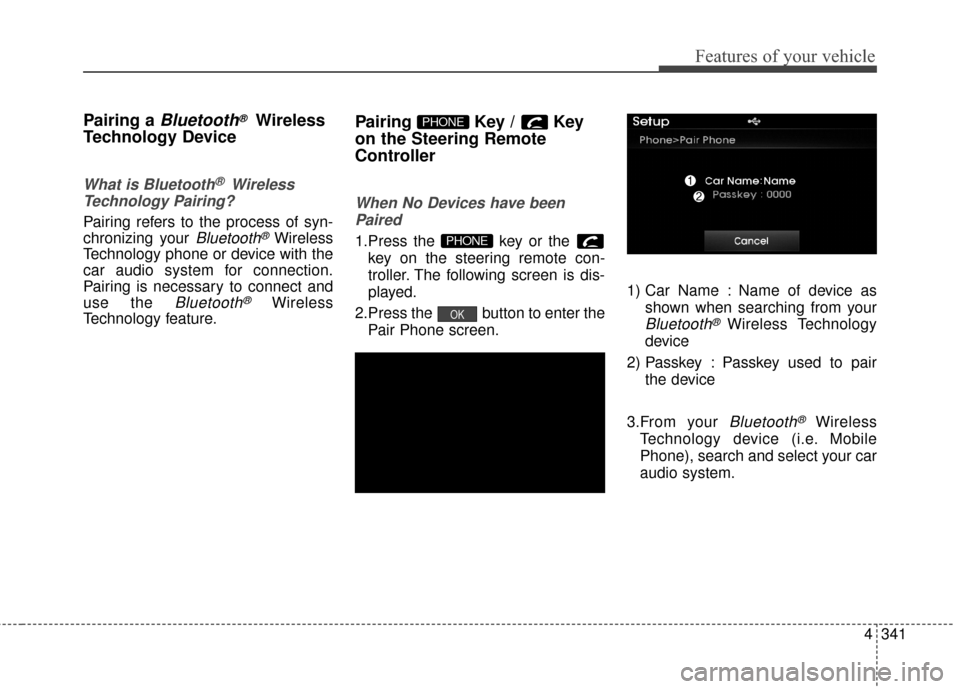
When No Devices have been
Paired
1.Press the key or the key on the steering remote con-
troller. The following screen is dis-
played.
2.Press the button to enter the Pair Phone screen. 1) Car Name : Name of device as
shown when searching from your
Bluetooth®Wireless Technology
device
2) Passkey : Passkey used to pair the device
3.From your
Bluetooth®Wireless
Technology device (i.e. Mobile
Phone), search and select your car
audio system.
OK
PHONE
PHONE
Page 440 of 669
![Hyundai Elantra 2016 User Guide VOICE RECOGNITION
Using Voice Recognition
Starting Voice Recognition
Shortly press the key on the
steering wheel remote controller. Say
a command.
If prompt feedback is in [ON], then
the system wil](/img/35/14551/w960_14551-439.png "Hyundai Elantra 2016 User Guide VOICE RECOGNITION
Using Voice Recognition
Starting Voice Recognition
Shortly press the key on the
steering wheel remote controller. Say
a command.
If prompt feedback is in [ON], then
the system wil")
VOICE RECOGNITION
Using Voice Recognition
Starting Voice Recognition
Shortly press the key on the
steering wheel remote controller. Say
a command.
If prompt feedback is in [ON], then
the system will say "Please say a
command after the beep (BEEP)"
If prompt feedback is in [OFF]mode, then the system will only
say "(BEEP)"
To change Prompt Feedback [On]/[Off], go to [System][Prompt Feedback]
✽ ✽ NOTICE
For proper recognition, say the com-
mand after the voice instruction and
beep tone.
Contact List Best Practices
1) Do not store single-name entries
(e.g., “Bob”, “Mom”, “Kim”, etc.).
Instead, always use full names
(including first and last names) for
all contacts (e.g., use “Jacob
Stevenson” instead of “Dad”).
2) Do not use abbreviations (i.e., use “Lieutenant” instead of “Lt.” or
“Sergeant” instead of “Sgt.”).
3) Do not use acronyms (i.e., use “County Finance Department”
instead of “CFD”).
4) Do not use special characters (e.g., “@”, “hyphen -”, “asterisk *”,
“ampersand &”).
5) If a name is not recognized from the contact list, change it to a
more descriptive name (e.g., use
“Grandpa Joseph” instead of “Pa
Joe”).
Skipping Prompt Messages
While prompt message is being stat-
ed Shortly press the key on the
steering remote controller
The prompt message is immediately
ended and the beep tone will sound.
After the “beep”, say the voice com-
mand.
Re-starting Voice Recognition
While system waits for a command
Shortly press the key on the
steering remote controller
The command wait state is immedi-
ately ended and the beep ton will
sound. After the “beep”, say the voice
command.
SETUP
4354
Features of your vehicle
Page 453 of 669
4367
Features of your vehicle
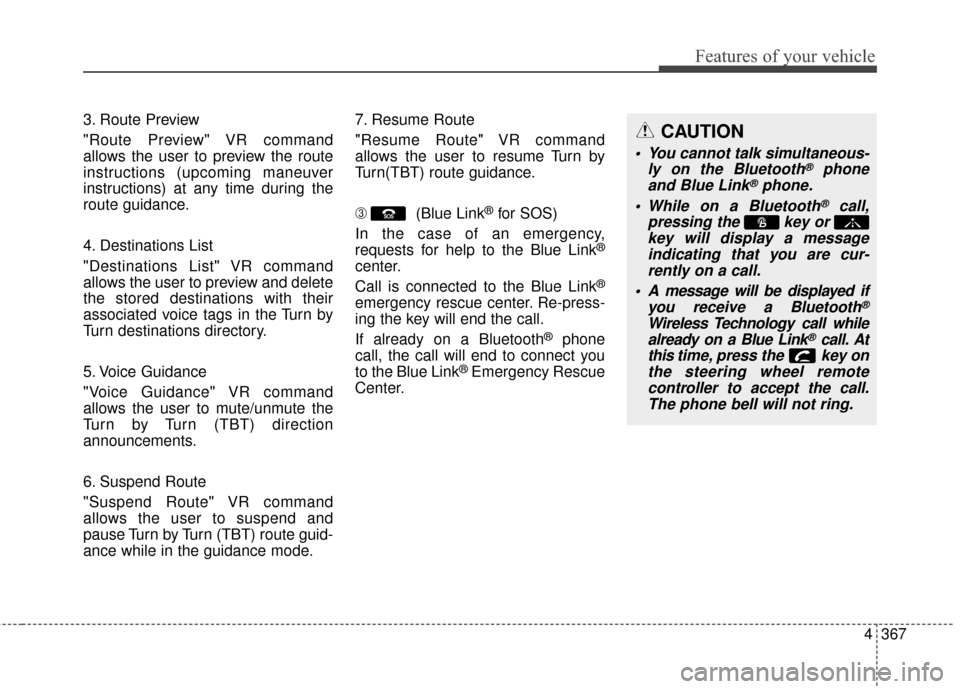
3. Route Preview
"Route Preview" VR command
allows the user to preview the route
instructions (upcoming maneuver
instructions) at any time during the
route guidance.
4. Destinations List
"Destinations List" VR command
allows the user to preview and delete
the stored destinations with their
associated voice tags in the Turn by
Turn destinations directory.
5. Voice Guidance
"Voice Guidance" VR command
allows the user to mute/unmute the
Turn by Turn (TBT) direction
announcements.
6. Suspend Route
"Suspend Route" VR command
allows the user to suspend and
pause Turn by Turn (TBT) route guid-
ance while in the guidance mode.7. Resume Route
"Resume Route" VR command
allows the user to resume Turn by
Turn(TBT) route guidance.
\b
(Blue Link
®for SOS)
In the case of an emergency,
requests for help to the Blue Link
®
center.
Call is connected to the Blue Link
®
emergency rescue center. Re-press-
ing the key will end the call.
If already on a Bluetooth
®phone
call, the call will end to connect you
to the Blue Link
®Emergency Rescue
Center.
CAUTION
You cannot talk simultaneous- ly on the Bluetooth®phone
and Blue Link®phone.
While on a Bluetooth
®call,
pressing the key or key will display a messageindicating that you are cur-rently on a call.
A message will be displayed if you receive a Bluetooth
®
Wireless Technology call whilealready on a Blue Link®call. At
this time, press the key on
the steering wheel remote controller to accept the call.The phone bell will not ring.
Page 658 of 669
Index
2I
Accessing your vehicle ....................................................4-3Immobilizer System ....................................................4-12
Remote key ....................................................................4-3
Remote key precautions ................................................4-5
Smart key ......................................................................4-\
7
Smart key precautions ................................................4-11
Active ECO system ........................................................5-41
Air bag warning labels....................................................3-67
Air bags ........................................................................\
..3-45 Additional safety precautions ......................................3-66
Air bag collision sensors ............................................3-61
Air bag deployment conditions ..................................3-62
Air bag non-deployment conditions ............................3-63
Air bag warning labels ................................................3-67
Curtain air bags ..........................................................3-49
Do not install a child restraint on the front passenger seat ............................................................3-60
Driver’s air bag............................................................3-47
Occupant Classification System (OCS) ......................3-55
Passenger's front air bag ..............................................3-47
Side (impact) air bags..................................................3-48
SRS Care ....................................................................3-65\
SRS components and functions ..................................3-50
What to expect after an air bag inflates ......................3-54
Where are the air bags? ..............................................3-47
Why didn't my air bag go off in a collision ................3-60 Air cleaner ......................................................................7-\
37
Air conditioning system
Automatic climate control system ..............................4-94
Manual climate control system ..................................4-84
Antenna ........................................................................\
4-120
Anti-lock brake system (ABS) ......................................5-32
Appearance care..............................................................7-87 Exterior care ................................................................7-87
Interior care ................................................................7-93
Armrest (Rear seats) ......................................................3-14
Audio remote control ....................................................4-121
Audio system ................................................................4-120 Antenna......................................................................4-\
120
Audio remote control ................................................4-121
Caring for disc ..........................................................4-125
CD player ................................................................4-135
How vehicle audio works ........................................4-122
Auto defogging system ................................................4-108
Auto door lock/unlock features ......................................4-18
Auto light position ..........................................................4-73
Automatic climate control system ..................................4-94 Air conditioning ........................................................4-100
Air conditioning refrigerant label..............................4-104
Air intake control ........................................................4-99
Automatic heating and air conditioning ......................4-95
Checking the amount of air conditioner refrigerant and compressor lubricant ........................................4-104
Fan speed control ......................................................4-100
A
Page 661 of 669

I5
Index
Door locks ......................................................................4-\
14Auto door lock/unlock features ..................................4-18
Central door lock switch ............................................4-17
Child-safety rear door lock..........................................4-19
Door lock button..........................................................4-16
Impact sensing door unlock system ............................4-18
Remote key ..................................................................4-14
Smart key ....................................................................4-15\
Speed sensing door lock system..................................4-18
Drinks holders, see cup holders ....................................4-115
Driver selectable steering mode ....................................4-39
Driver’s air bag ..............................................................3-47
Driving assist system Active ECO system ....................................................5-41
Driving at night ..............................................................5-49
Driving in flooded areas ................................................5-50
Driving in the rain ..........................................................5-50 Electric chromic mirror (ECM) with compass and
HomeLink
®system ......................................................4-43
Electric power steering (EPS) ........................................4-38
Electronic stability control (ESC) ..................................5-34
Emergency towing ..........................................................6-29
Emission control system ................................................7-94 Crankcase emission control system ............................7-94
Evaporative emission control system ..........................7-94
Exhaust emission control system ................................7-95
Engine compartment..................................................2-6, 7-2
Engine compartment panel fuse ....................................7-66
Engine coolant ................................................................7-32
Engine coolant temperature gauge ................................4-54
Engine number ..................................................................8-7
Engine oil ........................................................................\
7-30
Engine Start/Stop button ..................................................5-9
Evaporative emission control system ............................7-94
Exhaust emission control system....................................7-95
Explanation of scheduled maintenance items ................7-26
Exterior care....................................................................7-87\
Exterior lights ................................................................4-72
Exterior overview Front ........................................................................\
......2-2
Rear........................................................................\
........2-3
E
Page 665 of 669
I9
Index
Fan speed control ........................................................4-89
Heating and air conditioning ......................................4-85
MAX A/C-Level ..........................................................4-87
Mode selection ............................................................4-86
Temperature control ....................................................4-87
Manual transaxle ............................................................5-18 Downshifting ..............................................................5-19
Good driving practices ................................................5-20
Using the clutch ..........................................................5-19
Map lamp ........................................................................\
4-79
Memory fuse ..................................................................7-65
Mirrors ........................................................................\
....4-42 Blind zone mirror ........................................................4-49
Blue Link
®center ........................................................4-42
Day/night rearview mirror ..........................................4-42
Electric chromic mirror (ECM) with compass and
HomeLink
®system ..................................................4-43
Folding the outside rearview mirror............................4-50
Inside rearview mirror ................................................4-42
Outside rearview mirror ..............................................4-48
Outside rearview mirror remote control......................4-49
Moonroof, see sunroof ....................................................4-34
Multi fuse ........................................................................\
7-67 Occupant Classification System (OCS)..........................3-55
Odometer ........................................................................\
4-55
Oil (Engine) ....................................................................7-30\
Outside rearview mirror..................................................4-48
Outside temperature ......................................................4-114
Owner maintenance ..........................................................7-6
Parking brake ........................................................5-30, 7-36
Parking light position......................................................4-72
Passenger's front air bag ................................................3-47
Power brakes ..................................................................5-29
Power outlet ..................................................................4-116
Power window lock switch ............................................4-27
Pre-tensioner seat belt ....................................................3-27
O
P