remote control Hyundai Elantra 2016 Owner's Manual
[x] Cancel search | Manufacturer: HYUNDAI, Model Year: 2016, Model line: Elantra, Model: Hyundai Elantra 2016Pages: 669, PDF Size: 31.96 MB
Page 18 of 669
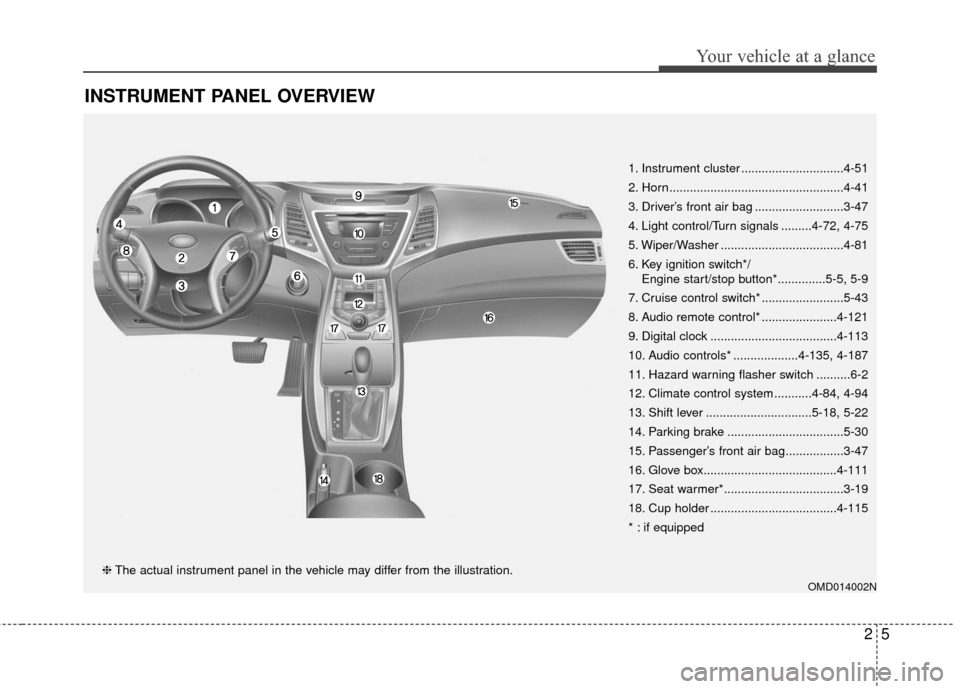
INSTRUMENT PANEL OVERVIEW
OMD014002N
1. Instrument cluster ..............................4-51
2. Horn...................................................4-41
3. Driver’s front air bag ..........................3-47
4. Light control/Turn signals .........4-72, 4-75
5. Wiper/Washer ....................................4-81
6. Key ignition switch*/Engine start/stop button*..............5-5, 5-9
7. Cruise control switch* ........................5-43
8. Audio remote control* ......................4-121
9. Digital clock .....................................4-113
10. Audio controls* ...................4-135, 4-187
11. Hazard warning flasher switch ..........6-2
12. Climate control system ...........4-84, 4-94
13. Shift lever ...............................5-18, 5-22
14. Parking brake ..................................5-30
15. Passenger’s front air bag.................3-47
16. Glove box.......................................4-111
17. Seat warmer*...................................3-19
18. Cup holder .....................................4-115
* : if equipped
❈ The actual instrument panel in the vehicle may differ from the illustration.
25
Your vehicle at a glance
Page 135 of 669
449
Features of your vehicle
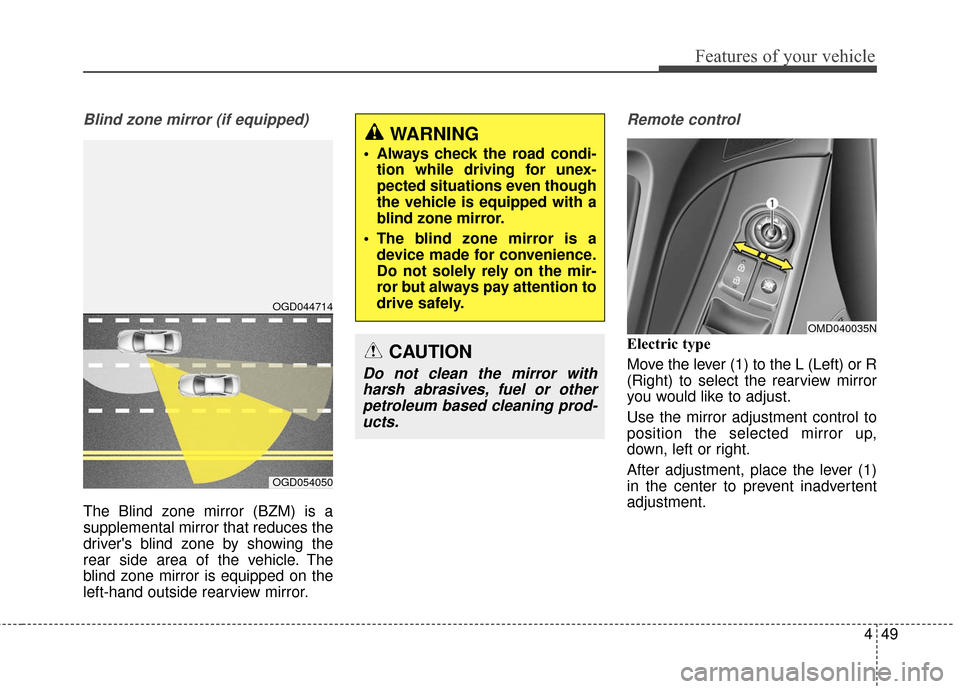
Blind zone mirror (if equipped)
The Blind zone mirror (BZM) is a
supplemental mirror that reduces the
driver's blind zone by showing the
rear side area of the vehicle. The
blind zone mirror is equipped on the
left-hand outside rearview mirror.
Remote control
Electric type
Move the lever (1) to the L (Left) or R
(Right) to select the rearview mirror
you would like to adjust.
Use the mirror adjustment control to
position the selected mirror up,
down, left or right.
After adjustment, place the lever (1)
in the center to prevent inadvertent
adjustment.
OMD040035N
OGD044714
OGD054050
WARNING
Always check the road condi-tion while driving for unex-
pected situations even though
the vehicle is equipped with a
blind zone mirror.
The blind zone mirror is a device made for convenience.
Do not solely rely on the mir-
ror but always pay attention to
drive safely.
CAUTION
Do not clean the mirror withharsh abrasives, fuel or otherpetroleum based cleaning prod-ucts.
Page 207 of 669
4121
Features of your vehicle
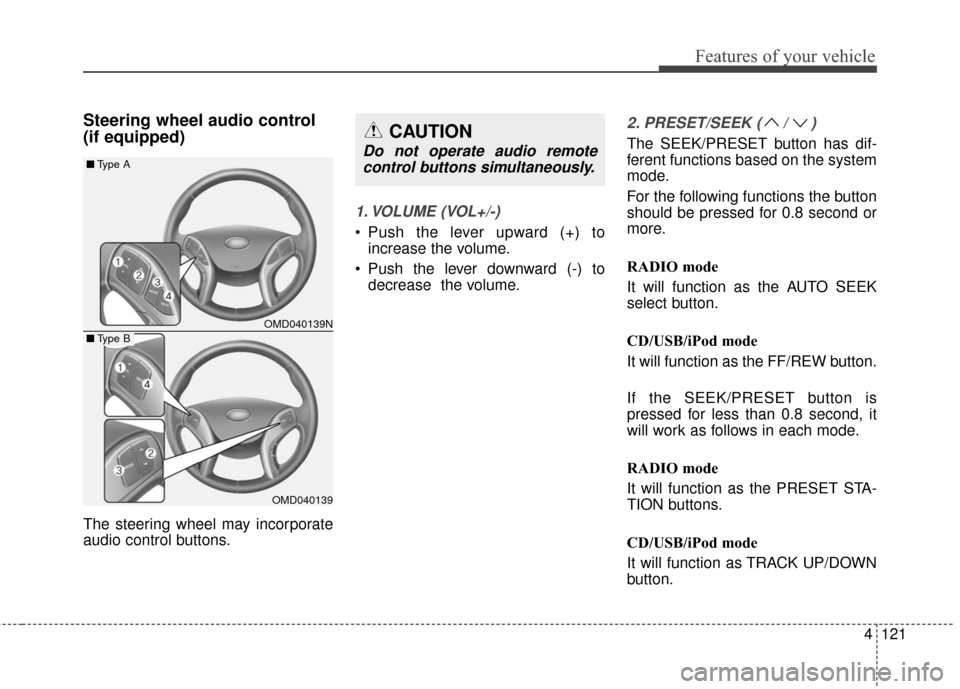
Steering wheel audio control
(if equipped)
The steering wheel may incorporate
audio control buttons.
1. VOLUME (VOL+/-)
Push the lever upward (+) toincrease the volume.
Push the lever downward (-) to decrease the volume.
2. PRESET/SEEK ( / )
The SEEK/PRESET button has dif-
ferent functions based on the system
mode.
For the following functions the button
should be pressed for 0.8 second or
more.
RADIO mode
It will function as the AUTO SEEK
select button.
CD/USB/iPod mode
It will function as the FF/REW button.
If the SEEK/PRESET button is
pressed for less than 0.8 second, it
will work as follows in each mode.
RADIO mode
It will function as the PRESET STA-
TION buttons.
CD/USB/iPod mode
It will function as TRACK UP/DOWN
button.CAUTION
Do not operate audio remotecontrol buttons simultaneously.
OMD040139N
OMD040139
■ Type A
■Type B
Page 247 of 669
4161
Features of your vehicle
PHONE (IF EQUIPPED)
Before using the Bluetooth®Wireless
Technology phone features
In order to use
Bluetooth®Wireless
Technology phone, you must first
pair and connect the
Bluetooth®
Wireless Technology mobile phone.
If the mobile phone is not paired or connected, it is not possible to
enter Phone mode. Once a phone
is paired or connected, the guid-
ance screen will be displayed.
If Priority is set upon vehicle igni- tion(IGN/ACC ON), the
Bluetooth®
Wireless Technology phone will be
automatically connected. Even if
you are outside, the first
Bluetooth®Wireless Technology
phone will be automatically con-
nected once you are in the vicinity
of the vehicle. If you do not want
automatic
Bluetooth®Wireless
Technology phone connection, set
the
Bluetooth®Wireless
Technology power to OFF.
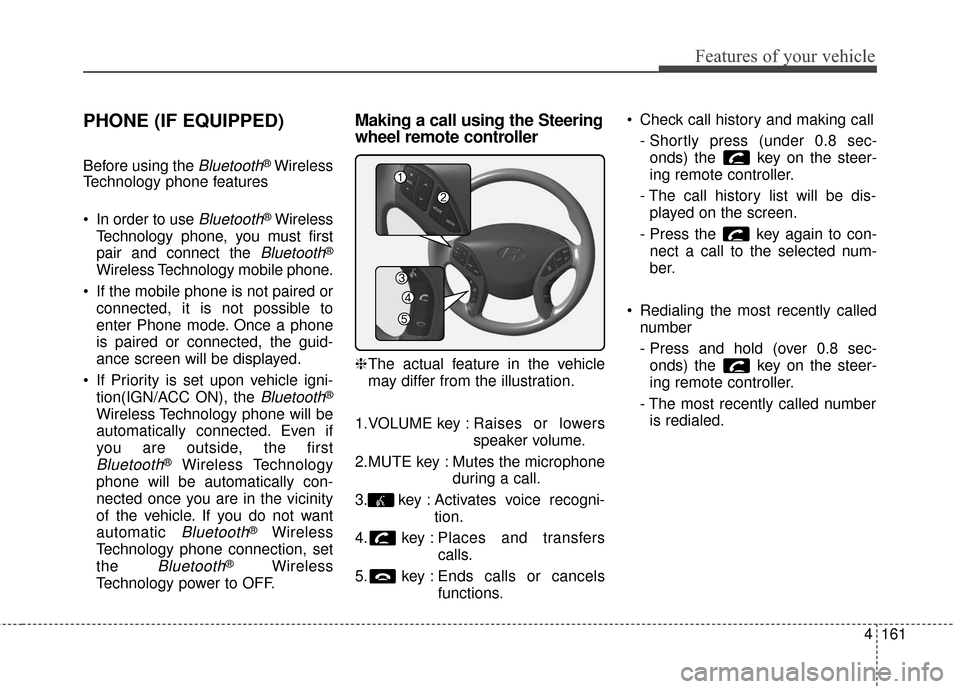
Making a call using the Steering
wheel remote controller
❈ The actual feature in the vehicle
may differ from the illustration.
1.VOLUME key : Raises or lowers
speaker volume.
2.MUTE key : Mutes the microphone during a call.
3. key : Activates voice recogni- tion.
4. key : Places and transfers calls.
5. key : Ends calls or cancels functions. Check call history and making call
- Shortly press (under 0.8 sec-onds) the key on the steer-
ing remote controller.
- The call history list will be dis- played on the screen.
- Press the key again to con- nect a call to the selected num-
ber.
Redialing the most recently called number
- Press and hold (over 0.8 sec-onds) the key on the steer-
ing remote controller.
- The most recently called number is redialed.
Page 249 of 669
4163
Features of your vehicle
Pairing key / key
on the Steering Remote
Controller
When No Devices have beenPaired
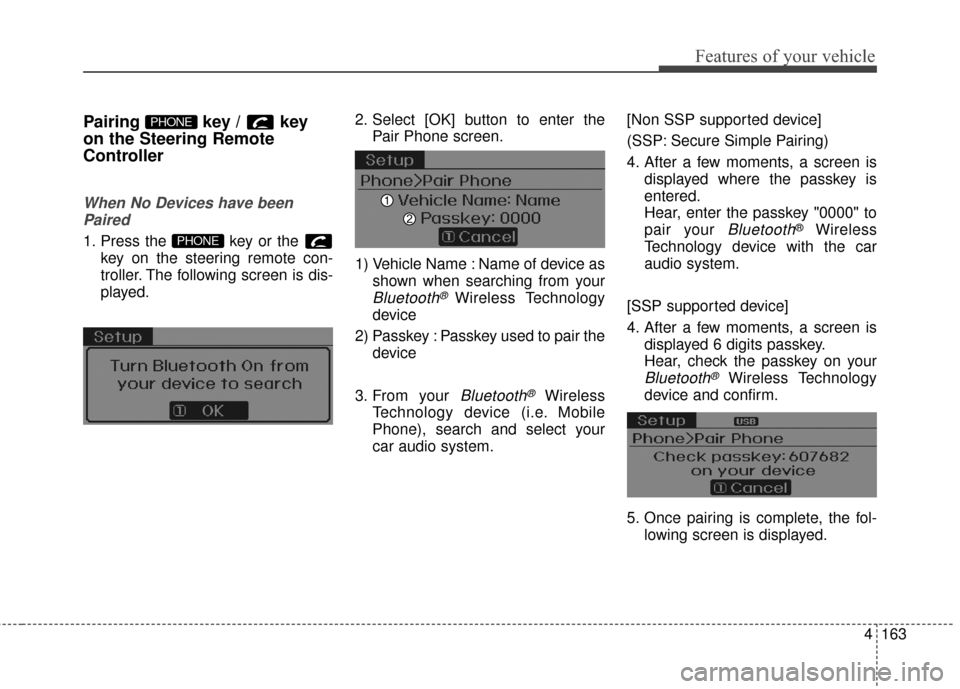
1. Press the key or the key on the steering remote con-
troller. The following screen is dis-
played. 2. Select [OK] button to enter the
Pair Phone screen.
1) Vehicle Name : Name of device as shown when searching from your
Bluetooth® Wireless Technology
device
2) Passkey : Passkey used to pair the device
3. From your
Bluetooth®Wireless
Technology device (i.e. Mobile
Phone), search and select your
car audio system. [Non SSP supported device]
(SSP: Secure Simple Pairing)
4. After a few moments, a screen is
displayed where the passkey is
entered.
Hear, enter the passkey "0000" to
pair your
Bluetooth®Wireless
Technology device with the car
audio system.
[SSP supported device]
4. After a few moments, a screen is displayed 6 digits passkey.
Hear, check the passkey on your
Bluetooth®Wireless Technology
device and confirm.
5. Once pairing is complete, the fol- lowing screen is displayed.
PHONE
PHONE
Page 261 of 669
![Hyundai Elantra 2016 Owners Manual 4175
Features of your vehicle
VOICE RECOGNITION
Using Voice Recognition
Starting Voice Recognition
Shortly press the key on the
steering wheel. Say a command.
If prompt feedback is in [ON], then
th](/img/35/14551/w960_14551-260.png "Hyundai Elantra 2016 Owners Manual 4175
Features of your vehicle
VOICE RECOGNITION
Using Voice Recognition
Starting Voice Recognition
Shortly press the key on the
steering wheel. Say a command.
If prompt feedback is in [ON], then
th")
4175
Features of your vehicle
VOICE RECOGNITION
Using Voice Recognition
Starting Voice Recognition
Shortly press the key on the
steering wheel. Say a command.
If prompt feedback is in [ON], then
the system will say "Please say a
command after the beep (BEEP)"
If prompt feedback is in [OFF]mode, then the system will only
say "(BEEP)"
To change Prompt Feedback [On]/[Off], go to [System][Prompt Feedback]
✽ ✽ NOTICE
For proper recognition, say the com-
mand after the voice instruction and
beep tone.
Contact List Best Practices
1) Do not store single-name entries
(e.g., “Bob”, “Mom”, “Kim”, etc.).
Instead, always use full names
(including first and last names) for
all contacts (e.g., use “Jacob
Stevenson” instead of “Dad”).
2) Do not use abbreviations (i.e., use “Lieutenant” instead of “Lt.” or
“Sergeant” instead of “Sgt.”).
3) Do not use acronyms (i.e., use “County Finance Department”
instead of “CFD”).
4) Do not use special characters (e.g., “@”, “hyphen -”, “asterisk *”,
“ampersand &”).
5) If a name is not recognized from the contact list, change it to a
more descriptive name (e.g., use
“Grandpa Joseph” instead of “Pa
Joe”).
Skipping Prompt Messages
While prompt message is being stat-
ed Shortly press the key on the
steering remote controller
The prompt message is immediately
ended and the beep tone will sound.
After the “beep”, say the voice com-
mand.
Re-starting Voice Recognition
While system waits for a command
Shortly press the key on the
steering remote controller
The command wait state is immedi-
ately ended and the beep ton will
sound. After the “beep”, say the voice
command.
SETUP
Page 262 of 669
Features of your vehicle
176
4
ENDING VOICE
RECOGNITION
While Voice Recognition is operating
Press and hold the key on the
steering remote controller
✽ ✽ NOTICE
• While using voice command,
pressing any steering wheel con-
trol or a different key will end
voice command.
• When the system is waiting for a voice command, say “cancel” or
“end” to end voice command.
• When the system is waiting for a voice command, press and hold
the key on the steering wheel
to end voice command.
Voice Recognition and Phone
Contact Tips:
The Hyundai Voice Recognition
System may have difficulty under-
standing some accents or uncom-
mon names.
When using Voice Recognition to
place a call, speak in a moderate
tone, with clear pronunciation To
maximize the use of Voice
Recognition, consider these guide-
lines when storing contacts:
Do not store single-name entries
(e.g., “Bob”, “Mom”, etc.). Instead,
always use full names (including first
and last names) for these contacts
Do not use special characters (e.g., '@', '-', '*', '&', etc.)
Do not use abbreviations (i.e., use "Lieutenant" instead of "Lt.") or
acronyms (i.e., use "County Finance
Department" instead of "C. F. D."; Be
sure to say the name exactly as it is
entered in the contacts list
Page 311 of 669
4225
Features of your vehicle
Pairing a Bluetooth®Wireless
Technology Device
What is Bluetooth®Wireless
Technology Pairing?
Pairing refers to the process of syn-
chronizing your
Bluetooth®Wireless
Technology phone or device with the
car audio system for connection.
Pairing is necessary to connect and
use the
Bluetooth®Wireless
Technology feature.
Pairing key / key on
the Steering Remote
Controller
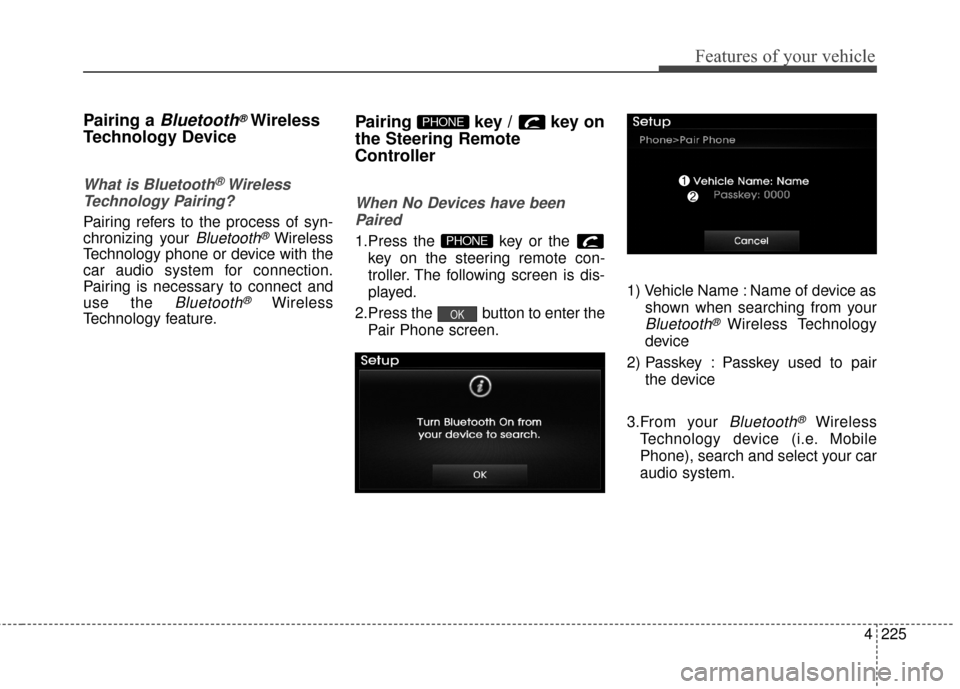
When No Devices have been
Paired
1.Press the key or the key on the steering remote con-
troller. The following screen is dis-
played.
2.Press the button to enter the Pair Phone screen. 1) Vehicle Name : Name of device as
shown when searching from your
Bluetooth®Wireless Technology
device
2) Passkey : Passkey used to pair the device
3.From your
Bluetooth®Wireless
Technology device (i.e. Mobile
Phone), search and select your car
audio system.
OK
PHONE
PHONE
Page 324 of 669
Features of your vehicle
238
4
VOICE RECOGNITION
Using Voice Recognition
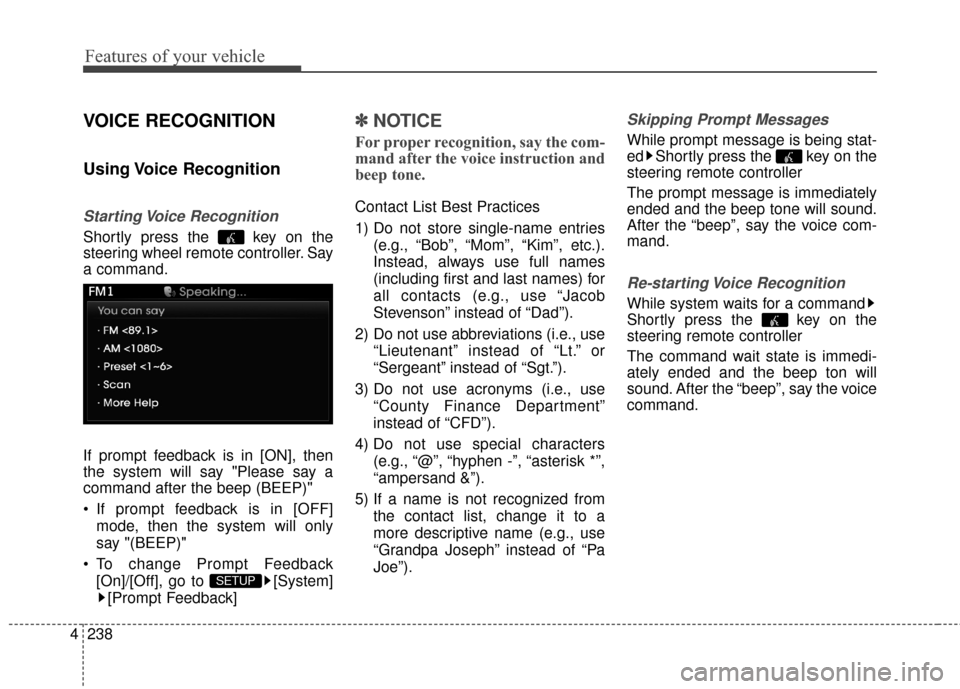
Starting Voice Recognition
Shortly press the key on the
steering wheel remote controller. Say
a command.
If prompt feedback is in [ON], then
the system will say "Please say a
command after the beep (BEEP)"
If prompt feedback is in [OFF]
mode, then the system will only
say "(BEEP)"
To change Prompt Feedback [On]/[Off], go to [System][Prompt Feedback]
✽ ✽ NOTICE
For proper recognition, say the com-
mand after the voice instruction and
beep tone.
Contact List Best Practices
1) Do not store single-name entries
(e.g., “Bob”, “Mom”, “Kim”, etc.).
Instead, always use full names
(including first and last names) for
all contacts (e.g., use “Jacob
Stevenson” instead of “Dad”).
2) Do not use abbreviations (i.e., use “Lieutenant” instead of “Lt.” or
“Sergeant” instead of “Sgt.”).
3) Do not use acronyms (i.e., use “County Finance Department”
instead of “CFD”).
4) Do not use special characters (e.g., “@”, “hyphen -”, “asterisk *”,
“ampersand &”).
5) If a name is not recognized from the contact list, change it to a
more descriptive name (e.g., use
“Grandpa Joseph” instead of “Pa
Joe”).
Skipping Prompt Messages
While prompt message is being stat-
ed Shortly press the key on the
steering remote controller
The prompt message is immediately
ended and the beep tone will sound.
After the “beep”, say the voice com-
mand.
Re-starting Voice Recognition
While system waits for a command
Shortly press the key on the
steering remote controller
The command wait state is immedi-
ately ended and the beep ton will
sound. After the “beep”, say the voice
command.
SETUP
Page 337 of 669
4251
Features of your vehicle
3. Route Preview
"Route Preview" VR command
allows the user to preview the route
instructions (upcoming maneuver
instructions) at any time during the
route guidance.
4. Destinations List
"Destinations List" VR command
allows the user to preview and delete
the stored destinations with their
associated voice tags in the Turn by
Turn destinations directory.
5. Voice Guidance
"Voice Guidance" VR command
allows the user to mute/unmute the
Turn by Turn (TBT) direction
announcements.
6. Suspend Route
"Suspend Route" VR command
allows the user to suspend and
pause Turn by Turn (TBT) route guid-
ance while in the guidance mode.7. Resume Route
"Resume Route" VR command
allows the user to resume Turn by
Turn (TBT) route guidance.
➂
(Blue Link
®for SOS)
In the case of an emergency,
requests for help to the Blue Link
®
center.
Call is connected to the Blue Link
®
emergency rescue center. Re-press-
ing the key will end the call.
If already on a
Bluetooth®phone call,
the call will end to connect you to the
Blue Link
®Emergency Rescue
Center.
CAUTION
You cannot talk simultaneous- ly on the Bluetooth®phone
and Blue Link®phone.
While on a Bluetooth
®call,
pressing the key or key will display a messageindicating that you are cur-rently on a call.
A message will be displayed if you receive a Bluetooth
®
Bluetooth®Wireless Technology
call while already on a Blue Link
®call. At this time, press
the key on the steering wheel remote controller toaccept the call. The phone bellwill not ring.