Temperature Hyundai Elantra 2017 Service Manual
[x] Cancel search | Manufacturer: HYUNDAI, Model Year: 2017, Model line: Elantra, Model: Hyundai Elantra 2017Pages: 637, PDF Size: 15.02 MB
Page 252 of 637
3-157
Convenient features of your vehicle
3
• Keep your drinks sealed while
driving to prevent spilling your
drink. If liquid spills, it may get
into the vehicle's electrical/elec-
tronic system and damage elec-
trical/electronic parts.
• When cleaning spilled liquids, do
not dry the cup holder at high
temperature. This may damage
the cup holder.
Sunvisor
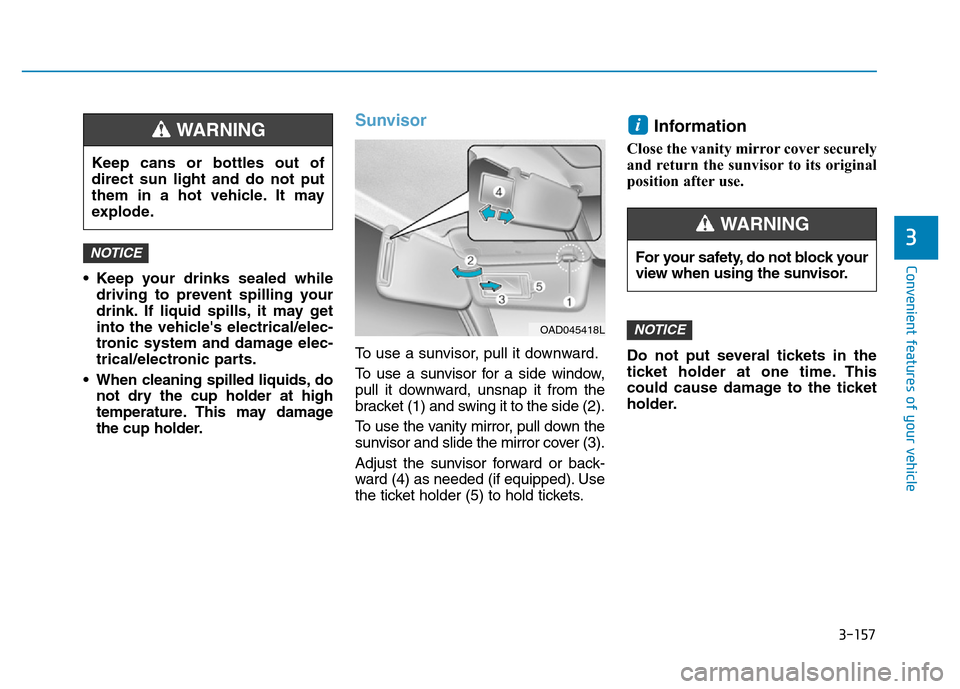
To use a sunvisor, pull it downward.
To use a sunvisor for a side window,
pull it downward, unsnap it from the
bracket (1) and swing it to the side (2).
To use the vanity mirror, pull down the
sunvisor and slide the mirror cover (3).
Adjust the sunvisor forward or back-
ward (4) as needed (if equipped). Use
the ticket holder (5) to hold tickets.
Information
Close the vanity mirror cover securely
and return the sunvisor to its original
position after use.
Do not put several tickets in the
ticket holder at one time. This
could cause damage to the ticket
holder.
NOTICE
i
NOTICE
Keep cans or bottles out of
direct sun light and do not put
them in a hot vehicle. It may
explode.
WARNING
OAD045418L
For your safety, do not block your
view when using the sunvisor.
WARNING
Page 277 of 637
4-20
Multimedia System
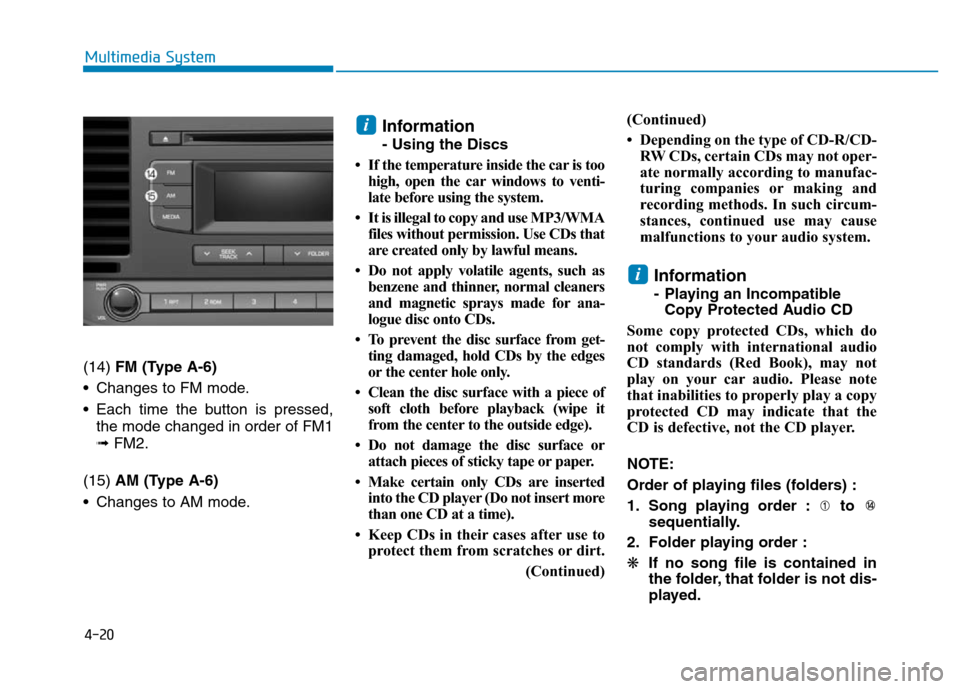
(14) FM (Type A-6)
• Changes to FM mode.
• Each time the button is pressed,
the mode changed in order of FM1
➟ FM2.
(15) AM (Type A-6)
• Changes to AM mode.
Information
- Using the Discs
• If the temperature inside the car is too
high, open the car windows to venti-
late before using the system.
• It is illegal to copy and use MP3/WMA
files without permission. Use CDs that
are created only by lawful means.
• Do not apply volatile agents, such as
benzene and thinner, normal cleaners
and magnetic sprays made for ana-
logue disc onto CDs.
• To prevent the disc surface from get-
ting damaged, hold CDs by the edges
or the center hole only.
• Clean the disc surface with a piece of
soft cloth before playback (wipe it
from the center to the outside edge).
• Do not damage the disc surface or
attach pieces of sticky tape or paper.
• Make certain only CDs are inserted
into the CD player (Do not insert more
than one CD at a time).
• Keep CDs in their cases after use to
protect them from scratches or dirt.
(Continued)(Continued)
• Depending on the type of CD-R/CD-
RW CDs, certain CDs may not oper-
ate normally according to manufac-
turing companies or making and
recording methods. In such circum-
stances, continued use may cause
malfunctions to your audio system.
Information
- Playing an Incompatible
Copy Protected Audio CD
Some copy protected CDs, which do
not comply with international audio
CD standards (Red Book), may not
play on your car audio. Please note
that inabilities to properly play a copy
protected CD may indicate that the
CD is defective, not the CD player.
NOTE:
Order of playing files (folders) :
1. Song playing order : to
sequentially.
2. Folder playing order :
❋If no song file is contained in
the folder, that folder is not dis-
played.
i
i
Page 427 of 637
5-41
Driving your vehicle
5
Power brakes
Your vehicle has power-assisted
brakes that adjust automatically
through normal usage.
If the engine is not running or is
turned off while driving, the power
assist for the brakes will not work.
You can still stop your vehicle by
applying greater force to the brake
pedal than typical. The stopping dis-
tance, however, will be longer than
with power brakes.
When the engine is not running, the
reserve brake power is partially
depleted each time the brake pedal
is applied. Do not pump the brake
pedal when the power assist has
been interrupted.
Pump the brake pedal only when
necessary to maintain steering con-
trol on slippery surfaces.
BRAKING SYSTEM
Take the following precautions:
•Do not drive with your foot
resting on the brake pedal.
This will create abnormal high
brake temperatures, exces-
sive brake lining and pad
wear, and increased stopping
distances.
•When descending down a
long or steep hill, move the
shift lever to Manual Shift
mode and manually downshift
to a lower gear in order to
control your speed without
using the brake pedal exces-
sively. Applying the brakes
continuously will cause the
brakes to overheat and could
result in a temporary loss of
braking performance.
(Continued)
(Continued)
•Wet brakes may impair the
vehicle's ability to safely slow
down; the vehicle may also
pull to one side when the
brakes are applied. Applying
the brakes lightly will indicate
whether they have been
affected in this way. Always
test your brakes in this fash-
ion after driving through deep
water. To dry the brakes, light-
ly tap the brake pedal to heat
up the brakes while maintain-
ing a safe forward speed until
brake performance returns to
normal. Avoid driving at high
speeds until the brakes func-
tion correctly.
WARNING
Page 442 of 637
5-56
The engine is automatically restart-
ed in the following situations.
- The fan speed of the manual cli-
mate control system is set above
the 3rd position, with the air condi-
tion ON.
- The fan speed of the automatic cli-
mate control system is set above
the 6th position, with the air condi-
tion ON.
- A certain period of time has been
elapsed with the air condition ON.
- The defroster is activated.
- The brake vacuum pressure is low.
- The battery is weak.
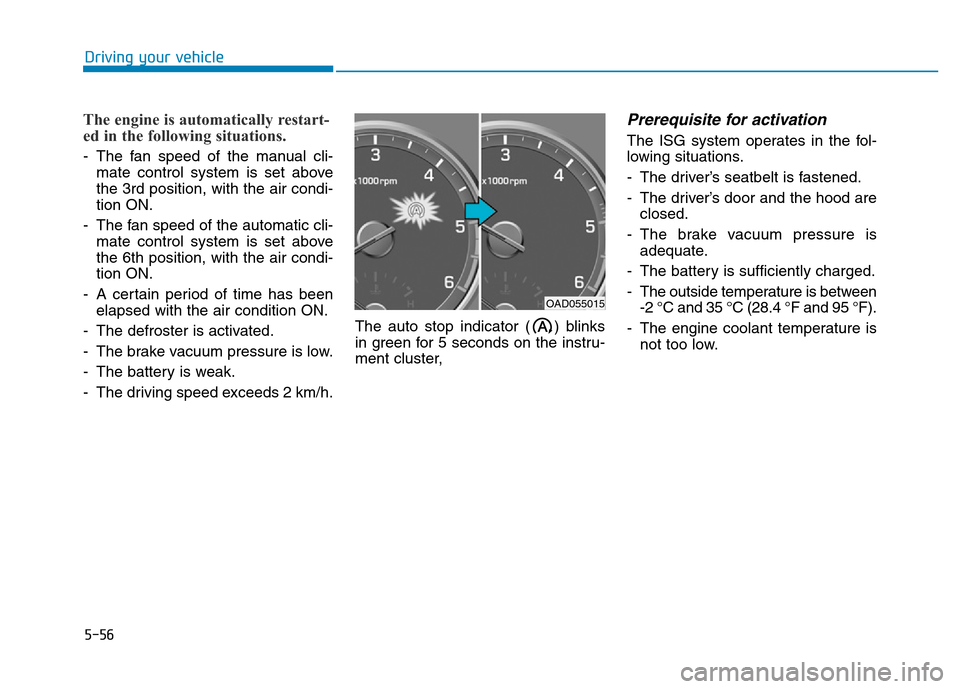
- The driving speed exceeds 2 km/h.The auto stop indicator ( ) blinks
in green for 5 seconds on the instru-
ment cluster,
Prerequisite for activation
The ISG system operates in the fol-
lowing situations.
- The driver’s seatbelt is fastened.
- The driver’s door and the hood are
closed.
- The brake vacuum pressure is
adequate.
- The battery is sufficiently charged.
- The outside temperature is between
-2 °C and 35 °C (28.4 °F and 95 °F).
- The engine coolant temperature is
not too low.
Driving your vehicle
OAD055015
Page 447 of 637
5-61
Driving your vehicle
5
When the ECO mode is activated:
• The acceleration response may be
slightly reduced as the accelerator
pedal is depressed moderately.
• The air conditioner performance
may be limited.
• The shift pattern of the automatic
transmission may change.
• The engine noise may get louder.
The above situations are normal
conditions when the ECO mode is
activated to improve fuel efficiency.Limitation of the ECO mode oper-
ation:
If the following conditions occur while
the ECO mode is operating, the sys-
tem operation is limited even though
there is no change in the ECO indi-
cator.
• When the coolant temperature is
low:
The system will be limited until
engine performance becomes nor-
mal.
• When driving up a hill:
The system will be limited to gain
power when driving uphill because
engine torque is restricted.
• When driving the vehicle with the
automatic transmission or the dual
clutch transmission gear shift lever
in manual shift mode:
The system will be limited accord-
ing to the shift location.
• When the accelerator pedal is
deeply depressed for a few sec-
onds:
The system will be limited, judging
that the driver wants to speed up.SPORT mode
SPORT mode manages
the driving dynamics by
automatically adjusting the
steering effort, the engine
and transmission control logic for
enhanced driver performance.
• When SPORT mode is selected by
pressing the DRIVE MODE button,
the SPORT indicator (orange
color) will illuminate.
• Whenever the engine is restarted,
the Drive Mode will revert back to
NORMAL mode. If SPORT mode is
desired, re-select SPORT mode
from the DRIVE MODE button.
• When SPORT mode is activated:
- The engine rpm will tend to
remain raised over a certain
length of time even after releas-
ing the accelerator
- Upshifts are delayed when accel-
erating
Information
In SPORT mode, the fuel efficiency
may decrease.
i
Page 456 of 637

5-70
Driving your vehicle
- A motorcycle or bicycle is near.
- A flat trailer is near.
- If the vehicle has started at the
same time as the vehicle next to
you and has accelerated.
- When the other vehicle passes at a
very fast speed.
- While changing lanes.
- While going down or up a steep
road where the height of the lane is
different.
- When the other vehicle approaches
very close.
- When a trailer or carrier is installed.
- When the temperature of the rear
bumper is high.
- When the sensors are blocked by
other vehicles, walls or parking-lot
pillars.
- When the detected vehicle also
moves back, as your vehicle drives
back.
- If there are small objects in the
detecting area such as a shopping
cart or a baby carriage.- If there is a low height vehicle such
as a sports car.
- When other vehicles are close to
your vehicle.
- When the vehicle in the next lane
moves two lanes away from you
OR when the vehicle two lanes
away moves to the next lane from
you.
Page 464 of 637
5-78
Driving your vehicle
Hazardous driving conditions
When hazardous driving elements
are encountered such as water,
snow, ice, mud and sand, take the
bellow suggestions:
• Drive cautiously and keep a longer
braking distance.
• Avoid abrupt braking or steering.
• When your vehicle is stuck in snow,
mud, or sand, use second gear.
Accelerate slowly to avoid unnec-
essary wheel spin.
• Put sand, rock salt, tire chains or
other non-slip materials under the
wheels to provide additional trac-
tion while the vehicle becomes
stuck in ice, snow, or mud.
Rocking the vehicle
If it is necessary to rock the vehicle
to free it from snow, sand, or mud,
first turn the steering wheel right and
left to clear the area around your
front wheels. Then, shift back and
forth between R (Reverse) and a for-
ward gear.
Try to avoid spinning the wheels, and
do not race the engine.
To prevent transmission wear, wait
until the wheels stop spinning before
shifting gears. Release the accelera-
tor pedal while shifting, and press
lightly on the accelerator pedal while
the transmission is in gear. Slowly
spinning the wheels in forward and
reverse directions causes a rocking
motion that may free the vehicle.
SPECIAL DRIVING CONDITIONS
Downshifting with an automatic
transmission while driving on
slippery surfaces can cause an
accident. The sudden change in
tire speed could cause the tires
to skid. Be careful when down-
shifting on slippery surfaces.
WARNING
If the vehicle is stuck and
excessive wheel spin occurs,
the temperature in the tires can
increase very quickly. If the tires
become damaged, a tire blow
out or tire explosion can occur.
This condition is dangerous -
you and others may be injured.
Do not attempt this procedure if
people or objects are anywhere
near the vehicle.
If you attempt to free the vehi-
cle, the vehicle can overheat
quickly, possibly causing an
engine compartment fire or
other damage. Try to avoid spin-
ning the wheels as much as
possible to prevent overheating
of either the tires or the engine.
DO NOT allow the vehicle to
spin the wheels above 56 km/h
(35 mph).
WARNING
Page 469 of 637
5-83
Driving your vehicle
5
Chain Installation
When installing tire chains, follow the
manufacturer's instructions and
mount them as tightly possible. Drive
slowly (less than 30 km/h (20 mph))
with chains installed. If you hear the
chains contacting the body or chas-
sis, stop and tighten them. If they still
make contact, slow down until the
noise stops. Remove the tire chains
as soon as you begin driving on
cleared roads.
When mounting snow chains, park
the vehicle on level ground away
from traffic. Turn on the vehicle
Hazard Warning Flasher and place a
triangular emergency warning device
behind the vehicle (if available).
Always place the vehicle in P (Park),
apply the parking brake and turn off
the engine before installing snow
chains.When using tire chains:
• Wrong size chains or improperly
installed chains can damage
your vehicle's brake lines, sus-
pension, body and wheels.
• Use SAE "S" class or wire
chains.
• If you hear noise caused by
chains contacting the body,
retighten the chain to prevent
contact with the vehicle body.
• To prevent body damage,
retighten the chains after driving
0.5~1.0 km (0.3~0.6 miles).
• Do not use tire chains on vehi-
cles equipped with aluminum
wheels. If unavoidable, use a
wire type chain.
• Use wire chains less than 15 mm
(0.59 in) wide to prevent damage
to the chain's connection.
Winter Precautions
Use high quality ethylene glycol
coolant
Your vehicle is delivered with high
quality ethylene glycol coolant in the
cooling system. It is the only type of
coolant that should be used because
it helps prevent corrosion in the cool-
ing system, lubricates the water
pump and prevents freezing. Be sure
to replace or replenish your coolant
in accordance with the maintenance
schedule in section 7. Before winter,
have your coolant tested to assure
that its freezing point is sufficient for
the temperatures anticipated during
the winter.
NOTICE
Page 470 of 637
5-84
Driving your vehicle
Check battery and cables
The winter temperature increases
the battery consumption.Inspect
the battery and cables, as speci-
fied in the chapter 7.The battery
charging level can be checked by an
authorized HYUNDAI dealer or in a
service station.
Change to "winter weight" oil if
necessary
In some regions during winter, it is
recommended to use the "winter
weight" oil with lower viscosity. For
further information, refer to the chap-
ter 8. When you are not sure about a
type of winter weight oil, consult an
authorized HYUNDAI dealer.Check spark plugs and ignition
system
Inspect the spark plugs, as speci-
fied in the chapter 7.If necessary,
replace them. Also check all ignition
wirings and components for any
cracks, wear-out, and damage.
To prevent locks from freezing
To prevent the locks from being
frozen, spray approved de-icing fluid
or glycerin into key holes. When a
lock opening is already covered with
ice, spray approved de-icing fluid
over the ice to remove it. When an
internal part of a lock freezes, try to
thaw it with a heated key. Carefully
use the heated key to avoid an injury.Use approved window washer
anti-freeze solution in system
To prevent the window washer from
being frozen, add authorized window
washer anti-freeze solution, as spec-
ified on the window washer contain-
er. Window washer anti-freeze solu-
tion is available from an authorized
HYUNDAI dealer, and so are the
most vehicle accessory outlets. Do
not use engine coolant or other types
of anti-freeze solution to prevent any
damage to the vehicle paint.
Page 474 of 637
5-88
Driving your vehicle
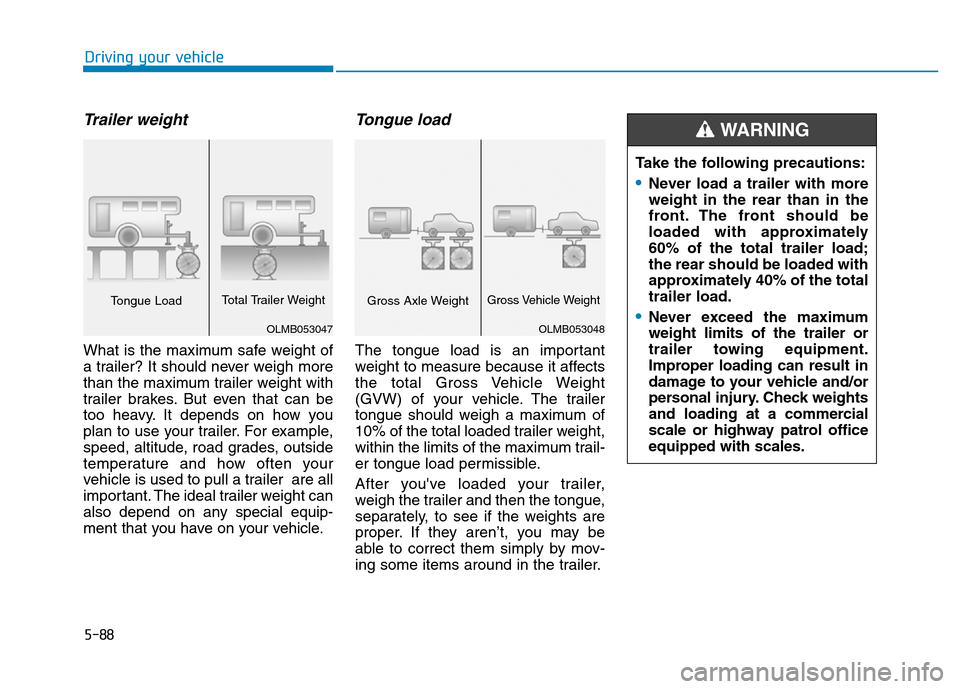
Trailer weight
What is the maximum safe weight of
a trailer? It should never weigh more
than the maximum trailer weight with
trailer brakes. But even that can be
too heavy. It depends on how you
plan to use your trailer. For example,
speed, altitude, road grades, outside
temperature and how often your
vehicle is used to pull a trailer are all
important. The ideal trailer weight can
also depend on any special equip-
ment that you have on your vehicle.
Tongue load
The tongue load is an important
weight to measure because it affects
the total Gross Vehicle Weight
(GVW) of your vehicle. The trailer
tongue should weigh a maximum of
10% of the total loaded trailer weight,
within the limits of the maximum trail-
er tongue load permissible.
After you've loaded your trailer,
weigh the trailer and then the tongue,
separately, to see if the weights are
proper. If they aren’t, you may be
able to correct them simply by mov-
ing some items around in the trailer.Take the following precautions:
•Never load a trailer with more
weight in the rear than in the
front. The front should be
loaded with approximately
60% of the total trailer load;
the rear should be loaded with
approximately 40% of the total
trailer load.
•Never exceed the maximum
weight limits of the trailer or
trailer towing equipment.
Improper loading can result in
damage to your vehicle and/or
personal injury. Check weights
and loading at a commercial
scale or highway patrol office
equipped with scales.
WARNING
OLMB053048
Gross Axle WeightGross Vehicle Weight
OLMB053047
Tongue LoadTotal Trailer Weight