warning Hyundai Elantra 2018 Owner's Manual
[x] Cancel search | Manufacturer: HYUNDAI, Model Year: 2018, Model line: Elantra, Model: Hyundai Elantra 2018Pages: 526, PDF Size: 17.2 MB
Page 339 of 526
5-56
Driving your vehicle
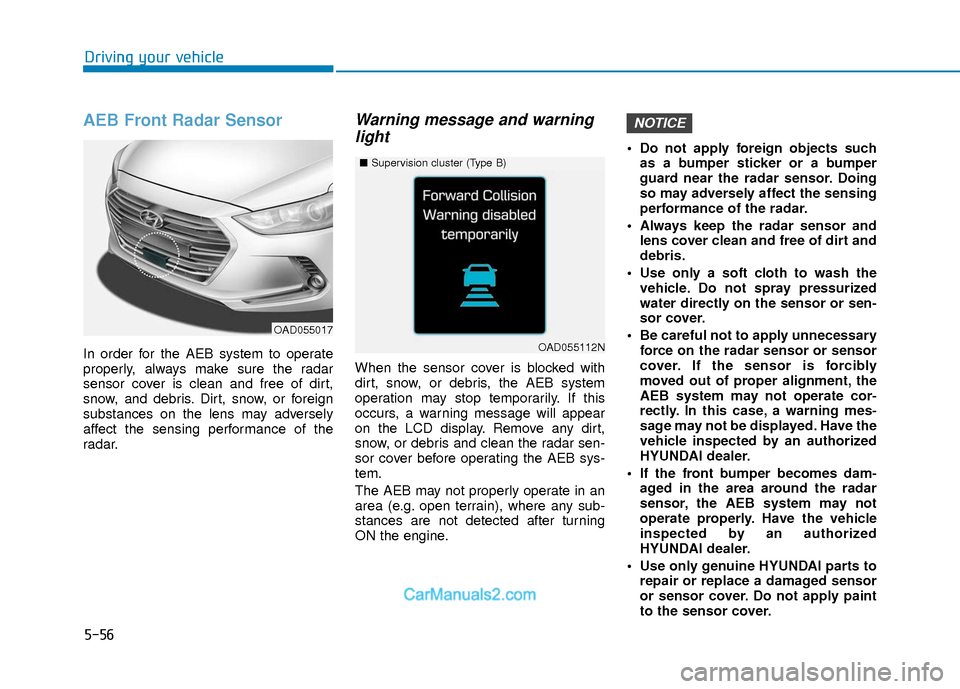
AEB Front Radar Sensor
In order for the AEB system to operate
properly, always make sure the radar
sensor cover is clean and free of dirt,
snow, and debris. Dirt, snow, or foreign
substances on the lens may adversely
affect the sensing performance of the
radar.
Warning message and warninglight
When the sensor cover is blocked with
dirt, snow, or debris, the AEB system
operation may stop temporarily. If this
occurs, a warning message will appear
on the LCD display. Remove any dirt,
snow, or debris and clean the radar sen-
sor cover before operating the AEB sys-
tem.
The AEB may not properly operate in an
area (e.g. open terrain), where any sub-
stances are not detected after turning
ON the engine. Do not apply foreign objects such
as a bumper sticker or a bumper
guard near the radar sensor. Doing
so may adversely affect the sensing
performance of the radar.
Always keep the radar sensor and lens cover clean and free of dirt and
debris.
Use only a soft cloth to wash the vehicle. Do not spray pressurized
water directly on the sensor or sen-
sor cover.
Be careful not to apply unnecessary force on the radar sensor or sensor
cover. If the sensor is forcibly
moved out of proper alignment, the
AEB system may not operate cor-
rectly. In this case, a warning mes-
sage may not be displayed. Have the
vehicle inspected by an authorized
HYUNDAI dealer.
If the front bumper becomes dam- aged in the area around the radar
sensor, the AEB system may not
operate properly. Have the vehicle
inspected by an authorized
HYUNDAI dealer.
Use only genuine HYUNDAI parts to repair or replace a damaged sensor
or sensor cover. Do not apply paint
to the sensor cover.
NOTICE
OAD055017
■ Supervision cluster (Type B)
OAD055112N
Page 340 of 526
5-57
Driving your vehicle
5
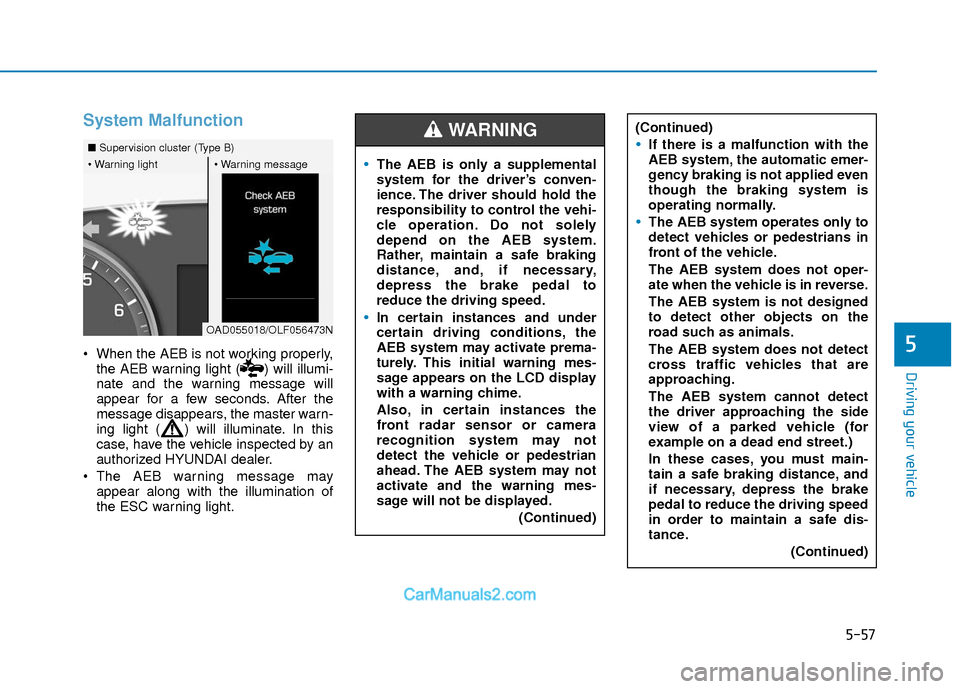
System Malfunction
When the AEB is not working properly,the AEB warning light ( ) will illumi-
nate and the warning message will
appear for a few seconds. After the
message disappears, the master warn-
ing light ( ) will illuminate. In this
case, have the vehicle inspected by an
authorized HYUNDAI dealer.
The AEB warning message may appear along with the illumination of
the ESC warning light.
■ Supervision cluster (Type B)
OAD055018/OLF056473N
The AEB is only a supplemental
system for the driver’s conven-
ience. The driver should hold the
responsibility to control the vehi-
cle operation. Do not solely
depend on the AEB system.
Rather, maintain a safe braking
distance, and, if necessary,
depress the brake pedal to
reduce the driving speed.
In certain instances and under
certain driving conditions, the
AEB system may activate prema-
turely. This initial warning mes-
sage appears on the LCD display
with a warning chime.
Also, in certain instances the
front radar sensor or camera
recognition system may not
detect the vehicle or pedestrian
ahead. The AEB system may not
activate and the warning mes-
sage will not be displayed.
(Continued)
WARNING (Continued)
If there is a malfunction with the
AEB system, the automatic emer-
gency braking is not applied even
though the braking system is
operating normally.
The AEB system operates only to
detect vehicles or pedestrians in
front of the vehicle.
The AEB system does not oper-
ate when the vehicle is in reverse.
The AEB system is not designed
to detect other objects on the
road such as animals.
The AEB system does not detect
cross traffic vehicles that are
approaching.
The AEB system cannot detect
the driver approaching the side
view of a parked vehicle (for
example on a dead end street.)
In these cases, you must main-
tain a safe braking distance, and
if necessary, depress the brake
pedal to reduce the driving speed
in order to maintain a safe dis-
tance.(Continued)
Page 342 of 526
5-59
Driving your vehicle
5
- The vehicle in front is driving erratical-ly.
- The vehicle drives through a construc- tion area, on an unpaved road, or
above metal materials, such as a rail-
way.
- The vehicle drives inside a building, such as a basement parking lot.
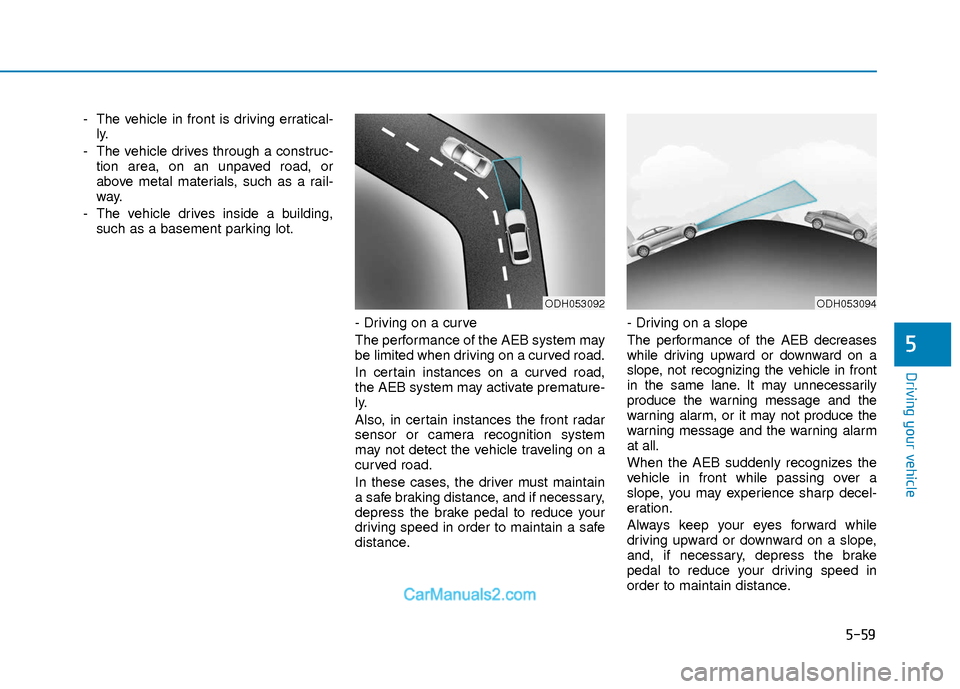
- Driving on a curve
The performance of the AEB system may
be limited when driving on a curved road.
In certain instances on a curved road,
the AEB system may activate premature-
ly.
Also, in certain instances the front radar
sensor or camera recognition system
may not detect the vehicle traveling on a
curved road.
In these cases, the driver must maintain
a safe braking distance, and if necessary,
depress the brake pedal to reduce your
driving speed in order to maintain a safe
distance. - Driving on a slope
The performance of the AEB decreases
while driving upward or downward on a
slope, not recognizing the vehicle in front
in the same lane. It may unnecessarily
produce the warning message and the
warning alarm, or it may not produce the
warning message and the warning alarm
at all.
When the AEB suddenly recognizes the
vehicle in front while passing over a
slope, you may experience sharp decel-
eration.
Always keep your eyes forward while
driving upward or downward on a slope,
and, if necessary, depress the brake
pedal to reduce your driving speed in
order to maintain distance.
ODH053092ODH053094
Page 344 of 526
5-61
Driving your vehicle
5
Detecting pedestrians
The sensor may be limited when:
- The pedestrian is not fully detected bythe camera recognition system, for
example, if the pedestrian is leaning
over or is not fully walking upright.
- The pedestrian is moving very quickly or appears abruptly in the camera
detection area.
The pedestrian is wearing clothing that
easily blends into the background,
making it difficult to be detected by the
camera recognition system.
- The outside lighting is too bright (e.g. when driving in bright sunlight or in sun
glare) or too dark (e.g. when driving on
a dark rural road at night).
- It is difficult to detect and distinguish the pedestrian from other objects in the
surroundings, for example, when there
is a group of pedestrians or a large
crowd.Information
In some instances, the AEB system may be
cancelled when subjected to electromag-
netic interference.
Information
This device complies with Part 15 of the
FCC rules.
Operation is subject to the following two
conditions:
1. This device may not cause harmful interference, and
2. This device must accept any interfer- ence received, including interference
that may cause undesired operation.
i
i
Do not use the Automatic
Emergency Braking system when
towing a vehicle. Application of
the AEB system while towing
may adversely affect the safety of
your vehicle or the towing vehi-
cle.
Use extreme caution when the
vehicle in front of you has cargo
that extends rearward from the
cab, or when the vehicle in front
of you has higher ground clear-
ance.
The AEB system is designed to
detect and monitor the vehicle
ahead or detect a pedestrian in
the roadway through radar sig-
nals and camera recognition. It is
not designed to detect bicycles,
motorcycles, or smaller wheeled
objects such as luggage bags,
shopping carts, or strollers.
Never try to test the operation of
the AEB system. Doing so may
cause severe injury or death.
WARNING
Page 345 of 526
5-62
Driving your vehicle
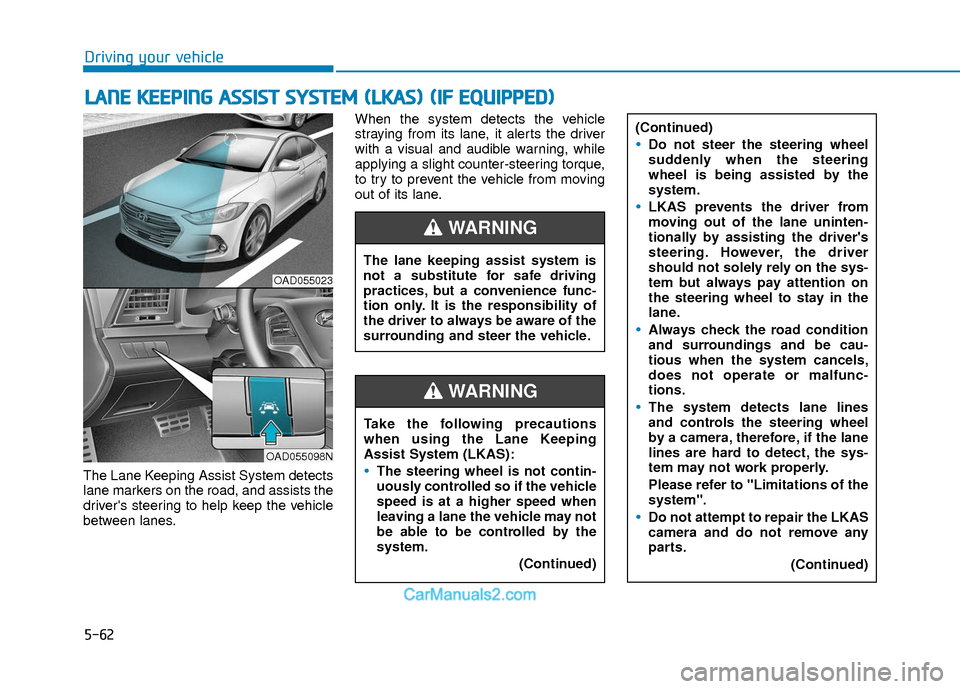
The Lane Keeping Assist System detects
lane markers on the road, and assists the
driver's steering to help keep the vehicle
between lanes.When the system detects the vehicle
straying from its lane, it alerts the driver
with a visual and audible warning, while
applying a slight counter-steering torque,
to try to prevent the vehicle from moving
out of its lane.
L L
A
A N
N E
E
K
K E
EE
EP
P I
IN
N G
G
A
A S
SS
SI
IS
S T
T
S
S Y
Y S
ST
T E
EM
M
(
( L
L K
K A
A S
S)
)
(
( I
IF
F
E
E Q
Q U
UI
IP
P P
PE
ED
D )
)
OAD055023
OAD055098N
The lane keeping assist system is
not a substitute for safe driving
practices, but a convenience func-
tion only. It is the responsibility of
the driver to always be aware of the
surrounding and steer the vehicle.
WARNING
Take the following precautions
when using the Lane Keeping
Assist System (LKAS):
The steering wheel is not contin-
uously controlled so if the vehicle
speed is at a higher speed when
leaving a lane the vehicle may not
be able to be controlled by the
system.
(Continued)
WARNING
(Continued)
Do not steer the steering wheel
suddenly when the steering
wheel is being assisted by the
system.
LKAS prevents the driver from
moving out of the lane uninten-
tionally by assisting the driver's
steering. However, the driver
should not solely rely on the sys-
tem but always pay attention on
the steering wheel to stay in the
lane.
Always check the road condition
and surroundings and be cau-
tious when the system cancels,
does not operate or malfunc-
tions.
The system detects lane lines
and controls the steering wheel
by a camera, therefore, if the lane
lines are hard to detect, the sys-
tem may not work properly.
Please refer to "Limitations of the
system".
Do not attempt to repair the LKAS
camera and do not remove any
parts.(Continued)
Page 346 of 526
5-63
Driving your vehicle
5
LKAS Operation
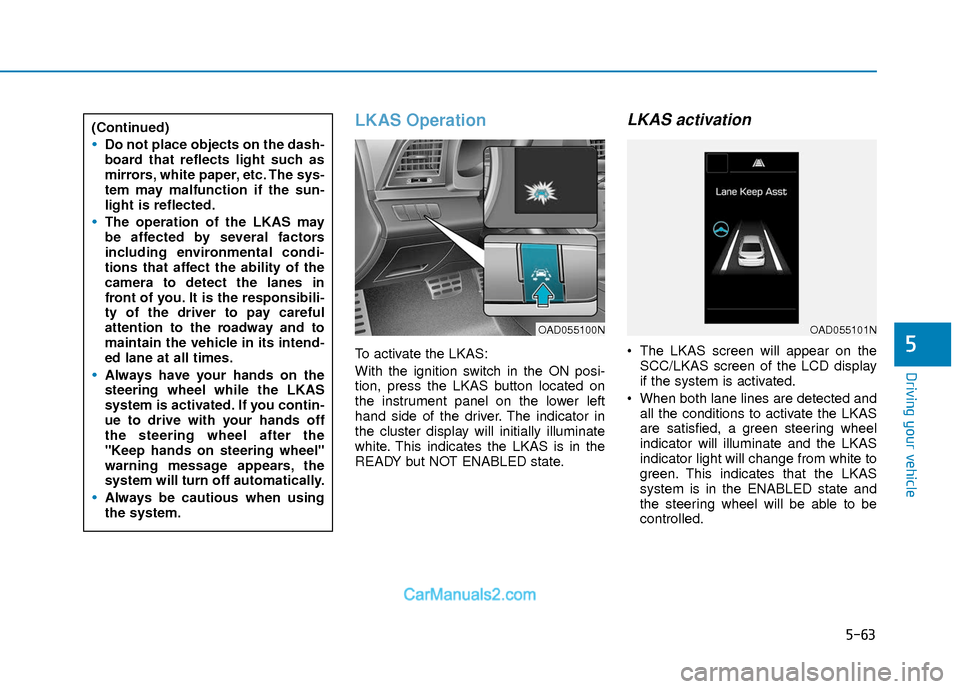
To activate the LKAS:
With the ignition switch in the ON posi-
tion, press the LKAS button located on
the instrument panel on the lower left
hand side of the driver. The indicator in
the cluster display will initially illuminate
white. This indicates the LKAS is in the
READY but NOT ENABLED state.
LKAS activation
The LKAS screen will appear on theSCC/LKAS screen of the LCD display
if the system is activated.
When both lane lines are detected and all the conditions to activate the LKAS
are satisfied, a green steering wheel
indicator will illuminate and the LKAS
indicator light will change from white to
green. This indicates that the LKAS
system is in the ENABLED state and
the steering wheel will be able to be
controlled.
(Continued)
Do not place objects on the dash-
board that reflects light such as
mirrors, white paper, etc. The sys-
tem may malfunction if the sun-
light is reflected.
The operation of the LKAS may
be affected by several factors
including environmental condi-
tions that affect the ability of the
camera to detect the lanes in
front of you. It is the responsibili-
ty of the driver to pay careful
attention to the roadway and to
maintain the vehicle in its intend-
ed lane at all times.
Always have your hands on the
steering wheel while the LKAS
system is activated. If you contin-
ue to drive with your hands off
the steering wheel after the
"Keep hands on steering wheel"
warning message appears, the
system will turn off automatically.
Always be cautious when using
the system.
OAD055100NOAD055101N
Page 347 of 526
5-64
Driving your vehicle
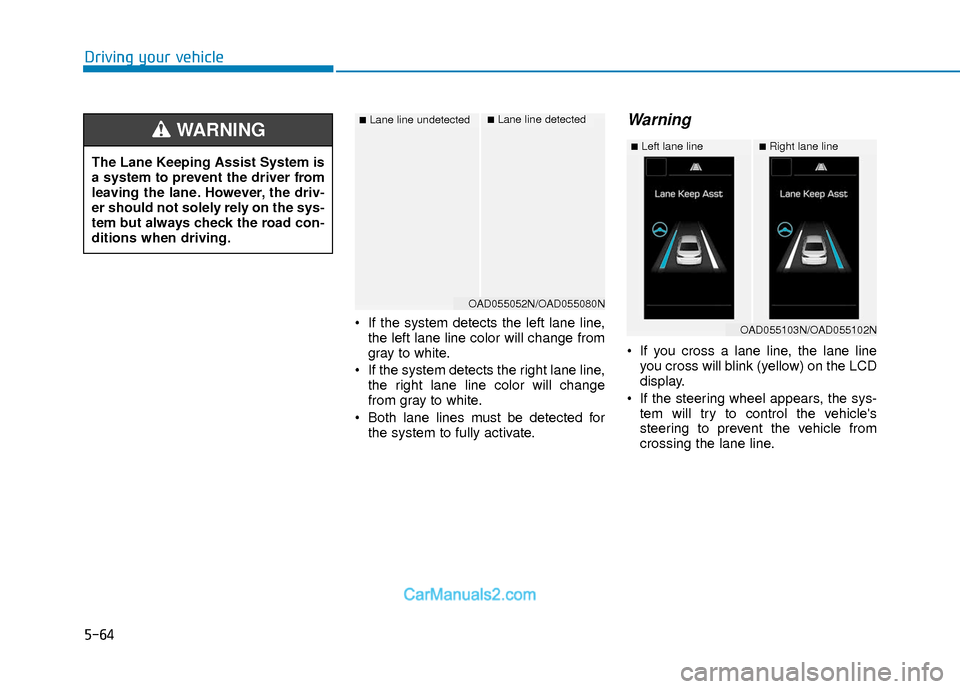
If the system detects the left lane line,the left lane line color will change from
gray to white.
If the system detects the right lane line, the right lane line color will change
from gray to white.
Both lane lines must be detected for the system to fully activate.
Warning
If you cross a lane line, the lane lineyou cross will blink (yellow) on the LCD
display.
If the steering wheel appears, the sys- tem will try to control the vehicle's
steering to prevent the vehicle from
crossing the lane line.
■Lane line undetected■Lane line detected
OAD055052N/OAD055080N
The Lane Keeping Assist System is
a system to prevent the driver from
leaving the lane. However, the driv-
er should not solely rely on the sys-
tem but always check the road con-
ditions when driving.
WARNING ■Left lane line■Right lane line
OAD055103N/OAD055102N
Page 348 of 526
5-65
Driving your vehicle
5
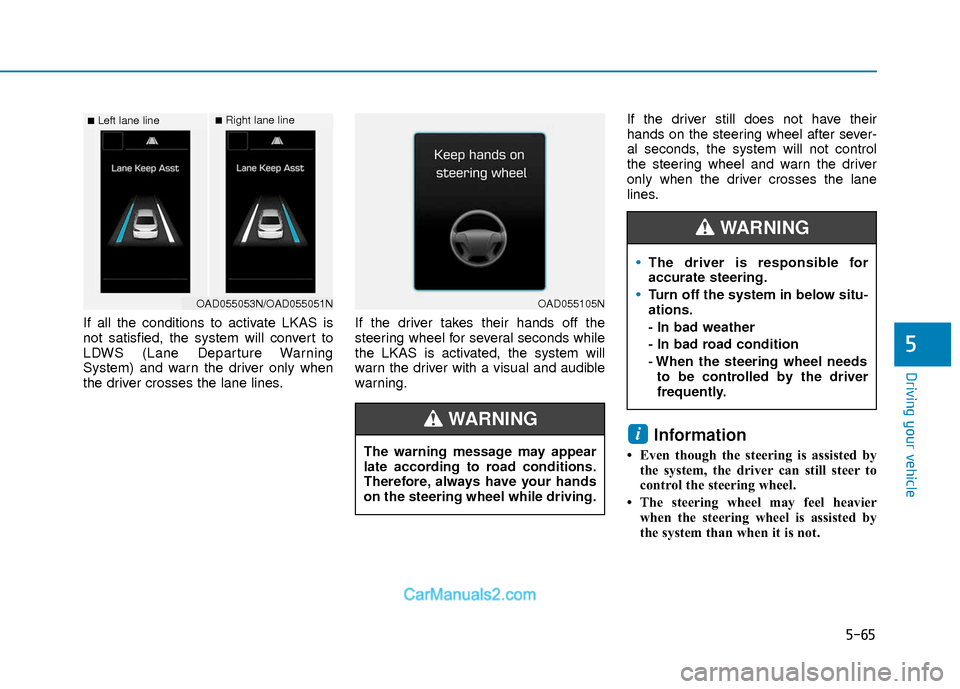
If all the conditions to activate LKAS is
not satisfied, the system will convert to
LDWS (Lane Departure Warning
System) and warn the driver only when
the driver crosses the lane lines.If the driver takes their hands off the
steering wheel for several seconds while
the LKAS is activated, the system will
warn the driver with a visual and audible
warning.If the driver still does not have their
hands on the steering wheel after sever-
al seconds, the system will not control
the steering wheel and warn the driver
only when the driver crosses the lane
lines.
Information
• Even though the steering is assisted by
the system, the driver can still steer to
control the steering wheel.
• The steering wheel may feel heavier when the steering wheel is assisted by
the system than when it is not.
i
■Left lane line■Right lane line
OAD055053N/OAD055051NOAD055105N
The warning message may appear
late according to road conditions.
Therefore, always have your hands
on the steering wheel while driving.
WARNING
The driver is responsible for
accurate steering.
Turn off the system in below situ-
ations.
- In bad weather
- In bad road condition
- When the steering wheel needsto be controlled by the driver
frequently.
WARNING
Page 349 of 526
5-66
Driving your vehicle
The LKAS system will not be in the
ENABLED state and the steering
wheel will not be assisted when:
Vehicle speed is below 40 mph (60 km/h) and over 110 mph (180
km/h).
Only one lane line is detected.
The turn signal is turned on before changing a lane. If you change lanes
without the turn signal on, the steering
wheel might be controlled.
The hazard warning flasher is on.
The width of the lane is below 10 feet (3.1 m) and over 15 feet (4.5
m).
ESC (Electronic Stability Control) is activated.
The vehicle is driven on a sharp curve.
The vehicle brakes suddenly.
The vehicle makes sharp lane changes.
Information
When the system is turned on or right
after changing a lane, drive in the middle
of the lane. If not, the system will not pro-
vide steering assist function.
Limitations of the System
The LKAS may operate prematurely
even if the vehicle does not depart from
the intended lane, OR, the LKAS may not
warn you if the vehicle leaves the intend-
ed lane under the following circum-
stances:
The lanes ahead are not visible due torain, snow, water on the road, dam-
aged or stained road surface, or other
factors.
The brightness outside changes sud- denly such as when entering or exiting
a tunnel.
The brightness outside is too low such as when the headlamps are not on at
night or the vehicle is going through a
tunnel.
It is difficult to distinguish the lane marking from the road surface or the
lane marking is faded or not clearly
marked.
Driving on a steep grade, over a hill, or when driving on a curved road.
When light coming from a street light or an oncoming vehicle is reflected on a
wet road surface such as a puddle in
the road.
The windshield or the LKAS camera lens is blocked with dirt or debris. The field of view in front is obstructed
by sun glare.
The lanes are incomplete or the area is in a construction zone.
There are more than two lane lines on the road in front of you.
The lane markings are not clearly visi- ble from the road.
The lane width is too wide or too nar- row. See previous page.
The windshield glass is fogged up; a clear view of the road is obstructed.
There are markings on the road sur- face that look like a lane line that is
inadvertently being detected by the
camera.
There is a boundary structure in the roadway such as a concrete barrier,
guardrail and reflector post that is
inadvertently being detected by the
camera.
There is not enough distance between you and the vehicle in front to be able
to detect the lane line or the vehicle
ahead is driving on the lane line.
The adverse road conditions cause excessive vehicle vibrations while driv-
ing.
i
Page 351 of 526
5-68
Driving your vehicle
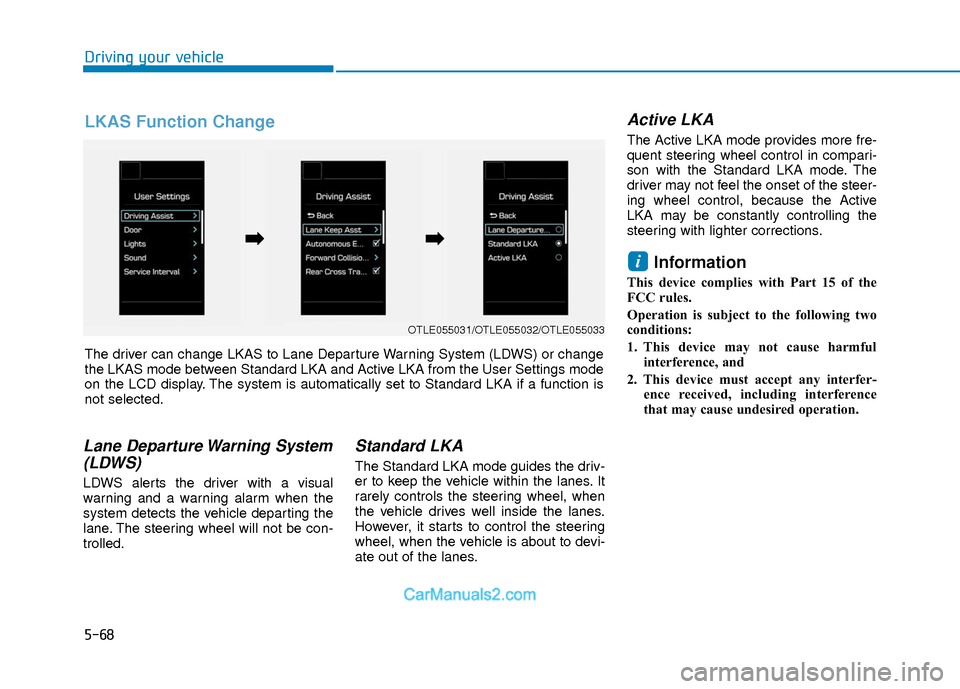
Lane Departure Warning System(LDWS)
LDWS alerts the driver with a visual
warning and a warning alarm when the
system detects the vehicle departing the
lane. The steering wheel will not be con-
trolled.
Standard LKA
The Standard LKA mode guides the driv-
er to keep the vehicle within the lanes. It
rarely controls the steering wheel, when
the vehicle drives well inside the lanes.
However, it starts to control the steering
wheel, when the vehicle is about to devi-
ate out of the lanes.
Active LKA
The Active LKA mode provides more fre-
quent steering wheel control in compari-
son with the Standard LKA mode. The
driver may not feel the onset of the steer-
ing wheel control, because the Active
LKA may be constantly controlling the
steering with lighter corrections.
Information
This device complies with Part 15 of the
FCC rules.
Operation is subject to the following two
conditions:
1. This device may not cause harmful
interference, and
2. This device must accept any interfer- ence received, including interference
that may cause undesired operation.
i
OTLE055031/OTLE055032/OTLE055033
The driver can change LKAS to Lane Departure Warning System (LDWS) or change
the LKAS mode between Standard LKA and Active LKA from the User Settings mode
on the LCD display. The system is automatically set to Standard LKA if a function is
not selected.
➡ ➡ ➡
➡
LKAS Function Change